light DODGE CHARGER SRT 2014 7.G Owners Manual
[x] Cancel search | Manufacturer: DODGE, Model Year: 2014, Model line: CHARGER SRT, Model: DODGE CHARGER SRT 2014 7.GPages: 614, PDF Size: 4.37 MB
Page 532 of 614
WARNING!(Continued)
high brake temperatures, excessive lining wear, and
possible brake damage. You would not have your full
braking capacity in an emergency.
Master Cylinder — Brake Fluid Level Check
Check the fluid level in the master cylinder immediately
if the brake system warning light indicates system fail-
ure.
Check the fluid level in the master cylinder when per-
forming underhood services.
Clean the top of the master cylinder area before removing
the cap. Add fluid to bring the level up to the top of the
“FULL” mark on the side of the master cylinder reservoir.
Overfilling of fluid is not recommended because it may
cause leaking in the system. Add enough fluid to bring the level up to the require-
ments described on the brake fluid reservoir. With disc
brakes, fluid level can be expected to fall as the brake
pads wear. However, low fluid level may be caused by a
leak and a checkup may be needed.
Use only manufacturer’s recommended brake fluid. Re-
fer to “Fluids, Lubricants, and Genuine Parts” in “Main-
taining Your Vehicle” for further information.
WARNING!
•
Use only manufacturer’s recommended brake
fluid. Refer to “Fluids, Lubricants, and Genuine
Parts” in “Maintaining Your Vehicle” for further
information. Using the wrong type of brake fluid
can severely damage your brake system and/or
impair its performance. The proper type of brake
fluid for your vehicle is also identified on the
(Continued)
530 MAINTAINING YOUR VEHICLE
Page 540 of 614
can act as an abrasive and damage the leather upholstery
and should be removed promptly with a damp cloth.
Stubborn soils can be removed easily with a soft cloth
and MOPAR® Total Clean. Care should be taken to avoid
soaking your leather upholstery with any liquid. Please
do not use polishes, oils, cleaning fluids, solvents, deter-
gents, or ammonia-based cleaners to clean your leather
upholstery. Application of a leather conditioner is not
required to maintain the original condition.
WARNING!
Do not use volatile solvents for cleaning purposes.
Many are potentially flammable, and if used in
closed areas they may cause respiratory harm.
CAUTION!
Do not use Alcohol and Alcohol-based and/or Keton
based cleaning products to clean leather seats, as
damage to the seat may result.
Cleaning Headlights
Your vehicle is equipped with plastic headlights and fog
lights that are lighter and less susceptible to stone break-
age than glass headlights.
Plastic is not as scratch resistant as glass and therefore
different lens cleaning procedures must be followed.
To minimize the possibility of scratching the lenses and
reducing light output, avoid wiping with a dry cloth. To
remove road dirt, wash with a mild soap solution fol-
lowed by rinsing.
Do not use abrasive cleaning components, solvents, steel
wool or other aggressive material to clean the lenses.
538 MAINTAINING YOUR VEHICLE
Page 549 of 614
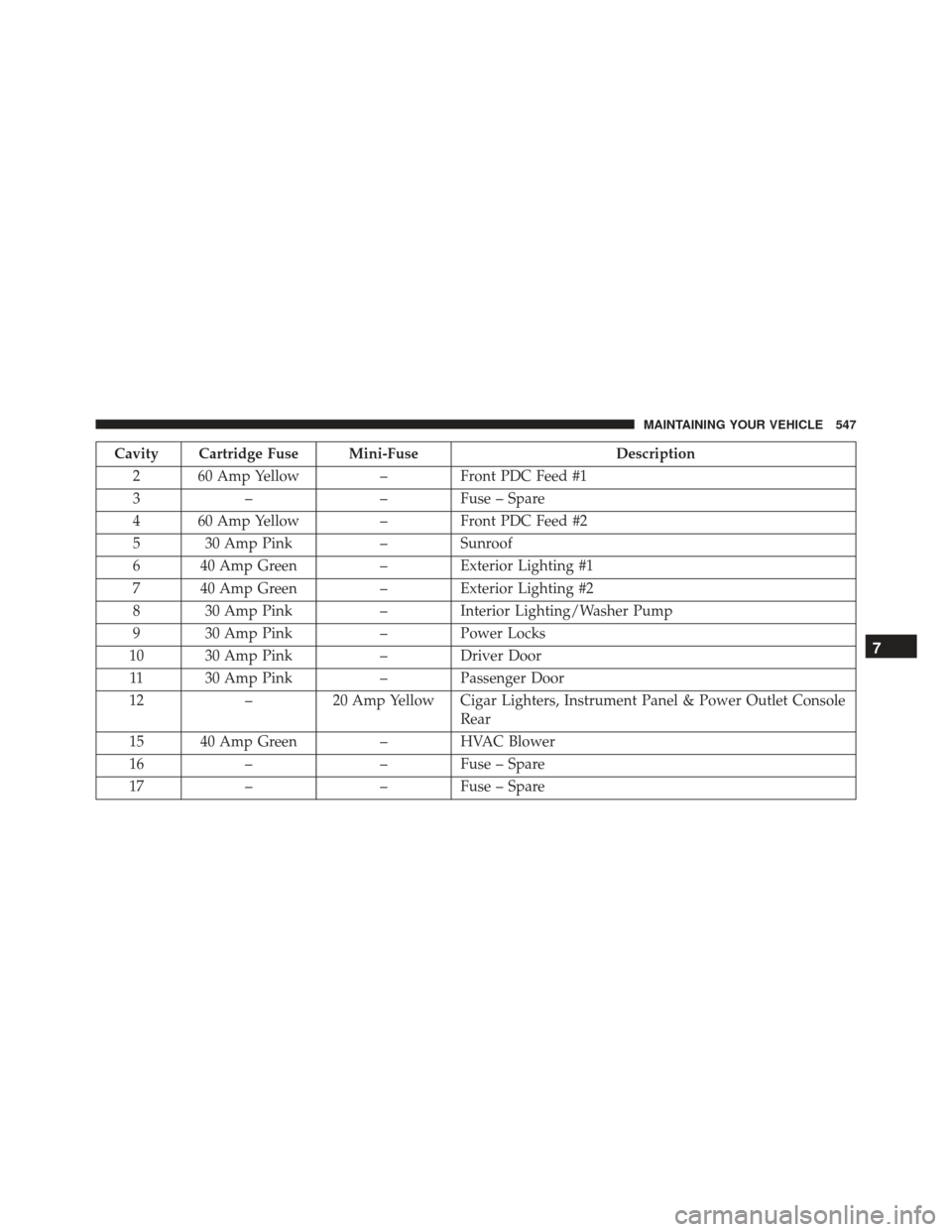
Cavity Cartridge Fuse Mini-FuseDescription
2 60 Amp Yellow – Front PDC Feed #1
3 – – Fuse – Spare
4 60 Amp Yellow – Front PDC Feed #2
5 30 Amp Pink – Sunroof
6 40 Amp Green – Exterior Lighting #1
7 40 Amp Green – Exterior Lighting #2
8 30 Amp Pink – Interior Lighting/Washer Pump
9 30 Amp Pink – Power Locks
10 30 Amp Pink – Driver Door
11 30 Amp Pink – Passenger Door
12 –20 Amp Yellow Cigar Lighters, Instrument Panel & Power Outlet Console
Rear
15 40 Amp Green – HVAC Blower
16 – – Fuse – Spare
17 – – Fuse – Spare
7
MAINTAINING YOUR VEHICLE 547
Page 551 of 614
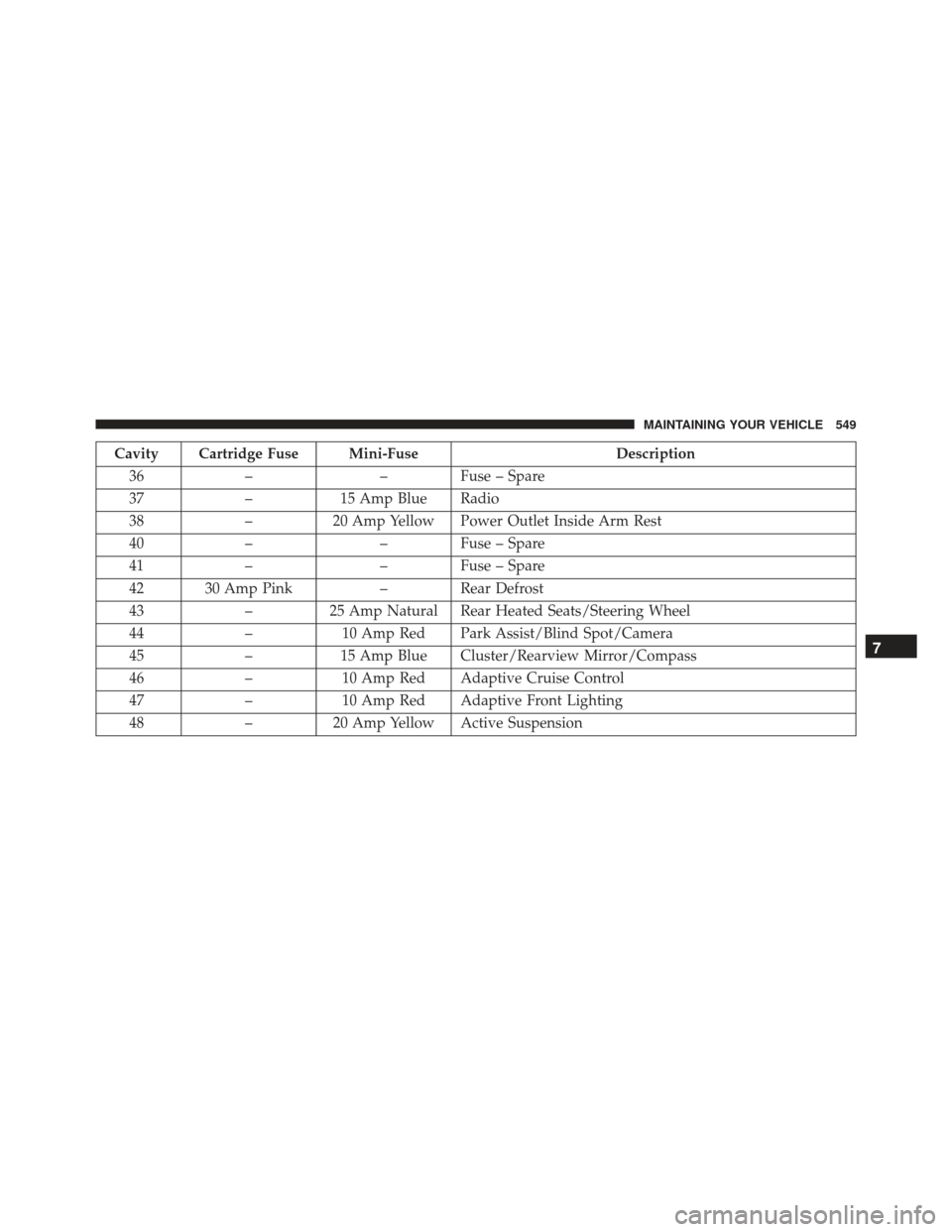
Cavity Cartridge Fuse Mini-FuseDescription
36 – – Fuse – Spare
37 –15 Amp Blue Radio
38 –20 Amp Yellow Power Outlet Inside Arm Rest
40 – – Fuse – Spare
41 – – Fuse – Spare
42 30 Amp Pink – Rear Defrost
43 –25 Amp Natural Rear Heated Seats/Steering Wheel
44 –10 Amp Red Park Assist/Blind Spot/Camera
45 –15 Amp Blue Cluster/Rearview Mirror/Compass
46 –10 Amp Red Adaptive Cruise Control
47 –10 Amp Red Adaptive Front Lighting
48 –20 Amp Yellow Active Suspension
7
MAINTAINING YOUR VEHICLE 549
Page 554 of 614
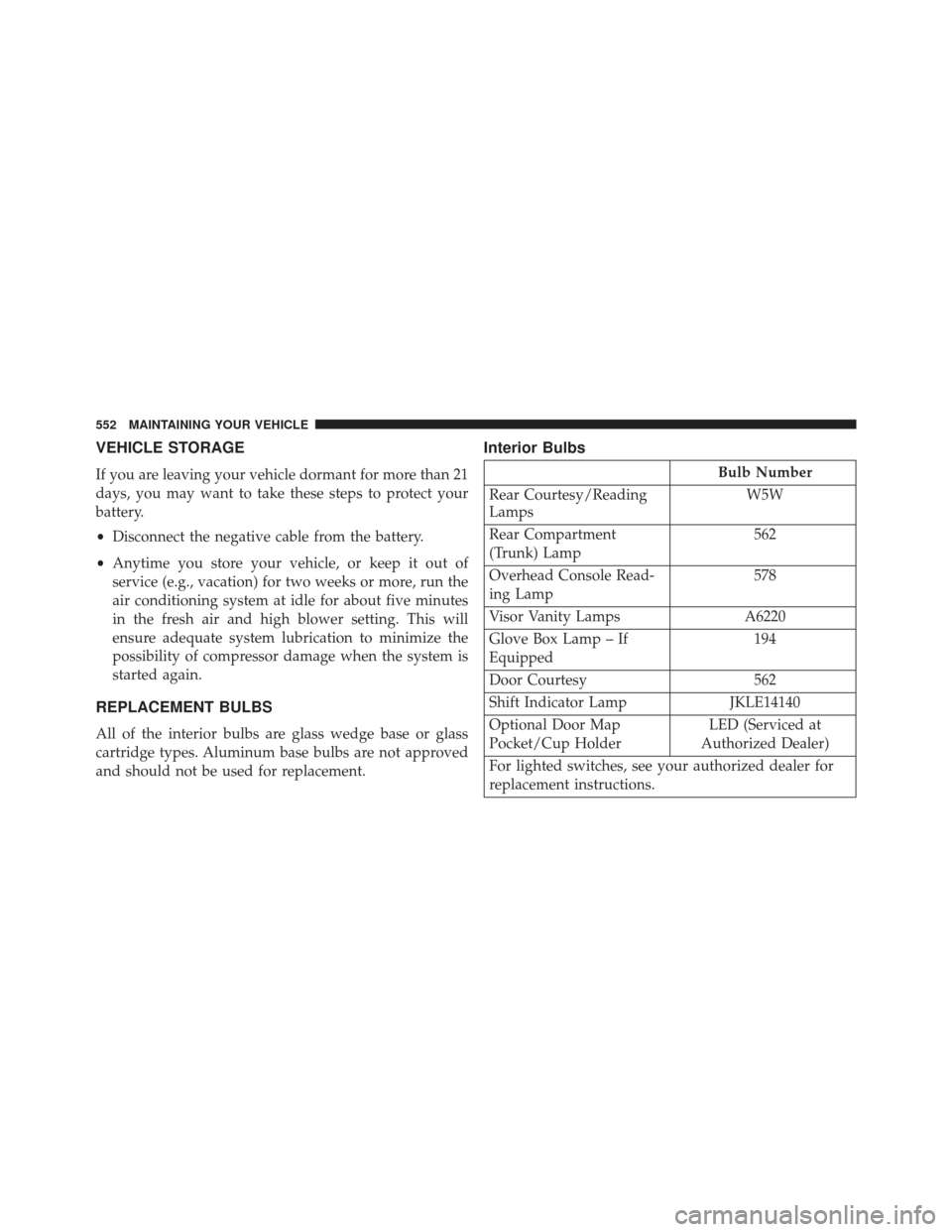
VEHICLE STORAGE
If you are leaving your vehicle dormant for more than 21
days, you may want to take these steps to protect your
battery.
•Disconnect the negative cable from the battery.
• Anytime you store your vehicle, or keep it out of
service (e.g., vacation) for two weeks or more, run the
air conditioning system at idle for about five minutes
in the fresh air and high blower setting. This will
ensure adequate system lubrication to minimize the
possibility of compressor damage when the system is
started again.
REPLACEMENT BULBS
All of the interior bulbs are glass wedge base or glass
cartridge types. Aluminum base bulbs are not approved
and should not be used for replacement.
Interior Bulbs
Bulb Number
Rear Courtesy/Reading
Lamps W5W
Rear Compartment
(Trunk) Lamp 562
Overhead Console Read-
ing Lamp 578
Visor Vanity Lamps A6220
Glove Box Lamp – If
Equipped 194
Door Courtesy 562
Shift Indicator Lamp JKLE14140
Optional Door Map
Pocket/Cup Holder LED (Serviced at
Authorized Dealer)
For lighted switches, see your authorized dealer for
replacement instructions.
552 MAINTAINING YOUR VEHICLE
Page 557 of 614
WARNING!
A transient high voltage occurs at the bulb sockets of
HID headlamps when the headlight switch is turned
ON. It may cause serious electrical shock or electro-
cution if not serviced properly. See your authorized
dealer for service.
NOTE: On vehicles equipped with HID headlamps,
when the headlamps are turned on, there is a blue hue to
the lights. This diminishes and becomes more white after
approximately 10 seconds, as the system charges.
Backup Lamps
1. Open trunk.
2. Remove fastener from cover. 3. Remove cover.
4. Twist the bulb one quarter turn to remove.
5. Reinstall new bulb.
6. Install cover and fastener.
Fastener Cover
7
MAINTAINING YOUR VEHICLE 555
Page 565 of 614
Your authorized dealer will reset the oil change indicator
message after completing the scheduled oil change. If a
scheduled oil change is performed by someone other
than your authorized dealer, the message can be reset by
referring to the steps described under “Electronic Vehicle
Information Center (EVIC)” in “Understanding Your
Instrument Panel” for further information.
At Each Stop For Fuel
•Check the engine oil level. Refer to “Maintenance
Procedures/Engine Oil” in “Maintaining Your Ve-
hicle” for further information.
• Check the windshield washer solvent and add if
required. Once A Month
•
Check tire pressure and look for unusual wear or
damage.
• Inspect the battery, and clean and tighten the terminals
as required.
• Check the fluid levels of the coolant reservoir, brake
master cylinder, and power steering, and add as
needed.
• Check all lights and other electrical items for correct
operation.
8
MAINTENANCE SCHEDULES 563
Page 586 of 614
The manufacturer will not stand behind any service
contract that is not the manufacturer’s service contract. It
is not responsible for any service contract other than the
manufacturer’s service contract. If you purchased a ser-
vice contract that is not a manufacturer’s service contract,
and you require service after the manufacturer’s New
Vehicle Limited Warranty expires, please refer to the
contract documents, and contact the person listed in
those documents.
We appreciate that you have made a major investment
when you purchased the vehicle. An authorized dealer
has also made a major investment in facilities, tools, and
training to assure that you are absolutely delighted with
the ownership experience. You will be pleased with their
sincere efforts to resolve any warranty issues or related
concerns.WARNING!
Engine exhaust, some of its constituents, and certain
vehicle components contain, or emit, chemicals
known to the State of California to cause cancer and
birth defects, or other reproductive harm. In addi-
tion, certain fluids contained in vehicles and certain
products of component wear contain, or emit, chemi-
cals known to the State of California to cause cancer
and birth defects, or other reproductive harm.
WARRANTY INFORMATION
See the Warranty Information Booklet, located on the
DVD, for the terms and provisions of Chrysler Group
LLC warranties applicable to this vehicle and market.
584 IF YOU NEED CONSUMER ASSISTANCE
Page 592 of 614
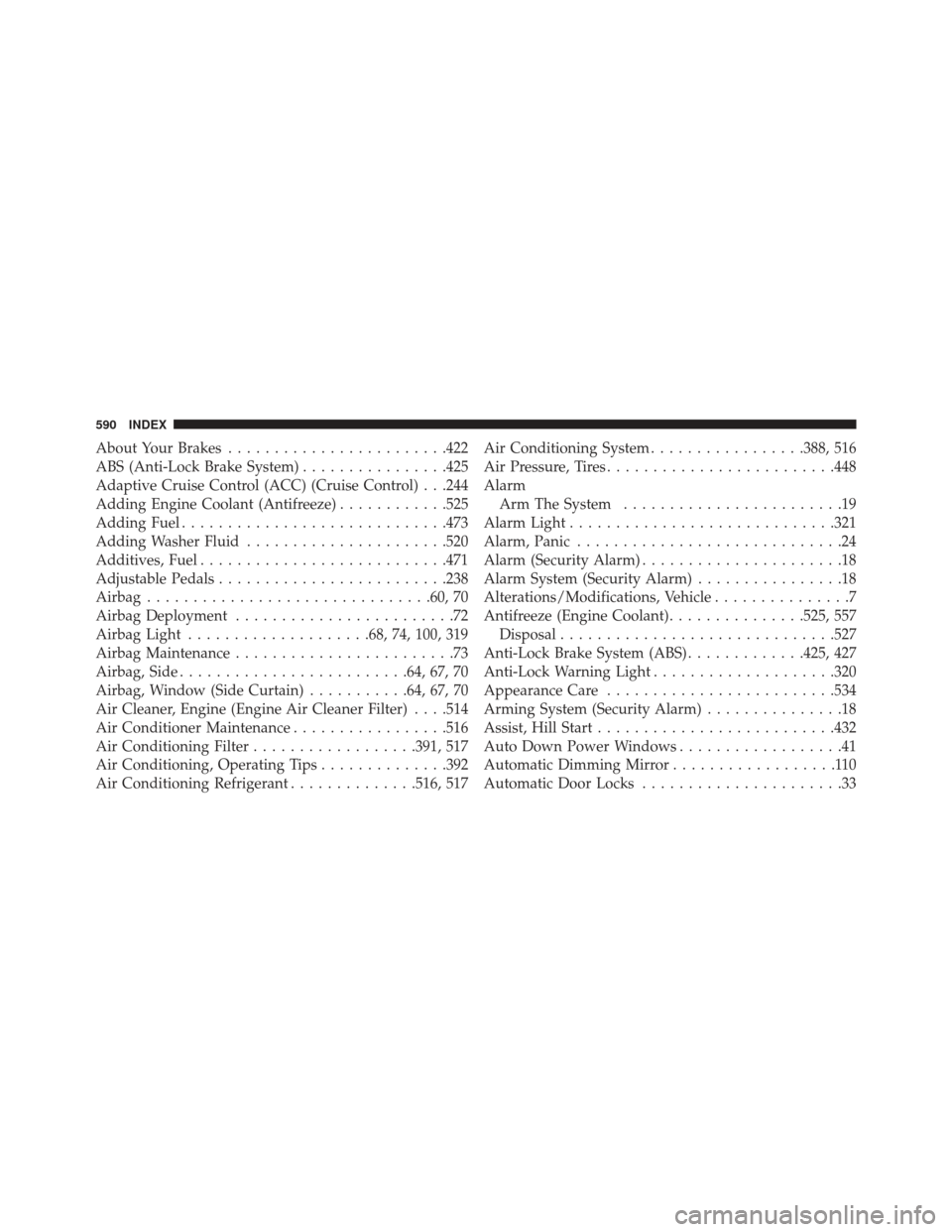
About Your Brakes....................... .422
ABS (Anti-Lock Brake System) ................425
Adaptive Cruise Control (ACC) (Cruise Control) . . .244
Adding Engine Coolant (Antifreeze) ............525
Adding Fuel ............................ .473
Adding Washer Fluid ..................... .520
Additives, Fuel .......................... .471
Adjustable Pedals ........................ .238
Airbag .............................. .60, 70
Airbag Deployment ........................72
Airbag Light ....................68, 74, 100, 319
Airbag Maintenance ........................73
Airbag, Side ........................ .64, 67, 70
Airbag, Window (Side Curtain) ...........64, 67, 70
Air Cleaner, Engine (Engine Air Cleaner Filter) . . . .514
Air Conditioner Maintenance .................516
Air Conditioning Filter ..................391, 517
Air Conditioning, Operating Tips ..............392
Air Conditioning Refrigerant ..............516, 517Air Conditioning System
.................388, 516
Air Pressure, Tires ........................ .448
Alarm Arm The System ........................19
Alarm Light ............................ .321
Alarm, Panic .............................24
Alarm (Security Alarm) ......................18
Alarm System (Security Alarm) ................18
Alterations/Modifications, Vehicle ...............7
Antifreeze (Engine Coolant) ...............525, 557
Disposal ............................. .527
Anti-Lock Brake System (ABS) .............425, 427
Anti-Lock Warning Light ....................320
Appearance Care ........................ .534
Arming System (Security Alarm) ...............18
Assist, Hill Start ......................... .432
Auto Down Power Windows ..................41
Automatic Dimming Mirror ..................110
Automatic Door Locks ......................33
590 INDEX
Page 593 of 614
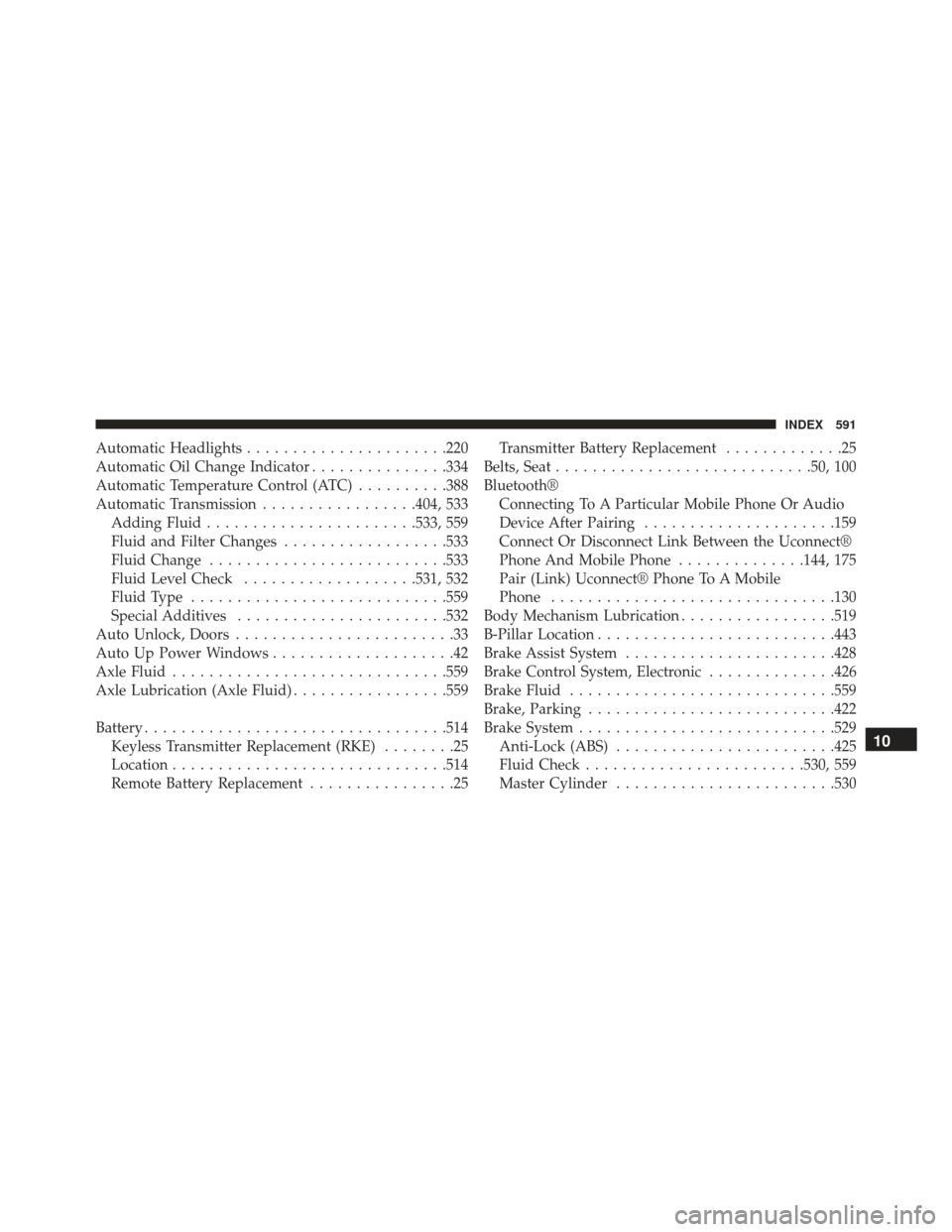
Automatic Headlights..................... .220
Automatic Oil Change Indicator ...............334
Automatic Temperature Control (ATC) ..........388
Automatic Transmission .................404, 533
Adding Fluid ...................... .533, 559
Fluid and Filter Changes ..................533
Fluid Change ......................... .533
Fluid Level Check ...................531, 532
Fluid Type ........................... .559
Special Additives ...................... .532
Auto Unlock, Doors ........................33
Auto Up Power Windows ....................42
Axle Fluid ............................. .559
Axle Lubrication (Axle Fluid) .................559
Battery ................................ .514
Keyless Transmitter Replacement (RKE) ........25
Location ............................. .514
Remote Battery Replacement ................25Transmitter Battery Replacement
.............25
Belts, Seat ........................... .50, 100
Bluetooth® Connecting To A Particular Mobile Phone Or Audio
Device After Pairing .....................159
Connect Or Disconnect Link Between the Uconnect®
Phone And Mobile Phone ..............144, 175
Pair (Link) Uconnect® Phone To A Mobile
Phone .............................. .130
Body Mechanism Lubrication .................519
B-Pillar Location ......................... .443
Brake Assist System ...................... .428
Brake Control System, Electronic ..............426
Brake Fluid ............................ .559
Brake, Parking .......................... .422
Brake System ........................... .529
Anti-Lock (ABS) ....................... .425
Fluid Check ....................... .530, 559
Master Cylinder ....................... .530
10
INDEX 591