engine DODGE CHARGER SRT 2016 7.G Workshop Manual
[x] Cancel search | Manufacturer: DODGE, Model Year: 2016, Model line: CHARGER SRT, Model: DODGE CHARGER SRT 2016 7.GPages: 634, PDF Size: 4.6 MB
Page 305 of 634
7. Restore Default•Ok
• Cancel
Speed Warning — If Equipped
Push and release the UPorDOWNar-
row button until the Speed Warning Menu
icon/title is highlighted in the DID. Push
and release OKto enter speed warning. Use
UP
or DOWNarrow to select a desired speed,
then push and release OKto set the speed. The
Manual Speed Assist (MSA) Speed Warning telltale
will display in the DID, and a chime will sound with
a pop up warning message when the set speed is
exceeded. Diagnostics — If Equipped
Push and release the
UPorDOWNarrow button
until the diagnostic Menu is selected. Then, the Driver
is able to view engine and emission vehicle faults.
• Push OKto have the most recent fault code sent.
• There is a delay when the next diagnostic code is
requested during which the following message is
displayed:
• “Checking System for Diagnostic Codes.”
• Driver must push the OKbutton again to see the next
Pcode otherwise current message remains displayed.
• Driver exits when they cycle to another submenu (up
or down).
• Faults are displayed from newest to the oldest.4
UNDERSTANDING YOUR INSTRUMENT PANEL 303
Page 309 of 634
Buttons On The Faceplate
Buttons on the faceplate are located below the Uconnect
system in the center of the instrument panel. In addition,
there is a Scroll/Enter control knob located on the right
side. Turn the control knob to scroll through menus and
change settings (i.e., 30, 60, 90), push the center of the
control knob one or more times to select or change a
setting (i.e., ON, OFF).
Your Uconnect system may also have a Screen Off and
Back buttons on the faceplate.
Push the Screen Off button on the faceplate to turn off the
Uconnect screen. Push the Screen Off button on the
faceplate a second time to turn the screen on.
Push the Back button on the faceplate to exit out of a
Menu or certain option on the Uconnect system.
Buttons On The Touchscreen
Buttons on the touchscreen are accessible on the
Uconnect touchscreen.
Customer Programmable Features — Uconnect
8.4 Settings
Press the “Apps” button, then press the “Settings”
button on the touchscreen to display the menu setting
screen. In this mode the Uconnect system allows you
to access programmable features that may be
equipped such as Display, Units, Voice, Clock, Safety
& Driving Assistance, Lights, Doors & Locks, Auto-On
Comfort, Engine Off Options, Audio, Phone/
Bluetooth, SiriusXM Setup, Restore Settings, Clear
Personal Data and System Information.
NOTE:
• Only one touchscreen area may be selected at a time.
4
UNDERSTANDING YOUR INSTRUMENT PANEL 307
Page 319 of 634
Lights
After pressing the “Lights” button on the touchscreen the
following settings will be available.
•Headlight Off Delay
When this feature is selected, it allows adjustment of the
amount of time the headlights remain on after the engine
is shut off. To change the Headlights Off Delay setting,
press the “+” or “-” button on the touchscreen to select
your desired time interval, and choose either 0, 30, 60 or
90 seconds.
• Headlight Illumination On Approach
When this feature is selected, the headlights will activate
and remain on for 0, 30, 60 or 90 seconds when the doors
are unlocked with the Remote Keyless Entry (RKE)
transmitter. To change the Illuminated Approach status,
press the “+” or “-” button on the touchscreen to select
your desired time interval. •
Headlights With Wipers — If Equipped
When this feature is selected, and the headlight switch is
in the AUTO position, the headlights will turn on ap-
proximately 10 seconds after the wipers are turned on.
The headlights will also turn off when the wipers are
turned off if they were turned on by this feature. To make
your selection, press the “Headlights With Wipers” but-
ton on the touchscreen, until a check-mark appears next
to setting, showing that the setting has been selected.
• Auto Dim High Beams — If Equipped
When this feature is selected, the high beam headlights
will activate/deactivate automatically under certain con-
ditions. To make your selection, press the “Auto High
Beams” button on the touchscreen, until a check-mark
appears next to setting, showing that the setting has been
selected. Refer to “Lights — If Equipped” in “Under-
standing The Features Of Your Vehicle” for further infor-
mation.
4
UNDERSTANDING YOUR INSTRUMENT PANEL 317
Page 320 of 634
•Daytime Running Lights — If Equipped
When this feature is selected, the headlights will turn on
whenever the engine is running. To make your selection,
press the “Daytime Running Lights” button on the touch-
screen, until a check-mark appears next to setting, show-
ing that the setting has been selected.
• Flash Lights With Lock
When this feature is selected, the hazard lights will flash
when the doors are locked or unlocked with the Remote
Keyless Entry (RKE) transmitter, or when using the
passive entry feature. This feature may be selected with
or without the “Sound Horn on Lock” feature selected. To
make your selection, press the “Flash Lights with Lock”
button on the touchscreen, until a check-mark appears
next to setting, showing that the setting has been se-
lected.Doors & Locks
After pressing the “Doors & Locks” button on the touch-
screen the following settings will be available:
• Auto Unlock On Exit
When this feature is selected, all doors will unlock when
the vehicle is stopped, the transmission is in the PARK or
NEUTRAL position and the driver’s door is opened. To
make your selection, press the “Auto Unlock On Exit”
button on the touchscreen, until a check-mark appears
next to the setting, showing that the setting has been
selected.
• Flash Lights With Lock
When this feature is selected, the exterior lights will flash
when the doors are locked or unlocked with the Remote
Keyless Entry (RKE) transmitter, or when using the
passive entry feature. This feature may be selected with
or without the “Sound Horn on Lock” feature selected. To
318 UNDERSTANDING YOUR INSTRUMENT PANEL
Page 323 of 634
temperatures are below 40° F (4.4° C). When tempera-
tures are above 80° F (26.7° C) the driver vented seat will
turn ON. To make your selection, press the “Auto-On
Driver Heated/Ventilated Seat & Steering Wheel With
Vehicle Start” button to select from “Off,” “Remote Start”
or “All Starts” until a check-mark appears next to setting,
showing that setting has been selected.
Engine Off Options
After pressing the “Engine Off Options” button on the
touchscreen the following settings will be available:
•Easy Exit Seat — If Equipped
When this feature is selected, the Driver ’s seat will
automatically move rearward once the engine is shut off.
To make your selection, press the “Easy Exit Seat” button
on the touchscreen, until a check-mark appears next to
setting, showing that setting has been selected. •
Engine Off Power Delay
When this feature is selected, the power window
switches, radio, Uconnect Phone system (if equipped),
DVD video system (if equipped), power sunroof (if
equipped), and power outlets will remain active for up to
10 minutes after the ignition is cycled to OFF. Opening
either front door will cancel this feature. To change the
Engine Off Power Delay setting, press the “+” or “-”
button on the touchscreen to select your desired time
interval, and choose from “0 seconds,” “45 seconds,” “5
minutes” or “10 minutes.”
• Headlight Off Delay
When this feature is selected, the driver can choose to
have the headlights remain on for 0, 30, 60, or 90 seconds
when exiting the vehicle. To change the Headlight Off
Delay status press the “+” or “–” button on the touch-
screen to select your desired time interval.
4
UNDERSTANDING YOUR INSTRUMENT PANEL 321
Page 328 of 634
The Performance Pages include the following:
•Home
• Timers
• Gauges 1
• Gauges 2
• G-Force
• Engine The following describes each feature and its operation:
Home
Performance Pages — Home
326 UNDERSTANDING YOUR INSTRUMENT PANEL
Page 337 of 634
•Vehicle Speed
Vehicle Speed measures the current speed of the vehicle
in either mph or km/h, starting at 0 with no maximum
value.
• Steering Wheel Angle
Steering Wheel Angle utilizes the steering angle sensor to
measure the degree of the steering wheel relative to zero.
The zero degree measurement indicates a steering wheel
straight ahead position. When the steering angle value is
negative, this indicates a turn to the left, and when the
steering angle value is positive, a turn to the right.Engine
SRT Performance Pages — Engine (6.4L)
4
UNDERSTANDING YOUR INSTRUMENT PANEL 335
Page 338 of 634
When selected, this screen displays the following values:
•Vehicle Speed
Shows the actual vehicle speed. •
Instantaneous Horsepower/Kilowatts
Shows the instantaneous horsepower.
• Instantaneous Torque
Shows the instantaneous torque.
• Oil Pressure (6.4L Only)
Shows the actual oil pressure.
• Gear
Shows the current (or pending) operating gear of the
vehicle.
• Boost Pressure (6.2L Only)
Shows the actual boost pressure.
SRT Performance Pages — Engine (6.2L)
336 UNDERSTANDING YOUR INSTRUMENT PANEL
Page 339 of 634
SRT Drive Modes
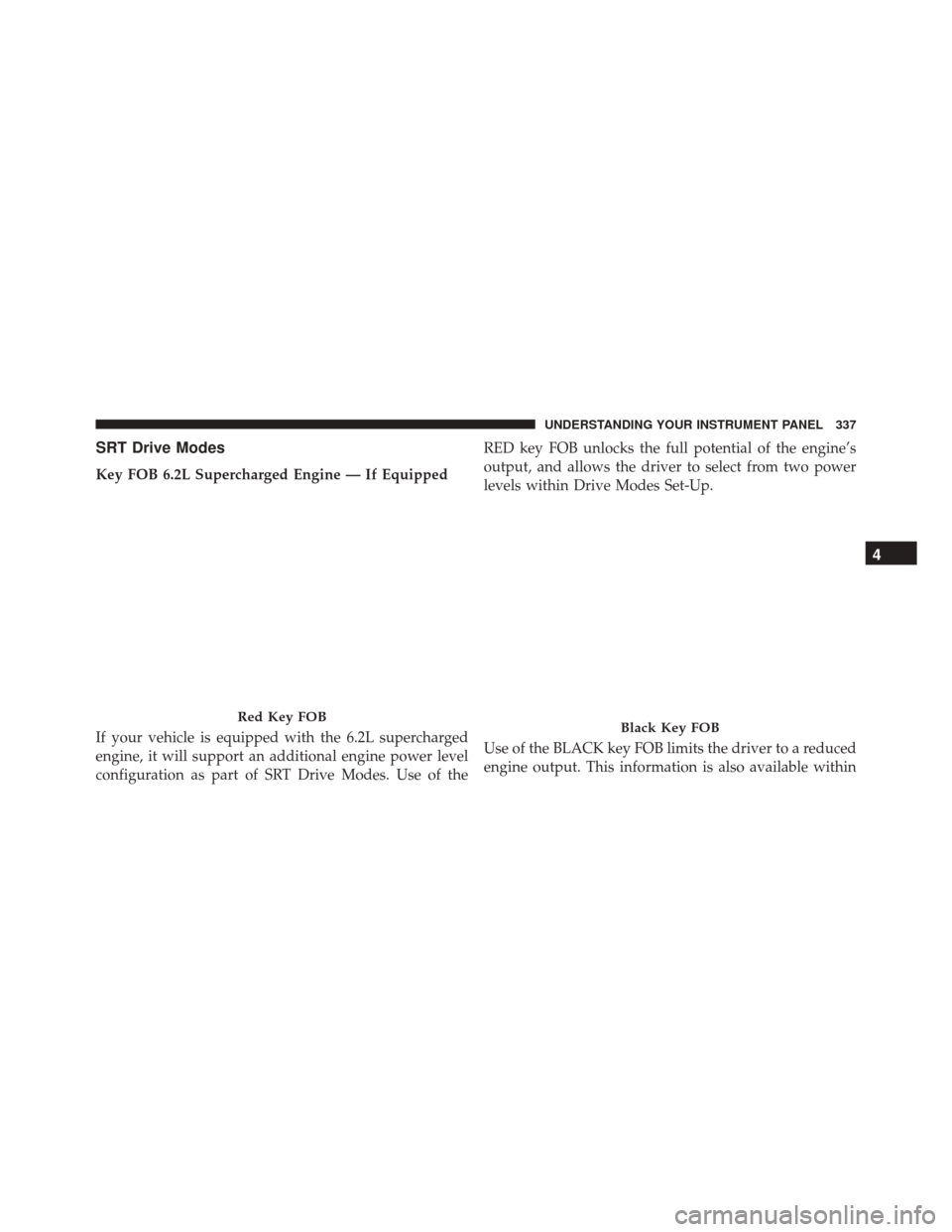
Key FOB 6.2L Supercharged Engine — If Equipped
If your vehicle is equipped with the 6.2L supercharged
engine, it will support an additional engine power level
configuration as part of SRT Drive Modes. Use of theRED key FOB unlocks the full potential of the engine’s
output, and allows the driver to select from two power
levels within Drive Modes Set-Up.
Use of the BLACK key FOB limits the driver to a reduced
engine output. This information is also available within
Red Key FOBBlack Key FOB
4
UNDERSTANDING YOUR INSTRUMENT PANEL 337
Page 341 of 634
Engine/
Transmis- sion Red Key/
700+ HP Black Key/
500 HP Transmis-
sion Paddle
Shifters Suspen-
sion Steering Traction
6.2L XXXXXN /AX
6.4L N/A N/A XXXX X
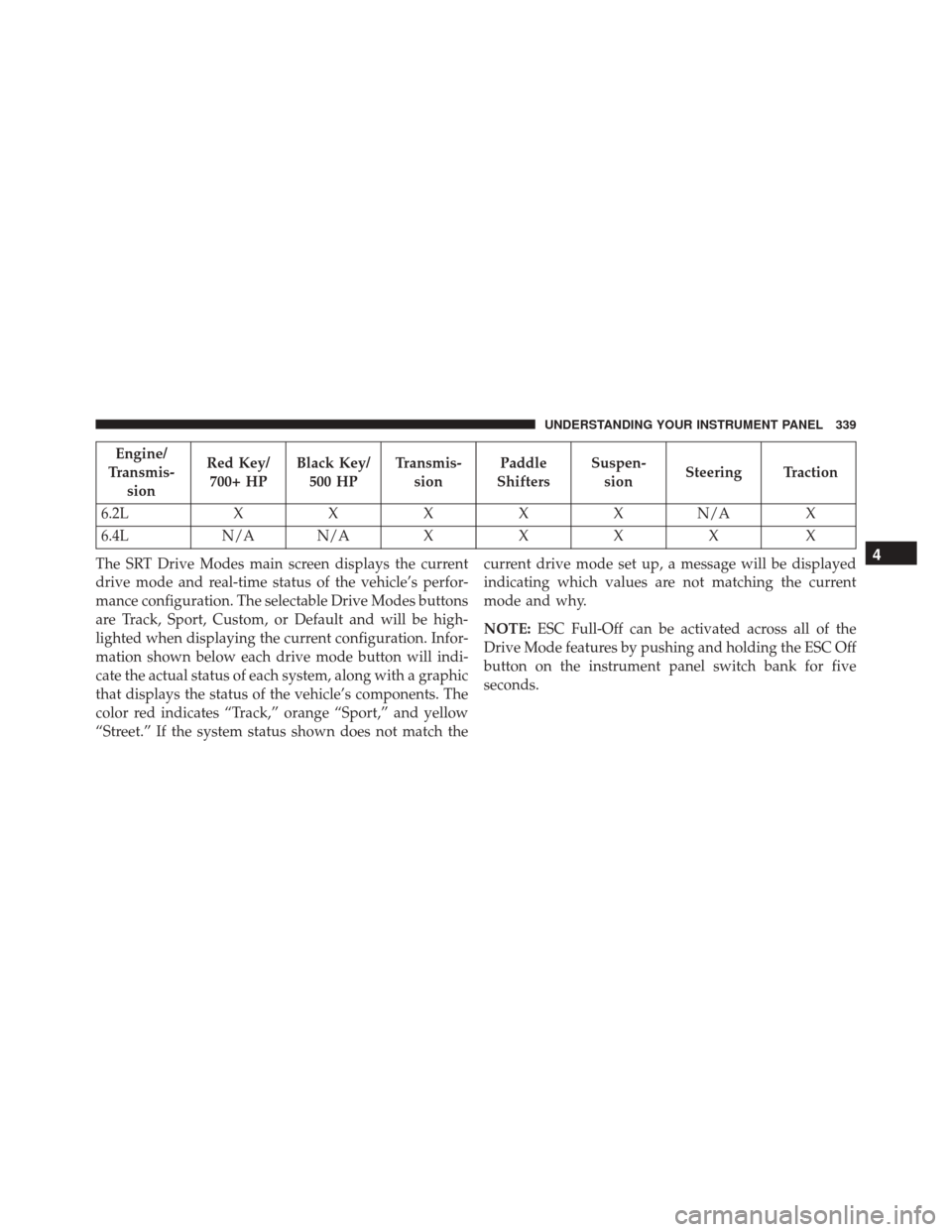
The SRT Drive Modes main screen displays the current
drive mode and real-time status of the vehicle’s perfor-
mance configuration. The selectable Drive Modes buttons
are Track, Sport, Custom, or Default and will be high-
lighted when displaying the current configuration. Infor-
mation shown below each drive mode button will indi-
cate the actual status of each system, along with a graphic
that displays the status of the vehicle’s components. The
color red indicates “Track,” orange “Sport,” and yellow
“Street.” If the system status shown does not match the current drive mode set up, a message will be displayed
indicating which values are not matching the current
mode and why.
NOTE:
ESC Full-Off can be activated across all of the
Drive Mode features by pushing and holding the ESC Off
button on the instrument panel switch bank for five
seconds.
4
UNDERSTANDING YOUR INSTRUMENT PANEL 339