ignition DODGE CHARGER SRT 2018 Owners Manual
[x] Cancel search | Manufacturer: DODGE, Model Year: 2018, Model line: CHARGER SRT, Model: DODGE CHARGER SRT 2018Pages: 490, PDF Size: 5.08 MB
Page 340 of 490
Under normal operating conditions, the catalytic converter
will not require maintenance. However, it is important to
keep the engine properly tuned to assure proper catalyst
operation and prevent possible catalyst damage.
NOTE:Intentional tampering with emissions control sys-
tems can result in civil penalties being assessed against
you.
In unusual situations involving grossly malfunctioning
engine operation, a scorching odor may suggest severe and
abnormal catalyst overheating. If this occurs, stop the
vehicle, turn off the engine and allow it to cool. Service,
including a tune-up to manufacturer’s specifications,
should be obtained immediately.
To minimize the possibility of catalytic converter damage:
• Do not shut off the engine or interrupt the ignition when
the transmission is in gear and the vehicle is in motion.
• Do not try to start the engine by pushing or towing the
vehicle.
• Do not idle the engine with any spark plug wires
disconnected or removed, such as when diagnostic
testing, or for prolonged periods during very rough idle
or malfunctioning operating conditions. NOTE:
Your vehicle’s exhaust system may be equipped
with an Electronic Exhaust Valve (EEV) system, if the
exhaust system is replaced with aftermarket products a
Malfunction Indicator Lamp (MIL) will illuminate.
Cooling System
WARNING!
• You or others can be badly burned by hot engine
coolant (antifreeze) or steam from your radiator. If
you see or hear steam coming from under the hood,
do not open the hood until the radiator has had time
to cool. Never open a cooling system pressure cap
when the radiator or coolant bottle is hot.
• Keep hands, tools, clothing, and jewelry away from
the radiator cooling fan when the hood is raised. The
fan starts automatically and may start at any time,
whether the engine is running or not.
• When working near the radiator cooling fan, discon-
nect the fan motor lead or turn the ignition to the
OFF mode. The fan is temperature controlled and can
start at any time the ignition is in the ON mode.
338 SERVICING AND MAINTENANCE
Page 384 of 490
MMT In Gasoline
Methylcyclopentadienyl Manganese Tricarbonyl (MMT) is
a manganese-containing metallic additive that is blended
into some gasoline to increase octane. Gasoline blended
with MMT provides no performance advantage beyond
gasoline of the same octane number without MMT. Gaso-
line blended with MMT reduces spark plug life and
reduces emissions system performance in some vehicles.
The manufacturer recommends that gasoline without
MMT be used in your vehicle. The MMT content of
gasoline may not be indicated on the gasoline pump;
therefore, you should ask your gasoline retailer whether
the gasoline contains MMT. MMT is prohibited in Federal
and California reformulated gasoline.
Fuel System Cautions
CAUTION!
Follow these guidelines to maintain your vehicle’s
performance:
•The use of leaded gasoline is prohibited by Federal
law. Using leaded gasoline can impair engine perfor-
mance and damage the emissions control system.
(Continued)
CAUTION! (Continued)
•An out-of-tune engine or certain fuel or ignition
malfunctions can cause the catalytic converter to
overheat. If you notice a pungent burning odor or
some light smoke, your engine may be out of tune or
malfunctioning and may require immediate service.
Contact an authorized dealer for service assistance.
• The use of fuel additives, which are now being sold
as octane enhancers, is not recommended. Most of
these products contain high concentrations of metha-
nol. Fuel system damage or vehicle performance
problems resulting from the use of such fuels or
additives is not the responsibility of the manufac-
turer and may void or not be covered under the New
Vehicle Limited Warranty.
NOTE: Intentional tampering with the emissions control
system can result in civil penalties being assessed against
you.
382 TECHNICAL SPECIFICATIONS
Page 401 of 490
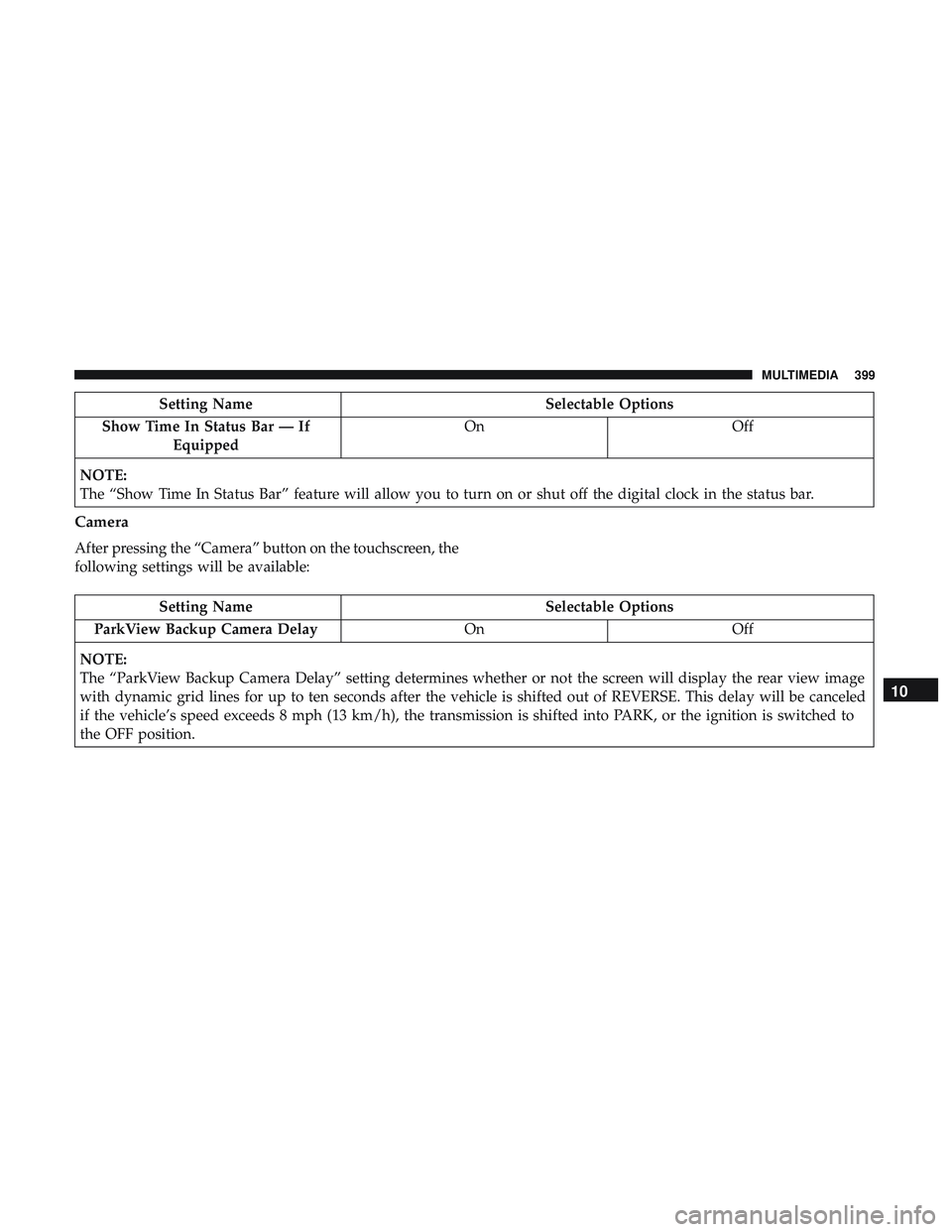
Setting NameSelectable Options
Show Time In Status Bar — If Equipped On
Off
NOTE:
The “Show Time In Status Bar” feature will allow you to turn on or shut off the digital clock in the status bar.
Camera
After pressing the “Camera” button on the touchscreen, the
following settings will be available:
Setting Name Selectable Options
ParkView Backup Camera Delay OnOff
NOTE:
The “ParkView Backup Camera Delay” setting determines whether or not the screen will display the rear view image
with dynamic grid lines for up to ten seconds after the vehicle is shifted out of REVERSE. This delay will be canceled
if the vehicle’s speed exceeds 8 mph (13 km/h), the transmission is shifted into PARK, or the ignition is switched to
the OFF position.
10
MULTIMEDIA 399
Page 402 of 490
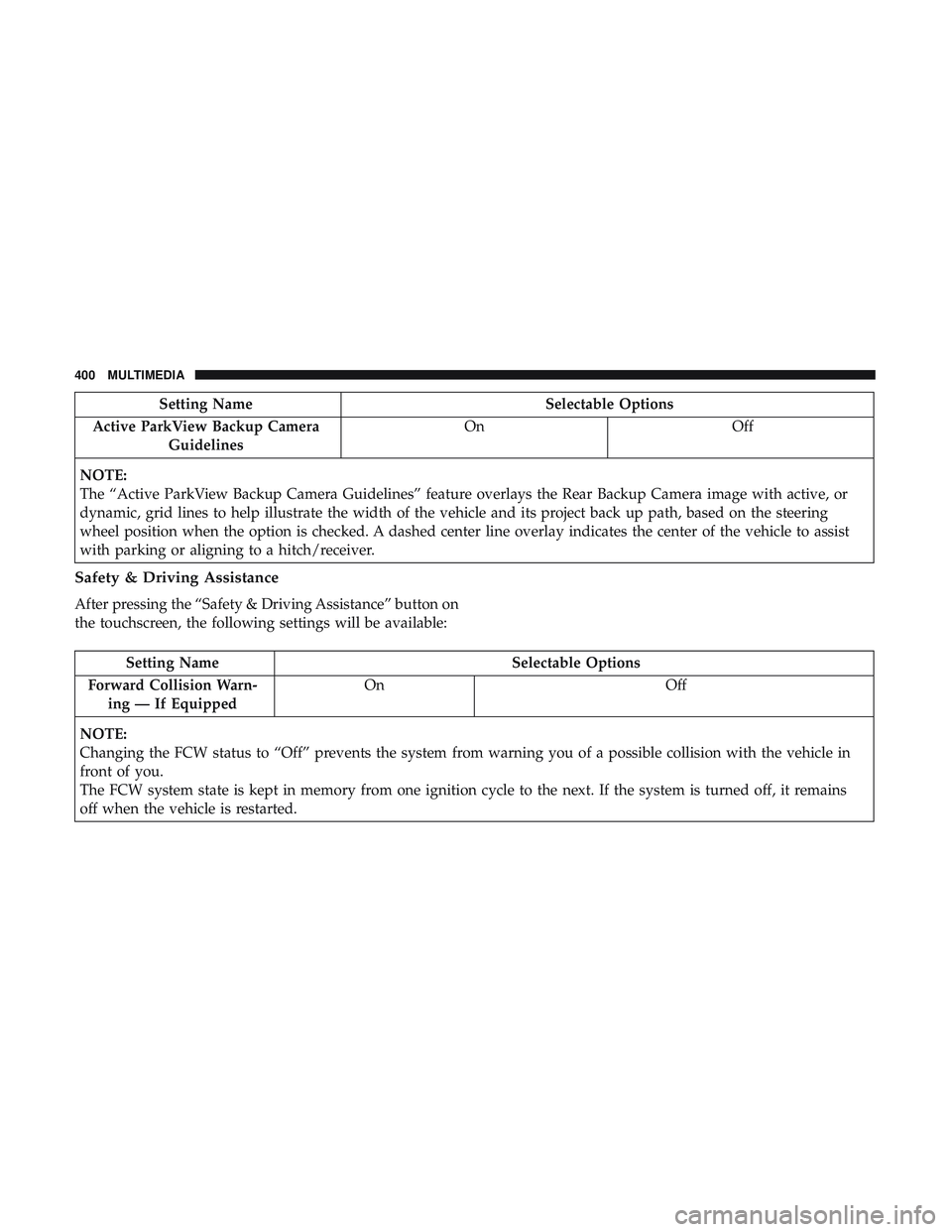
Setting NameSelectable Options
Active ParkView Backup Camera Guidelines On
Off
NOTE:
The “Active ParkView Backup Camera Guidelines” feature overlays the Rear Backup Camera image with active, or
dynamic, grid lines to help illustrate the width of the vehicle and its project back up path, based on the steering
wheel position when the option is checked. A dashed center line overlay indicates the center of the vehicle to assist
with parking or aligning to a hitch/receiver.
Safety & Driving Assistance
After pressing the “Safety & Driving Assistance” button on
the touchscreen, the following settings will be available:
Setting Name Selectable Options
Forward Collision Warn- ing — If Equipped On
Off
NOTE:
Changing the FCW status to “Off” prevents the system from warning you of a possible collision with the vehicle in
front of you.
The FCW system state is kept in memory from one ignition cycle to the next. If the system is turned off, it remains
off when the vehicle is restarted.
400 MULTIMEDIA
Page 405 of 490
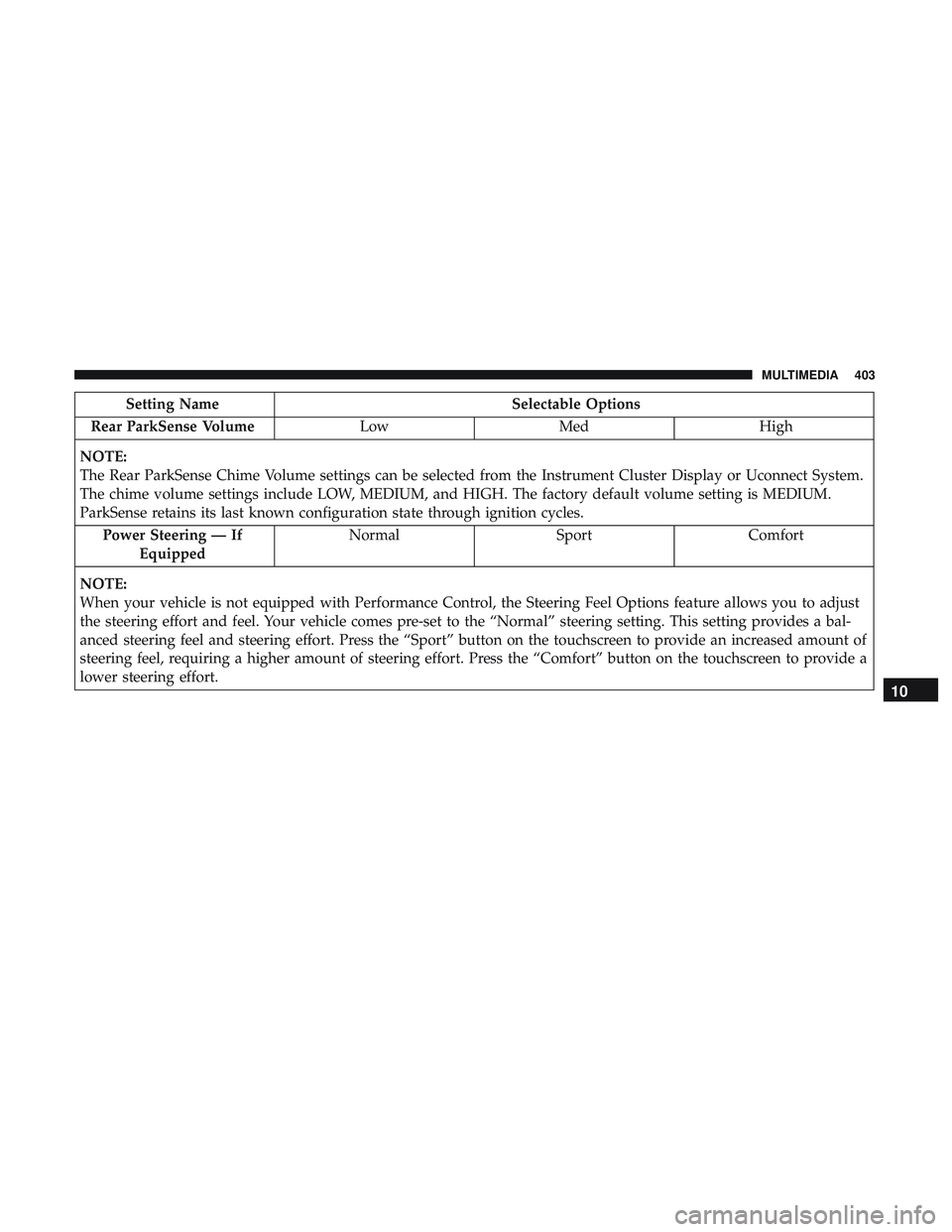
Setting NameSelectable Options
Rear ParkSense Volume LowMed High
NOTE:
The Rear ParkSense Chime Volume settings can be selected from the Instrument Cluster Display or Uconnect System.
The chime volume settings include LOW, MEDIUM, and HIGH. The factory default volume setting is MEDIUM.
ParkSense retains its last known configuration state through ignition cycles. Power Steering — If Equipped Normal
SportComfort
NOTE:
When your vehicle is not equipped with Performance Control, the Steering Feel Options feature allows you to adjust
the steering effort and feel. Your vehicle comes pre-set to the “Normal” steering setting. This setting provides a bal-
anced steering feel and steering effort. Press the “Sport” button on the touchscreen to provide an increased amount of
steering feel, requiring a higher amount of steering effort. Press the “Comfort” button on the touchscreen to provide a
lower steering effort.
10
MULTIMEDIA 403
Page 407 of 490
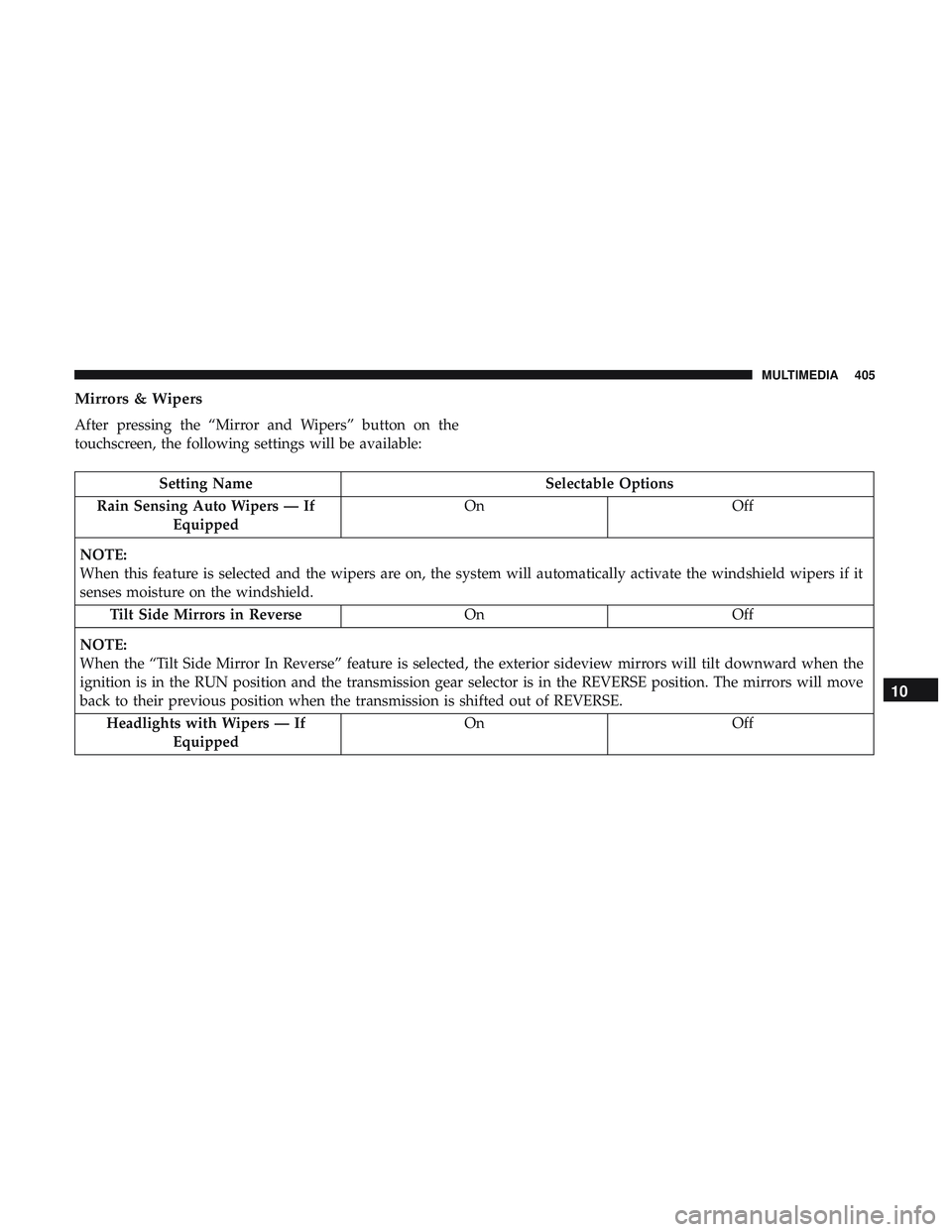
Mirrors & Wipers
After pressing the “Mirror and Wipers” button on the
touchscreen, the following settings will be available:
Setting NameSelectable Options
Rain Sensing Auto Wipers — If Equipped On
Off
NOTE:
When this feature is selected and the wipers are on, the system will automatically activate the windshield wipers if it
senses moisture on the windshield. Tilt Side Mirrors in Reverse OnOff
NOTE:
When the “Tilt Side Mirror In Reverse” feature is selected, the exterior sideview mirrors will tilt downward when the
ignition is in the RUN position and the transmission gear selector is in the REVERSE position. The mirrors will move
back to their previous position when the transmission is shifted out of REVERSE. Headlights with Wipers — If Equipped On
Off
10
MULTIMEDIA 405
Page 412 of 490
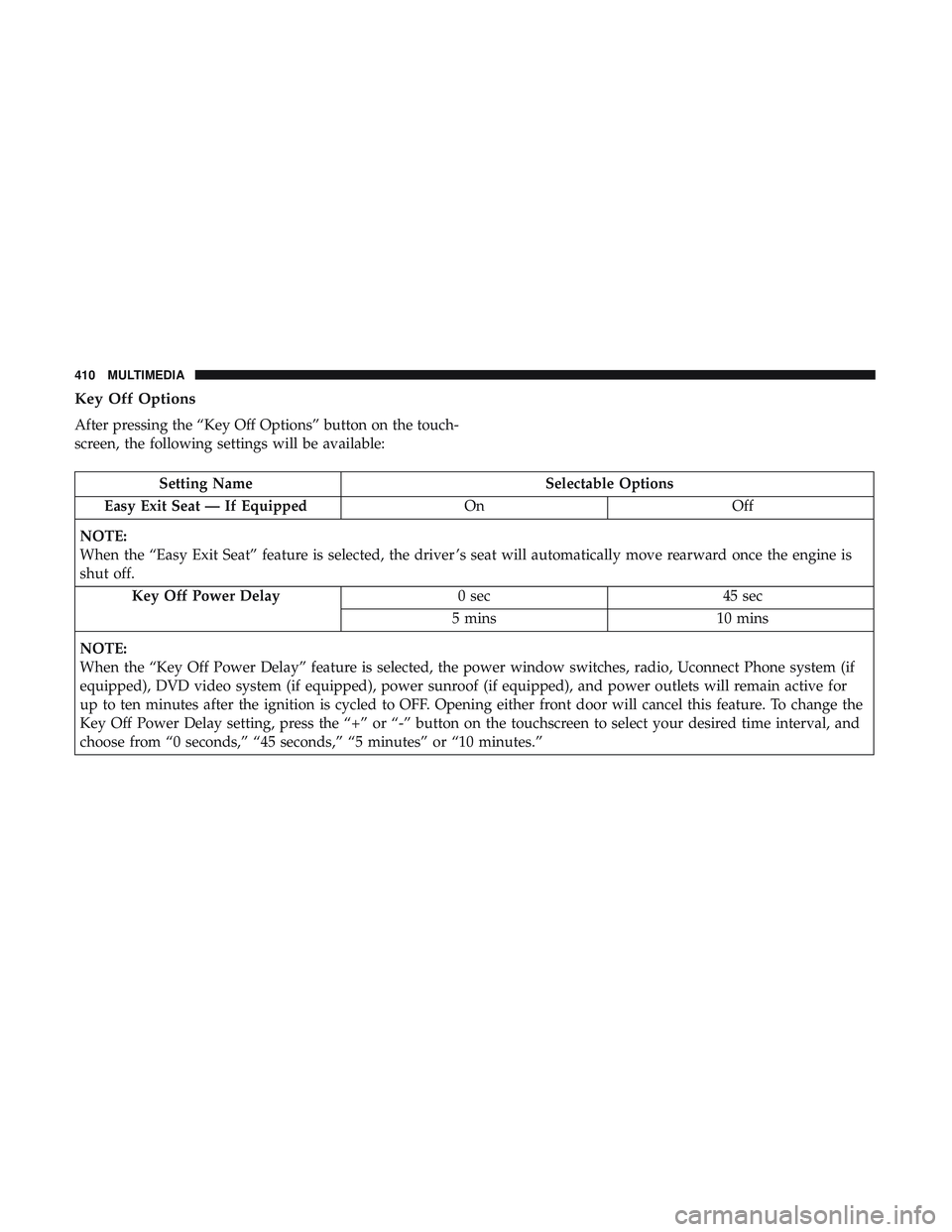
Key Off Options
After pressing the “Key Off Options” button on the touch-
screen, the following settings will be available:
Setting NameSelectable Options
Easy Exit Seat — If Equipped OnOff
NOTE:
When the “Easy Exit Seat” feature is selected, the driver ’s seat will automatically move rearward once the engine is
shut off. Key Off Power Delay 0 sec45 sec
5 mins 10 mins
NOTE:
When the “Key Off Power Delay” feature is selected, the power window switches, radio, Uconnect Phone system (if
equipped), DVD video system (if equipped), power sunroof (if equipped), and power outlets will remain active for
up to ten minutes after the ignition is cycled to OFF. Opening either front door will cancel this feature. To change the
Key Off Power Delay setting, press the “+” or “-” button on the touchscreen to select your desired time interval, and
choose from “0 seconds,” “45 seconds,” “5 minutes” or “10 minutes.”
410 MULTIMEDIA
Page 446 of 490
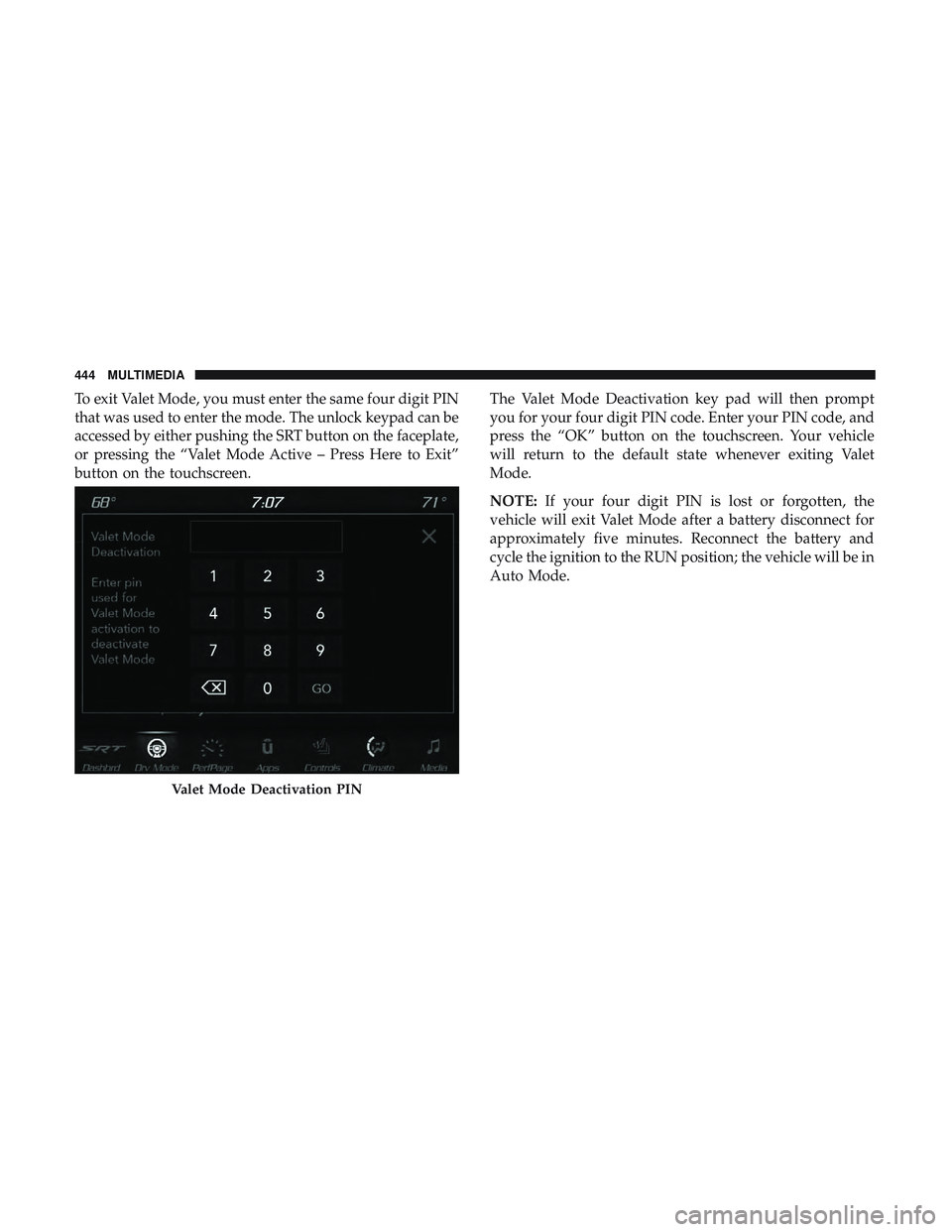
To exit Valet Mode, you must enter the same four digit PIN
that was used to enter the mode. The unlock keypad can be
accessed by either pushing the SRT button on the faceplate,
or pressing the “Valet Mode Active – Press Here to Exit”
button on the touchscreen.The Valet Mode Deactivation key pad will then prompt
you for your four digit PIN code. Enter your PIN code, and
press the “OK” button on the touchscreen. Your vehicle
will return to the default state whenever exiting Valet
Mode.
NOTE:
If your four digit PIN is lost or forgotten, the
vehicle will exit Valet Mode after a battery disconnect for
approximately five minutes. Reconnect the battery and
cycle the ignition to the RUN position; the vehicle will be in
Auto Mode.
Valet Mode Deactivation PIN
444 MULTIMEDIA
Page 480 of 490
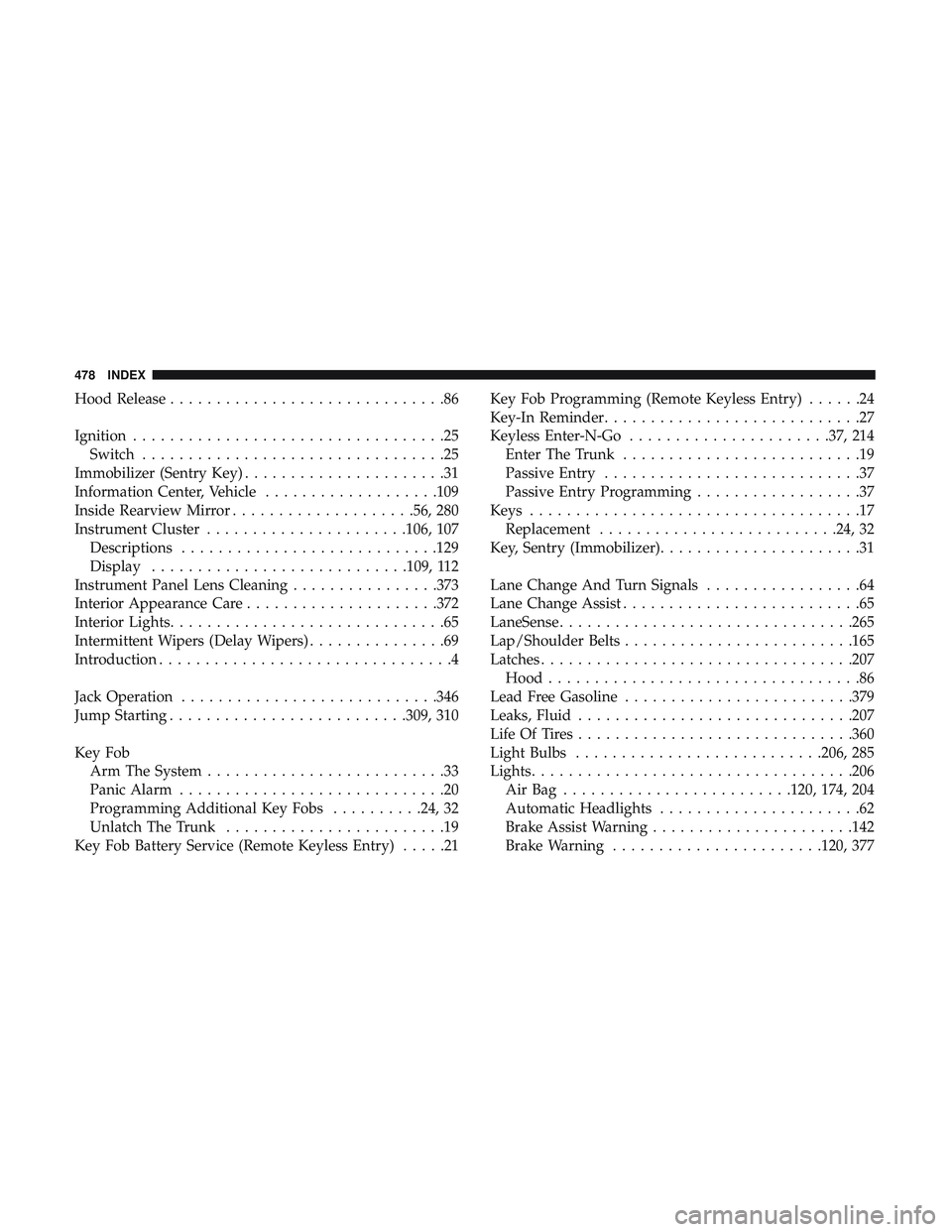
Hood Release..............................86
Ignition ..................................25
Switch .................................25
Immobilizer (Sentry Key) ......................31
Information Center, Vehicle ...................109
Inside Rearview Mirror ....................56, 280
Instrument Cluster ..................... .106, 107
Descriptions ............................129
Display ............................109, 112
Instrument Panel Lens Cleaning ................373
Interior Appearance Care .....................372
Interior Lights ..............................65
Intermittent Wipers (Delay Wipers) ...............69
Introduction ................................4
Jack Operation ............................346
Jump Starting ..........................309, 310
Key Fob Arm The System ..........................33
Panic Alarm .............................20
Programming Additional Key Fobs ..........24, 32
Unlatch The Trunk ........................19
Key Fob Battery Service (Remote Keyless Entry) .....21Key Fob Programming (Remote Keyless Entry)
......24
Key-In Reminder ............................27
Keyless Enter-N-Go ..................... .37, 214
Enter The Trunk ..........................19
Passive Entry ............................37
Passive Entry Programming ..................37
Keys ....................................17
Replacement ..........................24, 32
Key, Sentry (Immobilizer) ......................31
Lane Change And Turn Signals .................64
Lane Change Assist ..........................65
LaneSense ............................... .265
Lap/Shoulder Belts ........................ .165
Latches ................................. .207
Hood ..................................86
Lead Free Gasoline ........................ .379
Leaks, Fluid ............................. .207
Life Of Tires ............................. .360
Light Bulbs .......................... .206, 285
Lights .................................. .206
A i
rBag .........................120, 174, 204
Automatic Headlights ......................62
Brake Assist Warning ..................... .142
Brake Warning .......................120, 377
478 INDEX