automatic transmission DODGE CHARGER SRT 2019 Owner's Manual
[x] Cancel search | Manufacturer: DODGE, Model Year: 2019, Model line: CHARGER SRT, Model: DODGE CHARGER SRT 2019Pages: 496, PDF Size: 5.32 MB
Page 356 of 496
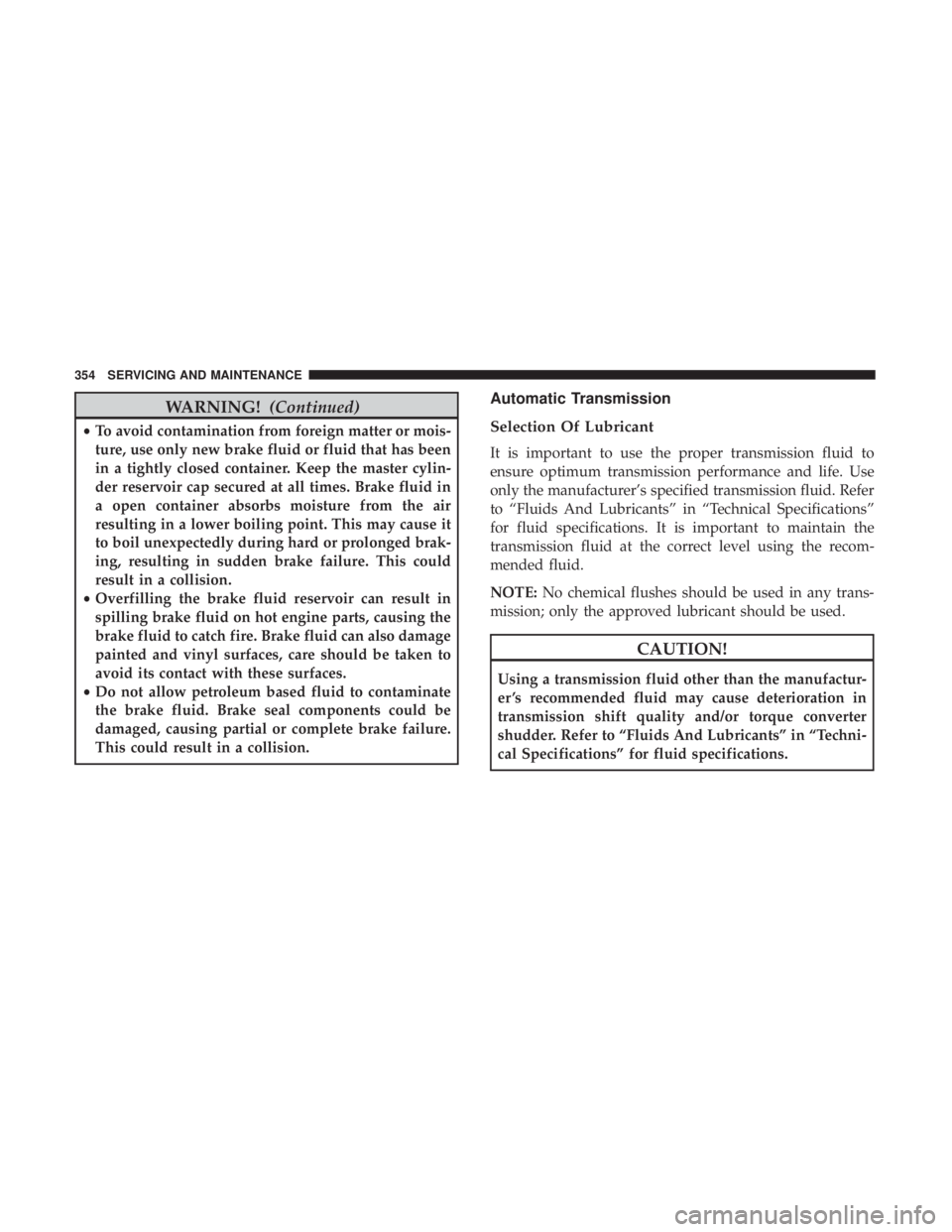
WARNING!(Continued)
•To avoid contamination from foreign matter or mois-
ture, use only new brake fluid or fluid that has been
in a tightly closed container. Keep the master cylin-
der reservoir cap secured at all times. Brake fluid in
a open container absorbs moisture from the air
resulting in a lower boiling point. This may cause it
to boil unexpectedly during hard or prolonged brak-
ing, resulting in sudden brake failure. This could
result in a collision.
• Overfilling the brake fluid reservoir can result in
spilling brake fluid on hot engine parts, causing the
brake fluid to catch fire. Brake fluid can also damage
painted and vinyl surfaces, care should be taken to
avoid its contact with these surfaces.
• Do not allow petroleum based fluid to contaminate
the brake fluid. Brake seal components could be
damaged, causing partial or complete brake failure.
This could result in a collision.
Automatic Transmission
Selection Of Lubricant
It is important to use the proper transmission fluid to
ensure optimum transmission performance and life. Use
only the manufacturer’s specified transmission fluid. Refer
to “Fluids And Lubricants” in “Technical Specifications”
for fluid specifications. It is important to maintain the
transmission fluid at the correct level using the recom-
mended fluid.
NOTE: No chemical flushes should be used in any trans-
mission; only the approved lubricant should be used.
CAUTION!
Using a transmission fluid other than the manufactur-
er ’s recommended fluid may cause deterioration in
transmission shift quality and/or torque converter
shudder. Refer to “Fluids And Lubricants” in “Techni-
cal Specifications” for fluid specifications.
354 SERVICING AND MAINTENANCE
Page 357 of 496
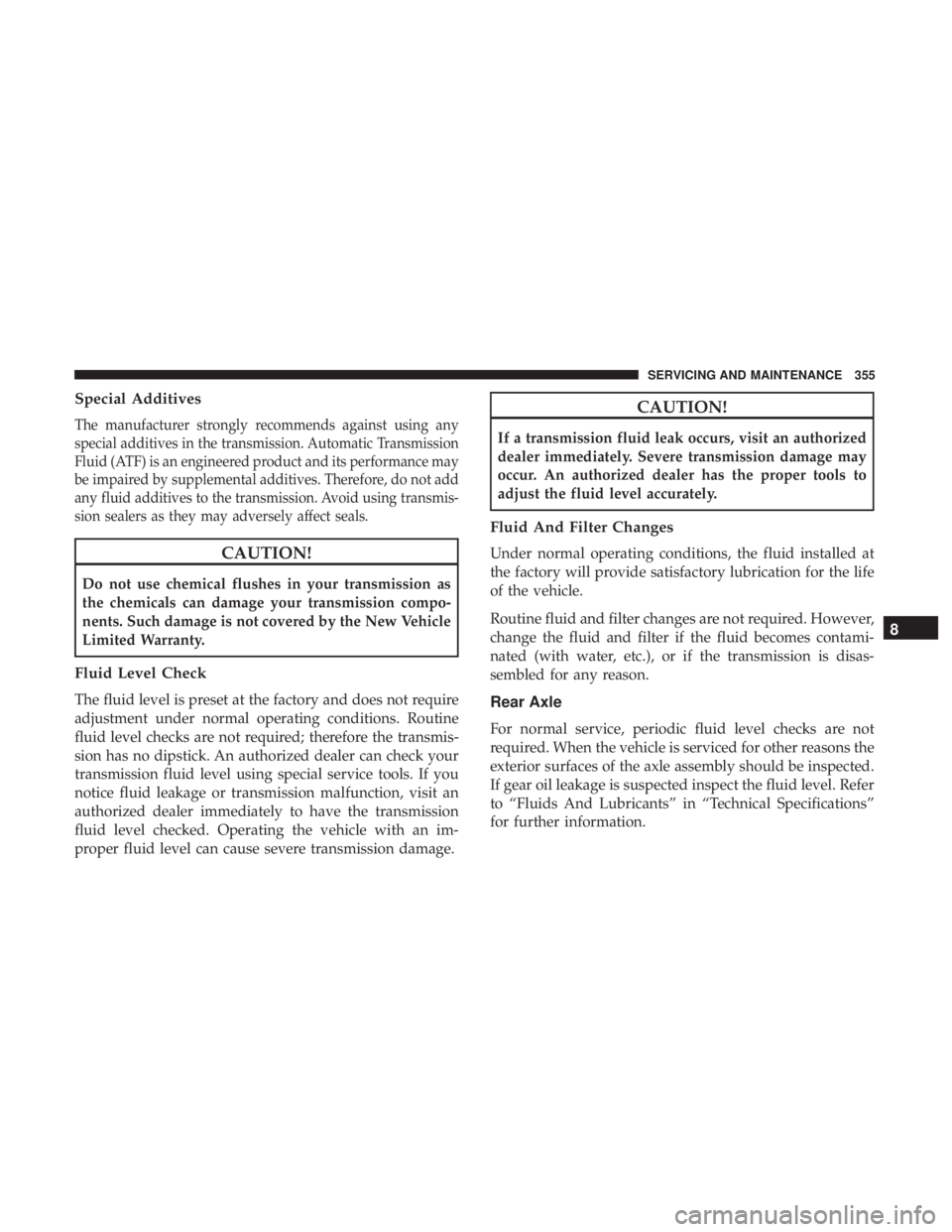
Special Additives
The manufacturer strongly recommends against using any
special additives in the transmission. Automatic Transmission
Fluid (ATF) is an engineered product and its performance may
be impaired by supplemental additives. Therefore, do not add
any fluid additives to the transmission. Avoid using transmis-
sion sealers as they may adversely affect seals.
CAUTION!
Do not use chemical flushes in your transmission as
the chemicals can damage your transmission compo-
nents. Such damage is not covered by the New Vehicle
Limited Warranty.
Fluid Level Check
The fluid level is preset at the factory and does not require
adjustment under normal operating conditions. Routine
fluid level checks are not required; therefore the transmis-
sion has no dipstick. An authorized dealer can check your
transmission fluid level using special service tools. If you
notice fluid leakage or transmission malfunction, visit an
authorized dealer immediately to have the transmission
fluid level checked. Operating the vehicle with an im-
proper fluid level can cause severe transmission damage.
CAUTION!
If a transmission fluid leak occurs, visit an authorized
dealer immediately. Severe transmission damage may
occur. An authorized dealer has the proper tools to
adjust the fluid level accurately.
Fluid And Filter Changes
Under normal operating conditions, the fluid installed at
the factory will provide satisfactory lubrication for the life
of the vehicle.
Routine fluid and filter changes are not required. However,
change the fluid and filter if the fluid becomes contami-
nated (with water, etc.), or if the transmission is disas-
sembled for any reason.
Rear Axle
For normal service, periodic fluid level checks are not
required. When the vehicle is serviced for other reasons the
exterior surfaces of the axle assembly should be inspected.
If gear oil leakage is suspected inspect the fluid level. Refer
to “Fluids And Lubricants” in “Technical Specifications”
for further information.
8
SERVICING AND MAINTENANCE 355
Page 397 of 496
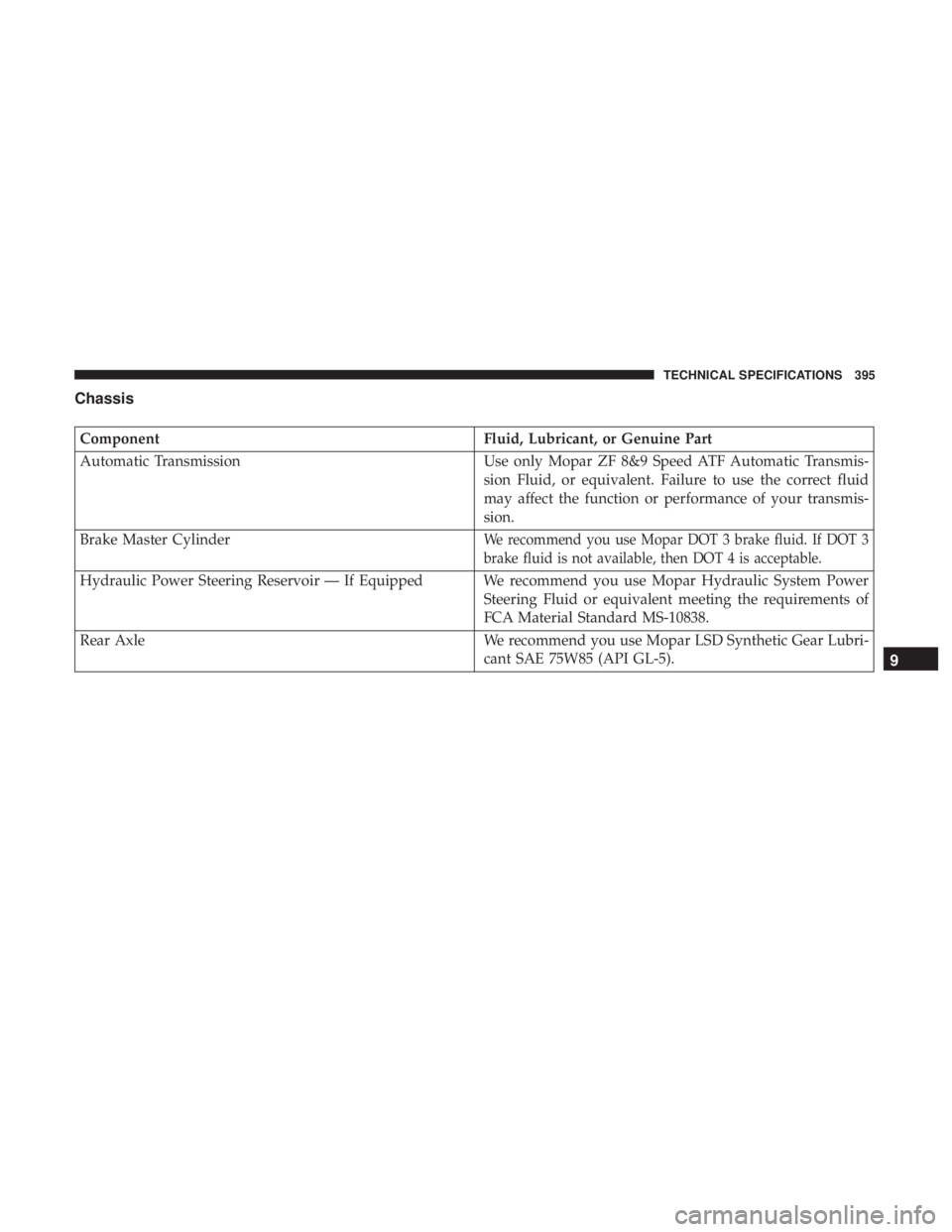
Chassis
ComponentFluid, Lubricant, or Genuine Part
Automatic Transmission Use only Mopar ZF 8&9 Speed ATF Automatic Transmis-
sion Fluid, or equivalent. Failure to use the correct fluid
may affect the function or performance of your transmis-
sion.
Brake Master Cylinder
We recommend you use Mopar DOT 3 brake fluid. If DOT 3
brake fluid is not available, then DOT 4 is acceptable.
Hydraulic Power Steering Reservoir — If Equipped We recommend you use Mopar Hydraulic System Power Steering Fluid or equivalent meeting the requirements of
FCA Material Standard MS-10838.
Rear Axle We recommend you use Mopar LSD Synthetic Gear Lubri- cant SAE 75W85 (API GL-5).
9
TECHNICAL SPECIFICATIONS 395
Page 414 of 496
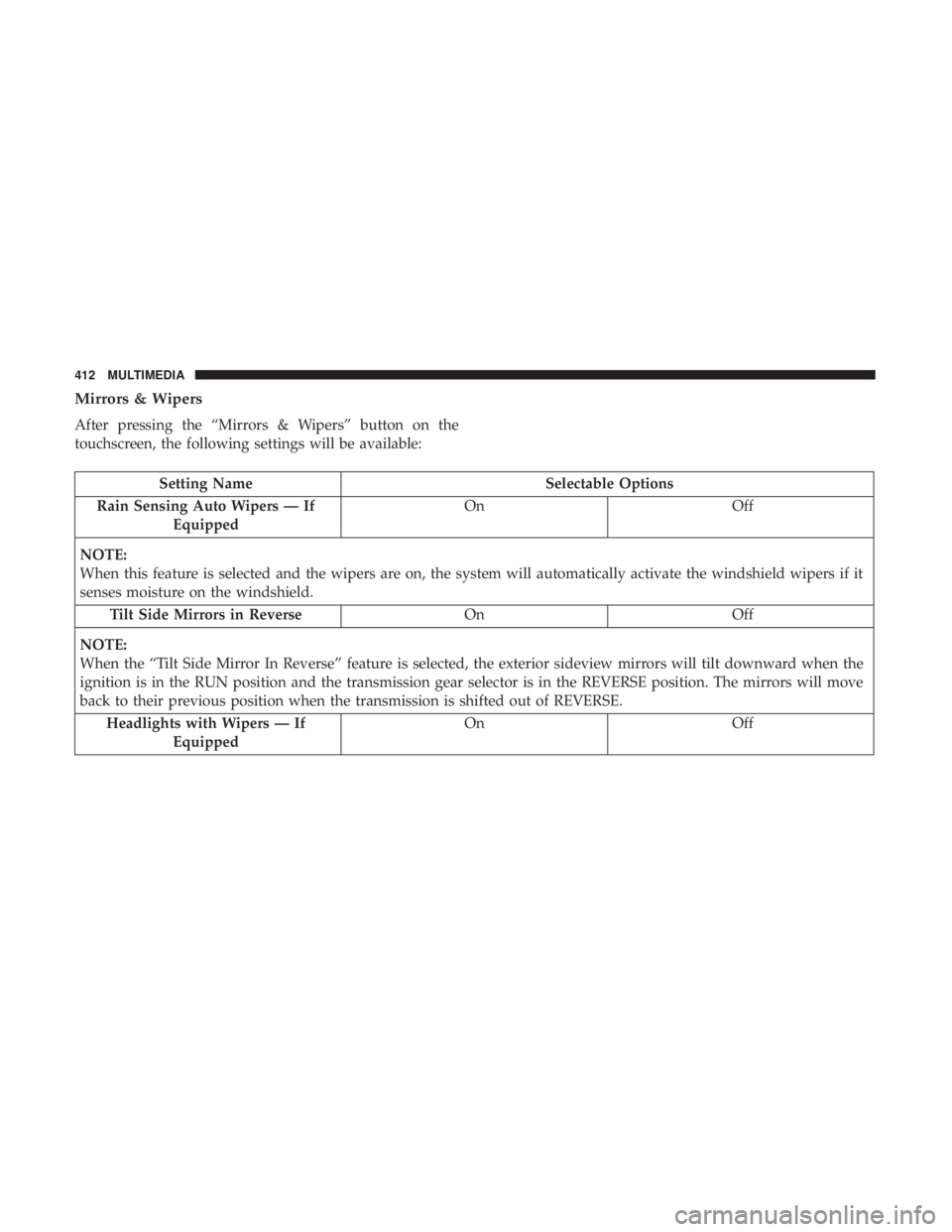
Mirrors & Wipers
After pressing the “Mirrors & Wipers” button on the
touchscreen, the following settings will be available:
Setting NameSelectable Options
Rain Sensing Auto Wipers — If Equipped On
Off
NOTE:
When this feature is selected and the wipers are on, the system will automatically activate the windshield wipers if it
senses moisture on the windshield. Tilt Side Mirrors in Reverse OnOff
NOTE:
When the “Tilt Side Mirror In Reverse” feature is selected, the exterior sideview mirrors will tilt downward when the
ignition is in the RUN position and the transmission gear selector is in the REVERSE position. The mirrors will move
back to their previous position when the transmission is shifted out of REVERSE. Headlights with Wipers — If Equipped On
Off
412 MULTIMEDIA
Page 427 of 496
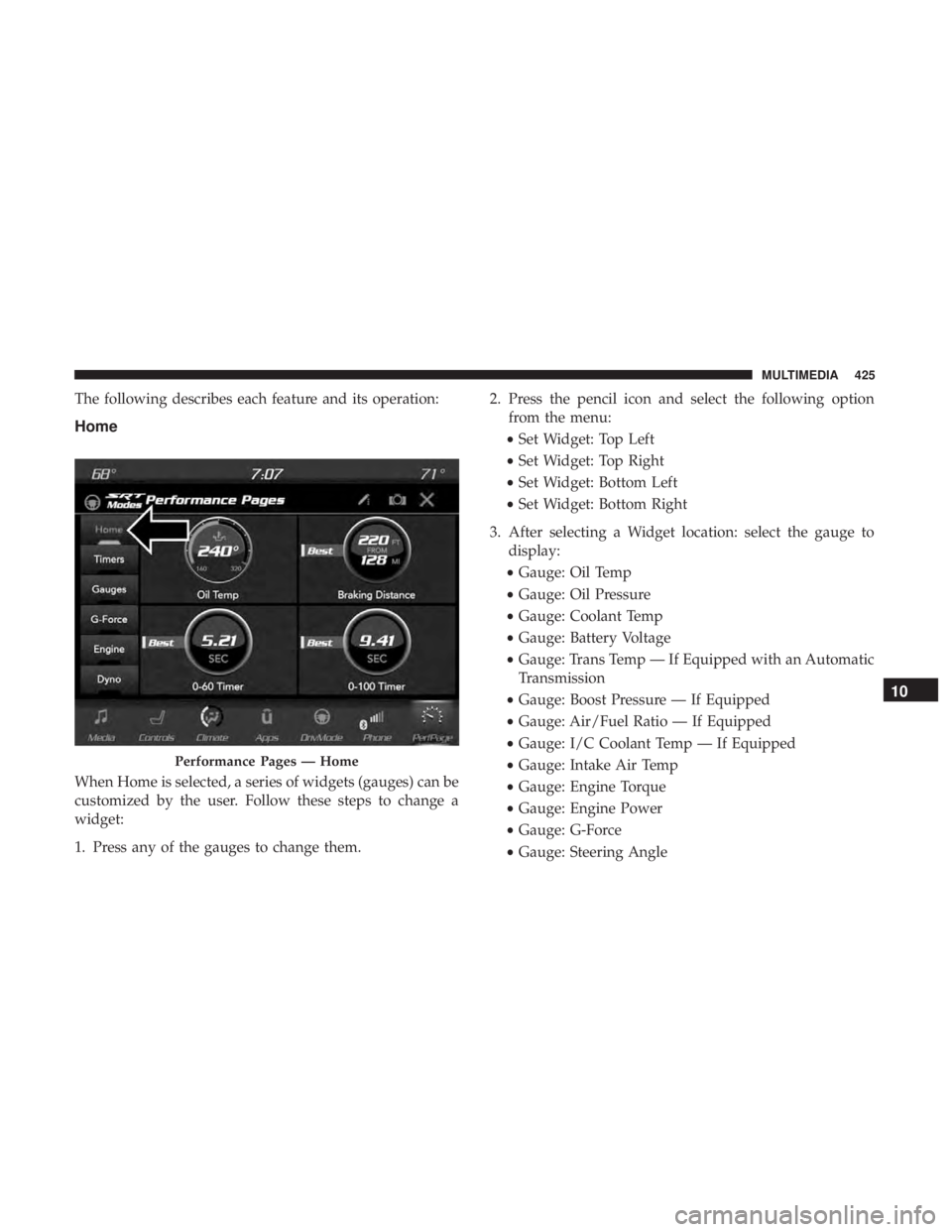
The following describes each feature and its operation:
Home
When Home is selected, a series of widgets (gauges) can be
customized by the user. Follow these steps to change a
widget:
1. Press any of the gauges to change them.2. Press the pencil icon and select the following option
from the menu:
• Set Widget: Top Left
• Set Widget: Top Right
• Set Widget: Bottom Left
• Set Widget: Bottom Right
3. After selecting a Widget location: select the gauge to display:
• Gauge: Oil Temp
• Gauge: Oil Pressure
• Gauge: Coolant Temp
• Gauge: Battery Voltage
• Gauge: Trans Temp — If Equipped with an Automatic
Transmission
• Gauge: Boost Pressure — If Equipped
• Gauge: Air/Fuel Ratio — If Equipped
• Gauge: I/C Coolant Temp — If Equipped
• Gauge: Intake Air Temp
• Gauge: Engine Torque
• Gauge: Engine Power
• Gauge: G-Force
• Gauge: Steering Angle
Performance Pages — Home
10
MULTIMEDIA 425
Page 431 of 496
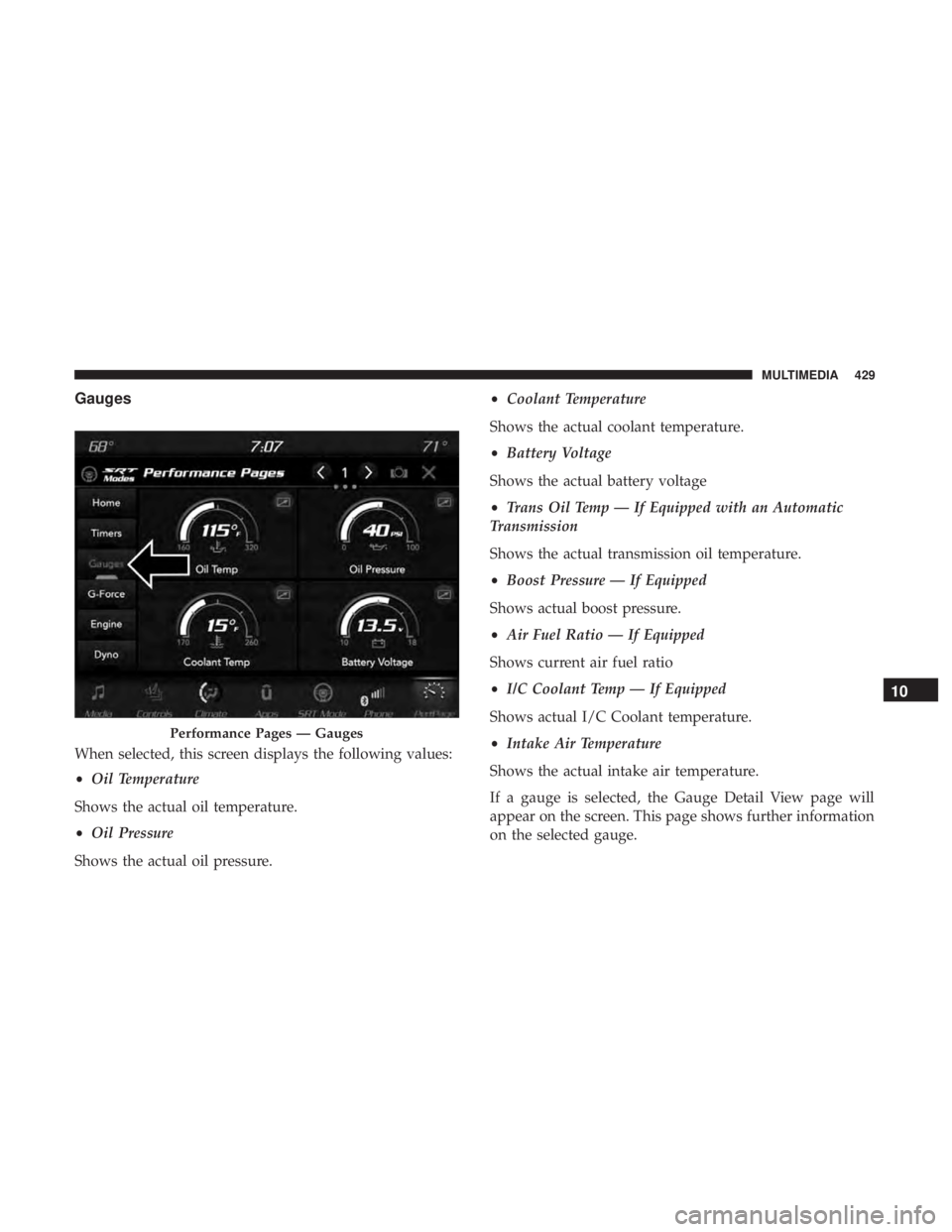
Gauges
When selected, this screen displays the following values:
•Oil Temperature
Shows the actual oil temperature.
• Oil Pressure
Shows the actual oil pressure. •
Coolant Temperature
Shows the actual coolant temperature.
• Battery Voltage
Shows the actual battery voltage
• Trans Oil Temp — If Equipped with an Automatic
Transmission
Shows the actual transmission oil temperature.
• Boost Pressure — If Equipped
Shows actual boost pressure.
• Air Fuel Ratio — If Equipped
Shows current air fuel ratio
• I/C Coolant Temp — If Equipped
Shows actual I/C Coolant temperature.
• Intake Air Temperature
Shows the actual intake air temperature.
If a gauge is selected, the Gauge Detail View page will
appear on the screen. This page shows further information
on the selected gauge.
Performance Pages — Gauges
10
MULTIMEDIA 429
Page 434 of 496
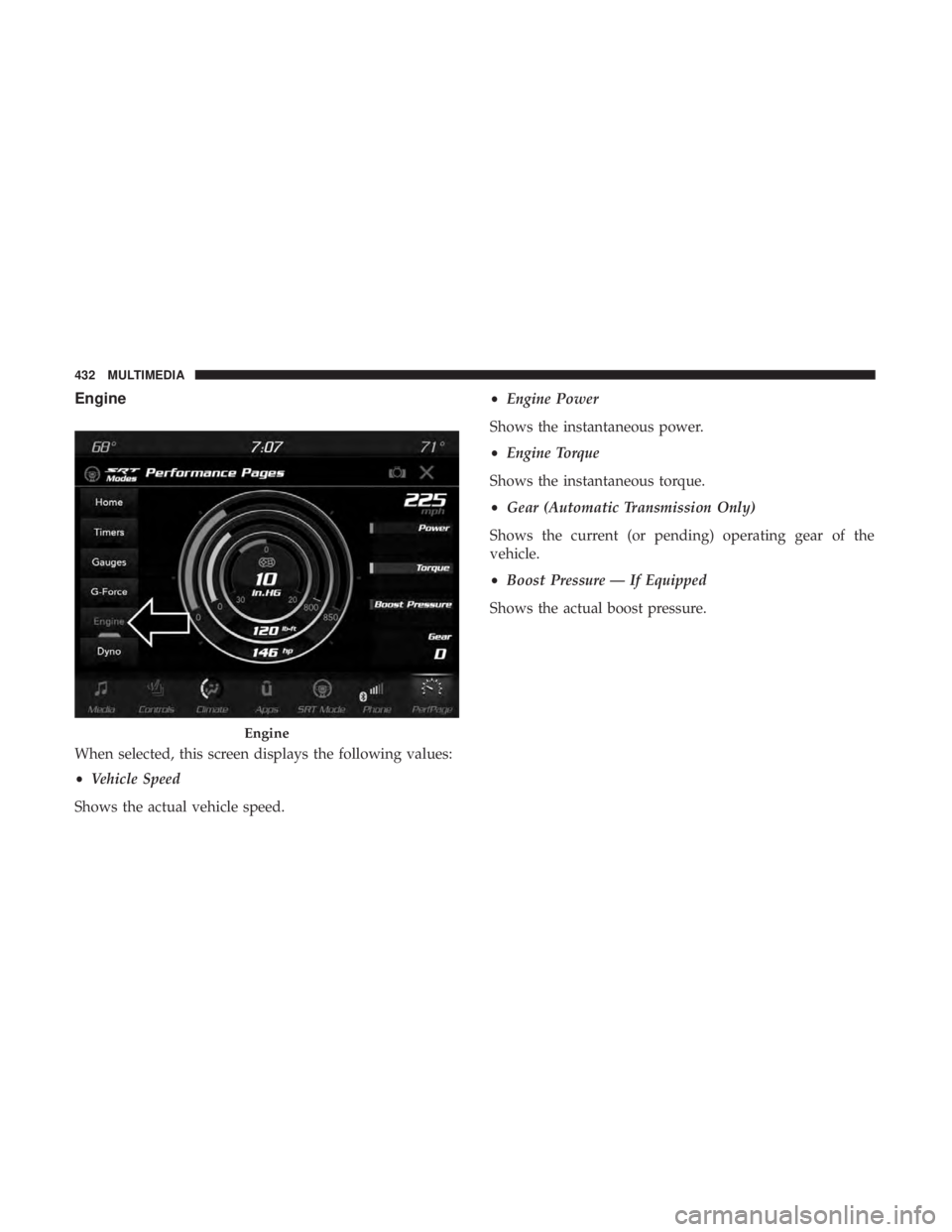
Engine
When selected, this screen displays the following values:
•Vehicle Speed
Shows the actual vehicle speed. •
Engine Power
Shows the instantaneous power.
• Engine Torque
Shows the instantaneous torque.
• Gear (Automatic Transmission Only)
Shows the current (or pending) operating gear of the
vehicle.
• Boost Pressure — If Equipped
Shows the actual boost pressure.
Engine
432 MULTIMEDIA
Page 435 of 496
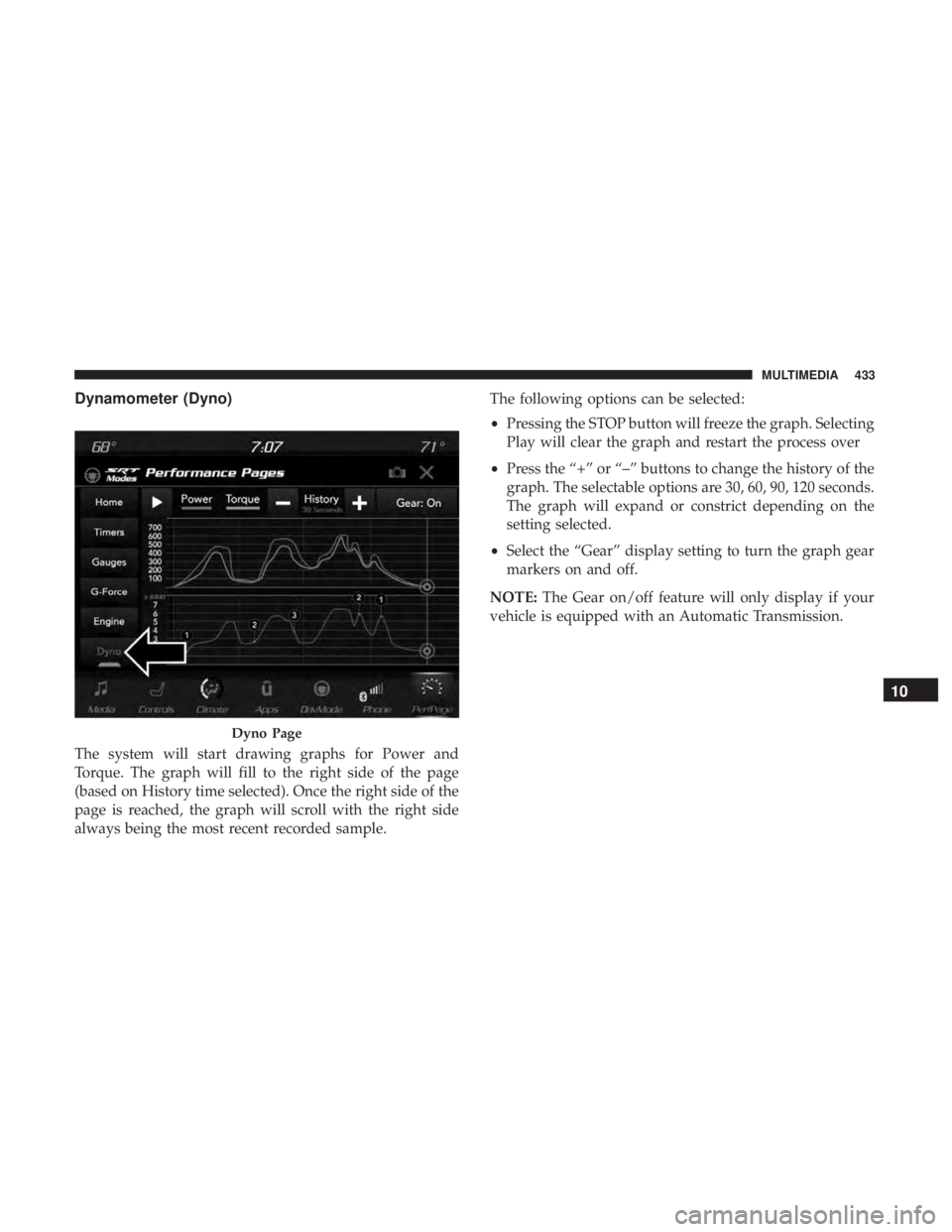
Dynamometer (Dyno)
The system will start drawing graphs for Power and
Torque. The graph will fill to the right side of the page
(based on History time selected). Once the right side of the
page is reached, the graph will scroll with the right side
always being the most recent recorded sample.The following options can be selected:
•
Pressing the STOP button will freeze the graph. Selecting
Play will clear the graph and restart the process over
• Press the “+” or “–” buttons to change the history of the
graph. The selectable options are 30, 60, 90, 120 seconds.
The graph will expand or constrict depending on the
setting selected.
• Select the “Gear” display setting to turn the graph gear
markers on and off.
NOTE: The Gear on/off feature will only display if your
vehicle is equipped with an Automatic Transmission.
Dyno Page
10
MULTIMEDIA 433
Page 453 of 496
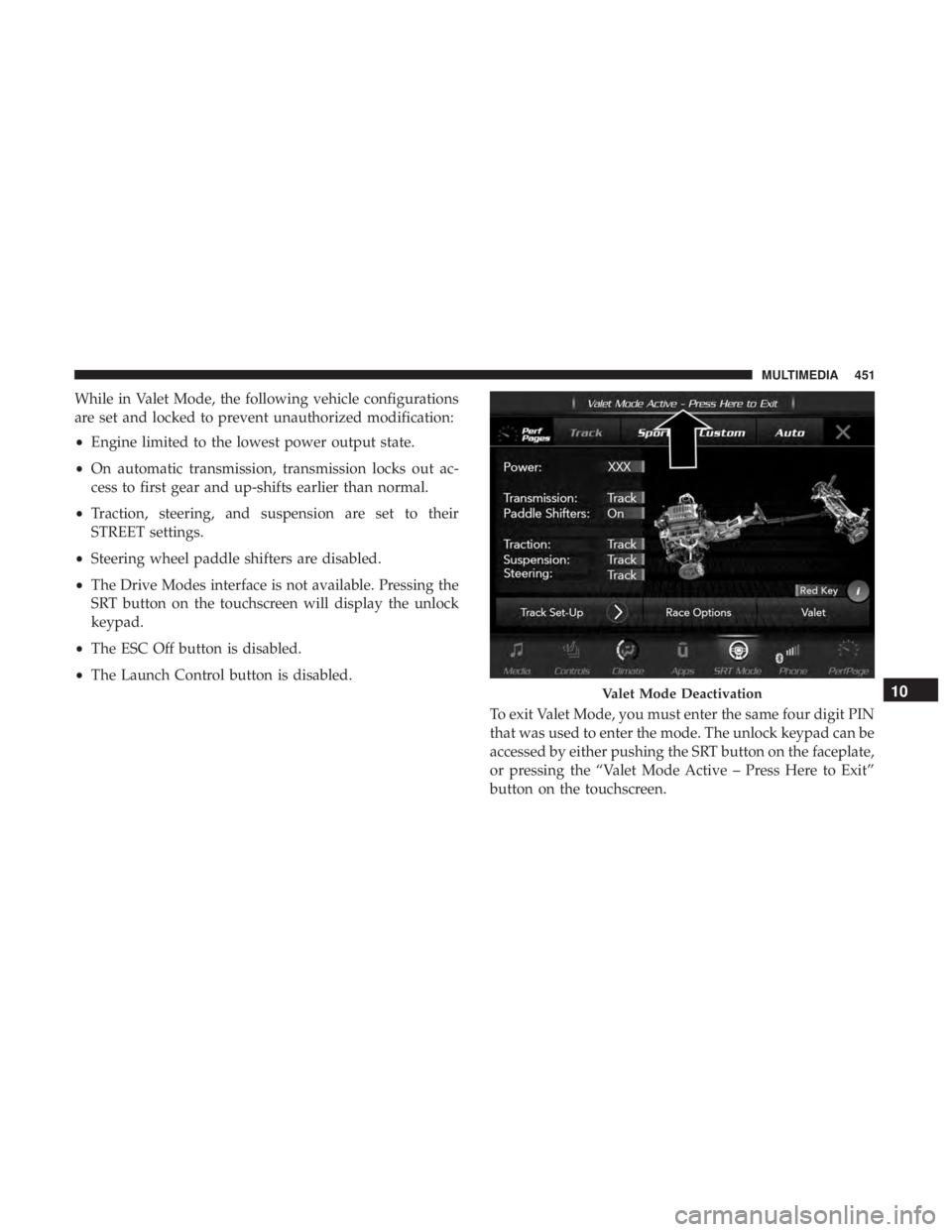
While in Valet Mode, the following vehicle configurations
are set and locked to prevent unauthorized modification:
•Engine limited to the lowest power output state.
• On automatic transmission, transmission locks out ac-
cess to first gear and up-shifts earlier than normal.
• Traction, steering, and suspension are set to their
STREET settings.
• Steering wheel paddle shifters are disabled.
• The Drive Modes interface is not available. Pressing the
SRT button on the touchscreen will display the unlock
keypad.
• The ESC Off button is disabled.
• The Launch Control button is disabled.
To exit Valet Mode, you must enter the same four digit PIN
that was used to enter the mode. The unlock keypad can be
accessed by either pushing the SRT button on the faceplate,
or pressing the “Valet Mode Active – Press Here to Exit”
button on the touchscreen.
Valet Mode Deactivation10
MULTIMEDIA 451
Page 481 of 496
Arming SystemSecurity Alarm ...........................35
Assist, Hill Start .......................... .145
Audio Systems (Radio) ...................... .399
Auto Down Power Windows ...................83
Automatic Door Locks ........................42
Automatic Headlights ........................65
Automatic High Beams .......................64
Automatic Temperature Control (ATC) ..........74, 79
Automatic Transmission ..................... .222
Adding Fluid .....................355, 393, 395
Fluid And Filter Change ...................355
Fluid Change .......................... .355
Fluid Level Check .....................354, 355
Fluid Type ...................... .354, 393, 395
Special Additives ........................ .355
Automatic Transmission Limp Home Mode .....42, 227
AutoPark ............................... .214
Autostick Operation ............................. .228
Auto Up Power Windows .....................83
AUXCord .............................. .454
Auxiliary Electrical Outlet (Power Outlet) .........102
Axle Fluid ........................... .393, 395Axle Lubrication
....................... .393, 395
Back-Up ................................ .271
Battery .............................. .124, 335
Charging System Light ....................124
Keyless Key Fob Replacement ................23
Location .............................. .335
Belts, Seat ............................... .205
Body Mechanism Lubrication ..................343
B-Pillar Location .......................... .361
Brake Assist System ........................ .139
Brake Control System ....................... .139
Brake Fluid ....................... .353, 393, 395
Brake System ......................... .352, 386
Fluid Check ..................... .353, 393, 395
Master
Cylinder ........................ .353
Parking .............................. .218
Warning Light ...................... .122, 386
Brake/Transmission Interlock ..................222
Brightness, Interior Lights .....................70
Bulb Replacement ......................... .289
Bulbs, Light .......................... .207, 289
Camera, Rear ............................ .271
Capacities, Fluid .......................... .392
12
INDEX 479