battery DODGE CHARGER SRT 2019 Service Manual
[x] Cancel search | Manufacturer: DODGE, Model Year: 2019, Model line: CHARGER SRT, Model: DODGE CHARGER SRT 2019Pages: 496, PDF Size: 5.32 MB
Page 335 of 496
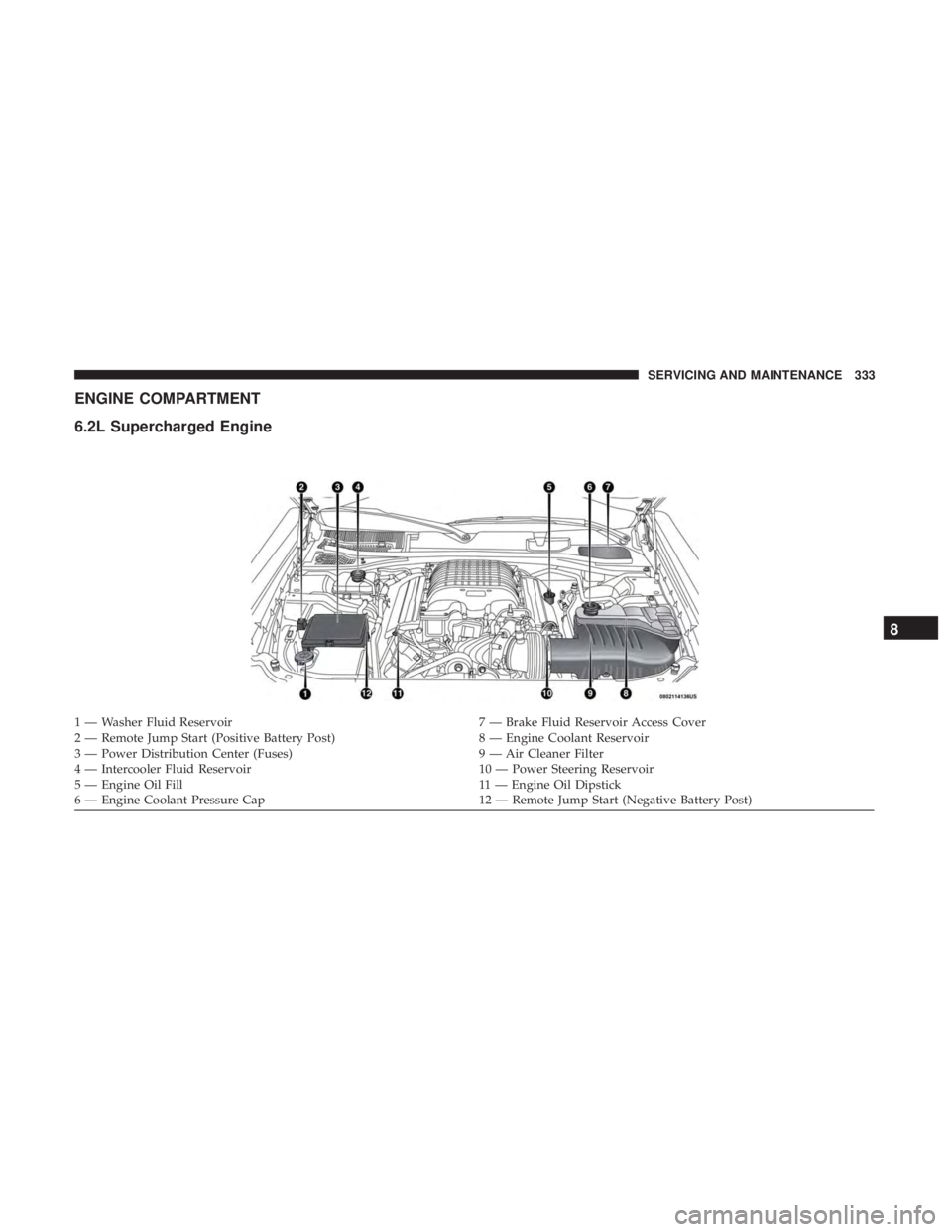
ENGINE COMPARTMENT
6.2L Supercharged Engine
1 — Washer Fluid Reservoir7 — Brake Fluid Reservoir Access Cover
2 — Remote Jump Start (Positive Battery Post) 8 — Engine Coolant Reservoir
3 — Power Distribution Center (Fuses) 9 — Air Cleaner Filter
4 — Intercooler Fluid Reservoir 10 — Power Steering Reservoir
5 — Engine Oil Fill 11 — Engine Oil Dipstick
6 — Engine Coolant Pressure Cap 12 — Remote Jump Start (Negative Battery Post)
8
SERVICING AND MAINTENANCE 333
Page 337 of 496
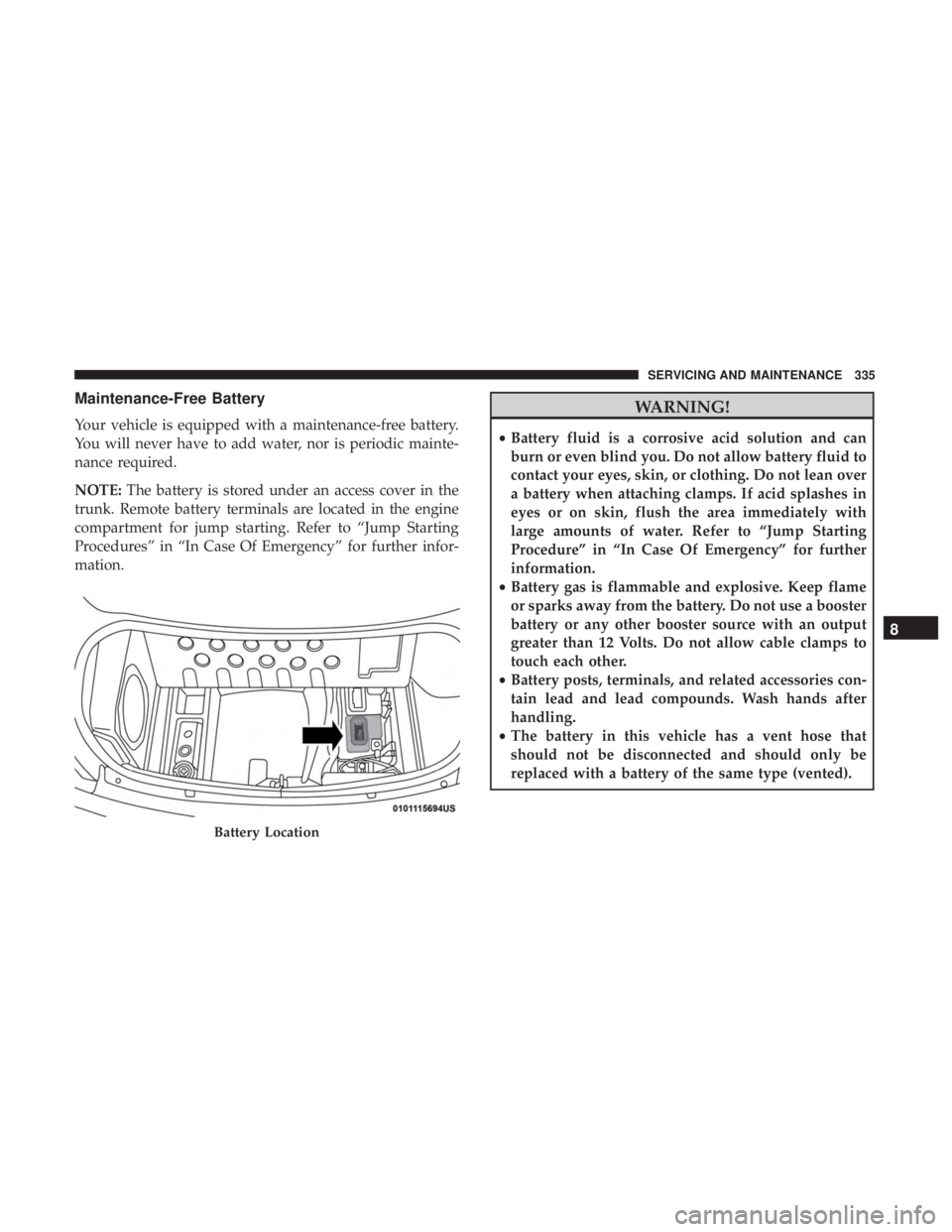
Maintenance-Free Battery
Your vehicle is equipped with a maintenance-free battery.
You will never have to add water, nor is periodic mainte-
nance required.
NOTE:The battery is stored under an access cover in the
trunk. Remote battery terminals are located in the engine
compartment for jump starting. Refer to “Jump Starting
Procedures” in “In Case Of Emergency” for further infor-
mation.
WARNING!
• Battery fluid is a corrosive acid solution and can
burn or even blind you. Do not allow battery fluid to
contact your eyes, skin, or clothing. Do not lean over
a battery when attaching clamps. If acid splashes in
eyes or on skin, flush the area immediately with
large amounts of water. Refer to “Jump Starting
Procedure” in “In Case Of Emergency” for further
information.
• Battery gas is flammable and explosive. Keep flame
or sparks away from the battery. Do not use a booster
battery or any other booster source with an output
greater than 12 Volts. Do not allow cable clamps to
touch each other.
• Battery posts, terminals, and related accessories con-
tain lead and lead compounds. Wash hands after
handling.
• The battery in this vehicle has a vent hose that
should not be disconnected and should only be
replaced with a battery of the same type (vented).
Battery Location
8
SERVICING AND MAINTENANCE 335
Page 338 of 496
CAUTION!
•It is essential when replacing the cables on the
battery that the positive cable is attached to the
positive post and the negative cable is attached to the
negative post. Battery posts are marked positive (+)
and negative (-) and are identified on the battery
case. Cable clamps should be tight on the terminal
posts and free of corrosion.
• If a “fast charger” is used while the battery is in the
vehicle, disconnect both vehicle battery cables before
connecting the charger to the battery. Do not use a
“fast charger” to provide starting voltage.
DEALER SERVICE
An authorized dealer has the qualified service personnel,
special tools, and equipment to perform all service opera-
tions in an expert manner. Service Manuals are available
which include detailed service information for your ve-
hicle. Refer to these Service Manuals before attempting any
procedure yourself.
NOTE: Intentional tampering with emissions control sys-
tems may void your warranty and could result in civil
penalties being assessed against you.
WARNING!
You can be badly injured working on or around a
motor vehicle. Only do service work for which you
have the knowledge and the proper equipment. If you
have any doubt about your ability to perform a service
job, take your vehicle to a competent mechanic.
Engine Oil
Change Engine Oil
The oil change indicator system will remind you that it is
time to take your vehicle in for scheduled maintenance.
Refer to “Scheduled Servicing” in this section for the
proper maintenance intervals.
NOTE: Under no circumstances should oil change inter-
vals exceed 6,000 miles (10,000 km) or six months, which-
ever occurs first.
Engine Oil Selection
For best performance and maximum protection under all
types of operating conditions, the manufacturer only rec-
ommends full synthetic engine oils that meet the American
Petroleum Institute (API) categories of SN.
336 SERVICING AND MAINTENANCE
Page 380 of 496
WARNING!
The traction grade assigned to this tire is based on
straight-ahead braking traction tests, and does not
include acceleration, cornering, hydroplaning, or
peak traction characteristics.
Temperature Grades
The Temperature grades are A (the highest), B, and C,
representing the tire’s resistance to the generation of
heat and its ability to dissipate heat, when tested under
controlled conditions on a specified indoor laboratory
test wheel.
Sustained high temperature can cause the material of
the tire to degenerate and reduce tire life, and excessive
temperature can lead to sudden tire failure. The grade C
corresponds to a level of performance, which all pas-
senger vehicle tires must meet under the Federal Motor
Vehicle Safety Standard No. 109. Grades B and A
represent higher levels of performance on the laboratory
test wheel, than the minimum required by law.
WARNING!
The temperature grade for this tire is established for
a tire that is properly inflated and not overloaded.
Excessive speed, under-inflation, or excessive load-
ing, either separately or in combination, can cause
heat buildup and possible tire failure.
VEHICLE STORAGE
If you are leaving your vehicle dormant for more than 21
days, you may want to take these steps to protect your
battery.
• Disconnect the negative cable from the battery.
• Anytime you store your vehicle, or keep it out of service
(e.g., vacation) for two weeks or more, run the air
conditioning system at idle for about five minutes in the
fresh air and high blower setting. This will ensure
adequate system lubrication to minimize the possibility
of compressor damage when the system is started again.
378 SERVICING AND MAINTENANCE
Page 381 of 496
Battery Storage Mode
With the ignition in the ON position, engine not running,
navigate to the battery gauge page on the instrument
cluster display, then press and hold the OK button. The
vehicle will be put into battery storage mode, which will
greatly increase the amount of time the vehicle can sit and
restart without needing to disconnect the battery. Going
into battery storage mode will increase the amount of time
between starts to about 60 days.
NOTE:The key fob buttons will not work while the
vehicle is in battery storage mode, pulling the door handle
will wake the vehicle and allow it to recognize the key fob
to unlock the door.
BODYWORK
Protection From Atmospheric Agents
Vehicle body care requirements vary according to geo-
graphic locations and usage. Chemicals that make roads
passable in snow and ice and those that are sprayed on
trees and road surfaces during other seasons are highly
corrosive to the metal in your vehicle. Outside parking, which exposes your vehicle to airborne contaminants, road
surfaces on which the vehicle is operated, extreme hot or
cold weather and other extreme conditions will have an
adverse effect on paint, metal trim, and underbody protec-
tion.
The following maintenance recommendations will enable
you to obtain maximum benefit from the corrosion resis-
tance built into your vehicle.
What Causes Corrosion?
Corrosion is the result of deterioration or removal of paint
and protective coatings from your vehicle.
The most common causes are:
•
Road salt, dirt and moisture accumulation.
• Stone and gravel impact.
• Insects, tree sap and tar.
• Salt in the air near seacoast localities.
• Atmospheric fallout/industrial pollutants.
8
SERVICING AND MAINTENANCE 379
Page 427 of 496
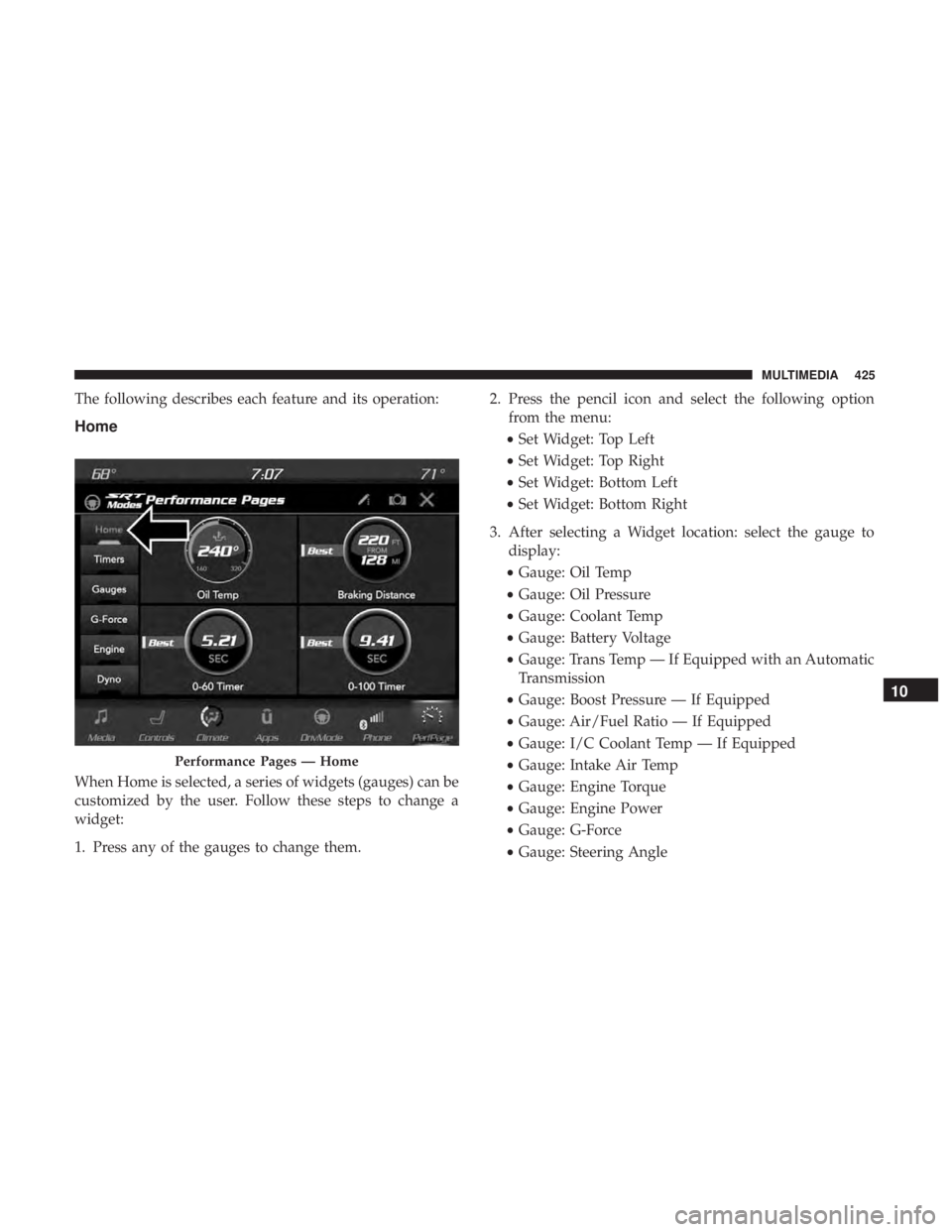
The following describes each feature and its operation:
Home
When Home is selected, a series of widgets (gauges) can be
customized by the user. Follow these steps to change a
widget:
1. Press any of the gauges to change them.2. Press the pencil icon and select the following option
from the menu:
• Set Widget: Top Left
• Set Widget: Top Right
• Set Widget: Bottom Left
• Set Widget: Bottom Right
3. After selecting a Widget location: select the gauge to display:
• Gauge: Oil Temp
• Gauge: Oil Pressure
• Gauge: Coolant Temp
• Gauge: Battery Voltage
• Gauge: Trans Temp — If Equipped with an Automatic
Transmission
• Gauge: Boost Pressure — If Equipped
• Gauge: Air/Fuel Ratio — If Equipped
• Gauge: I/C Coolant Temp — If Equipped
• Gauge: Intake Air Temp
• Gauge: Engine Torque
• Gauge: Engine Power
• Gauge: G-Force
• Gauge: Steering Angle
Performance Pages — Home
10
MULTIMEDIA 425
Page 431 of 496
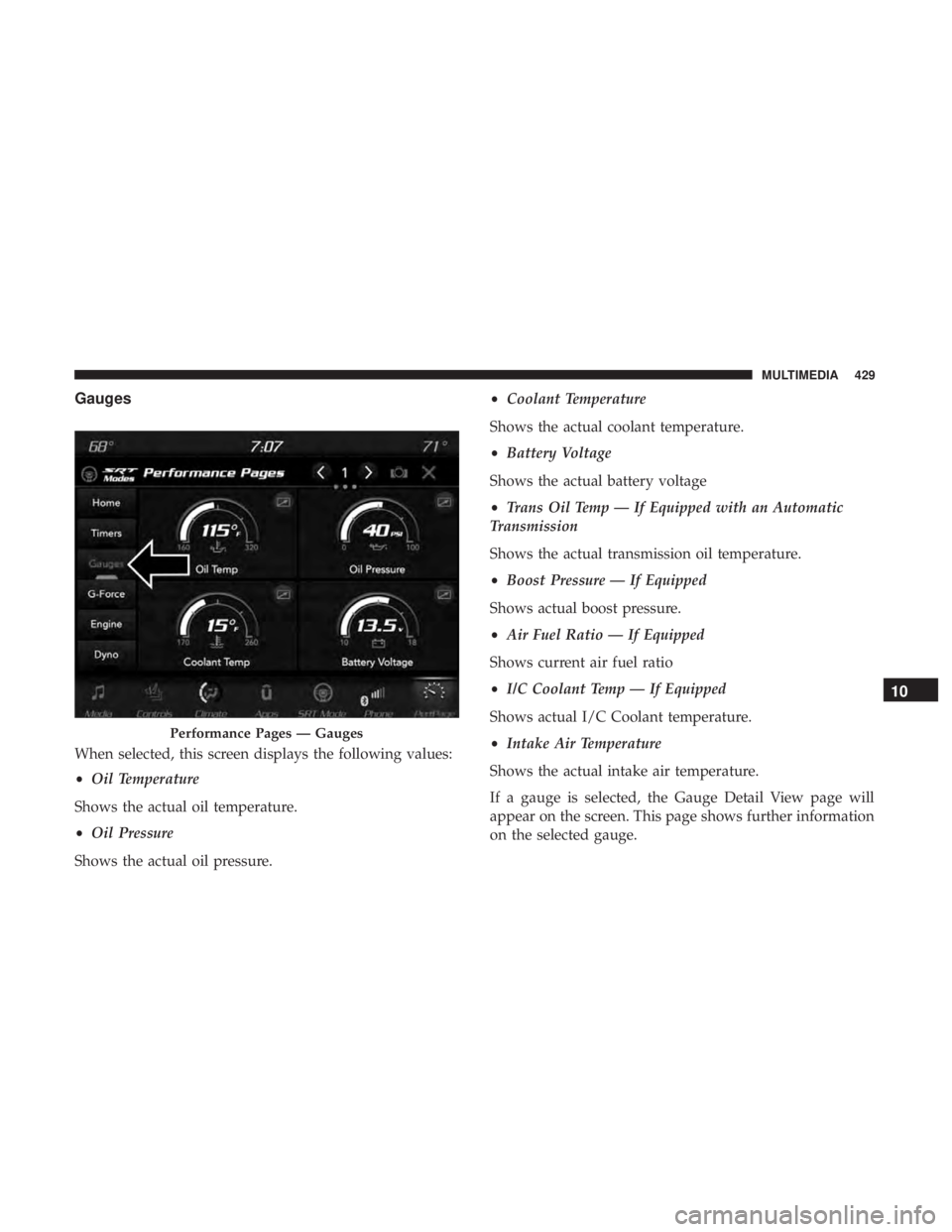
Gauges
When selected, this screen displays the following values:
•Oil Temperature
Shows the actual oil temperature.
• Oil Pressure
Shows the actual oil pressure. •
Coolant Temperature
Shows the actual coolant temperature.
• Battery Voltage
Shows the actual battery voltage
• Trans Oil Temp — If Equipped with an Automatic
Transmission
Shows the actual transmission oil temperature.
• Boost Pressure — If Equipped
Shows actual boost pressure.
• Air Fuel Ratio — If Equipped
Shows current air fuel ratio
• I/C Coolant Temp — If Equipped
Shows actual I/C Coolant temperature.
• Intake Air Temperature
Shows the actual intake air temperature.
If a gauge is selected, the Gauge Detail View page will
appear on the screen. This page shows further information
on the selected gauge.
Performance Pages — Gauges
10
MULTIMEDIA 429
Page 451 of 496
change in increments of 250 RPM. Pressing and holding the
arrows will change the RPM values in increments of 500
RPM, ranging from 2000–6000 RPM (6.2L) and 2000–6250
(6.2L High Output). The Shift Light setup screen may only
be accessed if the feature is enabled. Press the “Reset to
Factory Default” button on the touchscreen to change back
to factory settings, or press the “Shift Light Off” button on
the touchscreen to turn the system off completely.
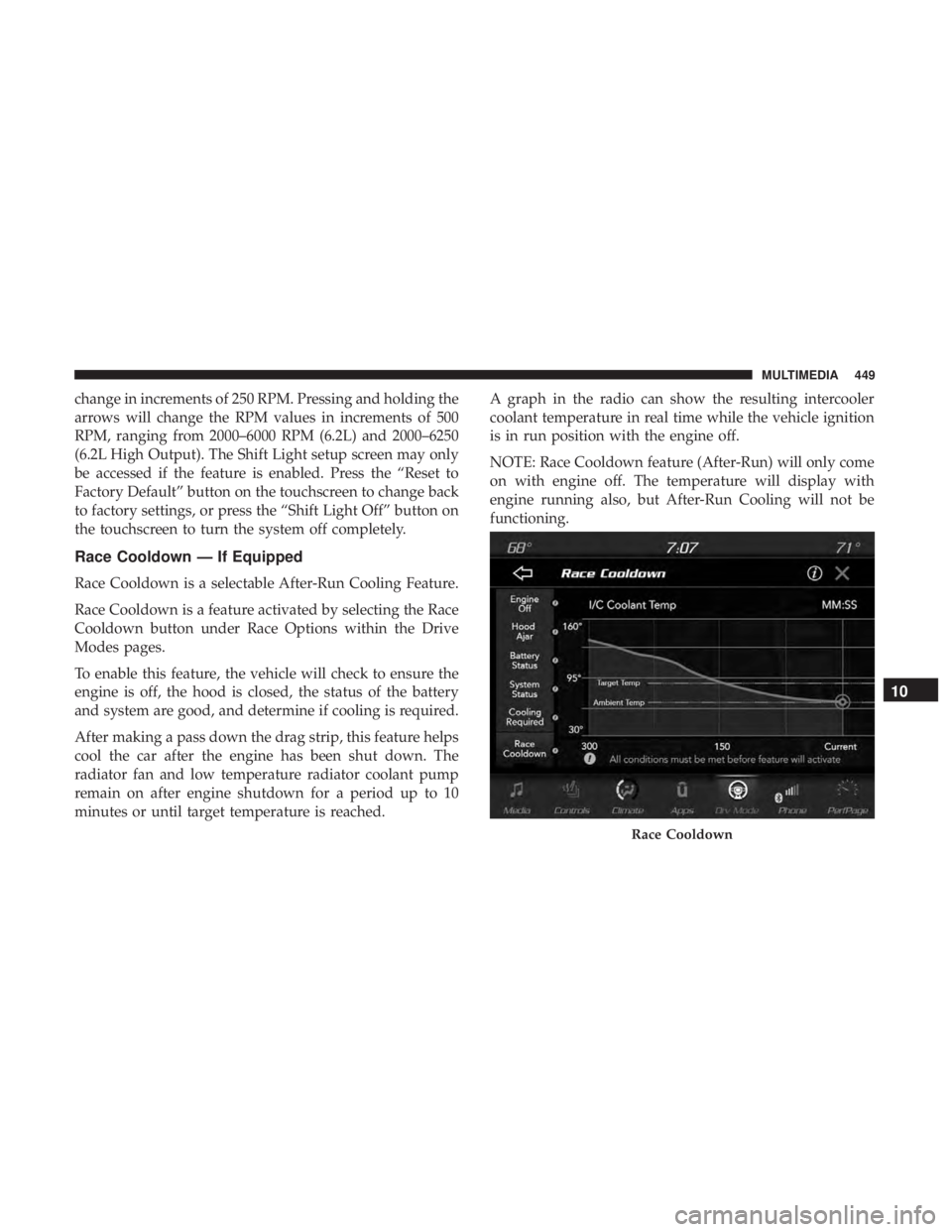
Race Cooldown — If Equipped
Race Cooldown is a selectable After-Run Cooling Feature.
Race Cooldown is a feature activated by selecting the Race
Cooldown button under Race Options within the Drive
Modes pages.
To enable this feature, the vehicle will check to ensure the
engine is off, the hood is closed, the status of the battery
and system are good, and determine if cooling is required.
After making a pass down the drag strip, this feature helps
cool the car after the engine has been shut down. The
radiator fan and low temperature radiator coolant pump
remain on after engine shutdown for a period up to 10
minutes or until target temperature is reached.A graph in the radio can show the resulting intercooler
coolant temperature in real time while the vehicle ignition
is in run position with the engine off.
NOTE: Race Cooldown feature (After-Run) will only come
on with engine off. The temperature will display with
engine running also, but After-Run Cooling will not be
functioning.
Race Cooldown
10
MULTIMEDIA 449
Page 452 of 496
This feature will automatically deactivate after extended
driving at road speeds, or when one or more of the
following conditions apply:
•If coolant temperatures reaches the target temperature
and cooling is no longer required.
• If battery voltage or state of charge drops below a
threshold.
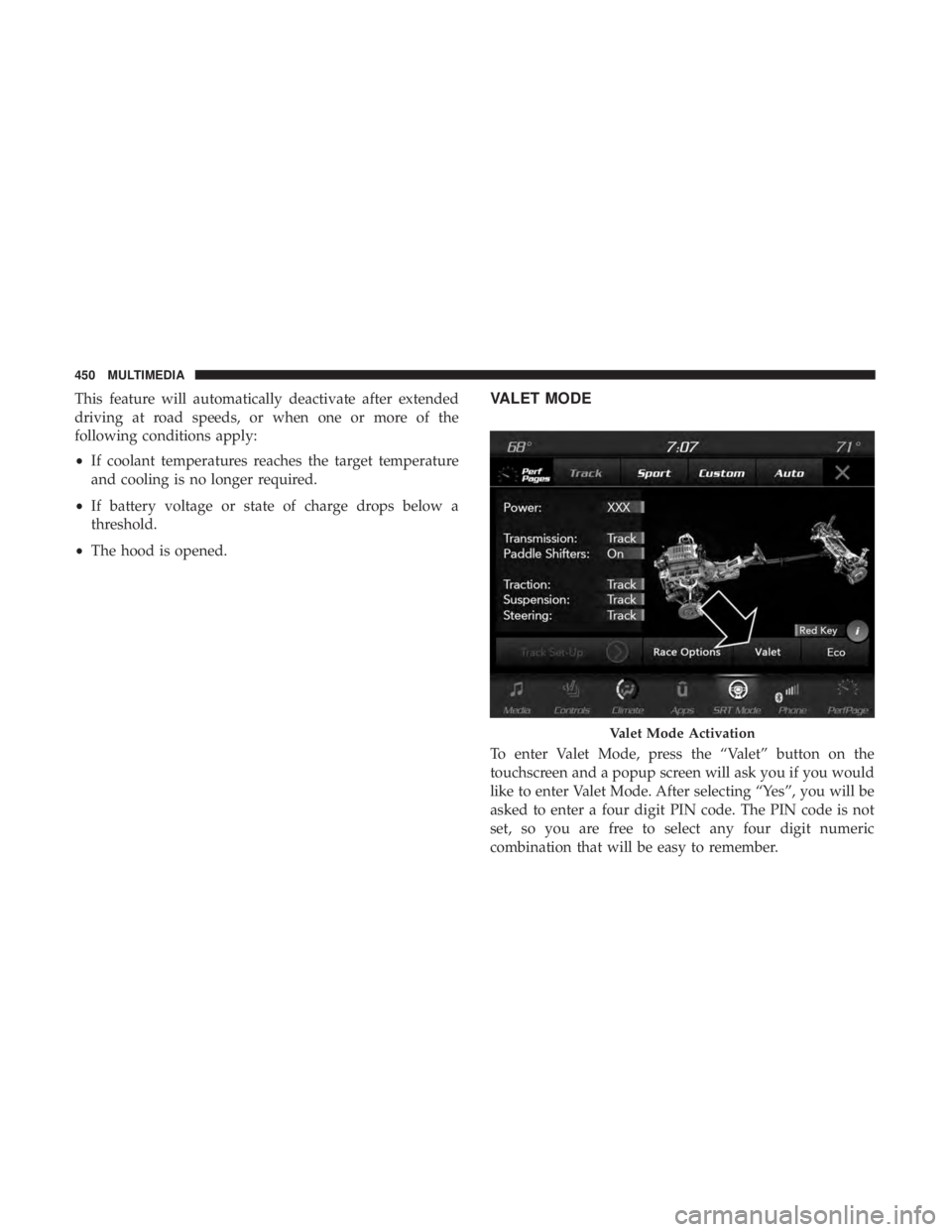
• The hood is opened.VALET MODE
To enter Valet Mode, press the “Valet” button on the
touchscreen and a popup screen will ask you if you would
like to enter Valet Mode. After selecting “Yes”, you will be
asked to enter a four digit PIN code. The PIN code is not
set, so you are free to select any four digit numeric
combination that will be easy to remember.
Valet Mode Activation
450 MULTIMEDIA
Page 454 of 496
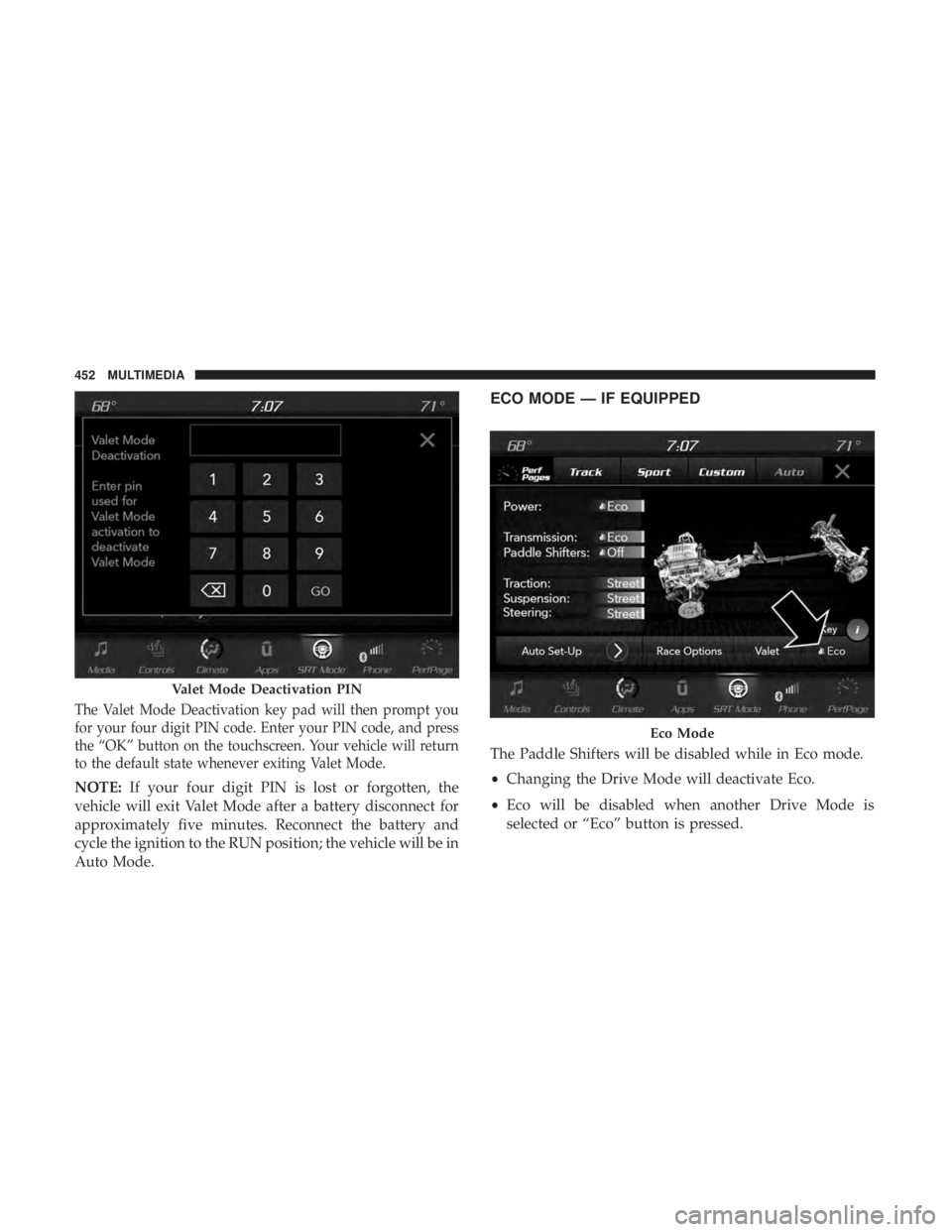
The Valet Mode Deactivation key pad will then prompt you
for your four digit PIN code. Enter your PIN code, and press
the “OK” button on the touchscreen. Your vehicle will return
to the default state whenever exiting Valet Mode.
NOTE:If your four digit PIN is lost or forgotten, the
vehicle will exit Valet Mode after a battery disconnect for
approximately five minutes. Reconnect the battery and
cycle the ignition to the RUN position; the vehicle will be in
Auto Mode.
ECO MODE — IF EQUIPPED
The Paddle Shifters will be disabled while in Eco mode.
• Changing the Drive Mode will deactivate Eco.
• Eco will be disabled when another Drive Mode is
selected or “Eco” button is pressed.
Valet Mode Deactivation PIN
Eco Mode
452 MULTIMEDIA