reset DODGE DAKOTA 2004 3.G Owners Manual
[x] Cancel search | Manufacturer: DODGE, Model Year: 2004, Model line: DAKOTA, Model: DODGE DAKOTA 2004 3.GPages: 300, PDF Size: 5.23 MB
Page 56 of 300

NDaytime Running Lights (Canada Only)......69
NLights-On Reminder....................69
NFog Lights Ð If Equipped................69
NCargo Light Ð If Equipped...............70
mMultifunction Control Lever...............70
NTurn Signals..........................70
NPassing Light.........................70
NHigh Beam / Low Beam Select Switch.......71
NWindshield Wipers.....................71
NWindshield Washers....................72
mTilt Steering Column Ð If Equipped.........73
mElectronic Speed Control Ð If Equipped......74
NTo Activate...........................74
NTo Set At A Desired Speed................74
NTo Deactivate.........................74
NTo Resume Speed......................75NTo Vary The Speed Setting................75
NTo Accelerate For Passing................75
mOverhead Console......................76
NCourtesy/Reading Lights.................76
mCompass/Temperature Mini-Trip Computer...77
NUS/M Button.........................77
NReset Button..........................77
NGlobal Reset..........................77
NStep Button..........................78
NAverage Fuel Economy (AVG ECO).........78
NDistance To Empty (DTE)................78
NTrip Odometer (ODO)...................78
NElapsed Time (ET)......................78
NC/T Button..........................79
NCompass/Temperature Display............79
NAutomatic Compass Calibration............79
56 UNDERSTANDING THE FEATURES OF YOUR VEHICLE
Page 64 of 300
Seatback ReleasesÐBucket And Split Bench
Both seats have a position latch release. To release the
seatback if you are on the outside of the vehicle, lift up on
the recliner lever located on the outboard side of the seat.
From the rear seat, lift the lever located on the rear of the
seatback.
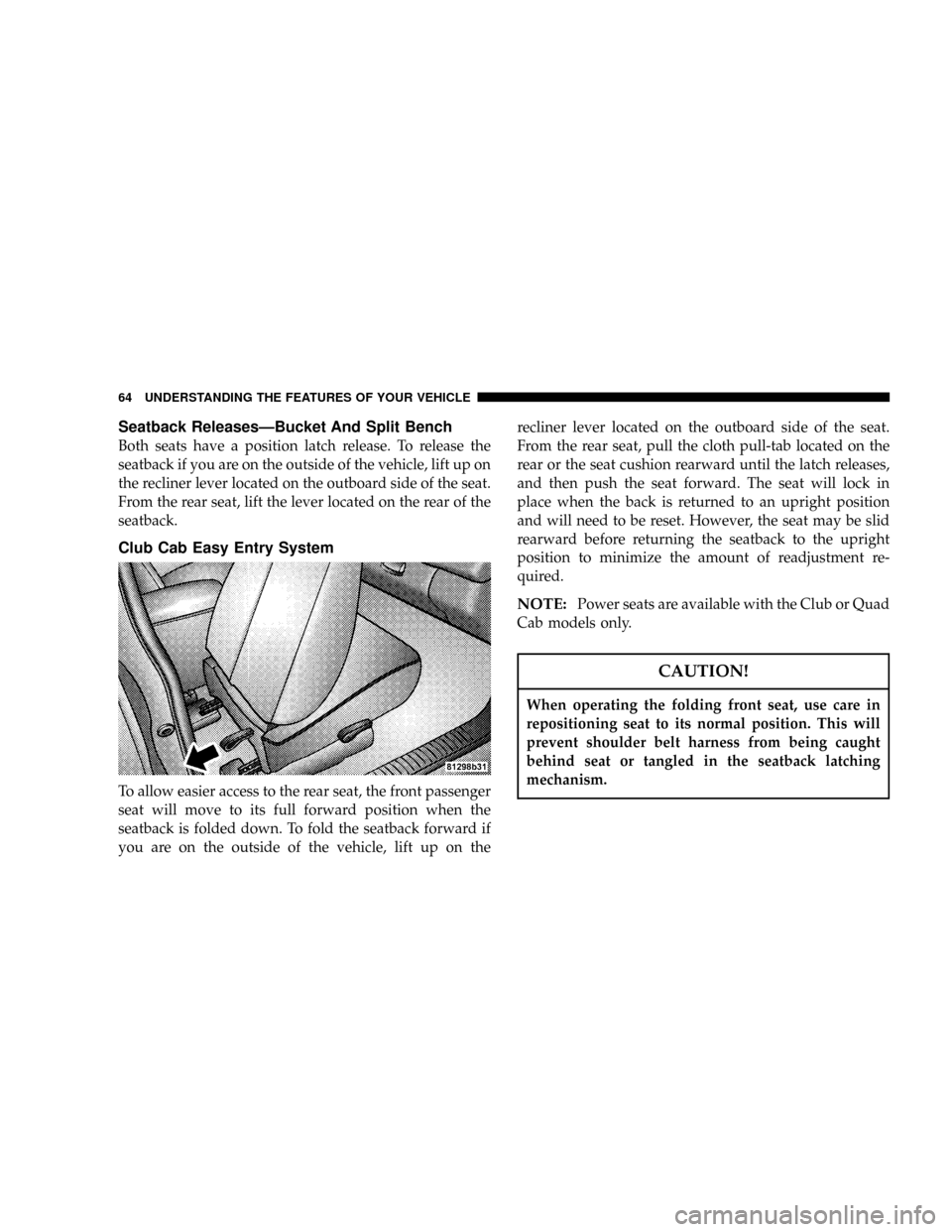
Club Cab Easy Entry System
To allow easier access to the rear seat, the front passenger
seat will move to its full forward position when the
seatback is folded down. To fold the seatback forward if
you are on the outside of the vehicle, lift up on therecliner lever located on the outboard side of the seat.
From the rear seat, pull the cloth pull-tab located on the
rear or the seat cushion rearward until the latch releases,
and then push the seat forward. The seat will lock in
place when the back is returned to an upright position
and will need to be reset. However, the seat may be slid
rearward before returning the seatback to the upright
position to minimize the amount of readjustment re-
quired.
NOTE:Power seats are available with the Club or Quad
Cab models only.
CAUTION!
When operating the folding front seat, use care in
repositioning seat to its normal position. This will
prevent shoulder belt harness from being caught
behind seat or tangled in the seatback latching
mechanism.
64 UNDERSTANDING THE FEATURES OF YOUR VEHICLE
Page 77 of 300
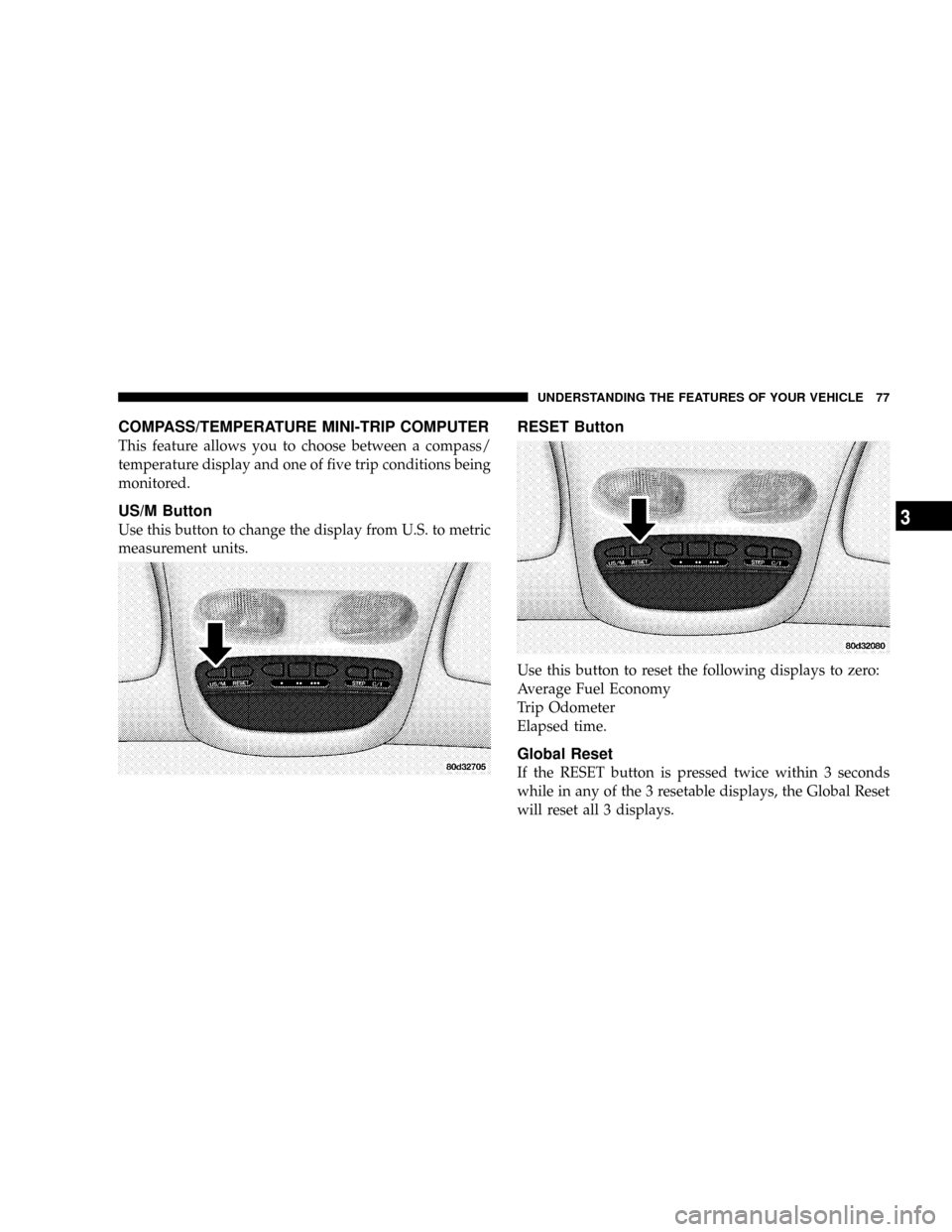
COMPASS/TEMPERATURE MINI-TRIP COMPUTER
This feature allows you to choose between a compass/
temperature display and one of five trip conditions being
monitored.
US/M Button
Use this button to change the display from U.S. to metric
measurement units.
RESET Button
Use this button to reset the following displays to zero:
Average Fuel Economy
Trip Odometer
Elapsed time.
Global Reset
If the RESET button is pressed twice within 3 seconds
while in any of the 3 resetable displays, the Global Reset
will reset all 3 displays.
UNDERSTANDING THE FEATURES OF YOUR VEHICLE 77
3
Page 78 of 300

Step Button
Use this button to choose or cycle through the four trip
conditions.
Average Fuel Economy (AVG ECO)
This display shows the average fuel economy since the
last reset.
Distance To Empty (DTE)
This display shows the estimated distance that can be
traveled with the fuel remaining in the tank. The distance
is calculated by multiplying the amount of fuel remain-
ing by the projected fuel economy. The distance predicted
will change every few seconds to a higher or lower
number as these factors change. The DTE will read zero
when the fuel gauge reads ªE.º
This display cannot be reset.
Trip Odometer (ODO)
This display shows the distance traveled since the last
reset.
Elapsed Time (ET)
This display shows the accumulated ignition ON time
since the last reset.
78 UNDERSTANDING THE FEATURES OF YOUR VEHICLE
Page 80 of 300

Manual Compass Calibration
If the compass appears erratic and the CAL light does not
appear, you must calibrate the compass. Find an open
area away from large metal objects. With the ignition ON
and the compass/temperature displayed, press and hold
the RESET button until the CAL symbol appears (about
10 seconds). Drive slowly, about 5 mph (8 km/h), in 3
complete 360É circles. The CAL light will turn off and the
compass will be calibrated.
Variance is the difference between magnetic North and
geographic North. For proper compass function, the
correct variance zone must be set. Refer to the variance
map for the correct variance zone. To check the variance
zone, the ignition must be on and the compass/
temperature displayed. Press and hold the RESET button
for about 5 seconds until VAR appears in the display. The
number displayed is the variance zone used by the
compass. To change the zone, press the STEP button to
scroll through numbers 1 through 15. Press the RESET
button after selecting the proper zone to return to the
normal compass/temperature display.
80 UNDERSTANDING THE FEATURES OF YOUR VEHICLE
Page 103 of 300
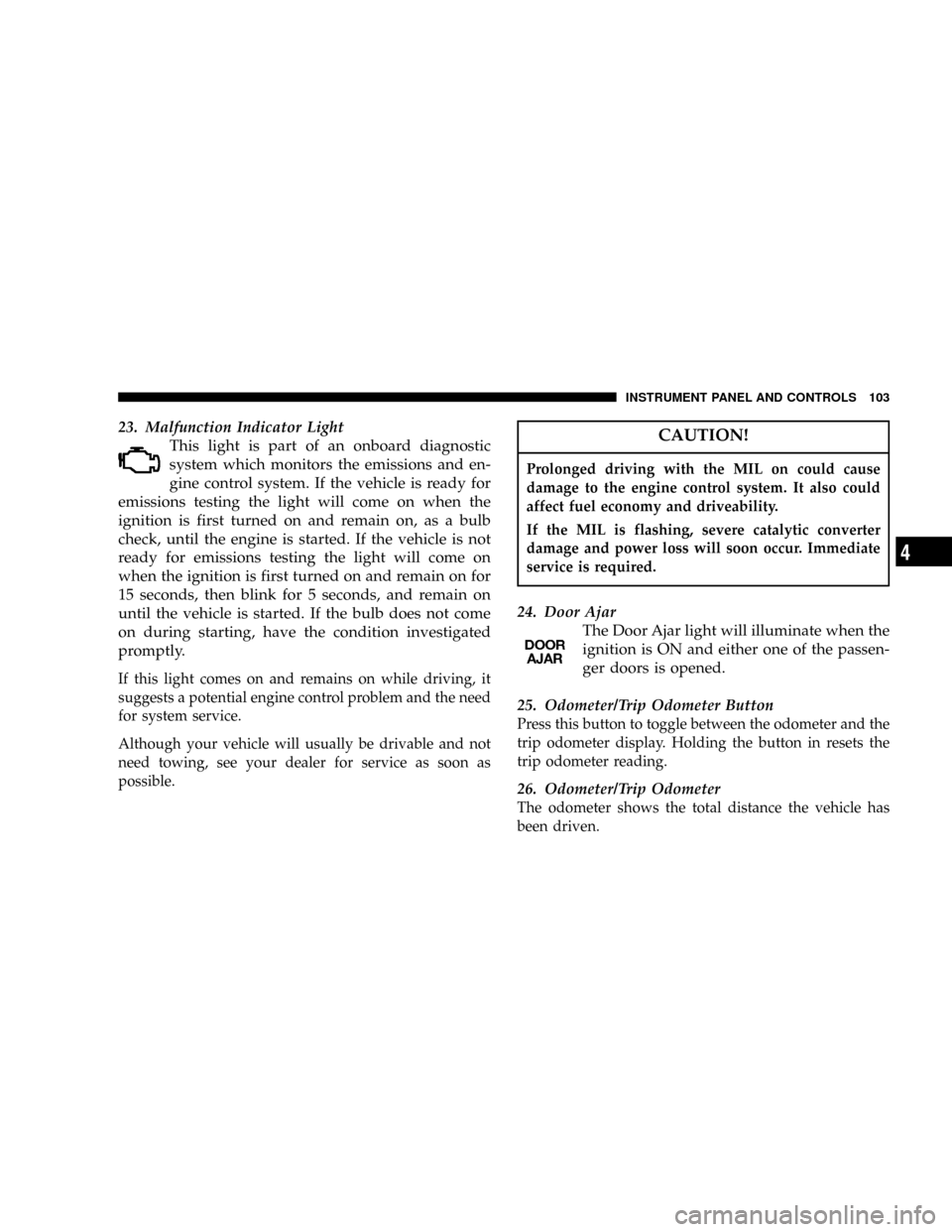
23. Malfunction Indicator Light
This light is part of an onboard diagnostic
system which monitors the emissions and en-
gine control system. If the vehicle is ready for
emissions testing the light will come on when the
ignition is first turned on and remain on, as a bulb
check, until the engine is started. If the vehicle is not
ready for emissions testing the light will come on
when the ignition is first turned on and remain on for
15 seconds, then blink for 5 seconds, and remain on
until the vehicle is started. If the bulb does not come
on during starting, have the condition investigated
promptly.
If this light comes on and remains on while driving, it
suggests a potential engine control problem and the need
for system service.
Although your vehicle will usually be drivable and not
need towing, see your dealer for service as soon as
possible.
CAUTION!
Prolonged driving with the MIL on could cause
damage to the engine control system. It also could
affect fuel economy and driveability.
If the MIL is flashing, severe catalytic converter
damage and power loss will soon occur. Immediate
service is required.
24. Door Ajar
The Door Ajar light will illuminate when the
ignition is ON and either one of the passen-
ger doors is opened.
25. Odometer/Trip Odometer Button
Press this button to toggle between the odometer and the
trip odometer display. Holding the button in resets the
trip odometer reading.
26. Odometer/Trip Odometer
The odometer shows the total distance the vehicle has
been driven.
INSTRUMENT PANEL AND CONTROLS 103
4
Page 107 of 300
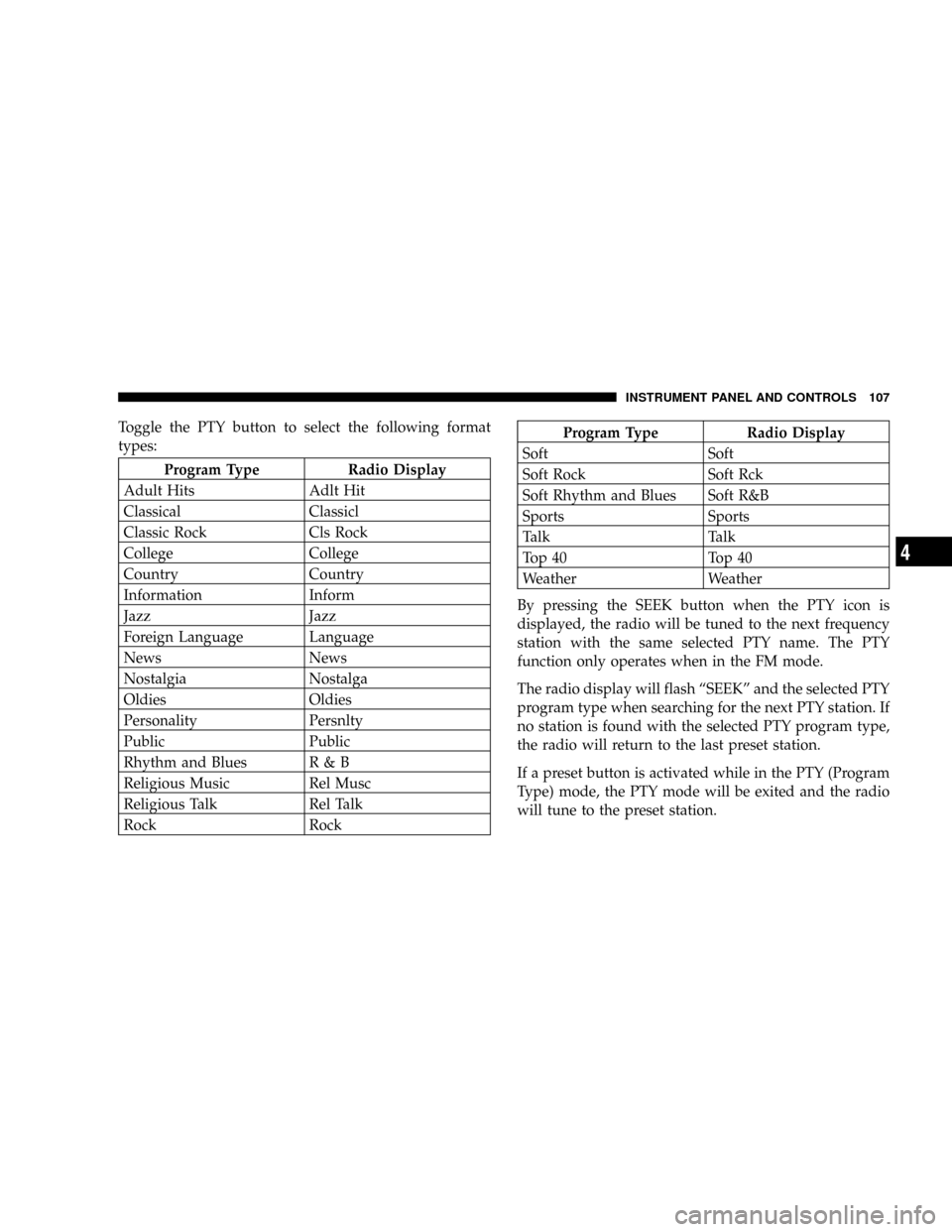
Toggle the PTY button to select the following format
types:
Program Type Radio Display
Adult Hits Adlt Hit
Classical Classicl
Classic Rock Cls Rock
College College
Country Country
Information Inform
Jazz Jazz
Foreign Language Language
News News
Nostalgia Nostalga
Oldies Oldies
Personality Persnlty
Public Public
Rhythm and Blues R & B
Religious Music Rel Musc
Religious Talk Rel Talk
Rock Rock
Program Type Radio Display
Soft Soft
Soft Rock Soft Rck
Soft Rhythm and Blues Soft R&B
Sports Sports
Talk Talk
Top 40 Top 40
Weather Weather
By pressing the SEEK button when the PTY icon is
displayed, the radio will be tuned to the next frequency
station with the same selected PTY name. The PTY
function only operates when in the FM mode.
The radio display will flash ªSEEKº and the selected PTY
program type when searching for the next PTY station. If
no station is found with the selected PTY program type,
the radio will return to the last preset station.
If a preset button is activated while in the PTY (Program
Type) mode, the PTY mode will be exited and the radio
will tune to the preset station.
INSTRUMENT PANEL AND CONTROLS 107
4
Page 115 of 300
Balance
The Balance control adjusts the left-to-right speaker bal-
ance. Press the BAL button in and it will pop out. Adjust
the balance and push the button back in.
Fade
The Fade control provides for balance between the front
and rear speakers. Press the FADE button in and it will
pop out. Adjust the balance and push the button back in.
Bass and Treble Tone Control
The tone controls consist of 2 separate bands. The bass
band is on the left, and the treble band is on the right.
Each band is adjusted by a slider control with a detent at
the mid-position. Moving the control up or down in-
creases or decreases amplification of that band. The mid
position provides a balanced output.
AM/FM Selection
Press the AM/FM button to change from AM to FM. The
operating mode will be displayed next to the station
frequency. The display will show ST when a stereo
station is received.
To Set The Radio Push-Button Memory
When you are receiving a station that you wish to
commit to push-button memory, press the SET button.
SET 1 will show in the display window. Select the ª1±5º
button you wish to lock onto this station and press and
release that button. If a button is not selected within 5
seconds after pressing the SET button, the station will
continue to play but will not be locked into push-button
memory.
You may add a second station to each push-button by
repeating the above procedure with this exception: Press
the SET button twice and SET 2 will show in the display
window. Each button can be set for SET 1 and SET 2 in
both AM and FM. This allows a total of 10 AM and 10 FM
stations to be locked into push-button memory. The
stations stored in SET 2 memory can be selected by
pressing the push-button twice. Every time a preset
button is used a corresponding button number will be
displayed.
Time
Press the TIME button to change the display between
radio frequency and time.
INSTRUMENT PANEL AND CONTROLS 115
4
Page 121 of 300
stations to be locked into push-button memory. The
stations stored in SET 2 memory can be selected by
pressing the push-button twice.
Every time a preset button is used a corresponding
button number will be displayed.
Balance
The balance control adjusts the left-to-right speaker bal-
ance. Press the BAL button in and it will pop out. Adjust
the balance and push the button back in.
Fade
The fade control provides for balance between the front
and rear speakers. Press the FADE button in and it will
pop out. Adjust the balance and push the button back in.
Bass and Treble Tone Control
The tone controls consist of 2 separate bands. The bass
band is on the left, and the treble band is on the right.
Each band is adjusted by a slider control with a detent at
the mid-position. Moving the control up or down in-
creases or decreases amplification of that band. The mid
position provides a balanced output.
AM/FM Selection
Press the AM/FM button to change from AM to FM. The
operating mode will be displayed next to the station
frequency. The display will show ST when a stereo
station is received in the FM mode.
Mode Button
Press the MODE button to select between the cassette
tape player, CD changer, or the Satellite Radio (if
equipped). When the Satellite Radio (if equipped) is
selected ªSAº will appear in your radio display.
A CD or tape may remain in the player while in the
Satellite or radio mode.
Cassette Player Features
With ignition OFF and the sound system OFF, you can
eject the tape cassette by pushing the EJECT button.
You can turn the tape player ON by inserting a cassette or
activating the MODE button (with a cassette in the radio),
but only when the ignition and radio are on.
Each time a cassette is inserted the tape player will begin
playing on the side of the cassette that is facing up in the
player.
INSTRUMENT PANEL AND CONTROLS 121
4
Page 126 of 300

To Set The Radio Push-Button Memory
When you are receiving a station that you wish to
commit to push-button memory, press the SET RND
button. SET 1 will show in the display window. Select the
ª1±6º button you wish to lock onto this station and press
and release that button. If a button is not selected within
5 seconds after pressing the SET RND button, the station
will continue to play but will not be locked into push-
button memory.
You may add a second station to each push-button by
repeating the above procedure with this exception: Press
the SET button twice and SET 2 will show in the display
window. Each button can be set for SET 1 and SET 2 in
both AM and FM. This allows a total of 12 AM and 12 FM
stations to be locked into push-button memory. The
stations stored in SET 2 memory can be selected by
pressing the corresponding push-button twice. Every
time a preset button is used, a corresponding button
number will be displayed.
Time Button
Press the TIME button to change the display between
radio frequency and time.
General Information
This radio complies with Part 15 of FCC rules and with
RSS-210 of Industry Canada. Operation is subject to the
following conditions:
1. This device may not cause harmful interference,
2. This device must accept any interference received,
including interference that may cause undesired opera-
tion.
NOTE:Changes or modifications not expressively ap-
proved by the party responsible for compliance could
void the user's authority to operate the equipment.
CD Player Operation
NOTE:
The ignition switch must be in the ON or ACC
position and the Power / Volume control pushed ON
before the CD player will operate.
126 INSTRUMENT PANEL AND CONTROLS