steering wheel DODGE DAKOTA 2009 3.G User Guide
[x] Cancel search | Manufacturer: DODGE, Model Year: 2009, Model line: DAKOTA, Model: DODGE DAKOTA 2009 3.GPages: 449, PDF Size: 10.96 MB
Page 125 of 449
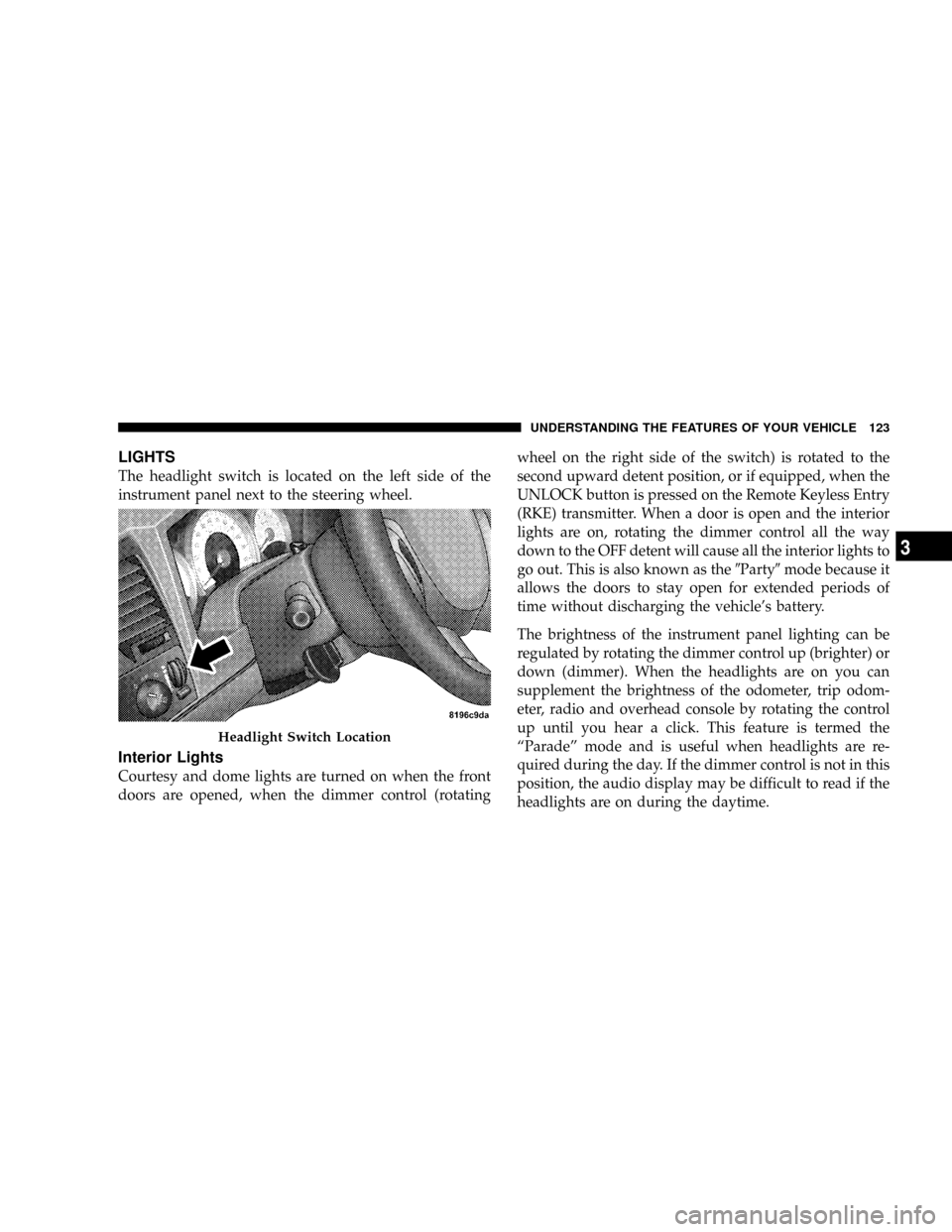
LIGHTS
The headlight switch is located on the left side of the
instrument panel next to the steering wheel.
Interior Lights
Courtesy and dome lights are turned on when the front
doors are opened, when the dimmer control (rotatingwheel on the right side of the switch) is rotated to the
second upward detent position, or if equipped, when the
UNLOCK button is pressed on the Remote Keyless Entry
(RKE) transmitter. When a door is open and the interior
lights are on, rotating the dimmer control all the way
down to the OFF detent will cause all the interior lights to
go out. This is also known as the9Party9mode because it
allows the doors to stay open for extended periods of
time without discharging the vehicle's battery.
The brightness of the instrument panel lighting can be
regulated by rotating the dimmer control up (brighter) or
down (dimmer). When the headlights are on you can
supplement the brightness of the odometer, trip odom-
eter, radio and overhead console by rotating the control
up until you hear a click. This feature is termed the
ªParadeº mode and is useful when headlights are re-
quired during the day. If the dimmer control is not in this
position, the audio display may be difficult to read if the
headlights are on during the daytime.
Headlight Switch Location
UNDERSTANDING THE FEATURES OF YOUR VEHICLE 123
3
Page 130 of 449
The arrow on either side of the instrument cluster flashes
to indicate the direction of the turn, and proper operation
of the front and rear turn signal lights. If an indicator fails
to light when the multifunction lever is moved, it would
suggest that the switch or indicator lamp is defective.
If a defective bulb or wiring circuit is detected for the
turn signal system, the arrow indicators will flash at a
faster rate.
NOTE:If a turn signal has been left on for at least a mile
duration, a continuous chime will sound.
Turn Signal Auto-Mode
Tap the multifunction lever once and the turn signal (left
or right) will flash three times, and automatically turn off.
Flash-To-Pass
You can signal another vehicle with your headlights by
partially pulling the multifunction lever toward the steer-
ing wheel. This will turn on the high beam headlights
until the multifunction lever is released.
High Beam/Low Beam Select Switch
Pull the multifunction lever fully toward the steering
wheel to switch the headlights from high or low beam.
128 UNDERSTANDING THE FEATURES OF YOUR VEHICLE
Page 133 of 449
Windshield Washers
To use the washer, push in on the washer knob on the end
of the multifunction lever and hold while spray is
desired. If the washer knob is depressed while in the
delay range, the wiper will operate for several seconds
after the washer knob is released. It will then resume the
intermittent interval previously selected. If the washer
knob is pushed, for a period greater than one second
while in the off position, the wiper will wipe approxi-
mately three wipes after the wash knob is released.
To prevent freeze-up of your windshield washer system
in cold weather, select a solution or mixture that meets or
exceeds the temperature range of your climate. This
rating information can be found on most washer fluid
containers.
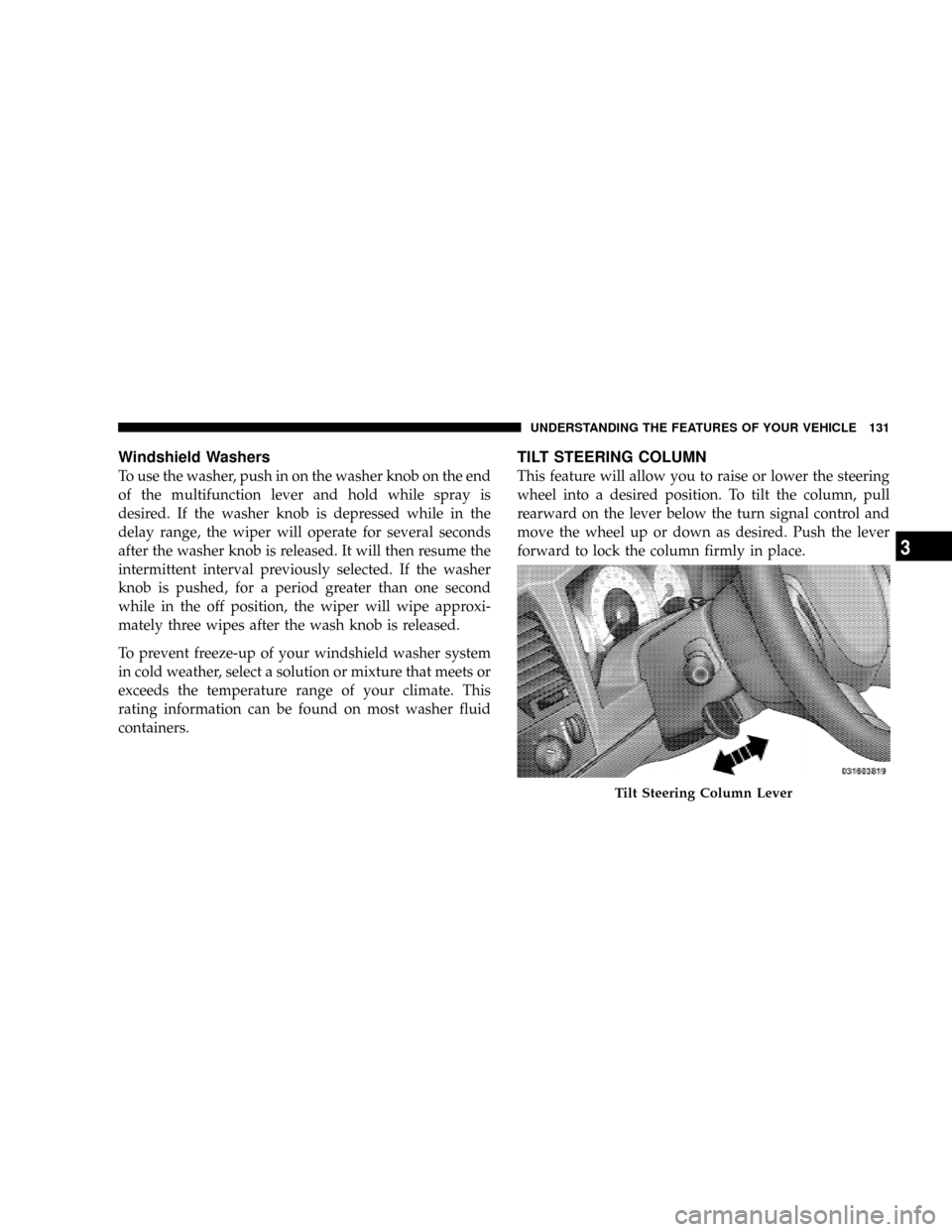
TILT STEERING COLUMN
This feature will allow you to raise or lower the steering
wheel into a desired position. To tilt the column, pull
rearward on the lever below the turn signal control and
move the wheel up or down as desired. Push the lever
forward to lock the column firmly in place.
Tilt Steering Column Lever
UNDERSTANDING THE FEATURES OF YOUR VEHICLE 131
3
Page 134 of 449
WARNING!
Tilting the steering column while the vehicle is
moving is dangerous. Without a stable steering col-
umn, you could lose control of the vehicle and have
an accident. Adjust the column only while the ve-
hicle is stopped. Be sure it is locked before driving.
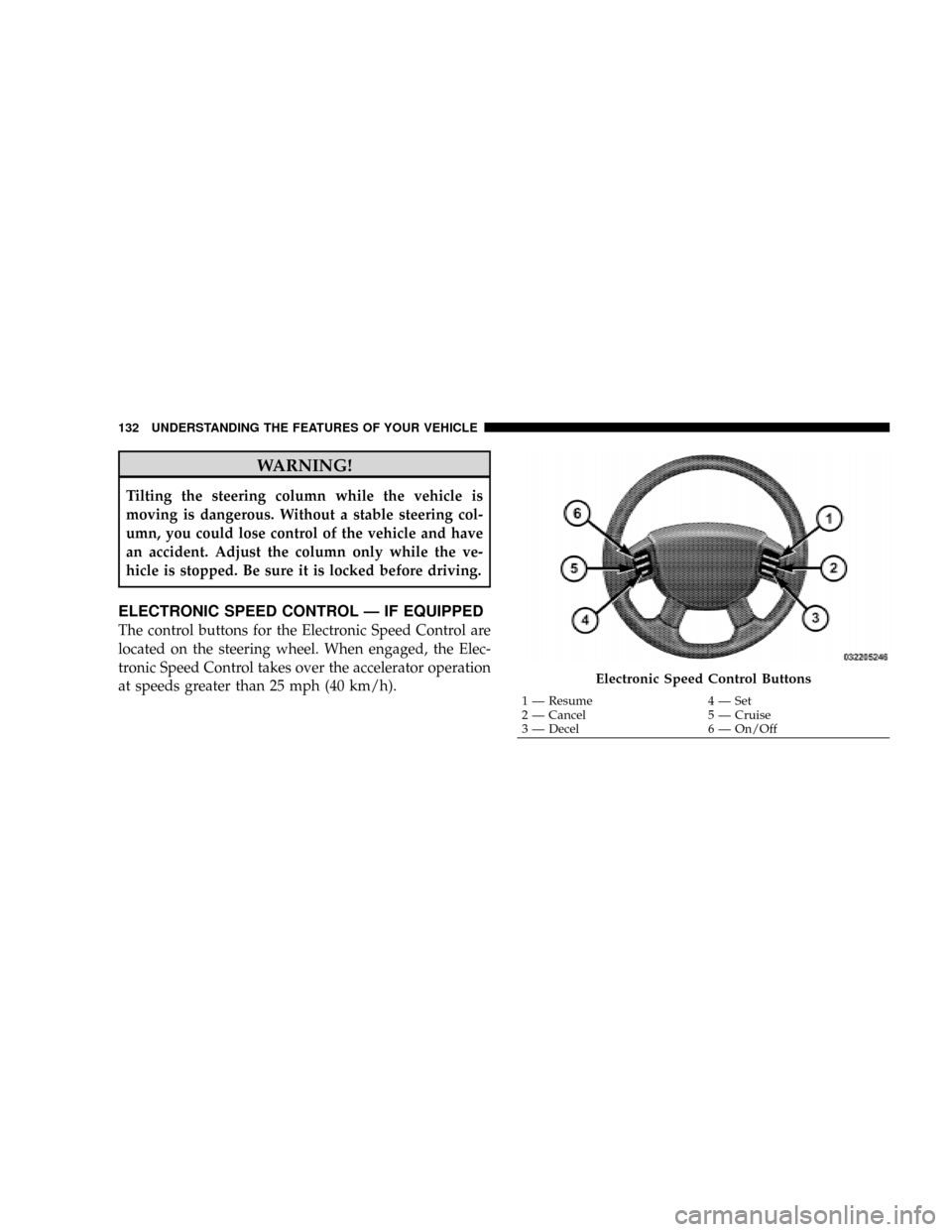
ELECTRONIC SPEED CONTROL Ð IF EQUIPPED
The control buttons for the Electronic Speed Control are
located on the steering wheel. When engaged, the Elec-
tronic Speed Control takes over the accelerator operation
at speeds greater than 25 mph (40 km/h).
Electronic Speed Control Buttons
1 Ð Resume 4 Ð Set
2 Ð Cancel 5 Ð Cruise
3 Ð Decel 6 Ð On/Off 132 UNDERSTANDING THE FEATURES OF YOUR VEHICLE
Page 228 of 449
Operating Instructions Ð Hands-Free Phone (If
Equipped)
Refer to ªHands-Free Communication (UConnectt)º in
Section 3.
Operating Instructions Ð Video Entertainment
System (VES)Ÿ (If Equipped)
Refer to separate ªVideo Entertainment System (VES)Ÿ
Guide.º
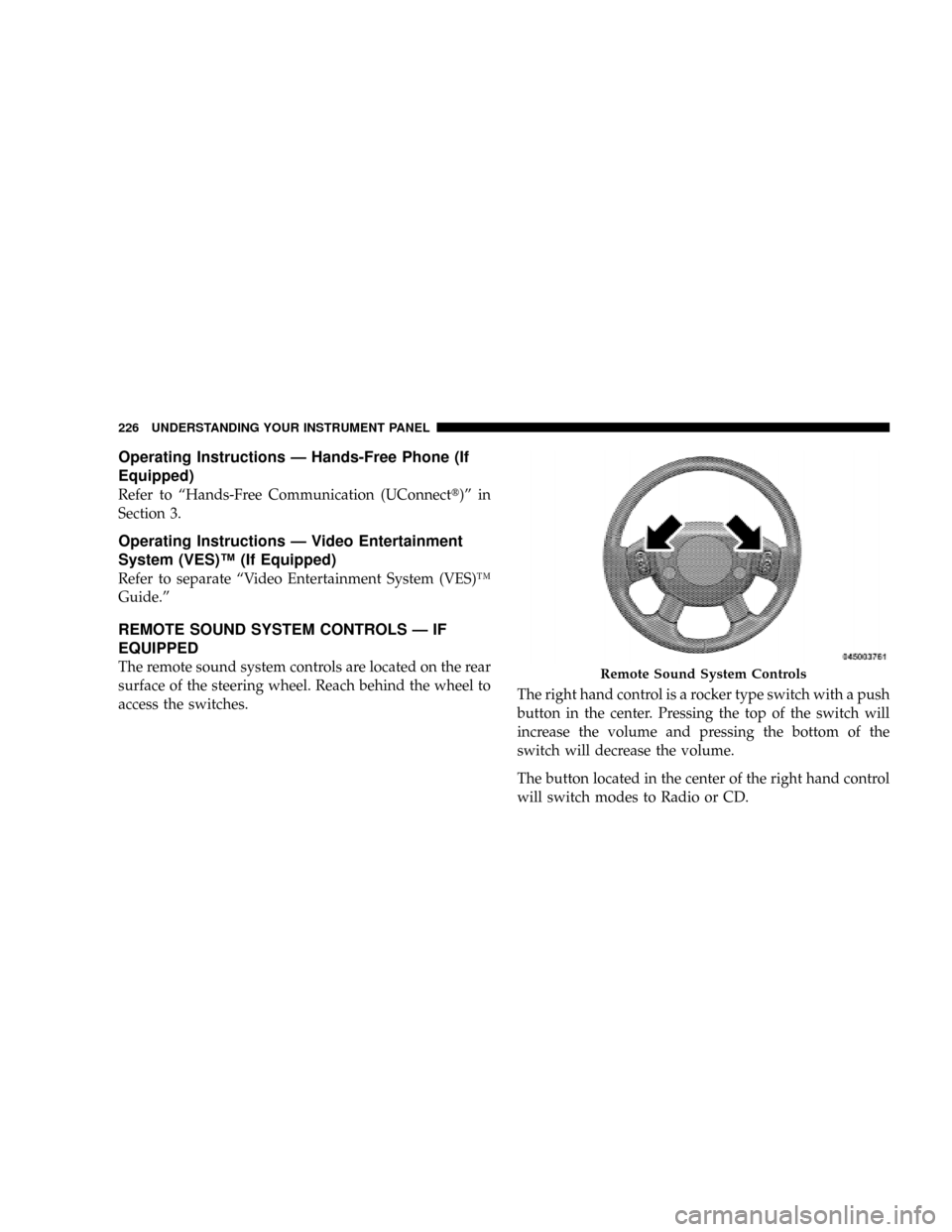
REMOTE SOUND SYSTEM CONTROLS Ð IF
EQUIPPED
The remote sound system controls are located on the rear
surface of the steering wheel. Reach behind the wheel to
access the switches.The right hand control is a rocker type switch with a push
button in the center. Pressing the top of the switch will
increase the volume and pressing the bottom of the
switch will decrease the volume.
The button located in the center of the right hand control
will switch modes to Radio or CD.Remote Sound System Controls
226 UNDERSTANDING YOUR INSTRUMENT PANEL
Page 238 of 449
NNV233/243 GII Transfer Case Operating
Information/Precautions................ 251
NShifting Procedure - NV233/243 Transfer
Case.............................. 255
NNV 244 Generation II Transfer Case
Operating Information / Precautions....... 257
NShifting Procedure - NV 244 Generation II
Transfer Case....................... 261
mLimited-Slip Rear Axle Differential Ð If
Equipped............................ 262
mDriving On Slippery Surfaces............. 263
mDriving Through Water.................. 264
NFlowing/Rising Water................. 264
NShallow Standing Water................ 264
mPower Steering........................ 266NPower Steering Fluid Check............. 266
mParking Brake........................ 267
mBrake System......................... 269
NRear-Wheel Anti-Lock Brake System (ABS) ±
If Equipped......................... 269
NFour-Wheel Anti-Lock Brake System (ABS) . . 270
mTire Safety Information.................. 272
NTire Markings....................... 272
NTire Identification Number (TIN).......... 275
NTire Loading And Tire Pressure........... 276
mTires Ð General Information.............. 280
NTire Pressure........................ 280
NTire Inflation Pressures................. 281
236 STARTING AND OPERATING
Page 268 of 449
POWER STEERING
The standard power steering system will give you good
vehicle response and increased ease of maneuverability
in tight spaces. The system will provide mechanical
steering capability if power assist is lost.
If for some reason the power assist is interrupted, it will
still be possible to steer your vehicle. Under these condi-
tions, you will observe a substantial increase in steering
effort, especially at very low vehicle speeds and during
parking maneuvers.
NOTE:Increased noise levels at the end of the steering
wheel travel are considered normal and do not indicate
that there is a problem with the power steering system.
Upon initial start-up in cold weather, the power steering
pump may make noise for a short amount of time. This is
due to the cold, thick fluid in the steering system. This
noise should be considered normal, and it does not in any
way damage the steering system.WARNING!
Continued operation with reduced power steering
assist could pose a safety risk to yourself and others.
Service should be obtained as soon as possible.
CAUTION!
Prolonged operation of the steering system at the end
of the steering wheel travel will increase the steering
fluid temperature and it should be avoided when
possible. Damage to the power steering pump may
occur.
Power Steering Fluid Check
Checking the power steering fluid level at a defined
service interval is not required. The fluid should only be
checked if a leak is suspected, abnormal noises are
266 STARTING AND OPERATING
Page 290 of 449
WARNING!
²DO NOT use a tire, wheel size or rating other than
that specified for your vehicle. Some combinations
of unapproved tires and wheels may change sus-
pension dimensions and performance characteris-
tics, resulting in changes to steering, handling, and
braking of your vehicle. This can cause unpredict-
able handling and stress to steering and suspen-
sion components. You could lose control and have
an accident resulting in serious injury or death.
Use only the tire and wheel sizes with load ratings
approved for your vehicle.
²NEVER use a tire with a smaller load index or
capacity, other than what was originally equipped
on your vehicle. Using a tire with a smaller load
index could result in tire overloading and failure.
You could lose control and have an accident.
(Continued)
WARNING! (Continued)
²Failure to equip your vehicle with tires having
adequate speed capability can result in sudden tire
failure and loss of vehicle control.
CAUTION!
Replacing original tires with tires of a different size
may result in false speedometer and odometer
readings.
Alignment And Balance
Poor suspension alignment may result in:
²Fast tire wear.
²Uneven tire wear, such as feathering and one-sided
wear.
²Vehicle pull to right or left.
288 STARTING AND OPERATING
Page 293 of 449
CAUTION!
²Do not use tire chains on vehicles equipped with
tires other than P245/70R16. There may not be
adequate clearance for the chains and you are
risking structural or body damage to your vehicle.
²Do not use tire chains on the front wheels of your
vehicle. There may not be adequate clearance for
the chains and you are risking structural or body
damage to your vehicle.
SNOW TIRES
Snow tires should be of the same size and type construc-
tion as the front tires. Consult the manufacturer of the
snow tire to determine any maximum vehicle speed
requirement associated with the tire. These tires should
always be operated at the vehicle maximum capacity
inflation pressures under any load condition.While studded tires improve performance on ice, skid
and traction capability on wet or dry surfaces may be
poorer than that of non-studded tires. Some states pro-
hibit studded tires; therefore, local laws should be
checked before using these tire types.
TIRE ROTATION RECOMMENDATIONS
Tires on the front and rear axles of vehicles operate at
different loads and perform different steering, driving,
and braking functions. For these reasons, they wear at
unequal rates and tend to develop irregular wear pat-
terns. These effects can be reduced by timely rotation of
tires. The benefits of rotation are especially worthwhile
with aggressive tread designs such as those on all season
type tires. Rotation will increase tread life, help to main-
tain mud, snow and wet traction levels, and contribute to
a smooth, quiet ride.
STARTING AND OPERATING 291
5
Page 320 of 449
WARNING! (Continued)
Make certain that the load is secured in the trailer
and will not shift during travel. When trailering
cargo that is not fully secured, dynamic load shifts
can occur that may be difficult for the driver to
control. You could lose control of your vehicle and
have an accident.
²When hauling cargo or towing a trailer, do not over-
load your vehicle or trailer. Overloading can cause a
loss of control, poor performance or damage to brakes,
axle, engine, transmission, steering, suspension, chas-
sis structure or tires.
²Safety chains must always be used between your
vehicle and trailer. Always connect the chains to the
frame or hook retainers of the vehicle hitch. Cross the
chains under the trailer tongue and allow enough
slack for turning corners.
²Vehicles with trailers should not be parked on a grade.
When parking, apply the parking brake on the tow
vehicle. Put the tow vehicle automatic transmission in
PARK. With a manual transmission, shift the transmis-
sion into REVERSE. For four-wheel drive vehicles,
make sure the transfer case is not in NEUTRAL.
Always, block or9chock9the trailer wheels.
²GCWR must not be exceeded.
²Total weight must be distributed between the tow
vehicle and the trailer so that the following four
ratings are not exceeded:
1. GVWR
2. GTW
3. GAWR
318 STARTING AND OPERATING