wheel DODGE DAKOTA 2009 3.G Owner's Manual
[x] Cancel search | Manufacturer: DODGE, Model Year: 2009, Model line: DAKOTA, Model: DODGE DAKOTA 2009 3.GPages: 449, PDF Size: 10.96 MB
Page 228 of 449
Operating Instructions Ð Hands-Free Phone (If
Equipped)
Refer to ªHands-Free Communication (UConnectt)º in
Section 3.
Operating Instructions Ð Video Entertainment
System (VES)Ÿ (If Equipped)
Refer to separate ªVideo Entertainment System (VES)Ÿ
Guide.º
REMOTE SOUND SYSTEM CONTROLS Ð IF
EQUIPPED
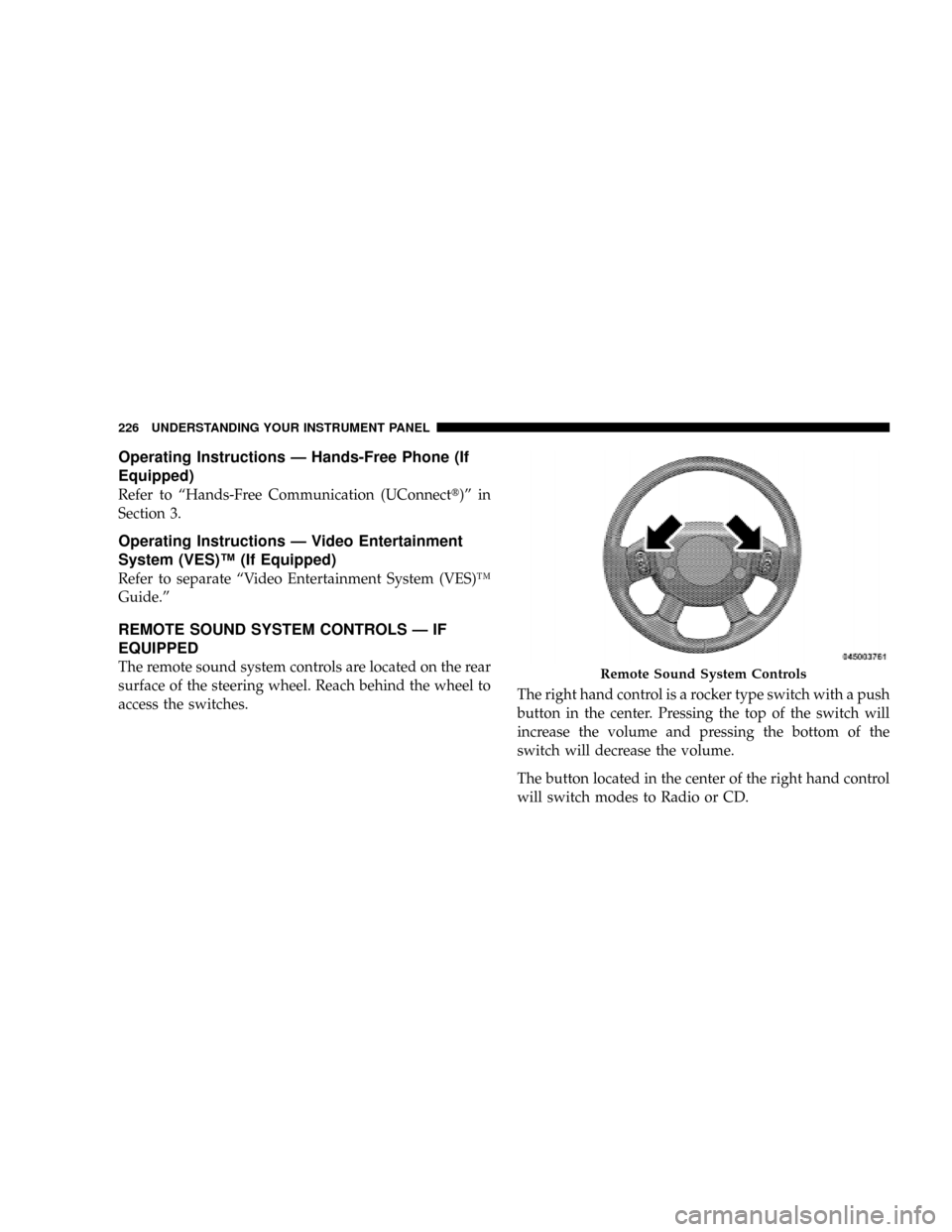
The remote sound system controls are located on the rear
surface of the steering wheel. Reach behind the wheel to
access the switches.The right hand control is a rocker type switch with a push
button in the center. Pressing the top of the switch will
increase the volume and pressing the bottom of the
switch will decrease the volume.
The button located in the center of the right hand control
will switch modes to Radio or CD.Remote Sound System Controls
226 UNDERSTANDING YOUR INSTRUMENT PANEL
Page 237 of 449
STARTING AND OPERATING
CONTENTS
mStarting Procedures.................... 239
NManual Transmission.................. 239
NAutomatic Transmission................ 239
NNormal Starting..................... 240
NExtreme Cold Weather (Below ±20ÉF Or
±29ÉC)............................ 240
NIf Engine Fails To Start................. 240
NAfter Starting....................... 241
mEngine Block Heater Ð If Equipped......... 241mManual Transmission................... 242
NShifting........................... 243
NDownshifting....................... 244
NReverse Shifting..................... 245
mAutomatic Transmission................. 245
NBrake/Transmission Interlock System...... 246
NAutomatic Transmission................ 246
mFour-Wheel Drive Operation.............. 251
5
Page 238 of 449
NNV233/243 GII Transfer Case Operating
Information/Precautions................ 251
NShifting Procedure - NV233/243 Transfer
Case.............................. 255
NNV 244 Generation II Transfer Case
Operating Information / Precautions....... 257
NShifting Procedure - NV 244 Generation II
Transfer Case....................... 261
mLimited-Slip Rear Axle Differential Ð If
Equipped............................ 262
mDriving On Slippery Surfaces............. 263
mDriving Through Water.................. 264
NFlowing/Rising Water................. 264
NShallow Standing Water................ 264
mPower Steering........................ 266NPower Steering Fluid Check............. 266
mParking Brake........................ 267
mBrake System......................... 269
NRear-Wheel Anti-Lock Brake System (ABS) ±
If Equipped......................... 269
NFour-Wheel Anti-Lock Brake System (ABS) . . 270
mTire Safety Information.................. 272
NTire Markings....................... 272
NTire Identification Number (TIN).......... 275
NTire Loading And Tire Pressure........... 276
mTires Ð General Information.............. 280
NTire Pressure........................ 280
NTire Inflation Pressures................. 281
236 STARTING AND OPERATING
Page 246 of 449
Downshifting
Moving from a high gear down to a lower gear is
recommended to preserve brakes when driving down
steep hills. In addition, downshifting at the right time
provides better acceleration when you desire to resume
speed. Downshift progressively. Do not skip gears to
avoid overspeeding the engine and clutch.
WARNING!
Do not downshift for additional engine braking on a
slippery surface. The drive wheels could lose their
grip and the vehicle could skid.
CAUTION!
When descending a hill, be very careful to downshift
one gear at a time to prevent overspeeding the engine
which can cause valve damage, and/or clutch disc
damage even if the clutch pedal is depressed.
Maximum Recommended Downshift Speeds
CAUTION!
Failure to follow the maximum recommended down-
shifting speeds may cause the engine to overspeed
and/or damage the clutch disc even if the clutch pedal
is depressed.
244 STARTING AND OPERATING
Page 253 of 449
cause damage to the transmission. The torque converter
will refill within five seconds of shifting from PARK into
any other gear position.
FOUR-WHEEL DRIVE OPERATION
NV233/243 GII Transfer Case Operating
Information/Precautions
The NV233/243 is an electric-shift transfer case and is
operated by the 4WD Control Switch (Transfer Case
Switch), which is located on the instrument panel.
The NV233/243 transfer case provides four mode posi-
tions: 2 (rear) wheel drive high range, 4 wheel drive high
range, 4 wheel drive low range, and NEUTRAL.
The NV233/243 transfer case is designed to be driven in
the 2-wheel drive position (2WD) for normal street and
highway conditions (dry hard-surfaced roads).
When additional traction is required, the transfer case
4WD LOCK and 4WD LOW positions can be used to lockthe front and rear driveshafts together and force the front
and rear wheels to rotate at the same speed. This is
accomplished by rotating the 4WD Control Switch to the
desired position - Refer to ªShifting Procedureº in this
section. The 4WD LOCK and 4WD LOW positions are
designed for loose or slippery road surfaces only. Driving
in the 4WD LOCK and 4WD LOW positions on dry
hard-surfaced roads may cause increased tire wear and
damage to the driveline components.
The transfer case NEUTRAL position is selected by
depressing the recessed button located on the lower
left-hand corner of the 4WD Control Switch.
NOTE:The transfer case NEUTRAL position is to be
used for recreational towing only. Refer to ªRecreational
Towingº in Section 5 for specific procedures on shifting
into and out of NEUTRAL.
STARTING AND OPERATING 251
5
Page 254 of 449
Transfer Case Position Indicator Lights
Transfer case position indicator lights are located on the
instrument cluster. If there is no indicator light on or
flashing, the transfer case position is in two-wheel drive
(2WD). If the indicator light is on, the desired position
(4WD LOCK and 4WD LOW) has been obtained.
If One or More Shift Requirements are not Met:
1. An indicator light will flash.
2. The transfer casewill notshift.
NOTE:Before retrying a selection, make certain that all
the necessary requirements for selecting a new transfer
case position have been met. To retry the selection, turn
the control knob back to the current position, wait five
seconds, and retry selection. To find the shift require-
ments, refer to the9Shifting Procedure9in this section.
The ªSVC 4WDº warning light monitors the electric shift
4WD system. If this light remains on after engine start-upor illuminates during driving, it means that the 4WD
system is not functioning properly and that service is
required.
WARNING!
Always engage the parking brake when powering
down the vehicle if the(SVC 4WD(light is illumi-
nated. Not engaging the parking brake may allow the
vehicle to roll, which may cause personal injury.
NOTE:Do not attempt to make a shift while only the
front or rear wheels are spinning. The NV233/243 trans-
fer case is not equipped with a synchronizer and there-
fore the front and rear driveshaft speeds must be equal
for the shift to take place. Shifting while only the front or
rear wheels are spinning can cause damage to the trans-
fer case.
252 STARTING AND OPERATING
Page 255 of 449
When operating your vehicle in 4WD LOW, the engine
speed is approximately three times that of the 2WD or
4WD LOCK positions at a given road speed. Take care
not to overspeed the engine and do not exceed 25 mph
(40 km/h).
Proper operation of 4-wheel drive vehicles depends on
tires of equal size, type and circumference on each wheel.
Any difference in tire size can cause damage to the
transfer case.
Because 4 wheel drive provides improved traction, there
is a tendency to exceed safe turning and stopping speeds.
Do not go faster than road conditions permit.WARNING!
You or others could be injured if you leave the
vehicle unattended with the transfer case in the
NEUTRAL position without first fully engaging the
parking brake. The transfer case NEUTRAL position
disengages both the front and rear driveshafts from
the powertrain and will allow the vehicle to move
regardless of the transmission position. The parking
brake should always be applied when the driver is
not in the vehicle.
STARTING AND OPERATING 253
5
Page 256 of 449
For additional information on the appropriate use of each
transfer case mode position, refer to the following infor-
mation:
2WD
The 2±Wheel Drive (Rear-Wheel Drive) High Range is
used for normal street and highway driving, on dry,
hard-surfaced roads.
4WD LOCK
The 4-Wheel Drive Lock (4WD LOCK) Range locks the
front and rear driveshafts together, forcing the front and
rear wheels to rotate at the same speed. This range
provides additional traction for loose or slippery road
surfaces only.4WD LOW
The 4-Wheel Drive Low (4WD LOW) Range provides
low speed 4-wheel drive. It locks the front and rear
driveshafts together, forcing the front and rear wheels to
rotate at the same speed. This range provides additional
traction and maximum pulling power for loose or slip-
pery road surfaces only. Do not exceed 25 mph
(40 km/h).
N
The NEUTRAL Range disengages both the front and rear
driveshafts from the powertrain. NEUTRAL is used for
flat towing behind another vehicle. Refer to ªRecreational
Towingº in Section 5.
254 STARTING AND OPERATING
Page 257 of 449
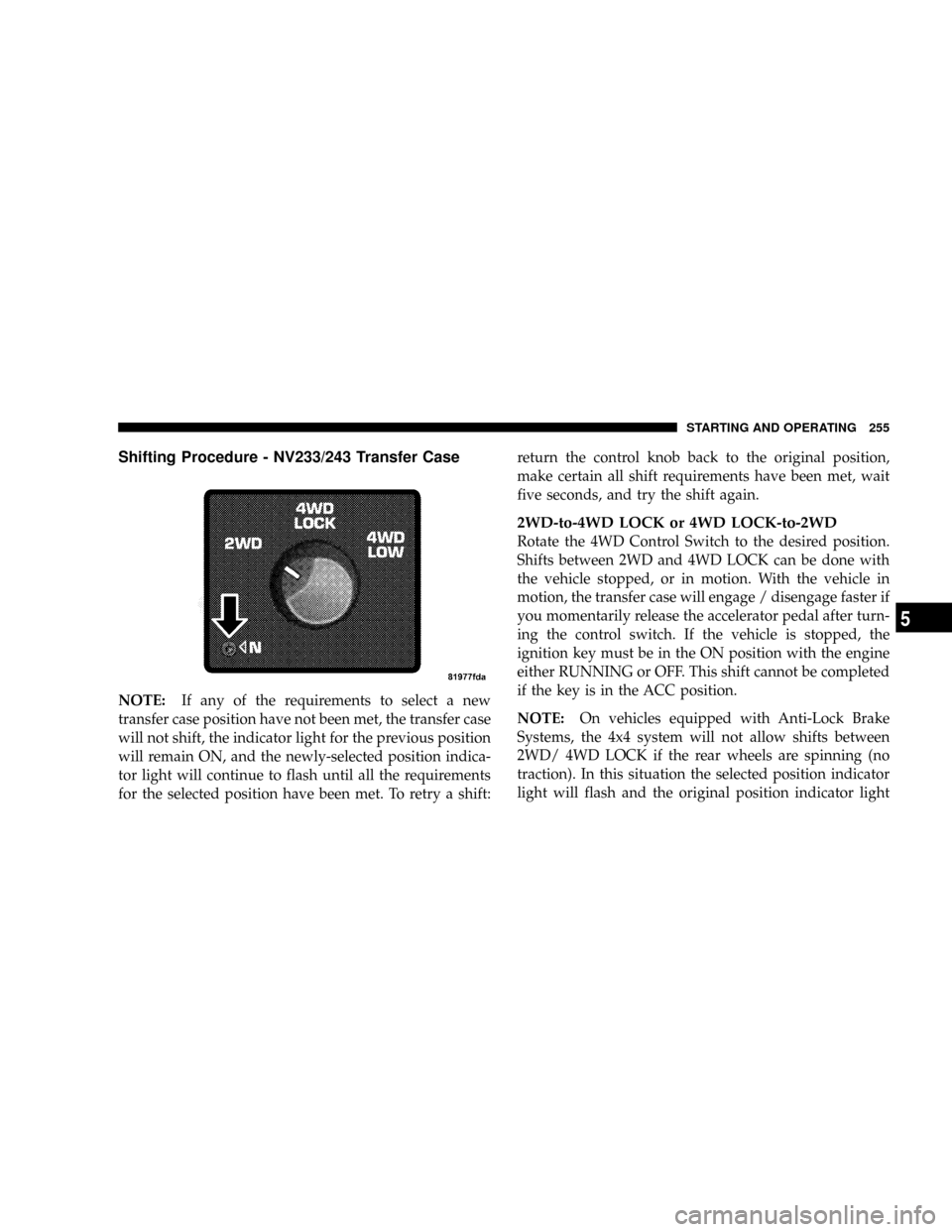
Shifting Procedure - NV233/243 Transfer Case
NOTE:If any of the requirements to select a new
transfer case position have not been met, the transfer case
will not shift, the indicator light for the previous position
will remain ON, and the newly-selected position indica-
tor light will continue to flash until all the requirements
for the selected position have been met. To retry a shift:return the control knob back to the original position,
make certain all shift requirements have been met, wait
five seconds, and try the shift again.
2WD-to-4WD LOCK or 4WD LOCK-to-2WD
Rotate the 4WD Control Switch to the desired position.
Shifts between 2WD and 4WD LOCK can be done with
the vehicle stopped, or in motion. With the vehicle in
motion, the transfer case will engage / disengage faster if
you momentarily release the accelerator pedal after turn-
ing the control switch. If the vehicle is stopped, the
ignition key must be in the ON position with the engine
either RUNNING or OFF. This shift cannot be completed
if the key is in the ACC position.
NOTE:On vehicles equipped with Anti-Lock Brake
Systems, the 4x4 system will not allow shifts between
2WD/ 4WD LOCK if the rear wheels are spinning (no
traction). In this situation the selected position indicator
light will flash and the original position indicator light
STARTING AND OPERATING 255
5
Page 258 of 449
will remain ON. At this time, reduce speed and stop
spinning the wheels to complete the shift. There may be
a delay up to 10 seconds for the shift to complete after the
wheels have stopped spinning.
4WD LOCK-to-4WD LOW or 4WD LOW-to-4WD
LOCK
NOTE:When shifting into or out of 4WD LOW, some
gear noise may be heard. This noise is normal and is not
detrimental to the vehicle or occupants.
Shifting can be performed with the vehicle rolling 2 to
3 mph (3 to 5 km/h), or completely stopped. USE
EITHER OF THE FOLLOWING PROCEDURES:
Preferred Procedure
1. With engine RUNNING, slow vehicle to 2 to 3 mph (3
to 5 km/h).2. Shift the transmission into NEUTRAL (depress clutch
on manual transmissions).
3. While still rolling, rotate the transfer case control
switch to the desired position.
4. After the desired position indicator light is ON (not
flashing), shift transmission back into gear (release clutch
on manual transmissions).
Alternate Procedure
1. Bring the vehicle to complete stop.
2. With the key ON and the engine either OFF or
RUNNING, shift the transmission into NEUTRAL (de-
press clutch on manual transmissions).
3. Rotate the transfer case control switch to the desired
position.
256 STARTING AND OPERATING