change time DODGE DAKOTA 2009 3.G Owner's Guide
[x] Cancel search | Manufacturer: DODGE, Model Year: 2009, Model line: DAKOTA, Model: DODGE DAKOTA 2009 3.GPages: 449, PDF Size: 10.96 MB
Page 227 of 449
Pressing the MUSIC TYPE button again will close the
MUSIC TYPE screen. Once closed, seek up, seek down,
and scan will no longer be based on your selection.
SETUP Button
Pressing the SETUP button allows you to select the
following items:
²Display Sirius ID number Ð Press the AUDIO/
SELECT button to display the Sirius ID number. This
number is used to activate, deactivate, or change the
Sirius subscription.
SET Button ± To Set the Pushbutton Memory
When you are receiving a channel that you wish to
commit to pushbutton memory, press the SET button.
The symbol SET 1 will now show in the display window.
Select the button (1-6) you wish to lock onto this channel
and press and release that button. If a button is notselected within five seconds after pressing the SET but-
ton, the channel will continue to play but will not be
stored into pushbutton memory.
You may add a second channel to each pushbutton by
repeating the above procedure with this exception: Press
the SET button twice and SET 2 will show in the display
window. Each button can be set for SET 1 and SET 2. This
allows a total of 12 Satellite channels to be stored into
pushbutton memory. The channels stored in SET 2
memory can be selected by pressing the pushbutton
twice.
Every time a preset button is used, a corresponding
button number will display.
Buttons1-6
These buttons tune the radio to the channels that you
commit to pushbutton memory (12 Satellite stations).
UNDERSTANDING YOUR INSTRUMENT PANEL 225
4
Page 229 of 449
The left hand control is a rocker type switch with a push
button in the center. The function of the left hand control
is different depending on which mode you are in.
The following describes the left hand control operation in
each mode.
Radio Operation
Pressing the top of the switch will SEEK up for the next
listenable station and pressing the bottom of the switch
will SEEK down for the next listenable station.
The button located in the center of the left hand control
will tune to the next pre-set station that you have
programmed in the radio pre-set push-buttons.
CD Player
Pressing the top of the switch once will go to the next
track on the CD. Pressing the bottom of the switch oncewill go to the beginning of the current track or to the
beginning of the previous track if it is within one second
after the current track begins to play.
If you press the switch up or down twice it plays the
second track, three times, it will play the third, etc.
The button in the center of the left hand switch changes
CD's on the 6±Disc in-dash CD changer radio. This
button does not function for all other radios.
CD/DVD MAINTENANCE
To keep a CD/DVD in good condition, take the following
precautions:
1. Handle the disc by its edge; avoid touching the
surface.
2. If the disc is stained, clean the surface with a soft cloth,
wiping from center to edge.
UNDERSTANDING YOUR INSTRUMENT PANEL 227
4
Page 231 of 449
Air Conditioning And Heater
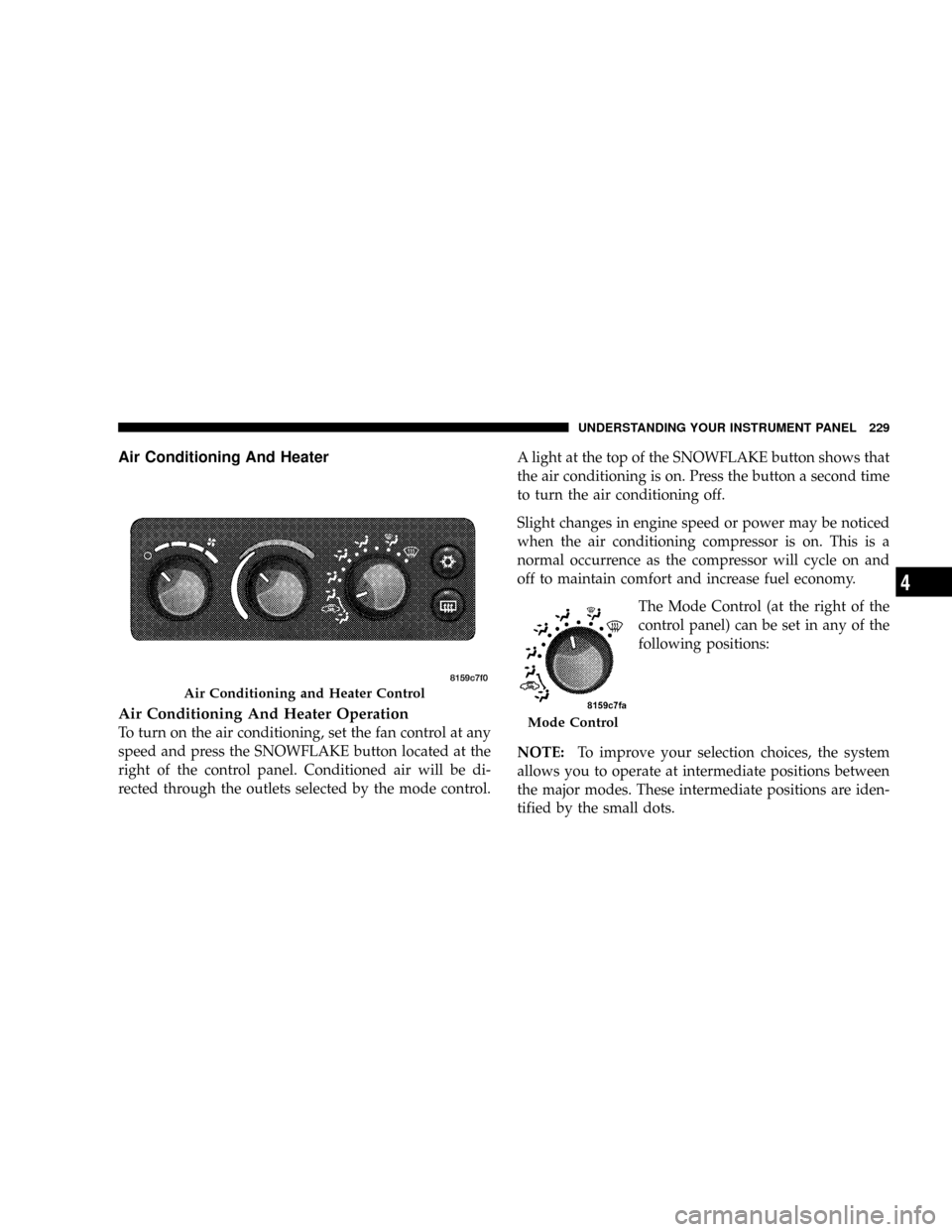
Air Conditioning And Heater Operation
To turn on the air conditioning, set the fan control at any
speed and press the SNOWFLAKE button located at the
right of the control panel. Conditioned air will be di-
rected through the outlets selected by the mode control.A light at the top of the SNOWFLAKE button shows that
the air conditioning is on. Press the button a second time
to turn the air conditioning off.
Slight changes in engine speed or power may be noticed
when the air conditioning compressor is on. This is a
normal occurrence as the compressor will cycle on and
off to maintain comfort and increase fuel economy.
The Mode Control (at the right of the
control panel) can be set in any of the
following positions:
NOTE:To improve your selection choices, the system
allows you to operate at intermediate positions between
the major modes. These intermediate positions are iden-
tified by the small dots.
Air Conditioning and Heater Control
Mode Control
UNDERSTANDING YOUR INSTRUMENT PANEL 229
4
Page 325 of 449
þWhen using the speed control, if you experience speed
drops greater than 10 mph (16 km/h), disengage until
you can resume cruising speed.
þUse speed control in flat terrain and with light loads to
maximize fuel efficiency.
Towing Tips Ð Cooling System
To reduce potential for engine and transmission over-
heating, take the following actions:
þCity Driving
When stopped for short periods of time, put transmission
in NEUTRAL and increase engine idle speed.
þHighway Driving
Reduce speed.
þAir Conditioning
Turn off temporarily.
SNOWPLOW
Snow plows, winches, and other aftermarket equipment
shouldnotbe added to the front end of your vehicle. The
airbag crash sensors may be affected by the change in the
front end structure. The airbags could deploy unexpect-
edly or could fail to deploy during a collision.
WARNING!
Do not add a snow plow, winches, or any other
aftermarket equipment to the front of your vehicle.
This could adversely affect the functioning of the
airbag system and you could be injured.
STARTING AND OPERATING 323
5
Page 339 of 449
Tire Changing Procedure
WARNING!
Getting under a jacked-up vehicle is dangerous. The
vehicle could slip off the jack and fall on you. You
could be crushed. Never get any part of your body
under a vehicle that is on a jack. Never start or run
the engine while the vehicle is on a jack. If you need
to get under a raised vehicle, take it to a service center
where it can be raised on a lift.
Do not raise this vehicle using a bumper jack. The scissor
jack is designed as a tool for changing tires on this vehicle
only. It is not recommended that the jack be used for
service purposes or to lift more than one wheel at a time.
Preparations
1. Park the vehicle on a firm level surface. Avoid icy or
slippery areas.
WARNING!
Do not attempt to change a tire on the side of the
vehicle close to moving traffic. Pull far enough off
the road to avoid the danger of being hit when
operating the jack or changing the wheel.
2. Set the parking brake.
3. Place the shift lever in PARK (automatic transmission).
On 4-Wheel Drive vehicles, shift the transfer case to the
4L position.
4. Turn the ignition OFF.
5. Turn on the Hazard Warning Flasher.
WHAT TO DO IN EMERGENCIES 337
6
Page 365 of 449
Windshield Washers
The fluid reservoir should be checked for fluid level at
regular intervals. When freezing weather is anticipated,
flush out the water in the reservoir by operating the
system. Fill the reservoir with windshield washer anti-
freeze (not radiator antifreeze), and operate the system
for a few seconds to flush out the residual water.
To prevent freeze-up of your windshield washer system
in cold weather, select a solution or mixture that meets or
exceeds the temperature range of your climate. This
rating information can be found on most washer fluid
containers.
WARNING!
Commercially available windshield washer solvents
are flammable. They could ignite and burn you. Care
must be exercised when filling or working around
the washer solution.
Exhaust System
The best protection against carbon monoxide entry into
the vehicle body is a properly maintained engine exhaust
system.
Whenever a change is noticed in the sound of the exhaust
system, when exhaust fumes can be detected inside the
vehicle, or when the underside or rear of the vehicle is
damaged, have a competent mechanic inspect the com-
plete exhaust system and adjacent body areas for broken,
damaged, deteriorated, or mispositioned parts. Open
seams or loose connections could permit exhaust fumes
to seep into the passenger compartment. In addition,
inspect the exhaust system each time the vehicle is raised
for lubrication or oil change. Replace as required.
MAINTAINING YOUR VEHICLE 363
7
Page 402 of 449
EMISSIONS CONTROL SYSTEM MAINTENANCE
The Scheduled Maintenance services listed inbold type,
must be done at the times or mileages specified to ensure
the continued proper functioning of the Emissions Con-
trol System. These, and all other maintenance services
included in this manual, should be done to provide best
vehicle performance and reliability. More frequent main-
tenance may be needed for vehicles in severe operating
conditions, such as dusty areas and very short trip
driving.
Inspection and service should also be done anytime a
malfunction is suspected.
NOTE:Maintenance, replacement, or repair of the emis-
sions control devices and systems on your vehicle may be
performed by any automotive repair establishment or
individual using any automotive part that has been
certified pursuant to U.S. EPA or in the State of Califor-
nia, California Air Resources Board regulations.
MAINTENANCE SCHEDULE
The oil change indicator system will remind you that it is
time to take your vehicle in for scheduled maintenance.
The ªChange Oilº message will flash in the instrument
cluster odometer and a single chime will sound, indicat-
ing that an oil change is necessary.
Based on engine operation conditions the oil change
indicator message will illuminate, this means that service
is required for your vehicle. Have your vehicle serviced
as soon as possible, within the next 500 miles (805 km).
NOTE:
²The oil change indicator message will not monitor the
time since the last oil change. Change your vehicle's
oil if it has been six months since your last oil change,
even if the oil change indicator message is NOT
illuminated.
400 MAINTENANCE SCHEDULES
8
M
A
I
N
T
E
N
A
N
C
E
S
C
H
E
D
U
L
E
S
Page 403 of 449
²Change your engine oil more often if you drive your
vehicle off-road for an extended period of time.
²Under no circumstances should oil change intervals
exceed 6,000 miles (10,000 km) or 6 months, whichever
comes first.
Your authorized dealer will reset the oil change indicator
message after completing the scheduled oil change. If this
scheduled oil change is performed by someone other
than your authorized dealer the message can be reset by
referring to the steps described under ªOil Change
Requiredº in ªUse Factory Settingsº of the EVIC section
in this manual, or under ªOdometer/Trip Odometerº in
the ªInstrument Cluster Descriptions section of this
manual.
At Each Stop for Fuel
²Check the engine oil level about five minutes after a
fully warmed engine is shut off. Checking the oil levelwhile the vehicle is on level ground will improve the
accuracy of the oil level reading. Add oil only when
the level is at or below the ADD or MIN mark.
²Check the windshield washer solvent and add if
required.
Once a Month
²Check tire pressure and look for unusual wear or
damage.
²Inspect the battery, and clean and tighten the terminals
as required.
²Check the fluid levels of coolant reservoir, brake
master cylinder, power steering and transmission, and
add as needed.
²Check all lights and other electrical items for correct
operation.
MAINTENANCE SCHEDULES 401
8
M
A
I
N
T
E
N
A
N
C
E
S
C
H
E
D
U
L
E
S
Page 437 of 449
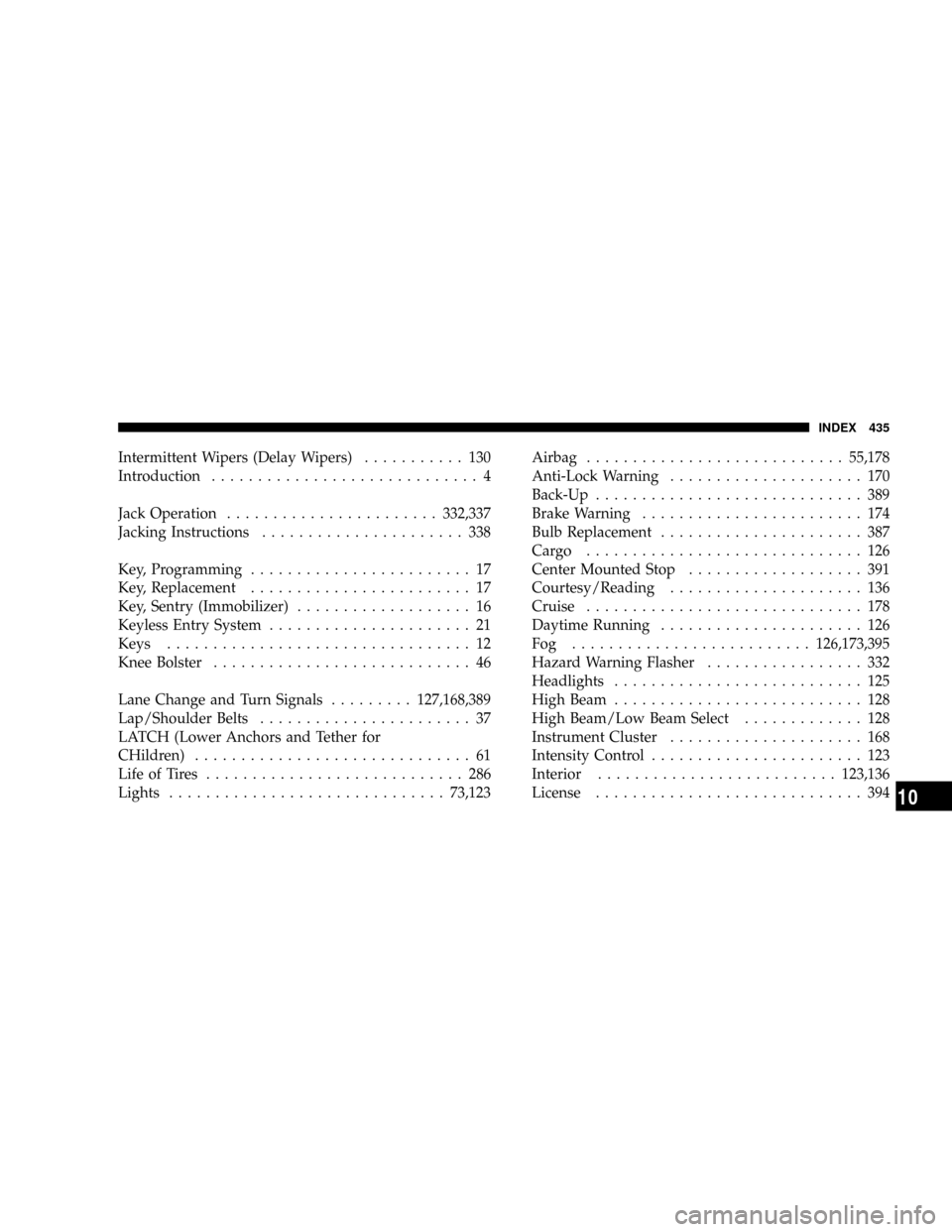
Intermittent Wipers (Delay Wipers)........... 130
Introduction............................. 4
Jack Operation.......................332,337
Jacking Instructions...................... 338
Key, Programming........................ 17
Key, Replacement........................ 17
Key, Sentry (Immobilizer)................... 16
Keyless Entry System...................... 21
Keys................................. 12
Knee Bolster............................ 46
Lane Change and Turn Signals.........127,168,389
Lap/Shoulder Belts....................... 37
LATCH (Lower Anchors and Tether for
CHildren).............................. 61
Life of Tires............................ 286
Lights..............................73,123Airbag............................55,178
Anti-Lock Warning..................... 170
Back-Up............................. 389
Brake Warning........................ 174
Bulb Replacement...................... 387
Cargo .............................. 126
Center Mounted Stop................... 391
Courtesy/Reading..................... 136
Cruise.............................. 178
Daytime Running...................... 126
Fog ..........................126,173,395
Hazard Warning Flasher................. 332
Headlights........................... 125
High Beam........................... 128
High Beam/Low Beam Select............. 128
Instrument Cluster..................... 168
Intensity Control....................... 123
Interior..........................123,136
License............................. 394
INDEX 435
10
Page 447 of 449

INTRODUCTION INTRODUCTION HOW TO USE THIS MANUAL WARNINGS AND CAUTIONS VEHICLE IDENTIFICATION NUMBER VEHICLE MODIFICATIONS/ALTERATIONS THINGS TO KNOW BEFORE STARTING YOUR VEHICLE A WORD ABOUT YOUR KEYS
Ignition Key RemovalLocking Doors With The KeySTEERING WHEEL LOCK - IF EQUIPPED If You Wish To Manually Lock The Steering WheelTo Release The SteeringWheel LockAutomatic Transmission Ignition Interlock SystemSENTRY KEY IMMOBILIZER SYSTEM
- IF EQUIPPED Replacement KeysCustomer Key ProgrammingVEHICLE SECURITY ALARM SYSTEM - IF EQUIPPED To Set the AlarmTo Disarm the SystemILLUMINATED ENTRY Vehicles Equipped With Power Door LocksREMOTE KEYLESS ENTRY To Unlock The
DoorsTo Lock The DoorsUsing The Panic AlarmGeneral InformationProgramming Additional TransmittersBattery ReplacementREMOTE STARTING SYSTEM -IF EQUIPPED DOOR LOCKS Manual Door LocksPower Door LocksChild Protection Door LockWINDOWS Power
WindowsAuto Down (Drivers Side Only)Window Lockout SwitchWind BuffetingOCCUPANT RESTRAINTS Lap/Shoulder BeltsAdjustable Upper Shoulder Belt AnchorageAutomatic Locking Retractors (ALR) Mode - If EquippedCenter Lap BeltsSeat Belt Pretensioners
Enhanced Driver Seat Belt Reminder System (BeltAlert) Seat Belts And Pregnant WomenSeat Belt ExtenderDriver And Right Front Passenger Supplemental Restraint System (SRS) - AirbagsEvent Data Recorder (EDR)Child RestraintENGINE BREAK-IN
RECOMMENDATIONS SAFETY TIPS Exhaust SystemSafety Checks You Should Make Inside The VehicleSafety Checks You Should Make Outside The VehicleUNDERSTANDING THE FEATURES OF YOUR VEHICLE MIRRORS Inside Day/Night MirrorOutside Mirrors
Outside Mirrors Folding Feature - If EquippedPower MirrorsHANDS-FREE COMMUNICATION (UConnect) - IF EQUIPPED OperationPhone Call FeaturesUConnect System FeaturesAdvanced Phone ConnectivityThings You Should Know About Your UConnect System
General InformationVOICE RECOGNITION SYSTEM (VR) - IF EQUIPPED Voice Recognition System (VR) OperationCommandsVoice TrainingSEATS Manual Seat AdjustmentFront Seats Manual Seat ReclinersManual Lumbar Support Adjustment - If EquippedAdjustable
Head Restraints - Front Seating PositionsSix-Way Power Seat Adjuster - Drivers Side OnlyExtended Cab/Crew Cab Rear SeatHeated Seats - If EquippedTOOPEN AND CLOSE THE HOOD LIGHTS Interior LightsBattery SaverHeadlight DelayHeadlights, Parking Lights
And Panel LightsDaytime Running Lights (Canada - Standard and U.S. Fleet Vehicles) - If EquippedLights-on ReminderFog Lights - If EquippedCargo Light - If EquippedMultifunction LeverWINDSHIELD WIPERS AND WASHERS Windshield WipersWindshield Washers
TILT STEERING COLUMN ELECTRONIC SPEED CONTROL - IF EQUIPPED To ActivateTo Set At A Desired SpeedTo DeactivateTo Resume SpeedTo Vary The Speed SettingTo Accelerate For PassingOVERHEAD CONSOLE Courtesy/Reading Lights
COMPASS/TEMPERATURE MINI-TRIP COMPUTER US/M ButtonRESET ButtonSTEP ButtonAverage Fuel Economy (AVG ECO)Distance To Empty (DTE)Trip Odometer (ODO)Elapsed Time (ET)C/T ButtonGlobal ResetCompass/Temperature DisplayAutomatic Compass
CalibrationManual Compass CalibrationTo Put Into a Calibration ModeOutside TemperatureGARAGE DOOR OPENER - IF EQUIPPED Programming HomeLinkGate Operator/Canadian ProgrammingUsing HomeLinkReprogramming A Single HomeLink ButtonSecurity
Troubleshooting TipsGeneral InformationELECTRICAL POWER OUTLETS Electrical Outlet Use With Engine OFF (Battery Fed Configuration)CUPHOLDERS REAR STORAGE - IF EQUIPPED Rear Convenience Storage CratesPlastic Grocery Bag Retainers FLOOR
CONSOLE - IF EQUIPPED Floor Console FeaturesREAR CARGO AREA UTILITY RAILS REAR WINDOW FEATURES Rear Window Defroster - If EquippedSliding Rear Window - If EquippedSLIDE-IN CAMPERS Camper ApplicationsGeneral InformationCarbon Monoxide
Warning-Vehicles Equipped With A Cap or Slide-In CampersTAILGATE Tailgate RemovalTwo-Position Tailgate/Upper Load PlatformUNDERSTANDING YOURINSTRUMENT PANEL INSTRUMENTS AND CONTROLS INSTRUMENT CLUSTER INSTRUMENT CLUSTER
DESCRIPTION ELECTRONIC DIGITAL CLOCK Clock Setting ProcedureSALES CODE REQ - AM/FM STEREO RADIO AND 6-DISC CD/DVD CHANGER (MP3/WMA AUX JACK) Operating Instructions - Radio ModeOperation Instructions - (DISC MODE for CD and
MP3/WMA Audio Play, DVD-VIDEO)Notes On Playing MP3/WMA FilesLIST Button (DISC Mode for MP3/WMA Play)INFO Button (DISC Mode for MP3/WMA Play)AM/FM/CD/DVD MULTIMEDIA SYSTEM RADIO (RER/REN) - IF EQUIPPED Operating Instructions - Voice
Recognition System (VR) - If EquippedOperating Instructions - Hands-Free Communication (UConnect) - If EquippedClock Setting ProcedureSALES CODE RES - AM/FM STEREO RADIO WITH CD PLAYER (MP3 AUX JACK) Operating Instructions - Radio ModeOperation
Instructions - CD MODE For CD And MP3 Audio PlayNotes on Playing MP3 FilesOperation Instructions - Auxiliary ModeSALES CODE RES/RSC - AM/FM STEREO RADIO WITH CD PLAYER (MP3 AUX JACK) AND SIRIUS RADIO Operating Instructions - Radio Mode
Operation Instructions - CD MODE for CD and MP3 Audio PlayNotes On Playing MP3 FilesLIST Button (CD Mode for MP3 Play)INFO Button (CD Mode for MP3 Play)SOUND BOX OPERATION SATELLITE RADIO - IF EQUIPPED (REN/REQ/RER/RES/REU RADIOS ONLY)
System ActivationElectronic Serial Number/Sirius Identification Number (ESN/SID)Selecting Satellite ModeSatellite AntennaReception QualityOperating Instructions - Satellite ModeOperating Instructions - Hands-Free Phone (If Equipped)Operating Instructions - Video
Entertainment System (VES) (If Equipped)REMOTE SOUND SYSTEM CONTROLS - IF EQUIPPED Radio OperationCD PlayerCD/DVD MAINTENANCE RADIO OPERATION AND CELLULAR PHONES CLIMATE CONTROLS Air Conditioning And Heater Operating Tips
Operation Tips Chart STARTING AND OPERATING STARTING PROCEDURES Manual TransmissionAutomatic TransmissionNormal StartingExtreme Cold Weather(below -20 degrees F or -29 degrees C)If Engine Fails To StartAfter StartingENGINE BLOCK HEATER -
IF EQUIPPED MANUAL TRANSMISSION Shifting DownshiftingReverse ShiftingAUTOMATIC TRANSMISSION Brake/Transmission Interlock SystemAutomatic TransmissionFOUR-WHEEL DRIVE OPERATION NV233/243 GII Transfer Case Operating Information/
PrecautionsShifting Procedure - NV233/243 Transfer Case NV 244 Generation II Transfer Case Operating Information / PrecautionsShifting Procedure - NV 244 Generation II Transfer Case LIMITED-SLIP REAR AXLE DIFFERENTIAL - IF EQUIPPED DRIVING ON SLIPPERY
SURFACES DRIVING THROUGH WATER Flowing/Rising WaterShallow Standing WaterPOWER STEERING Power Steering Fluid CheckPARKING BRAKE BRAKE SYSTEM Rear-Wheel Anti-Lock Brake System (ABS) - If EquippedFour-Wheel Anti-Lock Brake System
(ABS)TIRE SAFETY INFORMATION Tire Markings Tire Identification Number (TIN)Tire Loading and Tire PressureTIRES - GENERAL INFORMATION Tire PressureTire Inflation PressuresTire Pressures for High Speed OperationRadial Ply TiresCompact Spare Tire - If
EquippedLimited-Use Spare - If EquippedTire SpinningTread Wear IndicatorsLife of TireReplacement TiresAlignment And BalanceSUPPLEMENTAL TIREPRESSURE
INFORMATION - IF EQUIPPED TIRE CHAINS SNOW TIRES TIRE ROTATION RECOMMENDATIONS TIRE PRESSURE MONITOR SYSTEM (TPMS) - IF EQUIPPED Base System - If EquippedGeneral InformationFUEL REQUIREMENTS Reformulated Gasoline
Gasoline/Oxygenate BlendsE-85 Usage In Non-Flex Fuel VehiclesMMT In GasolineMaterials Added To FuelFuel System CautionsCarbon Monoxide WarningsFLEXIBLE FUEL (4.7L ENGINE ONLY) - IF EQUIPPED E-85 General InformationETHANOL FUEL (E-85)Fuel
RequirementsSelection Of Engine Oil For Flexible Fuel Vehicles (E-85) and Gasoline VehiclesStartingCruising RangeReplacement PartsADDING FUELFuel Filler Cap (Gas Cap)VEHICLE LOADING Certification LabelCurb WeightLoadingTRAILER TOWING Common Towing
DefinitionsTrailer Hitch ClassificationTrailer Towing Weights (Maximum Trailer Weight Ratings)Trailer and Tongue WeightTowing RequirementsTowing TipsSNOWPLOW RECREATIONAL TOWING (BEHIND MOTORHOME, ETC.) 2WD Models4WD ModelsWHAT TO DO
IN EMERGENCIES HAZARD WARNING FLASHER CHANGING A FLAT TIRE Jack LocationRemoving The Spare TireTire Changing ProcedurePreparationsInstructionsTo Stow the Flat or SpareJUMP-STARTING FREEING A STUCK VEHICLE EMERGENCY TOW HOOKS
- IF EQUIPPED TOWING A DISABLED VEHICLE Four-Wheel Drive VehiclesTwo-Wheel Drive VehiclesMAINTAINING YOUR VEHICLE ENGINE COMPARTMENT - 3.7L ENGINE COMPARTMENT - 4.7L ONBOARD DIAGNOSTIC SYSTEM - OBD II Loose Fuel Filler Cap
MessageEMISSIONS INSPECTION AND MAINTENANCE PROGRAMS REPLACEMENT PARTS DEALER SERVICE MAINTENANCE PROCEDURES Engine OilEngine Oil FilterEngine Air Cleaner FilterMaintenance-Free BatteryAir Conditioner MaintenanceDrive Shaft
Constant Velocity JointsBody LubricationWindshield Wiper BladesWindshield WashersExhaust SystemCooling SystemBrake SystemClutch HydraulicSystemManual TransmissionAutomatic TransmissionTransfer CaseAxlesAppearance Care and Protection from Corrosion
FUSES Underhood Fuses (Power Distribution Center)VEHICLE STORAGE REPLACEMENT LIGHT BULBS BULB REPLACEMENT Headlight (Halogen)/Front Park And Turn LightsRear Side Marker, Taillamps/Stop Lamps, And Turn Signal Bulbs - ReplacementCenter
High-Mounted Stop Light And Cargo LampLicense LampsFog LightsFLUIDS AND CAPACITIES FLUIDS, LUBRICANTS AND GENUINE PARTS EngineChassisMAINTENANCE SCHEDULES EMISSIONS CONTROL SYSTEM MAINTENANCE MAINTENANCE SCHEDULE
Required Maintenance IntervalsIF YOU NEED CONSUMER ASSISTANCE SUGGESTIONS FOR OBTAINING SERVICE FOR YOUR VEHICLE Prepare For The AppointmentPrepare A ListBe Reasonable With RequestsWARRANTY INFORMATION (U.S. Vehicles Only)
MOPAR PARTS REPORTING SAFETY DEFECTS In The 50 United States And Washington, D.CIn CanadaPUBLICATION ORDER FORMS DEPARTMENT OF TRANSPORTATION UNIFORM TIRE QUALITY GRADES TreadwearTraction GradesTemperature GradesIF YOU
NEED ASSISTANCE Chrysler LLC Customer CenterChrysler Canada Inc. Customer CenterIn Mexico contactCustomer Assistance For The Hearing Or Speech Impaired (TDD/TTY)Service ContractINDEX