CD player DODGE DAKOTA 2009 3.G Owners Manual
[x] Cancel search | Manufacturer: DODGE, Model Year: 2009, Model line: DAKOTA, Model: DODGE DAKOTA 2009 3.GPages: 449, PDF Size: 10.96 MB
Page 112 of 449
General Information
This device complies with Part 15 of the FCC rules and
RSS 210 of Industry Canada. Operation is subject to the
following conditions:
²Changes or modifications not expressly approved by
the party responsible for compliance could void the
user's authority to operate the equipment.
²This device may not cause harmful interference.
²This device must accept any interference received,
including interference that may cause undesired
operation.
VOICE RECOGNITION SYSTEM (VR) Ð IF
EQUIPPED
Voice Recognition System (VR) Operation
This Voice Recognition System allows you to
control your AM, FM radio, satellite radio, disc
player, and a memo recorder.
NOTE:Take care to speak into the Voice Interface
System as calmly and normally as possible. The ability of
the Voice Interface System to recognize user voice com-
mands may be negatively affected by rapid speaking or a
raised voice level.
WARNING!
Any voice commanded system should be used only
in safe driving conditions and all attention should be
kept on the roadway ahead. Failure to do so may
result in an accident causing serious injury or death.
110 UNDERSTANDING THE FEATURES OF YOUR VEHICLE
Page 166 of 449
NOperating Instructions Ð Hands-Free
Communication (UConnectt)Ð
If Equipped......................... 196
NClock Setting Procedure................ 196
mSales Code RES Ð AM/FM Stereo Radio With
CD Player (MP3 AUX Jack)................ 198
NOperating Instructions Ð Radio Mode...... 199
NOperation Instructions Ð CD Mode For CD
And MP3 Audio Play.................. 202
NNotes On Playing MP3 Files............. 204
NOperation Instructions - Auxiliary Mode.... 207
mSales Code RES/RSC Ð AM/FM Stereo Radio
With CD Player (MP3 AUX Jack) And Sirius
Radio............................... 207
NOperating Instructions Ð Radio Mode...... 208NOperation Instructions Ð CD Mode For CD
And MP3 Audio Play.................. 214
NNotes On Playing MP3 Files............. 216
NList Button (CD Mode For MP3 Play)...... 218
NInfo Button (CD Mode For MP3 Play)...... 219
mSound Box Operation................... 220
mSatellite Radio Ð If Equipped
(REN/REQ/RER/RES/REU Radios Only)..... 221
NSystem Activation.................... 221
NElectronic Serial Number/Sirius
Identification Number (ESN/SID)......... 221
NSelecting Satellite Mode................ 222
NSatellite Antenna..................... 222
NReception Quality.................... 223
164 UNDERSTANDING YOUR INSTRUMENT PANEL
Page 167 of 449
NOperating Instructions Ð Satellite Mode.... 223
NOperating Instructions Ð Hands-Free Phone
(If Equipped)........................ 226
NOperating Instructions Ð Video
Entertainment System (VES)Ÿ
(If Equipped)........................ 226
mRemote Sound System Controls Ð
If Equipped........................... 226
NRadio Operation..................... 227NCD Player.......................... 227
mCD/DVD Maintenance.................. 227
mRadio Operation And Cellular Phones....... 228
mClimate Controls...................... 228
NAir Conditioning And Heater............ 229
NOperating Tips...................... 232
NOperation Tips Chart.................. 234
UNDERSTANDING YOUR INSTRUMENT PANEL 165
4
Page 188 of 449
²Audio Stream ± Repeatedly pressing SELECT will
switch to different audio languages (if supported on
the disc) (if equipped).
²Angle ± Repeatedly pressing SELECT will change
the viewing angle if supported by the DVD disc (if
equipped).
NOTE:
²The available selections for each of the above entries
varies depending upon the disc.
²These selections can only be made while playing a
DVD.
²VESŸ Power -Allows you to turn VESŸ ON and
OFF (if equipped).
²VESŸ Lock -Locks out rear VESŸ remote controls (if
equipped).
²VESŸ CH1/CH2 -Allows the user to change the
mode of either the IR1 or IR2, wireless headphones by
pressing the AUDIO/SELECT button (if equipped).
²Set Home Clock -Pressing the SELECT button allows
you to set the clock. Turn the TUNE/SCROLL control
knob to adjust the hours and then press and turn the
TUNE/SCROLL control knob to adjust the minutes.
Press the TUNE/SCROLL control knob again to save
changes.
²Player Defaults -Selecting this item will allow the
user to scroll through the following items, and set
defaults according to customer preference.
Menu Language Ð If Equipped
Selecting this item will allow the user to choose the
default startup DVD menu language (effective only if
language supported by disc). If you want to select a
language not listed, then scroll down and select9other.9
186 UNDERSTANDING YOUR INSTRUMENT PANEL
Page 189 of 449
Enter the four-digit country code using the TUNE/
SCROLL control knob to scroll up and down to select the
number and then push to select.
Audio Language Ð If Equipped
Selecting this item allows you to choose a default audio
language (effective only if the language is supported by
the disc). You can select a language not listed by scrolling
down and selecting9other.9Enter the country code using
the TUNE/SCROLL control knob to scroll up and down
to select the number and then push to select.
Subtitle Language Ð If Equipped
Selecting this item allows you to choose a default subtitle
language (effective only if the language is supported by
the disc). You can select a language not listed by scrolling
down and selecting9other.9Enter the country code using
the TUNE/SCROLL control knob to scroll up and down
to select the number and then push to select.Subtitles Ð If Equipped
Selecting this item allows you to choose between subtitle
Off or On.
Audio DRC Ð If Equipped
Selecting this item allows you to limit maximum audio
dynamic range. The default is set to9High,9and under
this setting, dialogues will play at 11 db higher than if the
setting is9Normal.9
Aspect Ratio Ð If Equipped
Selecting this item allows you to choose between wide
screen, pan scan, and letter box.
AutoPlay Ð If Equipped
When this is set to On and a DVD video is inserted, it will
bypass the DVD menu screen and automatically play the
movie. In some rare cases, the DVD player may not
auto-play the main title. In such cases, use the MENU
button on the remote control to select desired title to play.
UNDERSTANDING YOUR INSTRUMENT PANEL 187
4
Page 191 of 449
Operation Instructions - (DISC MODE for CD and
MP3/WMA Audio Play, DVD-VIDEO)
The radio DVD player and many DVD discs are coded by
geographic region. These region codes must match in
order for the disc to play. If the region code for the DVD
disc does not match the region code for the radio DVD
player, it will not play the disc. Customers may take their
vehicle to an authorized dealer to change the region code
of the player a maximum of five times.
CAUTION!
The radio may shut down during extremely hot
conditions. When this occurs, the radio will indicate
ªDisc Hotº and shut off until a safe temperature is
reached. This shutdown is necessary to protect the
optics of the DVD player and other radio internal
components.NOTE:The ignition switch must be in the ON or ACC
position to operate the radio.
LOAD Button Ð Loading Compact Disc(s)
Press the LOAD button and the pushbutton with the
corresponding number (1-6) where the CD is being
loaded. The radio will display PLEASE WAIT and
prompt when to INSERT DISC. After the radio displays
9INSERT DISC,9insert the CD into the player.
Radio display will show9LOADING DISC9when the disc
is loading and ªREADING DISCº when the radio is
reading the disc.
CAUTION!
This CD player will accept 4±3/4 in (12 cm) discs only.
The use of other sized discs may damage the CD
player mechanism.
UNDERSTANDING YOUR INSTRUMENT PANEL 189
4
Page 192 of 449
Eject Button Ð Ejecting Compact Disc(s)
Press the EJECT button and the pushbutton
with the corresponding number (1-6) where the
CD was loaded and the disc will unload and
move to the entrance for easy removal. Radio
display will show9EJECTING DISC9when the disc is
being ejected and prompt the user to remove the disc.
Press and hold the EJECT button for five seconds and all
CDs will be ejected from the radio.
The disc can be ejected with the radio and ignition OFF.
SEEK Button (CD MODE)
Press the right SEEK button for the next selection on the
CD. Press the left SEEK button to return to the beginning
of the current selection, or return to the beginning of the
previous selection if the CD is within the first second of
the current selection. Pressing and holding the SEEK
button will allow you to scroll through the tracks faster in
CD, MP3/MWA modes.
SCAN Button (CD MODE)
Press the SCAN button to scan through each track on the
CD currently playing.
TIME Button (CD MODE)
Press this button to change the display from a large CD
playing time display to a small CD playing time display.
RW/FF (CD MODE)
Press and hold FF (Fast Forward) and the CD player will
begin to fast forward until FF is released, or RW or
another CD button is pressed. The RW (Rewind) button
works in a similar manner.
AM or FM Button (CD MODE)
Switches the Radio into the AM or FM Radio mode.
190 UNDERSTANDING YOUR INSTRUMENT PANEL
Page 196 of 449
Press and hold the INFO button again for three seconds
to return to9elapsed time9display.
Operation Instructions - Auxiliary Mode
The auxiliary (AUX) jack is an audio input jack, which
allows the user to plug in a portable device such as an
MP3/WMA player, cassette player, or microphone and
utilize the vehicle's audio system to amplify the source
and play through the vehicle speakers.
Pressing the AUX button will change the mode to auxil-
iary device if the AUX jack is connected.
NOTE:The AUX device must be turned on and the
device's volume set to the proper level. If the AUX audio
is not loud enough, turn the device's volume up. If the
AUX audio sounds distorted, turn the device's volume
down.
SEEK Button (Auxiliary Mode)
No function.
SCAN Button (Auxiliary Mode)
No function.
EJECT Button (Auxiliary Mode)
No function.
TIME Button (Auxiliary Mode)
Press the TIME button to change the display from
elapsed playing time to time of day. The time of day will
display for five seconds.
RW/FF (Auxiliary Mode)
No function.
SET Button (Auxiliary Mode)
No function.
194 UNDERSTANDING YOUR INSTRUMENT PANEL
Page 198 of 449
AM/FM/CD/DVD MULTIMEDIA SYSTEM RADIO
(RER/REN) ± IF EQUIPPED
NOTE:The sales code is located on the lower right side
of the unit's faceplate.
The REN and RER Multimedia systems contain a radio,
CD/DVD player, USB port, a 20-gigabyte hard drive
(HDD), and a ªJukeBoxº (virtual CD changer). Sirius
Satellite Radio is optional. The 6.5 in (16.5 cm) touch
screen allows for easy menu selection.
The RER radio also contains a Global Positioning System
(GPS)-based Navigation system.
Refer to your Multimedia system (REN) or Navigation
(RER) user's manual for detailed operating instructions.
Operating Instructions Ð Voice Recognition
System (VR) Ð If Equipped
For the radio, refer to ªVoice Recognition System (VR)º in
Section 3.
Operating Instructions Ð Hands-Free
Communication (UConnectT) Ð If Equipped
Refer to ªHands-Free Communication (UConnectt)º in
Section 3.
Clock Setting Procedure
Global Positioning System (GPS) Ð RER only
The GPS receiver used in this system is synchronized to
the time data being transmitted by the GPS satellite. The
satellite clock is Greenwich Mean Time (GMT). This is the
worldwide standard for time. This makes the system's
clock very accurate, once the appropriate time zone and
daylight savings information is set.
To Manually Set the Clock Ð RER/REN
1. Turn on the multimedia system.
2. Touch the screen where the time is displayed. The
clock setting menu will appear on the screen.
196 UNDERSTANDING YOUR INSTRUMENT PANEL
Page 200 of 449
Touch the screen where the words ªShow Time if Radio is
Offº are displayed to change the current setting.
Changing the Time Zone
1. Turn on the multimedia system.
2. Touch the screen where the time is displayed. The
clock setting menu will appear on the screen.
3. Touch the screen where the words ªSet Time Zoneº are
displayed. The time zone selection menu will appear on
the screen.
4. Select a time zone by touching the screen where your
selection appears. If you do not see a time zone that you
want to select, touch the screen where the word ªPageº is
displayed to view additional time zones in the menu.
5. Touch the screen where the word ªSaveº is displayed.
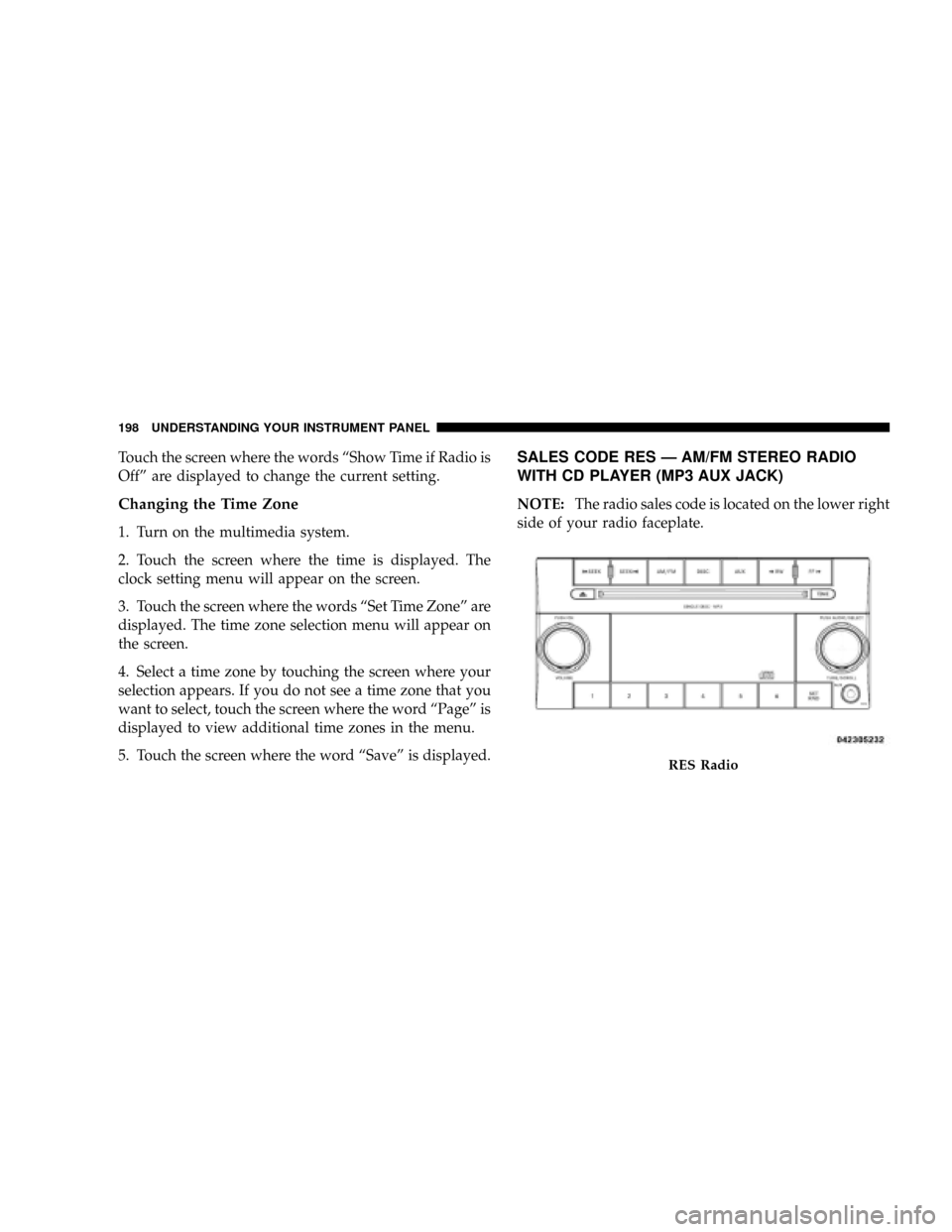
SALES CODE RES Ð AM/FM STEREO RADIO
WITH CD PLAYER (MP3 AUX JACK)
NOTE:The radio sales code is located on the lower right
side of your radio faceplate.
RES Radio
198 UNDERSTANDING YOUR INSTRUMENT PANEL