radio DODGE DAKOTA 2010 3.G Repair Manual
[x] Cancel search | Manufacturer: DODGE, Model Year: 2010, Model line: DAKOTA, Model: DODGE DAKOTA 2010 3.GPages: 450, PDF Size: 9.32 MB
Page 234 of 450
RW/FF
Pressing the RW (Rewind) or FF (Fast Forward) buttons
causes the tuner to search for the next channel in the
direction of the arrows.
TUNE Control (Rotary)
Turn the rotary TUNE/SCROLL control knob clockwise
to increase or counterclockwise to decrease the channel.
MUSIC TYPE Button — Except REU Radio
Pressing this button once will turn on the Music Type mode
for five seconds. Pressing the MUSIC TYPE button or
turning the TUNE/SCROLL control knob within five sec-
onds will allow the program format type to be selected.
Toggle the MUSIC TYPE button again to select the music
type.
By pressing the SEEK button when the Music Type
function is active, the radio will be tuned to the next
channel with the same selected Music Type name.If a preset button is activated while in the Music Type
(Program Type) mode, the Music Type mode will be
exited and the radio will tune to the preset channel.
MUSIC TYPE Button — REU Radio
Pressing this button provides a Music Type list from
which you can make a selection. Once a selection is
made, you can seek up or down or scan the channels and
the radio will tune to the next station matching the
selected format. There is no time-out for this screen.
Pressing the MUSIC TYPE button again will close the
Music Type screen. Once closed, seek up, seek down, and
scan will no longer be based on your selection.
SETUP Button
Pressing the SETUP button allows you to select the
following items:
•Display Sirius ID number — Press the AUDIO/
SELECT button to display the Sirius ID number. This
number is used to activate, deactivate, or change the
Sirius subscription.
4
UNDERSTANDING YOUR INSTRUMENT PANEL 233
Page 235 of 450
SET Button – To Set the Pushbutton Memory
When you are receiving a channel that you wish to
commit to pushbutton memory, press the SET button.
The symbol SET 1 will now show in the display window.
Select the button (1-6) you wish to lock onto this channel
and press and release that button. If a button is not
selected within five seconds after pressing the SET but-
ton, the channel will continue to play but will not be
stored into pushbutton memory.
You may add a second channel to each pushbutton by
repeating the above procedure with this exception: Press
the SET button twice and SET 2 will show in the display
window. Each button can be set for SET 1 and SET 2. This
allows a total of 12 Satellite channels to be stored into
pushbutton memory. The channels stored in SET 2
memory can be selected by pressing the pushbutton
twice.Every time a preset button is used, a corresponding
button number will display.
Buttons 1 - 6
These buttons tune the radio to the channels that you
commit to pushbutton memory (12 Satellite stations).
Operating Instructions — Uconnect™ Phone (If
Equipped)
Refer to “Uconnect™ Phone” in “Understanding The
Features Of Your Vehicle”.
Operating Instructions — Video Entertainment
System (VES)™ (If Equipped)
Refer to separate “Video Entertainment System (VES)™
Guide.”
234 UNDERSTANDING YOUR INSTRUMENT PANEL
Page 236 of 450
REMOTE SOUND SYSTEM CONTROLS — IF
EQUIPPED
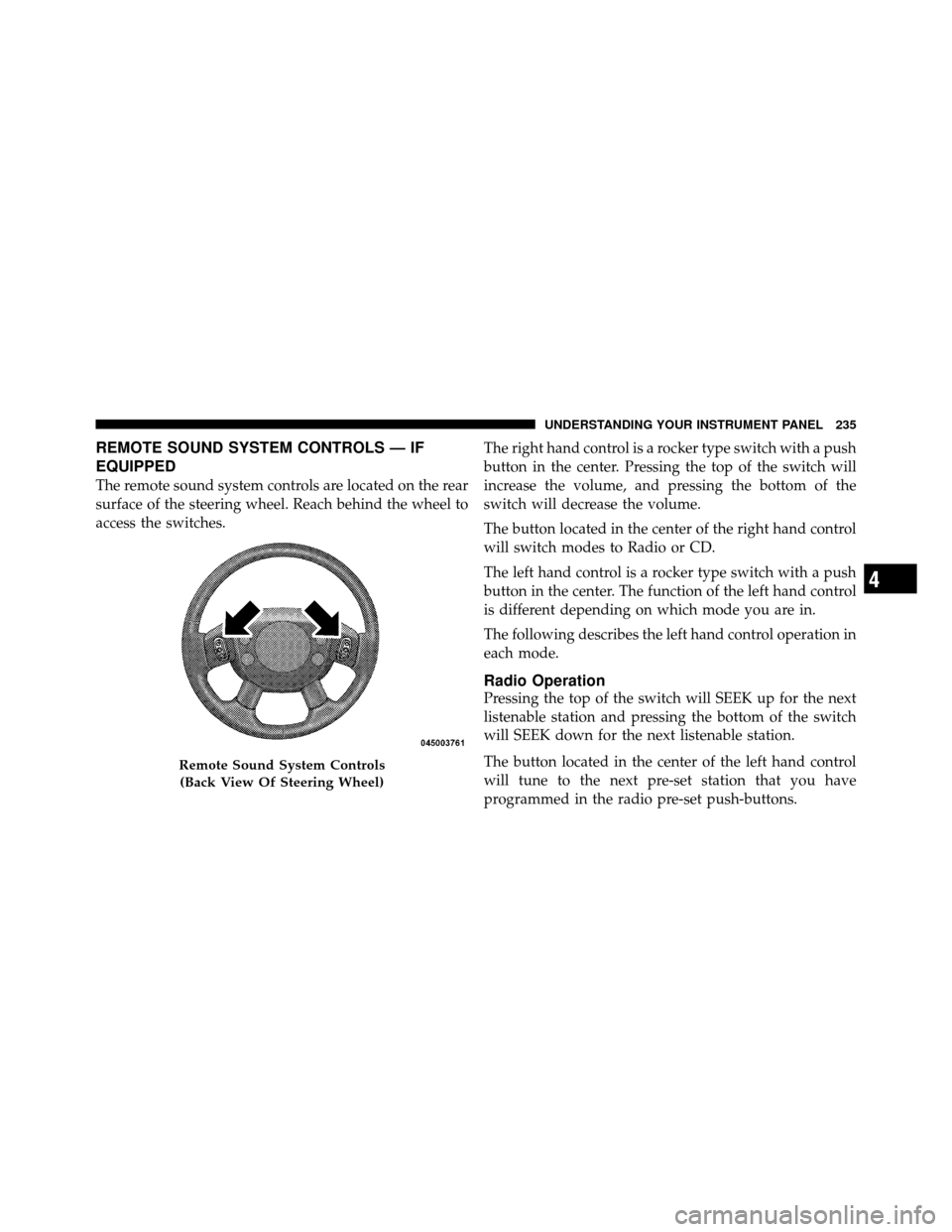
The remote sound system controls are located on the rear
surface of the steering wheel. Reach behind the wheel to
access the switches.The right hand control is a rocker type switch with a push
button in the center. Pressing the top of the switch will
increase the volume, and pressing the bottom of the
switch will decrease the volume.
The button located in the center of the right hand control
will switch modes to Radio or CD.
The left hand control is a rocker type switch with a push
button in the center. The function of the left hand control
is different depending on which mode you are in.
The following describes the left hand control operation in
each mode.
Radio Operation
Pressing the top of the switch will SEEK up for the next
listenable station and pressing the bottom of the switch
will SEEK down for the next listenable station.
The button located in the center of the left hand control
will tune to the next pre-set station that you have
programmed in the radio pre-set push-buttons.
Remote Sound System Controls
(Back View Of Steering Wheel)
4
UNDERSTANDING YOUR INSTRUMENT PANEL 235
Page 237 of 450
CD Player
Pressing the top of the switch once will go to the next
track on the CD. Pressing the bottom of the switch once
will go to the beginning of the current track or to the
beginning of the previous track if it is within one second
after the current track begins to play.
If you press the switch up or down twice it plays the
second track, three times, it will play the third, etc.
The button in the center of the left hand switch changes
CD’s on the 6–Disc in-dash CD changer radio. This
button does not function for all other radios.
CD/DVD DISC MAINTENANCE
To keep a CD/DVD in good condition, take the following
precautions:
1. Handle the disc by its edge; avoid touching the
surface.2. If the disc is stained, clean the surface with a soft cloth,
wiping from center to edge.
3. Do not apply paper or tape to the disc; avoid scratch-
ing the disc.
4. Do not use solvents such as benzene, thinner, cleaners,
or anti-static sprays.
5. Store the disc in its case after playing.
6. Do not expose the disc to direct sunlight.
7. Do not store the disc where temperatures may become
too high.
NOTE:
If you experience difficulty in playing a particu-
lar disc, it may be damaged (i.e., scratched, reflective
coating removed, a hair, moisture or dew on the disc)
oversized, or have protection encoding. Try a known
good disc before considering disc player service.
236 UNDERSTANDING YOUR INSTRUMENT PANEL
Page 238 of 450
RADIO OPERATION AND CELLULAR PHONES
Under certain conditions, the cellular phone being on in
your vehicle can cause erratic or noisy performance from
your radio. This condition may be lessened or eliminated
by relocating the cellular phone antenna. This condition
is not harmful to the radio. If your radio performance
does not satisfactorily “clear” by the repositioning of the
antenna, it is recommended that the radio volume be
turned down or off during cellular phone operation.
CLIMATE CONTROLS
The controls for the heating, ventilation and air condi-
tioning system in this vehicle consist of a series of rotary
knobs. These comfort controls can be set to obtain desired
interior conditions.
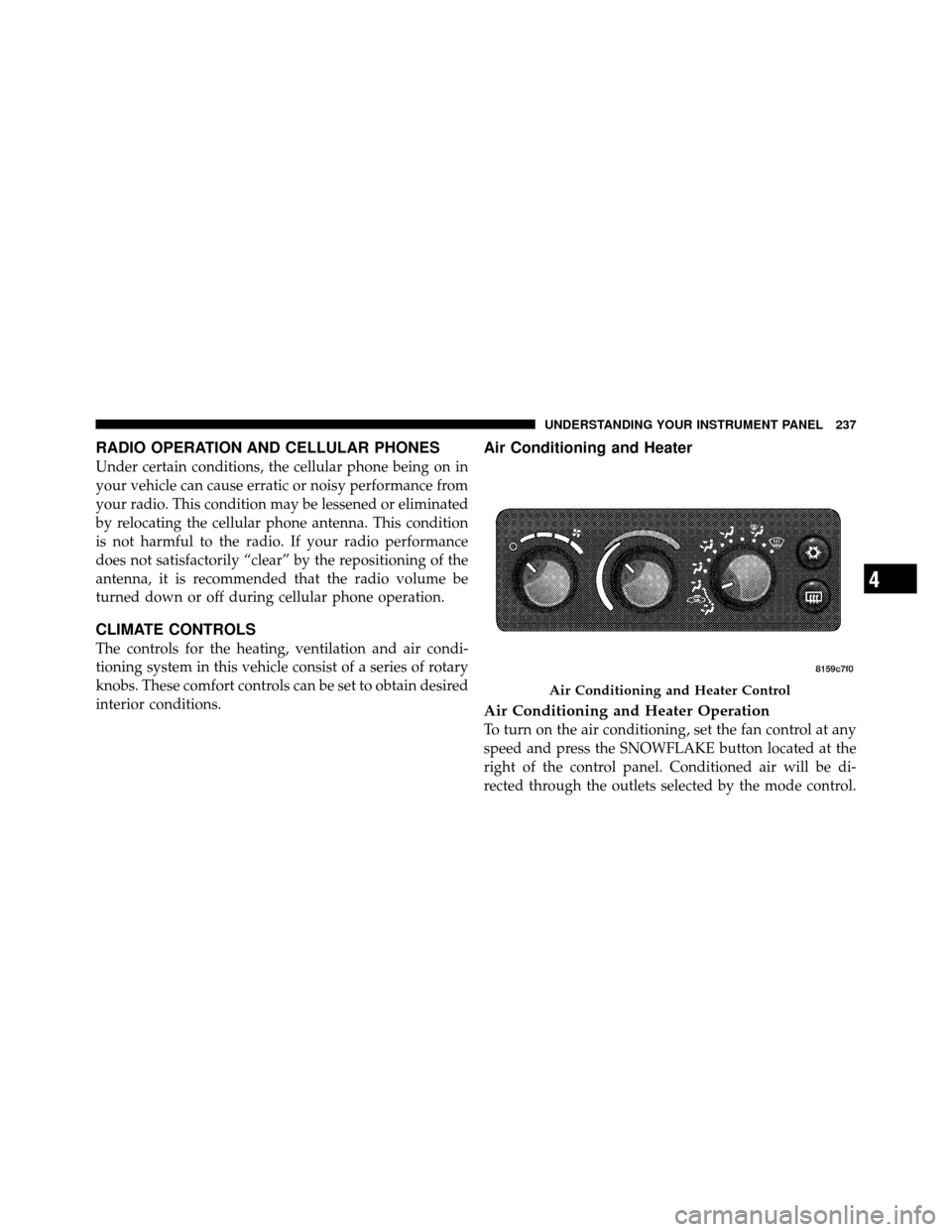
Air Conditioning and Heater
Air Conditioning and Heater Operation
To turn on the air conditioning, set the fan control at any
speed and press the SNOWFLAKE button located at the
right of the control panel. Conditioned air will be di-
rected through the outlets selected by the mode control.
Air Conditioning and Heater Control
4
UNDERSTANDING YOUR INSTRUMENT PANEL 237
Page 272 of 450
The ABS remains operational in the four-wheel drive
mode. The level of performance is reduced when the
front brakes are locked up. This will cause the rear brakes
to lock-up through the drivetrain, which may reduce the
effectiveness of the anti-lock system.
During severe braking conditions, particularly with
changing road surfaces, such as ice to concrete, a slight
drop or minor pulsation may be felt in the brake pedal.
WARNING!
Both Anti-Lock Brake Systems contain sophisticated
electronic equipment. It may be susceptible to inter-
ference caused by improperly installed or high out-
put radio transmitting equipment. This interference
can cause possible loss of anti-lock braking capabil-
ity. Installation of such equipment should be done by
qualified professionals.
Four-Wheel Anti-Lock Brake System (ABS) — If
Equipped
The Four-Wheel ABS is designed to aid the driver in
maintaining vehicle control under adverse braking con-
ditions. The system operates with a separate computer to
modulate hydraulic pressure, to prevent wheel lock-up
and help avoid skidding on slippery surfaces.
The system’s pump motor runs during an ABS stop to
provide regulated hydraulic pressure. The pump motor
makes a low humming noise during operation, which is
normal.
The ABS includes an amber “ABS Warning Light.” When
the light is illuminated, the ABS is not functioning. The
system reverts to standard non-anti-lock brakes. Turning
the ignition OFF and ON again may reset the ABS if the
fault detected was only momentary.
5
STARTING AND OPERATING 271
Page 298 of 450
the fault condition no longer exists. A system fault can
occur by any of the following scenarios: 1) Jamming due
to electronic devices or driving next to facilities emitting
the same radio frequencies as the TPM sensors; 2) Install-
ing some form of aftermarket window tinting that affects
radio wave signals; 3) Lots of snow or ice around the
wheels or wheel housings; 4) Using tire chains on the
vehicle; 5) Using wheels/tires not equipped with TPM
sensors.
NOTE: Your vehicle is equipped with a non-matching
full size spare wheel and tire assembly.
1. This spare tire does not have a tire pressure monitor-
ing sensor. Therefore, the TPMS will not monitor the tire
pressure in the spare tire.
2. If you install the full size spare tire in place of a road
tire that has a pressure below the low-pressure warninglimit, upon the next ignition key cycle a chime will sound
and the “TPM Telltale Light” will still turn ON due to the
low tire.
3. However, after driving the vehicle for up to 20 min-
utes above 15 mph (25 km/h), the “TPM Telltale Light”
will flash on and off for 75 seconds and then remain on
solid.
4. For each subsequent ignition key cycle, a chime will
sound and the “TPM Telltale Light” will flash on and off
for 75 seconds and then remain on solid.
5. Once you repair or replace the original road tire, and
reinstall it on the vehicle in place of the full size spare tire,
the TPMS will update automatically and the “TPM
Telltale Light” will turn OFF, as long as no tire pressure is
below the low-pressure warning limit in any of the four
active road tires. The vehicle may need to be driven for
up to 20 minutes above 15 mph (25 km/h) in order for the
TPMS to receive this information.
5
STARTING AND OPERATING 297
Page 346 of 450
WARNING!
•Take care to avoid the radiator cooling fan when-
ever the hood is raised. It can start anytime the
ignition switch is on. You can be injured by
moving fan blades.
•Remove any metal jewelry such as watch bands or
bracelets that might make an inadvertent electrical
contact. You could be seriously injured.
•Batteries contain sulfuric acid that can burn your
skin or eyes and generate hydrogen gas which is
flammable and explosive. Keep open flames or
sparks away from the battery.
1. Set the parking brake, shift the automatic transmission
into PARK and turn the ignition to LOCK.
2. Turn off the heater, radio, and all unnecessary electri-
cal accessories. 3. If using a another vehicle to jump-start the battery,
park the vehicle within the jumper cables reach, set the
parking brake and make sure the ignition is OFF.
WARNING!
Do not allow vehicles to touch each other as this
could establish a ground connection and personal
injury could result.
Jump-Starting Procedure
WARNING!
Failure to follow this procedure could result in per-
sonal injury or property damage due to battery ex-
plosion.
6
WHAT TO DO IN EMERGENCIES 345
Page 387 of 450
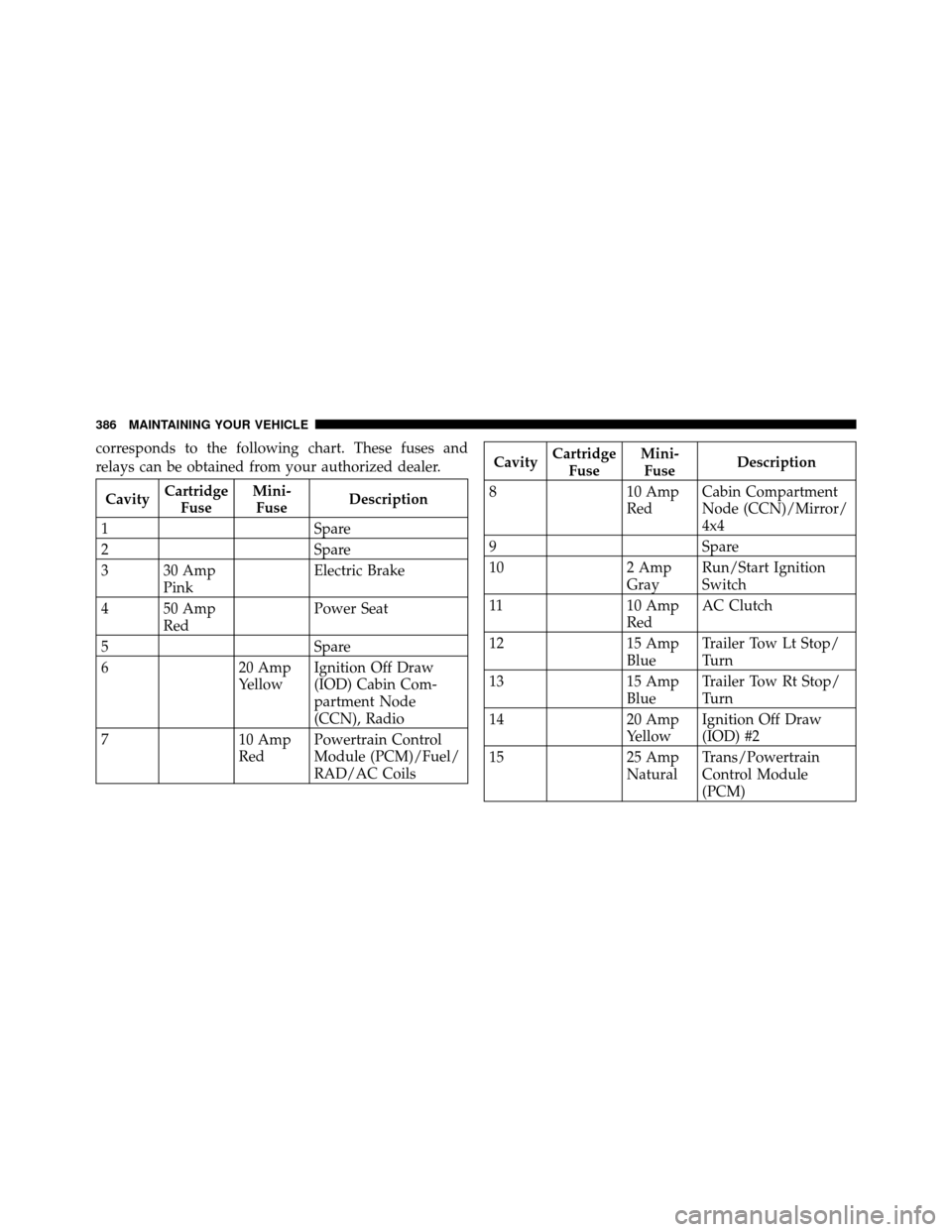
corresponds to the following chart. These fuses and
relays can be obtained from your authorized dealer.
CavityCartridge
Fuse Mini-
Fuse Description
1 Spare
2 Spare
3 30 Amp Pink Electric Brake
4 50 Amp Red Power Seat
5 Spare
6 20 Amp
YellowIgnition Off Draw
(IOD) Cabin Com-
partment Node
(CCN), Radio
7 10 Amp
RedPowertrain Control
Module (PCM)/Fuel/
RAD/AC Coils
Cavity
Cartridge
Fuse Mini-
Fuse Description
8 10 Amp
RedCabin Compartment
Node (CCN)/Mirror/
4x4
9 Spare
10 2 Amp
GrayRun/Start Ignition
Switch
11 10 Amp
RedAC Clutch
12 15 Amp
BlueTrailer Tow Lt Stop/
Turn
13 15 Amp
BlueTrailer Tow Rt Stop/
Turn
14 20 Amp
YellowIgnition Off Draw
(IOD) #2
15 25 Amp
NaturalTrans/Powertrain
Control Module
(PCM)
386 MAINTAINING YOUR VEHICLE
Page 433 of 450
Adding Fuel........................... 307
Air Cleaner, Engine (Engine Air Cleaner Filter) . . . 362
Air Conditioner Maintenance ............... 363
Air Conditioning ........................ 237
Air Conditioning, Operating Tips ..........237,240
Air Conditioning Refrigerant .............363,364
Air Conditioning System ................237,363
Air Filter .............................. 362
Air Pressure, Tires ....................... 284
Airbag ........................... 46,54,186
Airbag Deployment ....................... 56
Airbag Light ........................ 53,58,76
Airbag Maintenance ....................... 57
Airbag, Side .......................... 52,54
Airbag, Window (Side Curtain) ...........49,52,54
Alarm, Panic ............................ 24
Alarm (Security Alarm) .................19,176
Alarm System (Security Alarm) ............... 19
Alterations/Modifications, Vehicle ............. 7Antenna, Satellite Radio
................... 231
Antifreeze (Engine Coolant) ..............370,399
Disposal ............................ 372
Anti-Lock Brake System (ABS) ............270,271
Anti-Lock Warning Light .................. 176
Anti-Theft Security Alarm (Theft Alarm) ........ 19
Anti-Theft System ..................... 19,176
Appearance Care ........................ 380
Assistance Towing ....................... 101
Auto Unlock, Doors ....................... 32
Automatic Dimming Mirror ................. 84
Automatic Door Locks ..................... 31
Automatic Transaxle .................... 12,252
Interlock System ....................... 15
Automatic Transmission .............249,253,376
Adding Fluid ......................... 376
Fluid Level Check ..................... 376
Fluid Type ........................... 401
Gear Ranges ......................... 253
432 INDEX