brake DODGE DAKOTA 2011 3.G User Guide
[x] Cancel search | Manufacturer: DODGE, Model Year: 2011, Model line: DAKOTA, Model: DODGE DAKOTA 2011 3.GPages: 76, PDF Size: 4.62 MB
Page 3 of 76
INTRODUCTION/WELCOME
Welcome From Chrysler Group LLC . . . 2
CONTROLS AT A GLANCE
Driver Cockpit...............4
Instrument Cluster ............6
GETTING STARTED
KeyFOB ..................8
Remote Start................8
Theft Alarm ................9
Seat Belt ..................9
Supplemental Restraint System (SRS) —
Airbags .................. 10
Child Restraints ............. 11
Front Seats ................ 14
Heated Seats .............. 16
Tilt Steering Column .......... 17
OPERATING YOUR VEHICLE
Turn Signals/Wiper/Washer/High
Beams Lever............... 18
Headlight Switch ............ 19
Speed Control .............. 20
Climate Controls ............. 21
Wind Buffeting .............. 21
ELECTRONICS
Non-Touch-Screen Radios ....... 22
Steering Wheel Audio Controls .... 25
Uconnect™ Phone ........... 25
Uconnect™ Voice Command ...... 27
Programmable Features ........ 28
Universal Garage Door Opener
(HomeLink
®)............... 29
Power Outlets .............. 31
OFF-ROAD CAPABILITIES
Four-Wheel Drive Operation ...... 32
UTILITY
Rear Crate 'N Go®Storage....... 33 Rear Cargo Area Utility Rails
...... 33
Tailgate .................. 33
Trailer Towing Weights (Maximum
Trailer Weight Ratings) ......... 34
Recreational Towing (Behind
Motorhome, Etc.) ............ 34
Brake/Transmission Interlock
System .................. 36
WHAT TO DO IN EMERGENCIES
24-Hour Towing Assistance ...... 37
Instrument Cluster Warning Lights . . 37
If Your Engine Overheats ........ 40
Jacking And Tire Changing ....... 42
Jump-Starting .............. 47
Emergency Tow Hooks ......... 49
Towing A Disabled Vehicle ....... 50
Freeing A Stuck Vehicle ......... 51
Event Data Recorder (EDR) ....... 52
MAINTAINING YOUR VEHICLE
Opening The Hood........... 53
Engine Compartment .......... 54
Fluids And Capacities .......... 56
Maintenance Chart ........... 58
Fuses ................... 61
Tire Pressures .............. 64
Wheel And Wheel Trim Care ...... 64
Exterior Bulbs .............. 65
CONSUMER ASSISTANCE
Chrysler Group LLC Customer Center . 66
Chrysler Canada Inc. Customer Center 66
Assistance For The Hearing Impaired . 66
Publications Ordering .......... 66
Reporting Safety Defects In
The 50 United States And
Washington, D.C. ............ 67
MOPAR ACCESSORIES
Authentic Accessories By MOPAR®.. 68
INDEX.................. 69
TABLE OF CONTENTS
Page 5 of 76
WARNING!
• Pedals that cannot move freely can cause loss of vehicle control andincrease the risk of serious personal injury.
• Always make sure that objects cannot fall into the driver foot well while the vehicle is moving. Objects can become trapped under the brake
pedal and accelerator pedal causing a loss of vehicle control.
• Failure to properly follow floor mat installation or mounting can cause interference with the brake pedal and accelerator pedal operation
causing loss of control of the vehicle.
• Never use the ‘PARK’ position as a substitute for the parking brake. Always apply the parking brake fully when parked to guard against
vehicle movement and possible injury or damage.
• Refer to your Owner's Manual on the DVD for further details.
USE OF AFTERMARKET PRODUCTS (ELECTRONICS)
The use of aftermarket devices including cell phones, MP3 players, GPS systems,
or chargers may affect the performance of on-board wireless features including
Keyless Enter-N-Go and Remote Start range. If you are experiencing difficulties
with any of your wireless features, try disconnecting your aftermarket devices to
see if the situation improves. If your symptoms persist, please see an authorized
dealer.
CHRYSLER, DODGE, JEEP, RAM TRUCK, ATF+4, MOPAR and Uconnect are
registered trademarks of Chrysler Group LLC. COPYRIGHT ©2011 CHRYSLER GROUP LLC
INTRODUCTION/WELCOME
3
Page 8 of 76
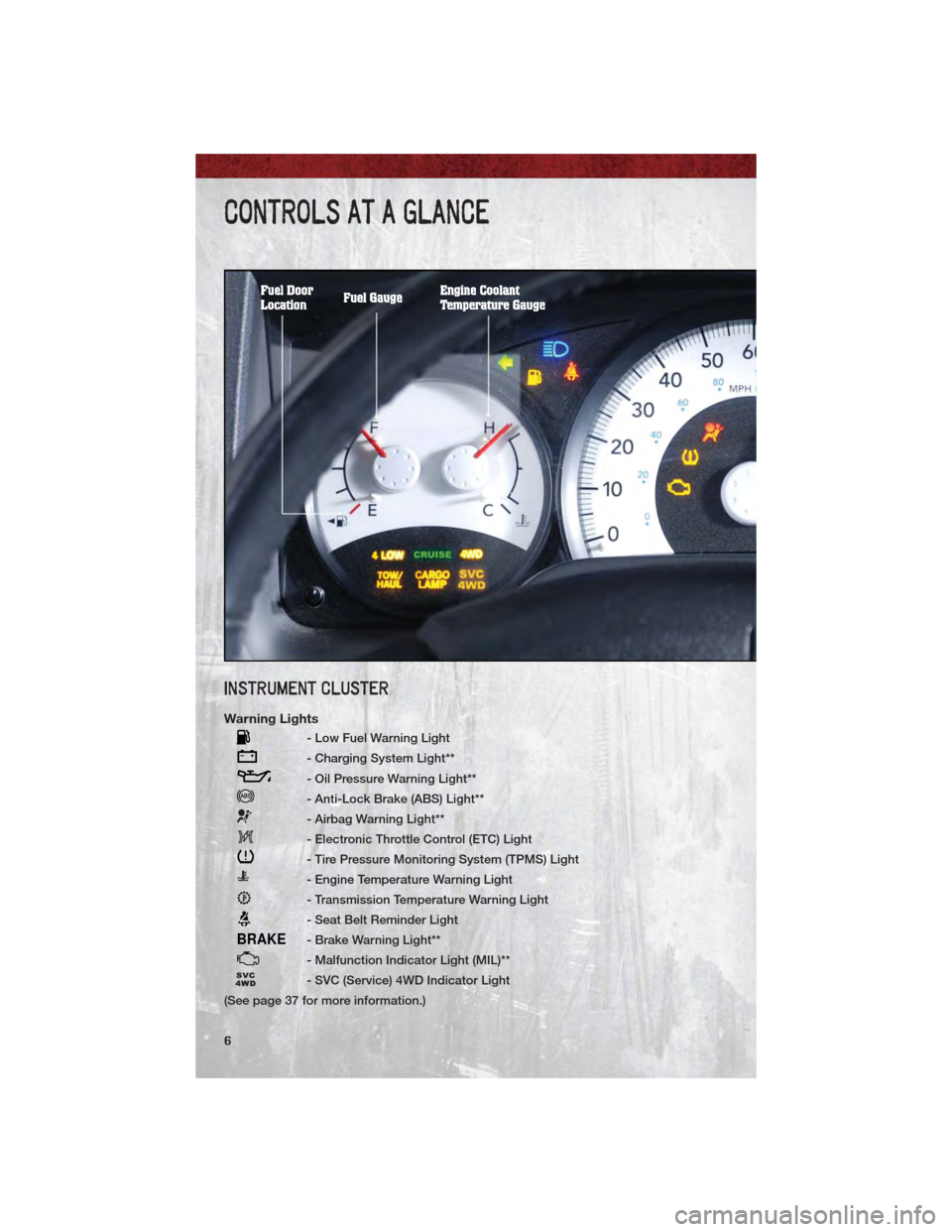
INSTRUMENT CLUSTER
Warning Lights
- Low Fuel Warning Light
- Charging System Light**
- Oil Pressure Warning Light**
- Anti-Lock Brake (ABS) Light**
- Airbag Warning Light**
- Electronic Throttle Control (ETC) Light
- Tire Pressure Monitoring System (TPMS) Light
- Engine Temperature Warning Light
- Transmission Temperature Warning Light
- Seat Belt Reminder Light
BRAKE- Brake Warning Light**
- Malfunction Indicator Light (MIL)**
- SVC (Service) 4WD Indicator Light
(See page 37 for more information.)
CONTROLS AT A GLANCE
6
Page 10 of 76
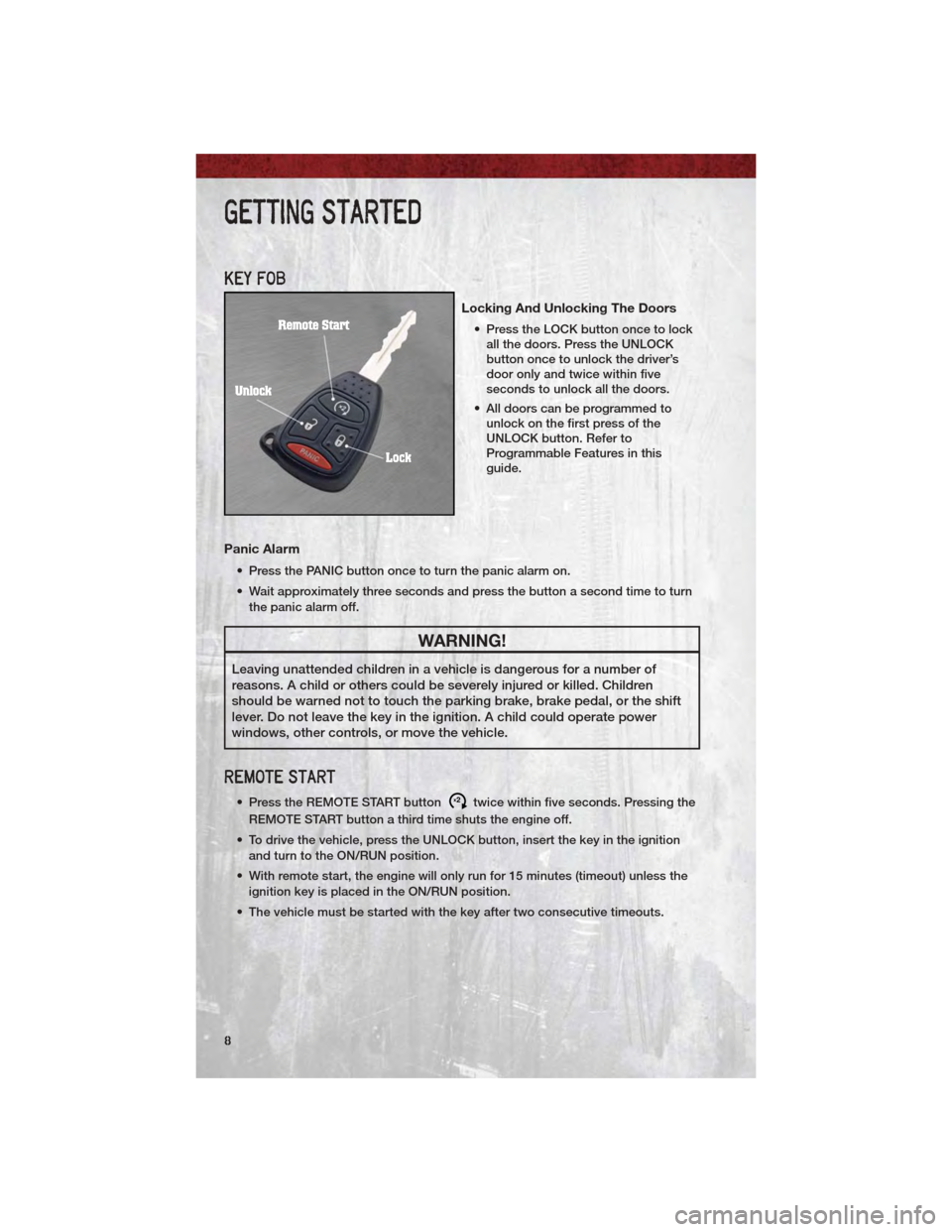
KEY FOB
Locking And Unlocking The Doors
• Press the LOCK button once to lockall the doors. Press the UNLOCK
button once to unlock the driver’s
door only and twice within five
seconds to unlock all the doors.
• All doors can be programmed to unlock on the first press of the
UNLOCK button. Refer to
Programmable Features in this
guide.
Panic Alarm
• Press the PANIC button once to turn the panic alarm on.
• Wait approximately three seconds and press the button a second time to turn
the panic alarm off.
WARNING!
Leaving unattended children in a vehicle is dangerous for a number of
reasons. A child or others could be severely injured or killed. Children
should be warned not to touch the parking brake, brake pedal, or the shift
lever. Do not leave the key in the ignition. A child could operate power
windows, other controls, or move the vehicle.
REMOTE START
• Press the REMOTE START buttonx2twice within five seconds. Pressing the
REMOTE START button a third time shuts the engine off.
• To drive the vehicle, press the UNLOCK button, insert the key in the ignition and turn to the ON/RUN position.
• With remote start, the engine will only run for 15 minutes (timeout) unless the ignition key is placed in the ON/RUN position.
• The vehicle must be started with the key after two consecutive timeouts.
GETTING STARTED
8
Page 22 of 76
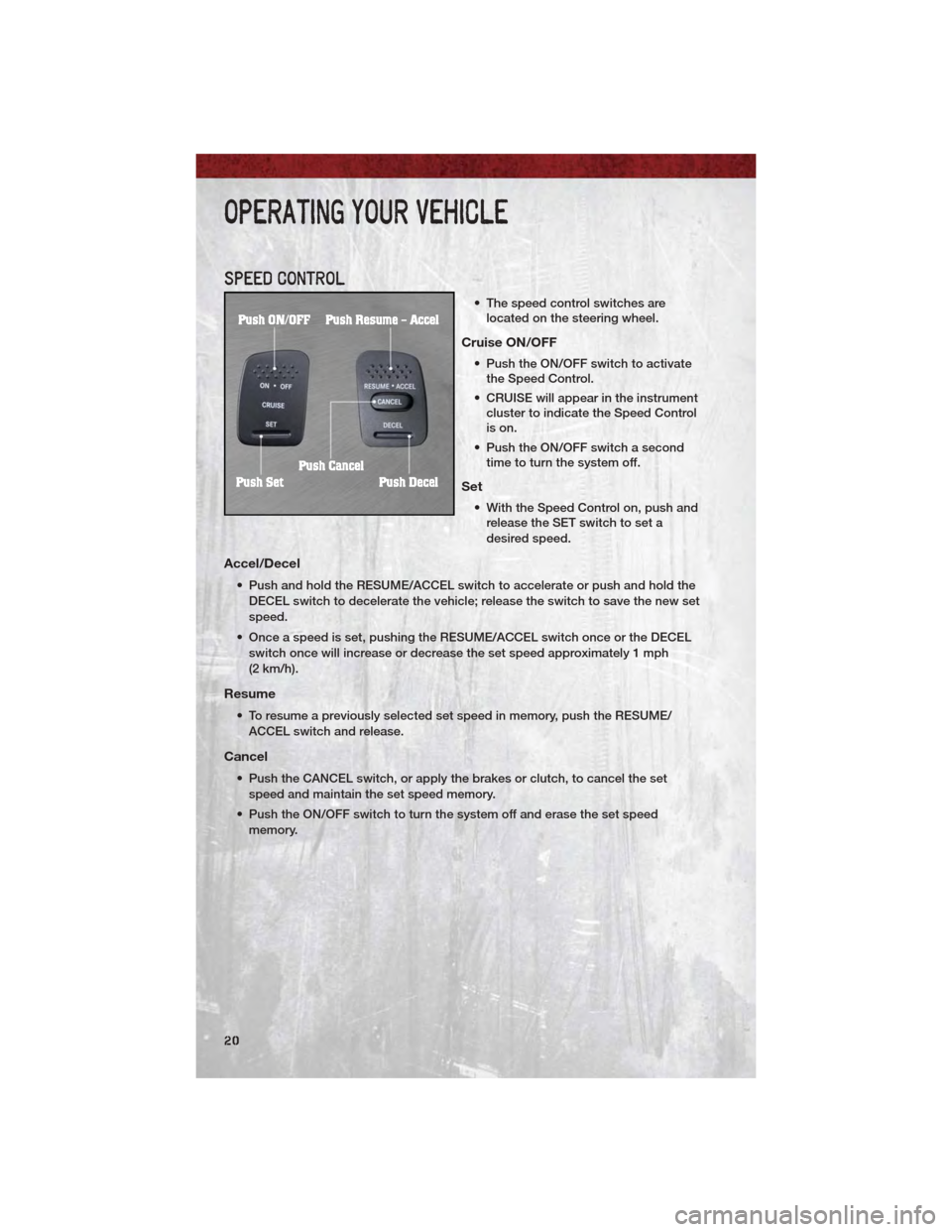
SPEED CONTROL
• The speed control switches arelocated on the steering wheel.
Cruise ON/OFF
• Push the ON/OFF switch to activatethe Speed Control.
• CRUISE will appear in the instrument cluster to indicate the Speed Control
is on.
• Push the ON/OFF switch a second time to turn the system off.
Set
• With the Speed Control on, push andrelease the SET switch to set a
desired speed.
Accel/Decel
• Push and hold the RESUME/ACCEL switch to accelerate or push and hold the
DECEL switch to decelerate the vehicle; release the switch to save the new set
speed.
• Once a speed is set, pushing the RESUME/ACCEL switch once or the DECEL switch once will increase or decrease the set speed approximately 1 mph
(2 km/h).
Resume
• To resume a previously selected set speed in memory, push the RESUME/ACCEL switch and release.
Cancel
• Push the CANCEL switch, or apply the brakes or clutch, to cancel the setspeed and maintain the set speed memory.
• Push the ON/OFF switch to turn the system off and erase the set speed memory.
OPERATING YOUR VEHICLE
20
Page 34 of 76
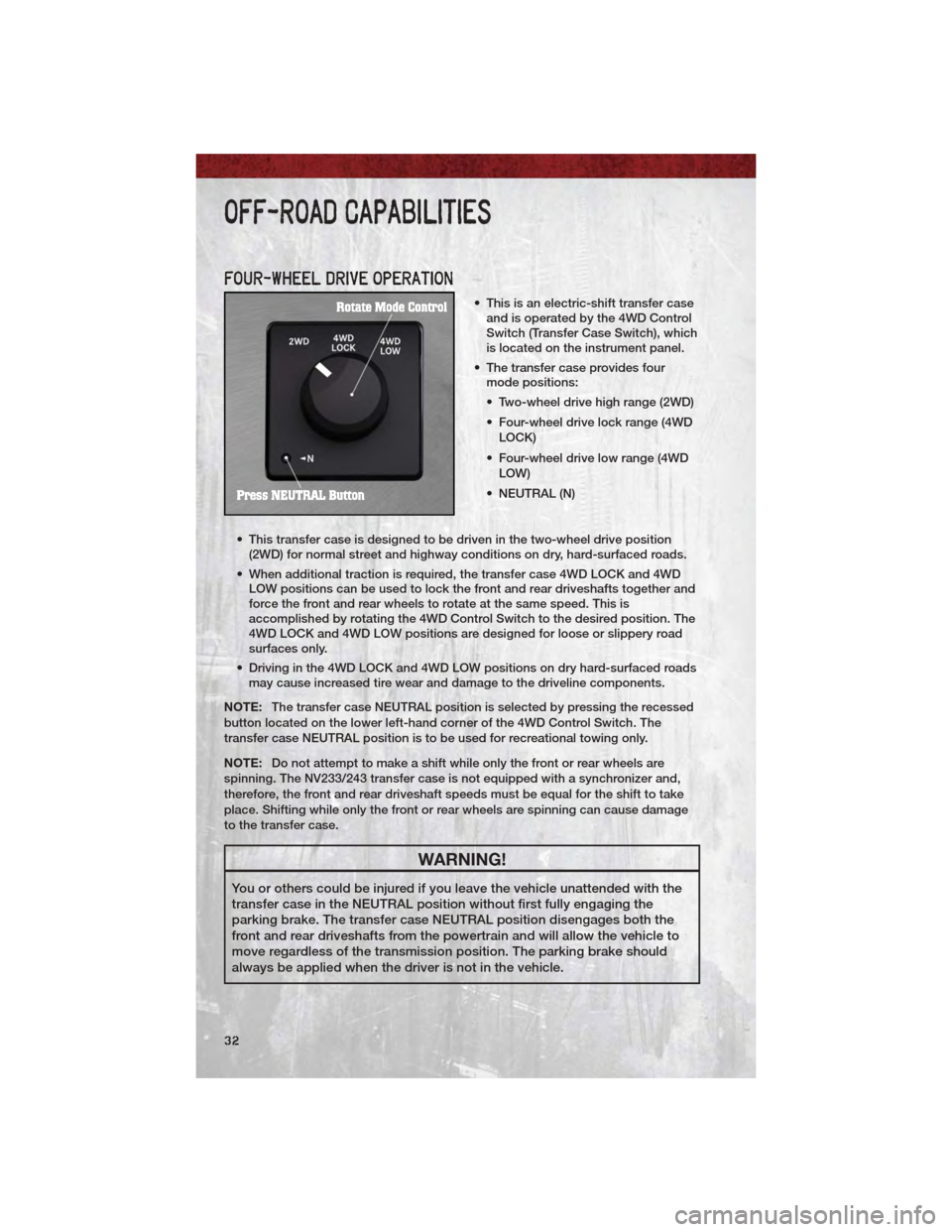
FOUR-WHEEL DRIVE OPERATION
• This is an electric-shift transfer caseand is operated by the 4WD Control
Switch (Transfer Case Switch), which
is located on the instrument panel.
• The transfer case provides four mode positions:
• Two-wheel drive high range (2WD)
• Four-wheel drive lock range (4WD
LOCK)
• Four-wheel drive low range (4WD LOW)
• NEUTRAL (N)
• This transfer case is designed to be driven in the two-wheel drive position (2WD) for normal street and highway conditions on dry, hard-surfaced roads.
• When additional traction is required, the transfer case 4WD LOCK and 4WD LOW positions can be used to lock the front and rear driveshafts together and
force the front and rear wheels to rotate at the same speed. This is
accomplished by rotating the 4WD Control Switch to the desired position. The
4WD LOCK and 4WD LOW positions are designed for loose or slippery road
surfaces only.
• Driving in the 4WD LOCK and 4WD LOW positions on dry hard-surfaced roads may cause increased tire wear and damage to the driveline components.
NOTE: The transfer case NEUTRAL position is selected by pressing the recessed
button located on the lower left-hand corner of the 4WD Control Switch. The
transfer case NEUTRAL position is to be used for recreational towing only.
NOTE: Do not attempt to make a shift while only the front or rear wheels are
spinning. The NV233/243 transfer case is not equipped with a synchronizer and,
therefore, the front and rear driveshaft speeds must be equal for the shift to take
place. Shifting while only the front or rear wheels are spinning can cause damage
to the transfer case.
WARNING!
You or others could be injured if you leave the vehicle unattended with the
transfer case in the NEUTRAL position without first fully engaging the
parking brake. The transfer case NEUTRAL position disengages both the
front and rear driveshafts from the powertrain and will allow the vehicle to
move regardless of the transmission position. The parking brake should
always be applied when the driver is not in the vehicle.
OFF-ROAD CAPABILITIES
32
Page 37 of 76
Four-Wheel Drive Models
Recreational Towing Procedure• Use the following procedure to prepare your vehicle for
recreational towing.
• Bring the vehicle to a complete
stop, shut the engine OFF and
turn the Key Fob to the ON/RUN
position (do not start the engine).
• Press the brake pedal and shift the automatic transmission into
NEUTRAL, or press the clutch
pedal to the floor on a manual
transmission.
• Using a ballpoint pen or similar object, press the transfer case
NEUTRAL button for four
seconds.
• After the shift is completed and the NEUTRAL light comes on,
release the NEUTRAL button.
• Start the engine and shift the automatic transmission into
REVERSE.
• Release the brake pedal for five seconds and ensure that there is
no vehicle movement.
• Repeat the previous step with the transmission in DRIVE.
• Shut the engine OFF, and place the Key Fob in the unlocked OFF
position.
• Shift automatic transmissions into PARK. Shift manual
transmissions into fourth gear.
• Attach the vehicle to the tow vehicle with a tow bar and
disconnect the negative battery
cable.
• Refer to your Owner's Manual on the DVD for further details. NOTE:
• The first two steps are requirements
that must be met prior to pressing
the NEUTRAL button, and must
continue to be met until the four
seconds elapse and the shift has
been completed. If any of these
requirements (with the exception of
Key Fob ON) are not met prior to
pressing the NEUTRAL button or are
no longer met during the four second
timer, then the NEUTRAL indicator
light will flash continuously until all
requirements are met or until the
NEUTRAL button is released.
• The Key Fob must be ON for a shift to take place and for the position
indicator lights to be operable. If the
Key Fob in not ON, the shift will not
take place and no position indicator
lights will be on or flashing.
• A flashing NEUTRAL position indicator light indicates that shift
requirements have not been met.
CAUTION!
• Internal damage to the transfercase will occur if a front or rear
wheel lift is used when
recreational towing.
• The transfer case must be shifted into NEUTRAL for
recreational towing. The
NEUTRAL button is located on
the lower left hand corner of the
4WD Control Switch. Shifts into
and out of transfer case
NEUTRAL can take place with
the selector switch in any mode
position.
• Automatic transmissions must be placed in PARK position for
recreational towing.
(Continued)
UTILITY
35
Page 38 of 76
CAUTION!(Continued)
• Manual transmissions must beplaced in gear (for example,
fourth gear) for recreational
towing. Failure to follow these
procedures can cause severe
transmission and/or transfer
case damage.
• It is necessary to follow these steps to be certain that the
transfer case is fully in
NEUTRAL before recreational
towing to prevent damage to
internal parts.
BRAKE/TRANSMISSION
INTERLOCK SYSTEM
• This system prevents you from
moving the shift lever out of PARK
and into any gear unless the brake
pedal is pressed.
• This system is active only when the ignition switch is in the ON/RUN
position.
UTILITY
36
Page 40 of 76
• When the malfunction indicator is illuminated, the system may not be able todetect or signal low tire pressure as intended. TPMS malfunctions may occur
for a variety of reasons, including the installation of replacement or alternate
tires or wheels on the vehicle that prevent the TPMS from functioning properly.
Always check the TPMS malfunction telltale after replacing one or more tires
or wheels on your vehicle, to ensure that the replacement or alternate tires and
wheels allow the TPMS to continue to function properly.
CAUTION!
The TPMS has been optimized for the original equipment tires and wheels.
TPMS pressures and warning have been established for the tire size
equipped on your vehicle. Undesirable system operation or sensor damage
may result when using replacement equipment that is not of the same size,
type, and/or style. Aftermarket wheels can cause sensor damage. Do not
use tire sealant from a can, or balance beads if your vehicle is equipped
with a TPMS, as damage to the sensors may result.
- Engine Temperature Warning Light
• This light warns of an overheated engine condition.
• If the light turns on and a warning chime sounds while driving, safely pull overand stop the vehicle. If the A/C system is on, turn it off. Also, shift the
transmission into NEUTRAL and idle the vehicle. If the temperature reading
does not return to normal, turn the engine off immediately.
• We recommend that you do not operate the vehicle or engine damage will occur. Have the vehicle serviced immediately.
WARNING!
A hot engine cooling system is dangerous. You or others could be badly
burned by steam or boiling coolant. You may want to call an authorized
service center for service if your vehicle overheats.
BRAKE- Brake Warning Light
• The Brake Warning light illuminates when there is either a system malfunctionor the parking brake is applied. If the light is on and the parking brake is not
applied, it indicates a possible brake hydraulic malfunction, brake booster
problem or an Anti-Lock Brake System problem.
• We recommend you drive to the nearest service center and have the vehicle serviced immediately.
WHAT TO DO IN EMERGENCIES
38
Page 41 of 76
WARNING!
Driving a vehicle with the red brake light on is dangerous. Part of the brake
system may have failed. It will take longer to stop the vehicle. You could
have a collision. Have the vehicle checked immediately.
- Malfunction Indicator Light (MIL)
• Certain conditions, such as a loose or missing gas cap, poor fuel quality, etc.,may illuminate the MIL after engine start. The vehicle should be serviced if the
light stays on through several typical driving cycles. In most situations, the
vehicle will drive normally and not require towing.
• If the MIL flashes when the engine is running, serious conditions may exist that could lead to immediate loss of power or severe catalytic converter
damage. We recommend you do not operate the vehicle. Have the vehicle
serviced immediately.
- Charging System Light
• This light shows the status of the electrical charging system. If the chargingsystem light remains on, it means that the vehicle is experiencing a problem
with the charging system.
• We recommend you do not continue driving if the charging system light is on. Have the vehicle serviced immediately.
- Oil Pressure Warning Light
• This light indicates low engine oil pressure. If the light turns on while driving,stop the vehicle and shut off the engine as soon as possible. A chime will
sound for four minutes when this light turns on.
• We recommend you do not operate the vehicle or engine damage will occur. Have the vehicle serviced immediately.
- Anti-Lock Brake (ABS) Light
• This light monitors the Anti-Lock Brake System (ABS).
• If the light is not on during starting, stays on, or turns on while driving, werecommend you drive to the nearest service center and have the vehicle
serviced immediately.
- Electronic Throttle Control (ETC) Light
• This light informs you of a problem with the Electronic Throttle Control (ETC)system.
• If a problem is detected, the light will come on while the engine is running. Cycle the ignition when the vehicle has completely stopped and the shift lever
is placed in the PARK position; the light should turn off.
WHAT TO DO IN EMERGENCIES
39