cruise control DODGE DURANGO 2012 3.G User Guide
[x] Cancel search | Manufacturer: DODGE, Model Year: 2012, Model line: DURANGO, Model: DODGE DURANGO 2012 3.GPages: 686, PDF Size: 4.46 MB
Page 225 of 686
NOTE:If the ACC “Clean Radar Sensor In Front Of
Vehicle” warning is active Normal (Fixed Speed) Cruise
Control is still available. For additional information refer
to “Normal (Fixed Speed) Cruise Control Mode” in this
section. If weather conditions are not a factor, the driver should
examine the sensor. It may require cleaning or removal of
an obstruction. The sensor is located in the center of the
vehicle behind the lower grille.
To keep the ACC System operating properly, it is impor-
tant to note the following maintenance items:
•Always keep the sensor clean. Carefully wipe the
sensor lens with a soft cloth. Be cautious not to damage
the sensor lens.
•Do not remove any screws from the sensor. Doing so
could cause an ACC system malfunction or failure and
require a sensor realignment.
•If the sensor is damaged due to a collision, see your
authorized dealer for service.
Clean Radar Sensor Warning
3
UNDERSTANDING THE FEATURES OF YOUR VEHICLE 223
Page 226 of 686
•Do not attach or install any accessories near the sensor,
including transparent material or aftermarket grilles.
Doing so could cause an ACC system failure or
malfunction.
When the condition that deactivated the system is no
longer present, the system will return to the “Adaptive
Cruise Control Off” state and will resume function by
simply reactivating it.
NOTE:
•If the “Clean Radar Sensor In Front Of Vehicle”
message occurs frequently (e.g. more than once on
every trip) without any snow, rain, mud, or other
obstruction, have the radar sensor realigned at your
authorized dealer.
•Installing a snow plow, front-end protector, an after-
market grille or modifying the grille is not recom-
mended. Doing so may block the sensor and inhibit
ACC operation.
ACC Unavailable Warning
If the system turns off, and the EVIC displays “ACC/
FCW Unavailable, Vehicle System Error”, there may be a
temporary malfunction that limits ACC functionality.
Although the vehicle is still drivable under normal
conditions, ACC will be temporarily unavailable. If this
occurs, try activating ACC again later, following a key
cycle. If the problem persists, see your authorized dealer.
Service ACC Warning
If the system turns off, and the EVIC displays “ACC/
FCW Unavailable Service Radar Sensor”, it indicates
there is an internal system fault. Although the vehicle is
still drivable under normal conditions, have the system
checked by an authorized dealer.
224 UNDERSTANDING THE FEATURES OF YOUR VEHICLE
Page 232 of 686
Normal (Fixed Speed) Cruise Control Mode
In addition to Adaptive Cruise Control mode, a normal
(fixed speed) Cruise Control mode is available for cruis-
ing at fixed speeds. The normal Cruise Control mode is
designed to maintain a set cruising speed without requir-
ing the driver to operate the accelerator. Cruise Control
can only be operated if the vehicle speed is above 20 mph
(32 km/h).
To change between the different cruise modes, press the
MODE button when the system is in either the OFF,
READY or SET state. Pressing of the MODE button in any
state will result in changing to the new Mode in the OFF
state.WARNING!
In the normal Cruise Control mode, the system will
not react to vehicles ahead. In addition, the proximity
warning does not activate and no alarm will sound
even if you are too close to the vehicle ahead since
neither the presence of the vehicle ahead nor the
vehicle-to-vehicle distance is detected. Be sure to
maintain a safe distance between your vehicle and
the vehicle ahead. Always be aware which mode is
selected.
To Set A Desired Speed
When the vehicle reaches the speed desired, press the
SET-button and release. The EVIC will display the set
speed.
NOTE: You must observe the display when setting or
changing speed, not the speedometer.
230 UNDERSTANDING THE FEATURES OF YOUR VEHICLE
Page 233 of 686
To Vary The Speed Setting
There are two ways to change the set speed:
•Use the accelerator pedal to adjust the vehicle to the
desired speed and press the SET-button.
•Tap the RES +or SET -button to increase or decrease
the set speed in 1 mph (1.6 km/h) increments respec-
tively. Hold the RES +or SET -button for 5 mph
(8 km/h) increments.
To Cancel
The system will disable normal Cruise Control without
erasing the memory if:
•You softly tap or depress the brake pedal.
•You press the CANCEL button.
•The Electronic Stability Control/Traction Control Sys-
tem (ESC/TCS) activates.
To Resume
Press the RES +button and then remove your foot from
the accelerator pedal. The EVIC will display the last set
speed.
To Turn Off
The system will turn off and erase the set speed in
memory if:
•You push the ON/OFF button.
•You turn off the ignition.
•You engage Four-Wheel Drive Low.
If the Cruise Control system is turned off and reactivated,
the system will return to the last driver setting (ACC or
Normal Cruise Control).
3
UNDERSTANDING THE FEATURES OF YOUR VEHICLE 231
Page 315 of 686
•Left front turn signal lamp out
•Right front turn signal lamp out
•Left rear turn signal lamp out
•Right rear turn signal lamp out
•Service air filter
•Low Tire Pressure
•Perform service
•ESC System Off
•Service blind spot system
•Blind spot detection unavailable
•Blind spot system off
•Blind spot detection unavailable sensor blocked
•Normal Cruise Ready — When Adaptive Cruise Con-
trol (ACC) system is turned off and Normal (Fixed
Speed) Cruise Control mode is available. Refer to
“Adaptive Cruise Control (ACC)” in “Understanding
The Features Of Your Vehicle” (if equipped).
•Adaptive Cruise Off — When the Adaptive Cruise
Control (ACC) system is turned off. Refer to “Adap-
tive Cruise Control (ACC)” in “Understanding The
Features Of Your Vehicle” (if equipped).
•ACC Ready — When the ACC system is activated.
Refer to “Adaptive Cruise Control (ACC)” in “Under-
standing The Features Of Your Vehicle” (if equipped).
•ACC Set — After setting the desired speed in the ACC
system. Refer to “Adaptive Cruise Control (ACC)” in
“Understanding The Features Of Your Vehicle” (if
equipped).
4
UNDERSTANDING YOUR INSTRUMENT PANEL 313
Page 316 of 686
•ACC Cancelled — To disable the ACC system. Refer to
“Adaptive Cruise Control (ACC)” in “Understanding
The Features Of Your Vehicle” (if equipped).
•Sensed Vehicle Indicator — The system detects a
slower moving vehicle in the same lane. Refer to
“Adaptive Cruise Control (ACC)” in “Understanding
The Features Of Your Vehicle” (if equipped).
•Driver Override — If you apply the accelerator after
setting the desired speed in the ACC system. Refer to
“Adaptive Cruise Control (ACC)” in “Understanding
The Features Of Your Vehicle” (if equipped).
•Distance Set — After changing the desired following
distance in the ACC system, this message will display
momentarily. Refer to “Adaptive Cruise Control
(ACC)” in “Understanding The Features Of Your
Vehicle” (if equipped).
•Brake — If the ACC system predicts that its maximum
braking level is not sufficient to maintain the set
distance, this message will flash and a chime will
sound while ACC continues to apply its maximum
braking capacity. When this occurs, you should imme-
diately apply the brakes as needed to maintain a safe
distance from the vehicle ahead. Refer to “Adaptive
Cruise Control (ACC)” in “Understanding The Fea-
tures Of Your Vehicle” (if equipped).
•Clean Radar Sensor in the Front of Vehicle — If the
ACC system deactivates due to performance limiting
conditions. Refer to “Adaptive Cruise Control (ACC)”
in “Understanding The Features Of Your Vehicle” (if
equipped).
•ACC/FCW Unavailable Vehicle System Error — If the
ACC system turns off due to a temporary malfunction
that limits functionality. Refer to “Adaptive Cruise
Control (ACC)” in “Understanding The Features Of
Your Vehicle” (if equipped).
314 UNDERSTANDING YOUR INSTRUMENT PANEL
Page 317 of 686
•ACC/FCW Unavailable Service Radar Sensor — If the
ACC system turns off due to an internal system fault
that requires service from an authorized dealer. Refer
to “Adaptive Cruise Control (ACC)” in “Understand-
ing The Features Of Your Vehicle” (if equipped).
•Cruise Off When Park Brake is On
•ACC Cancelled Below Min. Speed
•Coolant low
•Oil change due > Dealer Info
•Key in ignition
•Lights on
•Key in Ignition Lights On
•Ignition or Accessory On
•Ignition or Accessory On Lights On
•Oil temp high Speed may be limited
•Oil temp high Speed limited
•Turn signal on
•Park assist on
•Warning object detected
•Remote start aborted — Door ajar
•Remote start aborted — Hood ajar
•Remote start aborted — L/Gate ajar
•Remote start aborted — Fuel low
•Remote start disabled — Start Vehicle to Reset
•Remote start active — Push Start Button
•Remote start active — Insert Key and Turn to Run
•Memory 1 profile set
4
UNDERSTANDING YOUR INSTRUMENT PANEL 315
Page 319 of 686
EVIC White Telltale Lights
This area will show reconfigurable white caution tell-
tales. These telltales include:
•Shift Lever Status
The shift lever status “P,R,N,D,L,5,4,3,2,1” are displayed
indicating the shift lever position. Telltales “5,4,3,2,1”
indicate the Electronic Range Select (ERS) feature has
been engaged and the gear selected is displayed. For
further information on ERS, refer to “Starting And Oper-
ating”
•Electronic Speed Control ON This light will turn on when the electronic
speed control is ON. For further information,
refer to “Electronic Speed Control” in “Under-
standing The Features Of Your Vehicle.”
•Electronic Speed Control SET This light will turn on when the electronic
speed control is SET. For further information,
refer to “Electronic Speed Control” in “Under-
standing The Features Of Your Vehicle.”
•Adaptive Cruise Control (ACC) ONThis light will turn on when the ACC is ON.
For further information, refer to “Adaptive
Cruise Control (ACC)” in “Understanding The
Features Of Your Vehicle.”
•Adaptive Cruise Control (ACC) SETThis light will turn on when the ACC is SET.
For further information, refer to “Adaptive
Cruise Control (ACC)” in “Understanding The
Features Of Your Vehicle.”
4
UNDERSTANDING YOUR INSTRUMENT PANEL 317
Page 320 of 686
•Forward Collision Warning (FCW) OFFThis light warns the driver of a potential colli-
sion with the vehicle in front and prompts the
driver to take action in order to avoid the
collision. For further information, refer to
“Adaptive Cruise Control (ACC)” in “Understanding
The Features Of Your Vehicle.”
•Power Steering System Over Temperature — If
Equipped If the “POWER STEERING SYSTEM OVER
TEMP” message and a icon are displayed on
the EVIC screen, it indicates that extreme steer-
ing maneuvers may have occurred, which
caused an over temperature condition in the power
steering system. You will lose power steering assistance momentarily until the over temperature condition no
longer exists. Once driving conditions are safe, then pull
over and let vehicle idle. After five minutes, the system
will cool and return to normal operation. Refer to “Power
Steering” in “Starting and Operating” for further infor-
mation.
NOTE:•Even if power steering assistance is no longer opera-
tional, it is still possible to steer the vehicle. Under
these conditions there will be a substantial increase in
steering effort, especially at very low vehicle speeds
and during parking maneuvers.
•If the condition persists, see your authorized dealer for
service.
318 UNDERSTANDING YOUR INSTRUMENT PANEL
Page 625 of 686
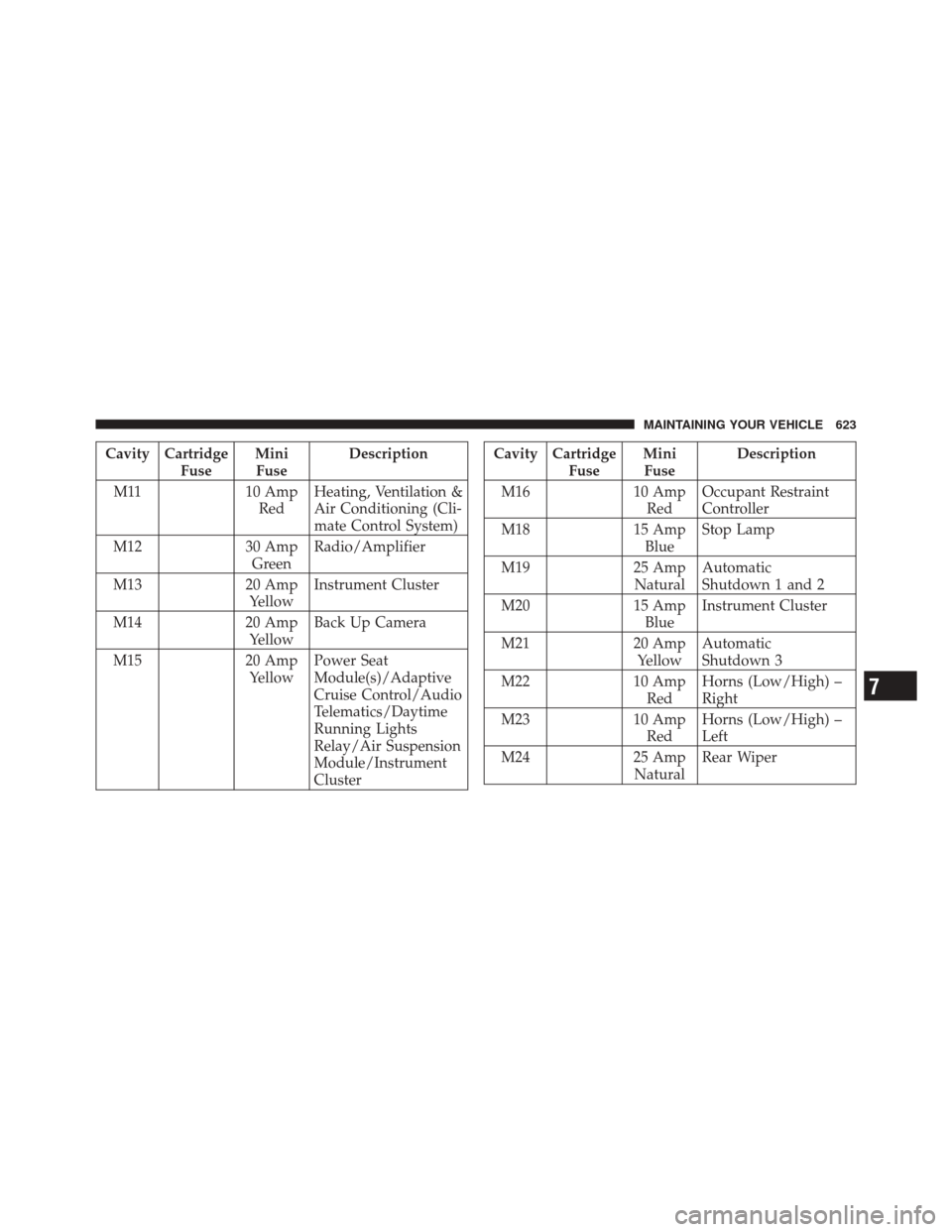
Cavity CartridgeFuseMini
Fuse Description
M11 10 Amp RedHeating, Ventilation &
Air Conditioning (Cli-
mate Control System)
M12 30 Amp GreenRadio/Amplifier
M13 20 Amp YellowInstrument Cluster
M14 20 Amp YellowBack Up Camera
M15 20 Amp YellowPower Seat
Module(s)/Adaptive
Cruise Control/Audio
Telematics/Daytime
Running Lights
Relay/Air Suspension
Module/Instrument
ClusterCavity Cartridge
FuseMini
Fuse Description
M16 10 Amp
Red Occupant Restraint
Controller
M18 15 Amp
Blue Stop Lamp
M19 25 Amp
Natural Automatic
Shutdown 1 and 2
M20 15 Amp
Blue Instrument Cluster
M21 20 Amp
Yellow Automatic
Shutdown 3
M22 10 Amp
Red Horns (Low/High) –
Right
M23 10 Amp
Red Horns (Low/High) –
Left
M24 25 Amp
Natural Rear Wiper
7
MAINTAINING YOUR VEHICLE 623