key DODGE DURANGO 2012 3.G Repair Manual
[x] Cancel search | Manufacturer: DODGE, Model Year: 2012, Model line: DURANGO, Model: DODGE DURANGO 2012 3.GPages: 686, PDF Size: 4.46 MB
Page 325 of 686
Vehicles Equipped With Keyless Enter-N-Go
1. Without pressing the brake pedal, cycle the ignition to
the ON/RUN position (Do not start the engine.)
2. Fully depress the accelerator pedal, slowly, three times
within 10 seconds.
3. Cycle the ignition to the OFF/LOCK position.
Vehicles Not Equipped With Keyless Enter-N-Go
1. Turn the ignition switch to the ON/RUN position (Do
not start the engine.)
2. Fully depress the accelerator pedal, slowly, three times
within 10 seconds.
3. Turn the ignition switch to the OFF/LOCK position.
NOTE:If the indicator message illuminates when you
start the vehicle, the oil change indicator system did not
reset. If necessary, repeat this procedure.Fuel Economy
Press and release the UP/DOWN buttons until one of the
following Fuel Economy Functions displays in the EVIC:
•Average Fuel Economy/Fuel Saver Mode
•Distance To Empty
Average Fuel Economy / Fuel Saver Mode — If
Equipped
This feature shows the average fuel economy since the
last reset. To reset the average fuel economy display,
press and release the SELECT button once while average
fuel economy is highlighted. Once reset, the history
information will be erased, and the averaging will con-
tinue from the last fuel average reading before the reset.
The FUEL SAVER MODE message will display above the
average fuel economy in the EVIC display. This message
will appear whenever the Multi-Displacement System
4
UNDERSTANDING YOUR INSTRUMENT PANEL 323
Page 328 of 686
Vehicle Info (Customer Information Features)
Press and release the UP or DOWN button until “Vehicle
Info” displays in the EVIC and press the SELECT button.
Press the UP and DOWN button to scroll through the
available information displays, then press SELECT to
display any one of the following choices.
•Coolant Temp
Displays the actual coolant temperature.
•Oil Temperature
Displays the actual oil temperature.
•Oil Pressure
Displays the actual oil pressure.
•Trans Temperature
Displays the actual transmission temperature.
•Engine Hours
Displays the number of hours of engine operation.
Units
Press and release the UP or DOWN button until “Units”
displays in the EVIC and press the SELECT button. The
EVIC, odometer, and navigation system (if equipped) can
be changed between English and Metric units of mea-
sure. To make your selection, press and release the
SELECT button the selected setting will be displayed.
Keyless Enter-N-Go Display — If Equipped
When the ENGINE START/STOP button is pressed to
change ignition switch positions, the Keyless Enter-N-Go
icon momentarily appears in the lower right corner of the
EVIC display showing the new ignition switch position.
Refer to “Keyless Enter-N-Go” in “Starting And Operat-
ing” for more information.
NOTE: Under certain conditions, the display may be
superseded by another display of higher priority. But
when the ignition switch position is changed, the display
always re-appears.
326 UNDERSTANDING YOUR INSTRUMENT PANEL
Page 334 of 686
button a check-mark appears next to the feature showing
the system has been activated or the check-mark is
removed showing the system has been deactivated. Refer
to “Driver Memory Seat” in “Understanding The Fea-
tures Of Your Vehicle.”
Remote Start Comfort Sys.
When this feature is selected and the remote start is
activated, the heated steering wheel and driver heated
seat features will automatically turn on when tempera-
tures are below 40° F (4.4° C). When temperatures are
above 80° F (26.7° C) the driver vented seat will turn on.
These features will stay on through the duration of
remote start or until the key is turned to RUN. To make
your selection, press and release the SELECT button until
a check-mark appears next to the feature showing the
system has been activated or the check-mark is removed
showing the system has been deactivated.
Horn With Remote Lock
When this feature is selected, a short horn sound will
occur when the RKE transmitter LOCK button is pressed.
This feature may be selected with or without the “Flash
Lamps with Lock” feature. To make your selection, press
and release the SELECT button until a check-mark ap-
pears next to the feature showing the system has been
activated or the check-mark is removed showing the
system has been deactivated.
Horn With Remote Start
When this feature is selected, a short horn sound will
occur when the RKE transmitter REMOTE START button
is pressed. To make your selection, press and release the
SELECT button until a check-mark appears next to the
feature showing the system has been activated or the
check-mark is removed showing the system has been
deactivated.
332 UNDERSTANDING YOUR INSTRUMENT PANEL
Page 336 of 686
Easy Entry/Exit Seat
(Available with Memory Seat Only)
This feature provides automatic driver seat positioning to
enhance driver mobility when entering and exiting the
vehicle. To make your selection, press and release the
SELECT button until a check-mark appears next to the
feature showing the system has been activated or the
check-mark is removed showing the system has been
deactivated.
NOTE:The seat will return to the memorized seat
location (if Recall Memory with Remote Key Unlock is set
to ON) when the RKE transmitter is used to unlock the
door. Refer to “Driver Memory Seat” in “Understanding
The Features Of Your Vehicle” for further information.
Tilt Mirror In Reverse
When this feature is selected, the outside rearview mir-
rors will tilt downward when the ignition switch is in the
RUN position and the transmission shift lever is in the REVERSE position. The mirrors will move back to their
previous position when the transmission is shifted out of
REVERSE. To make your selection, press and release the
SELECT button until a check-mark appears next to the
feature showing the system has been activated or the
check-mark is removed showing the system has been
deactivated.
Key-Off Power Delay
When this feature is selected, the power window
switches, radio, hands-free system (if equipped), DVD
video system (if equipped), power sunroof (if equipped),
and power outlets will remain active for up to 10 minutes
after the ignition switch is turned OFF. Opening either
front vehicle door will cancel this feature. To make your
selection, scroll up or down until the preferred setting is
highlighted, then press and release the SELECT button
until a check-mark appears next to the setting, showing
that the setting has been selected.
334 UNDERSTANDING YOUR INSTRUMENT PANEL
Page 337 of 686
Illuminated Approach
When this feature is selected, the headlights will activate
and remain on for 0, 30, 60, or 90 seconds when the doors
are unlocked with the RKE transmitter. To make your
selection, scroll up or down until the preferred setting is
highlighted, then press and release the SELECT button
until a check-mark appears next to the setting, showing
that the setting has been selected.
Hill Start Assist (HSA)
When this feature is selected, the HSA system is active.
Refer to “Electronic Brake Control System” in “Starting
And Operating” for system function and operating infor-
mation. To make your selection, press and release the
SELECT button until a check-mark appears next to the
feature showing the system has been activated or the
check-mark is removed showing the system has been
deactivated.
Display ECO Symbol — If Equipped
The “ECO” message is located in the Compass/
Temperature display; this message can be turned on or
off. To make your selection, press and release the SELECT
button until a check-mark appears next to the setting,
showing that the setting has been selected.
Keyless Enter-N-Go (Passive Entry)
This feature allows you to lock and unlock the vehicle’s
door(s) without having to press the RKE transmitter lock
or unlock buttons. To make your selection, press and
release the SELECT button until a check-mark appears
next to the feature showing the system has been activated
or the check-mark is removed showing the system has
been deactivated. Refer to “Keyless Enter-N-Go ” in
“Things To Know Before Starting Your Vehicle”.4
UNDERSTANDING YOUR INSTRUMENT PANEL 335
Page 375 of 686
•When the Video Screen are open and a DVD is inserted
into the VES™ player, the screen turns on automati-
cally, the headphone transmitters turn on and play-
back begins.
Single Video Screen
NOTE:Typically there are two different ways to operate
the features of the Video Entertainment System (VES)™.
•The Remote Control
•The Touch-Screen Radio (If Equipped)
Play A DVD
1. Press the OPEN/CLOSE or LOAD hard-key on the
radio faceplate (Touch-Screen). Or
Press the LOAD button then corresponding number (1–6)
where the DVD is to be loaded (Non-Touch-Screen).
2. Insert the DVD with the label facing up. The radio
automatically selects the appropriate mode after the disc
is recognized and displays the menu screen or starts
playing the first track.
3. Ensure the VES™ Remote Control and the Headphone
switch is on Channel 1.
4
UNDERSTANDING YOUR INSTRUMENT PANEL 373
Page 376 of 686
Using The Remote Control
1. Press the MODE button on the Remote Control.
2. While looking at the video screen, highlight DISC by
either pressing Up/Down/Left/Right buttons or by re-
peatedly pressing the MODE button, then press ENTER
on the Remote Control.NOTE:
The VES™ system will retain the last setting
when turned off.
Using The Touch-Screen Radio Controls
1. Press the MENU hard-key on the radio faceplate.
2. Touch the Rear VES soft-key to display the Rear VES
Controls. If a channel list appears on the right side of the
screen, touch the HIDE LIST soft-key to display the Rear
VES Controls screen.
Select DISC Mode On The VES Screen
374 UNDERSTANDING YOUR INSTRUMENT PANEL
Page 377 of 686
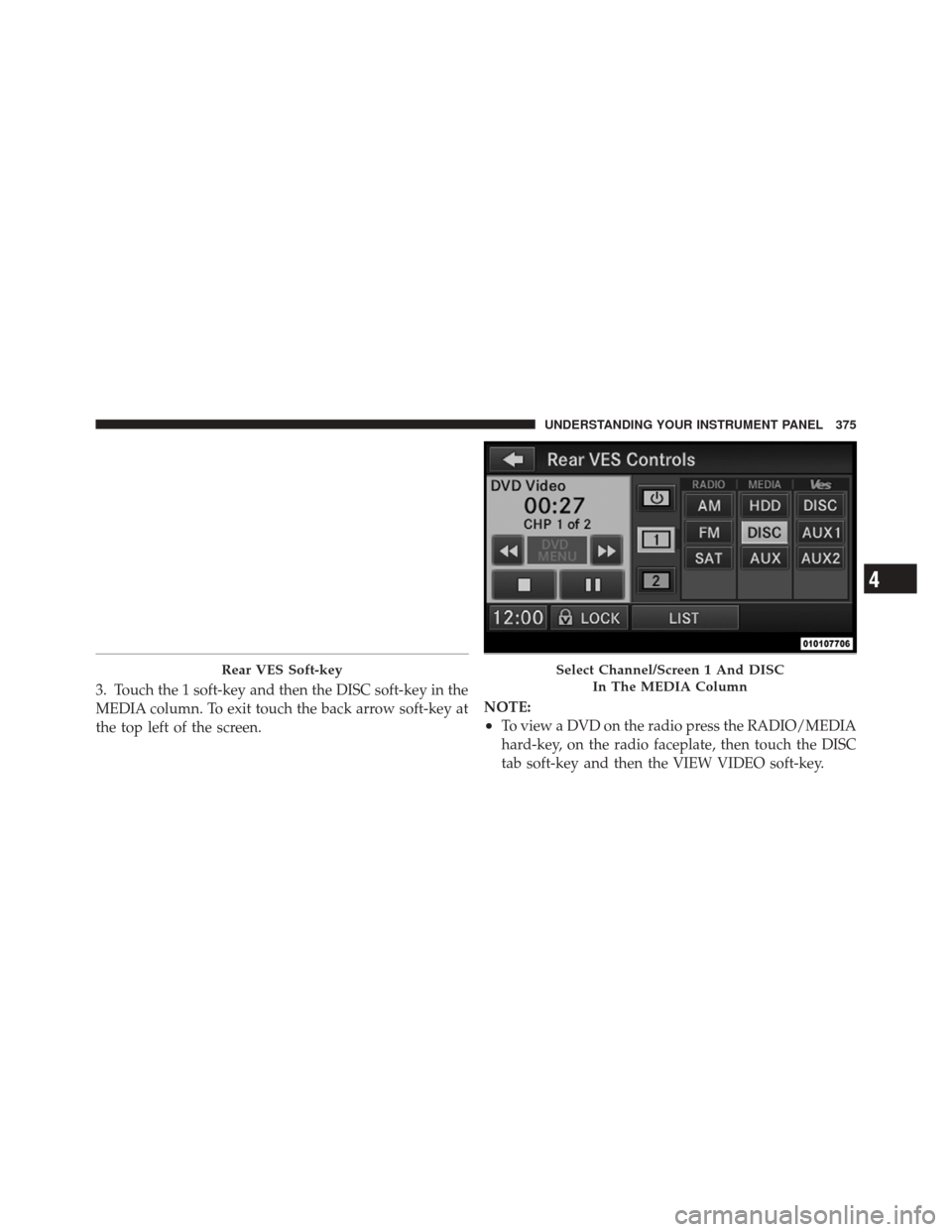
3. Touch the 1 soft-key and then the DISC soft-key in the
MEDIA column. To exit touch the back arrow soft-key at
the top left of the screen.NOTE:
•To view a DVD on the radio press the RADIO/MEDIA
hard-key, on the radio faceplate, then touch the DISC
tab soft-key and then the VIEW VIDEO soft-key.
Rear VES Soft-keySelect Channel/Screen 1 And DISC
In The MEDIA Column
4
UNDERSTANDING YOUR INSTRUMENT PANEL 375
Page 380 of 686
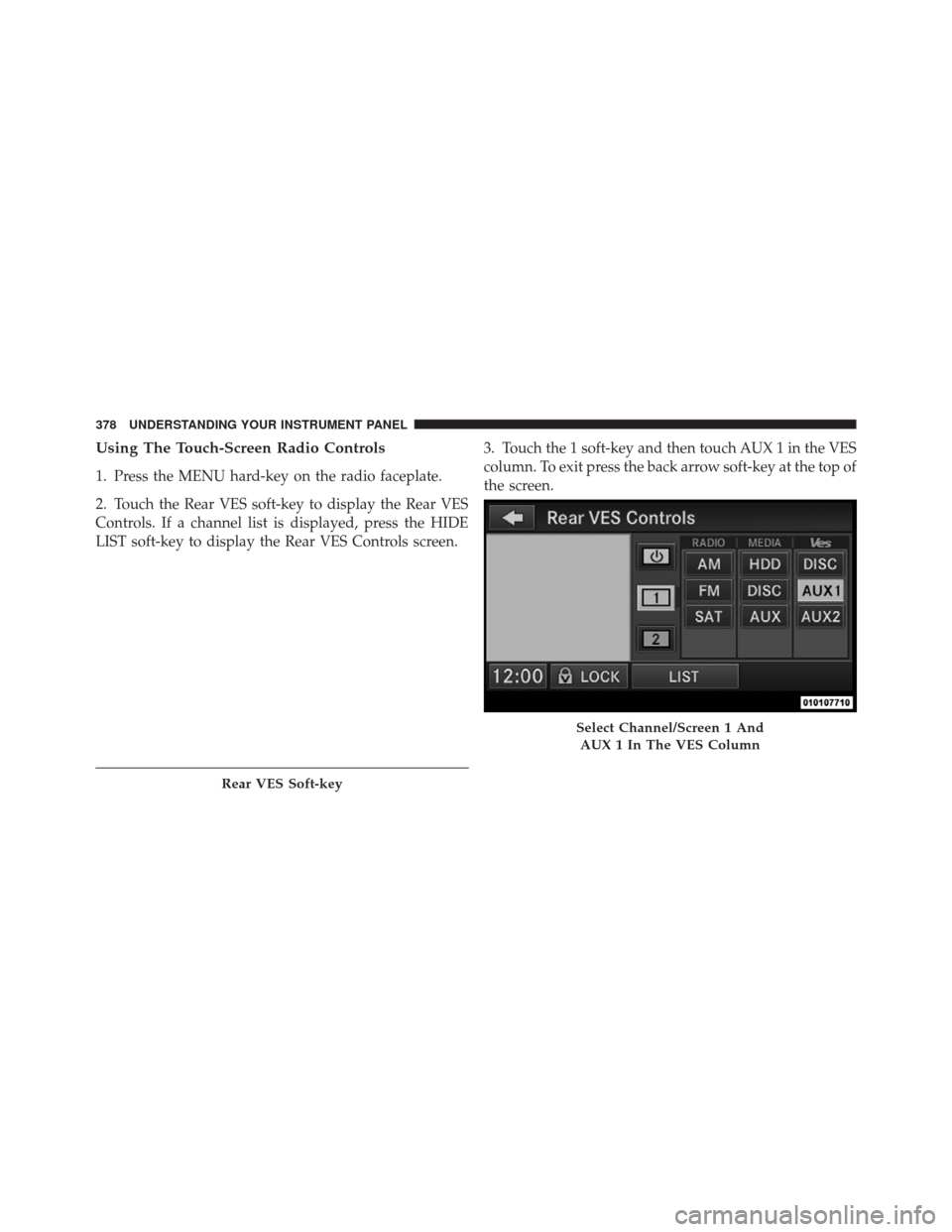
Using The Touch-Screen Radio Controls
1. Press the MENU hard-key on the radio faceplate.
2. Touch the Rear VES soft-key to display the Rear VES
Controls. If a channel list is displayed, press the HIDE
LIST soft-key to display the Rear VES Controls screen.3. Touch the 1 soft-key and then touch AUX 1 in the VES
column. To exit press the back arrow soft-key at the top of
the screen.
Rear VES Soft-key
Select Channel/Screen 1 And
AUX 1 In The VES Column
378 UNDERSTANDING YOUR INSTRUMENT PANEL
Page 382 of 686
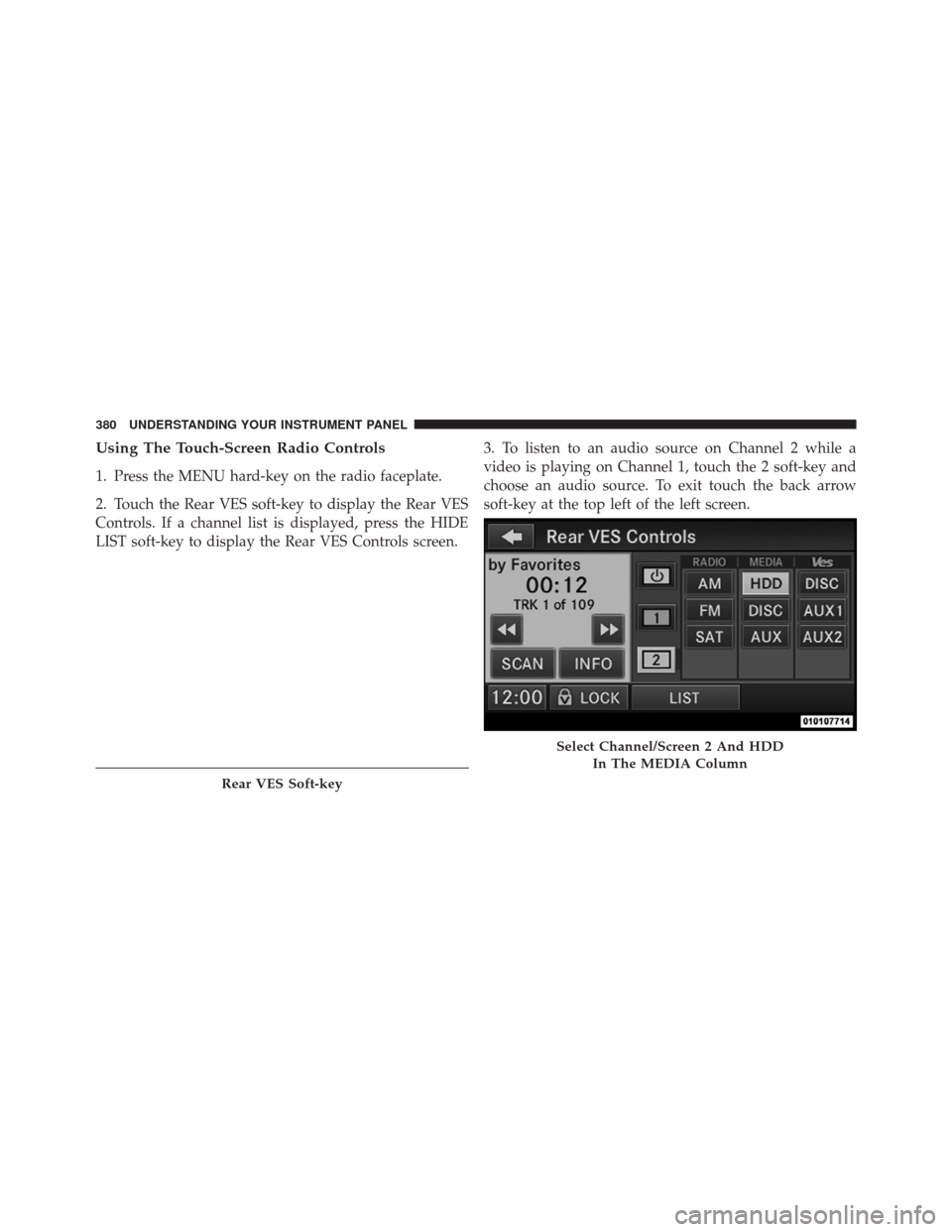
Using The Touch-Screen Radio Controls
1. Press the MENU hard-key on the radio faceplate.
2. Touch the Rear VES soft-key to display the Rear VES
Controls. If a channel list is displayed, press the HIDE
LIST soft-key to display the Rear VES Controls screen.3. To listen to an audio source on Channel 2 while a
video is playing on Channel 1, touch the 2 soft-key and
choose an audio source. To exit touch the back arrow
soft-key at the top left of the left screen.
Rear VES Soft-key
Select Channel/Screen 2 And HDD
In The MEDIA Column
380 UNDERSTANDING YOUR INSTRUMENT PANEL