brake light DODGE DURANGO 2015 3.G User Guide
[x] Cancel search | Manufacturer: DODGE, Model Year: 2015, Model line: DURANGO, Model: DODGE DURANGO 2015 3.GPages: 689, PDF Size: 20.05 MB
Page 326 of 689
8 mph (12 km/h), the transmission is shifted into PARK
or the ignition is switched to the OFF position. To set the
ParkView® Backup Camera Delay push the MORE but-
ton on the faceplate, the “settings” button on the touch-
screen, then the “Safety & Driving Assistance” button on
the touchscreen. Press the “Parkview Backup camera
Delay” button on the touchscreen to turn the ParkView®
Delay ON or OFF.
•Rain Sensing Auto Wipers
When this feature is selected, the system will automati-
cally activate the windshield wipers if it senses moisture
on the windshield. To make your selection, press the
“Rain Sensing” button on the touchscreen and make your
selection. Press the back arrow button on the touchscreen
to return to the previous menu.
•Hill Start Assist — If Equipped
When this feature is selected, the Hill Start Assist (HSA)
system is active. Refer to “Electronic Brake Control
System” in “Starting And Operating” for system function
and operating information. To make your selection, press
the “Hill Start Assist” button on the touchscreen and
make your selection. Press the back arrow button on the
touchscreen to return to the previous menu.
Lights
After pressing the “Lights” button on the touchscreen the
following settings will be available.
•Headlights Off Delay
When this feature is selected, it allows the adjustment of
the amount of time the headlights remain on after the
engine is shut off. To change the Headlights Off Delay
setting, press the “Headlight Off Delay” button on the
touchscreen, and choose either 0 sec, 30 sec, 60 sec or 90
seconds. Press the back arrow button on the touchscreen
to return to the previous menu.
324 UNDERSTANDING YOUR INSTRUMENT PANEL
Page 421 of 689
▫Rain Brake Support....................470
▫ESC Activation/Malfunction Indicator Light And
ESC OFF Indicator Light................470
!TIRE SAFETY INFORMATION.............472
▫Tire Markings........................472
▫Tire Identification Number (TIN)...........475
▫Tire Terminology And Definitions..........477
▫Tire Loading And Tire Pressure...........478
!TIRES — GENERAL INFORMATION........483
▫Tire Pressure........................483
▫Tire Inflation Pressures.................485
▫Tire Pressures For High Speed Operation . . . .486
▫Radial Ply Tires......................486
▫Tire Types...........................487
▫Run Flat Tires — If Equipped.............489
▫Spare Tires — If Equipped...............489
▫Tire Spinning........................492
▫Tread Wear Indicators..................492
▫Life Of Tire.........................493
▫Replacement Tires.....................494
!TIRE CHAINS (TRACTION DEVICES).......496
!TIRE ROTATION RECOMMENDATIONS.....497
!TIRE PRESSURE MONITOR SYSTEM (TPMS) . .498
▫Premium System......................502
▫Tire Pressure Monitoring Low Pressure
Warnings...........................503
5
STARTING AND OPERATING 419
Page 432 of 689
Key Ignition Park Interlock
This vehicle is equipped with a Key Ignition Park Inter-
lock which requires the transmission to be in PARK
before the engine can be turned off. This helps the driver
avoid inadvertently leaving the vehicle without placing
the transmission in PARK.
This system also locks the transmission in PARK when-
ever the ignition switch is in the OFF position.
Brake/Transmission Shift Interlock System
This vehicle is equipped with a Brake Transmission Shift
Interlock System (BTSI) that holds the transmission gear
selector in PARK unless the brakes are applied. To shift
the transmission out of PARK, the engine must be
running and the brake pedal must be pressed.
The brake pedal must also be pressed to shift from
NEUTRAL into DRIVE or REVERSE when the vehicle is
stopped or moving at low speeds.
Fuel Economy (ECO) Mode
The Fuel Economy (ECO) mode can improve the vehi-
cle’s overall fuel economy during normal driving condi-
tions. Each time the vehicle is started ECO mode is
engaged and an amber light in the center stack of the
instrument panel will be illuminated. To disable ECO
mode, press the “ECO” switch in the center stack of the
instrument panel and the amber light will go out indi-
cating ECO mode is disabled.
430 STARTING AND OPERATING
Page 435 of 689
NOTE:After selecting any gear range, wait a moment to
allow the selected gear to engage before accelerating.
This is especially important when the engine is cold.
PARK (P)
This range supplements the parking brake by locking the
transmission. The engine can be started in this range.
Never attempt to use PARK while the vehicle is in
motion. Apply the parking brake when leaving the
vehicle in this range.
When parking on a level surface, you may shift the
transmission into PARK first, and then apply the parking
brake.
When parking on a hill, apply the parking brake before
shifting the transmission to PARK. As an added precau-
tion, turn the front wheels toward the curb on a downhill
grade and away from the curb on an uphill grade.
NOTE:On vehicles equipped with the electronically
shifted transfer case, ensure that the transfer case is in
AWD AUTO or LOW RANGE position on the AWD
Control Switch. Ensure that the NEUTRAL position light
is NOT illuminated.
WARNING!
•Never use the PARK position as a substitute for the
parking brake. Always apply the parking brake
fully when parked to guard against vehicle move-
ment and possible injury or damage.
•Your vehicle could move and injure you and others
if it is not in PARK. Make sure the transmission is
in PARK before leaving the vehicle.
(Continued)
5
STARTING AND OPERATING 433
Page 445 of 689
If One Or More Shift Conditions Are Not Met:
1. The indicator light for the current position will remain
ON.
2. The newly selected position indicator light will con-
tinue to flash.
3. The transfer casewill notshift.
NOTE:Before retrying a selection, make certain that all
the necessary requirements for selecting a new transfer
case position have been met. To retry the selection, turn
the control knob back to the current position, wait five
seconds, and retry selection. To find the shift require-
ments, refer to the#Shifting Procedure#for your transfer
case, located in this section of the owner’s manual.
The “SERV AWD” Warning Light monitors the electronic
shift all-wheel drive system. If this light remains on after
engine start up or illuminates during driving, it means
that the all-wheel drive system is not functioning prop-
erly and that service is required.
WARNING!
Always engage the parking brake when powering
down the vehicle if the “SERV AWD Warning Light”
is illuminated. Not engaging the parking brake may
allow the vehicle to roll which may cause personal
injury.
NOTE:Do not attempt to make a shift while only the
front or rear wheels are spinning. This could cause
damage to driveline components.
When operating your vehicle in LOW RANGE, the
engine speed is approximately three times that of the
AWD AUTO position at a given road speed. Take care not
to overspeed the engine and do not exceed 25 mph
(40 km/h).
5
STARTING AND OPERATING 443
Page 449 of 689
NEUTRAL Shift Procedure
1. Bring the vehicle to a complete stop with the engine
running.
2. Press and hold the brake pedal.
3. Shift the transmission into NEUTRAL.
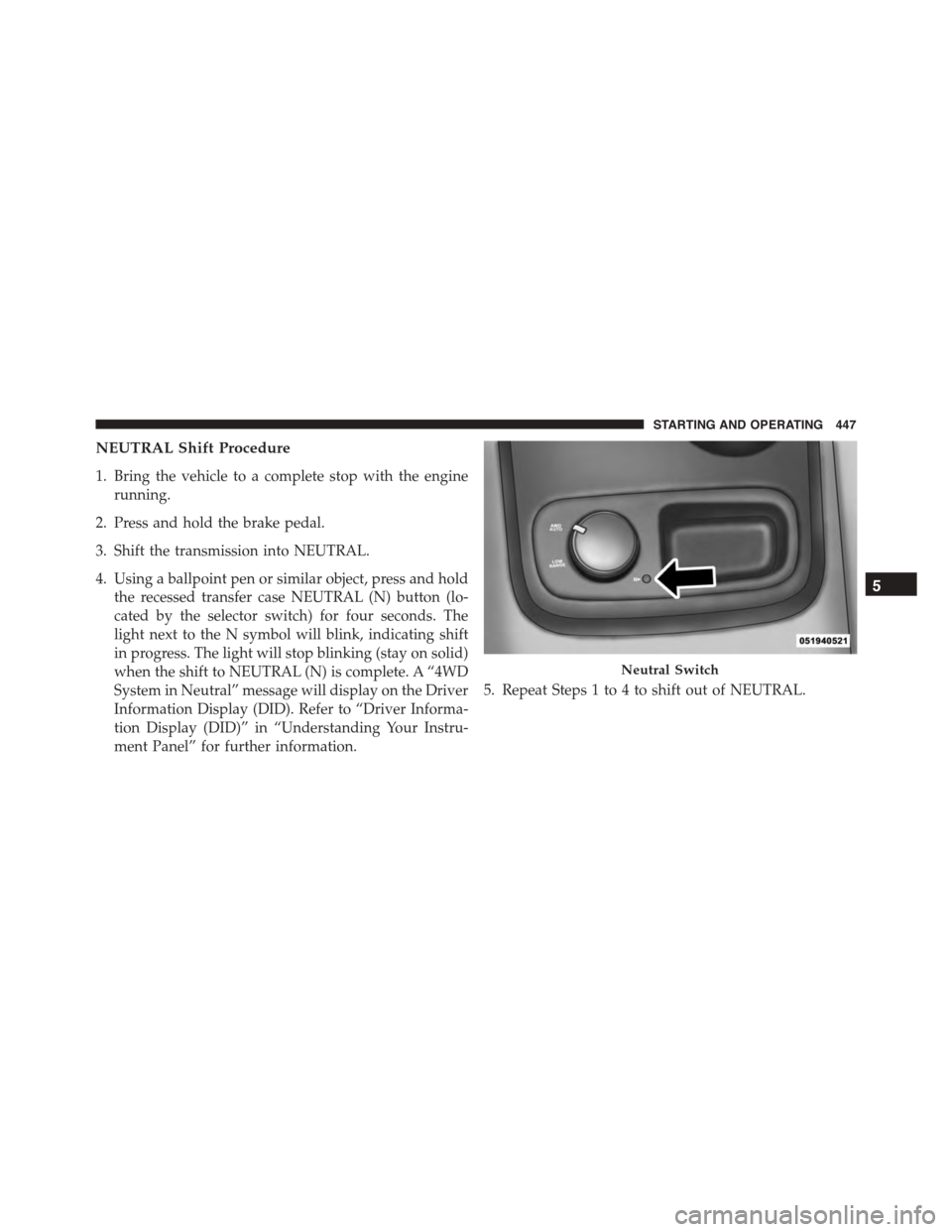
4. Using a ballpoint pen or similar object, press and hold
the recessed transfer case NEUTRAL (N) button (lo-
cated by the selector switch) for four seconds. The
light next to the N symbol will blink, indicating shift
in progress. The light will stop blinking (stay on solid)
when the shift to NEUTRAL (N) is complete. A “4WD
System in Neutral” message will display on the Driver
Information Display (DID). Refer to “Driver Informa-
tion Display (DID)” in “Understanding Your Instru-
ment Panel” for further information.
5. Repeat Steps 1 to 4 to shift out of NEUTRAL.
Neutral Switch
5
STARTING AND OPERATING 447
Page 453 of 689
Hill Climbing
NOTE:Before attempting to climb a hill, determine the
conditions at the crest and/or on the other side.
Before climbing a steep hill, shift the transmission to a
lower gear and shift the transfer case to LOW. Use first
gear and LOW for very steep hills.
If you stall or begin to lose forward motion while
climbing a steep hill, allow your vehicle to come to a stop
and immediately apply the brakes. Restart the engine,
and shift into REVERSE. Back slowly down the hill,
allowing the compression braking of the engine to help
regulate your speed. If the brakes are required to control
vehicle speed, apply them lightly and avoid locking or
skidding the tires.
WARNING!
If the engine stalls, you lose forward motion, or
cannot make it to the top of a steep hill or grade,
never attempt to turn around. To do so may result in
tipping and rolling the vehicle. Always back care-
fully straight down a hill in REVERSE gear. Never
back down a hill in NEUTRAL using only the brake.
Remember, never drive diagonally across a hill always
drive straight up or down.
If the wheels start to slip as you approach the crest of a
hill, ease off the accelerator and maintain forward motion
by turning the front wheels slowly. This may provide a
fresh “bite” into the surface and will usually provide
traction to complete the climb.
5
STARTING AND OPERATING 451
Page 455 of 689
WARNING!
Abrasive material in any part of the brakes may cause
excessive wear or unpredictable braking. You might
not have full braking power when you need it to
prevent a collision. If you have been operating your
vehicle in dirty conditions, get your brakes checked
and cleaned as necessary.
•If you experience unusual vibration after driving in
mud, slush or similar conditions, check the wheels for
impacted material. Impacted material can cause a
wheel imbalance and freeing the wheels of it will
correct the situation.
POWER STEERING
3.6L Engine
Your vehicle is equipped with an electro-hydraulic power
steering system that will give you good vehicle response
and increased ease of maneuverability in tight spaces.
The system will vary its assist to provide light efforts
while parking and good feel while driving. If the electro-
hydraulic power steering system experiences a fault that
prevents it from providing power steering assist, then the
system will provide mechanical steering capability.
CAUTION!
Extreme steering maneuvers may cause the electri-
cally driven pump to reduce or stop power steering
assistance in order to prevent damage to the system.
Normal operation will resume once the system is
allowed to cool.
5
STARTING AND OPERATING 453
Page 458 of 689
apparent, and/or the system is not functioning as antici-
pated. Coordinate inspection efforts through an autho-
rized dealer.
CAUTION!
Do not use chemical flushes in your power steering
system as the chemicals can damage your power
steering components. Such damage is not covered by
the New Vehicle Limited Warranty.
WARNING!
Fluid level should be checked on a level surface and
with the engine off to prevent injury from moving
parts and to ensure accurate fluid level reading. Do
not overfill. Use only manufacturer’s recommended
power steering fluid.
If necessary, add fluid to restore to the proper indicated
level. With a clean cloth, wipe any spilled fluid from all
surfaces. Refer to “Fluids, Lubricants, and Genuine
Parts” in “Maintaining Your Vehicle” for further informa-
tion.
FUEL SAVER TECHNOLOGY 5.7L ENGINE ONLY —
IF EQUIPPED
This feature offers improved fuel economy by shutting
off four of the engine’s eight cylinders during light load
and cruise conditions. The system is automatic with no
driver inputs or additional driving skills required.
NOTE:This system may take some time to return to full
functionality after a battery disconnect.
PARKING BRAKE
Before leaving the vehicle, make sure that the parking
brake is fully applied and place the shift lever in the
PARK position.
456 STARTING AND OPERATING
Page 459 of 689
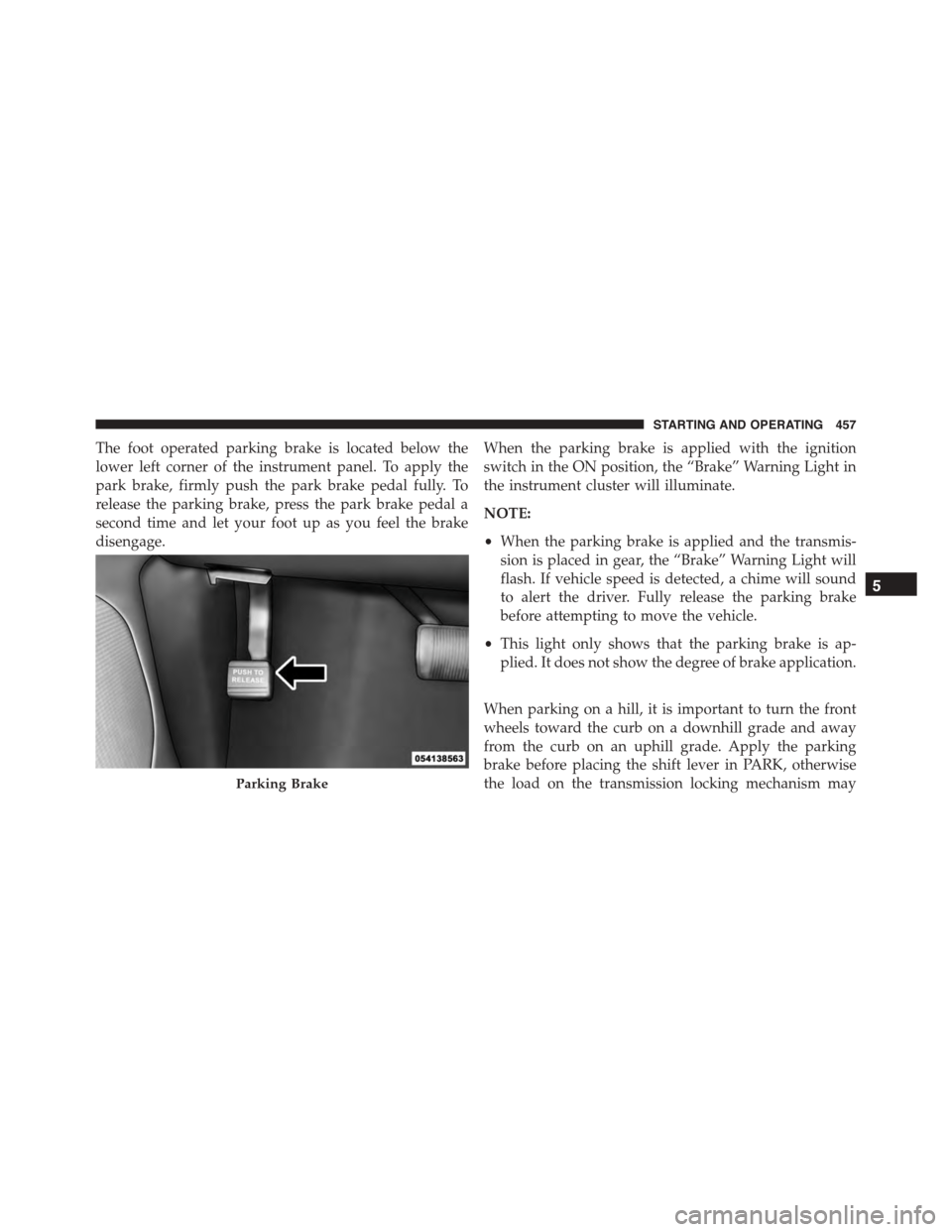
The foot operated parking brake is located below the
lower left corner of the instrument panel. To apply the
park brake, firmly push the park brake pedal fully. To
release the parking brake, press the park brake pedal a
second time and let your foot up as you feel the brake
disengage.
When the parking brake is applied with the ignition
switch in the ON position, the “Brake” Warning Light in
the instrument cluster will illuminate.
NOTE:
•When the parking brake is applied and the transmis-
sion is placed in gear, the “Brake” Warning Light will
flash. If vehicle speed is detected, a chime will sound
to alert the driver. Fully release the parking brake
before attempting to move the vehicle.
•This light only shows that the parking brake is ap-
plied. It does not show the degree of brake application.
When parking on a hill, it is important to turn the front
wheels toward the curb on a downhill grade and away
from the curb on an uphill grade. Apply the parking
brake before placing the shift lever in PARK, otherwise
the load on the transmission locking mechanism mayParking Brake
5
STARTING AND OPERATING 457