lights DODGE DURANGO 2015 3.G Workshop Manual
[x] Cancel search | Manufacturer: DODGE, Model Year: 2015, Model line: DURANGO, Model: DODGE DURANGO 2015 3.GPages: 689, PDF Size: 20.05 MB
Page 348 of 689
(24 km/h). To make your selection, press the “Auto Door
Locks” button on the touchscreen, until a check-mark
appears next to setting, showing that setting has been
selected. Press the back arrow button on the touchscreen
to return to the previous menu, or push the back button
on the faceplate.
•Auto Unlock On Exit
When this feature is selected, all doors will unlock when
the vehicle is stopped, the transmission is in the PARK or
NEUTRAL position and the driver’s door is opened. To
make your selection, press the “Auto Unlock on Exit”
button on the touchscreen, until a check-mark appears next
to setting, showing that setting has been selected. Press the
back arrow button on the touchscreen to return to the
previous menu, or push the back button on the faceplate.
•Flash Lights With Lock
When this feature is selected, the exterior lights will flash
when the doors are locked or unlocked with the Remote
Keyless Entry (RKE) transmitter, or when using the
passive entry feature. This feature may be selected with
or without the sound horn on lock feature selected. To
make your selection, press the “Flash Lights with Lock”
button on the touchscreen, until a check-mark appears
next to setting, indicating that the setting has been
selected. Press the back arrow button on the touchscreen
to return to the previous menu.
•Sound Horn With Lock
When this feature is selected, the horn will sound when
the door locks are activated. To make your selection,
press either the “Off,” “1st Press,” or “2nd Press” button
on the touchscreen, until a check-mark appears next to
setting, showing that setting has been selected. Press the
back arrow button on the touchscreen to return to the
previous menu.
346 UNDERSTANDING YOUR INSTRUMENT PANEL
Page 352 of 689
Engine Off Power Delay status press the press the “+” or
“-” button to choose from “0 seconds,” “45 seconds,” “5
minutes,” or “10 minutes.” Press the back arrow button
on the touchscreen to return to the previous menu.
•Headlight Off Delay
When this feature is selected, the driver can choose to have
the headlights remain on for 0, 30, 60, or 90 seconds when
exiting the vehicle. To change the Headlight Off Delay
status press the “+” or “-” button on the touchscreen to
select your desired time interval. Press the back arrow
button on the touchscreen to return to the previous menu.
Audio
After pressing the “Audio” button on the touchscreen the
following settings will be available.
•Balance/Fade
This feature allows you to adjust the Balance and Fade
settings. Press and drag the speaker icon, use the arrows
to adjust, or tap the ‘C’ icon to readjust to the center. Press
the back arrow button on the touchscreen to return to the
previous menu.
•Equalizer
This feature allows you to adjust the Bass, Mid and Treble
settings. Adjust the settings with the “+” and “–” setting
buttons on the touchscreen or by selecting any point on
the scale between the “+” and “–” buttons on the
touchscreen. Press the back arrow button on the touch-
screen to return to the previous menu.
NOTE:Bass/Mid/Treble allow you to simply slide your
finger up or down to change the setting as well as press
directly on the desired setting.
•Speed Adjusted Volume
This feature increases or decreases volume relative to
vehicle speed. To change the Speed Adjusted Volume
350 UNDERSTANDING YOUR INSTRUMENT PANEL
Page 412 of 689
Uconnect® Access* (8.4A/8.4AN)
An included trial and/or subscription is required to take
advantage of the Uconnect® Access services in the next
section of this guide. To register with Uconnect® Access,
press the Apps button on the 8.4-inch touchscreen to get
started. Detailed registration instructions can be found
on the next page.
*Uconnect® Access is available only on equipped ve-
hicles purchased within the continental United States and
Alaska. Services can only be used where coverage is
available; see coverage map for details.
9-1-1 Call
Theft Alarm Notification
Remote Door Lock/Unlock
Stolen Vehicle Assistance
Remote Vehicle Start**
Remote Horn and Lights
Yelp® Search
Voice Texting
Roadside Assistance Call
Wi-Fi Hotspot***
**If vehicle is equipped.
***Extra charges apply.
410 UNDERSTANDING YOUR INSTRUMENT PANEL
Page 444 of 689
This electronically shifted transfer case is designed to be
driven in the AWD AUTO position for normal street and
highway conditions on dry hard surfaced roads.
For variable driving conditions, the AWD AUTO mode
can be used. In this mode, the front axle is engaged, but
the vehicle’s power is sent to the rear wheels. All-wheel
drive will be automatically engaged when the vehicle
senses a loss of traction.
When additional traction is required, the transfer case
LOW RANGE position can be used to lock the front and
rear driveshafts together forcing the front and rear
wheels to rotate at the same speed. This is accomplished
by rotating the AWD Control Switch to the desired
position. Refer to “Shifting Procedure” for specific shift-
ing instructions. The LOW RANGE position is designed
for loose, slippery road surfaces only. Driving in the
LOW RANGE position on dry hard surfaced roads may
cause increased tire wear and damage to the driveline
components.
Transfer Case Position Indicator Messages
The Transfer Case Position Indicator messages (AWD
AUTO and LOW RANGE) are located in the Driver
Information Display (DID) and indicate the current and
desired transfer case selection. Refer to “Driver Informa-
tion Display (DID)” in “Understanding Your Instrument
Panel” for further information. When you select a differ-
ent transfer case position, the position indicator lights
will do the following:
If All Shift Conditions Are Met:
1. The current position indicator light will turn OFF.
2. The selected position indicator light will flash until the
transfer case completes the shift.
3. When the shift is complete, the indicator light for the
selected position will stop flashing and remain ON.
442 STARTING AND OPERATING
Page 448 of 689
2. Shift the transmission into NEUTRAL.
3. While still rolling, rotate the AWD control switch to
the desired position.
4. After the desired position indicator light is ON (not
flashing), shift the transmission back into gear.
Alternate Procedure
1. Bring the vehicle to complete stop.
2. With the ignition switch in ON/ RUN position and
engine running, shift the transmission to Neutral.
3. Rotate the AWD control switch to the desired position.
4. After the desired position indicator light is ON (not
flashing), shift the transmission back into gear.
NOTE:
•If Steps 1 or 2 of either the Preferred or Alternate
Procedure are not satisfied prior to attempting the shift
or if they no longer are being met while the shift
attempt is in process, the desired position indicator
light will flash continuously while the original position
indicator light is ON, until all requirements have been
met.
•The ignition switch must be in the RUN position for a
shift to take place and for the position indicator lights
to be operable. If the ignition switch is not in the RUN
position, then the shift will not take place and no
position indicator lights will be on or flashing.
446 STARTING AND OPERATING
Page 535 of 689
WARNING!(Continued)
•Towing any trailer will increase your stopping
distance. When towing you should allow for addi-
tional space between your vehicle and the vehicle
in front of you. Failure to do so could result in a
collision.
CAUTION!
If the trailer weighs more than 1,000 lbs (454 kg)
loaded, it should have its own brakes and they
should be of adequate capacity. Failure to do this
could lead to accelerated brake lining wear, higher
brake pedal effort, and longer stopping distances.
Towing Requirements — Trailer Lights And Wiring
Whenever you pull a trailer, regardless of the trailer size,
stoplights and turn signals on the trailer are required for
motoring safety.
The Trailer Tow Package may include a four- and seven-
pin wiring harness. Use a factory approved trailer har-
ness and connector.
NOTE:Do not cut or splice wiring into the vehicles
wiring harness.
5
STARTING AND OPERATING 533
Page 545 of 689
NOTE:
•Steps 1 through 3 are requirements that must be met
before pressing the NEUTRAL (N) button, and must
continue to be met until the shift has been completed.
If any of these requirements are not met before press-
ing the NEUTRAL (N) button or are no longer met
during the shift, the NEUTRAL (N) indicator light will
flash continuously until all requirements are met or
until the NEUTRAL (N) button is released.
•The ignition switch must be in the ON/RUN position
for a shift to take place and for the position indicator
lights to be operable. If the ignition switch is not in the
ON/RUN position, the shift will not take place and no
position indicator lights will be on or flashing.
•A flashing NEUTRAL (N) position indicator light
indicates that shift requirements have not been met.
Shifting Out Of NEUTRAL (N)
Use the following procedure to prepare your vehicle for
normal usage.
1. Bring the vehicle to a complete stop, leaving it con-
nected to the tow vehicle.
2. Firmly apply the parking brake.
3. Start the engine.
4. Press and hold the brake pedal.
5. Shift the transmission into NEUTRAL.
6. Using a ballpoint pen or similar object, press and hold
the recessed transfer case NEUTRAL (N) button (lo-
cated by the selector switch) for one second.
5
STARTING AND OPERATING 543
Page 547 of 689
NOTE:
•Steps 1 through 5 are requirements that must be met
before pressing the NEUTRAL (N) button, and must
continue to be met until the shift has been completed.
If any of these requirements are not met before press-
ing the NEUTRAL (N) button or are no longer met
during the shift, the NEUTRAL (N) indicator light will
flash continuously until all requirements are met or
until the NEUTRAL (N) button is released.
•The ignition switch must be in the ON/RUN position
for a shift to take place and for the position indicator
lights to be operable. If the ignition switch is not in the
ON/RUN position, the shift will not take place and no
position indicator lights will be on or flashing.
•A flashing NEUTRAL (N) position indicator light
indicates that shift requirements have not been met.
5
STARTING AND OPERATING 545
Page 625 of 689
Interior Care
Use MOPAR® Total Clean to clean fabric upholstery and
carpeting.
Use MOPAR® Total Clean to clean vinyl upholstery.
MOPAR® Total Clean is specifically recommended for
leather upholstery.
Your leather upholstery can be best preserved by regular
cleaning with a damp soft cloth. Small particles of dirt
can act as an abrasive and damage the leather upholstery
and should be removed promptly with a damp cloth.
Stubborn soils can be removed easily with a soft cloth
and MOPAR® Total Clean. Care should be taken to avoid
soaking your leather upholstery with any liquid. Please
do not use polishes, oils, cleaning fluids, solvents, deter-
gents, or ammonia-based cleaners to clean your leather
upholstery. Application of a leather conditioner is not
required to maintain the original condition.
WARNING!
Do not use volatile solvents for cleaning purposes.
Many are potentially flammable, and if used in
closed areas they may cause respiratory harm.
CAUTION!
Do not use Alcohol and Alcohol-based and/or Keton
based cleaning products to clean leather seats, as
damage to the seat may result.
Cleaning Headlights
Your vehicle is equipped with plastic headlights and fog
lights that are lighter and less susceptible to stone break-
age than glass headlights.
Plastic is not as scratch resistant as glass and therefore
different lens cleaning procedures must be followed.
7
MAINTAINING YOUR VEHICLE 623
Page 629 of 689
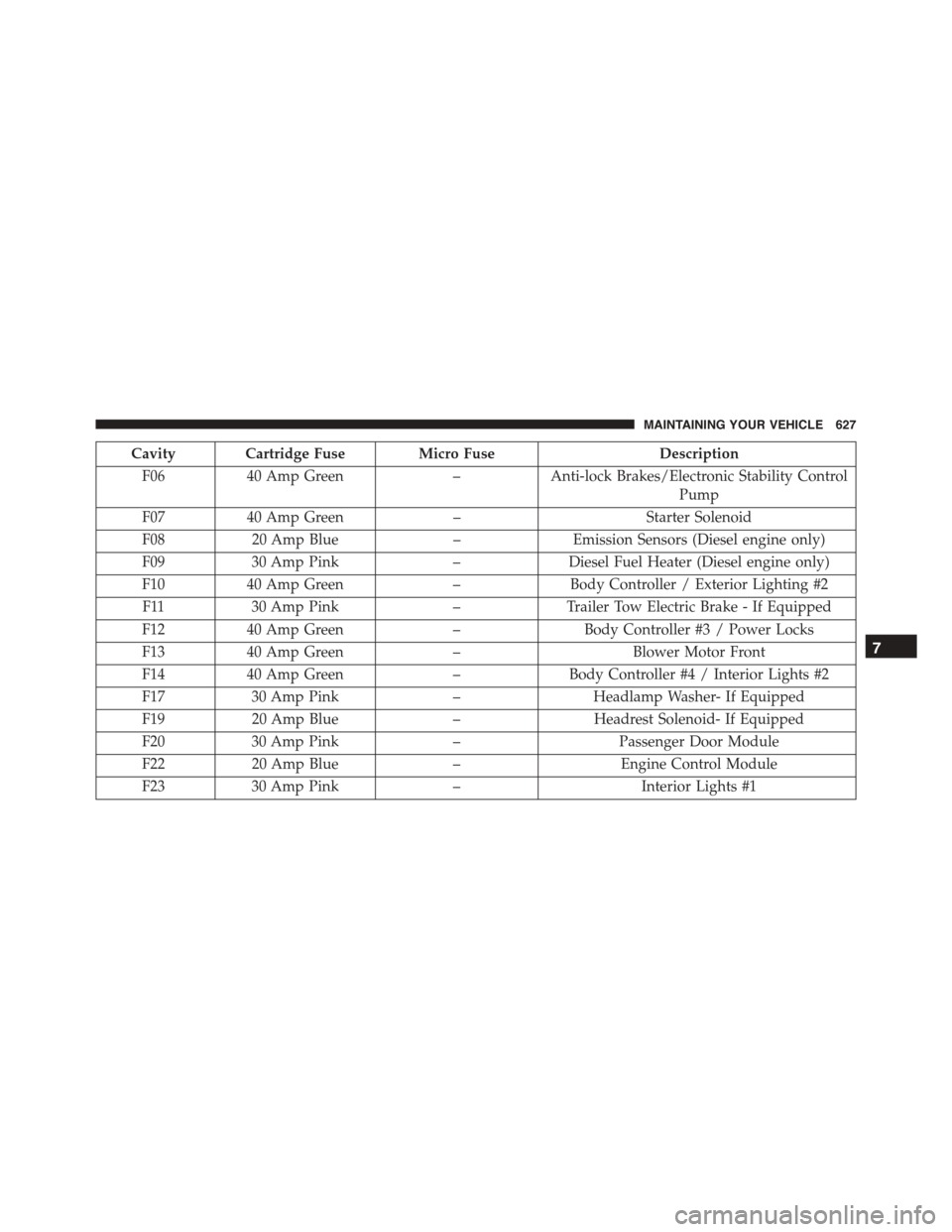
Cavity Cartridge Fuse Micro FuseDescription
F0640 Amp Green–Anti-lock Brakes/Electronic Stability Control
Pump
F0740 Amp Green–Starter Solenoid
F0820 Amp Blue–Emission Sensors (Diesel engine only)
F0930 Amp Pink–Diesel Fuel Heater (Diesel engine only)
F1040 Amp Green–Body Controller / Exterior Lighting #2
F1130 Amp Pink–Trailer Tow Electric Brake - If Equipped
F1240 Amp Green–Body Controller #3 / Power Locks
F1340 Amp Green–Blower Motor Front
F1440 Amp Green–Body Controller #4 / Interior Lights #2
F1730 Amp Pink–Headlamp Washer- If Equipped
F1920 Amp Blue–Headrest Solenoid- If Equipped
F2030 Amp Pink–Passenger Door Module
F2220 Amp Blue–Engine Control Module
F2330 Amp Pink–Interior Lights #1
7
MAINTAINING YOUR VEHICLE 627