radio DODGE DURANGO 2017 3.G Owner's Guide
[x] Cancel search | Manufacturer: DODGE, Model Year: 2017, Model line: DURANGO, Model: DODGE DURANGO 2017 3.GPages: 584, PDF Size: 5.14 MB
Page 286 of 584
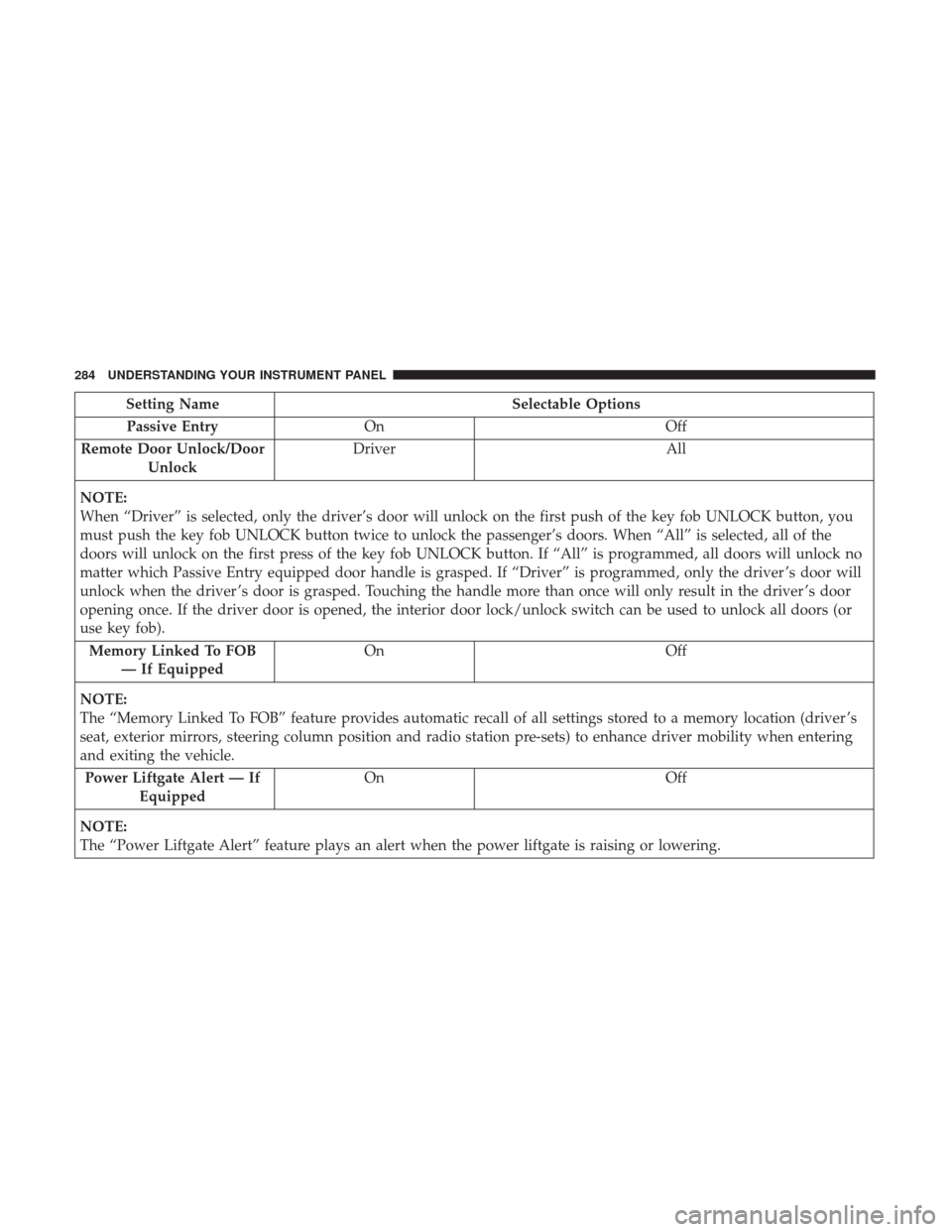
Setting NameSelectable Options
Passive Entry On Off
Remote Door Unlock/Door Unlock Driver
All
NOTE:
When “Driver” is selected, only the driver’s door will unlock on the first push of the key fob UNLOCK button, you
must push the key fob UNLOCK button twice to unlock the passenger’s doors. When “All” is selected, all of the
doors will unlock on the first press of the key fob UNLOCK button. If “All” is programmed, all doors will unlock no
matter which Passive Entry equipped door handle is grasped. If “Driver” is programmed, only the driver ’s door will
unlock when the driver ’s door is grasped. Touching the handle more than once will only result in the driver ’s door
opening once. If the driver door is opened, the interior door lock/unlock switch can be used to unlock all doors (or
use key fob). Memory Linked To FOB — If Equipped On
Off
NOTE:
The “Memory Linked To FOB” feature provides automatic recall of all settings stored to a memory location (driver ’s
seat, exterior mirrors, steering column position and radio station pre-sets) to enhance driver mobility when entering
and exiting the vehicle. Power Liftgate Alert — If Equipped On
Off
NOTE:
The “Power Liftgate Alert” feature plays an alert when the power liftgate is raising or lowering.
284 UNDERSTANDING YOUR INSTRUMENT PANEL
Page 288 of 584
Engine Off Options
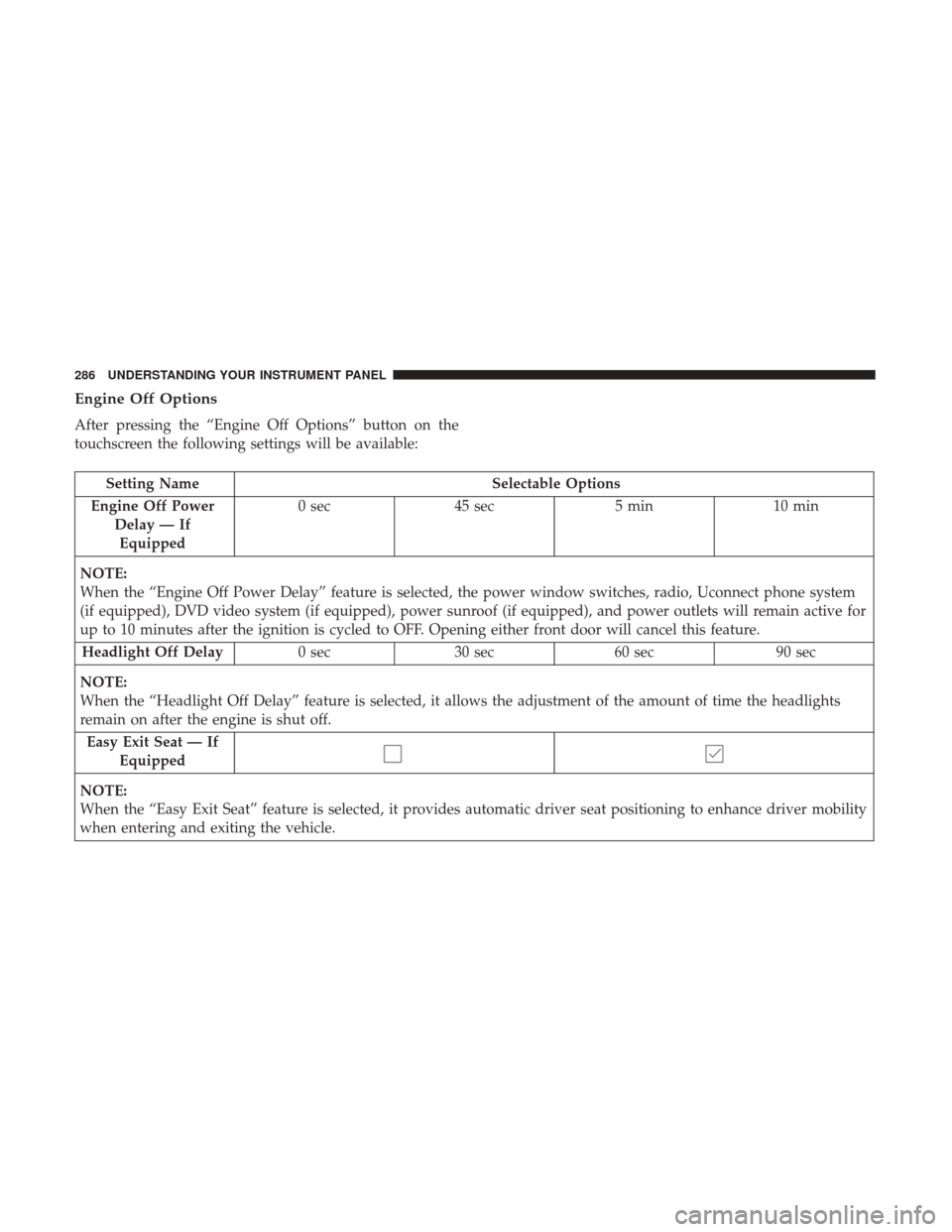
After pressing the “Engine Off Options” button on the
touchscreen the following settings will be available:
Setting NameSelectable Options
Engine Off Power Delay — IfEquipped 0 sec
45 sec 5 min10 min
NOTE:
When the “Engine Off Power Delay” feature is selected, the power window switches, radio, Uconnect phone system
(if equipped), DVD video system (if equipped), power sunroof (if equipped), and power outlets will remain active for
up to 10 minutes after the ignition is cycled to OFF. Opening either front door will cancel this feature. Headlight Off Delay 0 sec30 sec 60 sec 90 sec
NOTE:
When the “Headlight Off Delay” feature is selected, it allows the adjustment of the amount of time the headlights
remain on after the engine is shut off. Easy Exit Seat — If Equipped
NOTE:
When the “Easy Exit Seat” feature is selected, it provides automatic driver seat positioning to enhance driver mobility
when entering and exiting the vehicle.
286 UNDERSTANDING YOUR INSTRUMENT PANEL
Page 293 of 584
SiriusXM Setup — If Equipped
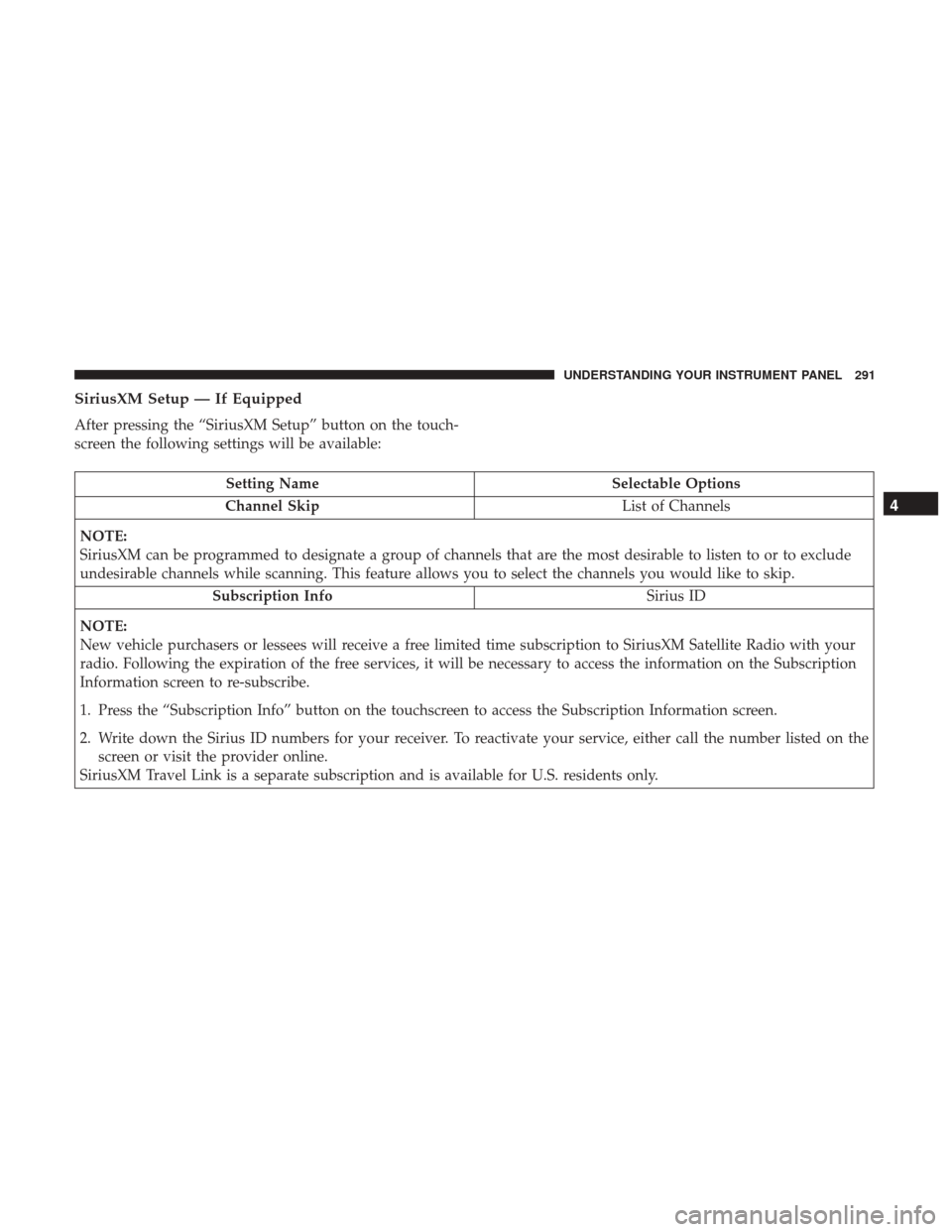
After pressing the “SiriusXM Setup” button on the touch-
screen the following settings will be available:
Setting NameSelectable Options
Channel Skip List of Channels
NOTE:
SiriusXM can be programmed to designate a group of channels that are the most desirable to listen to or to exclude
undesirable channels while scanning. This feature allows you to select the channels you would like to skip. Subscription Info Sirius ID
NOTE:
New vehicle purchasers or lessees will receive a free limited time subscription to SiriusXM Satellite Radio with your
radio. Following the expiration of the free services, it will be necessary to access the information on the Subscription
Information screen to re-subscribe.
1. Press the “Subscription Info” button on the touchscreen to access the Subscription Information screen.
2. Write down the Sirius ID numbers for your receiver. To reactivate your service, either call the number listed on the screen or visit the provider online.
SiriusXM Travel Link is a separate subscription and is available for U.S. residents only.
4
UNDERSTANDING YOUR INSTRUMENT PANEL 291
Page 308 of 584
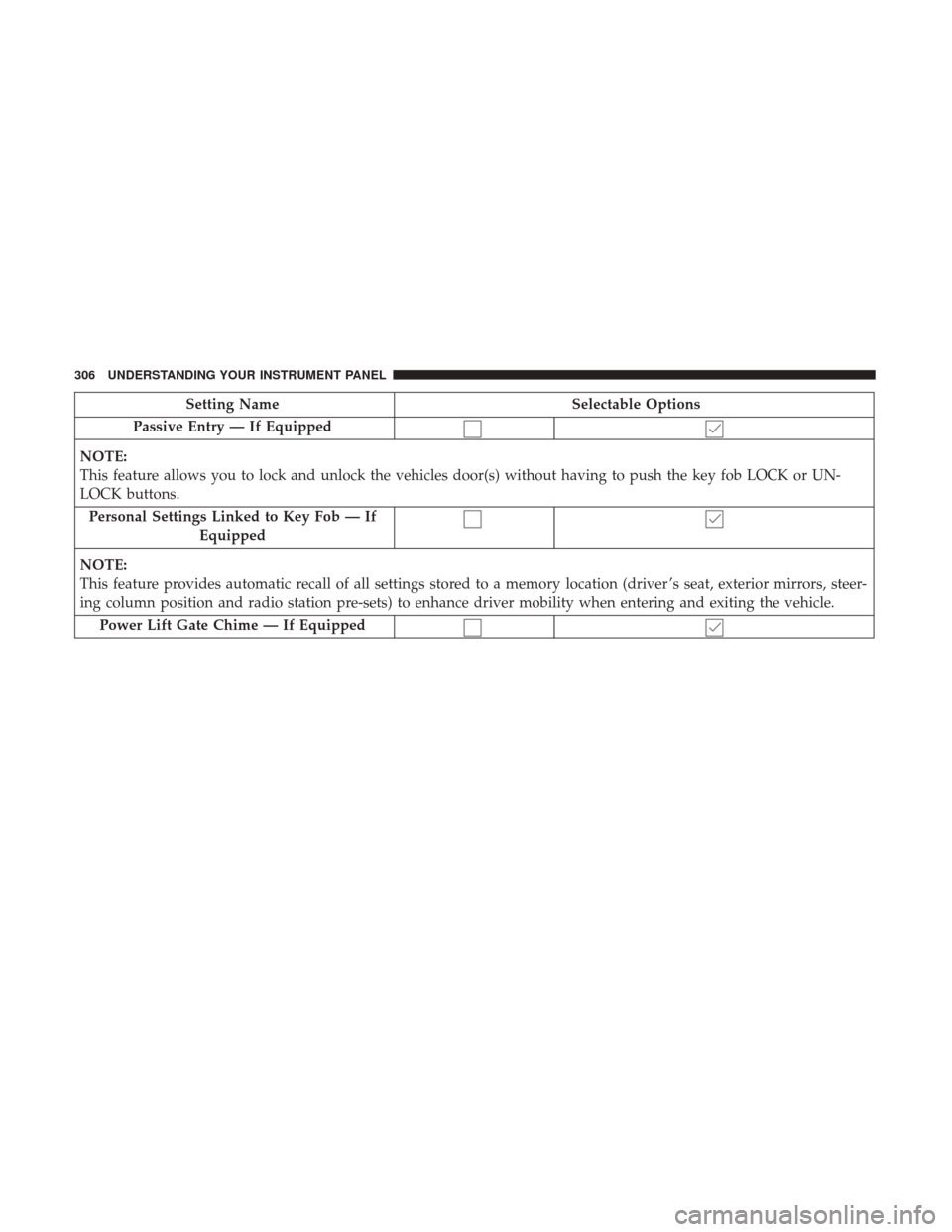
Setting NameSelectable Options
Passive Entry — If Equipped
NOTE:
This feature allows you to lock and unlock the vehicles door(s) without having to push the key fob LOCK or UN-
LOCK buttons. Personal Settings Linked to Key Fob — If Equipped
NOTE:
This feature provides automatic recall of all settings stored to a memory location (driver ’s seat, exterior mirrors, steer-
ing column position and radio station pre-sets) to enhance driver mobility when entering and exiting the vehicle. Power Lift Gate Chime — If Equipped
306 UNDERSTANDING YOUR INSTRUMENT PANEL
Page 310 of 584
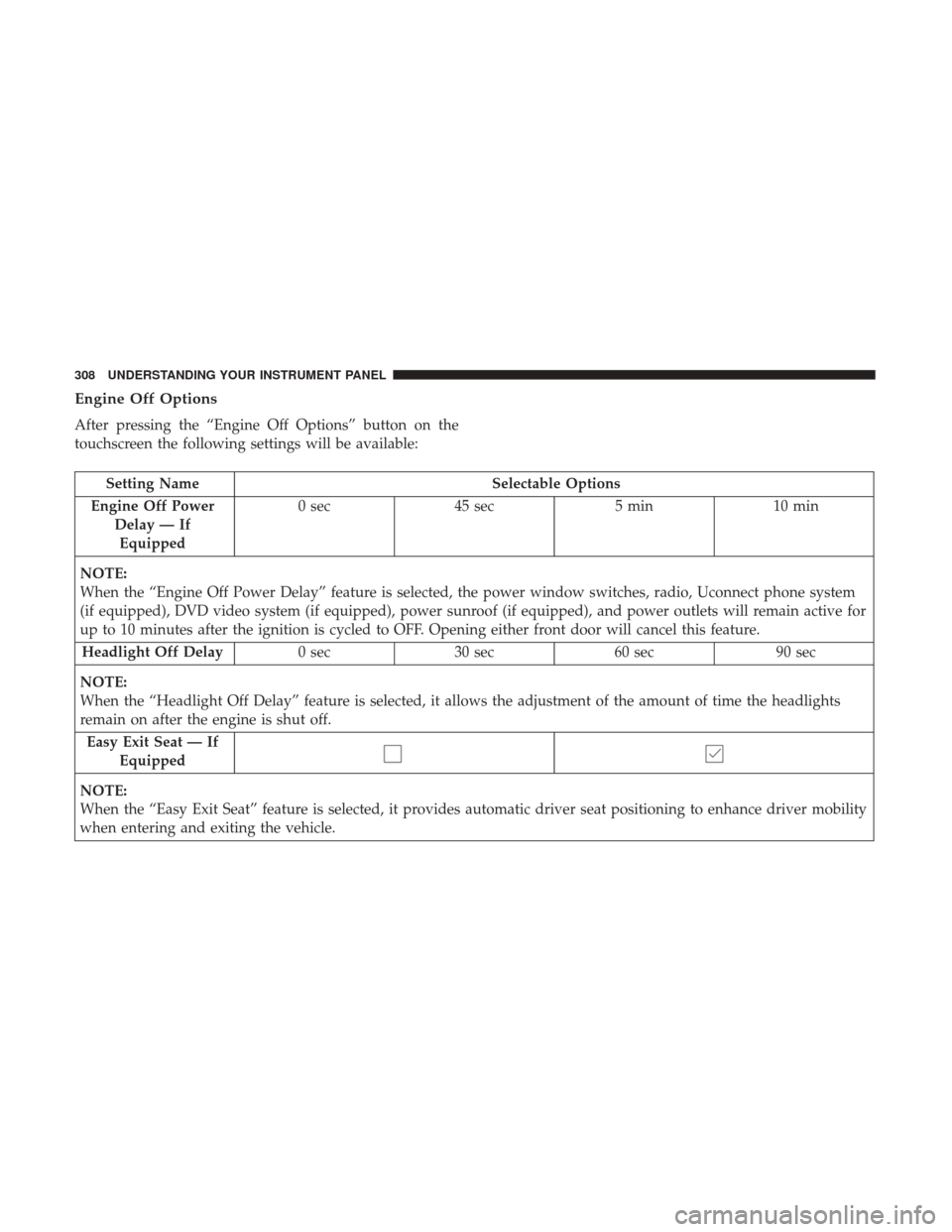
Engine Off Options
After pressing the “Engine Off Options” button on the
touchscreen the following settings will be available:
Setting NameSelectable Options
Engine Off Power Delay — IfEquipped 0 sec
45 sec 5 min10 min
NOTE:
When the “Engine Off Power Delay” feature is selected, the power window switches, radio, Uconnect phone system
(if equipped), DVD video system (if equipped), power sunroof (if equipped), and power outlets will remain active for
up to 10 minutes after the ignition is cycled to OFF. Opening either front door will cancel this feature. Headlight Off Delay 0 sec30 sec 60 sec 90 sec
NOTE:
When the “Headlight Off Delay” feature is selected, it allows the adjustment of the amount of time the headlights
remain on after the engine is shut off. Easy Exit Seat — If Equipped
NOTE:
When the “Easy Exit Seat” feature is selected, it provides automatic driver seat positioning to enhance driver mobility
when entering and exiting the vehicle.
308 UNDERSTANDING YOUR INSTRUMENT PANEL
Page 313 of 584
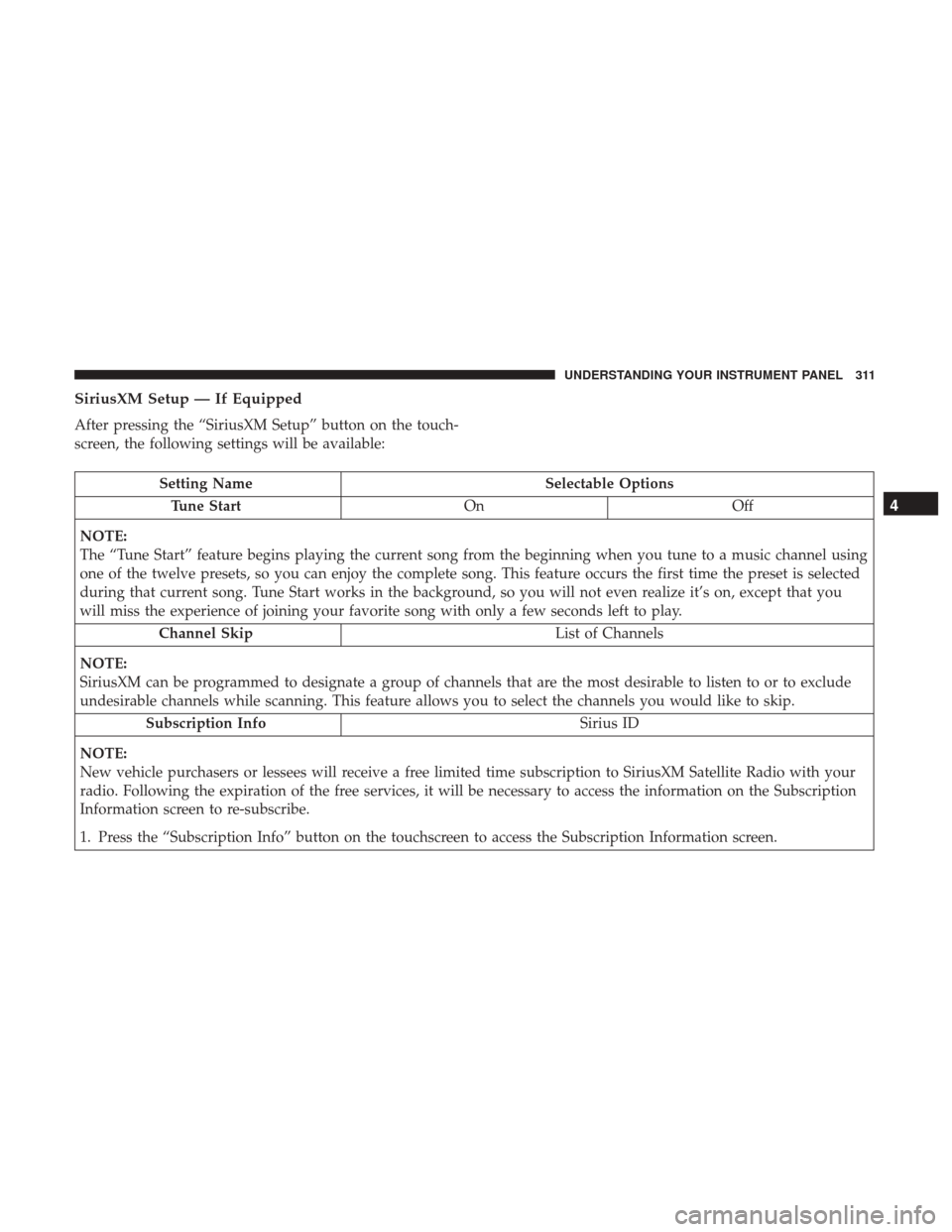
SiriusXM Setup — If Equipped
After pressing the “SiriusXM Setup” button on the touch-
screen, the following settings will be available:
Setting NameSelectable Options
Tune Start OnOff
NOTE:
The “Tune Start” feature begins playing the current song from the beginning when you tune to a music channel using
one of the twelve presets, so you can enjoy the complete song. This feature occurs the first time the preset is selected
during that current song. Tune Start works in the background, so you will not even realize it’s on, except that you
will miss the experience of joining your favorite song with only a few seconds left to play. Channel Skip List of Channels
NOTE:
SiriusXM can be programmed to designate a group of channels that are the most desirable to listen to or to exclude
undesirable channels while scanning. This feature allows you to select the channels you would like to skip. Subscription Info Sirius ID
NOTE:
New vehicle purchasers or lessees will receive a free limited time subscription to SiriusXM Satellite Radio with your
radio. Following the expiration of the free services, it will be necessary to access the information on the Subscription
Information screen to re-subscribe.
1. Press the “Subscription Info” button on the touchscreen to access the Subscription Information screen.
4
UNDERSTANDING YOUR INSTRUMENT PANEL 311
Page 316 of 584
UCONNECT RADIOS — IF EQUIPPED
For detailed information about your Uconnect radio, refer
to your Uconnect Owner ’s Manual Supplement.
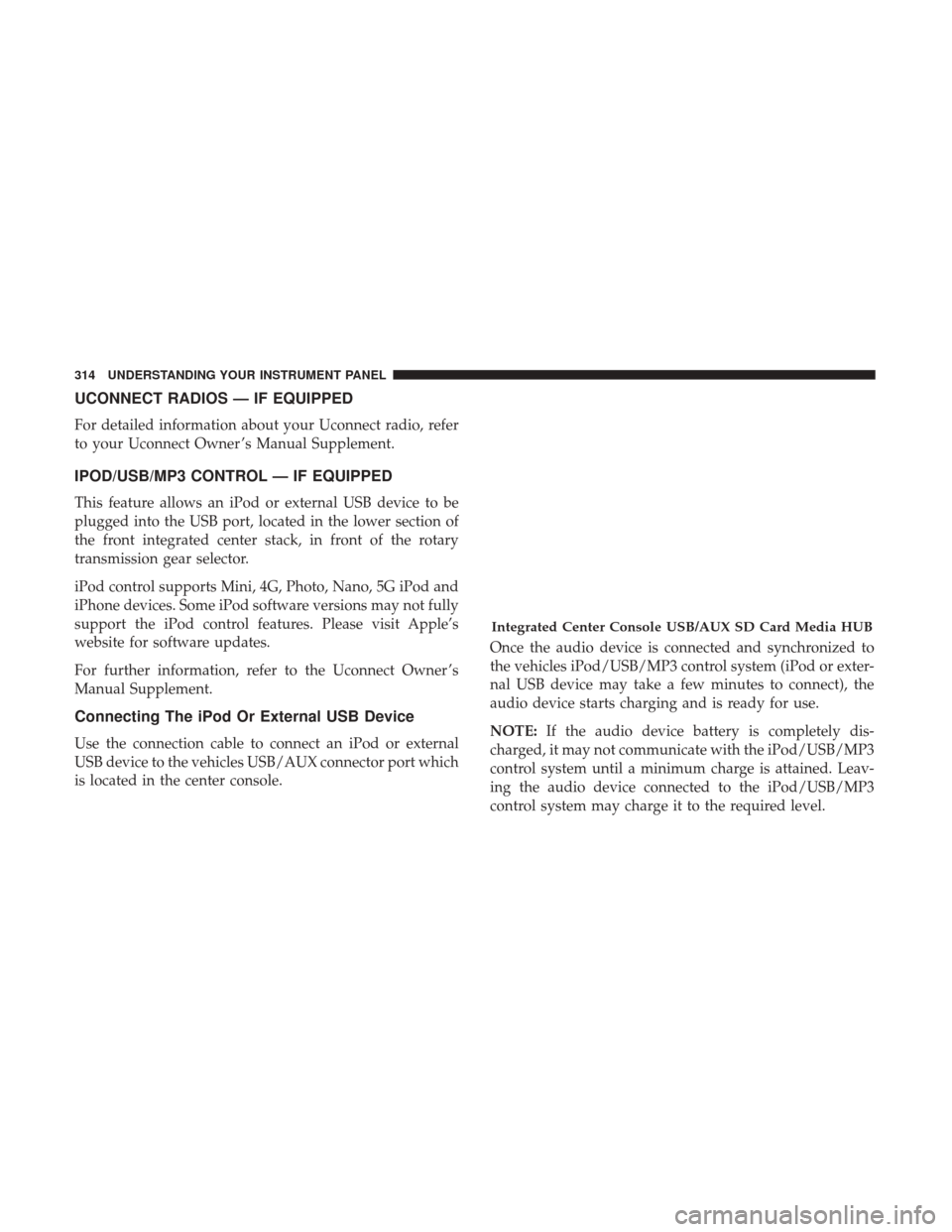
IPOD/USB/MP3 CONTROL — IF EQUIPPED
This feature allows an iPod or external USB device to be
plugged into the USB port, located in the lower section of
the front integrated center stack, in front of the rotary
transmission gear selector.
iPod control supports Mini, 4G, Photo, Nano, 5G iPod and
iPhone devices. Some iPod software versions may not fully
support the iPod control features. Please visit Apple’s
website for software updates.
For further information, refer to the Uconnect Owner ’s
Manual Supplement.
Connecting The iPod Or External USB Device
Use the connection cable to connect an iPod or external
USB device to the vehicles USB/AUX connector port which
is located in the center console.Once the audio device is connected and synchronized to
the vehicles iPod/USB/MP3 control system (iPod or exter-
nal USB device may take a few minutes to connect), the
audio device starts charging and is ready for use.
NOTE:
If the audio device battery is completely dis-
charged, it may not communicate with the iPod/USB/MP3
control system until a minimum charge is attained. Leav-
ing the audio device connected to the iPod/USB/MP3
control system may charge it to the required level.
Integrated Center Console USB/AUX SD Card Media HUB
314 UNDERSTANDING YOUR INSTRUMENT PANEL
Page 317 of 584
Using This Feature
By using an iPod cable, or an external USB device to
connect to the USB port:
•The audio device can be played on the vehicle’s sound
system, providing metadata (artist, track title, album,
etc.) information on the radio display.
• The audio device can be controlled using the radio
buttons to Play, Browse, and List the iPod contents.
• The audio device battery charges when plugged into the
USB/AUX connector (if supported by the specific audio
device).
NOTE: For further information, refer to the Uconnect
Owner ’s Manual Supplement.
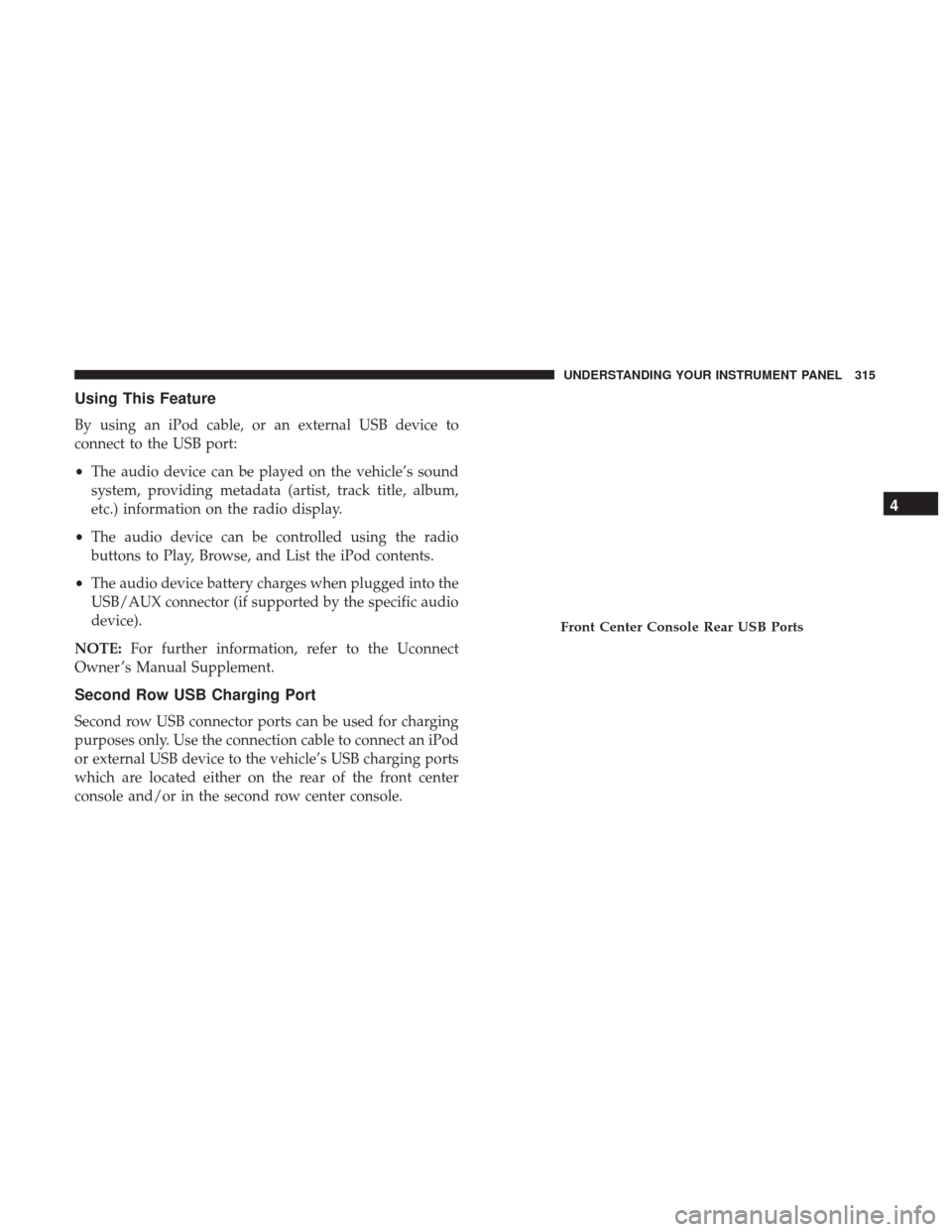
Second Row USB Charging Port
Second row USB connector ports can be used for charging
purposes only. Use the connection cable to connect an iPod
or external USB device to the vehicle’s USB charging ports
which are located either on the rear of the front center
console and/or in the second row center console.
Front Center Console Rear USB Ports
4
UNDERSTANDING YOUR INSTRUMENT PANEL 315
Page 320 of 584
•The system can be controlled by the front seat occupants
utilizing either the touchscreen radio, or by the rear seat
occupants using the remote control.
Dual Video Screen
NOTE: Typically there are two different ways to operate
the features of the Rear Seat Entertainment System.
• The Remote Control
• The Touchscreen Radio (If Equipped)
Blu-ray Disc Player
Play A Blu-ray Disc
The Blu-ray Disc player is located in the center console.
1. Insert a Blu-ray disc into the VES disc player with the
label facing as indicated on the Blu-ray player. The radio
automatically selects the appropriate mode after the disc
is recognized and displays the menu screen, the lan-
guage screen, or starts playing the first track.
2. To watch a Blu-ray disc on Rear 1 for driver’s side rear passengers, ensure the Remote Control and Headphone
switch is on Rear 1.
RSE System Headphone Channel Selectors
Blu-ray Disc Player Location
318 UNDERSTANDING YOUR INSTRUMENT PANEL
Page 321 of 584
3. To watch a Blu-ray disc on Rear 2 for passenger side rearpassengers, ensure the Remote Control and Headphone
switch is on Rear 2.
NOTE:
•
To view a Blu-ray disc on the radio, press the “Media”
button on the touchscreen, and then press the “Disc” button.
Press the “Play” button, and then the “full screen” button.
•Viewing a Blu-ray disc on the radio screen is not available
in all states/provinces. The vehicle must be stopped, and
the gear selector must be in the PARK position for vehicles
with automatic transmission.
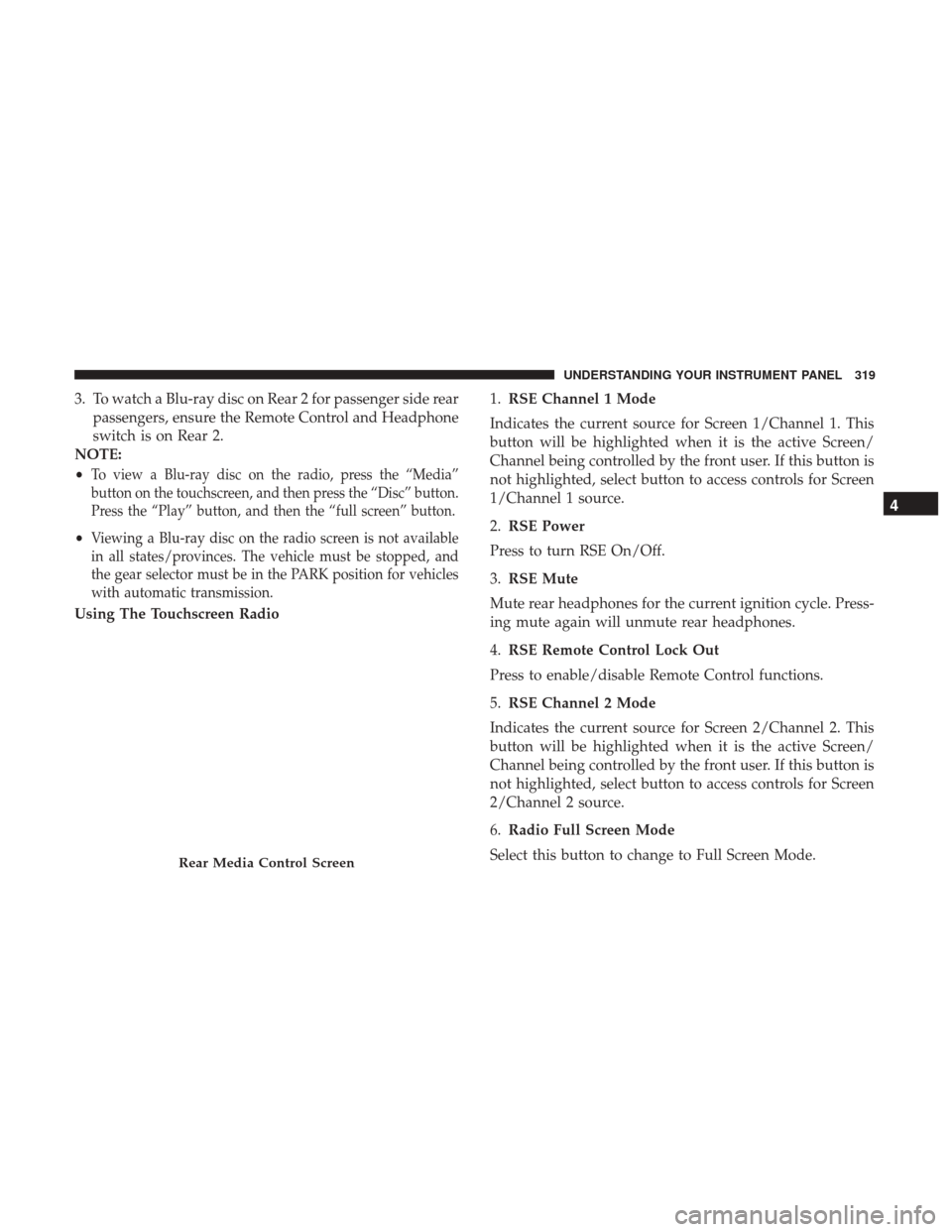
Using The Touchscreen Radio 1.
RSE Channel 1 Mode
Indicates the current source for Screen 1/Channel 1. This
button will be highlighted when it is the active Screen/
Channel being controlled by the front user. If this button is
not highlighted, select button to access controls for Screen
1/Channel 1 source.
2. RSE Power
Press to turn RSE On/Off.
3. RSE Mute
Mute rear headphones for the current ignition cycle. Press-
ing mute again will unmute rear headphones.
4. RSE Remote Control Lock Out
Press to enable/disable Remote Control functions.
5. RSE Channel 2 Mode
Indicates the current source for Screen 2/Channel 2. This
button will be highlighted when it is the active Screen/
Channel being controlled by the front user. If this button is
not highlighted, select button to access controls for Screen
2/Channel 2 source.
6. Radio Full Screen Mode
Select this button to change to Full Screen Mode.
Rear Media Control Screen
4
UNDERSTANDING YOUR INSTRUMENT PANEL 319