clock DODGE DURANGO 2017 3.G Owners Manual
[x] Cancel search | Manufacturer: DODGE, Model Year: 2017, Model line: DURANGO, Model: DODGE DURANGO 2017 3.GPages: 584, PDF Size: 5.14 MB
Page 137 of 584
LIGHTS
Headlight Switch
The headlight switch is located on the left side of the
instrument panel, next to the steering wheel. The headlight
switch controls the operation of the headlights, parking
lights, instrument panel lights, cargo lights and fog lights
(if equipped).To turn on the headlights, rotate the headlight
switch clockwise. When the headlight switch is
on the parking lights, taillights, license plate light
and instrument panel lights are also turned on.
To turn off the headlights, rotate the headlight switch back
to the O (OFF) position.
NOTE:
• Your vehicle is equipped with plastic headlight and fog
light (if equipped) lenses that are lighter and less sus-
ceptible to stone breakage than glass lights. Plastic is not
as scratch resistant as glass and therefore different lens
cleaning procedures must be followed.
• To minimize the possibility of scratching the lenses and
reducing light output, avoid wiping with a dry cloth. To
remove road dirt, wash with a mild soap solution
followed by rinsing.
CAUTION!
Do not use abrasive cleaning components, solvents, steel
wool or other abrasive materials to clean the lenses.
Headlight Switch
3
UNDERSTANDING THE FEATURES OF YOUR VEHICLE 135
Page 138 of 584
Automatic Headlights
This system automatically turns the headlights on or off
according to ambient light levels. To turn the system on,
rotate the headlight switch counterclockwise to the AUTO
position. When the system is on, the headlight time delay
feature is also on. This means the headlights will stay on
for up to 90 seconds after you place the ignition into the
OFF position. To turn the automatic system off, move the
headlight switch out of the AUTO position.
NOTE:The engine must be running before the headlights
will come on in the automatic mode.
Headlights On Automatically With Wipers
If your vehicle is equipped with Automatic Headlights, it
also has this customer-programmable feature. When your
headlights are in the automatic mode and the engine is
running, they will automatically turn on when the wiper
system is on. This feature is programmable through the
Uconnect system. Refer to “Uconnect Settings/Customer
Programmable Features” in “Understanding Your Instru-
ment Panel” for further information. NOTE:
When your headlights come on during the day-
time, the vehicle will monitor outside brightness and
decide if the instrument panel needs to be dimmed or not.
Refer to “Lights” in this section for further information.
Automatic High Beam — If Equipped
The Automatic High Beam Headlamp Control system
provides increased forward lighting at night by automat-
ing high beam control through the use of a digital camera
mounted on the inside rearview mirror. This camera de-
tects vehicle specific light and automatically switches from
high beams to low beams until the approaching vehicle is
out of view.
NOTE:
• The Automatic High Beam Headlamp Control can be
turned on or off using the Uconnect System. Refer to
“Uconnect Settings” in “Understanding Your Instrument
Panel” for further information.
• Broken, muddy, or obstructed headlights and taillights
of vehicles in the field of view will cause headlights to
remain on longer (closer to the vehicle). Also, dirt, film,
and other obstructions on the windshield or camera lens
will cause the system to function improperly.
136 UNDERSTANDING THE FEATURES OF YOUR VEHICLE
Page 139 of 584
•To opt out of the Advanced Auto High-Beam Sensitivity
Control (default) and enter Reduced High-Beam Sensi-
tivity Control (not recommended), toggle highbeam
lever 6 full on/off cycles within 10 seconds of ignition
ON. System will return to default setting upon ignition
off.
If the windshield or Automatic High Beam Headlamp
Control mirror is replaced, the mirror must be re-aimed to
ensure proper performance. See your local Authorized
Dealer.
Daytime Running Lights — If Equipped
The Daytime Running Lights come on whenever the en-
gine is running, and the transmission is not in the PARK
position. The lights will remain on until the ignition is
switched to the OFF or ACC position or the parking brake
is engaged. The headlight switch must be used for normal
nighttime driving.
NOTE: If allowed by law in the country in which the
vehicle was purchased the Daytime Running Lights can be
turned on and off using the Uconnect System, refer to
“Uconnect Settings” in “Understanding Your Instrument
Panel” for further information.
Headlight Delay
To aid in your exit, your vehicle is equipped with a
headlight delay that will leave the headlights on for
approximately 90 seconds. This delay is initiated when the
ignition is turned OFF while the headlight switch is on, and
then the headlight switch is cycled off. Headlight delay can
be cancelled by either turning the headlight switch on then
off, or by turning the ignition ON.
NOTE: The headlight delay time is programmable through
the Uconnect System. Refer to “Uconnect Settings/
Customer Programmable Features” in “Understanding
Your Instrument Panel” for further information.
Parking Lights And Panel Lights
To turn on the parking lights and instrument panel
lights, rotate the headlight switch clockwise. To turn
off the parking lights, rotate the headlight switch back to
the O (Off) position.
3
UNDERSTANDING THE FEATURES OF YOUR VEHICLE 137
Page 276 of 584
change settings (i.e., 30, 60, 90), push the center of the
control knob one or more times to select or change a setting
(i.e., ON, OFF).
Your Uconnect system may also have Screen Off and Back
buttons located below the Uconnect system.
Push the Screen Off button to turn off the Uconnect
touchscreen. Push the Screen Off button a second time to
turn the touchscreen on.
Push the Back button to exit out of a Menu or certain
option on the Uconnect system.
Buttons On The Touchscreen
Buttons on the touchscreen are accessible on the Uconnect
display.
Customer Programmable Features — Uconnect 5.0
Personal Settings
Push the MORE button on the faceplate to display the
menu setting screen. In this mode the Uconnect system
allows you to access programmable features that may be
equipped such as Display, Voice, Clock & Date, Safety &Assistance, Lights, Doors & Locks, Auto-On Comfort,
Engine Off Options, Compass Settings, Audio, Phone/
Bluetooth, Sirius Setup, Restore Settings, Clear Personal
Data, and System Information.
NOTE:
Only one touchscreen area may be selected at a
time.
When making a selection, press the button on the touch-
screen to enter the desired mode. Once in the desired
mode, press and release the preferred setting and make
your selection. Once the setting is complete, either press
the Back Arrow/Done button on the touchscreen or the
Back button on the faceplate to return to the previous menu
or press the “X” button on the touchscreen to close out of
the settings screen. Pressing the “Up” or “Down” Arrow
buttons on the right side of the screen will allow you to
toggle up or down through the available settings.
NOTE: All settings should be changed with the ignition in
the RUN position.
274 UNDERSTANDING YOUR INSTRUMENT PANEL
Page 279 of 584
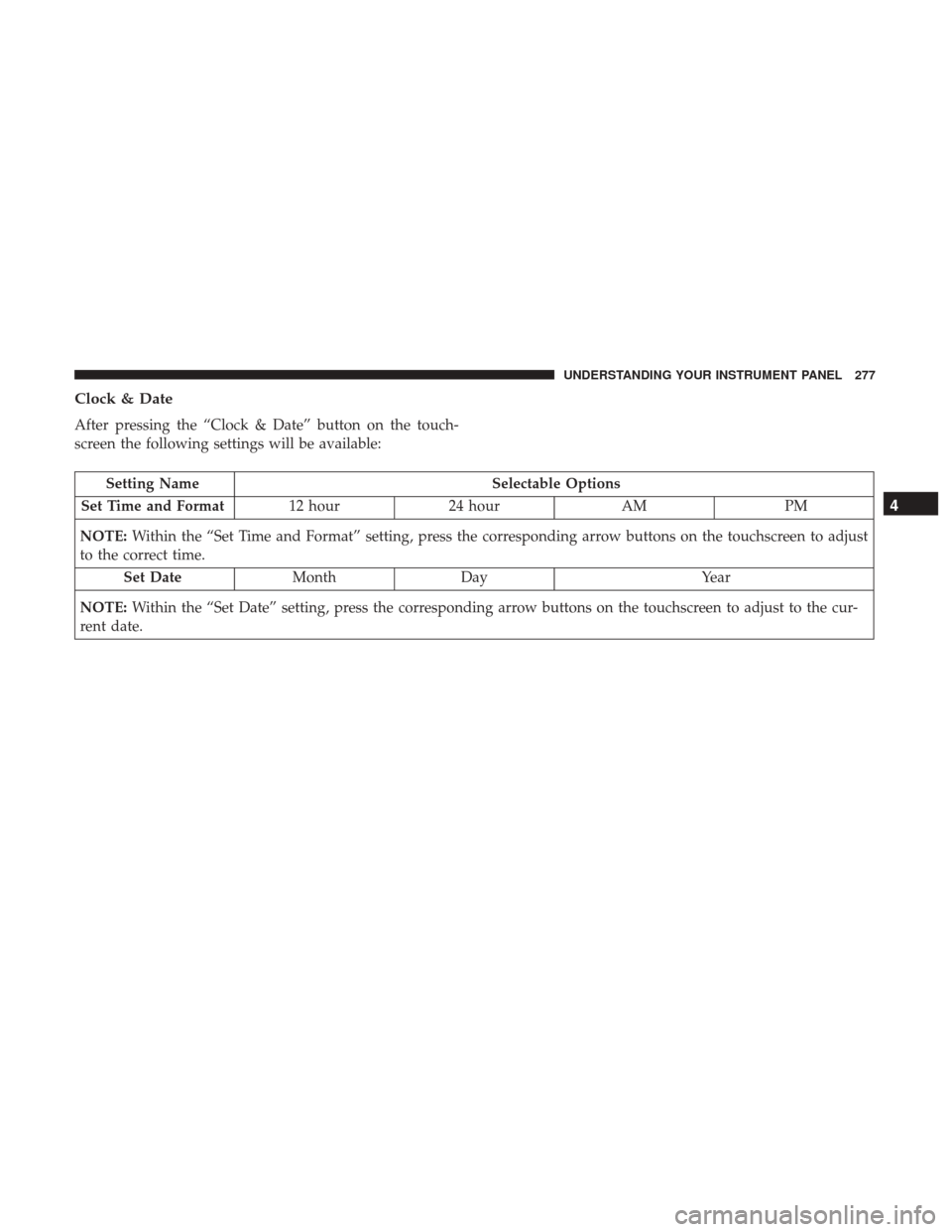
Clock & Date
After pressing the “Clock & Date” button on the touch-
screen the following settings will be available:
Setting NameSelectable Options
Set Time and Format 12 hour24 hour AMPM
NOTE: Within the “Set Time and Format” setting, press the corresponding arrow buttons on the touchscreen to adjust
to the correct time.
Set Date MonthDay Year
NOTE: Within the “Set Date” setting, press the corresponding arrow buttons on the touchscreen to adjust to the cur-
rent date.
4
UNDERSTANDING YOUR INSTRUMENT PANEL 277
Page 295 of 584
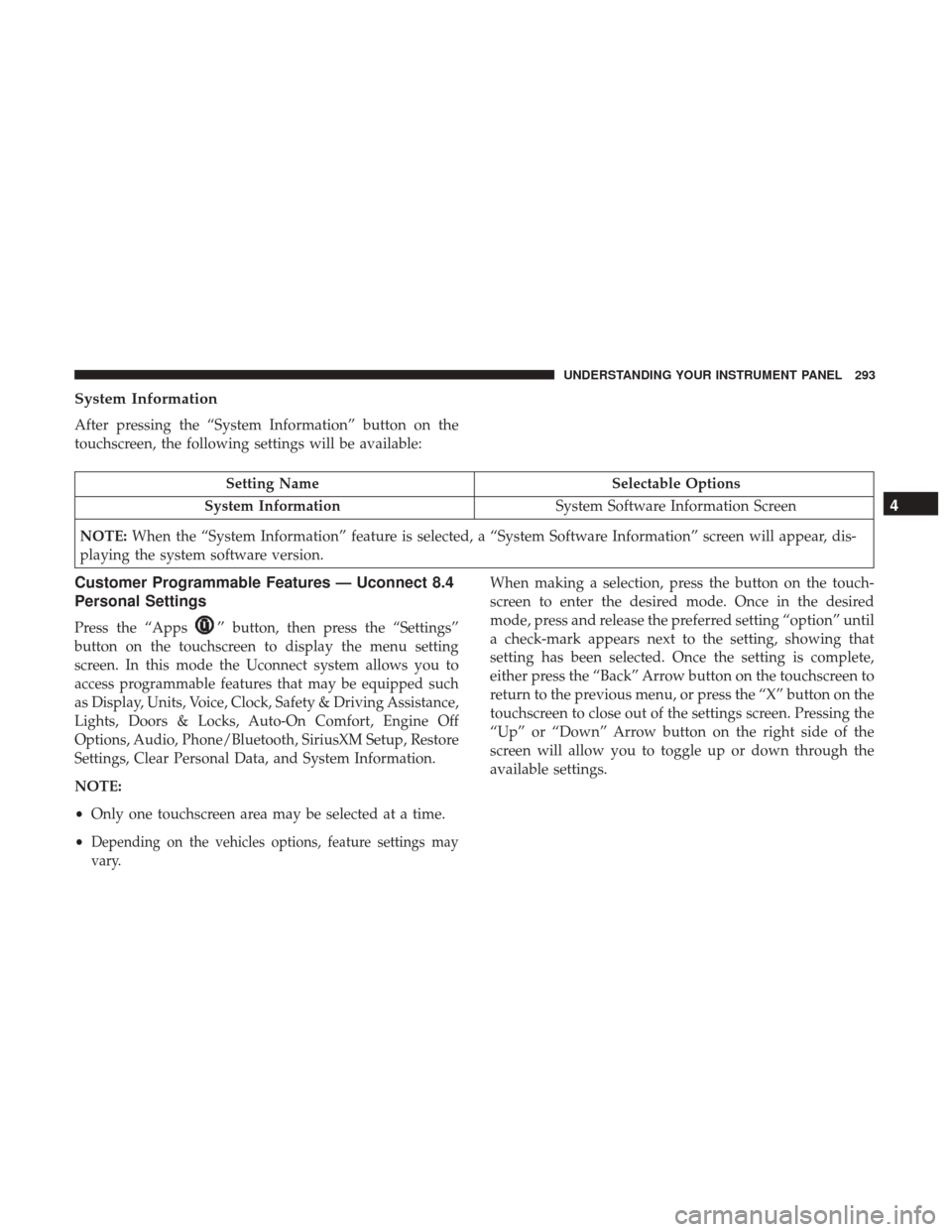
System Information
After pressing the “System Information” button on the
touchscreen, the following settings will be available:
Setting NameSelectable Options
System Information System Software Information Screen
NOTE: When the “System Information” feature is selected, a “System Software Information” screen will appear, dis-
playing the system software version.
Customer Programmable Features — Uconnect 8.4
Personal Settings
Press the “Apps”button, then press the “Settings”
button on the touchscreen to display the menu setting
screen. In this mode the Uconnect system allows you to
access programmable features that may be equipped such
as Display, Units, Voice, Clock, Safety & Driving Assistance,
Lights, Doors & Locks, Auto-On Comfort, Engine Off
Options, Audio, Phone/Bluetooth, SiriusXM Setup, Restore
Settings, Clear Personal Data, and System Information.
NOTE:
• Only one touchscreen area may be selected at a time.
•
Depending on the vehicles options, feature settings may
vary.
When making a selection, press the button on the touch-
screen to enter the desired mode. Once in the desired
mode, press and release the preferred setting “option” until
a check-mark appears next to the setting, showing that
setting has been selected. Once the setting is complete,
either press the “Back” Arrow button on the touchscreen to
return to the previous menu, or press the “X” button on the
touchscreen to close out of the settings screen. Pressing the
“Up” or “Down” Arrow button on the right side of the
screen will allow you to toggle up or down through the
available settings.
4
UNDERSTANDING YOUR INSTRUMENT PANEL 293
Page 299 of 584
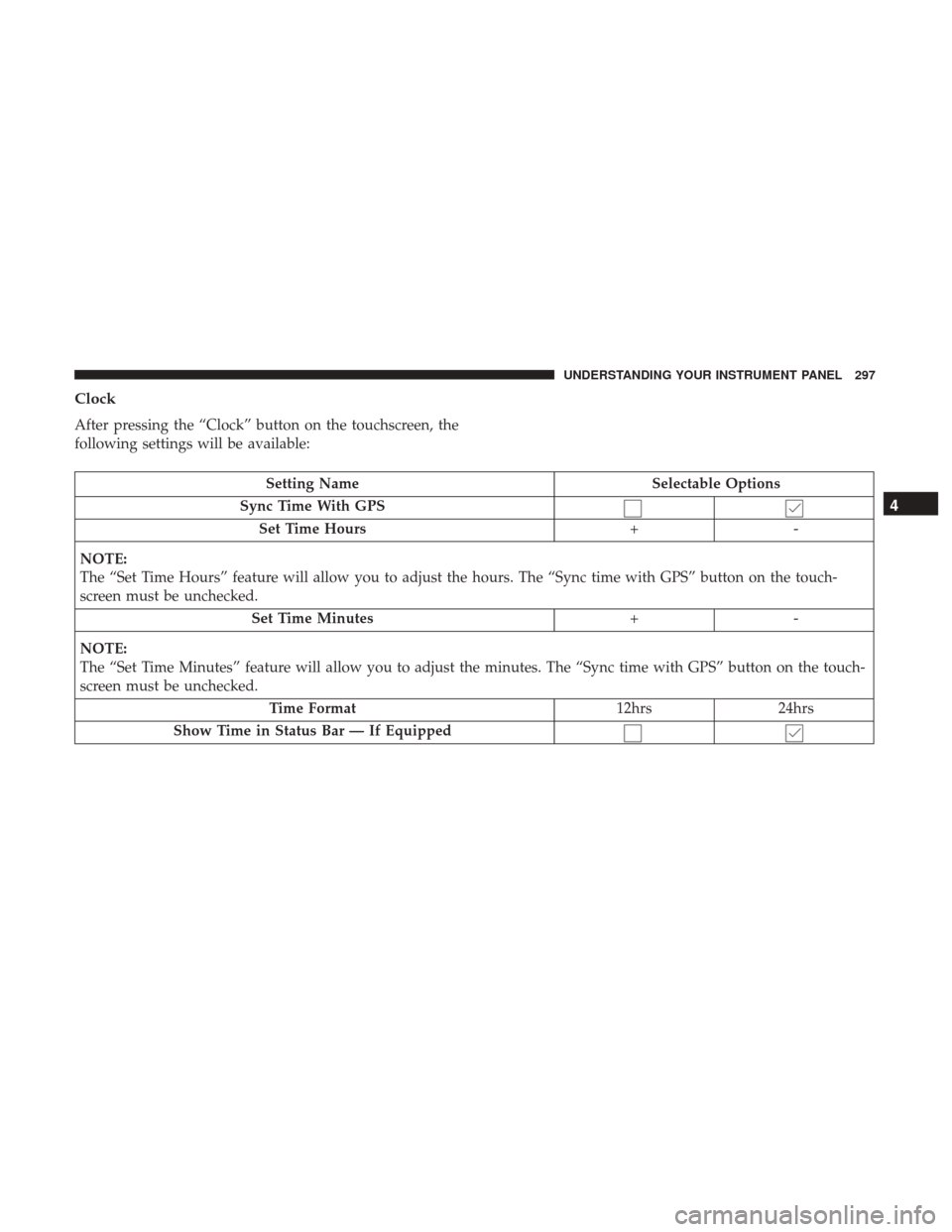
Clock
After pressing the “Clock” button on the touchscreen, the
following settings will be available:
Setting NameSelectable Options
Sync Time With GPS Set Time Hours +-
NOTE:
The “Set Time Hours” feature will allow you to adjust the hours. The “Sync time with GPS” button on the touch-
screen must be unchecked. Set Time Minutes +-
NOTE:
The “Set Time Minutes” feature will allow you to adjust the minutes. The “Sync time with GPS” button on the touch-
screen must be unchecked. Time Format 12hrs24hrs
Show Time in Status Bar — If Equipped
4
UNDERSTANDING YOUR INSTRUMENT PANEL 297
Page 342 of 584
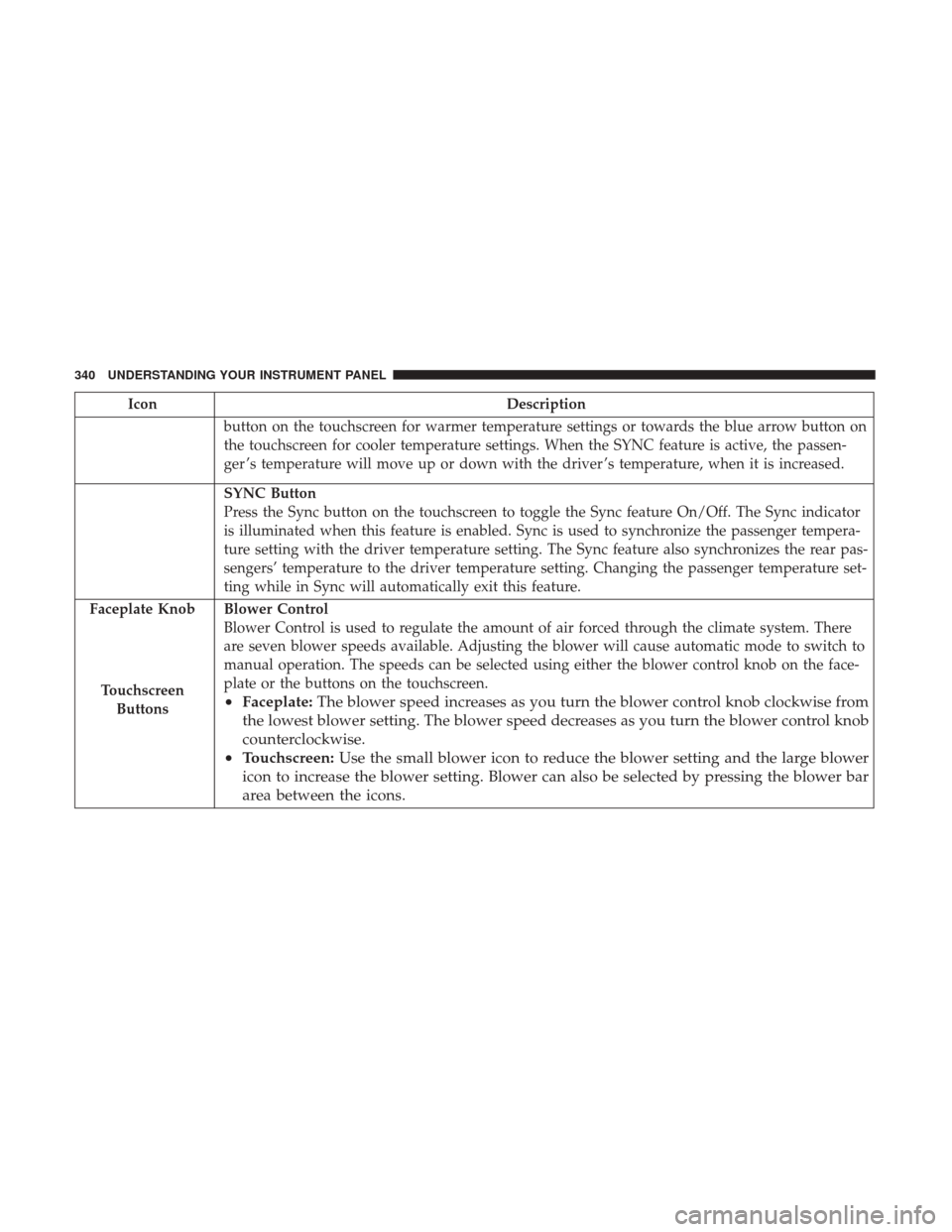
IconDescription
button on the touchscreen for warmer temperature settings or towards the blue arrow button on
the touchscreen for cooler temperature settings. When the SYNC feature is active, the passen-
ger ’s temperature will move up or down with the driver ’s temperature, when it is increased.
SYNC Button
Press the Sync button on the touchscreen to toggle the Sync feature On/Off. The Sync indicator
is illuminated when this feature is enabled. Sync is used to synchronize the passenger tempera-
ture setting with the driver temperature setting. The Sync feature also synchronizes the rear pas-
sengers’ temperature to the driver temperature setting. Changing the passenger temperature set-
ting while in Sync will automatically exit this feature.
Faceplate Knob
Touchscreen Buttons
Blower Control
Blower Control is used to regulate the amount of air forced through the climate system. There
are seven blower speeds available. Adjusting the blower will cause automatic mode to switch to
manual operation. The speeds can be selected using either the blower control knob on the face-
plate or the buttons on the touchscreen.
• Faceplate: The blower speed increases as you turn the blower control knob clockwise from
the lowest blower setting. The blower speed decreases as you turn the blower control knob
counterclockwise.
• Touchscreen: Use the small blower icon to reduce the blower setting and the large blower
icon to increase the blower setting. Blower can also be selected by pressing the blower bar
area between the icons.
340 UNDERSTANDING YOUR INSTRUMENT PANEL
Page 460 of 584
NOTE:
•The trailer tongue weight must be considered as part of
the combined weight of occupants and cargo, and
should never exceed the weight referenced on the Tire
and Loading Information placard. Refer to “Tire Safety
Information” in “Starting And Operating” for further
information. The addition of passengers and cargo may
require reducing trailer tongue load and Gross Trailer
Weight (GTW). Redistributing cargo (to the trailer) may
be necessary to avoid exceeding Rear Gross Axle Weight
Rating (GAWR) of 3,900 lbs (1 769 kg).
• Vehicles not factory equipped with trailer tow package
are limited to 3,500 lbs (350 lbs tongue weight).
Trailer Hitch Receiver Cover Removal — If
Equipped
Your vehicle may be equipped with a trailer hitch receiver
cover, this must be removed to access the trailer hitch
receiver (if equipped). This cover is located at the bottom
center of the rear fascia. 1. Turn the two locking retainers located at the bottom of
the hitch receiver cover a 1/4 turn counterclockwise and
pull bottom of the hitch receiver cover outward (to-
wards you).
2. Pull the bottom of the cover outward (towards you) then downwards to disengage the tabs located at the top of
the hitch receiver cover to remove.Hitch Receiver Cover Retainers
1 — Hitch Receiver Cover
2 — Locking Retainers
458 STARTING AND OPERATING
Page 485 of 584
4. For a rear tire, place the jack in the slot on the reartie-down bracket, just forward of the rear tire. Do not
raise the vehicle until you are sure the jack is fully
engaged. 5. Raise the vehicle by turning the jack screw clockwise.
Raise the vehicle just enough to remove the flat tire.
WARNING!
Raising the vehicle higher than necessary can make the
vehicle less stable. It could slip off the jack and hurt
someone near it. Raise the vehicle only enough to
remove the tire.
6. Remove the lug nuts and wheel.
Front Jack LocationRear Jacking Location
6
WHAT TO DO IN EMERGENCIES 483