radio DODGE DURANGO 2018 Workshop Manual
[x] Cancel search | Manufacturer: DODGE, Model Year: 2018, Model line: DURANGO, Model: DODGE DURANGO 2018Pages: 592, PDF Size: 6.57 MB
Page 549 of 592
RADIO OPERATION AND MOBILE PHONES
Under certain conditions, the mobile phone being on in
your vehicle can cause erratic or noisy performance from
your radio. This condition may be lessened or eliminated
by relocating the mobile phone antenna. This condition is
not harmful to the radio. If your radio performance does
not satisfactorily “clear” by the repositioning of the an-
tenna, it is recommended that the radio volume be turned
down or off during mobile phone operation when not
using Uconnect (if equipped).
Regulatory And Safety Information
USA/CANADA
Exposure to Radio Frequency Radiation
The radiated output power of the internal wireless radio is
far below the FCC and IC radio frequency exposure limits.
Nevertheless, the wireless radio will be used in such a
manner that the radio is 20 cm or further from the human
body.
The internal wireless radio operates within guidelines
found in radio frequency safety standards and recommen-
dations, which reflect the consensus of the scientific com-
munity.The radio manufacturer believes the internal wireless radio
is safe for use by consumers. The level of energy emitted is
far less than the electromagnetic energy emitted by wire-
less devices such as mobile phones. However, the use of
wireless radios may be restricted in some situations or
environments, such as aboard airplanes. If you are unsure
of restrictions, you are encouraged to ask for authorization
before turning on the wireless radio.
The following regulatory statement applies to all Radio
Frequency (RF) devices equipped in this vehicle:
This device complies with Part 15 of the FCC Rules and
with Industry Canada license-exempt RSS standard(s).
Operation is subject to the following two conditions:
1. This device may not cause harmful interference, and
2. This device must accept any interference received, in-
cluding interference that may cause undesired opera-
tion.
NOTE: Changes or modifications not expressly approved
by the party responsible for compliance could void the
user ’s authority to operate the equipment.
10
MULTIMEDIA 547
Page 550 of 592
NOTE:
•This equipment has been tested and found to comply
with the limits for a Class B digital device, pursuant to
Part 15 of the FCC Rules. These limits are designed to
provide reasonable protection against harmful interfer-
ence in a residential installation. This equipment gener-
ates, uses and can radiate radio frequency energy and, if
not installed and used in accordance with the instruc-
tions, may cause harmful interference to radio commu-
nications. However, there is no guarantee that interfer-
ence will not occur in a particular installation.
• If this equipment does cause harmful interference to
radio or television reception, which can be determined
by turning the equipment off and on, the user is encour-
aged to try to correct the interference by one or more of
the following measures:
1. Increase the separation between the equipment and receiver.
2. Consult an authorized dealer or an experienced radio technician for help.UCONNECT VOICE RECOGNITION QUICK TIPS
Introducing Uconnect
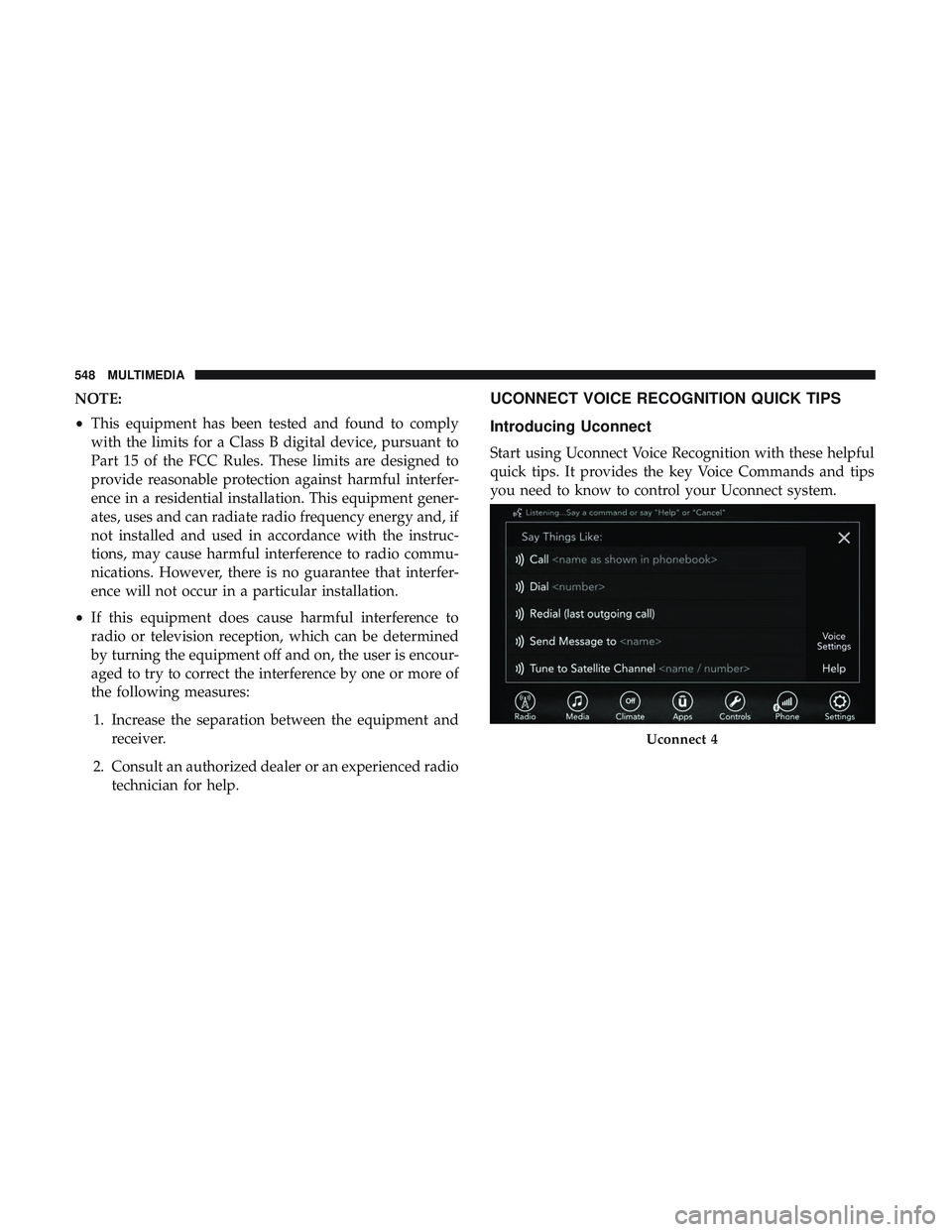
Start using Uconnect Voice Recognition with these helpful
quick tips. It provides the key Voice Commands and tips
you need to know to control your Uconnect system.
Uconnect 4
548 MULTIMEDIA
Page 552 of 592
5. You can interrupt the help message or system promptsby pushing the VR or Phone button and saying a Voice
Command from the current category.Basic Voice Commands
The basic Voice Commands below can be given at any
point while using your Uconnect system.
Push the VR button
. After the beep, say:
•“Cancel” to stop a current voice session
• “Help” to hear a list of suggested Voice Commands
• “Repeat” to listen to the system prompts again
Notice the visual cues that inform you of your voice
recognition system’s status. Cues appear on the touch-
screen.
Radio
Use your voice to quickly get to the AM, FM or SiriusXM
Satellite Radio stations you would like to hear. (Subscrip-
tion or included SiriusXM Satellite Radio trial required.)
Push the VR button
. After the beep, say:
• “Tune to ninety-five-point-five FM”
• “Tune to Satellite Channel Hits 1”
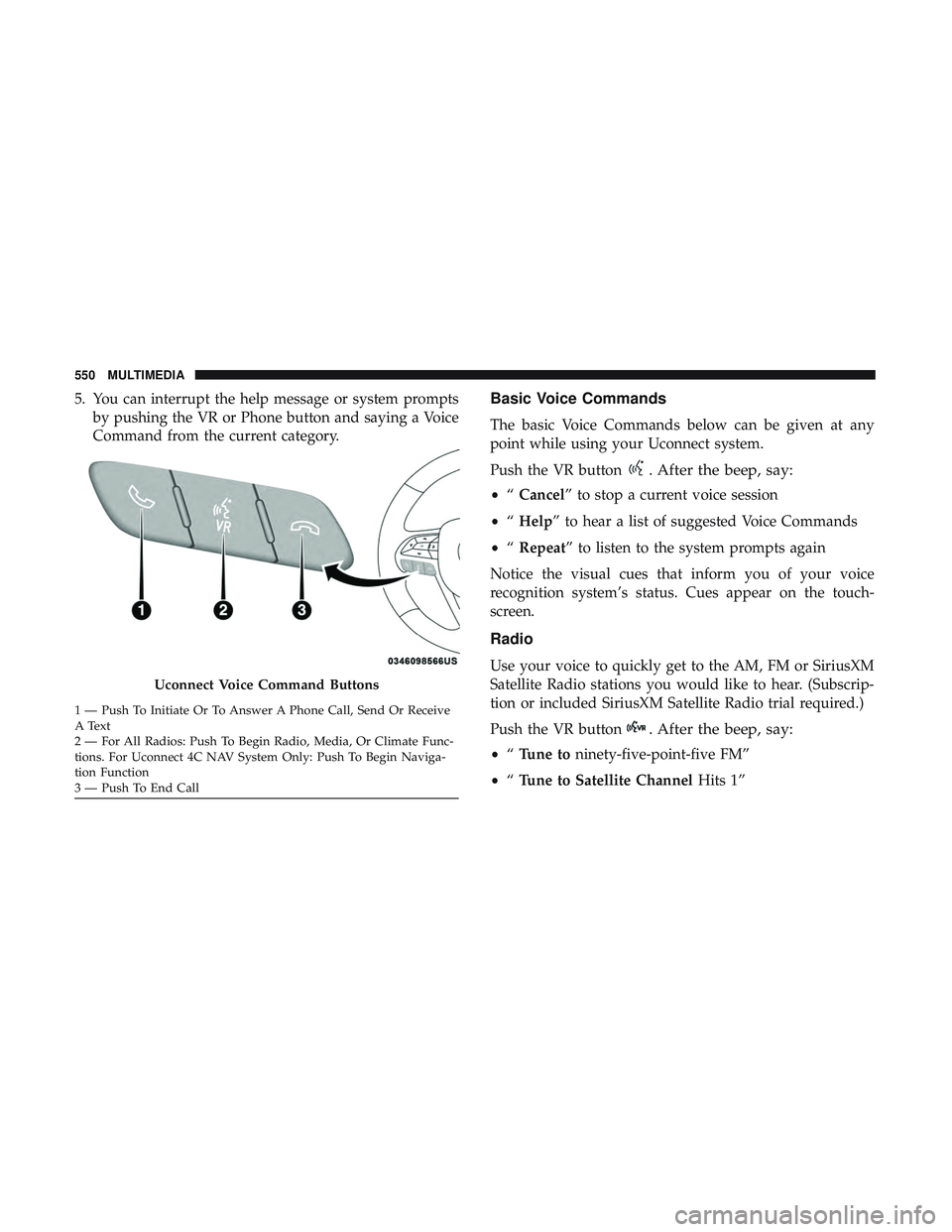
Uconnect Voice Command Buttons
1 — Push To Initiate Or To Answer A Phone Call, Send Or Receive
A Text
2 — For All Radios: Push To Begin Radio, Media, Or Climate Func-
tions. For Uconnect 4C NAV System Only: Push To Begin Naviga-
tion Function
3 — Push To End Call 550 MULTIMEDIA
Page 553 of 592
TIP:At any time, if you are not sure of what to say or want
to learn a Voice Command, push the VR button
and say,
“ Help.” The system provides you with a list of com-
mands.
Media
Uconnect offers connections via USB, Bluetooth and auxil-
iary ports (If Equipped). Voice operation is only available
for connected USB and AUX devices.
Push the VR button
. After the beep, say one of the
following commands and follow the prompts to switch
your media source or choose an artist.
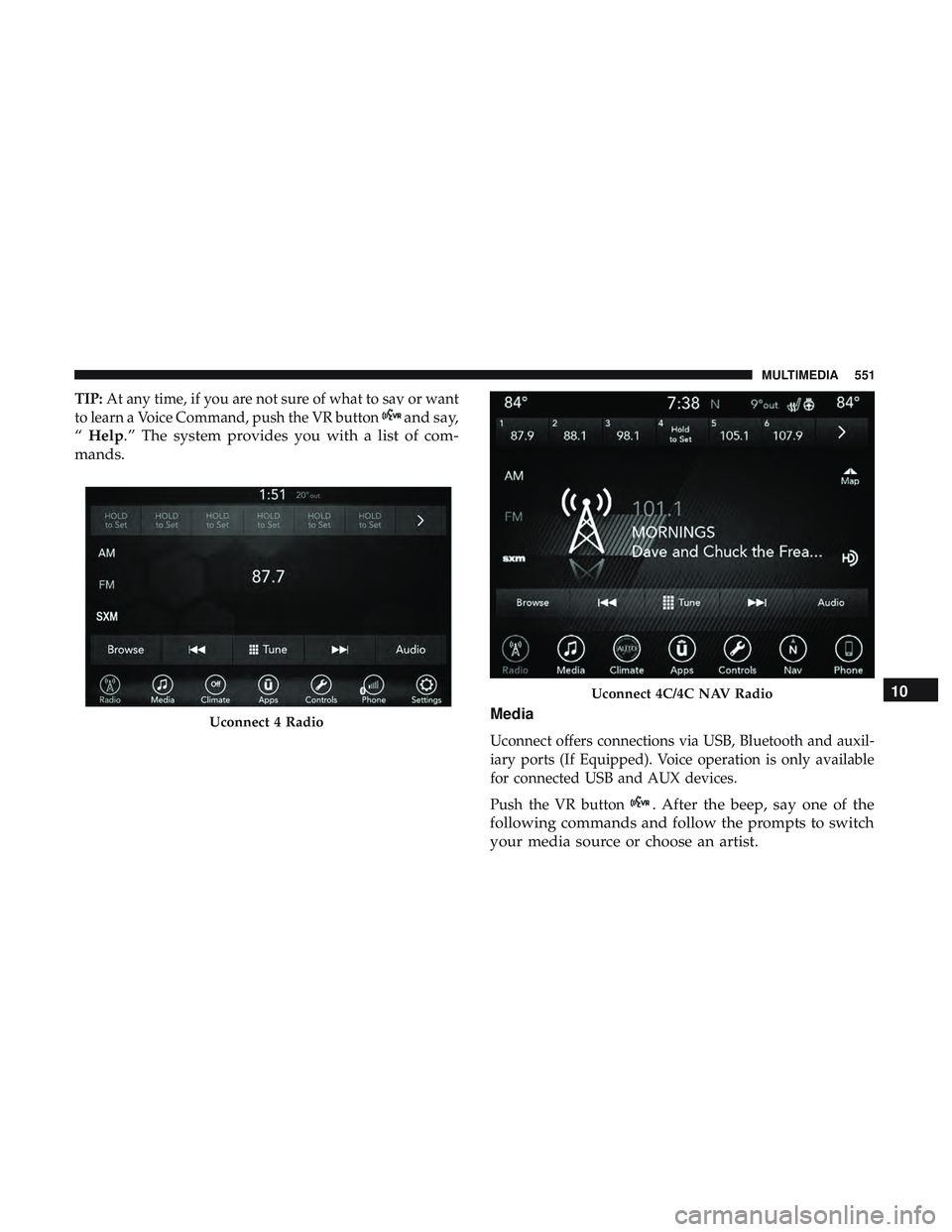
Uconnect 4 Radio
Uconnect 4C/4C NAV Radio10
MULTIMEDIA 551
Page 567 of 592
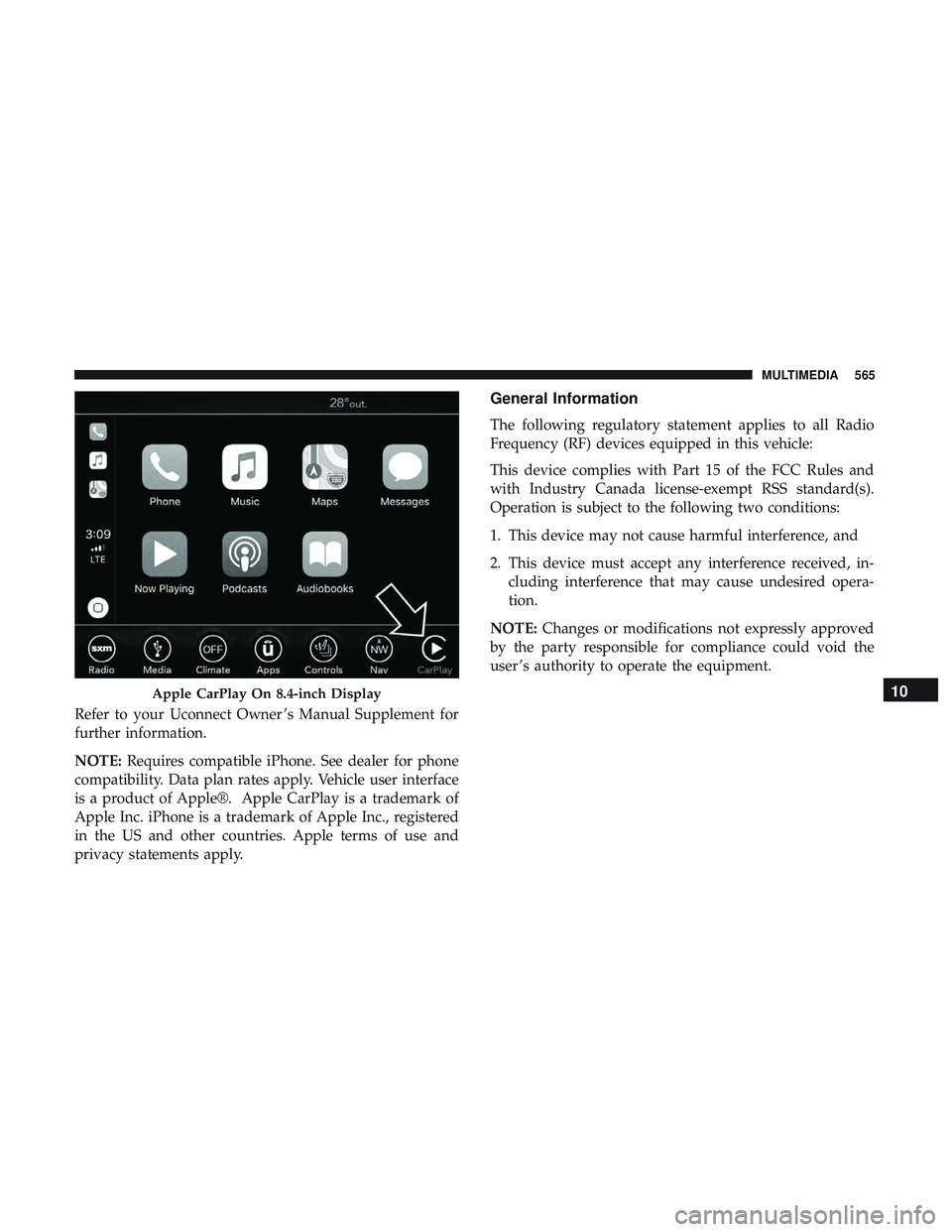
Refer to your Uconnect Owner ’s Manual Supplement for
further information.
NOTE:Requires compatible iPhone. See dealer for phone
compatibility. Data plan rates apply. Vehicle user interface
is a product of Apple®. Apple CarPlay is a trademark of
Apple Inc. iPhone is a trademark of Apple Inc., registered
in the US and other countries. Apple terms of use and
privacy statements apply.
General Information
The following regulatory statement applies to all Radio
Frequency (RF) devices equipped in this vehicle:
This device complies with Part 15 of the FCC Rules and
with Industry Canada license-exempt RSS standard(s).
Operation is subject to the following two conditions:
1. This device may not cause harmful interference, and
2. This device must accept any interference received, in- cluding interference that may cause undesired opera-
tion.
NOTE: Changes or modifications not expressly approved
by the party responsible for compliance could void the
user ’s authority to operate the equipment.
Apple CarPlay On 8.4-inch Display10
MULTIMEDIA 565
Page 568 of 592
Additional Information
© 2018 FCA US LLC. All rights reserved. Mopar and
Uconnect are registered trademarks and Mopar Owner
Connect is a trademark of FCA US LLC. Android is a
trademark of Google Inc. SiriusXM and all related marks
and logos are trademarks of SiriusXM Radio Inc.
Uconnect System Support:
•U.S. residents visit DriveUconnect.com or call: 1-877-
855-8400(24 hours a day 7 days a week)
• Canadian residents visit DriveUconnect.ca or call: 1-800-
465-2001(English) or 1-800-387-9983(French)
SiriusXM Guardian services support:
• U.S. residents visit www.siriusxm.com/guardian or call:
1-844-796-4827
• Canadian residents visit www.siriusxm.ca/guardian or
call: 1-877-324-9091
CD/DVD DISC MAINTENANCE
To keep a CD/DVD in good condition, take the following
precautions:
1. Handle the disc by its edge; avoid touching the surface. 2. If the disc is stained, clean the surface with a soft cloth,
wiping from center to edge.
3. Do not apply paper or tape to the disc; avoid scratching the disc.
4. Do not use solvents such as benzene, thinner, cleaners, or anti-static sprays.
5. Store the disc in its case after playing.
6. Do not expose the disc to direct sunlight.
7. Do not store the disc where temperatures may become too high.
NOTE: If you experience difficulty in playing a particular
disc, it may be damaged (e.g., scratched, reflective coating
removed, a hair, moisture or dew on the disc), oversized, or
have protection encoding. Try a known good disc before
considering disc player service.
566 MULTIMEDIA
Page 577 of 592
Anti-Lock Warning Light.....................163
Apple CarPlay ............................564
Arming System Security Alarm ...........................29
Assist, Hill Start .......................... .174
Audio Systems (Radio) .......................485
Auto Down Power Windows ..................103
Automatic Headlights ........................74
Automatic High Beams .......................74
Automatic Temperature Control (ATC) ............98
Automatic Transmission ..................262, 273
Adding Fluid .......................... .439
Fluid And Filter Change ...................439
Fluid Change .......................... .439
Fluid Level Check .....................438, 439
Fluid Type ..........................438, 481
Special Additives ........................ .438
Automatic Transmission Limp Home Mode ........278
Auxiliary Electrical Outlet (Power Outlet) .........128
Auxiliary Power Outlet ..................... .128
Axle Fluid ...............................481
Battery ...............................157, 416
Charging System Light ....................157
Keyless Key Fob Replacement ................19Belts, Seat
............................... .253
Blind Spot Monitoring .......................181
Body Mechanism Lubrication ..................425
B-Pillar Location .......................... .446
Brake Assist System ........................ .174
Brake Control System, Electronic ................173
Brake Fluid .......................... .437, 481
Brake System ..........................436, 471
Anti-Lock (ABS) ........................ .471
Fluid Check ............................437
Master Cylinder ........................ .437
Parking ...............................268
Warning Light .......................... .156
Brake/T ransmission
Interlock..................272
Bulb Replacement .......................372, 373
Bulbs, Light ............................. .256
Camera, Rear ............................ .337
Capacities, Fluid .......................... .477
Caps, Filler Oil (Engine) ........................ .414, 419
Radiator (Coolant Pressure) .................435
Carbon Monoxide Warning ................253, 476
Cargo Area Cover .......................111,112
Cargo Compartment .........................111
12
INDEX 575
Page 583 of 592
Headlights..........................373, 374
Headlights On With Wipers ..................75
Interior ................................77
Malfunction Indicator (Check Engine) ..........160
Park ................................. .165
Passing ................................74
Reading ................................78
Rear Servicing .......................... .375
Rear Tail Lamps ........................ .375
Seat Belt Reminder .......................155
Security Alarm ..........................160
Service ............................ .372, 373
Side Marker ............................375
Traction Control ........................ .179
Turn Signals ................72, 166, 256, 374, 375
Vanity Mirror ............................71
Warning Instrument Cluster Descriptions . . . .158, 166
Loading Vehicle ............................342
Tires................................. .446
Load Shed Battery Saver Mode .................153
Load Shed Battery Saver On ...................153
Load Shed Electrical Load Reduction .............153
Load Shed Intelligent Battery Sensor .............153
Locks Child Protection ..........................39 Manual
................................31
Power Door .............................32
Lubrication, Body ..........................425
Luggage Carrier .......................... .133
Lug Nuts ............................... .471
Maintenance Free Battery .....................416
Maintenance Schedule .......................409
Malfunction Indicator Light (Check Engine) . . . .160, 168
Manual, Service ............................572
Memory Feature (Memory Seats) ..............40, 47
Memory Seat ............................40, 47
Memory Seats And Radio ...................40, 47
Methanol ............................... .474
Mirrors .................................. 6
8
Electric Remote ...........................70
Exterior Folding ..........................69
Heated .................................71
Outside ................................69
Rearview ............................68, 366
Vanity .................................71
Modifications/Alterations Vehicle .................................6
Monitor, Tire Pressure System ..................192
Mopar Parts ............................. .571
12
INDEX 581
Page 585 of 592
Sunroof...............................105
Tilt/Telescoping Steering Column ..............66
Windows ............................. .102
Power Seats Down ...............................44, 46
Forward ............................ .44, 46
Rearward ............................44, 46
Up .................................44, 46
Pregnant Women And Seat Belts ................207
Preparation For Jacking ..................... .387
Pretensioners Seat Belts ............................. .208
Radial Ply Tires ............................452
Radiator Cap (Coolant Pressure Cap) .............435
Radio Frequency General Information ................22, 27, 29, 38
Radio Operation .......................... .547
Radio Remote Controls ..................... .527
Rain Sensitive Wiper System ...................83
Rear Air Conditioning ........................95
Rear Axle (Differential) ..................... .439
Rear Camera ............................. .337
Rear Cross Path ............................187
Rear Cupholders .......................... .126Rear ParkSense System
...................313, 322
Rear Seats, Folding ..........................53
Rear Wiper/Washer ..........................84
Reclining Front Seats .........................42
Recreational Towing ........................ .355
Shifting Into Transfer Case Neutral (N) .........357
Shifting Out Of Transfer Case Neutral (N) .......360
Reformulated Gasoline .......................474
Refrigerant ...............................421
Release, Hood ............................ .108
Reminder, Seat Belt ........................ .200
Remote Control Starting System ...........................25
Remote Keyless Entry ........................18
Arm The Alarm ..........................30
Disarm The Alarm ........................30
Programming Additional Key Fobs ..........22,28
Remote
Sound System (Radio) Control ...........527
Remote Starting Exit Remote Start Mode .....................27
Uconnect Customer Programmable Features .....500
Uconnect Settings ........................500
Remote Starting System .......................25
Replacement Bulbs ........................ .372
Replacement Keys ........................22, 28
12
INDEX 583
Page 591 of 592
INSTALLATION OF RADIO TRANSMITTING
EQUIPMENT
Special design considerations are incorporated into this
vehicle’s electronic system to provide immunity to radio
frequency signals. Mobile two-way radios and telephone
equipment must be installed properly by trained person-
nel. The following must be observed during installation.
The positive power connection should be made directly
to the battery and fused as close to the battery as possible.
The negative power connection should be made to body
sheet metal adjacent to the negative battery connection.
This connection should not be fused.
Antennas for two-way radios should be mounted on the
roof or the rear area of the vehicle. Care should be used
in mounting antennas with magnet bases. Magnets may
affect the accuracy or operation of the compass on
vehicles so equipped.
The antenna cable should be as short as practical and
routed away from the vehicle wiring when possible. Use
only fully shielded coaxial cable.
Carefully match the antenna and cable to the radio to
ensure a low Standing Wave Ratio (SWR).Mobile radio equipment with output power greater than
normal may require special precautions.
All installations should be checked for possible interfer-
ence between the communications equipment and the
vehicle’s electronic systems.
WARNING:
Operating, servicing and maintaining a
passenger vehicle or off-road highway
motor vehicle can expose you to chemicals
including engine exhaust, carbon monoxide,
phthalates, and lead, which are known to
the State of California to cause cancer and
birth defects or other reproductive harm.
To minimize exposure, avoid breathing
exhaust, do not idle the engine except as
necessary, service your vehicle in a
well-ventilated area and wear gloves or
wash your hands frequently when servicing
your vehicle. For more information go to
www.P65Warnings.ca.gov/passenger-vehicle.
VEHICLES SOLD IN CANADA
With respect to any Vehicles Sold in Canada, the name
FCA US LLC shall be deemed to be deleted and the name
FCA Canada Inc. used in substitution therefore.
DRIVING AND ALCOHOL
Drunken driving is one of the most frequent causes of
accidents.
Your driving ability can be seriously impaired with blood
alcohol levels far below the legal minimum. If you are
drinking, don’t drive. Ride with a designated non-
drinking driver, call a cab, a friend, or use public trans-
portation.
WARNING!
Driving after drinking can lead to an accident.
Your perceptions are less sharp, your reflexes are
slower, and your judgment is impaired when you
have been drinking. Never drink and then drive.
This manual illustrates and describes the operation of
features and equipment that are either standard or op-
tional on this vehicle. This manual may also include a
description of features and equipment that are no longer
available or were not ordered on this vehicle. Please
disregard any features and equipment described in this
manual that are not on this vehicle.
FCA US LLC reserves the right to make changes in design
and specifications, and/or make additions to or improve-
ments to its products without imposing any obligation
upon itself to install them on products previously manu-
factured.
Copyright © 2018 FCA US LLC
DID_3636012_18e_Durango_OM_EN_071018.indd 27/10/18 3:13 PM