instrument panel DODGE DURANGO 2018 Manual PDF
[x] Cancel search | Manufacturer: DODGE, Model Year: 2018, Model line: DURANGO, Model: DODGE DURANGO 2018Pages: 592, PDF Size: 6.57 MB
Page 335 of 592
When both lane markings are detected and the driver
unintentionally drifts out of the lane (no turn signal
applied), the LaneSense system provides a haptic warning
in the form of torque applied to the steering wheel to
prompt the driver to remain within the lane boundaries. If
the driver continues to unintentionally drift out of the lane,
the LaneSense system provides a visual warning through
the instrument cluster display to prompt the driver to
remain within the lane boundaries.
The driver may manually override the haptic warning by
applying torque into the steering wheel at any time.
When only a single lane marking is detected and the driver
unintentionally drifts across the lane marking (no turn
signal applied), the LaneSense system provides visual
warnings through the instrument cluster display to prompt
the driver to remain within the lane. When only a single
lane marking is detected, a haptic (torque) warning will not
be provided.
NOTE:When operating conditions have been met, the
LaneSense system will monitor if the driver ’s hands are on
the steering wheel and provides an audible warning to the
driver when the driver ’s hands are not detected on the
steering wheel. The system will cancel if the driver does
not return their hands to the wheel.Turning LaneSense On Or Off
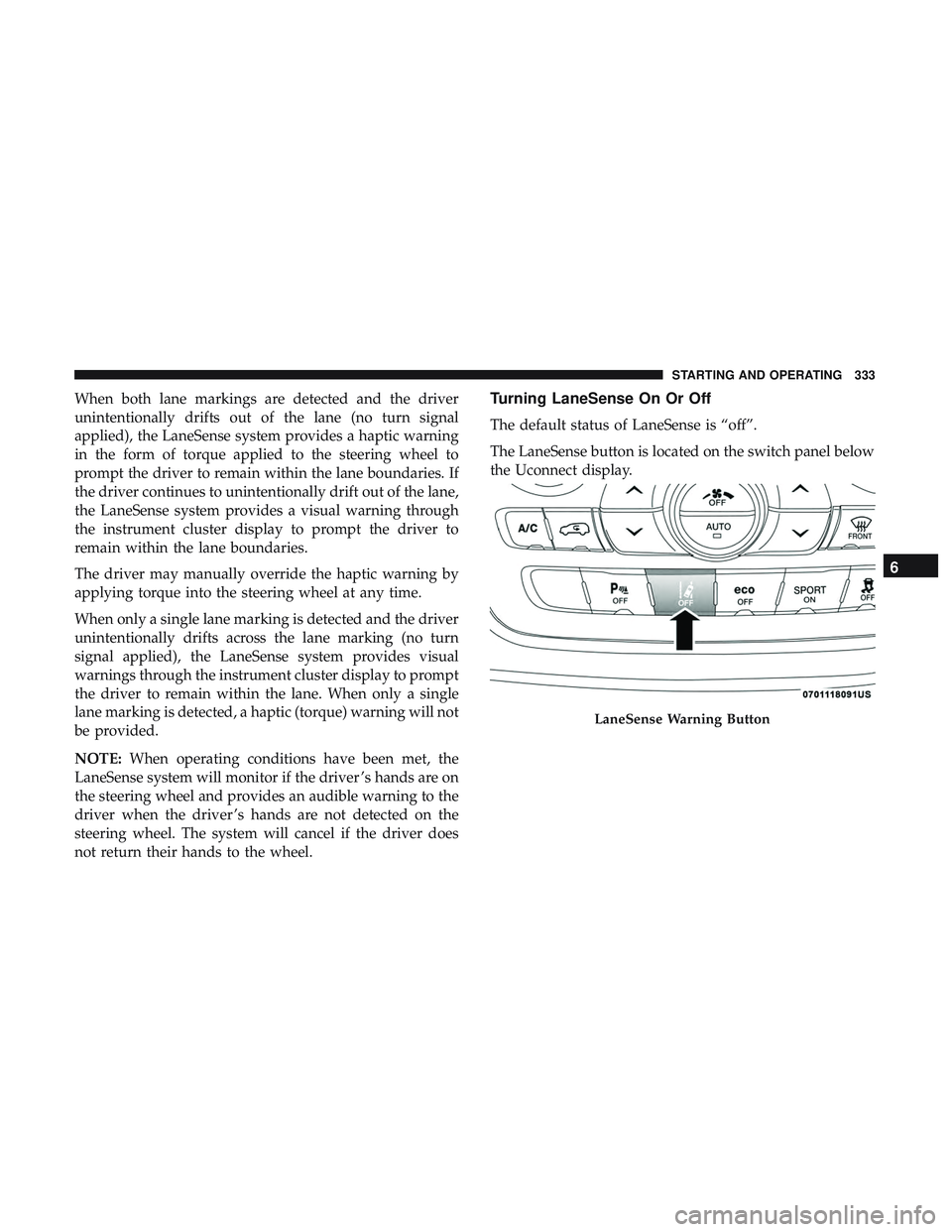
The default status of LaneSense is “off”.
The LaneSense button is located on the switch panel below
the Uconnect display.
LaneSense Warning Button
6
STARTING AND OPERATING 333
Page 372 of 592
WARNING!
•Ignoring the Rearview Mirror light could mean you
will not have SOS Call services. If the Rearview
Mirror light is illuminated, have your authorized
dealer service the SOS Call system immediately.
• The Occupant Restraint Control module turns on the
air bag Warning Light on the instrument panel if a
malfunction in any part of the system is detected. If
the Air Bag Warning Light is illuminated, have your
authorized dealer service the Occupant Restraint
Control system immediately.
Even if the SOS Call system is fully functional, factors
beyond FCA US LLC’s control may prevent or stop the SOS
Call system operation. These include, but are not limited
to, the following factors:
• Delayed accessories mode is active.
• The ignition is in the OFF position.
• The vehicle’s electrical systems are not intact.
• The SOS Call system software and/or hardware are
damaged during a crash.
• The vehicle battery loses power or becomes discon-
nected during a vehicle crash. •
LTE (voice/data) or 4G (data) network and/or Global
Positioning Satellite signals are unavailable or ob-
structed.
• Equipment malfunction at the SOS operator facility.
• Operator error by the SOS operator.
• LTE (voice/data) or 4G (data) network congestion.
• Weather.
• Buildings, structures, geographic terrain, or tunnels.
WARNING!
ALWAYS obey traffic laws and pay attention to the
road. ALWAYS drive safely with your hands on the
steering wheel. You have full responsibility and as-
sume all risks related to the use of the features and
applications in this vehicle. Only use the features and
applications when it is safe to do so. Failure to do so
may result in an accident involving serious injury or
death.
370 IN CASE OF EMERGENCY
Page 374 of 592
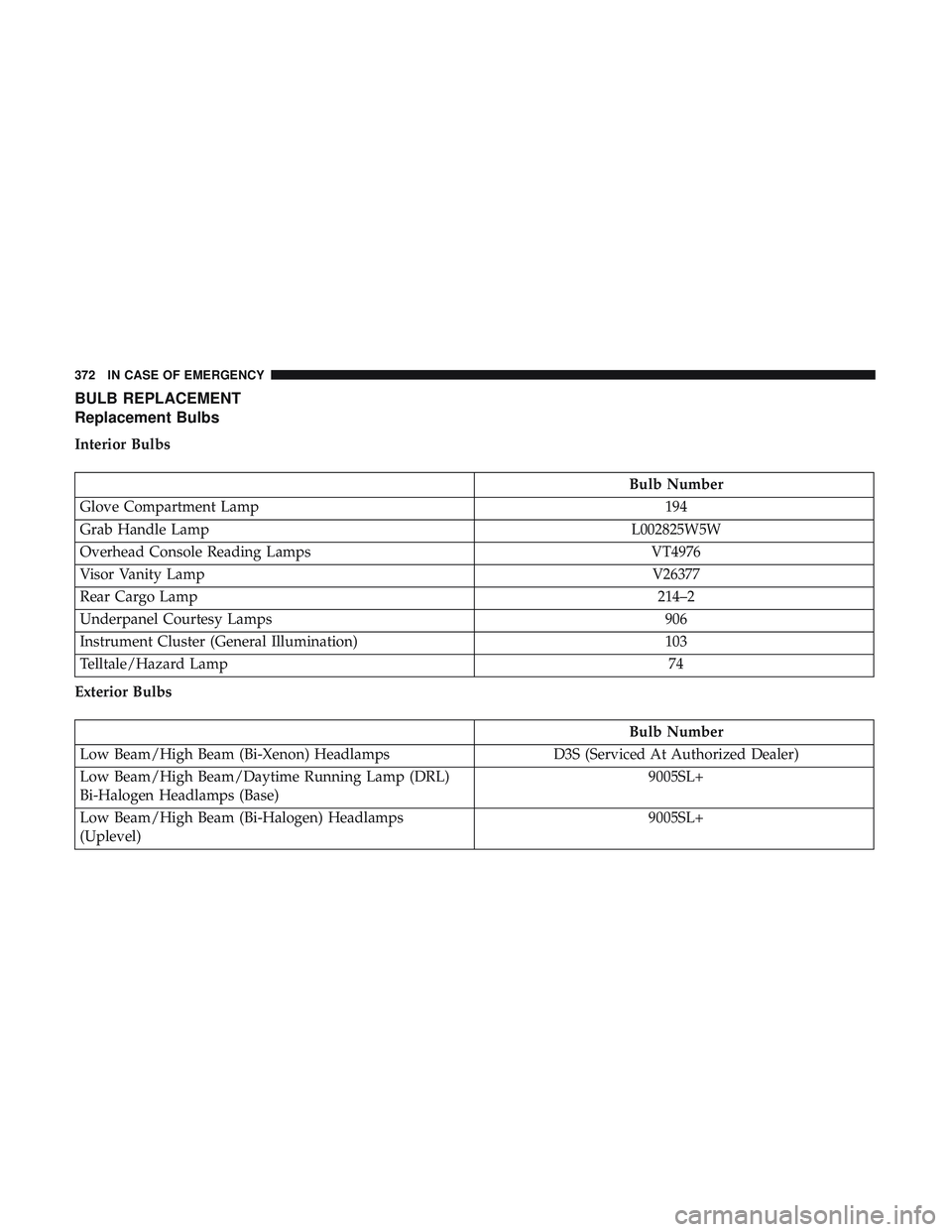
BULB REPLACEMENT
Replacement Bulbs
Interior Bulbs
Bulb Number
Glove Compartment Lamp 194
Grab Handle Lamp L002825W5W
Overhead Console Reading Lamps VT4976
Visor Vanity Lamp V26377
Rear Cargo Lamp 214–2
Underpanel Courtesy Lamps 906
Instrument Cluster (General Illumination) 103
Telltale/Hazard Lamp 74
Exterior Bulbs
Bulb Number
Low Beam/High Beam (Bi-Xenon) Headlamps D3S (Serviced At Authorized Dealer)
Low Beam/High Beam/Daytime Running Lamp (DRL)
Bi-Halogen Headlamps (Base) 9005SL+
Low Beam/High Beam (Bi-Halogen) Headlamps
(Uplevel) 9005SL+
372 IN CASE OF EMERGENCY
Page 384 of 592
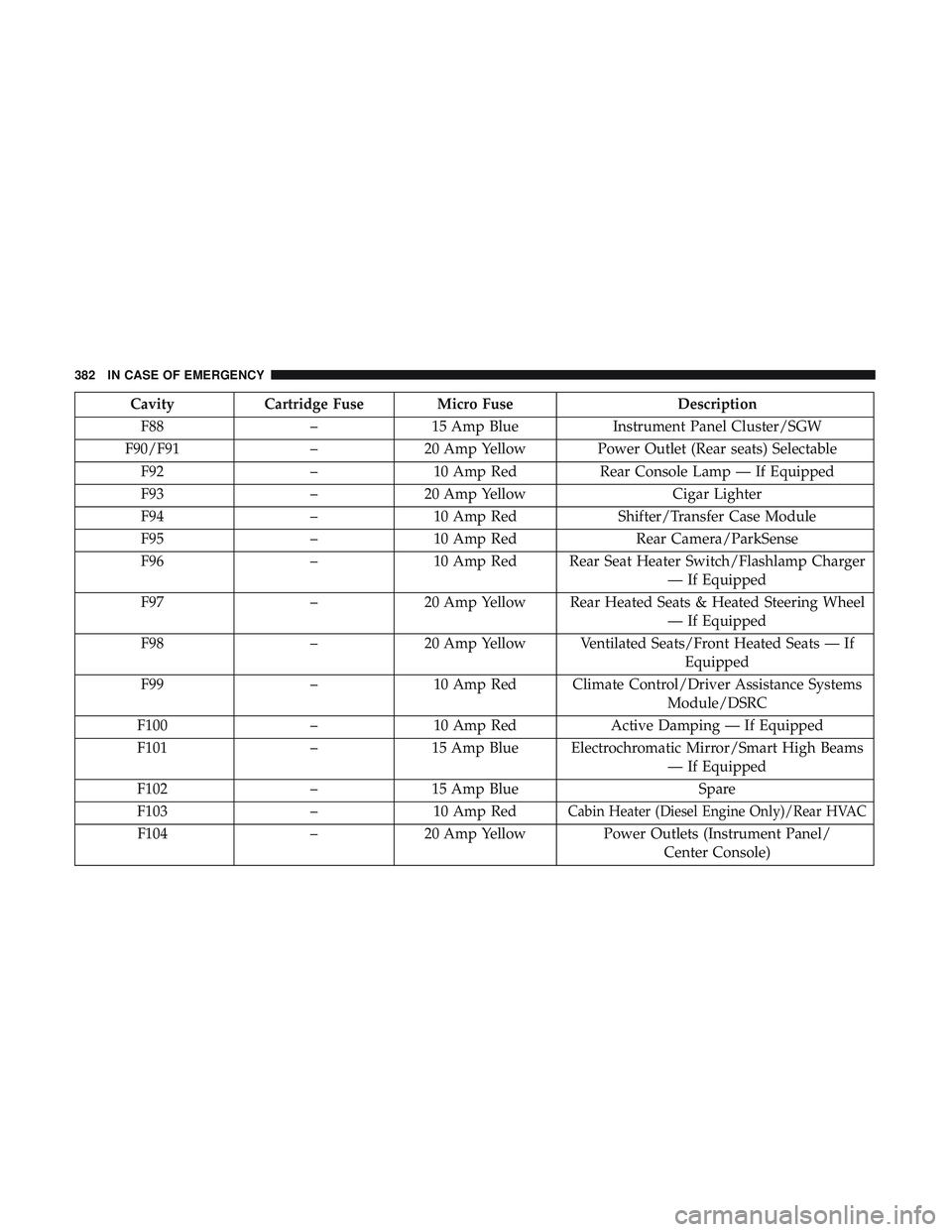
CavityCartridge Fuse Micro Fuse Description
F88 –15 Amp Blue Instrument Panel Cluster/SGW
F90/F91 –20 Amp Yellow Power Outlet (Rear seats) Selectable
F92 –10 Amp Red Rear Console Lamp — If Equipped
F93 –20 Amp Yellow Cigar Lighter
F94 –10 Amp Red Shifter/Transfer Case Module
F95 –10 Amp Red Rear Camera/ParkSense
F96 –10 Amp Red Rear Seat Heater Switch/Flashlamp Charger
— If Equipped
F97 –20 Amp Yellow Rear Heated Seats & Heated Steering Wheel
— If Equipped
F98 –20 Amp Yellow Ventilated Seats/Front Heated Seats — If
Equipped
F99 –10 Amp Red Climate Control/Driver Assistance Systems
Module/DSRC
F100 –10 Amp Red Active Damping — If Equipped
F101 –15 Amp Blue Electrochromatic Mirror/Smart High Beams
— If Equipped
F102 –15 Amp Blue Spare
F103 –10 Amp Red
Cabin Heater (Diesel Engine Only)/Rear HVAC
F104 –20 Amp Yellow Power Outlets (Instrument Panel/
Center Console)
382 IN CASE OF EMERGENCY
Page 472 of 592
IDENTIFICATION DATA
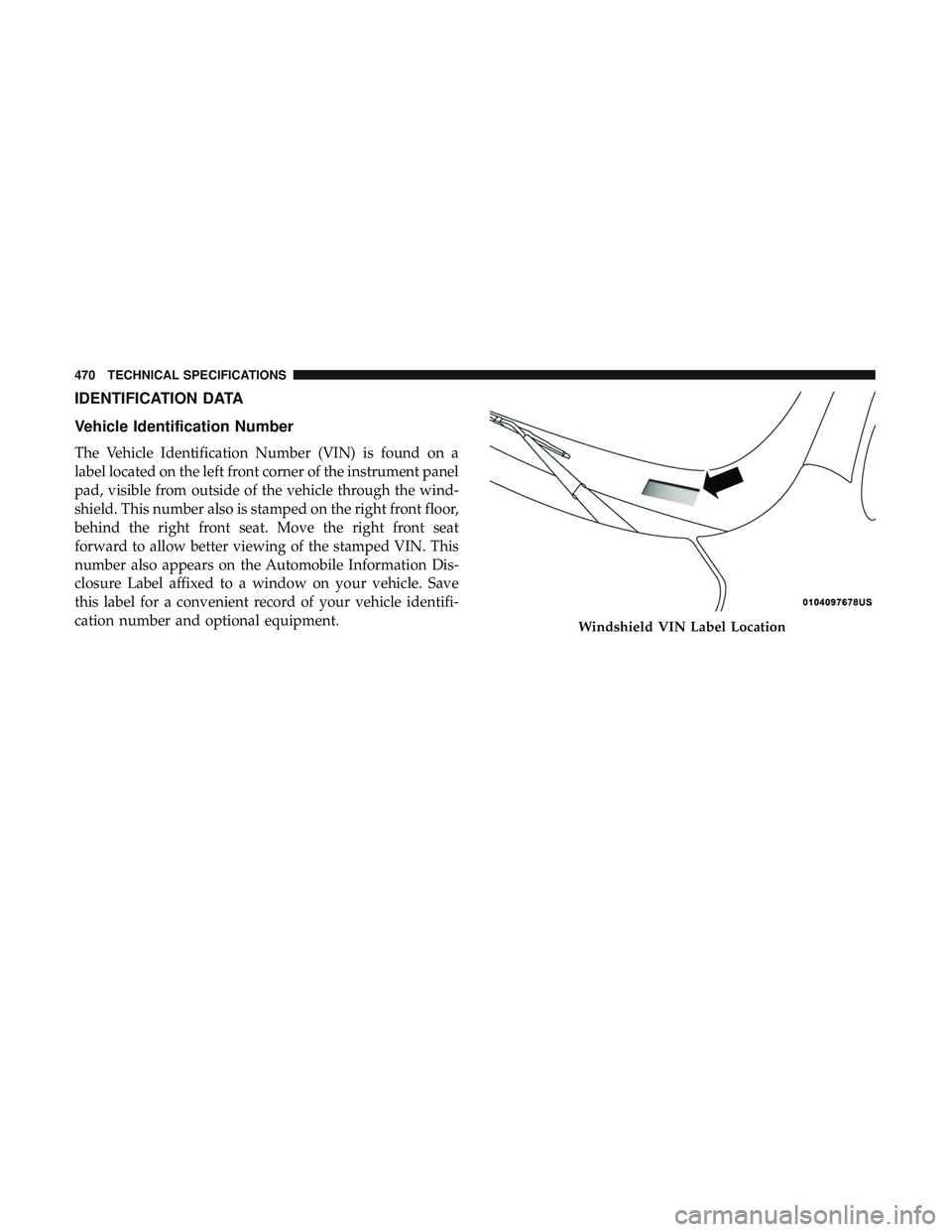
Vehicle Identification Number
The Vehicle Identification Number (VIN) is found on a
label located on the left front corner of the instrument panel
pad, visible from outside of the vehicle through the wind-
shield. This number also is stamped on the right front floor,
behind the right front seat. Move the right front seat
forward to allow better viewing of the stamped VIN. This
number also appears on the Automobile Information Dis-
closure Label affixed to a window on your vehicle. Save
this label for a convenient record of your vehicle identifi-
cation number and optional equipment.
Windshield VIN Label Location
470 TECHNICAL SPECIFICATIONS
Page 489 of 592
NOTE:
•FCA US LLC or your dealer may contact you directly
regarding software updates.
• To help further improve vehicle security and minimize
the potential risk of a security breach, vehicle owners
should:
• Routinely check www.driveuconnect.com/support/
software-update.html (U.S. Residents) or www.driveu-
connect.ca (Canadian Residents) to learn about avail-
able Uconnect software updates.
• Only connect and use trusted media devices (e.g.
personal mobile phones, USBs, CDs).
Privacy of any wireless and wired communications cannot
be assured. Third parties may unlawfully intercept infor-
mation and private communications without your consent.
For further information, refer to “Data Collection & Pri-
vacy” in your Uconnect Owner ’s Manual Supplement or
“Onboard Diagnostic System (OBD II) Cybersecurity” in
“Getting To Know Your Instrument Panel”.UCONNECT SETTINGS
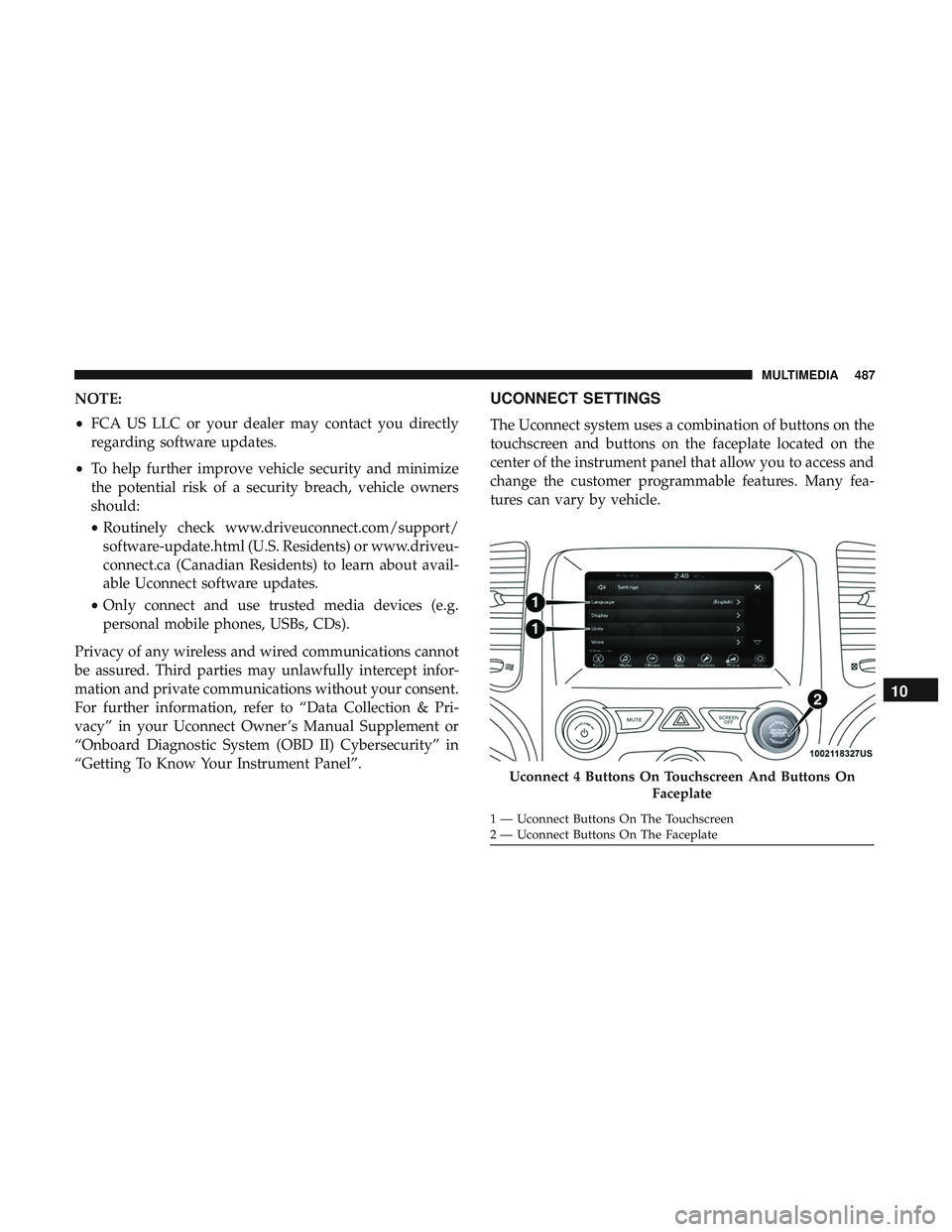
The Uconnect system uses a combination of buttons on the
touchscreen and buttons on the faceplate located on the
center of the instrument panel that allow you to access and
change the customer programmable features. Many fea-
tures can vary by vehicle.
Uconnect 4 Buttons On Touchscreen And Buttons On Faceplate
1 — Uconnect Buttons On The Touchscreen
2 — Uconnect Buttons On The Faceplate
10
MULTIMEDIA 487
Page 581 of 592
Fuses.................................. .376
Garage Door Opener (HomeLink) ...............114
Gasoline, Clean Air ........................ .474
Gasoline, (Fuel) ............................473
Gasoline, Reformulated ..................... .474
Gear Ranges ............................. .274
Glass Cleaning ............................468
Gross Axle Weight Rating .....................344
Gross Vehicle Weight Rating ...................344
GVWR ................................. .342
Hazard Warning Flashers .....................366
Headlights ...............................373
Automatic ..............................74
Bulb Replacement ........................374
Cleaning ...............................465
On With Wipers ..........................75
Passing ................................74
Replacing ............................. .374
Head Restraints ............................60
Heated Mirrors .............................71
Heater, Engine Block ........................267
Hill Start Assist ............................174 Hitches
Trailer Towing .......................... .346
Holder, Cup ............................. .126
HomeLink (Garage Door Opener) ...............114
Hood Prop ...............................108
Hood Release ............................ .108
Ignition ..................................22
Key Fob Battery Low Or Dead ................22
Key Fob Not Detected ......................22
Keyless Ignition ..........................22
Keyless Push Button .......................22
Push Button Ignition .......................22
Switch .................................22
Immobilizer (Sentry Key) ......................28
Inside Rearview Mirror ....................68, 366
Instrument Cluster ..........................142
Descriptions ............................166
Display ............................144, 149
Instr
ument Panel Lens Cleaning ................467
Interior And Instrument Lights ..................77
Interior Appearance Care .....................466
Interior Lights ..............................77
Intermittent Wipers (Delay Wipers) ...............81
Introduction ................................4
12
INDEX 579