clock DODGE DURANGO 2019 User Guide
[x] Cancel search | Manufacturer: DODGE, Model Year: 2019, Model line: DURANGO, Model: DODGE DURANGO 2019Pages: 598, PDF Size: 4.32 MB
Page 399 of 598
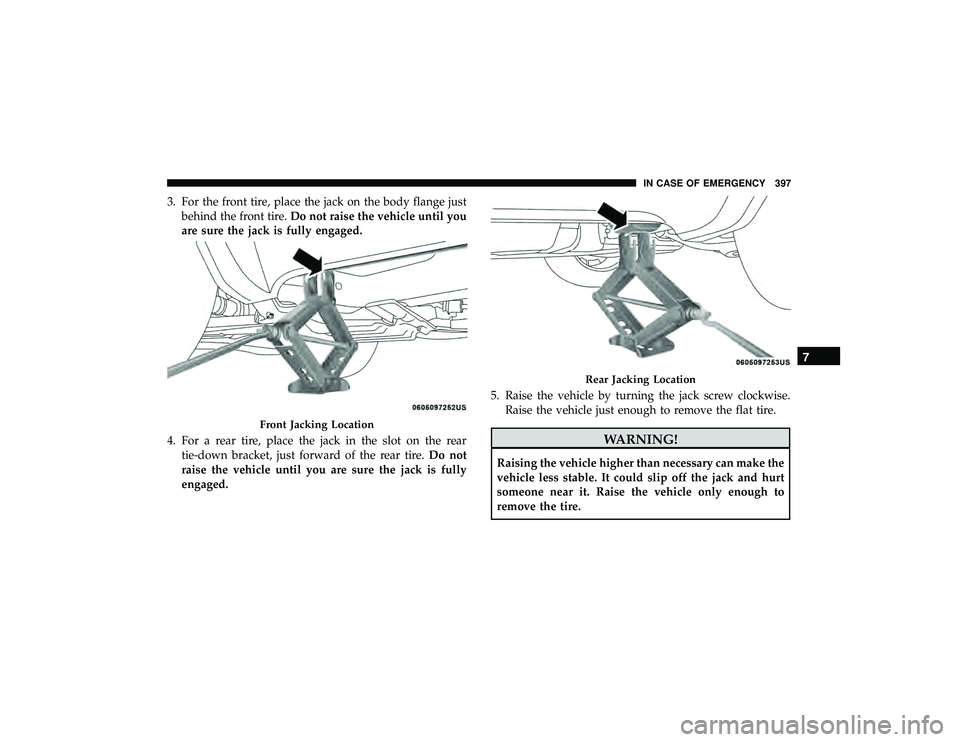
3. For the front tire, place the jack on the body flange justbehind the front tire. Do not raise the vehicle until you
are sure the jack is fully engaged.
4. For a rear tire, place the jack in the slot on the rear tie-down bracket, just forward of the rear tire. Do not
raise the vehicle until you are sure the jack is fully
engaged. 5. Raise the vehicle by turning the jack screw clockwise.
Raise the vehicle just enough to remove the flat tire.
WARNING!
Raising the vehicle higher than necessary can make the
vehicle less stable. It could slip off the jack and hurt
someone near it. Raise the vehicle only enough to
remove the tire.
Front Jacking Location
Rear Jacking Location
7
IN CASE OF EMERGENCY 397
Page 400 of 598
6. Remove the lug nuts and wheel.
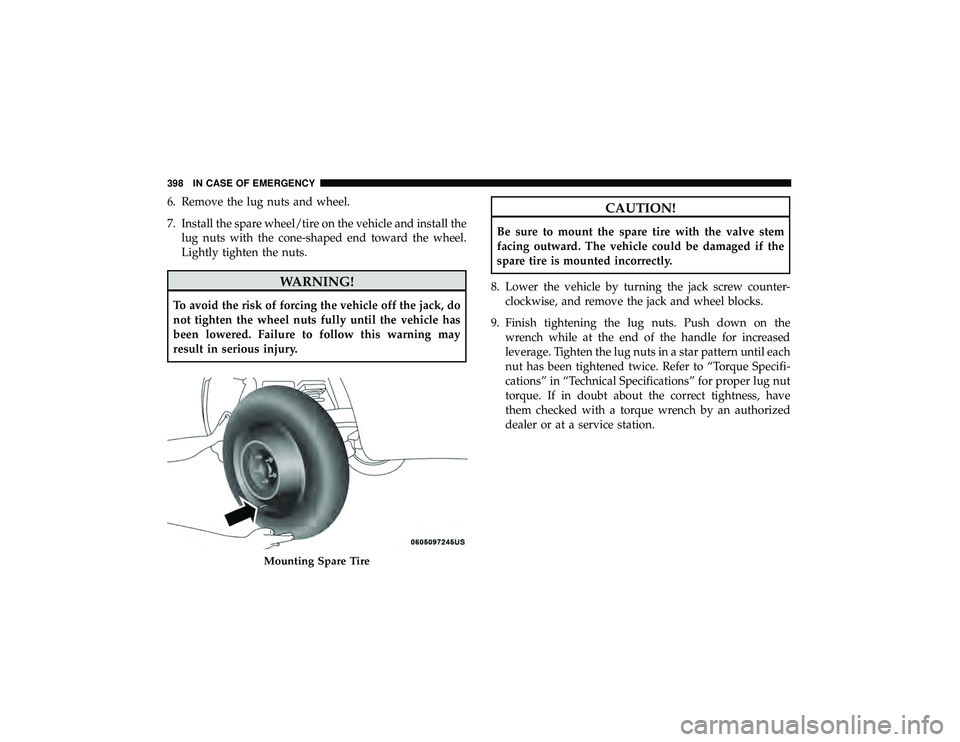
7. Install the spare wheel/tire on the vehicle and install thelug nuts with the cone-shaped end toward the wheel.
Lightly tighten the nuts.
WARNING!
To avoid the risk of forcing the vehicle off the jack, do
not tighten the wheel nuts fully until the vehicle has
been lowered. Failure to follow this warning may
result in serious injury.
CAUTION!
Be sure to mount the spare tire with the valve stem
facing outward. The vehicle could be damaged if the
spare tire is mounted incorrectly.
8. Lower the vehicle by turning the jack screw counter- clockwise, and remove the jack and wheel blocks.
9. Finish tightening the lug nuts. Push down on the wrench while at the end of the handle for increased
leverage. Tighten the lug nuts in a star pattern until each
nut has been tightened twice. Refer to “Torque Specifi-
cations” in “Technical Specifications” for proper lug nut
torque. If in doubt about the correct tightness, have
them checked with a torque wrench by an authorized
dealer or at a service station.
Mounting Spare Tire
398 IN CASE OF EMERGENCY
Page 402 of 598
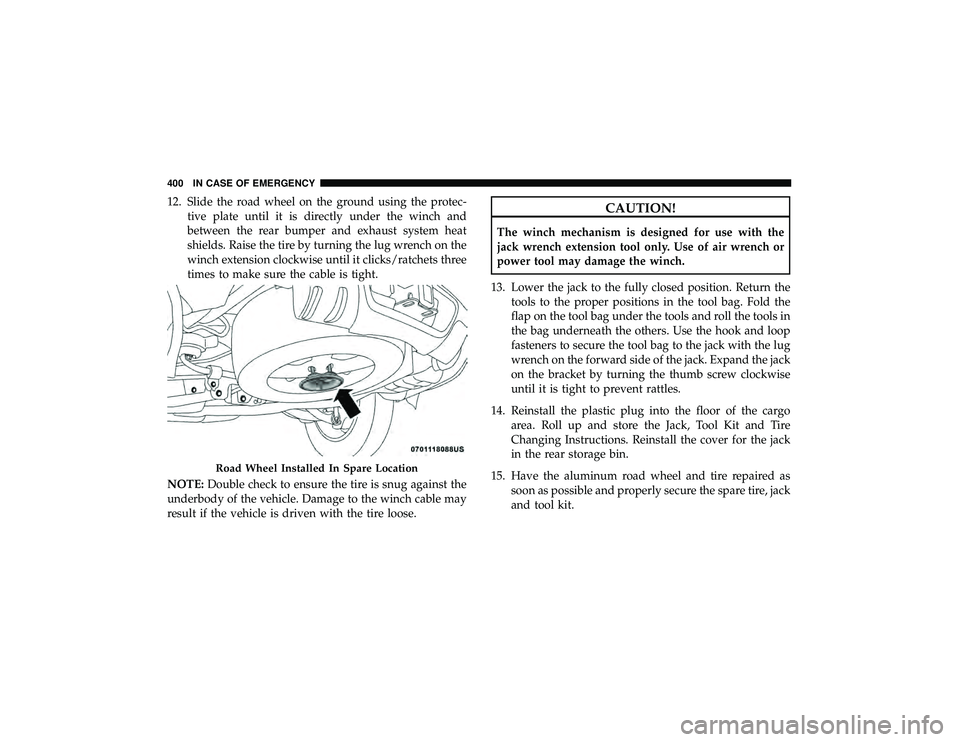
12. Slide the road wheel on the ground using the protec-tive plate until it is directly under the winch and
between the rear bumper and exhaust system heat
shields. Raise the tire by turning the lug wrench on the
winch extension clockwise until it clicks/ratchets three
times to make sure the cable is tight.
NOTE: Double check to ensure the tire is snug against the
underbody of the vehicle. Damage to the winch cable may
result if the vehicle is driven with the tire loose.CAUTION!
The winch mechanism is designed for use with the
jack wrench extension tool only. Use of air wrench or
power tool may damage the winch.
13. Lower the jack to the fully closed position. Return the tools to the proper positions in the tool bag. Fold the
flap on the tool bag under the tools and roll the tools in
the bag underneath the others. Use the hook and loop
fasteners to secure the tool bag to the jack with the lug
wrench on the forward side of the jack. Expand the jack
on the bracket by turning the thumb screw clockwise
until it is tight to prevent rattles.
14. Reinstall the plastic plug into the floor of the cargo area. Roll up and store the Jack, Tool Kit and Tire
Changing Instructions. Reinstall the cover for the jack
in the rear storage bin.
15. Have the aluminum road wheel and tire repaired as soon as possible and properly secure the spare tire, jack
and tool kit.
Road Wheel Installed In Spare Location
400 IN CASE OF EMERGENCY
Page 403 of 598
WARNING!
A loose tire or jack thrown forward in a collision or
hard stop, could endanger the occupants of the vehicle.
Always stow the jack parts and the spare tire in the
places provided.
Road Tire Installation
1. Mount the road tire on the axle.
2. Install the remaining lug nuts with the cone shaped endof the nut toward the wheel. Lightly tighten the lug
nuts.
WARNING!
To avoid the risk of forcing the vehicle off the jack, do
not tighten the wheel nuts fully until the vehicle has
been lowered. Failure to follow this warning may
result in serious injury.
3. Lower the vehicle to the ground by turning the jack handle counterclockwise.
4. Refer to “Torque Specifications” in “Technical Specifica- tions” for proper lug nut torque. 5. After 25 miles (40 km), check the lug nut torque with a
torque wrench to ensure that all lug nuts are properly
seated against the wheel.
JUMP STARTING
If your vehicle has a discharged battery, it can be jump
started using a set of jumper cables and a battery in another
vehicle, or by using a portable battery booster pack. Jump
starting can be dangerous if done improperly, so please
follow the procedures in this section carefully.
WARNING!
Do not attempt jump starting if the battery is frozen. It
could rupture or explode and cause personal injury.
CAUTION!
Do not use a portable battery booster pack or any other
booster source with a system voltage greater than 12
Volts or damage to the battery, starter motor, alternator
or electrical system may occur.
NOTE: When using a portable battery booster pack, follow
the manufacturer’s operating instructions and precautions.
7
IN CASE OF EMERGENCY 401
Page 498 of 598
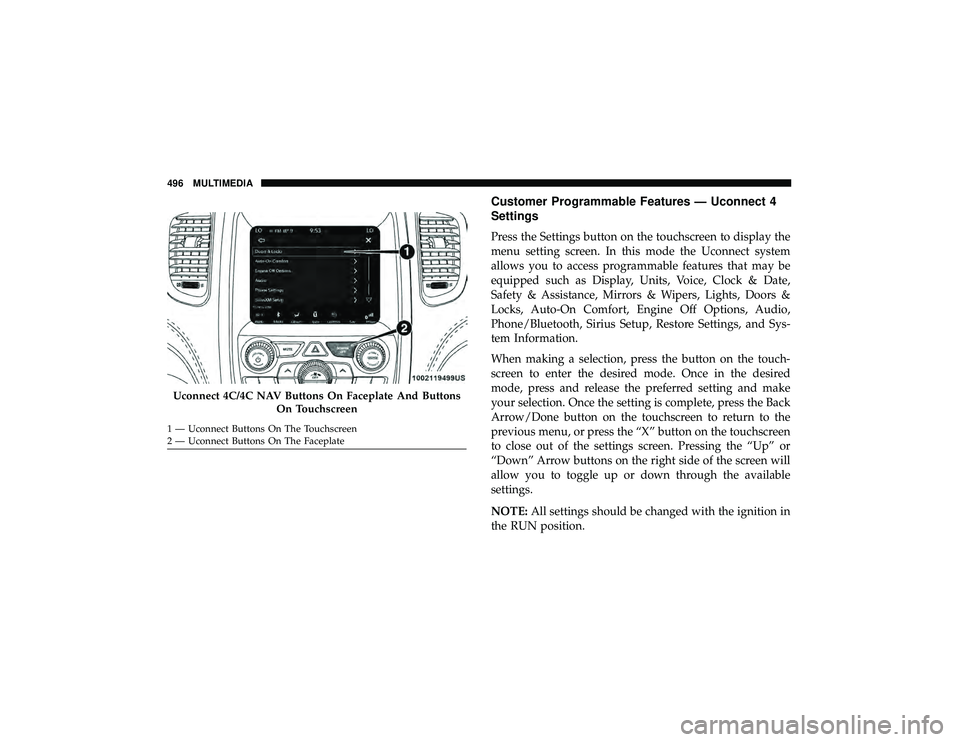
Customer Programmable Features — Uconnect 4
Settings
Press the Settings button on the touchscreen to display the
menu setting screen. In this mode the Uconnect system
allows you to access programmable features that may be
equipped such as Display, Units, Voice, Clock & Date,
Safety & Assistance, Mirrors & Wipers, Lights, Doors &
Locks, Auto-On Comfort, Engine Off Options, Audio,
Phone/Bluetooth, Sirius Setup, Restore Settings, and Sys-
tem Information.
When making a selection, press the button on the touch-
screen to enter the desired mode. Once in the desired
mode, press and release the preferred setting and make
your selection. Once the setting is complete, press the Back
Arrow/Done button on the touchscreen to return to the
previous menu, or press the “X” button on the touchscreen
to close out of the settings screen. Pressing the “Up” or
“Down” Arrow buttons on the right side of the screen will
allow you to toggle up or down through the available
settings.
NOTE:All settings should be changed with the ignition in
the RUN position.
Uconnect 4C/4C NAV Buttons On Faceplate And Buttons
On Touchscreen
1 — Uconnect Buttons On The Touchscreen
2 — Uconnect Buttons On The Faceplate 496 MULTIMEDIA
Page 501 of 598
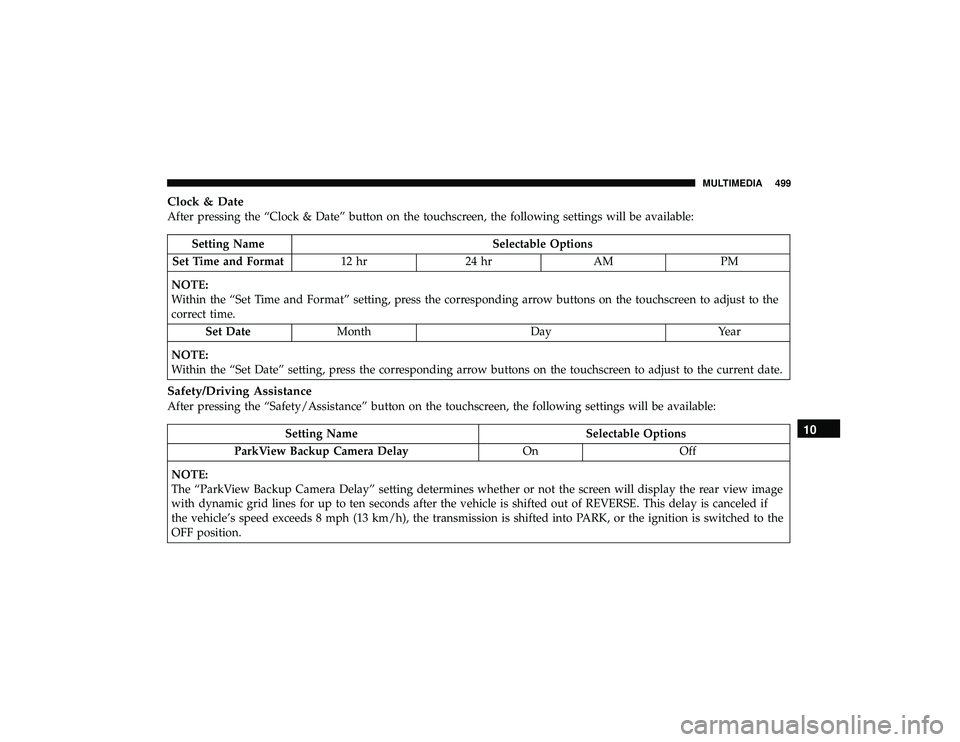
Clock & Date
After pressing the “Clock & Date” button on the touchscreen, the following settings will be available:
Setting NameSelectable Options
Set Time and Format 12 hr24 hr AMPM
NOTE:
Within the “Set Time and Format” setting, press the corresponding arrow buttons on the touchscreen to adjust to the
correct time. Set Date Month DayYear
NOTE:
Within the “Set Date” setting, press the corresponding arrow buttons on the touchscreen to adjust to the current date.
Safety/Driving Assistance
After pressing the “Safety/Assistance” button on the touchscreen, the following settings will be available:
Setting Name Selectable Options
ParkView Backup Camera Delay OnOff
NOTE:
The “ParkView Backup Camera Delay” setting determines whether or not the screen will display the rear view image
with dynamic grid lines for up to ten seconds after the vehicle is shifted out of REVERSE. This delay is canceled if
the vehicle’s speed exceeds 8 mph (13 km/h), the transmission is shifted into PARK, or the ignition is switched to the
OFF position.10
MULTIMEDIA 499
Page 515 of 598
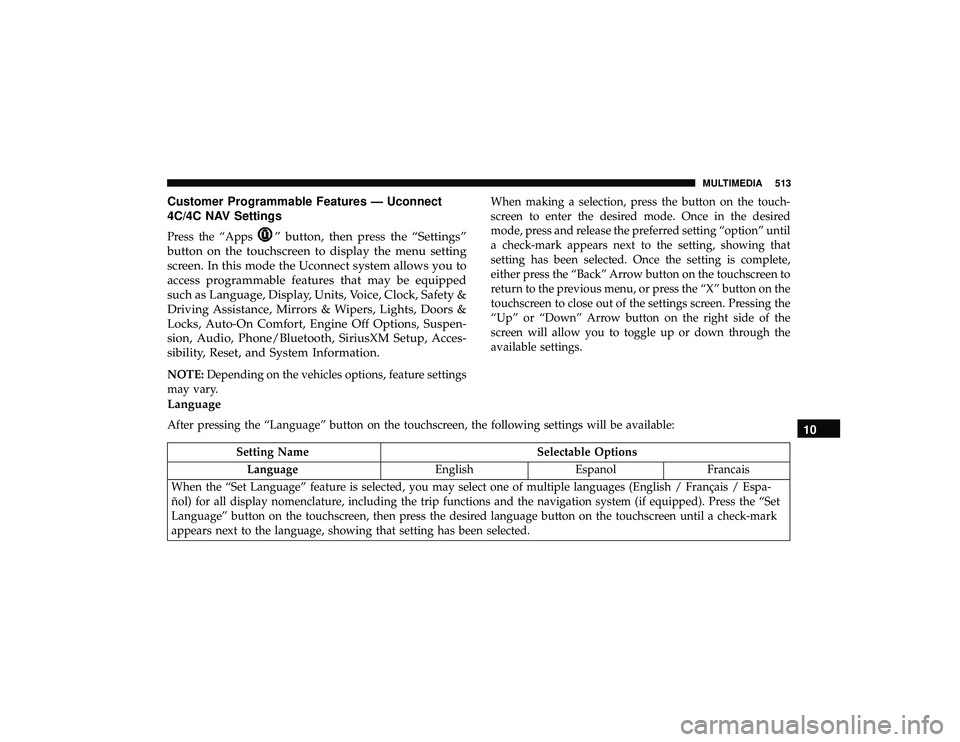
Customer Programmable Features — Uconnect
4C/4C NAV Settings
Press the “Apps” button, then press the “Settings”
button on the touchscreen to display the menu setting
screen. In this mode the Uconnect system allows you to
access programmable features that may be equipped
such as Language, Display, Units, Voice, Clock, Safety &
Driving Assistance, Mirrors & Wipers, Lights, Doors &
Locks, Auto-On Comfort, Engine Off Options, Suspen-
sion, Audio, Phone/Bluetooth, SiriusXM Setup, Acces-
sibility, Reset, and System Information.
NOTE: Depending on the vehicles options, feature settings
may vary. When making a selection, press the button on the touch-
screen to enter the desired mode. Once in the desired
mode, press and release the preferred setting “option” until
a check-mark appears next to the setting, showing that
setting has been selected. Once the setting is complete,
either press the “Back” Arrow button on the touchscreen to
return to the previous menu, or press the “X” button on the
touchscreen to close out of the settings screen. Pressing the
“Up” or “Down” Arrow button on the right side of the
screen will allow you to toggle up or down through the
available settings.
Language
After pressing the “Language” button on the touchscreen, the following settings will be available:
Setting Name
Selectable Options
Language EnglishEspanolFrancais
When the “Set Language” feature is selected, you may select one of multiple languages (English / Français / Espa-
ñol) for all display nomenclature, including the trip functions and the navigation system (if equipped). Press the “Set
Language” button on the touchscreen, then press the desired language button on the touchscreen until a check-mark
appears next to the language, showing that setting has been selected.
10
MULTIMEDIA 513
Page 518 of 598
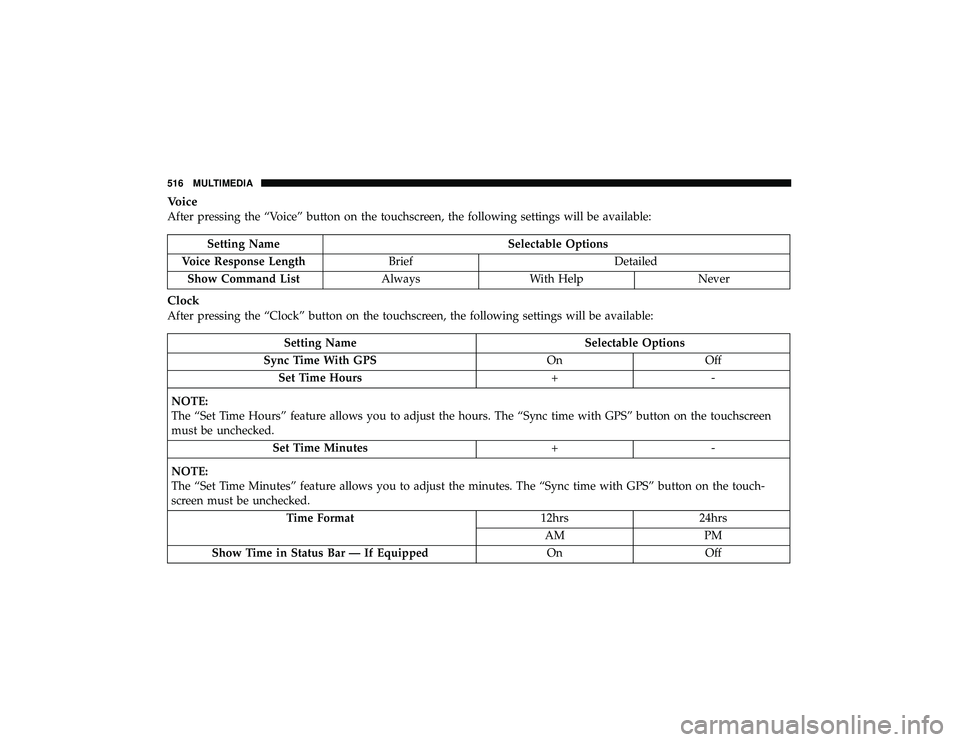
Voice
After pressing the “Voice” button on the touchscreen, the following settings will be available:
Setting NameSelectable Options
Voice Response Length Brief Detailed
Show Command List AlwaysWith Help Never
Clock
After pressing the “Clock” button on the touchscreen, the following settings will be available:
Setting Name Selectable Options
Sync Time With GPS OnOff
Set Time Hours +-
NOTE:
The “Set Time Hours” feature allows you to adjust the hours. The “Sync time with GPS” button on the touchscreen
must be unchecked. Set Time Minutes +-
NOTE:
The “Set Time Minutes” feature allows you to adjust the minutes. The “Sync time with GPS” button on the touch-
screen must be unchecked. Time Format 12hrs24hrs
AM PM
Show Time in Status Bar — If Equipped OnOff
516 MULTIMEDIA