fuel pressure DODGE DURANGO 2019 User Guide
[x] Cancel search | Manufacturer: DODGE, Model Year: 2019, Model line: DURANGO, Model: DODGE DURANGO 2019Pages: 598, PDF Size: 4.32 MB
Page 345 of 598
NOTE:If the fuel door does not latch after the manual
release cable has been activated, the actuator latch should
be manually returned to the closed position.
VEHICLE LOADING
Gross Vehicle Weight Rating (GVWR)
The GVWR is the total permissible weight of your vehicle
including driver, passengers, vehicle, options and cargo.
The label also specifies maximum capacities of front and
rear axle systems (GAWR). Total load must be limited so
GVWR and front and rear GAWR are not exceeded.
Payload
The payload of a vehicle is defined as the allowable load
weight a truck can carry, including the weight of the driver,
all passengers, options and cargo.
Gross Axle Weight Rating (GAWR)
The GAWR is the maximum permissible load on the front
and rear axles. The load must be distributed in the cargo
area so that the GAWR of each axle is not exceeded.
Each axle GAWR is determined by the components in the
system with the lowest load carrying capacity (axle,
springs, tires or wheels). Heavier axles or suspension components sometimes specified by purchasers for in-
creased durability does not necessarily increase the vehi-
cle’s GVWR.
Tire Size
The tire size on the Vehicle Certification Label represents
the actual tire size on your vehicle. Replacement tires must
be equal to the load capacity of this tire size.
Rim Size
This is the rim size that is appropriate for the tire size
listed.
Inflation Pressure
This is the cold tire inflation pressure for your vehicle for
all loading conditions up to full GAWR.
Curb Weight
The curb weight of a vehicle is defined as the total weight
of the vehicle with all fluids, including vehicle fuel, at full
capacity conditions, and with no occupants or cargo loaded
into the vehicle. The front and rear curb weight values are
determined by weighing your vehicle on a commercial
scale before any occupants or cargo are added.
6
STARTING AND OPERATING 343
Page 419 of 598
SCHEDULED SERVICING
Your vehicle is equipped with an automatic oil change
indicator system. The oil change indicator system will
remind you that it is time to take your vehicle in for
scheduled maintenance.
Based on engine operation conditions, the oil change
indicator message will illuminate. This means that service
is required for your vehicle. Operating conditions such as
frequent short-trips, trailer tow, extremely hot or cold
ambient temperatures, and E85 fuel usage will influence
when the “Oil Change Required” message is displayed.
Severe Operating Conditions can cause the change oil
message to illuminate as early as 3,500 miles (5,600 km)
since last reset. Have your vehicle serviced as soon as
possible, within the next 500 miles (800 km).
Your authorized dealer will reset the oil change indicator
message after completing the scheduled oil change.
NOTE:Under no circumstances should oil change inter-
vals exceed 10,000 miles (16,000 km), twelve months or 350
hours of engine run time, whichever comes first. The 350
hours of engine run or idle time is generally only a concern
for fleet customers. Severe Duty All Models
Change Engine Oil at 4,000 miles (6,500 km) or 350 hours of
engine run time if the vehicle is operated in a dusty and off
road environment or is operated predominately at idle or
only very low engine RPM’s. This type of vehicle use is
considered Severe Duty.
Once A Month Or Before A Long Trip:
•
Check engine oil level
• Check windshield washer fluid level
• Check the tire inflation pressures and look for unusual
wear or damage
• Check the fluid levels of the coolant reservoir, brake
master cylinder and fill as needed.
• Check function of all interior and exterior lights
Maintenance Plan
Required Maintenance
Refer to the Maintenance Plans on the following pages for
required maintenance.
8
SERVICING AND MAINTENANCE 417
Page 426 of 598
Checking Oil Level
To assure proper lubrication of your vehicle’s engine, the
engine oil must be maintained at the correct level. Check
the oil level at regular intervals, such as every fuel stop.
The best time to check the engine oil level is about five
minutes after a fully warmed up engine is shut off.
Checking the oil while the vehicle is on level ground will
improve the accuracy of the oil level readings. Always
maintain the oil level within the SAFE zone on the dipstick.
Adding one quart of oil when the reading is at the bottom
of the SAFE zone will result in a reading at the top of the
safe zone on these engines.
CAUTION!
Overfilling or underfilling will cause oil aeration or
loss of oil pressure. This could damage your engine.
Adding Washer Fluid
The instrument cluster display will indicate when the
washer fluid level is low. When the sensor detects a low
fluid level, the windshield will light on the vehicle graphic
outline and the “WASHER FLUID LOW” message will be
displayed.The fluid reservoir for the windshield washers and the rear
window washer is shared. The fluid reservoir is located in
the engine compartment, be sure to check the fluid level at
regular intervals. Fill the reservoir with windshield washer
solvent only (not radiator antifreeze). When refilling the
washer fluid reservoir, take some washer fluid and apply it
to a cloth or towel and wipe clean the wiper blades, this
will help blade performance. To prevent freeze-up of your
windshield washer system in cold weather, select a solu-
tion or mixture that meets or exceeds the temperature
range of your climate. This rating information can be found
on most washer fluid containers.
WARNING!
Commercially available windshield washer solvents
are flammable. They could ignite and burn you. Care
must be exercised when filling or working around the
washer solution.
Maintenance-Free Battery
Your vehicle is equipped with a maintenance-free battery.
You will never have to add water, nor is periodic mainte-
nance required.
424 SERVICING AND MAINTENANCE
Page 461 of 598
NOTE:
•Unequal tire pressures from side to side may cause
erratic and unpredictable steering response.
• Unequal tire pressure from side to side may cause the
vehicle to drift left or right.
Fuel Economy
Underinflated tires will increase tire rolling resistance
resulting in higher fuel consumption.
Tread Wear
Improper cold tire inflation pressures can cause abnormal
wear patterns and reduced tread life, resulting in the need
for earlier tire replacement.
Ride Comfort And Vehicle Stability
Proper tire inflation contributes to a comfortable ride.
Over-inflation produces a jarring and uncomfortable ride.
Tire Inflation Pressures
The proper cold tire inflation pressure is listed on the
driver’s side B-Pillar or rear edge of the driver’s side door. At least once a month:
•
Check and adjust tire pressure with a good quality
pocket-type pressure gauge. Do not make a visual
judgement when determining proper inflation. Tires
may look properly inflated even when they are under-
inflated.
• Inspect tires for signs of tire wear or visible damage.
CAUTION!
After inspecting or adjusting the tire pressure, always
reinstall the valve stem cap. This will prevent moisture
and dirt from entering the valve stem, which could
damage the valve stem.
Inflation pressures specified on the placard are always
“cold tire inflation pressure”. Cold tire inflation pressure is
defined as the tire pressure after the vehicle has not been
driven for at least three hours, or driven less than 1 mile
(1.6 km) after sitting for a minimum of three hours. The
cold tire inflation pressure must not exceed the maximum
inflation pressure molded into the tire sidewall.
Check tire pressures more often if subject to a wide range
of outdoor temperatures, as tire pressures vary with tem-
perature changes.
8
SERVICING AND MAINTENANCE 459
Page 500 of 598
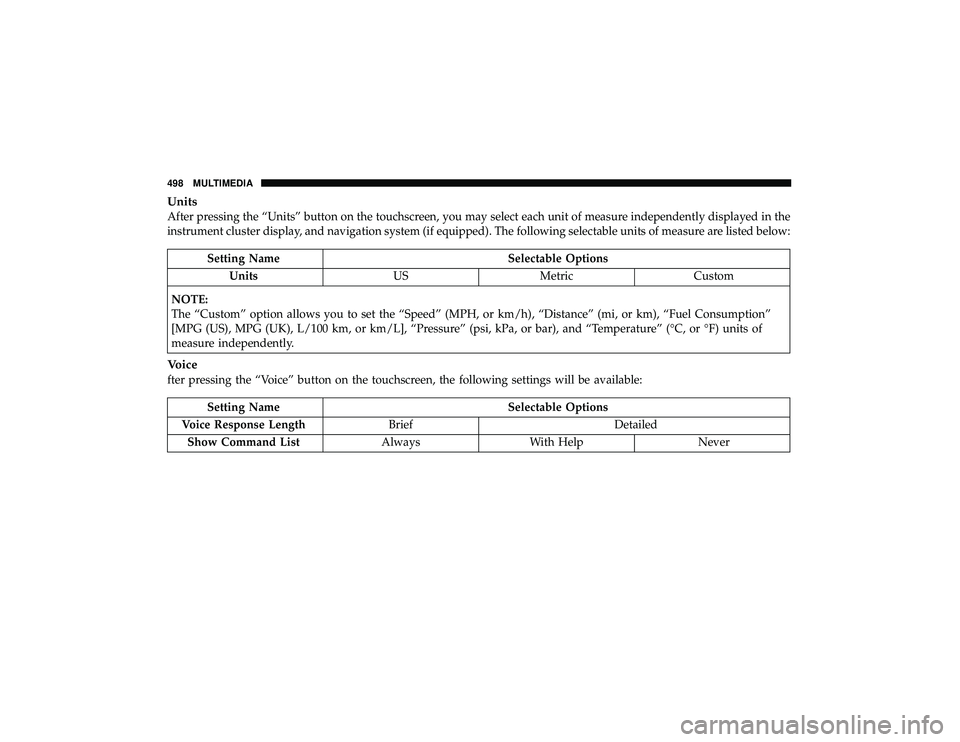
Units
After pressing the “Units” button on the touchscreen, you may select each unit of measure independently displayed in the
instrument cluster display, and navigation system (if equipped). The following selectable units of measure are listed below:
Setting NameSelectable Options
Units USMetric Custom
NOTE:
The “Custom” option allows you to set the “Speed” (MPH, or km/h), “Distance” (mi, or km), “Fuel Consumption”
[MPG (US), MPG (UK), L/100 km, or km/L], “Pressure” (psi, kPa, or bar), and “Temperature” (°C, or °F) units of
measure independently.
Voice
fter pressing the “Voice” button on the touchscreen, the following settings will be available:
Setting Name Selectable Options
Voice Response Length Brief Detailed
Show Command List AlwaysWith Help Never
498 MULTIMEDIA
Page 517 of 598
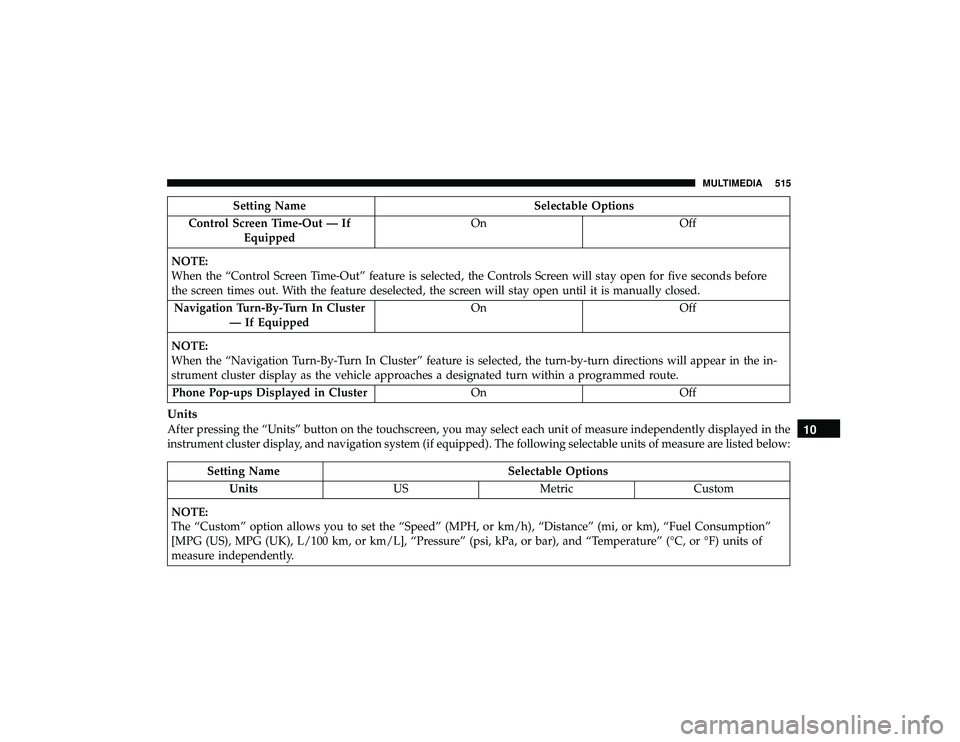
Setting NameSelectable Options
Control Screen Time-Out — If Equipped On
Off
NOTE:
When the “Control Screen Time-Out” feature is selected, the Controls Screen will stay open for five seconds before
the screen times out. With the feature deselected, the screen will stay open until it is manually closed. Navigation Turn-By-Turn In Cluster — If Equipped On
Off
NOTE:
When the “Navigation Turn-By-Turn In Cluster” feature is selected, the turn-by-turn directions will appear in the in-
strument cluster display as the vehicle approaches a designated turn within a programmed route. Phone Pop-ups Displayed in Cluster OnOff
Units
After pressing the “Units” button on the touchscreen, you may select each unit of measure independently displayed in the
instrument cluster display, and navigation system (if equipped). The following selectable units of measure are listed below:
Setting Name Selectable Options
Units USMetric Custom
NOTE:
The “Custom” option allows you to set the “Speed” (MPH, or km/h), “Distance” (mi, or km), “Fuel Consumption”
[MPG (US), MPG (UK), L/100 km, or km/L], “Pressure” (psi, kPa, or bar), and “Temperature” (°C, or °F) units of
measure independently.
10
MULTIMEDIA 515
Page 582 of 598
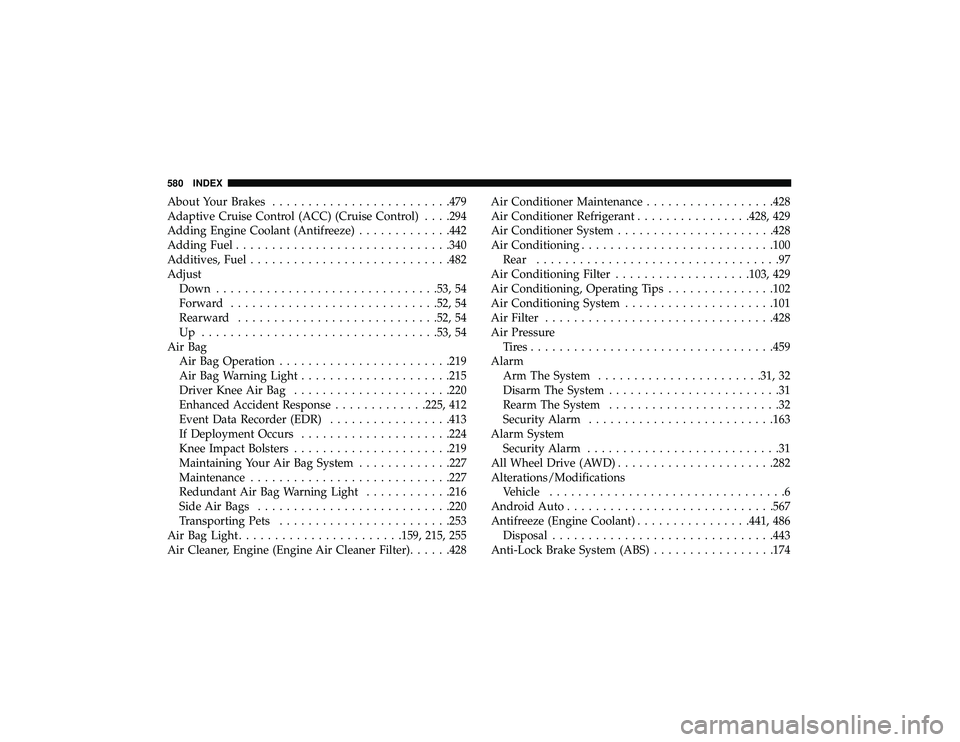
About Your Brakes........................ .479
Adaptive Cruise Control (ACC) (Cruise Control) . . . .294
Adding Engine Coolant (Antifreeze) .............442
Adding Fuel ............................. .340
Additives, Fuel ........................... .482
Adjust Down .............................. .53, 54
Forward ............................ .52, 54
Rearward ........................... .52, 54
Up ................................ .53, 54
Air Bag Air Bag Operation ....................... .219
Air Bag Warning Light .....................215
Driver Knee Air Bag ..................... .220
Enhanced Accident Response .............225, 412
Event Data Recorder (EDR) .................413
If Deployment Occurs .....................224
Knee Impact Bolsters ..................... .219
Maintaining Your Air Bag System .............227
Maintenance ........................... .227
Redundant Air Bag Warning Light ............216
Side Air Bags .......................... .220
Transporting Pets ....................... .253
Air Bag Light .......................159, 215, 255
Air Cleaner, Engine (Engine Air Cleaner Filter) ......428Air Conditioner Maintenance
..................428
Air Conditioner Refrigerant ................428, 429
Air Conditioner System ..................... .428
Air Conditioning .......................... .100
Rear ..................................97
Air Conditioning Filter .................. .103, 429
Air Conditioning, Operating Tips ...............102
Air Conditioning System .....................101
Air Filter ............................... .428
Air Pressure Tires................................. .459
Alarm Arm The System .......................31, 32
Disarm The
System ........................31
Rearm The System ........................32
Security Alarm ......................... .163
Alarm System Security Alarm ...........................31
All Wheel Drive (AWD) ..................... .282
Alterations/Modifications Vehicle .................................6
Android Auto ............................ .567
Antifreeze (Engine Coolant) ................441, 486
Disposal .............................. .443
Anti-Lock Brake System (ABS) .................174
580 INDEX
Page 590 of 598
Methanol............................... .482
Mirrors ..................................70
Electric Remote ...........................72
Exterior Folding ..........................71
Heated .................................73
Outside ................................71
Rearview ........................... .70, 372
Vanity .................................73
Modifications/Alterations Vehicle .................................6
Monitor, Tire Pressure System ..................194
Mopar Parts ............................. .577
Multi-Function Control Lever ...................74
New Vehicle Break-In Period ..................269
Occupant Restraints ........................ .200
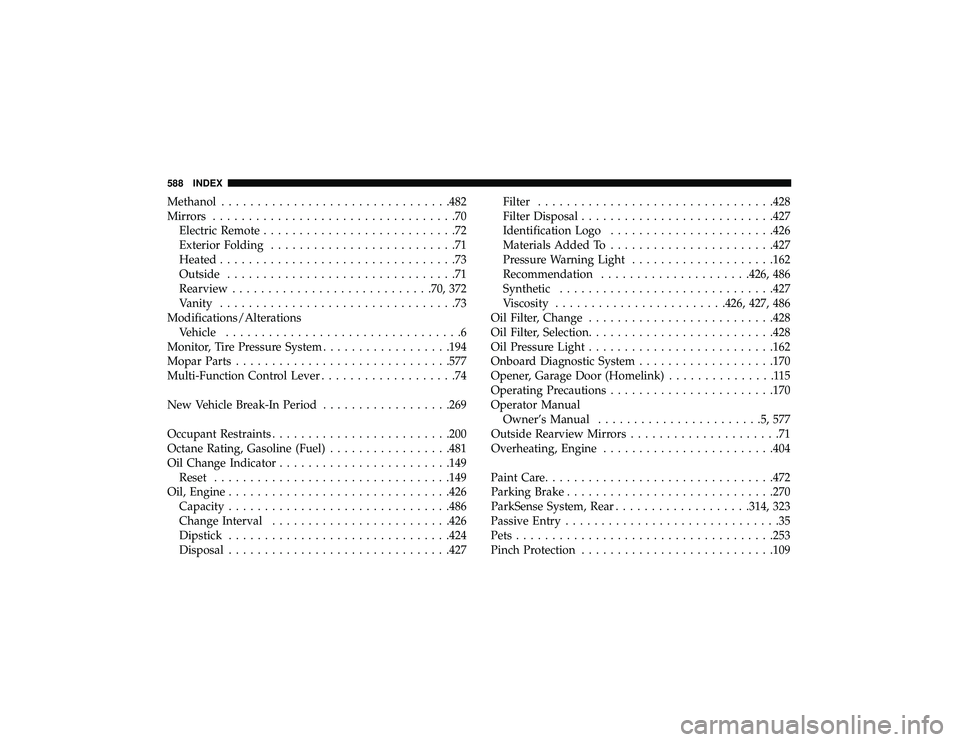
Octane Rating, Gasoline (Fuel) .................481
Oil Change Indicator ....................... .149
Reset ................................ .149
Oil, Engine .............................. .426
Capacity .............................. .486
Change Interval ........................ .426
Dipstick .............................. .424
Disposal .............................. .427Filter
................................ .428
Filter Disposal .......................... .427
Identification Logo .......................426
Materials Added To .......................427
Pressure Warning Light ................... .162
Recommendation .....................426, 486
Synthetic ............................. .427
Viscosity ....................... .426, 427, 486
Oil Filter, Change ......................... .428
Oil Filter, Selection ......................... .428
Oil Pressure Light ......................... .162
Onboard Diagnostic System ...................170
Opener, Garage Door (Homelink) ...............115
Operating Precautions .......................170
Operator Manual Owner’s Manual ....................... 5
,577
Outside Rearview Mirrors .....................71
Overheating, Engine ....................... .404
Paint Care ............................... .472
Parking Brake ............................ .270
ParkSense System, Rear .................. .314, 323
Passive Entry ..............................35
Pets ................................... .253
Pinch Protection .......................... .109
588 INDEX