ignition DODGE DURANGO 2019 Owner's Manual
[x] Cancel search | Manufacturer: DODGE, Model Year: 2019, Model line: DURANGO, Model: DODGE DURANGO 2019Pages: 598, PDF Size: 4.32 MB
Page 77 of 598
NOTE:
•Your vehicle is equipped with plastic headlight and fog
light (if equipped) lenses that are lighter and less sus-
ceptible to stone breakage than glass lights. Plastic is not
as scratch resistant as glass and therefore different lens
cleaning procedures must be followed.
• To minimize the possibility of scratching the lenses and
reducing light output, avoid wiping with a dry cloth. To
remove road dirt, wash with a mild soap solution
followed by rinsing.
CAUTION!
Do not use abrasive cleaning components, solvents,
steel wool or other abrasive materials to clean the
lenses.
Daytime Running Lights — If Equipped
The Daytime Running Lights come on whenever the en-
gine is running, and the transmission is not in the PARK
position. The lights will remain on until the ignition is
switched to the OFF or ACC position or the parking brake
is engaged. The headlight switch must be used for normal
nighttime driving. NOTE:
If allowed by law in the country in which the
vehicle was purchased the Daytime Running Lights can be
turned on and off using the Uconnect System, refer to
“Uconnect Settings” in “Multimedia” for further informa-
tion.
High/Low Beam Switch
Push the multifunction lever toward the instrument panel
to switch the headlights to high beams. Pulling the multi-
function back toward the steering wheel will turn the low
beams back on, or shut the high beams off.
Automatic High Beam — If Equipped
The Automatic High Beam Headlamp Control system
provides increased forward lighting at night by automat-
ing high beam control through the use of a digital camera
mounted on the inside rearview mirror. This camera de-
tects vehicle specific light and automatically switches from
high beams to low beams until the approaching vehicle is
out of view.
3
GETTING TO KNOW YOUR VEHICLE 75
Page 78 of 598
NOTE:
•The Automatic High Beam Headlamp Control can be
turned on or off by selecting “ON” under “Auto High
Beam” within your Uconnect settings, as well as turning
the headlight switch to the AUTO position. Refer to
“Uconnect Settings” in “Multimedia” for further infor-
mation.
• Broken, muddy, or obstructed headlights and taillights
of vehicles in the field of view will cause headlights to
remain on longer (closer to the vehicle). Also, dirt, film,
and other obstructions on the windshield or camera lens
will cause the system to function improperly.
If the windshield or Automatic High Beam Headlamp
Control mirror is replaced, the mirror must be re-aimed to
ensure proper performance. See a local authorized dealer.
Flash-To-Pass
You can signal another vehicle with your headlights by
lightly pulling the multifunction lever toward you. This
will cause the high beam headlights to turn on, and remain
on, until the lever is released.
Automatic Headlights
This system automatically turns the headlights on or off
according to ambient light levels. To turn the system on,
rotate the headlight switch counterclockwise to the AUTO
position. When the system is on, the headlight time delay
feature is also on. This means the headlights will stay on
for up to 90 seconds after you place the ignition into the
OFF position. The headlight time delay can be pro-
grammed 0/30/60/90 seconds.
Refer to “Uconnect Settings” in “Multimedia” for further
information.
To turn the automatic system off, move the headlight
switch out of the AUTO position.
NOTE: The engine must be running before the headlights
will come on in the automatic mode.
Parking Lights And Panel Lights
To turn on the parking lights and instrument panel lights,
rotate the headlight switch clockwise. To turn off the
parking lights, rotate the headlight switch back to the O
(off) position.
76 GETTING TO KNOW YOUR VEHICLE
Page 79 of 598
Headlights On Automatically With Wipers
If your vehicle is equipped with Automatic Headlights, it
also has this customer-programmable feature. When your
headlights are in the automatic mode and the engine is
running, they will automatically turn on when the wiper
system is on. This feature is programmable through the
Uconnect system. Refer to “Uconnect Settings” in “Multi-
media” for further information.
NOTE:When your headlights come on during the day-
time, the vehicle will monitor outside brightness and
decide if the instrument panel needs to be dimmed or not.
Refer to “Interior Lights” in “Getting To Know Your
Vehicle” for further information.
Headlight Delay
To aid in your exit, your vehicle is equipped with a
headlight delay that will leave the headlights on for
approximately 90 seconds. This delay is initiated when the
ignition is turned OFF while the headlight switch is on, and
then the headlight switch is cycled off. Headlight delay can
be cancelled by either turning the headlight switch on then
off, or by turning the ignition ON. NOTE:
The headlight delay time is programmable through
the Uconnect System. Refer to “Uconnect Settings” in
“Multimedia” for further information.
Lights-On Reminder
If the headlights, parking lights, or cargo lights are left on
after the ignition is turned OFF, a chime will sound when
the driver ’s door is opened.
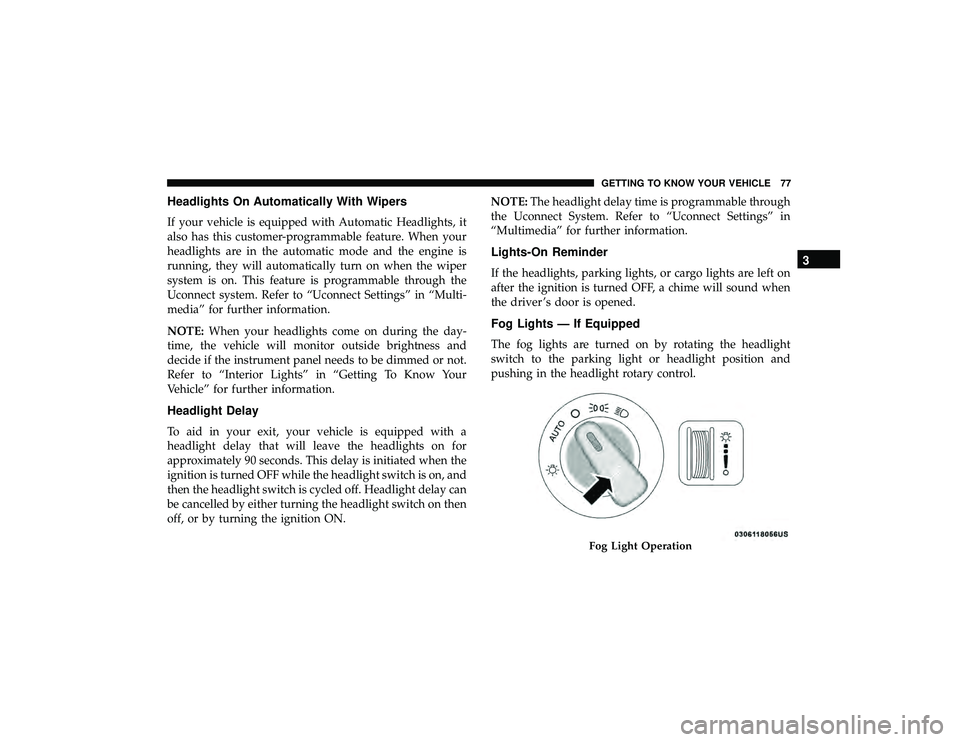
Fog Lights — If Equipped
The fog lights are turned on by rotating the headlight
switch to the parking light or headlight position and
pushing in the headlight rotary control.
Fog Light Operation
3
GETTING TO KNOW YOUR VEHICLE 77
Page 80 of 598
The fog lights will operate only when the parking lights are
on or when the vehicle headlights are on low beam. An
indicator light located in the instrument cluster display
will illuminate when the fog lights are on. The fog lights
will turn off when the switch is pushed a second time,
when the headlight switch is rotated to the off position, or
the high beam is selected.
Turn Signals
Move the multifunction lever up or down and the arrows
on each side of the instrument cluster will flash to show
proper operation of the front and rear turn signal lights.
NOTE:If either light remains on and does not flash, or
there is a very fast flash rate, check for a defective outside
light bulb. If an indicator fails to light when the lever is
moved, it would suggest that the indicator bulb is defec-
tive.
When the Daytime Running Lights are on and a turn signal
is activated, the Daytime Running Lamp will turn off on
the side of the vehicle in which the turn signal is flashing.
The Daytime Running Lamp will turn back on when the
turn signal is turned off.
Lane Change Assist — If Equipped
Tap the multifunction lever up or down once, without
moving beyond the detent, and the turn signal (right or
left) will flash three times then automatically turn off.
Battery Saver
To protect the life of your vehicle’s battery, load shedding
is provided for both the interior and exterior lights.
If the ignition is OFF and any door is left ajar for 10 minutes
or the dimmer control is rotated all the way up to the dome
on position for 10 minutes, the interior lights will automati-
cally turn off.
NOTE: Battery saver mode is canceled if the ignition is
ON.
If the headlights remain on while the ignition is cycled OFF,
the exterior lights will automatically turn off after eight
minutes. If the headlights are turned on and left on for
eight minutes while the ignition is OFF, the exterior lights
will automatically turn off.
78 GETTING TO KNOW YOUR VEHICLE
Page 87 of 598
NOTE:
•The Rain Sensing feature will not operate when the
wiper switch is in the low or high-speed position.
• The Rain Sensing feature may not function properly
when ice, or dried salt water is present on the wind-
shield.
• Use of Rain-X or products containing wax or silicone
may reduce Rain Sensing performance.
• The Rain Sensing feature can be turned on and off using
the Uconnect System, refer to “Uconnect Settings” in
“Multimedia” for further information.
The Rain Sensing system has protection features for the
wiper blades and arms, and will not operate under the
following conditions:
• Low Ambient Temperature — When the ignition is first
turned ON, the Rain Sensing system will not operate
until the wiper switch is moved, vehicle speed is greater
than 3 mph (5 km/h), or the outside temperature is
greater than 32°F (0°C). •
Transmission In NEUTRAL Position — When the igni-
tion is ON, and the automatic transmission is in the
NEUTRAL position, the Rain Sensing system will not
operate until the wiper switch is moved, vehicle speed is
greater than 3 mph (5 km/h), or the gear selector is
moved out of the NEUTRAL position.
Remote Start Mode Inhibit — On vehicles equipped with
Remote Starting system, Rain Sensing wipers are not
operational when the vehicle is in the remote start mode.
Once the operator is in the vehicle and has placed the
ignition switch in the RUN position, rain sensing wiper
operation can resume, if it has been selected, and no other
inhibit conditions (mentioned previously) exist.
3
GETTING TO KNOW YOUR VEHICLE 85
Page 88 of 598
Rear Window Wiper/Washer
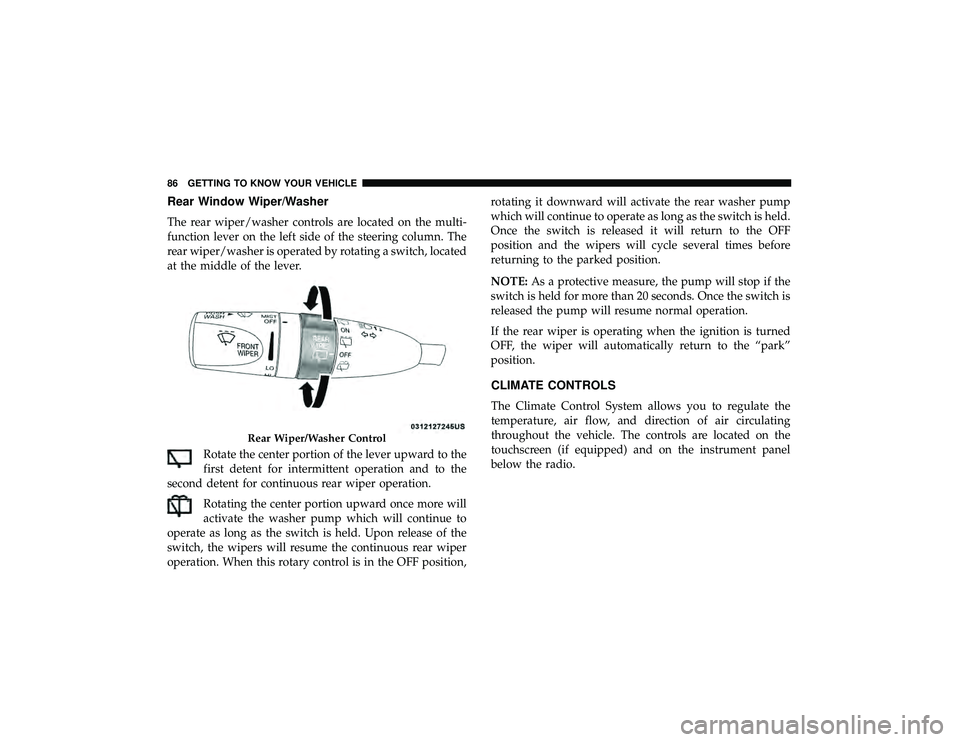
The rear wiper/washer controls are located on the multi-
function lever on the left side of the steering column. The
rear wiper/washer is operated by rotating a switch, located
at the middle of the lever.Rotate the center portion of the lever upward to the
first detent for intermittent operation and to the
second detent for continuous rear wiper operation.
Rotating the center portion upward once more will
activate the washer pump which will continue to
operate as long as the switch is held. Upon release of the
switch, the wipers will resume the continuous rear wiper
operation. When this rotary control is in the OFF position, rotating it downward will activate the rear washer pump
which will continue to operate as long as the switch is held.
Once the switch is released it will return to the OFF
position and the wipers will cycle several times before
returning to the parked position.
NOTE:
As a protective measure, the pump will stop if the
switch is held for more than 20 seconds. Once the switch is
released the pump will resume normal operation.
If the rear wiper is operating when the ignition is turned
OFF, the wiper will automatically return to the “park”
position.
CLIMATE CONTROLS
The Climate Control System allows you to regulate the
temperature, air flow, and direction of air circulating
throughout the vehicle. The controls are located on the
touchscreen (if equipped) and on the instrument panel
below the radio.
Rear Wiper/Washer Control
86 GETTING TO KNOW YOUR VEHICLE
Page 106 of 598
Operating Tips ChartWINDOWS
Power Windows
The power window controls are located on the driver’s
door trim panel. There is a single switch on the front
passenger door and rear passenger doors which operate
the front and rear passenger door windows. The window
controls will operate only when the keyless push button
ignition is placed in the ON/RUN or ACC position.
Power Window Switches
104 GETTING TO KNOW YOUR VEHICLE
Page 107 of 598
The power window switches remain active for up to 10
minutes after the ignition has been turned OFF. Opening a
vehicle front door will cancel this feature.
WARNING!
Never leave children unattended in a vehicle, and do not
let children play with power windows. Do not leave the
key fob in or near the vehicle, or in a location accessible to
children, and do not leave the ignition of a vehicle
equipped with Keyless Enter-N-Go in the ACC or ON/
RUN mode. Occupants, particularly unattended children,
can become entrapped by the windows while operating
the power window switches. Such entrapment may result
in serious injury or death.
Auto-Down
Both the driver and front passenger window switches have
an Auto-Down feature. Push the window switch past the
first detent, release, and the window will go down auto-
matically. To cancel the Auto-Down movement, operate the
switch in either the up or down direction and release the
switch.
To open the window part way, push the switch to the first
detent and release it when you want the window to stop.
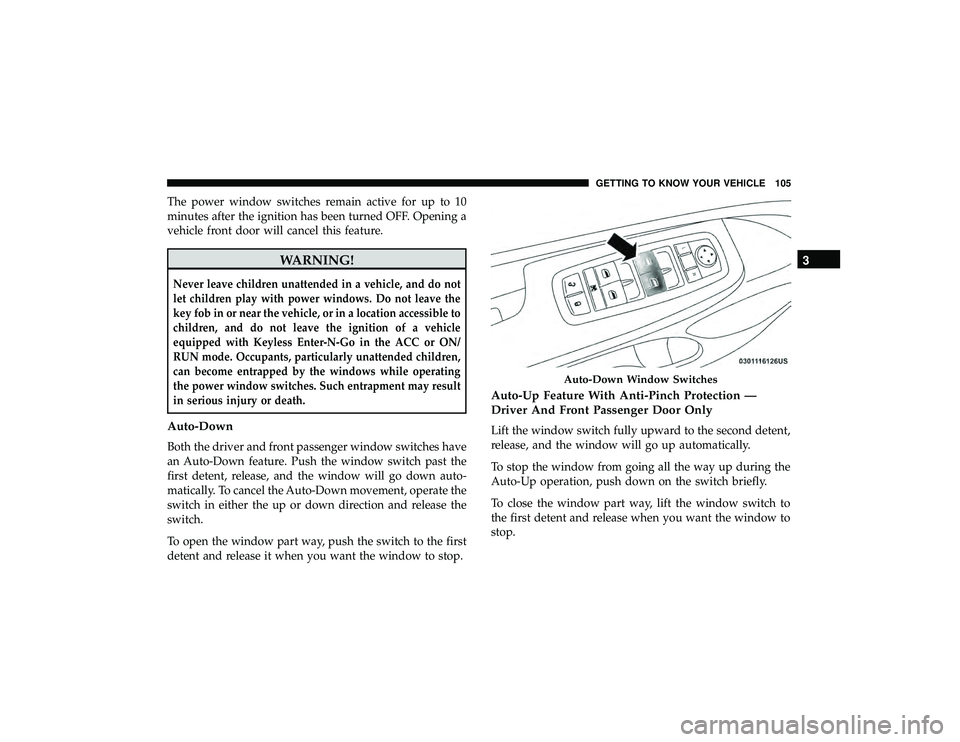
Auto-Up Feature With Anti-Pinch Protection —
Driver And Front Passenger Door Only
Lift the window switch fully upward to the second detent,
release, and the window will go up automatically.
To stop the window from going all the way up during the
Auto-Up operation, push down on the switch briefly.
To close the window part way, lift the window switch to
the first detent and release when you want the window to
stop.
Auto-Down Window Switches
3
GETTING TO KNOW YOUR VEHICLE 105
Page 109 of 598
Wind Buffeting
Wind buffeting can be described as the perception of
pressure on the ears or a helicopter-type sound in the ears.
Your vehicle may exhibit wind buffeting with the windows
down, or the sunroof (if equipped) in certain open or
partially open positions. This is a normal occurrence and
can be minimized. If the buffeting occurs with the rear
windows open, open the front and rear windows together
to minimize the buffeting. If the buffeting occurs with the
sunroof open, adjust the sunroof opening to minimize the
buffeting or open any window.
POWER SUNROOF — IF EQUIPPED
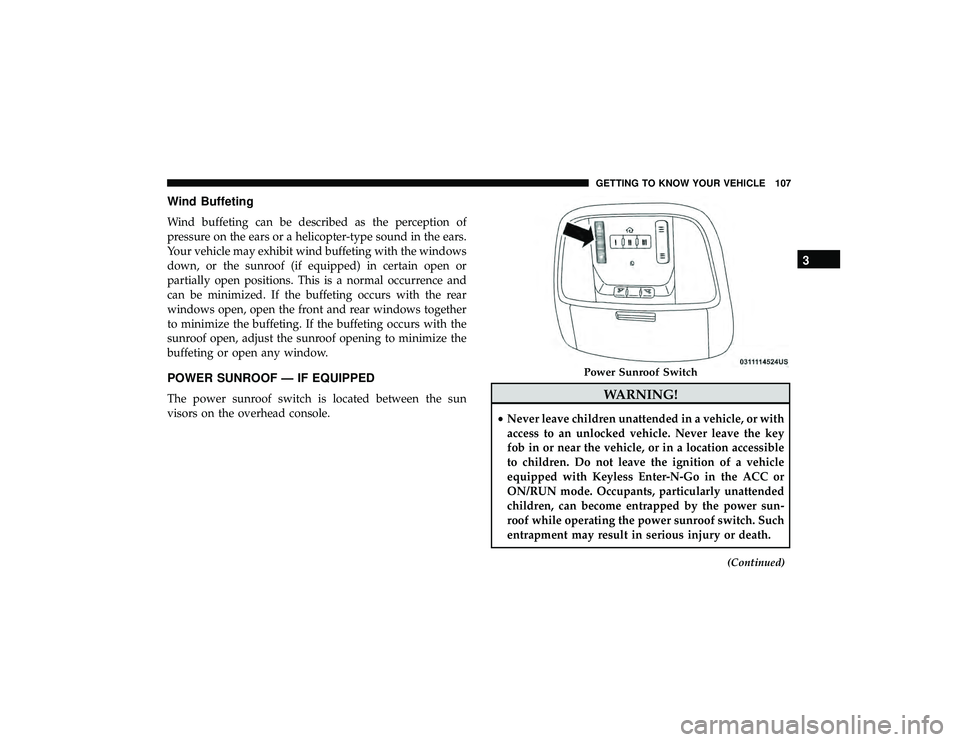
The power sunroof switch is located between the sun
visors on the overhead console.WARNING!
•Never leave children unattended in a vehicle, or with
access to an unlocked vehicle. Never leave the key
fob in or near the vehicle, or in a location accessible
to children. Do not leave the ignition of a vehicle
equipped with Keyless Enter-N-Go in the ACC or
ON/RUN mode. Occupants, particularly unattended
children, can become entrapped by the power sun-
roof while operating the power sunroof switch. Such
entrapment may result in serious injury or death.
(Continued)
Power Sunroof Switch
3
GETTING TO KNOW YOUR VEHICLE 107
Page 111 of 598
partially open positions. This is a normal occurrence and
can be minimized. If the buffeting occurs with the rear
windows open, then open the front and rear windows
together to minimize the buffeting. If the buffeting occurs
with the sunroof open, adjust the sunroof opening to
minimize the buffeting or open any window.
Sunshade Operation
The sunshade can be opened manually. However, the
sunshade will open automatically as the sunroof opens.
NOTE:The sunshade cannot be closed if the sunroof is
open.
Pinch Protect Feature
This feature will detect an obstruction in the closing of the
sunroof during the Express Close operation. If an obstruc-
tion in the path of the sunroof is detected, the sunroof will
automatically retract. Remove the obstruction if this oc-
curs.
NOTE: If three consecutive sunroof close attempts result in
Pinch Protect reversals, Pinch Protect will disable and the
sunroof must be closed in Manual Mode.
Sunroof Maintenance
Use only a non-abrasive cleaner and a soft cloth to clean the
glass panel.
Ignition Off Operation
NOTE:
• The power sunroof switch can remain active in Acces-
sory Delay for up to approximately 10 minutes after the
vehicle’s ignition is placed to the OFF position. Opening
either front door will cancel this feature.
• This feature is programmable using the Uconnect Sys-
tem. Refer to “Uconnect Settings” in “Multimedia” for
further information.
Calibration Procedure
If the sunroof Express Operation feature is no longer
functioning, or the sunroof is auto reversing while attempt-
ing to Express Close but no obstruction is in the roof
opening, the sunroof can be re-calibrated per the following
steps:
1. Set the ignition to ACC or the ON/RUN.
2. Close the sunroof glass.
3
GETTING TO KNOW YOUR VEHICLE 109