AUX DODGE DURANGO 2020 Owner's Manual
[x] Cancel search | Manufacturer: DODGE, Model Year: 2020, Model line: DURANGO, Model: DODGE DURANGO 2020Pages: 464, PDF Size: 22.14 MB
Page 425 of 464
MULTIMEDIA423
Performance such as audio clarity, echo, and
loudness to a large degree rely on the phone
and network, and not the Uconnect Phone.
Echo at the far end can sometimes be reduced
by lowering the in-vehicle audio volume.
Bluetooth® Communication Link
Mobile phones have been found to lose
connection to the Uconnect Phone. When this
happens, the connection can generally be
re-established by switching the mobile phone
OFF/ON. Your mobile phone is recommended to
remain in Bluetooth® ON mode.
Power-Up
After switching the ignition key from OFF to
either the ON/RUN or ACC position, or after a
language change, you must wait at least
15 seconds prior to using the system.
STEERING WHEEL AUDIO CONTROLS
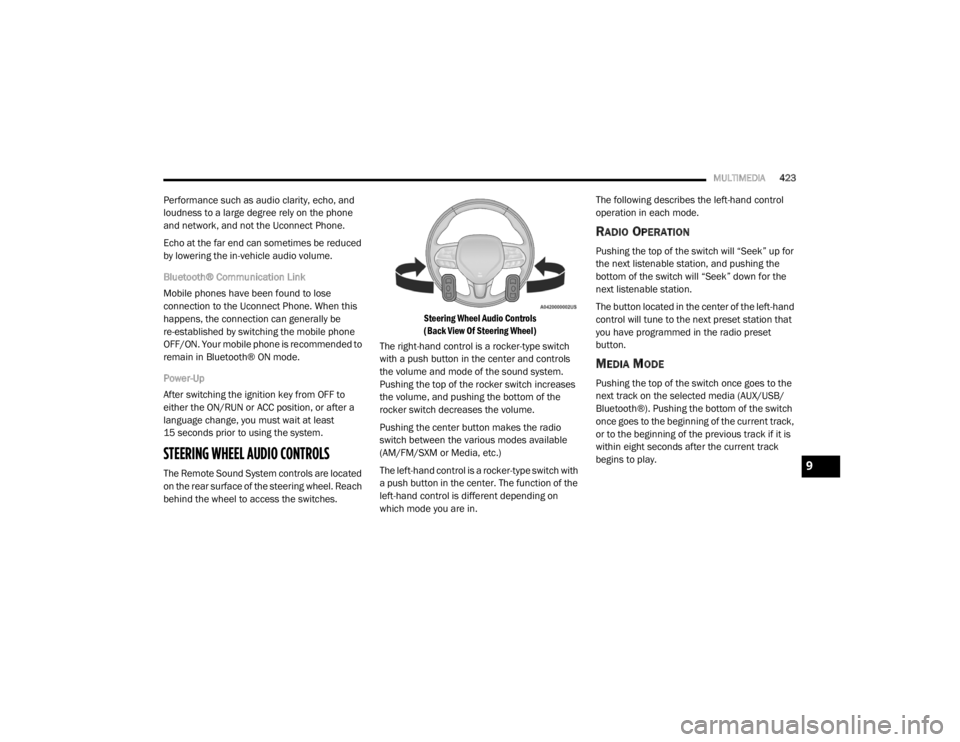
The Remote Sound System controls are located
on the rear surface of the steering wheel. Reach
behind the wheel to access the switches.
Steering Wheel Audio Controls
(Back View Of Steering Wheel)
The right-hand control is a rocker-type switch
with a push button in the center and controls
the volume and mode of the sound system.
Pushing the top of the rocker switch increases
the volume, and pushing the bottom of the
rocker switch decreases the volume.
Pushing the center button makes the radio
switch between the various modes available
(AM/FM/SXM or Media, etc.)
The left-hand control is a rocker-type switch with
a push button in the center. The function of the
left-hand control is different depending on
which mode you are in. The following describes the left-hand control
operation in each mode.
RADIO OPERATION
Pushing the top of the switch will “Seek” up for
the next listenable station, and pushing the
bottom of the switch will “Seek” down for the
next listenable station.
The button located in the center of the left-hand
control will tune to the next preset station that
you have programmed in the radio preset
button.
MEDIA MODE
Pushing the top of the switch once goes to the
next track on the selected media (AUX/USB/
Bluetooth®). Pushing the bottom of the switch
once goes to the beginning of the current track,
or to the beginning of the previous track if it is
within eight seconds after the current track
begins to play.
9
20_WD_OM_EN_USC_t.book Page 423
Page 426 of 464
424MULTIMEDIA
IPOD®/USB/MP3 CONTROL — IF EQUIPPED
This feature allows an iPod® or external USB
device to be plugged into the USB port, located
inside the storage area on the center stack of
the instrument panel.
Plugging in a smartphone device to a USB Port
may activate Android Auto™ or Apple CarPlay®
features, if equipped. For further information,
refer to “Android Auto™” or “Apple CarPlay®” in
the Owner’s Manual Supplement.
iPod® control supports Mini, 4G, Photo, iPod
nano®, 5G iPod® and iPhone® devices. Some
iPod® software versions may not fully support
the iPod® control features. Please visit
Apple’s® website for software updates.
For further information, refer to the Uconnect
Owner’s Manual Supplement.
CONNECTING THE AU X AUDIO INPUT OR
E
XTERNAL USB DEVICE
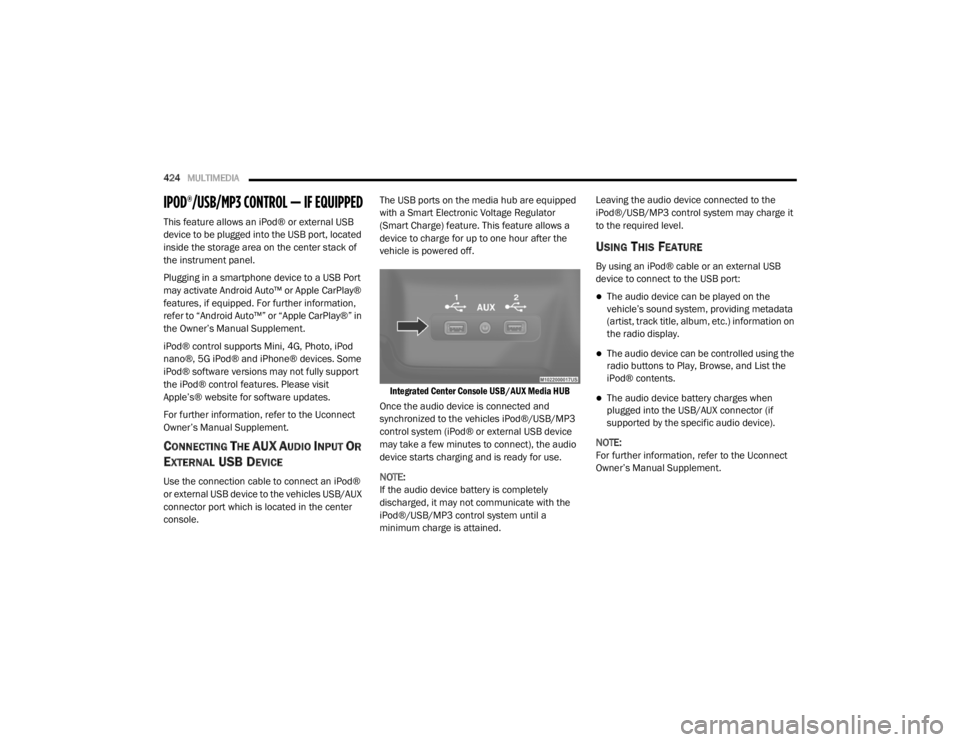
Use the connection cable to connect an iPod®
or external USB device to the vehicles USB/AUX
connector port which is located in the center
console. The USB ports on the media hub are equipped
with a Smart Electronic Voltage Regulator
(Smart Charge) feature. This feature allows a
device to charge for up to one hour after the
vehicle is powered off.
Integrated Center Console USB/AUX Media HUB
Once the audio device is connected and
synchronized to the vehicles iPod®/USB/MP3
control system (iPod® or external USB device
may take a few minutes to connect), the audio
device starts charging and is ready for use.
NOTE:
If the audio device battery is completely
discharged, it may not communicate with the
iPod®/USB/MP3 control system until a
minimum charge is attained. Leaving the audio device connected to the
iPod®/USB/MP3 control system may charge it
to the required level.
USING THIS FEATURE
By using an iPod® cable or an external USB
device to connect to the USB port:
The audio device can be played on the
vehicle’s sound system, providing metadata
(artist, track title, album, etc.) information on
the radio display.
The audio device can be controlled using the
radio buttons to Play, Browse, and List the
iPod® contents.
The audio device battery charges when
plugged into the USB/AUX connector (if
supported by the specific audio device).
NOTE:
For further information, refer to the Uconnect
Owner’s Manual Supplement.
20_WD_OM_EN_USC_t.book Page 424
Page 430 of 464
428MULTIMEDIA
6. Radio Full Screen Mode
Select this button to change to Full Screen
Mode.
7. Cabin Audio Mode Select this button to change the cabin audio
to the rear entertainment source currently
shown on the rear media control screen.
8. RSE Mode Select this button to change the source for
the active (highlighted) rear Screen/Chan -
nel on the rear media control screen.
Press the Media button on the touchscreen,
and then press the rear media button on the
touchscreen.
Press the OK button on the touchscreen to
begin playing the Blu-ray™ disc on the touch -
screen radio.
Using The Remote Control
Select an audio channel (Rear 1 for driver’s
side rear screen and Rear 2 for passenger’s
side rear screen), and then press the source
key. Using the Up and Down arrows, highlight
disc from the menu and press the OK button.
Press the POPUP/MENU key to navigate the
disc menu and options.
PLAY VIDEO GAMES
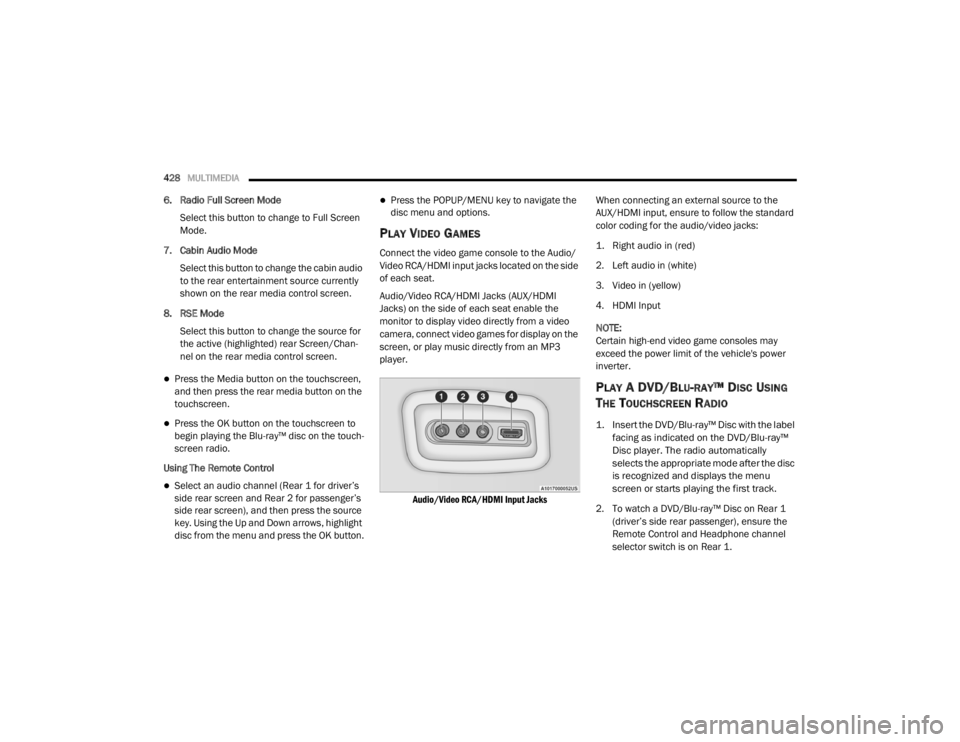
Connect the video game console to the Audio/
Video RCA/HDMI input jacks located on the side
of each seat.
Audio/Video RCA/HDMI Jacks (AUX/HDMI
Jacks) on the side of each seat enable the
monitor to display video directly from a video
camera, connect video games for display on the
screen, or play music directly from an MP3
player.
Audio/Video RCA/HDMI Input Jacks
When connecting an external source to the
AUX/HDMI input, ensure to follow the standard
color coding for the audio/video jacks:
1. Right audio in (red)
2. Left audio in (white)
3. Video in (yellow)
4. HDMI Input
NOTE:
Certain high-end video game consoles may
exceed the power limit of the vehicle's power
inverter.
PLAY A DVD/BLU-RAY™ DISC USING
T
HE TOUCHSCREEN RADIO
1. Insert the DVD/Blu-ray™ Disc with the label
facing as indicated on the DVD/Blu-ray™
Disc player. The radio automatically
selects the appropriate mode after the disc
is recognized and displays the menu
screen or starts playing the first track.
2. To watch a DVD/Blu-ray™ Disc on Rear 1 (driver’s side rear passenger), ensure the
Remote Control and Headphone channel
selector switch is on Rear 1.
20_WD_OM_EN_USC_t.book Page 428
Page 435 of 464
MULTIMEDIA433
Foam earpieces, which will wear over time
through normal use, are specifically not covered
(replacement foam is available for a nominal
charge). APTIV IS NOT LIABLE FOR ANY
INJURIES OR DAMAGES TO PERSONS OR
PROPERTY RESULTING FROM THE USE OF, OR
ANY FAILURE OR DEFECT IN, THE PRODUCT,
NOR IS APTIV LIABLE FOR ANY GENERAL,
SPECIAL, DIRECT, INDIRECT, INCIDENTAL,
CONSEQUENTIAL, EXEMPLARY, PUNITIVE OR
OTHER DAMAGES OF ANY KIND OR NATURE
WHATSOEVER. Some states and jurisdictions
may not allow the exclusion or limitation of
incidental or consequential damages, so the
above limitation may not apply to you. This
warranty gives you specific legal rights. You may
also have other rights, which vary from
jurisdiction to jurisdiction.
What Will Aptiv Do? Aptiv, at its option, will
repair or replace any defective Product. Aptiv
reserves the right to replace any discontinued
Product with a comparable model. THIS
WARRANTY IS THE SOLE WARRANTY FOR THIS
PRODUCT, SETS FORTH YOUR EXCLUSIVE
REMEDY REGARDING DEFECTIVE PRODUCTS,
AND IS IN LIEU OF ALL OTHER WARRANTIES
(EXPRESS OR IMPLIED), INCLUDING ANY WARRANTY FOR MERCHANTABILITY OR
FITNESS FOR A PARTICULAR PURPOSE.
If you have any questions or comments
regarding your Aptiv wireless headphones,
please email [email protected] or phone:
888-293-3332
System Information
Disc Menu
When listening to a CD Audio or CD Data disc,
pushing the remote control’s POPUP/MENU
button displays a list of all commands which
control playback of the disc.
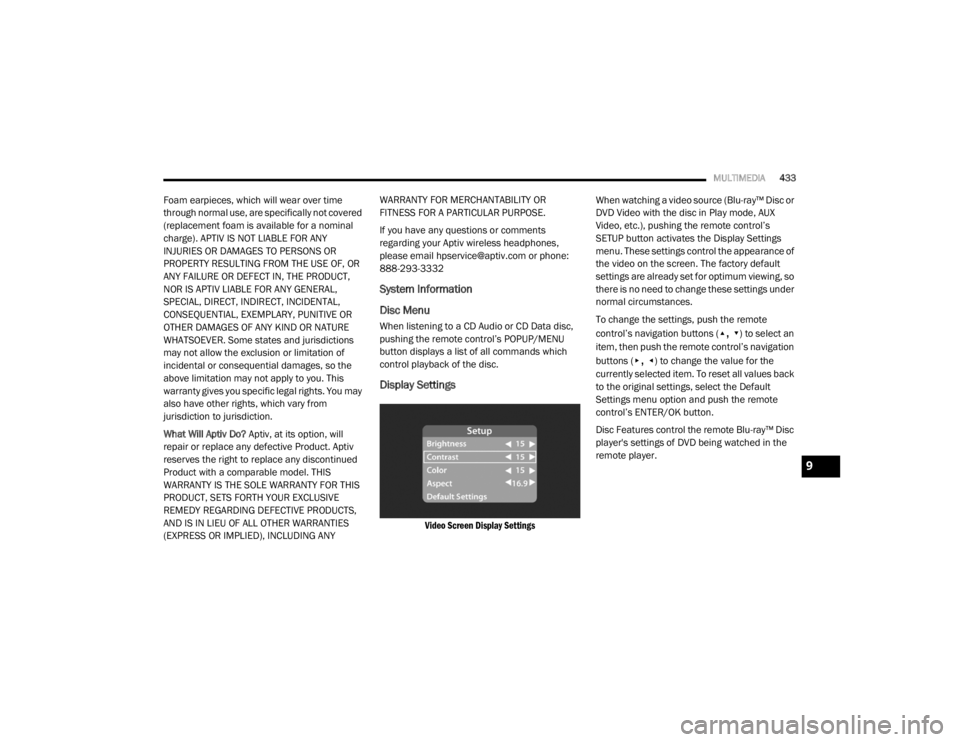
Display Settings
Video Screen Display Settings
When watching a video source (Blu-ray™ Disc or
DVD Video with the disc in Play mode, AUX
Video, etc.), pushing the remote control’s
SETUP button activates the Display Settings
menu. These settings control the appearance of
the video on the screen. The factory default
settings are already set for optimum viewing, so
there is no need to change these settings under
normal circumstances.
To change the settings, push the remote
control’s navigation buttons (
▴, ▾) to select an
item, then push the remote control’s navigation
buttons (
▸, ◂) to change the value for the
currently selected item. To reset all values back
to the original settings, select the Default
Settings menu option and push the remote
control’s ENTER/OK button.
Disc Features control the remote Blu-ray™ Disc
player's settings of DVD being watched in the
remote player.
9
20_WD_OM_EN_USC_t.book Page 433
Page 439 of 464
MULTIMEDIA437
The following regulatory statement applies to all
Radio Frequency (RF) devices equipped in this
vehicle:
This device complies with Part 15 of the FCC
Rules and with Innovation, Science, and
Economic Development Canada license-exempt
RSS standard(s). Operation is subject to the
following two conditions:
1. This device may not cause harmful
interference, and
2. This device must accept any interference received, including interference that may
cause undesired operation.
Le présent appareil est conforme aux CNR
d`Innovation, Science and Economic
Development applicables aux appareils radio
exempts de licence. L'exploitation est autorisée
aux deux conditions suivantes:
1. l'appareil ne doit pas produire de brouillage, et
2. l'utilisateur de l'appareil doit accepter tout
brouillage radioélectrique subi, même si le
brouillage est susceptible d'en compro -
mettre le fonctionnement.
La operación de este equipo está sujeta a las
siguientes dos condiciones:
1. es posible que este equipo o dispositivo no cause interferencia perjudicial y
2. este equipo o dispositivo debe aceptar cualquier interferencia, incluyendo la que
pueda causar su operación no deseada.
NOTE:
Changes or modifications not expressly
approved by the party responsible for compli -
ance could void the user’s authority to operate
the equipment. NOTE:
This equipment has been tested and found to
comply with the limits for a Class B digital
device, pursuant to Part 15 of the FCC Rules.
These limits are designed to provide reason
-
able protection against harmful interference
in a residential installation. This equipment
generates, uses and can radiate radio
frequency energy and, if not installed and
used in accordance with the instructions,
may cause harmful interference to radio
communications. However, there is no guar -
antee that interference will not occur in a
particular installation.
If this equipment does cause harmful inter -
ference to radio or television reception,
which can be determined by turning the
equipment off and on, the user is encour -
aged to try to correct the interference by one
or more of the following measures:
a. Increase the separation between the equipment and receiver.
b. Consult an authorized dealer or an expe -
rienced radio technician for help.
9
20_WD_OM_EN_USC_t.book Page 437
Page 441 of 464

MULTIMEDIA439
BASIC VOICE COMMANDS
The basic Voice Commands below can be given
at any point while using your Uconnect system.
Push the VR button . After the beep, say:
“Cancel ” to stop a current voice session
“Help ” to hear a list of suggested Voice
Commands
“ Repeat ” to listen to the system prompts
again
Notice the visual cues that inform you of your
voice recognition system’s status. Cues appear
on the touchscreen.
RADIO
Use your voice to quickly get to the AM, FM, or
SiriusXM® Satellite Radio stations you would
like to hear. (Subscription or included
SiriusXM® Satellite Radio trial required.)
Push the VR button . After the beep, say:
“ Tune to ninety-five-point-five FM”
“Tune to Satellite Channel Hits 1”TIP:
At any time, if you are not sure of what to say or
want to learn a Voice Command, push the VR
button and say, “
Help”. The system provides
you with a list of commands.
MEDIA
Uconnect offers connections via USB,
Bluetooth®, and auxiliary ports (if equipped).
Voice operation is only available for connected
USB and AUX devices.
Push the VR button . After the beep, say one
of the following commands and follow the
prompts to switch your media source or choose
an artist.
“ Change source to Bluetooth®”
“Change source to AUX”
“Change source to USB”
“Play artist Beethoven”; “ Play album
Greatest Hits”; “ Play song Moonlight
Sonata”; “ Play genre Classical” TIP:
Press the Browse button on the touchscreen to
see all of the music on your USB device. Your
Voice Command must match exactly how the
artist, album, song, and genre information is
displayed.
PHONE
Making and answering hands-free phone calls
is easy with Uconnect. When the Phonebook
button is illuminated on your touchscreen, your
system is ready. Check UconnectPhone.com for
mobile phone compatibility and pairing
instructions.
Push the Phone button . After the beep, say
one of the following commands:
“ Call John Smith”
“Dial 123-456-7890 and follow the system
prompts”
“ Redial (call previous outgoing phone
number)”
“ Call back (call previous incoming phone
number)”
9
20_WD_OM_EN_USC_t.book Page 439
Page 445 of 464
MULTIMEDIA443
Apple CarPlay® is a trademark of Apple® Inc.
iPhone® is a trademark of Apple® Inc., regis -
tered in the US and other countries. Apple®
terms of use and privacy statements apply.
GENERAL INFORMATION
The following regulatory statement applies to all
Radio Frequency (RF) devices equipped in this
vehicle:
This device complies with Part 15 of the FCC
Rules and with Innovation, Science and
Economic Development Canada license-exempt
RSS standard(s).
Operation is subject to the following two
conditions:
1. This device may not cause harmful interference, and
2. This device must accept any interference received, including interference that may
cause undesired operation. Le présent appareil est conforme aux CNR
d`Innovation, Science and Economic
Development applicables aux appareils radio
exempts de licence. L'exploitation est autorisée
aux deux conditions suivantes:
1. l'appareil ne doit pas produire de
brouillage, et
2. l'utilisateur de l'appareil doit accepter tout brouillage radioélectrique subi, même si le
brouillage est susceptible d'en compro -
mettre le fonctionnement.
La operación de este equipo está sujeta a las
siguientes dos condiciones:
1. es posible que este equipo o dispositivo no cause interferencia perjudicial y
2. este equipo o dispositivo debe aceptar cualquier interferencia, incluyendo la que
pueda causar su operación no deseada.
NOTE:
Changes or modifications not expressly
approved by the party responsible for compli -
ance could void the user’s authority to operate
the equipment. ADDITIONAL
INFORMATION
© 202 1 FCA US LLC. All rights reserved.
Mopar and Uconnect are registered
trademarks and Mopar Owner Connect is a
trademark of FCA US LLC. Android™ is a
trademark of Google Inc. SiriusXM® and all
related marks and logos are trademarks of
SiriusXM® Radio Inc.
Uconnect System Support:
US residents visit www.DriveUconnect.com or
call: 1-877-855-8400 (24 hours a day 7 days
a week)
Canadian residents visit www.DriveUcon -
nect.ca or call: 1-800-465-2001 (English) or
1-800-387-9983 (French)
SiriusXM Guardian™ services support:
US residents visitwww.driveuconnect.com/
sirius-xm-guardian or call: 1-844-796-4827
Canadian residents visitwww.siriusxm.ca/
guardian-v1/ or call: 1-877-324-90919
20_WD_OM_EN_USC_t.book Page 443
Page 450 of 464

448
INDEX
A
About Your Brakes......................................... 350Adaptive Cruise Control (ACC)
(Cruise Control).............................................. 208Adding Engine Coolant (Antifreeze)............... 322Adding Fuel.................................................... 238Additives, Fuel............................................... 352Adjust
Down.................................................... 38, 39Forward................................................ 38, 39Rearward.............................................. 38, 39Up......................................................... 38, 39Air BagAir Bag Operation...................................... 156Air Bag Warning Light................................ 153Driver Knee Air Bag................................... 157Enhanced Accident Response......... 161, 293Event Data Recorder (EDR)....................... 293If Deployment Occurs................................ 160Knee Impact Bolsters................................ 156Maintaining Your Air Bag System.............. 161Maintenance............................................. 161Redundant Air Bag Warning Light.............154Side Air Bags............................................. 157Transporting Pets...................................... 180Air Bag Light............................... 110, 153, 181
Air Cleaner, Engine (Engine Air Cleaner
Filter)............................................................ 311Air Conditioner Maintenance........................ 313Air Conditioner Refrigerant........................... 313Air Conditioner System................................. 313Air Conditioning................................................ 68Rear............................................................. 66Air Conditioning Filter.................... 70, 311, 314Air Conditioning System................................... 69Air Conditioning, Operating Tips....................... 69Air Filter........................................................ 311Air PressureTires......................................................... 336AlarmArm The System................................... 23, 24Disarm The System..................................... 24Rearm The System...................................... 24Security Alarm.......................................... 113Alarm SystemSecurity Alarm............................................. 23All Wheel Drive (AWD)................................... 199Alterations/ModificationsVehicle......................................................... 11Android Auto................................................. 442Antifreeze (Engine Coolant)........ 322, 355, 356Disposal................................................... 323
Anti-Lock Brake System (ABS)....................... 122Anti-Lock Warning Light................................ 116Apple CarPlay................................................ 442Arming SystemSecurity Alarm.............................................23Assist, Hill Start............................................. 128Audio Settings............................................... 402Audio Systems (Radio).................................. 361Auto Down Power Windows..............................71Automatic Headlights.......................................52Automatic High Beams.....................................51Automatic Temperature Control (ATC)..............69Automatic Transmission....................... 184, 193Adding Fluid..................................... 326, 360Fluid And Filter Change............................. 326Fluid Change............................................. 326Fluid Level Check...................................... 326Fluid Type............................... 326, 358, 360Special Additives...................................... 326Automatic Transmission Limp Home Mode... 197Aux Mode...................................................... 405Auxiliary Driving Systems.............................. 131Auxiliary Electrical Outlet (Power Outlet)..........87Auxiliary Power Outlet......................................87Axle Fluid....................................................... 358Axle Lubrication............................................ 360
20_WD_OM_EN_USC_t.book Page 448
Page 452 of 464

450
Radiator Cap
............................................. 323Selection Of Coolant (Antifreeze)......322, 355, 356, 357, 359Corrosion Protection...................................... 346Cruise Control (Speed Control)............ 205, 208Cruise Light......................................... 117, 119Cupholders...................................................... 86Customer Assistance..................................... 444Cybersecurity................................................. 361
D
Daytime Running Lights................................... 51Dealer Service............................................... 308Defroster, Windshield.................................... 181Diagnostic System, Onboard......................... 120Disabled Vehicle Towing................................ 290DisposalAntifreeze (Engine Coolant)....................... 323Disturb........................................................... 420Do Not Disturb............................................... 441Door Ajar.............................................. 111, 112Door Ajar Light..................................... 111, 112Door Locks............................................... 24, 29Child-Protection Door Lock — Rear Doors.... 29Door Opener, Garage....................................... 78Doors............................................................... 24Driver’s Seat Back Tilt..................................... 32Driving........................................................... 257DVD Player (Video Entertainment
System)......................................................... 425
E
Economy (Fuel) Mode................................... 192Electric Brake Control System....................... 123Anti-Lock Brake System............................ 122Electronic Roll Mitigation................. 124, 130Electric Remote Mirrors................................... 49Electrical Outlet, Auxiliary (Power Outlet)......... 87Electronic Speed Control (Cruise Control)..... 206Electronic Stability Control (ESC).................. 125Electronic Throttle Control Warning Light...... 111Electronically Shifted Transfer Case............. 199Emergency Gas Can Refueling...................... 286Emergency, In Case OfFreeing Vehicle When Stuck..................... 289Hazard Warning Flasher........................... 261Jacking............................................ 275, 327Jump Starting........................................... 283Emission Control System Maintenance........ 121Engine.................................................. 304, 306Air Cleaner................................................ 311Block Heater............................................. 188Break-In Recommendations............ 188, 189Compartment......................... 304, 305, 306Compartment Identification............. 304, 305Coolant (Antifreeze).................................. 359Cooling..................................................... 321Exhaust Gas Caution....................... 180, 354Fails To Start............................................ 187Flooded, Starting...................................... 187
Fuel Requirements.......................... 351, 355Jump Starting........................................... 283Oil........................ 308, 309, 355, 356, 359Oil Filler Cap........................... 304, 309, 310Oil Filter.................................................... 311Oil Selection.................. 309, 355, 356, 357Oil Synthetic.............................................. 311Overheating.............................................. 287Starting............................................ 184, 185Engine Oil Viscosity.............................. 309, 310Engine Oil Viscosity Chart.............................. 310Enhanced Accident Response Feature161, 293Ethanol.......................................................... 353Exhaust Gas Cautions.......................... 180, 354Exhaust System................................... 180, 320Exterior Lights............................... 50, 183, 266
F
FiltersAir Cleaner
................................................ 311Air Conditioning........................ 70, 311, 314Engine Oil........................................ 311, 359Engine Oil Disposal................................... 311Flashers........................................................ 261Hazard Warning........................................ 261Turn Signals............................ 118, 183, 269Flash-To-Pass...................................................52Flooded Engine Starting................................ 187
20_WD_OM_EN_USC_t.book Page 450
Page 455 of 464

453
Locks Child Protection
........................................... 29Manual........................................................ 24Power Door.................................................. 25Lubrication, Body........................................... 316Lug Nuts/Bolts.............................................. 350Luggage Carrier............................................... 90
M
Maintenance................................................... 74Maintenance Free Battery............................. 307Maintenance Schedule........................ 294, 298Malfunction Indicator Light
(Check Engine).................................... 113, 121ManualService...................................................... 447Memory Feature (Memory Seats).................... 30Memory Seat................................................... 30Memory Seats And Radio................................ 30Methanol....................................................... 353Mirrors............................................................. 47Electric Remote........................................... 49Exterior Folding........................................... 48Heated........................................................ 49Outside........................................................ 48Rearview..................................... 47, 48, 261Vanity.......................................................... 50Modifications/AlterationsVehicle........................................................ 11
Monitor, Tire Pressure System...................... 138Mopar Parts.................................................. 446Multi-Function Control Lever............................ 50
N
New Vehicle Break-In Period......................... 188
O
Occupant Restraints..................................... 143Octane Rating, Gasoline (Fuel)............ 351, 359Oil Change Indicator..................................... 101Reset........................................................ 101Oil Filter, Change.......................................... 311Oil Filter, Selection........................................ 311Oil Pressure Light.......................................... 112Oil, Engine............................................ 308, 359Capacity........................................... 355, 356Change Interval............................... 308, 309Dipstick.................................................... 307Disposal................................................... 311Filter................................................ 311, 359Filter Disposal........................................... 311Identification Logo.................................... 310Materials Added To.................................. 311Pressure Warning Light............................ 112Recommendation................... 309, 355, 356Synthetic.................................................. 311Viscosity........................ 309, 310, 355, 356
Onboard Diagnostic System.......................... 120Opener, Garage Door (Homelink).....................78Operating Precautions.................................. 120Operator ManualOwner's Manual................................. 10, 447Outside Rearview Mirrors.................................48Overheating, Engine...................................... 287
P
Paint Care..................................................... 346Parking Brake............................................... 190ParkSense System, Rear...................... 221, 227Passive Entry....................................................26Performance................................................. 104Pets............................................................... 180Pinch Protection...............................................74Placard, Tire And Loading Information.......... 332PowerBrakes...................................................... 350Distribution Center (Fuses)....................... 270Door Locks...................................................25Inverter........................................................90Liftgate........................................................75Mirrors.........................................................49Outlet (Auxiliary Electrical Outlet).................87Seats...........................................................37Steering........................................... 202, 358Sunroof........................................................73Tilt/Telescoping Steering Column................46Windows......................................................71
11
20_WD_OM_EN_USC_t.book Page 453