ignition DODGE DURANGO 2023 Owner's Manual
[x] Cancel search | Manufacturer: DODGE, Model Year: 2023, Model line: DURANGO, Model: DODGE DURANGO 2023Pages: 328, PDF Size: 13.82 MB
Page 51 of 328
GETTING TO KNOW YOUR VEHICLE49
AUTOMATIC HEADLIGHT LEVELING —
I
F EQUIPPED
This feature prevents the headlights from
interfering with the vision of oncoming drivers.
Headlight leveling automatically adjusts the height
of the headlight beam in reaction to changes in
vehicle pitch.
BATTERY SAVER
Timers are set to both the interior and exterior
lights to protect the life of your vehicle’s battery.
After 10 minutes, if the ignition is OFF and any door
is left open or the dimmer control is rotated all the
way up to the dome light on position, the interior
lights will automatically turn off.
NOTE:Battery saver mode is canceled if the ignition is ON.
If the headlights remain on while the ignition is
placed in the OFF position, the exterior lights will
automatically turn off after eight minutes. If the
headlights are turned on and left on for eight
minutes while the ignition is OFF, the exterior lights
will automatically turn off.
INTERIOR LIGHTS
Courtesy and dome lights are turned on when the
front doors are opened or when the dimmer control
is rotated to its upward most position. If your
vehicle is equipped with a key fob and the unlock
button is pushed, the courtesy and dome lights will
turn on. When a door is open and the interior lights
are on, rotating the dimmer control all the way
down, to the O (off) position, will cause all the
interior lights to go out. This allows the doors to
stay open for extended periods of time without
discharging the vehicle’s battery.
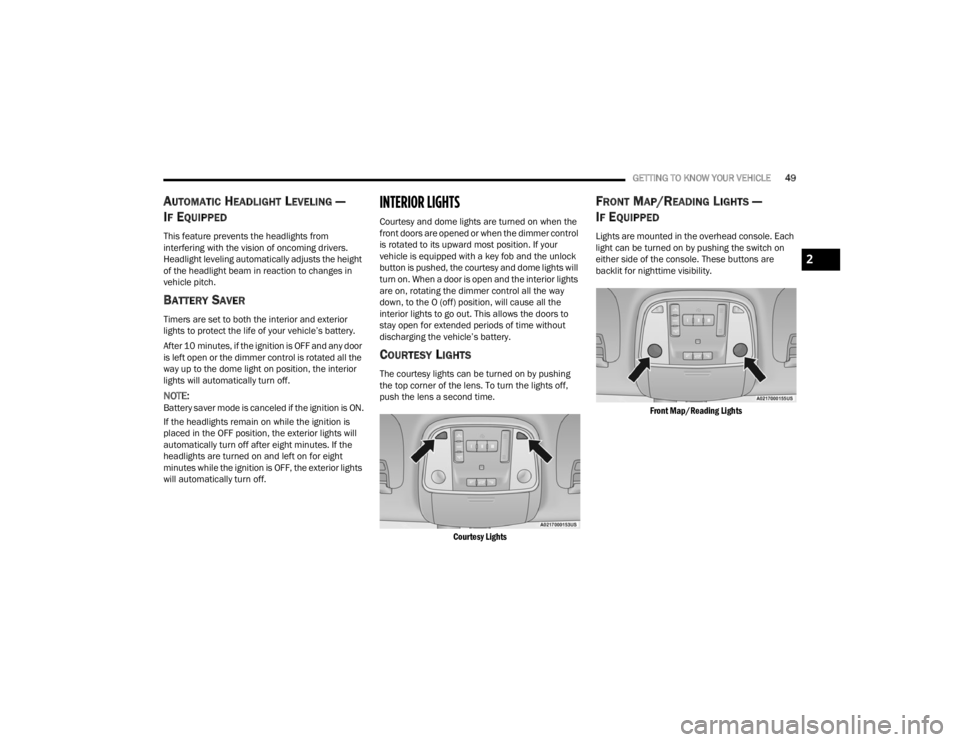
COURTESY LIGHTS
The courtesy lights can be turned on by pushing
the top corner of the lens. To turn the lights off,
push the lens a second time.
Courtesy Lights
FRONT MAP/READING LIGHTS —
I
F EQUIPPED
Lights are mounted in the overhead console. Each
light can be turned on by pushing the switch on
either side of the console. These buttons are
backlit for nighttime visibility.
Front Map/Reading Lights
2
23_WD_OM_EN_USC_t.book Page 49
Page 53 of 328

GETTING TO KNOW YOUR VEHICLE51
ILLUMINATED ENTRY
When programmed with the Uconnect system, the
headlights and courtesy lights will turn on when
you use the key fob to unlock the doors or open any
door Úpage 153.
The time the lights stay on is programmable up to
90 seconds. The lights will fade to off after the
programmed time, or they will immediately fade to
off once the ignition switch is placed in the ON/
RUN position from the OFF position.
The front courtesy overhead console and door
courtesy lights will not turn off if the instrument
panel dimmer switch is rotated to the upward most
position, past the detent. The overhead and door
courtesy lights will turn off after 10 minutes when
the ignition is placed in the OFF position to protect
the battery.
The illuminated entry system will not operate if the
instrument panel dimmer switch is rotated all the
way downward to the O (off) position.
WINDSHIELD WIPERS AND WASHERS
The windshield wiper/washer controls are located
on the multifunction lever on the left side of the
steering column. The front wipers are operated by
rotating a switch, located on the end of the lever.
WINDSHIELD WIPER OPERATION
Rotate the end of the lever to one of the first four
detent positions for intermittent settings, the fifth
detent for low wiper operation and the sixth detent
for high wiper operation.
Windshield Wiper Operation
Intermittent Wipers
Use one of the four intermittent wiper settings
when weather conditions make a single wiping
cycle, with a variable delay between cycles,
desirable. At driving speeds above 10 mph
(16 km/h), the delay can be regulated from a
maximum of approximately 18 seconds between
cycles (first detent), to a cycle every one second
(fourth detent). If the vehicle is moving less than
10 mph (16 km/h), delay times will be doubled.
CAUTION!
Always remove any buildup of snow that
prevents the windshield wiper blades from
returning to the “park” position. If the windshield
wiper switch is turned off, and the blades cannot
return to the “park” position, damage to the
wiper motor may occur.
1 — Push End Of Lever And Hold For Front Washer
2 — Rotate Downward For Mist
3 — Rotate For Rear Wiper/Washer Operation
4 — Rotate For Front Wiper Operation
2
23_WD_OM_EN_USC_t.book Page 51
Page 54 of 328

52GETTING TO KNOW YOUR VEHICLE
Windshield Washers
To use the washer, push on the end of the lever
(toward the steering wheel) and hold. If the lever is
pushed while in the intermittent setting, the wipers
will turn on and operate for several cycles after the
end of the lever is released, and then resume the
intermittent interval previously selected.
If the end of the lever is pushed while the wipers
are in the off position, the wipers will operate for
several cycles, then turn off.
NOTE:As a protective measure, the washer will stop if the
switch is held for more than 20 seconds. Once the
switch is released the washer will resume normal
operation. Mist
Rotate the end of the lever downward to the MIST
position and release for a single wiping cycle.
NOTE:The Mist feature does not activate the washer
pump; therefore, no washer fluid will be sprayed on
the windshield. The washer function must be used
in order to spray the windshield with washer fluid.
For information on wiper care and replacement,
see Ú
page 261.
RAIN SENSING WIPERS — IF EQUIPPED
This feature senses rain or snowfall on the
windshield and automatically activates the wipers.
Rotate the end of the multifunction lever to one of
four detent positions to activate this feature.
The sensitivity of the system can be adjusted with
the multifunction lever. Wiper delay position one is
the least sensitive, and wiper delay position four is
the most sensitive.
Setting three is preferred by the average driver
during normal rain conditions.
NOTE:
The Rain Sensing feature will not operate when
the wiper switch is in the low or high-speed posi -
tion.
The Rain Sensing feature may not function prop -
erly when ice, or dried salt water is present on
the windshield.
Use of products containing wax or silicone may
reduce Rain Sensing performance.
The Rain Sensing feature can be turned on and
off using the Uconnect system Ú page 153.
The Rain Sensing system has protection features
for the wiper blades and arms, and will not operate
under the following conditions:
Low Ambient Temperature — When the ignition
is first placed in the ON position, the Rain
Sensing system will not operate until the wiper
switch is moved, vehicle speed is greater than
3 mph (5 km/h), or the outside temperature is
greater than 32°F (0°C).
Transmission In NEUTRAL Position — When the
ignition is in the ON position, and the gear
selector is in NEUTRAL, the Rain Sensing system
will not operate until the wiper switch is moved,
vehicle speed is greater than 3 mph (5 km/h),
or the gear selector is moved out of NEUTRAL.
WARNING!
Sudden loss of visibility through the windshield
could lead to a collision. You might not see other
vehicles or other obstacles. To avoid sudden
icing of the windshield during freezing weather,
warm the windshield with the defroster before
and during windshield washer use.
23_WD_OM_EN_USC_t.book Page 52
Page 55 of 328
GETTING TO KNOW YOUR VEHICLE53
REAR WINDOW WIPER/WASHER
The rear wiper/washer controls are located on the
multifunction lever on the left side of the steering
column. The rear wiper/washer is operated by
rotating a switch, located at the middle of the lever.
Rotate the center portion of the lever
upward to the first detent for
intermittent operation and to the
second detent for continuous rear wiper
operation.
Rotate the center portion of the lever
upward to the third detent to activate
the washer. The washer will continue to
operate as long as the switch is held.
Rotate the center portion downward from the OFF
position to activate the rear washer. The washer
will continue to operate as long as the switch is
held.
NOTE:As a protective measure, the pump will stop if the
switch is held for more than 20 seconds. Once the
switch is released the pump will resume normal
operation.
If the rear wiper is operating when the ignition is
placed in the OFF position, the wiper will
automatically return to the “park” position.
CLIMATE CONTROLS
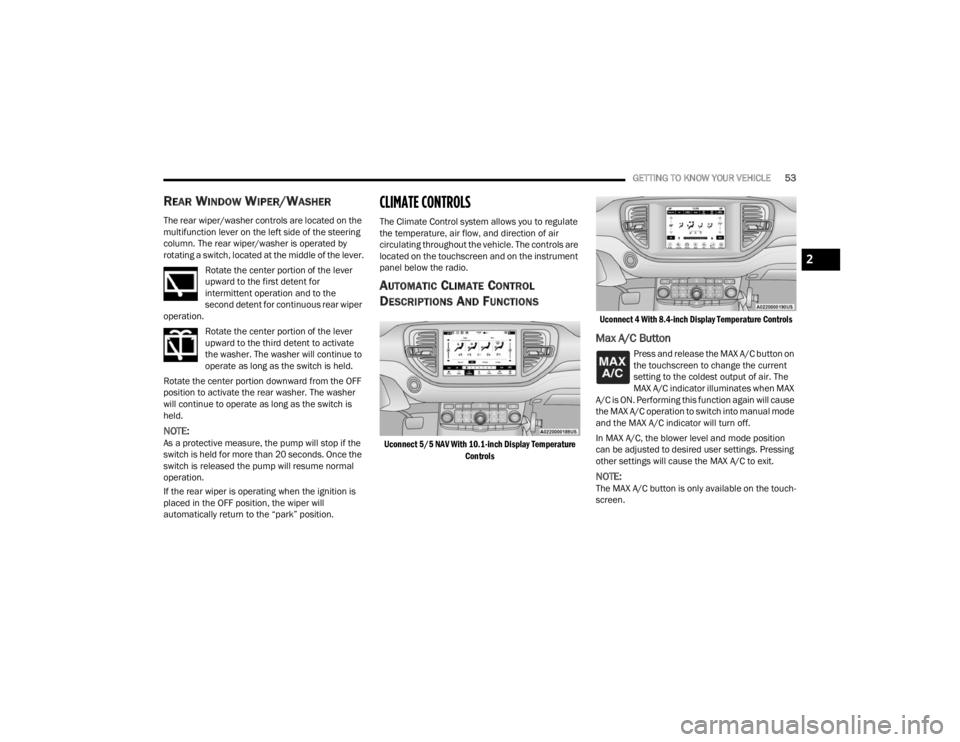
The Climate Control system allows you to regulate
the temperature, air flow, and direction of air
circulating throughout the vehicle. The controls are
located on the touchscreen and on the instrument
panel below the radio.
AUTOMATIC CLIMATE CONTROL
D
ESCRIPTIONS AND FUNCTIONS
Uconnect 5/5 NAV With 10.1-inch Display Temperature
Controls Uconnect 4 With 8.4-inch Display Temperature Controls
Max A/C Button
Press and release the MAX A/C button on
the touchscreen to change the current
setting to the coldest output of air. The
MAX A/C indicator illuminates when MAX
A/C is ON. Performing this function again will cause
the MAX A/C operation to switch into manual mode
and the MAX A/C indicator will turn off.
In MAX A/C, the blower level and mode position
can be adjusted to desired user settings. Pressing
other settings will cause the MAX A/C to exit.
NOTE:The MAX A/C button is only available on the touch -
screen.
2
23_WD_OM_EN_USC_t.book Page 53
Page 64 of 328
62GETTING TO KNOW YOUR VEHICLE
Rear Full Center Console — If Equipped
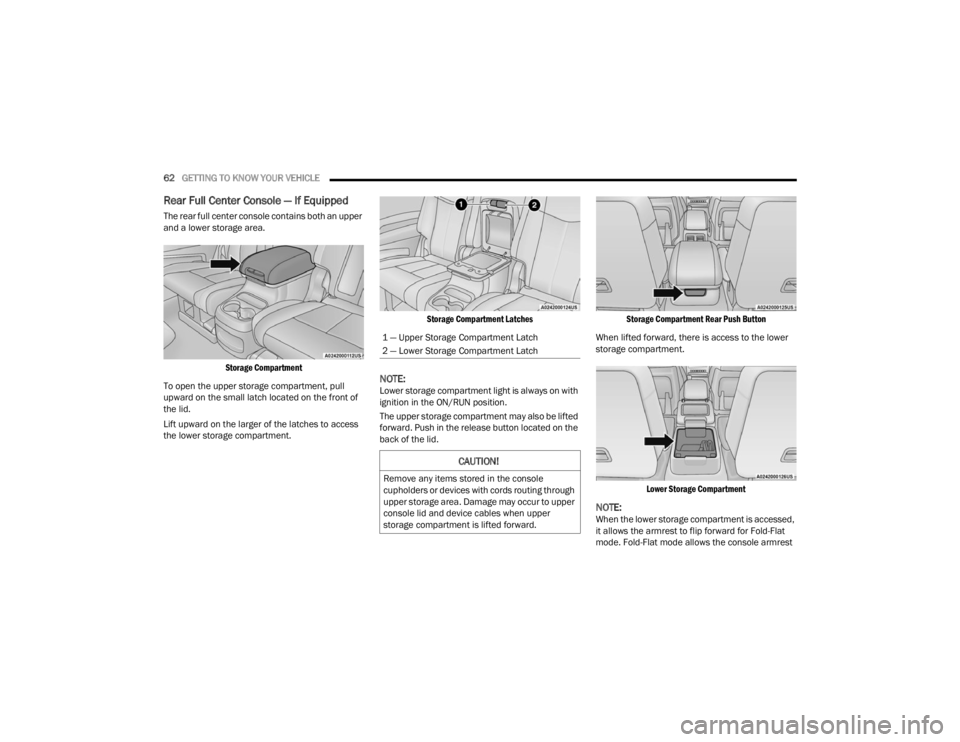
The rear full center console contains both an upper
and a lower storage area.
Storage Compartment
To open the upper storage compartment, pull
upward on the small latch located on the front of
the lid.
Lift upward on the larger of the latches to access
the lower storage compartment.
Storage Compartment Latches
NOTE:Lower storage compartment light is always on with
ignition in the ON/RUN position.
The upper storage compartment may also be lifted
forward. Push in the release button located on the
back of the lid.
Storage Compartment Rear Push Button
When lifted forward, there is access to the lower
storage compartment.
Lower Storage Compartment
NOTE:When the lower storage compartment is accessed,
it allows the armrest to flip forward for Fold-Flat
mode. Fold-Flat mode allows the console armrest
1 — Upper Storage Compartment Latch
2 — Lower Storage Compartment Latch
CAUTION!
Remove any items stored in the console
cupholders or devices with cords routing through
upper storage area. Damage may occur to upper
console lid and device cables when upper
storage compartment is lifted forward.
23_WD_OM_EN_USC_t.book Page 62
Page 67 of 328
GETTING TO KNOW YOUR VEHICLE65
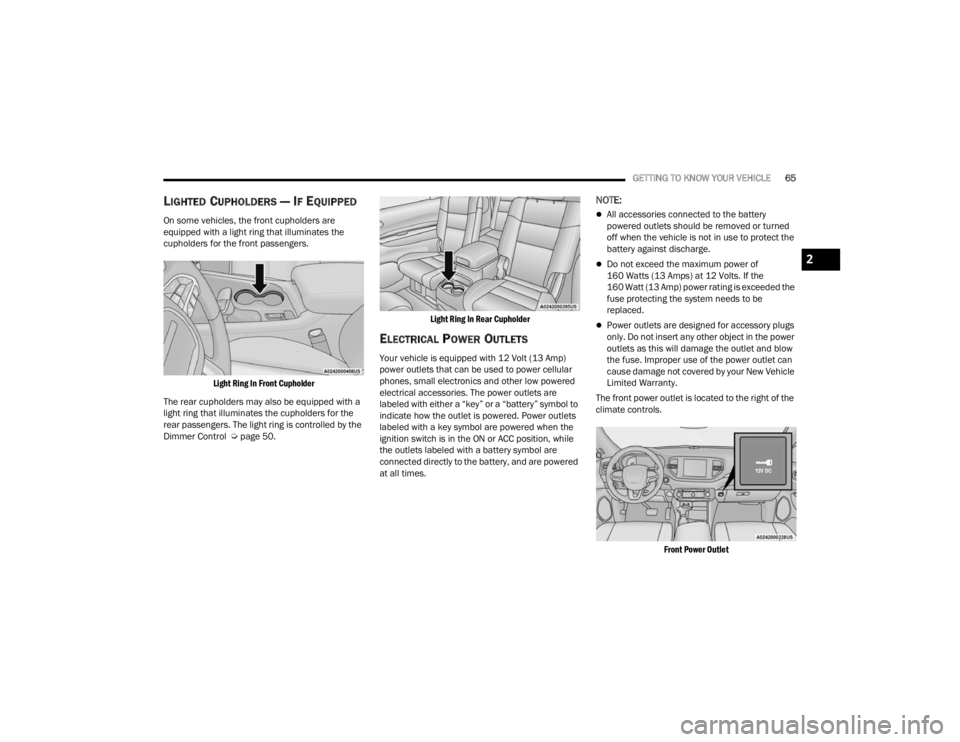
LIGHTED CUPHOLDERS — IF EQUIPPED
On some vehicles, the front cupholders are
equipped with a light ring that illuminates the
cupholders for the front passengers.
Light Ring In Front Cupholder
The rear cupholders may also be equipped with a
light ring that illuminates the cupholders for the
rear passengers. The light ring is controlled by the
Dimmer Control Ú page 50.
Light Ring In Rear Cupholder
ELECTRICAL POWER OUTLETS
Your vehicle is equipped with 12 Volt (13 Amp)
power outlets that can be used to power cellular
phones, small electronics and other low powered
electrical accessories. The power outlets are
labeled with either a “key” or a “battery” symbol to
indicate how the outlet is powered. Power outlets
labeled with a key symbol are powered when the
ignition switch is in the ON or ACC position, while
the outlets labeled with a battery symbol are
connected directly to the battery, and are powered
at all times.
NOTE:
All accessories connected to the battery
powered outlets should be removed or turned
off when the vehicle is not in use to protect the
battery against discharge.
Do not exceed the maximum power of
160 Watts (13 Amps) at 12 Volts. If the
160 Watt (13 Amp) power rating is exceeded the
fuse protecting the system needs to be
replaced.
Power outlets are designed for accessory plugs
only. Do not insert any other object in the power
outlets as this will damage the outlet and blow
the fuse. Improper use of the power outlet can
cause damage not covered by your New Vehicle
Limited Warranty.
The front power outlet is located to the right of the
climate controls.
Front Power Outlet
2
23_WD_OM_EN_USC_t.book Page 65
Page 70 of 328
68GETTING TO KNOW YOUR VEHICLE
WIRELESS CHARGING PAD —
I
F EQUIPPED
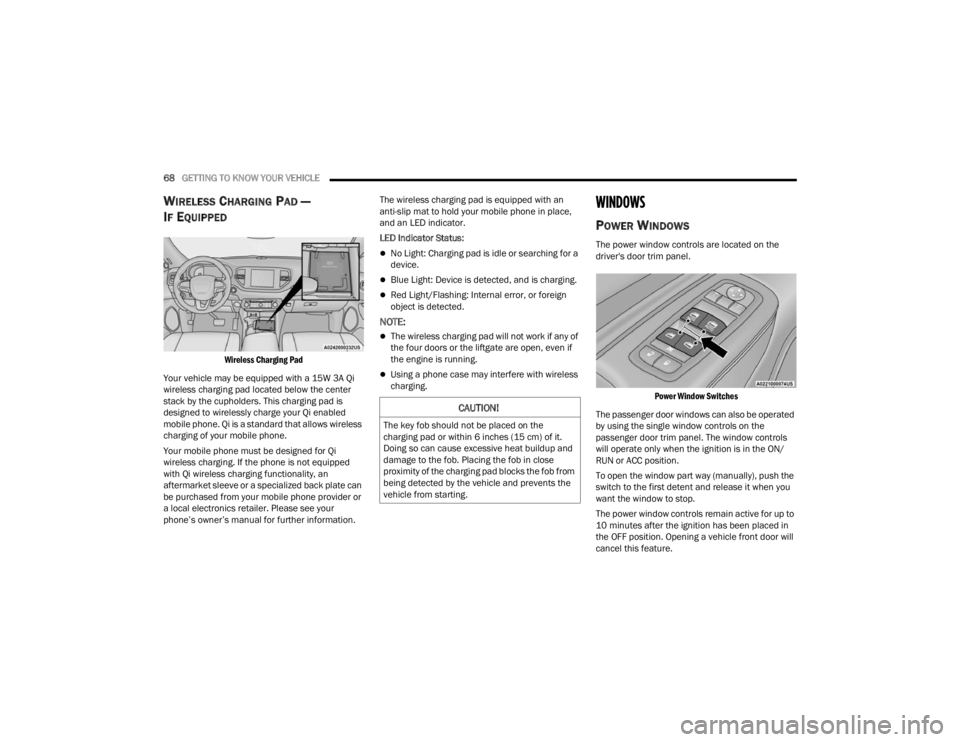
Wireless Charging Pad
Your vehicle may be equipped with a 15W 3A Qi
wireless charging pad located below the center
stack by the cupholders. This charging pad is
designed to wirelessly charge your Qi enabled
mobile phone. Qi is a standard that allows wireless
charging of your mobile phone.
Your mobile phone must be designed for Qi
wireless charging. If the phone is not equipped
with Qi wireless charging functionality, an
aftermarket sleeve or a specialized back plate can
be purchased from your mobile phone provider or
a local electronics retailer. Please see your
phone’s owner’s manual for further information. The wireless charging pad is equipped with an
anti-slip mat to hold your mobile phone in place,
and an LED indicator.
LED Indicator Status:
No Light: Charging pad is idle or searching for a
device.
Blue Light: Device is detected, and is charging.
Red Light/Flashing: Internal error, or foreign
object is detected.
NOTE:
The wireless charging pad will not work if any of
the four doors or the liftgate are open, even if
the engine is running.
Using a phone case may interfere with wireless
charging.
WINDOWS
POWER WINDOWS
The power window controls are located on the
driver's door trim panel.
Power Window Switches
The passenger door windows can also be operated
by using the single window controls on the
passenger door trim panel. The window controls
will operate only when the ignition is in the ON/
RUN or ACC position.
To open the window part way (manually), push the
switch to the first detent and release it when you
want the window to stop.
The power window controls remain active for up to
10 minutes after the ignition has been placed in
the OFF position. Opening a vehicle front door will
cancel this feature.
CAUTION!
The key fob should not be placed on the
charging pad or within 6 inches (15 cm) of it.
Doing so can cause excessive heat buildup and
damage to the fob. Placing the fob in close
proximity of the charging pad blocks the fob from
being detected by the vehicle and prevents the
vehicle from starting.
23_WD_OM_EN_USC_t.book Page 68
Page 71 of 328
GETTING TO KNOW YOUR VEHICLE69
Automatic Window Features
Auto-Down Feature
Both the driver and front passenger window
switches have an Auto-Down feature. Push the
window switch past the first detent, release, and
the window will go down automatically.
To cancel the Auto-Down movement, operate the
switch in either the up or down direction and
release the switch.
Auto-Up Feature With Anti-Pinch Protection —
Driver And Front Passenger Door Only
Lift the window switch fully upward to the second
detent, release, and the window will go up
automatically. To stop the window from going all the way up
during the Auto-Up operation, push down on the
switch briefly.
If the window runs into any obstacle during
Auto-Up, it will reverse direction and then go back
down. Remove the obstacle and use the window
switch again to close the window.
NOTE:Any impact due to rough road conditions may
trigger the auto reverse function unexpectedly
during Auto-Up. If this happens, pull the switch
lightly to the first detent and hold it to close the
window manually.
Reset Auto-Up
Should the Auto-Up feature stop working, the
window may need to be reset. To reset Auto-Up:
1. Make sure the door is fully closed.
2. Pull the window switch up to close the window
completely and continue to hold the switch up
for an additional two seconds after the window
is closed. 3. Push the window switch down firmly to the
second detent to open the window completely
and continue to hold the switch down for an
additional two seconds after the window is
fully open.
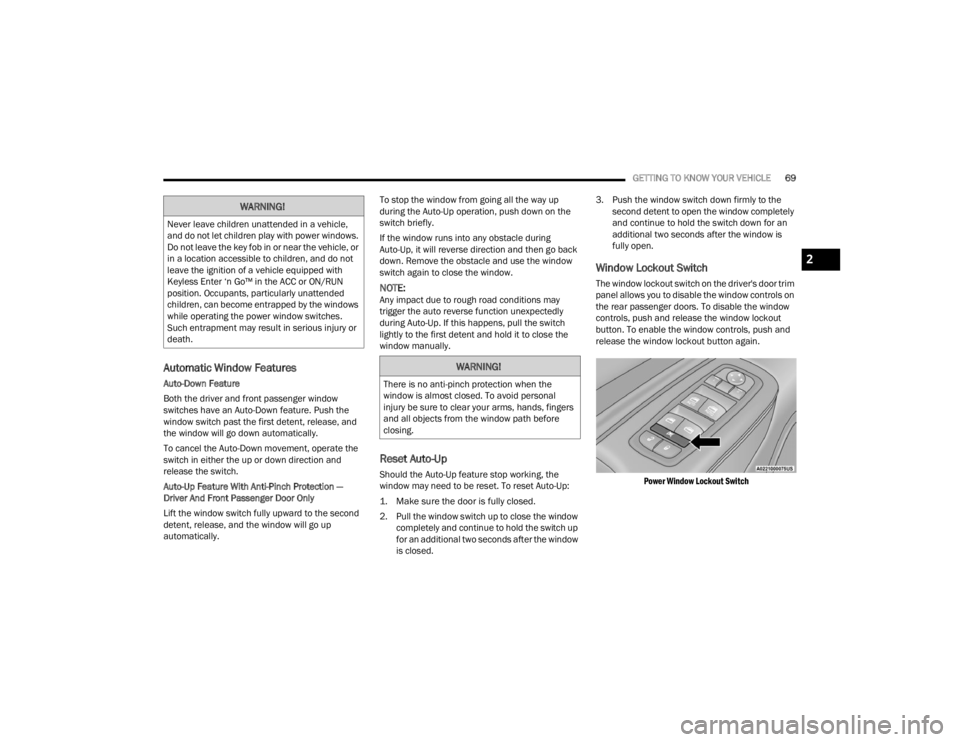
Window Lockout Switch
The window lockout switch on the driver's door trim
panel allows you to disable the window controls on
the rear passenger doors. To disable the window
controls, push and release the window lockout
button. To enable the window controls, push and
release the window lockout button again.
Power Window Lockout Switch
WARNING!
Never leave children unattended in a vehicle,
and do not let children play with power windows.
Do not leave the key fob in or near the vehicle, or
in a location accessible to children, and do not
leave the ignition of a vehicle equipped with
Keyless Enter ‘n Go™ in the ACC or ON/RUN
position. Occupants, particularly unattended
children, can become entrapped by the windows
while operating the power window switches.
Such entrapment may result in serious injury or
death.
WARNING!
There is no anti-pinch protection when the
window is almost closed. To avoid personal
injury be sure to clear your arms, hands, fingers
and all objects from the window path before
closing.
2
23_WD_OM_EN_USC_t.book Page 69
Page 72 of 328
70GETTING TO KNOW YOUR VEHICLE
WIND BUFFETING
Wind buffeting can be described as the perception
of pressure on the ears or a helicopter-type sound
in the ears. Your vehicle may exhibit wind buffeting
with the windows down, or the sunroof (if
equipped) in certain open or partially open
positions. This is a normal occurrence and can be
minimized. If the buffeting occurs with the rear
windows open, open the front and rear windows
together to minimize the buffeting. If the buffeting
occurs with the sunroof open, adjust the sunroof
opening to minimize the buffeting or open any
window.
POWER SUNROOF — IF EQUIPPED
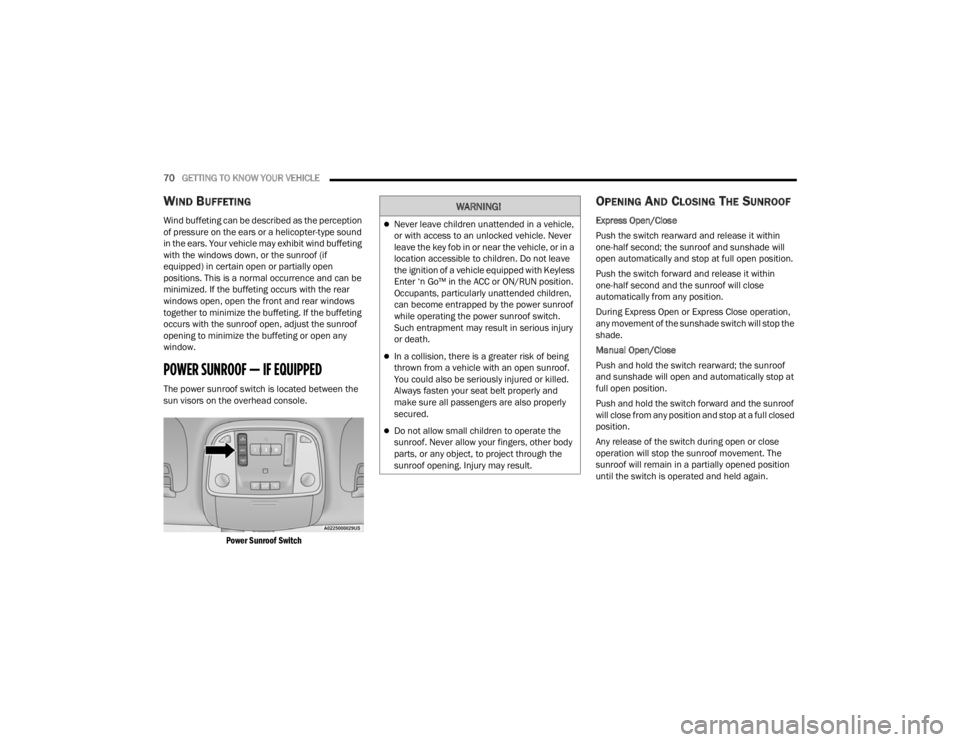
The power sunroof switch is located between the
sun visors on the overhead console.
Power Sunroof Switch
OPENING AND CLOSING THE SUNROOF
Express Open/Close
Push the switch rearward and release it within
one-half second; the sunroof and sunshade will
open automatically and stop at full open position.
Push the switch forward and release it within
one-half second and the sunroof will close
automatically from any position.
During Express Open or Express Close operation,
any movement of the sunshade switch will stop the
shade.
Manual Open/Close
Push and hold the switch rearward; the sunroof
and sunshade will open and automatically stop at
full open position.
Push and hold the switch forward and the sunroof
will close from any position and stop at a full closed
position.
Any release of the switch during open or close
operation will stop the sunroof movement. The
sunroof will remain in a partially opened position
until the switch is operated and held again.
WARNING!
Never leave children unattended in a vehicle,
or with access to an unlocked vehicle. Never
leave the key fob in or near the vehicle, or in a
location accessible to children. Do not leave
the ignition of a vehicle equipped with Keyless
Enter ‘n Go™ in the ACC or ON/RUN position.
Occupants, particularly unattended children,
can become entrapped by the power sunroof
while operating the power sunroof switch.
Such entrapment may result in serious injury
or death.
In a collision, there is a greater risk of being
thrown from a vehicle with an open sunroof.
You could also be seriously injured or killed.
Always fasten your seat belt properly and
make sure all passengers are also properly
secured.
Do not allow small children to operate the
sunroof. Never allow your fingers, other body
parts, or any object, to project through the
sunroof opening. Injury may result.
23_WD_OM_EN_USC_t.book Page 70
Page 73 of 328
GETTING TO KNOW YOUR VEHICLE71
Venting The Sunroof
Push and release the Vent button within one-half
second and the sunroof will open to the vent
position. This is called Express Vent, and it will
occur regardless of sunroof position. During
Express Vent operation, any movement of the
switch will stop the sunroof.
SUNSHADE OPERATION
The sunshade can be opened manually. However,
the sunshade will open automatically as the
sunroof opens.
NOTE:The sunshade cannot be closed if the sunroof is
open.
PINCH PROTECT FEATURE
This feature will detect an obstruction in the
closing of the sunroof during the Express Close
operation. If an obstruction in the path of the
sunroof is detected, the sunroof will automatically
retract. Remove the obstruction if this occurs.
NOTE:If three consecutive sunroof close attempts result
in Pinch Protect reversals, Pinch Protect will
disable and the sunroof must be closed in Manual
Mode.
SUNROOF MAINTENANCE
Use only a non-abrasive cleaner and a soft cloth to
clean the glass panel. Periodically check for and
clear out any debris that may have collected in the
tracks.
IGNITION OFF OPERATION
The power sunroof switch can remain active in
Accessory Delay for up to approximately
10 minutes after the vehicle’s ignition is placed
to the OFF position. Opening either front door
will cancel this feature.
This feature is programmable using the
Uconnect system Ú page 153.
HOOD
OPENING THE HOOD
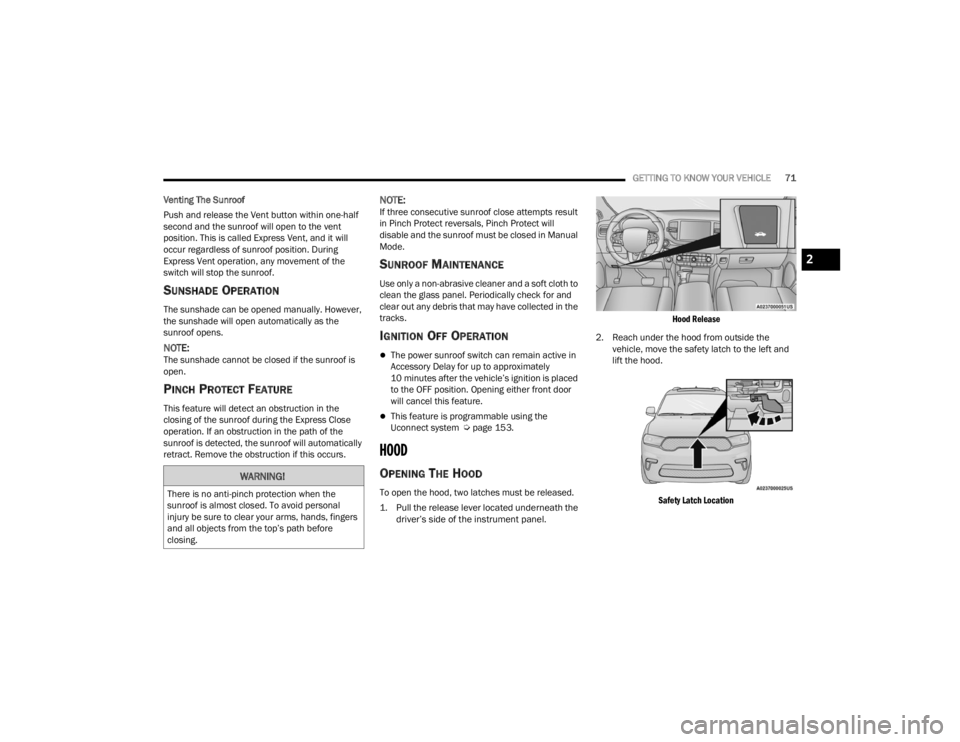
To open the hood, two latches must be released.
1. Pull the release lever located underneath the
driver’s side of the instrument panel.
Hood Release
2. Reach under the hood from outside the vehicle, move the safety latch to the left and
lift the hood.
Safety Latch Location
WARNING!
There is no anti-pinch protection when the
sunroof is almost closed. To avoid personal
injury be sure to clear your arms, hands, fingers
and all objects from the top’s path before
closing.
2
23_WD_OM_EN_USC_t.book Page 71