steering wheel DODGE DURANGO 2023 Owners Manual
[x] Cancel search | Manufacturer: DODGE, Model Year: 2023, Model line: DURANGO, Model: DODGE DURANGO 2023Pages: 328, PDF Size: 13.82 MB
Page 4 of 328

2
INTRODUCTION
SYMBOLS KEY ...........................................................8
ROLLOVER WARNING ............................................. 8
VEHICLE MODIFICATIONS/ALTERATIONS .............9
SYMBOL GLOSSARY.................................................9
GETTING TO KNOW YOUR VEHICLE
KEYS ....................................................................... 13 Key Fob .............................................................13
SENTRY KEY .......................................................... 16
IGNITION SWITCH .................................................. 16
Keyless Enter ‘n Go™ Ignition .........................16
REMOTE START — IF EQUIPPED .......................... 17
How To Use Remote Start ................................18
To Exit Remote Start Mode ..............................19
Remote Start Front Defrost Activation —
If Equipped........................................................19
Remote Start Comfort Systems —
If Equipped........................................................19
Remote Start Windshield Wiper De-Icer
Activation — If Equipped ..................................20
Remote Start Cancel Message — If Equipped .. 20
VEHICLE SECURITY SYSTEM — IF EQUIPPED ..... 20
To Arm The System ..........................................20
To Disarm The System .....................................20
Rearming Of The System .................................21
Security System Manual Override ...................21
Tamper Alert .....................................................21 DOORS ....................................................................21
Manual Door Locks ..........................................21
Power Door Locks ............................................22
Keyless Enter ‘n Go™ — Passive Entry ...........22
Automatic Unlock On Exit Feature —
If Equipped........................................................25
Child-Protection Door Lock System —
Rear Doors .......................................................25
STEERING WHEEL ..................................................25
Manual Tilt/Telescoping Steering Column —
If Equipped .......................................................25
Power Tilt/Telescoping Steering Column —
If Equipped........................................................26
Heated Steering Wheel —
If Equipped .......................................................26
DRIVER MEMORY SETTINGS — IF EQUIPPED .....27
Programming The Memory Feature ................27
Linking And Unlinking The Remote Keyless
Entry Key Fob To Memory ................................27
Memory Position Recall ...................................28
SEATS ......................................................................28
Manual Adjustment (Front Seats) —
If Equipped........................................................28
Manual Adjustment (Rear Seats) ....................30
Power Adjustment (Front Seats) —
If Equipped .......................................................33
Heated Seats — If Equipped ...........................35
Front Ventilated Seats — If Equipped .............36
Head Restraints ...............................................36 UCONNECT VOICE RECOGNITION —
IF EQUIPPED .......................................................... 38
Introducing Voice Recognition ........................ 38
Basic Voice Commands ................................... 38
Get Started .......................................................39
Additional Information ..................................... 39
MIRRORS ............................................................... 40
Inside Rearview Mirror..................................... 40
Illuminated Vanity Mirrors .............................. 40
Outside Mirrors ................................................ 40
Outside Mirrors With Turn Signal —
If Equipped .......................................................41
Outside Automatic Dimming Mirror —
If Equipped .......................................................41
Power Mirrors .................................................. 41
Heated Mirrors — If Equipped ......................... 41
UNIVERSAL GARAGE DOOR OPENER
(HOMELINK®) — IF EQUIPPED ............................ 41
Before You Begin Programming HomeLink® ... 42
Erasing All The HomeLink® Channels ............ 42
Identifying Whether You Have A Rolling Code
Or Non-Rolling Code Device ............................ 42
Programming HomeLink® To A Garage Door
Opener ..............................................................42
Programming HomeLink® To A Miscellaneous
Device ............................................................... 43
Reprogramming A Single HomeLink® Button .. 44
Canadian/Gate Operator Programming ......... 44
Security ............................................................. 45
Troubleshooting Tips........................................ 45
23_WD_OM_EN_USC_t.book Page 2
Page 6 of 328

4
STARTING AND OPERATING
STARTING THE ENGINE ......................................... 98
Automatic Transmission ..................................98
Normal Starting ...............................................98
AutoPark ...........................................................99
Extended Park Starting ................................. 100If Engine Fails To Start .................................. 101
Cold Weather Operation
(Below –22°F Or −30°C) ............................ 101
After Starting.................................................. 101
ENGINE BREAK-IN RECOMMENDATIONS ........ 101
PARKING BRAKE ................................................ 102
AUTOMATIC TRANSMISSION.............................. 103 Ignition Park Interlock ................................... 104Brake Transmission Shift Interlock (BTSI)
System ........................................................... 104Fuel Economy (ECO) Mode ........................... 104
8-Speed Automatic Transmission ................ 104
SPORT MODE — IF EQUIPPED ............................ 108
ALL-WHEEL DRIVE OPERATION .........................108
Single-Speed Operating Instructions/
Precautions — If Equipped ............................ 108
Electronically Shifted Transfer Case —
If Equipped..................................................... 109
Shifting Procedure......................................... 110
TOW N GO — IF EQUIPPED ................................. 111
Guidelines For Track Use .............................. 112
FUEL SAVER TECHNOLOGY 5.7L ONLY —
IF EQUIPPED ......................................................... 113
POWER STEERING ............................................... 113 STOP/START SYSTEM — IF EQUIPPED ............. 114
Autostop Mode .............................................. 114
Possible Reasons The Engine Does Not
Autostop......................................................... 114
To Start The Engine While In Autostop
Mode .............................................................. 114
To Manually Turn Off The
Stop/Start System......................................... 115
To Manually Turn On The
Stop/Start System......................................... 115
System Malfunction ...................................... 115
CRUISE CONTROL SYSTEMS — IF EQUIPPED .... 115
Cruise Control ............................................... 115
Adaptive Cruise Control (ACC) ...................... 117
PARKSENSE FRONT/REAR PARK ASSIST
SYSTEM — IF EQUIPPED .................................... 125
ParkSense Sensors ....................................... 126
ParkSense Display ........................................ 126ParkSense Warning Display ......................... 129
Enabling And Disabling ParkSense .............. 129Operation With A Trailer................................ 129
Service The ParkSense Park Assist System ...130
Cleaning The ParkSense System ................. 130
ParkSense System Usage Precautions........ 130
LANESENSE — IF EQUIPPED ............................. 131
LaneSense Operation ................................... 131Turning LaneSense On Or Off ....................... 132
LaneSense Warning Message ...................... 132Changing LaneSense Status ........................ 134 PARKVIEW REAR BACK UP CAMERA .............. 134
REFUELING THE VEHICLE ................................... 135
VEHICLE LOADING .............................................. 136
Certification Label ......................................... 136
TRAILER TOWING ................................................ 137
Common Towing Definitions......................... 137
Trailer Hitch Classification............................ 139
Trailer Towing Weights (Maximum Trailer
Weight Ratings) ............................................ 139
Trailer Hitch Receiver Cover Removal —
If Equipped .................................................... 140
Trailer And Tongue Weight .......................... 140
Towing Requirements .................................. 141Towing Tips ................................................... 145
RECREATIONAL TOWING
(BEHIND MOTORHOME) ..................................... 146
Towing This Vehicle Behind Another Vehicle ..146
Recreational Towing — Rear-Wheel
Drive Models ................................................. 147
Recreational Towing — All-Wheel Drive
Models (Single-Speed Transfer Case) ......... 147
Recreational Towing — All-Wheel Drive
Models (Two-Speed Transfer Case) ............. 147
DRIVING TIPS ....................................................... 150
On-Road Driving Tips..................................... 150Off-Road Driving Tips .................................... 150
23_WD_OM_EN_USC_t.book Page 4
Page 7 of 328

5
MULTIMEDIA
UCONNECT SYSTEMS ......................................... 153
CYBERSECURITY ................................................. 153
UCONNECT SETTINGS ......................................... 153Customer Programmable Features .............. 154
STEERING WHEEL AUDIO CONTROLS .............. 176
Radio Operation ............................................ 176
Media Mode................................................... 176
RADIO OPERATION AND MOBILE PHONES...... 176
Regulatory And Safety Information .............. 176
SAFETY
SAFETY FEATURES .............................................. 177 Anti-Lock Brake System (ABS) ..................... 177
Rear Seat Reminder Alert (RSRA) ................ 178
Electronic Brake Control (EBC) System ...... 178
AUXILIARY DRIVING SYSTEMS .......................... 183
Blind Spot Monitoring (BSM) —
If Equipped..................................................... 183
Forward Collision Warning (FCW) With
Mitigation ....................................................... 186
Tire Pressure Monitoring System (TPMS) .... 188
OCCUPANT RESTRAINT SYSTEMS .................... 191
Occupant Restraint Systems Features ........ 191
Important Safety Precautions....................... 191
Seat Belt Systems ........................................ 192
Supplemental Restraint Systems (SRS) ...... 198
Child Restraints ............................................. 210 SAFETY TIPS ....................................................... 225
Transporting Passengers .............................. 225Transporting Pets ......................................... 225
Connected Vehicles ...................................... 225
Safety Checks You Should Make Inside
The Vehicle ................................................... 226
Periodic Safety Checks You Should Make
Outside The Vehicle ...................................... 227
Exhaust Gas................................................... 228
Carbon Monoxide Warnings ......................... 228
IN CASE OF EMERGENCY
HAZARD WARNING FLASHERS ........................ 229
SOS AND ASSIST MIRROR — IF EQUIPPED ..... 229
JACKING AND TIRE CHANGING ........................ 232 Preparations For Jacking .............................. 232Jack Location ................................................. 233
Spare Tire Stowage ....................................... 234
Spare Tire Removal ....................................... 234
Jacking Instructions ..................................... 236
JUMP STARTING ................................................. 239
Preparations For Jump Start ........................ 240
Jump Starting Procedure .............................. 240
REFUELING IN EMERGENCY – IF EQUIPPED .. 242
IF YOUR ENGINE OVERHEATS ........................... 243
MANUAL PARK RELEASE ................................... 243
FREEING A STUCK VEHICLE .............................. 245
TOWING A DISABLED VEHICLE ........................ 246
Rear-Wheel Drive Models ............................. 247
All-Wheel Drive Models ................................. 247 ENHANCED ACCIDENT RESPONSE SYSTEM
(EARS) .................................................................. 248
EVENT DATA RECORDER (EDR) ......................... 248
SERVICING AND MAINTENANCE
SCHEDULED SERVICING .................................... 249
Maintenance Plan ......................................... 250
ENGINE COMPARTMENT .................................... 253
3.6L Engine ................................................... 253
5.7L Engine ................................................... 254
Checking Oil Level ......................................... 255
Adding Washer Fluid .................................... 255
Maintenance-Free Battery ........................... 255
Pressure Washing ......................................... 256
VEHICLE MAINTENANCE ..................................... 256
Engine Oil ...................................................... 256
Engine Oil Filter ............................................. 257Engine Air Cleaner Filter .............................. 257
Air Conditioner Maintenance ....................... 258
Accessory Drive Belt Inspection ................... 260Body Lubrication ........................................... 261
Windshield Wiper Blades.............................. 261
Exhaust System ............................................ 264
Cooling System.............................................. 265
Brake System ............................................... 268Automatic Transmission ............................... 269
Front/Rear Axle Fluid ................................... 269
Transfer Case ............................................... 270Fuses.............................................................. 270
Bulb Replacement ........................................ 278
23_WD_OM_EN_USC_t.book Page 5
Page 9 of 328

7
INTRODUCTION
Dear Customer,
Congratulations on the purchase of your new Dodge vehicle. Be assured that it represents precision workmanship, distinctive styling, and high quality.
This is a specialized utility vehicle. It can go places and perform tasks that are not intended for conventional passenger vehicles. It handles and maneuvers
differently from many passenger vehicles both on-road and off-road, so take time to become familiar with your vehicle. If equipped, the two-wheel drive version
of this vehicle was designed for on-road use only. It is not intended for off-road driving or use in other severe conditions suited for a four-wheel drive vehicle.
Before you start to drive this vehicle, read the Owner’s Manual. Be sure you are familiar with all vehicle controls, particularly those used for braking, steering,
transmission, and transfer case shifting. Learn how your vehicle handles on different road surfaces. Your driving skills will improve with experience. When driving
off-road, or working the vehicle, don’t overload the vehicle or expect the vehicle to overcome the natural laws of physics. Always observe federal, state, provincial
and local laws wherever you drive. As with other vehicles of this type, failure to operate this vehicle correctly may result in loss of control or a collision Úpage 150.
This Owner's Manual has been prepared with the assistance of service and engineering specialists to acquaint you with the operation and maintenance of your
vehicle. It is supplemented by customer-oriented documents. Within this information, you will find a description of the services that FCA US LLC offers to its
customers as well as the details of the terms and conditions for maintaining its validity. Please take the time to read all of these publications carefully before
driving your vehicle for the first time. Following the instructions, recommendations, tips, and important warnings in this manual will help ensure safe and
enjoyable operation of your vehicle.
This Owner's Manual describes all versions of this vehicle. Options and equipment dedicated to specific markets or versions are not expressly indicated in the
text. Therefore, you should only consider the information that is related to the trim level, engine, and version that you have purchased. Any content introduced
throughout the Owner's Information, which may or may not be applicable to your vehicle, will be identified with the wording "If Equipped". All data contained in
this publication are intended to help you use your vehicle in the best possible way. FCA US LLC aims at a constant improvement of the vehicles produced. For
this reason, it reserves the right to make changes to the model described for technical and/or commercial reasons. For further information, contact an authorized
dealer.
When it comes to service remember that authorized dealers know your Dodge best, have factory-trained technicians, genuine Mopar® parts, and care about
your satisfaction.1
23_WD_OM_EN_USC_t.book Page 7
Page 21 of 328

GETTING TO KNOW YOUR VEHICLE19
TO EXIT REMOTE START MODE
To drive the vehicle after starting the Remote Start
system, either push and release the unlock button
on the key fob to unlock the doors, or unlock the
vehicle using Keyless Enter ‘n Go™ — Passive Entry
via the door handles, and disarm the Vehicle
Security system (if equipped). Then, prior to the
end of the 15 minute cycle, push and release the
START/STOP ignition button.
The Remote Start system will turn the engine off if
the Remote Start button on the key fob is pushed
again, or if the engine is allowed to run for the
entire 15 minute cycle. Once the ignition is placed
in the ON/RUN position, the climate controls will
resume the previously set operations
(temperature, blower control, etc.).
NOTE:
To avoid unintentional shutdowns, the system
will disable for two seconds after receiving a
valid Remote Start request.
For vehicles equipped with the Keyless
Enter ‘n Go™ — Passive Entry feature, the
message “Remote Start Active — Push Start
Button” will display in the instrument cluster
display until you push the START/STOP ignition
button.
REMOTE START FRONT DEFROST
A
CTIVATION — IF EQUIPPED
When Remote Start is active, and the outside
ambient temperature is 40°F (4.5°C) or below, the
system will automatically activate front defrost for
15 minutes or less. The timing is dependent on the
ambient temperature. Once the timer expires, the
system will automatically adjust the settings
depending on ambient conditions. See “Remote
Start Comfort Systems — If Equipped” in the next
section for detailed operation.
REMOTE START COMFORT SYSTEMS —
I
F EQUIPPED
When Remote Start is activated, the front and rear
defrost will automatically turn on in cold weather.
The heated steering wheel and driver heated seat
feature will turn on if selected in the Comfort menu
screen within Uconnect Settings Ú page 153. In
warm weather, the driver vented seat feature will
automatically turn on when Remote Start is
activated, if programmed in the Comfort menu
screen. The vehicle will adjust the climate control
settings depending on the outside ambient
temperature. Automatic Temperature Control (ATC) —
If Equipped
The climate controls will automatically adjust to
the optimal temperature and mode settings
depending on the outside ambient temperature.
This will occur until the ignition is placed in the ON/
RUN position, where the climate controls will
resume their previous settings.
Manual Temperature Control (MTC) — If Equipped
In ambient temperatures at 40°F (4.5°C) or
below, the climate settings will default to
maximum heat, with fresh air entering the
cabin. If the front defrost timer expires, the
vehicle will enter Mix Mode.
In ambient temperatures from 40°F (4.5°C) to
78°F (26°C), the climate settings will be based
on the last settings selected by the driver.
In ambient temperatures at 78°F (26°C) or
above, the climate settings will default to MAX
A/C, Bi-Level Mode, and Recirculation on.
For more information on ATC, MTC, and climate
control settings, see Ú page 53.
NOTE:These features will stay on through the duration of
Remote Start until the ignition is placed in the ON/
RUN position. The climate control settings will
change if manually adjusted by the driver while the
vehicle is in Remote Start mode, and exit auto -
matic override. This includes the OFF button on the
climate controls, which will turn the system off.
2
23_WD_OM_EN_USC_t.book Page 19
Page 27 of 328
GETTING TO KNOW YOUR VEHICLE25
AUTOMATIC UNLOCK ON EXIT FEATURE —
I
F EQUIPPED
If Auto Unlock is enabled within Uconnect Settings
Ú page 153, this feature will unlock all the doors
when any door is opened if the vehicle is in PARK.
CHILD-PROTECTION DOOR LOCK
S
YSTEM — REAR DOORS
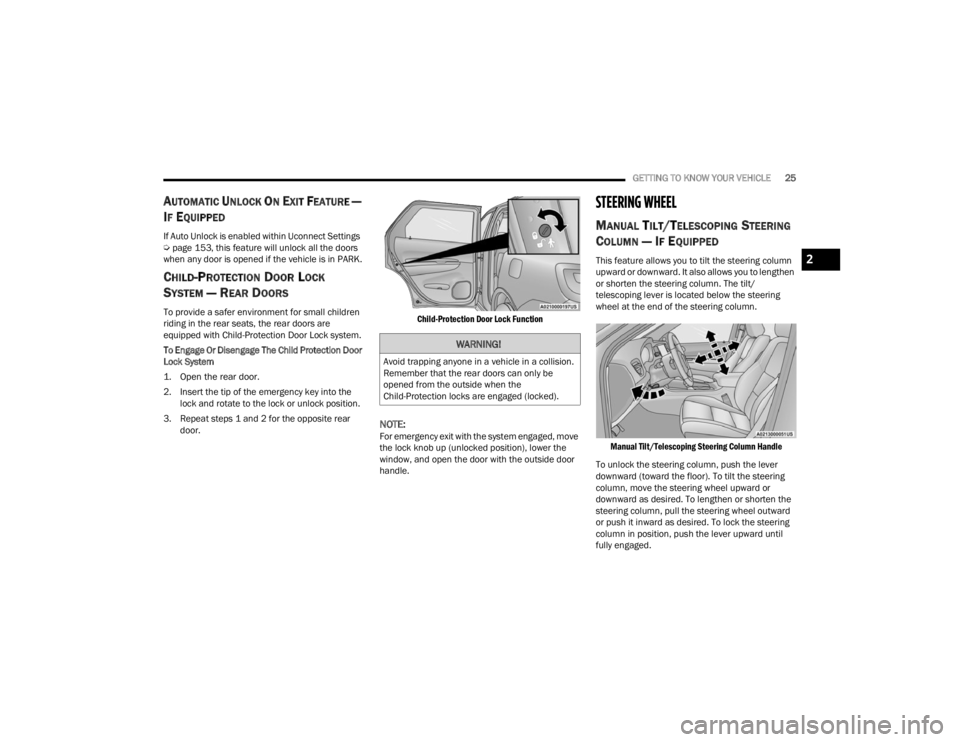
To provide a safer environment for small children
riding in the rear seats, the rear doors are
equipped with Child-Protection Door Lock system.
To Engage Or Disengage The Child Protection Door
Lock System
1. Open the rear door.
2. Insert the tip of the emergency key into the
lock and rotate to the lock or unlock position.
3. Repeat steps 1 and 2 for the opposite rear door.
Child-Protection Door Lock Function
NOTE:For emergency exit with the system engaged, move
the lock knob up (unlocked position), lower the
window, and open the door with the outside door
handle.
STEERING WHEEL
MANUAL TILT/TELESCOPING STEERING
C
OLUMN — IF EQUIPPED
This feature allows you to tilt the steering column
upward or downward. It also allows you to lengthen
or shorten the steering column. The tilt/
telescoping lever is located below the steering
wheel at the end of the steering column.
Manual Tilt/Telescoping Steering Column Handle
To unlock the steering column, push the lever
downward (toward the floor). To tilt the steering
column, move the steering wheel upward or
downward as desired. To lengthen or shorten the
steering column, pull the steering wheel outward
or push it inward as desired. To lock the steering
column in position, push the lever upward until
fully engaged.
WARNING!
Avoid trapping anyone in a vehicle in a collision.
Remember that the rear doors can only be
opened from the outside when the
Child-Protection locks are engaged (locked).
2
23_WD_OM_EN_USC_t.book Page 25
Page 28 of 328
26GETTING TO KNOW YOUR VEHICLE
POWER TILT/TELESCOPING STEERING
C
OLUMN — IF EQUIPPED
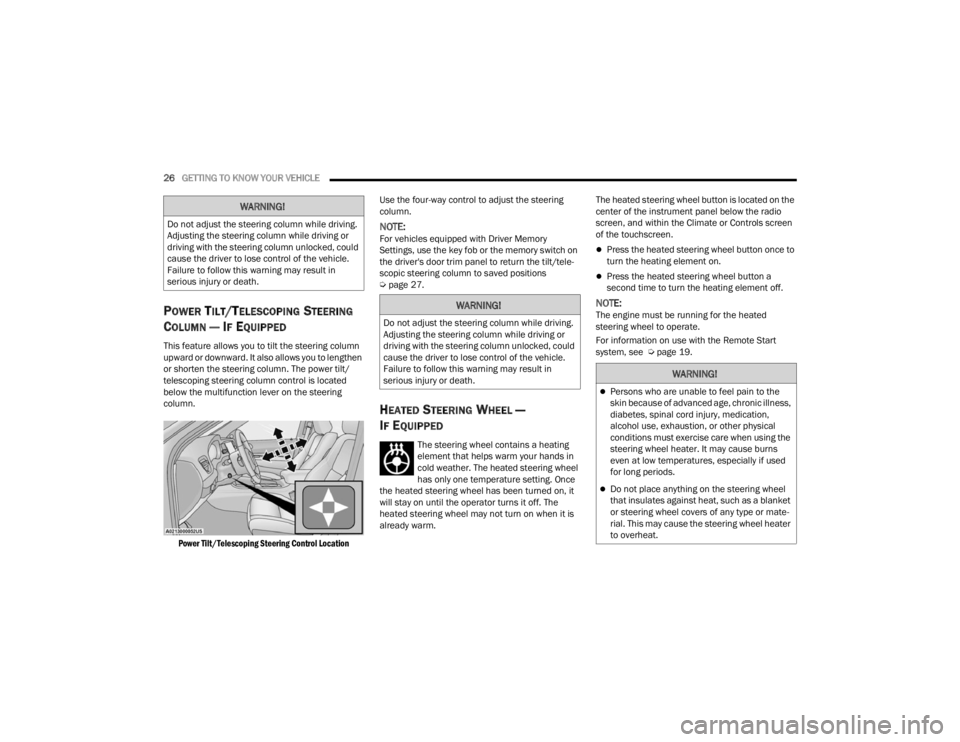
This feature allows you to tilt the steering column
upward or downward. It also allows you to lengthen
or shorten the steering column. The power tilt/
telescoping steering column control is located
below the multifunction lever on the steering
column.
Power Tilt/Telescoping Steering Control Location
Use the four-way control to adjust the steering
column.
NOTE:For vehicles equipped with Driver Memory
Settings, use the key fob or the memory switch on
the driver's door trim panel to return the tilt/tele
-
scopic steering column to saved positions
Ú page 27.
HEATED STEERING WHEEL —
I
F EQUIPPED
The steering wheel contains a heating
element that helps warm your hands in
cold weather. The heated steering wheel
has only one temperature setting. Once
the heated steering wheel has been turned on, it
will stay on until the operator turns it off. The
heated steering wheel may not turn on when it is
already warm. The heated steering wheel button is located on the
center of the instrument panel below the radio
screen, and within the Climate or Controls screen
of the touchscreen.
Press the heated steering wheel button once to
turn the heating element on.
Press the heated steering wheel button a
second time to turn the heating element off.
NOTE:The engine must be running for the heated
steering wheel to operate.
For information on use with the Remote Start
system, see Ú
page 19.
WARNING!
Do not adjust the steering column while driving.
Adjusting the steering column while driving or
driving with the steering column unlocked, could
cause the driver to lose control of the vehicle.
Failure to follow this warning may result in
serious injury or death.
WARNING!
Do not adjust the steering column while driving.
Adjusting the steering column while driving or
driving with the steering column unlocked, could
cause the driver to lose control of the vehicle.
Failure to follow this warning may result in
serious injury or death.
WARNING!
Persons who are unable to feel pain to the
skin because of advanced age, chronic illness,
diabetes, spinal cord injury, medication,
alcohol use, exhaustion, or other physical
conditions must exercise care when using the
steering wheel heater. It may cause burns
even at low temperatures, especially if used
for long periods.
Do not place anything on the steering wheel
that insulates against heat, such as a blanket
or steering wheel covers of any type or mate -
rial. This may cause the steering wheel heater
to overheat.
23_WD_OM_EN_USC_t.book Page 26
Page 41 of 328
GETTING TO KNOW YOUR VEHICLE39
GET STARTED
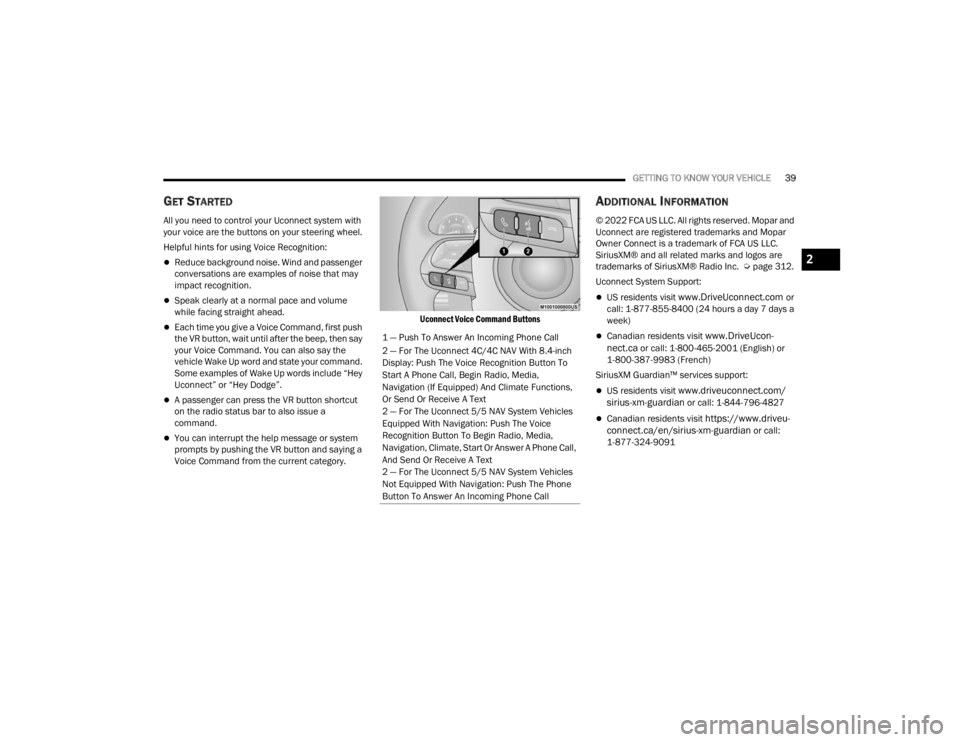
All you need to control your Uconnect system with
your voice are the buttons on your steering wheel.
Helpful hints for using Voice Recognition:
Reduce background noise. Wind and passenger
conversations are examples of noise that may
impact recognition.
Speak clearly at a normal pace and volume
while facing straight ahead.
Each time you give a Voice Command, first push
the VR button, wait until after the beep, then say
your Voice Command. You can also say the
vehicle Wake Up word and state your command.
Some examples of Wake Up words include “Hey
Uconnect” or “Hey Dodge”.
A passenger can press the VR button shortcut
on the radio status bar to also issue a
command.
You can interrupt the help message or system
prompts by pushing the VR button and saying a
Voice Command from the current category.
Uconnect Voice Command Buttons
ADDITIONAL INFORMATION
© 2022 FCA US LLC. All rights reserved. Mopar and
Uconnect are registered trademarks and Mopar
Owner Connect is a trademark of FCA US LLC.
SiriusXM® and all related marks and logos are
trademarks of SiriusXM® Radio Inc. Ú
page 312.
Uconnect System Support:
US residents visit www.DriveUconnect.com or
call: 1-877-855-8400 (24 hours a day 7 days a
week)
Canadian residents visit www.DriveUcon -
nect.ca or call: 1-800-465-2001 (English) or
1-800-387-9983 (French)
SiriusXM Guardian™ services support:
US residents visit www.driveuconnect.com/
sirius-xm-guardian or call: 1-844-796-4827
Canadian residents visit https://www.driveu -
connect.ca/en/sirius-xm-guardian or call:
1-877-324-9091
1 — Push To Answer An Incoming Phone Call
2 — For The Uconnect 4C/4C NAV With 8.4-inch
Display: Push The Voice Recognition Button To
Start A Phone Call, Begin Radio, Media,
Navigation (If Equipped) And Climate Functions,
Or Send Or Receive A Text
2 — For The Uconnect 5/5 NAV System Vehicles
Equipped With Navigation: Push The Voice
Recognition Button To Begin Radio, Media,
Navigation, Climate, Start Or Answer A Phone Call,
And Send Or Receive A Text
2 — For The Uconnect 5/5 NAV System Vehicles
Not Equipped With Navigation: Push The Phone
Button To Answer An Incoming Phone Call
2
23_WD_OM_EN_USC_t.book Page 39
Page 47 of 328
GETTING TO KNOW YOUR VEHICLE45
SECURITY
It is advised to erase all channels before you sell or
turn in your vehicle.
To do this, push and hold the two outside buttons
for 20 seconds until the indicator flashes. Note
that all channels will be erased. Individual
channels cannot be erased.
The HomeLink® universal transmitter is disabled
when the Vehicle Security system is active.
TROUBLESHOOTING TIPS
If you are having trouble programming
HomeLink®, here are some of the most common
solutions:
Replace the battery in the garage door opener
hand-held transmitter.
Push the LEARN button on the garage door
opener to complete the training for a rolling
code.
Did you unplug the device for programming and
remember to plug it back in?
If you have any problems, or require assistance,
please call toll-free 1-800-355-3515 or on the
Internet at
HomeLink.com for information or
assistance.
EXTERIOR LIGHTS
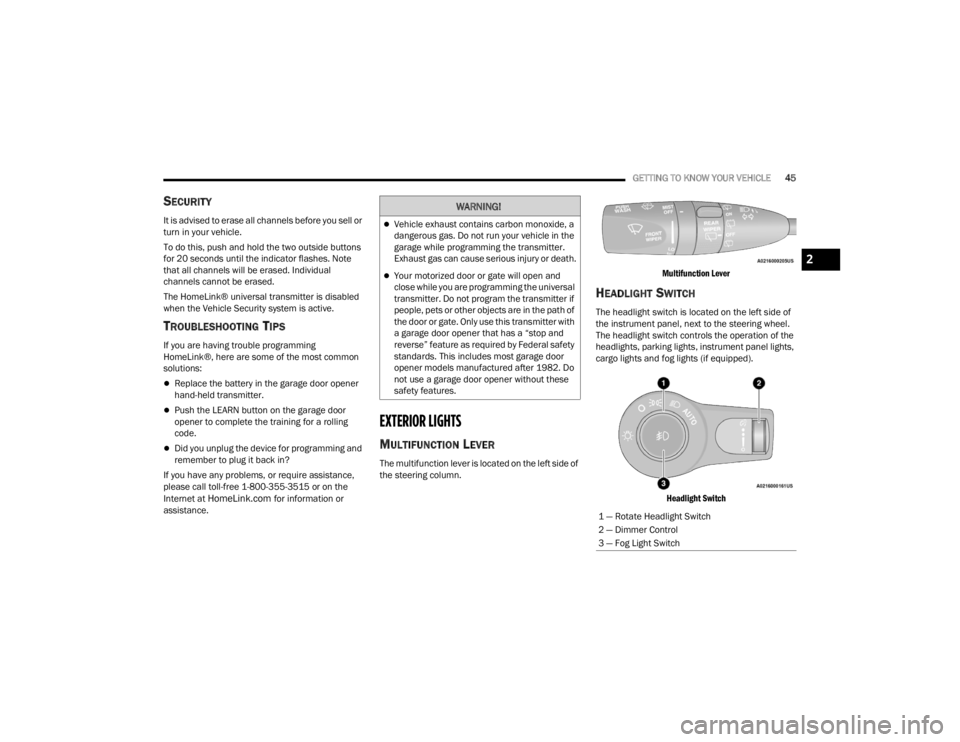
MULTIFUNCTION LEVER
The multifunction lever is located on the left side of
the steering column.
Multifunction Lever
HEADLIGHT SWITCH
The headlight switch is located on the left side of
the instrument panel, next to the steering wheel.
The headlight switch controls the operation of the
headlights, parking lights, instrument panel lights,
cargo lights and fog lights (if equipped).
Headlight Switch
WARNING!
Vehicle exhaust contains carbon monoxide, a
dangerous gas. Do not run your vehicle in the
garage while programming the transmitter.
Exhaust gas can cause serious injury or death.
Your motorized door or gate will open and
close while you are programming the universal
transmitter. Do not program the transmitter if
people, pets or other objects are in the path of
the door or gate. Only use this transmitter with
a garage door opener that has a “stop and
reverse” feature as required by Federal safety
standards. This includes most garage door
opener models manufactured after 1982. Do
not use a garage door opener without these
safety features.
1 — Rotate Headlight Switch
2 — Dimmer Control
3 — Fog Light Switch
2
23_WD_OM_EN_USC_t.book Page 45
Page 54 of 328
52GETTING TO KNOW YOUR VEHICLE
Windshield Washers
To use the washer, push on the end of the lever
(toward the steering wheel) and hold. If the lever is
pushed while in the intermittent setting, the wipers
will turn on and operate for several cycles after the
end of the lever is released, and then resume the
intermittent interval previously selected.
If the end of the lever is pushed while the wipers
are in the off position, the wipers will operate for
several cycles, then turn off.
NOTE:As a protective measure, the washer will stop if the
switch is held for more than 20 seconds. Once the
switch is released the washer will resume normal
operation. Mist
Rotate the end of the lever downward to the MIST
position and release for a single wiping cycle.
NOTE:The Mist feature does not activate the washer
pump; therefore, no washer fluid will be sprayed on
the windshield. The washer function must be used
in order to spray the windshield with washer fluid.
For information on wiper care and replacement,
see Ú
page 261.
RAIN SENSING WIPERS — IF EQUIPPED
This feature senses rain or snowfall on the
windshield and automatically activates the wipers.
Rotate the end of the multifunction lever to one of
four detent positions to activate this feature.
The sensitivity of the system can be adjusted with
the multifunction lever. Wiper delay position one is
the least sensitive, and wiper delay position four is
the most sensitive.
Setting three is preferred by the average driver
during normal rain conditions.
NOTE:
The Rain Sensing feature will not operate when
the wiper switch is in the low or high-speed posi -
tion.
The Rain Sensing feature may not function prop -
erly when ice, or dried salt water is present on
the windshield.
Use of products containing wax or silicone may
reduce Rain Sensing performance.
The Rain Sensing feature can be turned on and
off using the Uconnect system Ú page 153.
The Rain Sensing system has protection features
for the wiper blades and arms, and will not operate
under the following conditions:
Low Ambient Temperature — When the ignition
is first placed in the ON position, the Rain
Sensing system will not operate until the wiper
switch is moved, vehicle speed is greater than
3 mph (5 km/h), or the outside temperature is
greater than 32°F (0°C).
Transmission In NEUTRAL Position — When the
ignition is in the ON position, and the gear
selector is in NEUTRAL, the Rain Sensing system
will not operate until the wiper switch is moved,
vehicle speed is greater than 3 mph (5 km/h),
or the gear selector is moved out of NEUTRAL.
WARNING!
Sudden loss of visibility through the windshield
could lead to a collision. You might not see other
vehicles or other obstacles. To avoid sudden
icing of the windshield during freezing weather,
warm the windshield with the defroster before
and during windshield washer use.
23_WD_OM_EN_USC_t.book Page 52