light DODGE DURANGO SRT 2018 Owners Manual
[x] Cancel search | Manufacturer: DODGE, Model Year: 2018, Model line: DURANGO SRT, Model: DODGE DURANGO SRT 2018Pages: 568, PDF Size: 6.54 MB
Page 475 of 568
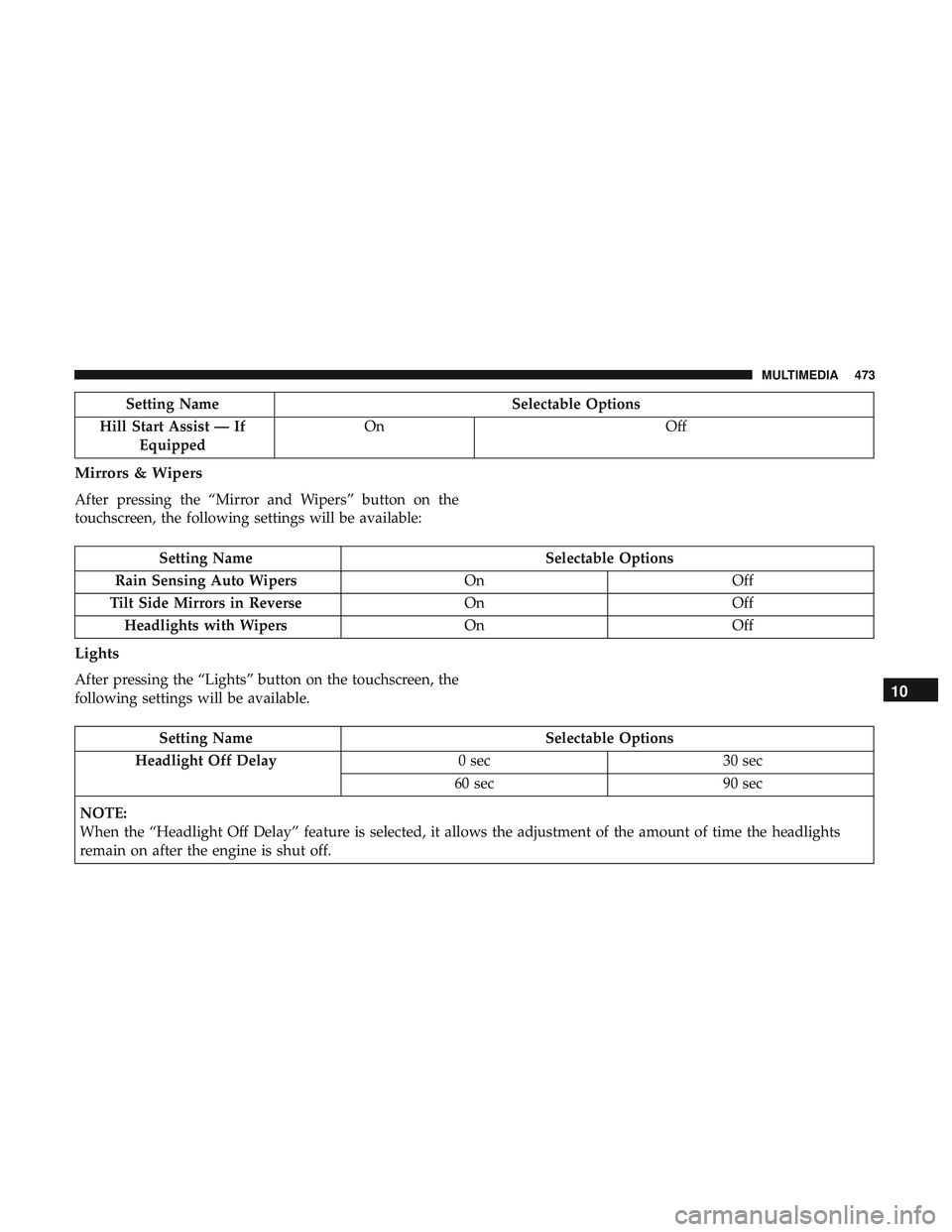
Setting NameSelectable Options
Hill Start Assist — If Equipped On
Off
Mirrors & Wipers
After pressing the “Mirror and Wipers” button on the
touchscreen, the following settings will be available:
Setting Name Selectable Options
Rain Sensing Auto Wipers OnOff
Tilt Side Mirrors in Reverse OnOff
Headlights with Wipers OnOff
Lights
After pressing the “Lights” button on the touchscreen, the
following settings will be available.
Setting Name Selectable Options
Headlight Off Delay 0 sec30 sec
60 sec 90 sec
NOTE:
When the “Headlight Off Delay” feature is selected, it allows the adjustment of the amount of time the headlights
remain on after the engine is shut off.
10
MULTIMEDIA 473
Page 476 of 568
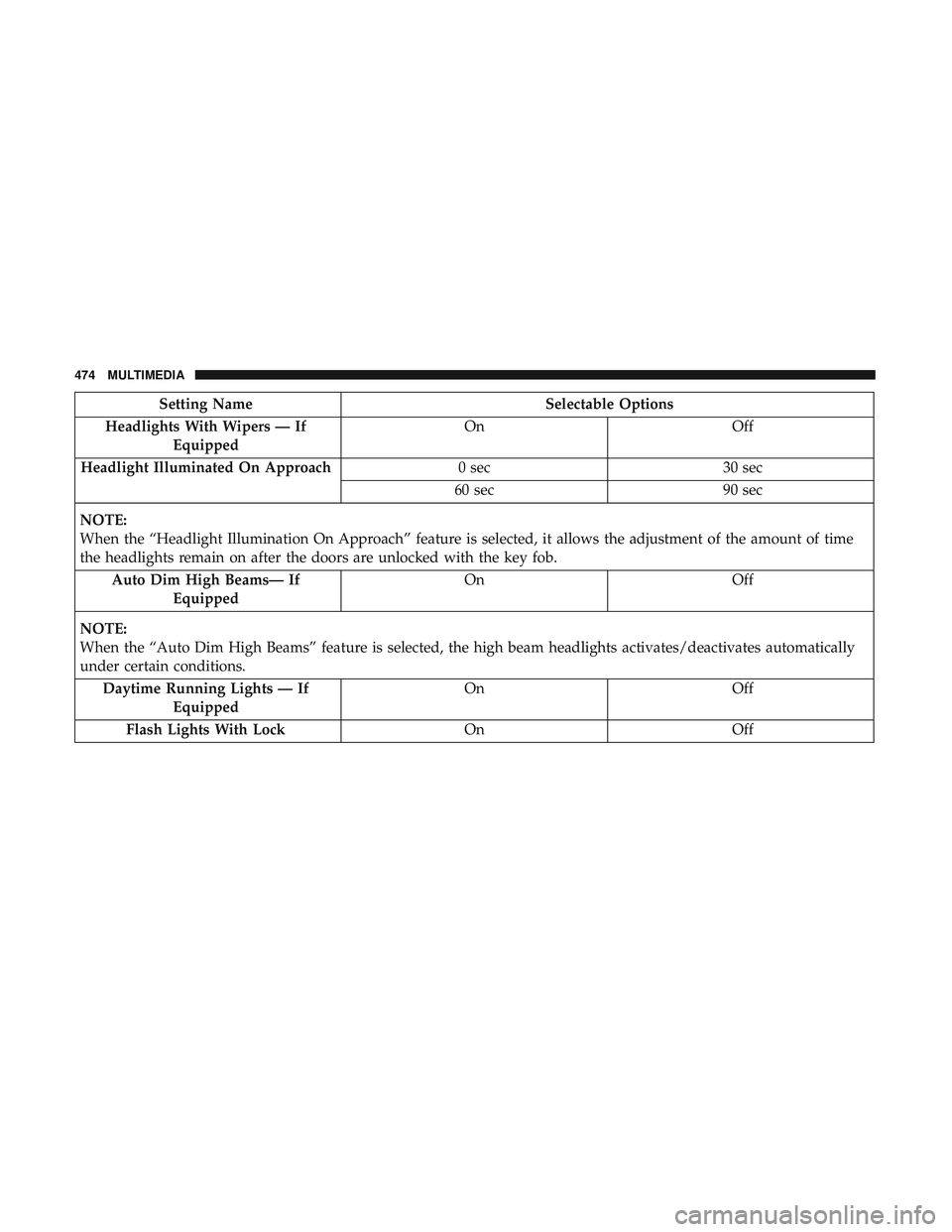
Setting NameSelectable Options
Headlights With Wipers — If Equipped On
Off
Headlight Illuminated On Approach 0 sec30 sec
60 sec 90 sec
NOTE:
When the “Headlight Illumination On Approach” feature is selected, it allows the adjustment of the amount of time
the headlights remain on after the doors are unlocked with the key fob. Auto Dim High Beams— If Equipped On
Off
NOTE:
When the “Auto Dim High Beams” feature is selected, the high beam headlights activates/deactivates automatically
under certain conditions. Daytime Running Lights — If Equipped On
Off
Flash Lights With Lock OnOff
474 MULTIMEDIA
Page 477 of 568
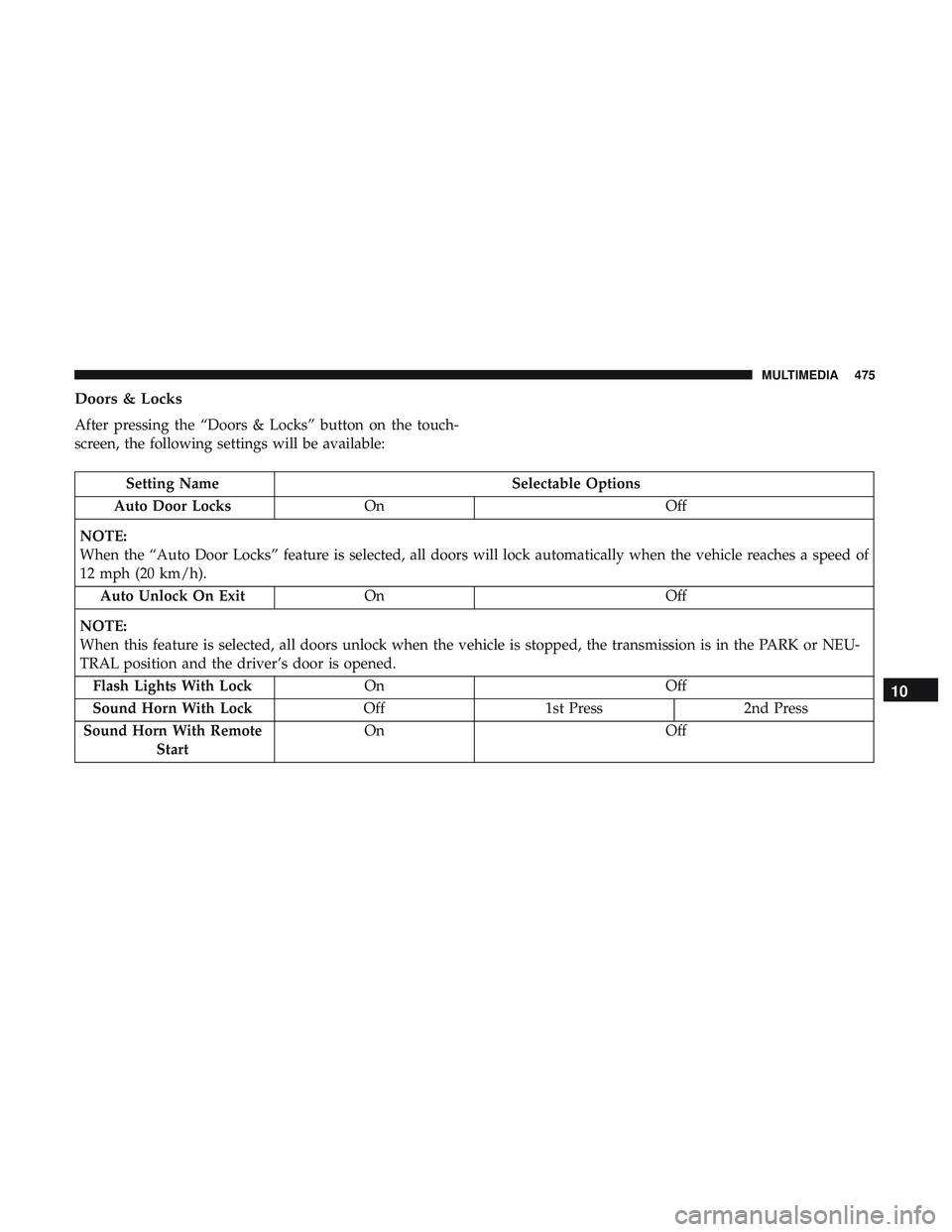
Doors & Locks
After pressing the “Doors & Locks” button on the touch-
screen, the following settings will be available:
Setting NameSelectable Options
Auto Door Locks On Off
NOTE:
When the “Auto Door Locks” feature is selected, all doors will lock automatically when the vehicle reaches a speed of
12 mph (20 km/h). Auto Unlock On Exit On Off
NOTE:
When this feature is selected, all doors unlock when the vehicle is stopped, the transmission is in the PARK or NEU-
TRAL position and the driver’s door is opened. Flash Lights With Lock On Off
Sound Horn With Lock Off1st Press 2nd Press
Sound Horn With Remote Start On
Off
10
MULTIMEDIA 475
Page 480 of 568
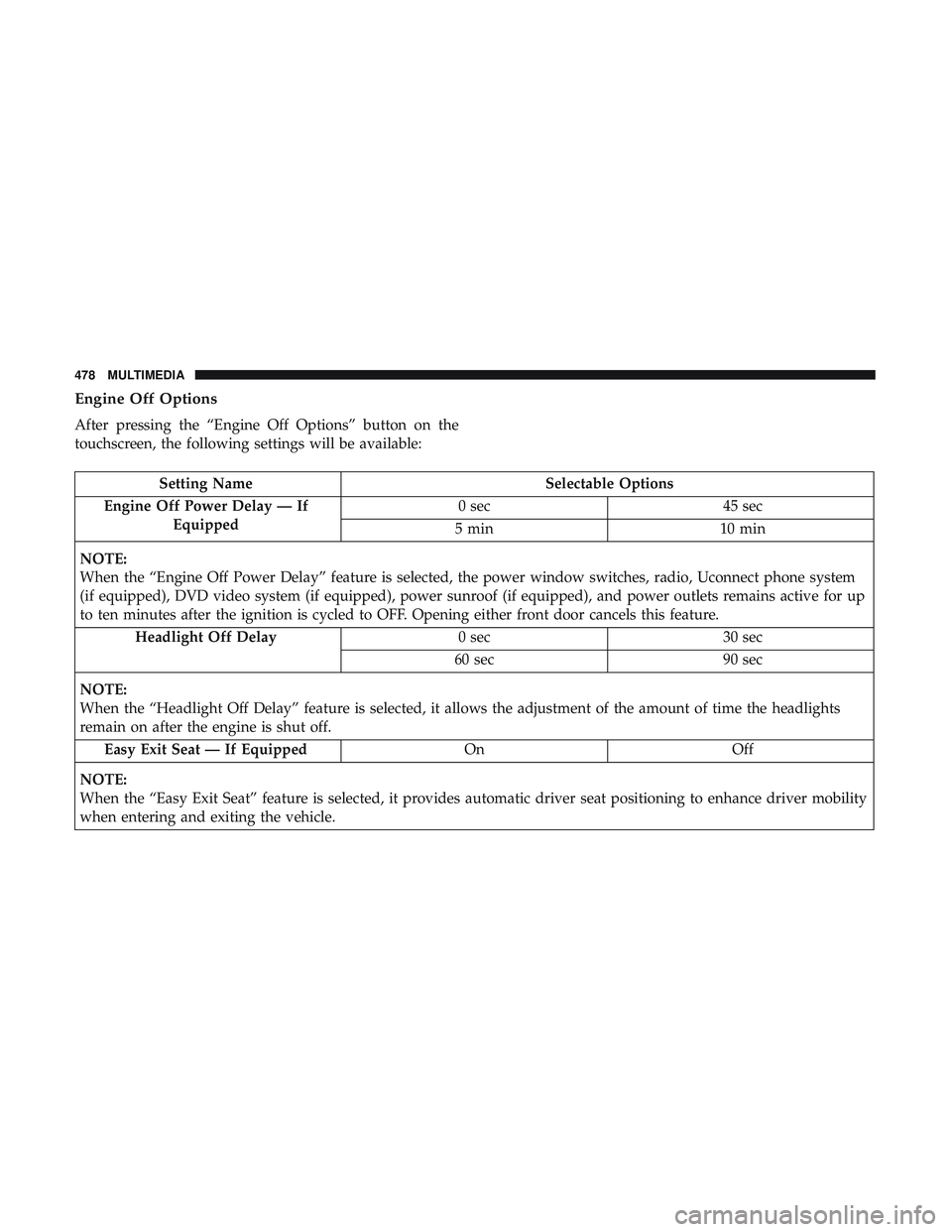
Engine Off Options
After pressing the “Engine Off Options” button on the
touchscreen, the following settings will be available:
Setting NameSelectable Options
Engine Off Power Delay — If Equipped 0 sec
45 sec
5 min 10 min
NOTE:
When the “Engine Off Power Delay” feature is selected, the power window switches, radio, Uconnect phone system
(if equipped), DVD video system (if equipped), power sunroof (if equipped), and power outlets remains active for up
to ten minutes after the ignition is cycled to OFF. Opening either front door cancels this feature. Headlight Off Delay 0 sec30 sec
60 sec 90 sec
NOTE:
When the “Headlight Off Delay” feature is selected, it allows the adjustment of the amount of time the headlights
remain on after the engine is shut off. Easy Exit Seat — If Equipped OnOff
NOTE:
When the “Easy Exit Seat” feature is selected, it provides automatic driver seat positioning to enhance driver mobility
when entering and exiting the vehicle.
478 MULTIMEDIA
Page 490 of 568
•Save
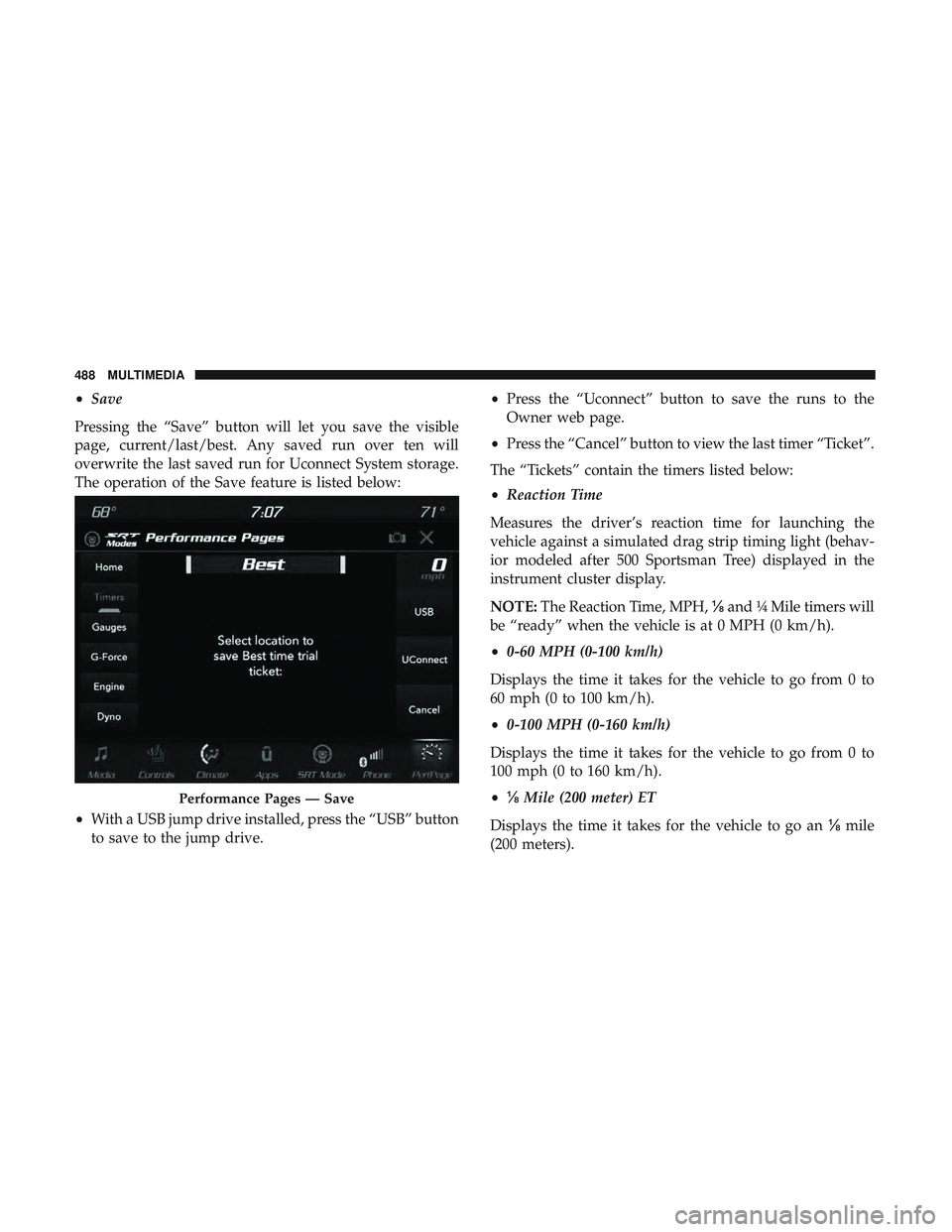
Pressing the “Save” button will let you save the visible
page, current/last/best. Any saved run over ten will
overwrite the last saved run for Uconnect System storage.
The operation of the Save feature is listed below:
• With a USB jump drive installed, press the “USB” button
to save to the jump drive. •
Press the “Uconnect” button to save the runs to the
Owner web page.
• Press the “Cancel” button to view the last timer “Ticket”.
The “Tickets” contain the timers listed below:
• Reaction Time
Measures the driver’s reaction time for launching the
vehicle against a simulated drag strip timing light (behav-
ior modeled after 500 Sportsman Tree) displayed in the
instrument cluster display.
NOTE: The Reaction Time, MPH, ⅛and ¼ Mile timers will
be “ready” when the vehicle is at 0 MPH (0 km/h).
• 0-60 MPH (0-100 km/h)
Displays the time it takes for the vehicle to go from 0 to
60 mph (0 to 100 km/h).
• 0-100 MPH (0-160 km/h)
Displays the time it takes for the vehicle to go from 0 to
100 mph (0 to 160 km/h).
• ⅛ Mile (200 meter) ET
Displays the time it takes for the vehicle to go an ⅛mile
(200 meters).
Performance Pages — Save
488 MULTIMEDIA
Page 494 of 568
•Steering Wheel Angle
Steering Wheel Angle utilizes the steering angle sensor to
measure the degree of the steering wheel relative to zero.
The zero degree measurement indicates a steering wheel
straight ahead position. When the steering angle value is
negative, a turn to the left is indicated, and when the
steering angle value is positive, a turn to the right is
indicated.
The friction circle display shows instantaneous G-Force as
a highlight and previous G-Force as dots within the circle.
The system records previous G-Force for three minutes. If
there are multiple samples at a given point, the color of the
dot will darken from blue to red. Vectors more frequent
will show in red; infrequent vectors will show in blue.Engine
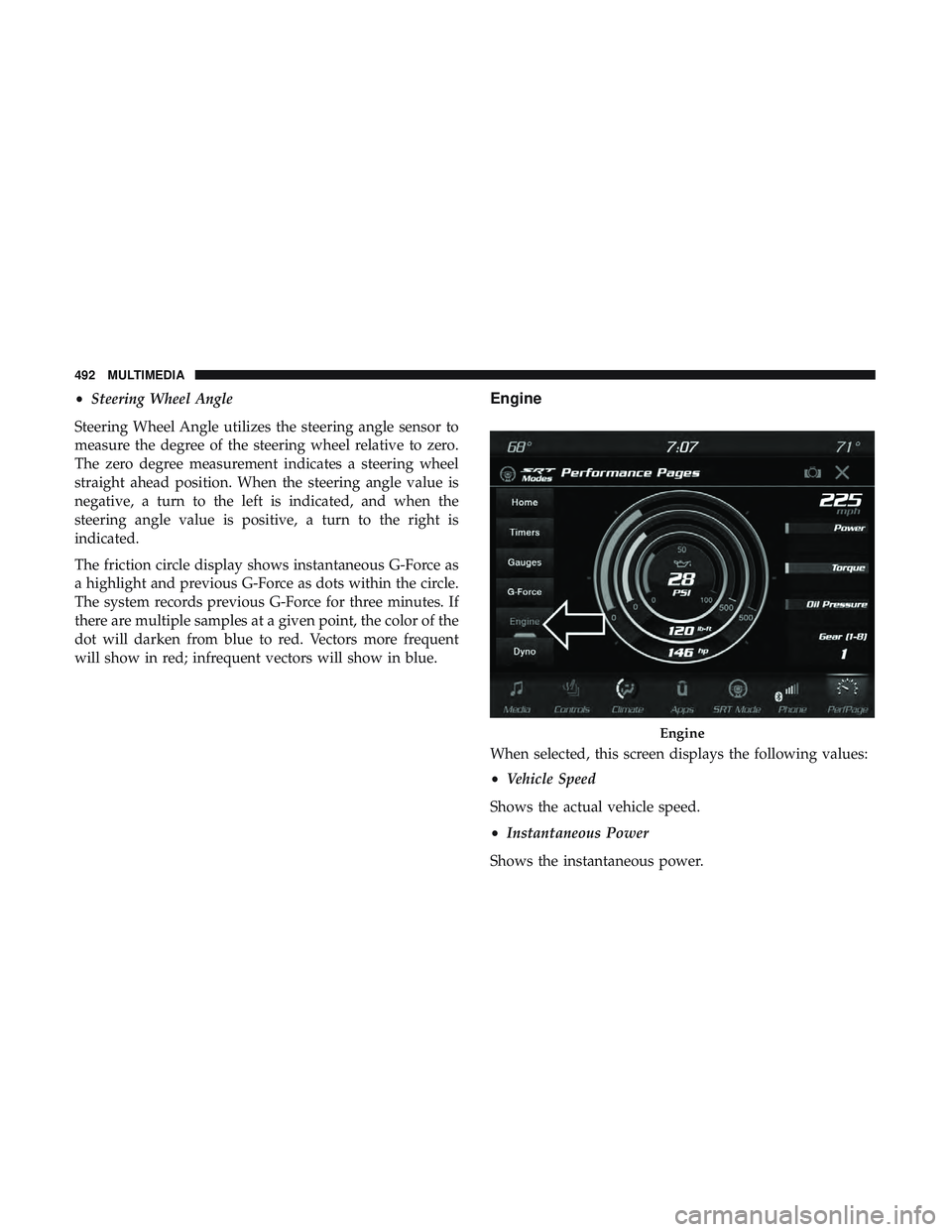
When selected, this screen displays the following values:
• Vehicle Speed
Shows the actual vehicle speed.
• Instantaneous Power
Shows the instantaneous power.
Engine
492 MULTIMEDIA
Page 497 of 568
The Drive Modes feature is controlled through the head unit
and may be accessed by performing any of the following:
•Selecting “Drive Modes” from the “Apps” menu.
• Selecting “Drive Modes” from within the Performance
Pages menu.
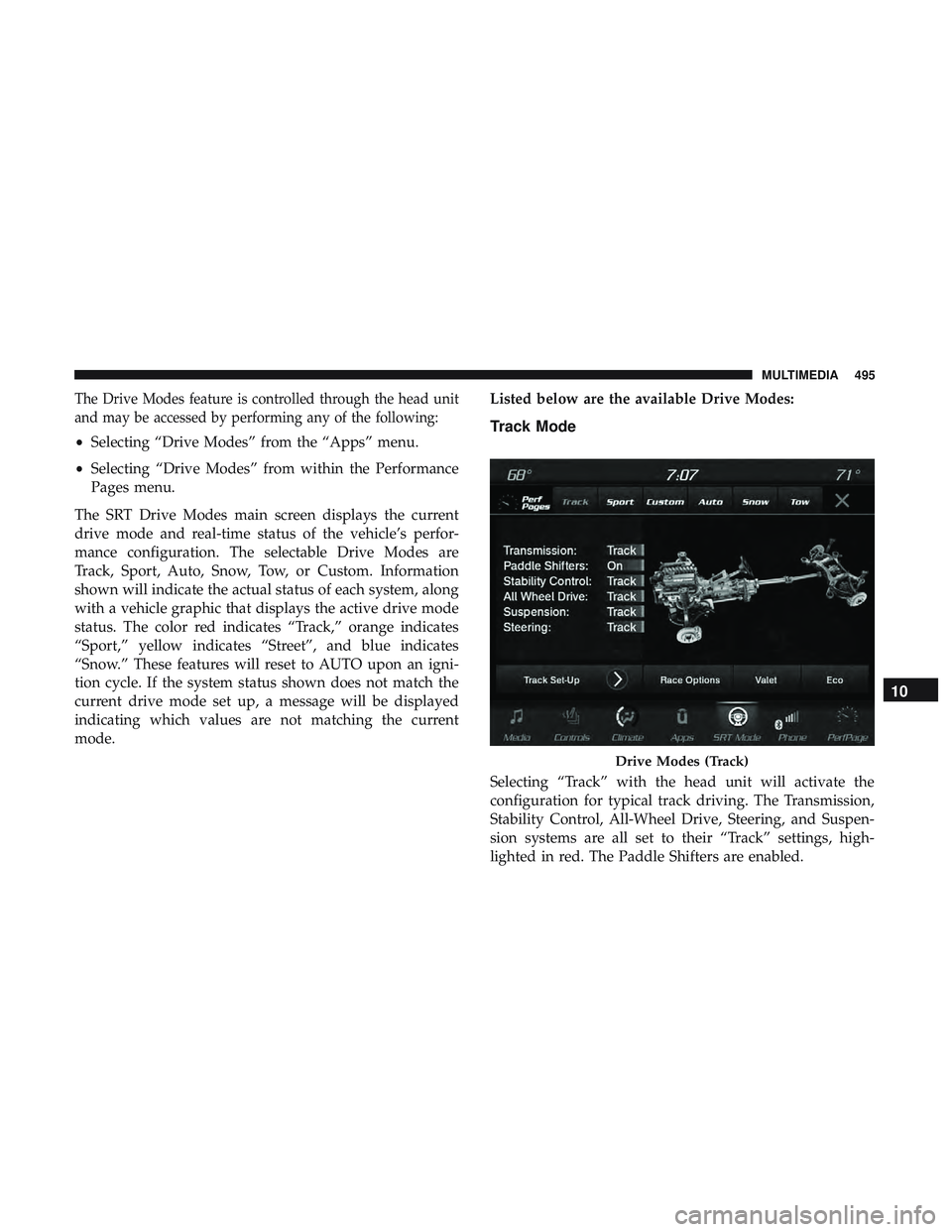
The SRT Drive Modes main screen displays the current
drive mode and real-time status of the vehicle’s perfor-
mance configuration. The selectable Drive Modes are
Track, Sport, Auto, Snow, Tow, or Custom. Information
shown will indicate the actual status of each system, along
with a vehicle graphic that displays the active drive mode
status. The color red indicates “Track,” orange indicates
“Sport,” yellow indicates “Street”, and blue indicates
“Snow.” These features will reset to AUTO upon an igni-
tion cycle. If the system status shown does not match the
current drive mode set up, a message will be displayed
indicating which values are not matching the current
mode. Listed below are the available Drive Modes:Track Mode
Selecting “Track” with the head unit will activate the
configuration for typical track driving. The Transmission,
Stability Control, All-Wheel Drive, Steering, and Suspen-
sion systems are all set to their “Track” settings, high-
lighted in red. The Paddle Shifters are enabled.
Drive Modes (Track)
10
MULTIMEDIA 495
Page 498 of 568
NOTE:Electronic Stability Control (ESC) Full-Off can be
activated by pushing and holding the ESC Off button on
the instrument panel switch bank for five seconds.
Sport Mode
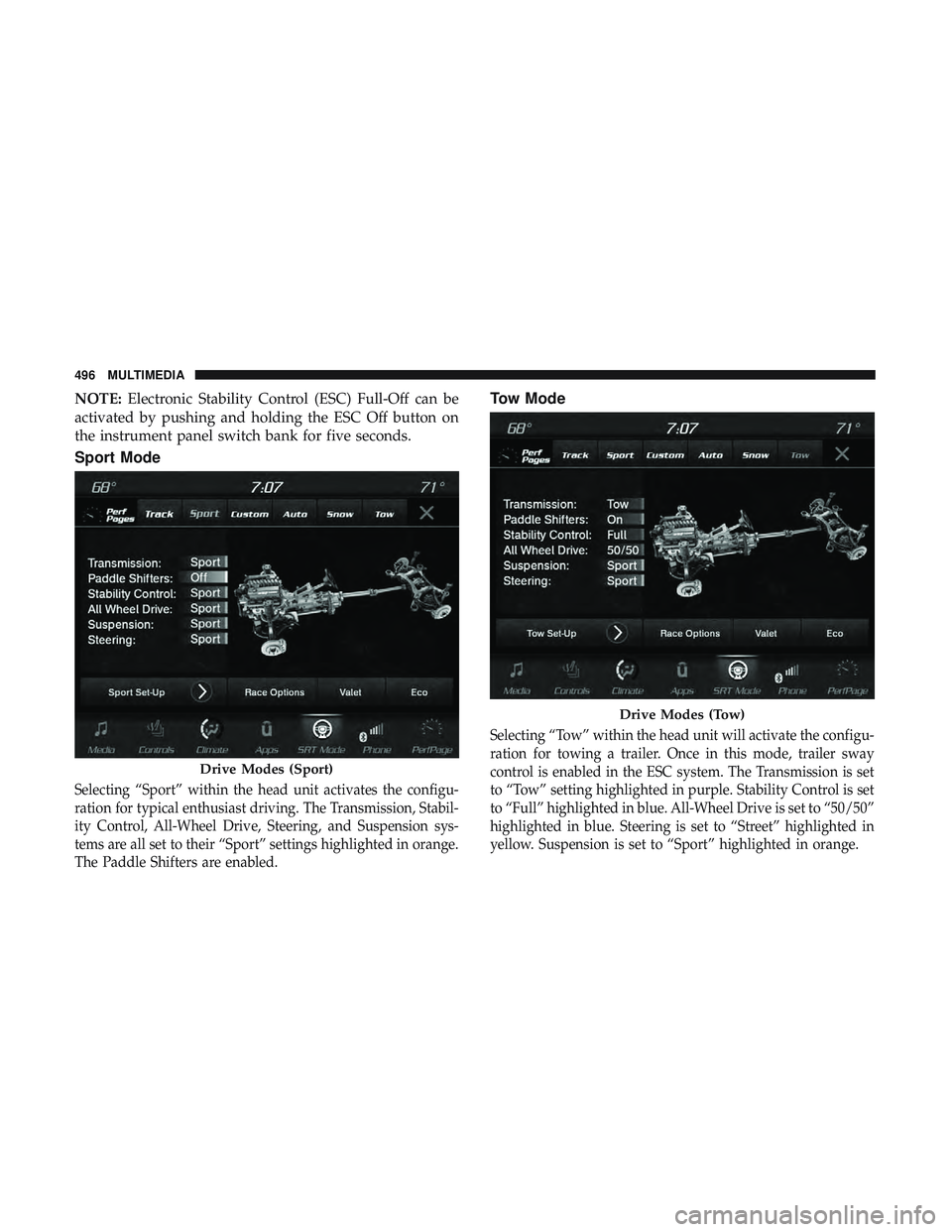
Selecting “Sport” within the head unit activates the configu-
ration for typical enthusiast driving. The Transmission, Stabil-
ity Control, All-Wheel Drive, Steering, and Suspension sys-
tems are all set to their “Sport” settings highlighted in orange.
The Paddle Shifters are enabled.
Tow Mode
Selecting “Tow” within the head unit will activate the configu-
ration for towing a trailer. Once in this mode, trailer sway
control is enabled in the ESC system. The Transmission is set
to “Tow” setting highlighted in purple. Stability Control is set
to “Full” highlighted in blue. All-Wheel Drive is set to “50/50”
highlighted in blue. Steering is set to “Street” highlighted in
yellow. Suspension is set to “Sport” highlighted in orange.
Drive Modes (Sport)
Drive Modes (Tow)
496 MULTIMEDIA
Page 499 of 568
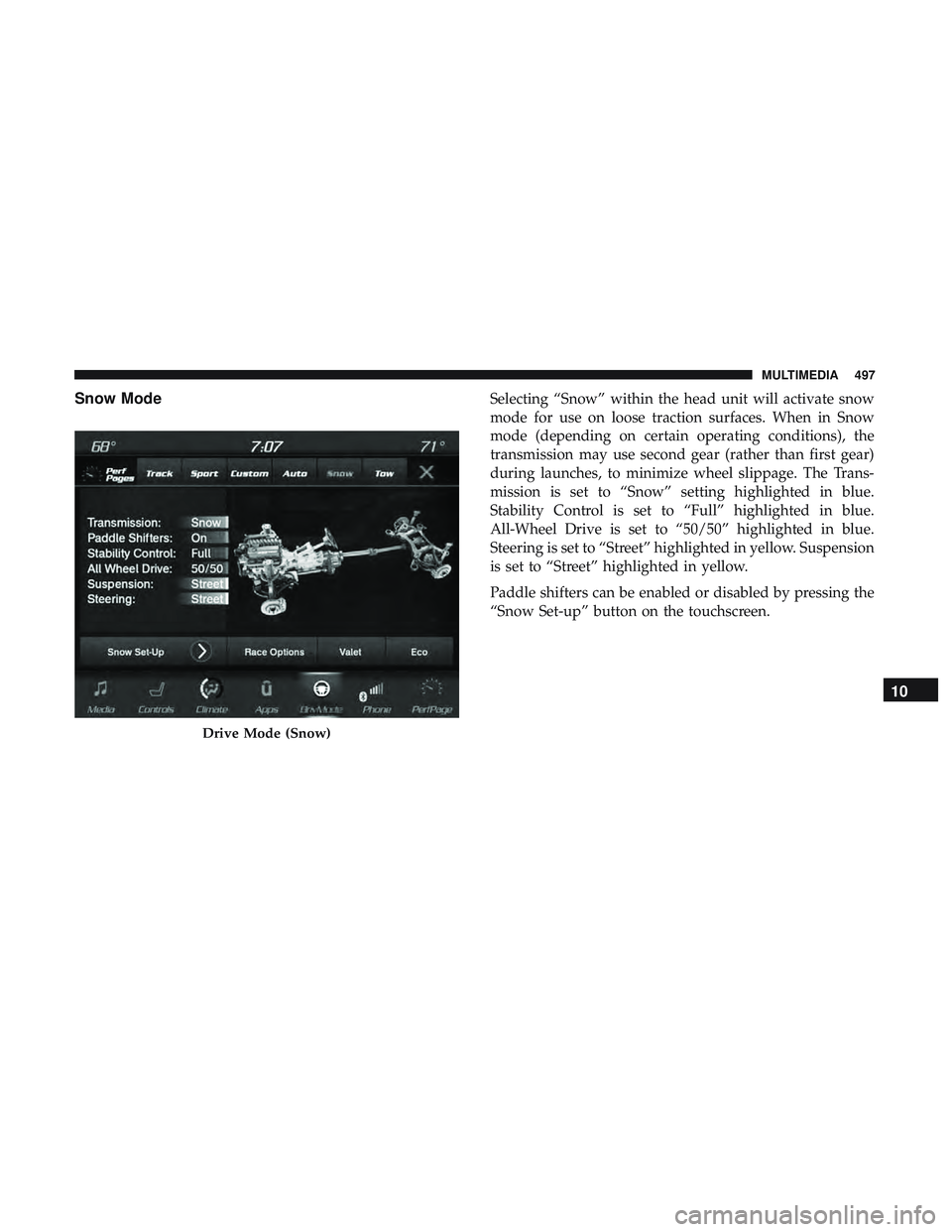
Snow ModeSelecting “Snow” within the head unit will activate snow
mode for use on loose traction surfaces. When in Snow
mode (depending on certain operating conditions), the
transmission may use second gear (rather than first gear)
during launches, to minimize wheel slippage. The Trans-
mission is set to “Snow” setting highlighted in blue.
Stability Control is set to “Full” highlighted in blue.
All-Wheel Drive is set to “50/50” highlighted in blue.
Steering is set to “Street” highlighted in yellow. Suspension
is set to “Street” highlighted in yellow.
Paddle shifters can be enabled or disabled by pressing the
“Snow Set-up” button on the touchscreen.
Drive Mode (Snow)
10
MULTIMEDIA 497
Page 500 of 568
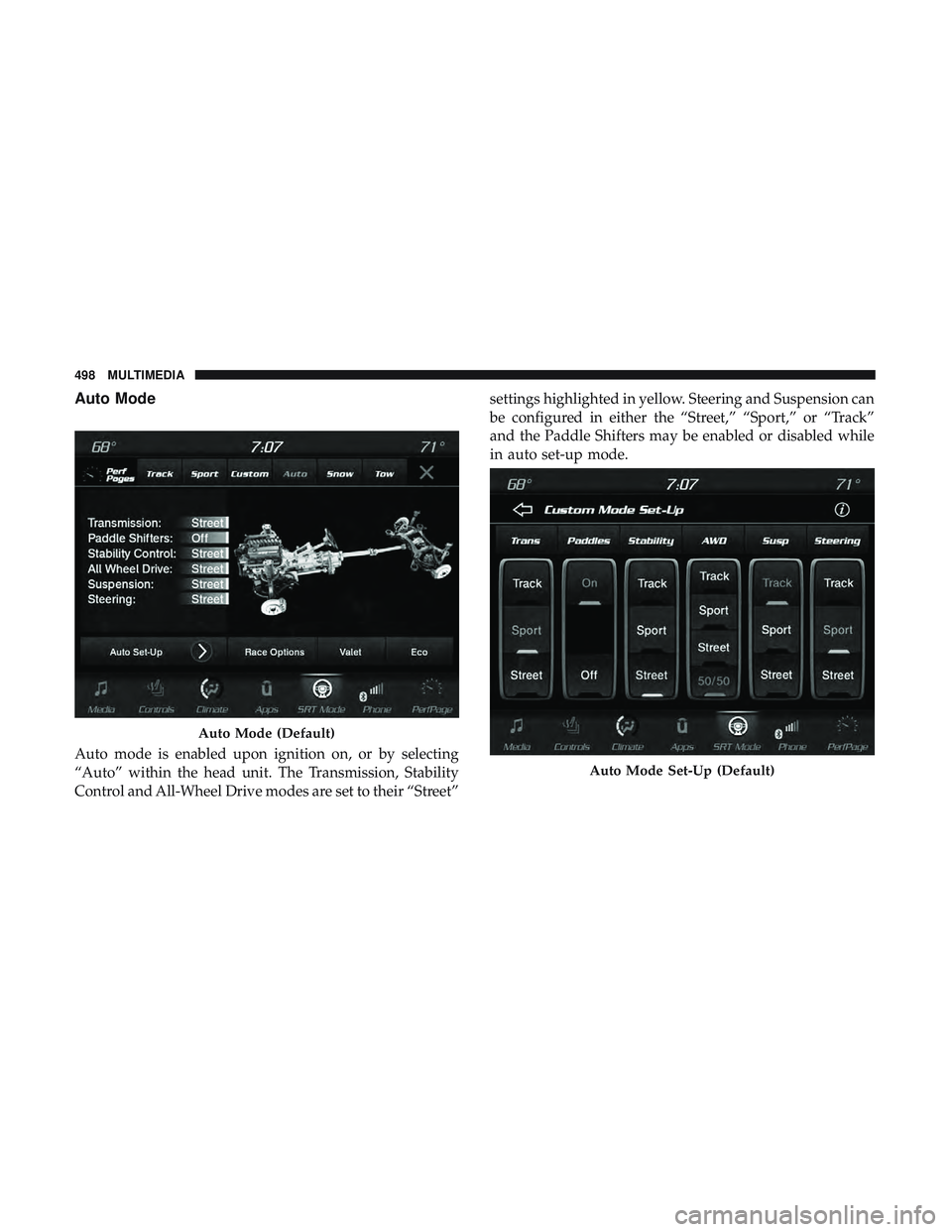
Auto Mode
Auto mode is enabled upon ignition on, or by selecting
“Auto” within the head unit. The Transmission, Stability
Control and All-Wheel Drive modes are set to their “Street”settings highlighted in yellow. Steering and Suspension can
be configured in either the “Street,” “Sport,” or “Track”
and the Paddle Shifters may be enabled or disabled while
in auto set-up mode.
Auto Mode (Default)
Auto Mode Set-Up (Default)
498 MULTIMEDIA