traction control DODGE DURANGO SRT 2018 User Guide
[x] Cancel search | Manufacturer: DODGE, Model Year: 2018, Model line: DURANGO SRT, Model: DODGE DURANGO SRT 2018Pages: 568, PDF Size: 6.54 MB
Page 291 of 568
To Set A Desired ACC Speed
When the vehicle reaches the speed desired, push the SET
(+)button or the SET (-)button and release. The instrument
cluster display will display the set speed.
If the system is set when the vehicle speed is below 20 mph
(32 km/h), the set speed shall be defaulted to 20 mph
(32 km/h). If the system is set when the vehicle speed is
above 20 mph (32 km/h), the set speed shall be the current
speed of the vehicle.
NOTE: ACC cannot be set if there is a stationary vehicle in
front of your vehicle in close proximity.
Remove your foot from the accelerator pedal. If you do not,
the vehicle may continue to accelerate beyond the set
speed. If this occurs:
• The message “DRIVER OVERRIDE” will display in the
instrument cluster display.
• The system will not be controlling the distance between
your vehicle and the vehicle ahead. The vehicle speed
will only be determined by the position of the accelera-
tor pedal.
To Cancel
The following conditions cancel the system:
•The brake pedal is applied.
• The CANC button is pushed.
• An Anti-Lock Brake System (ABS) event occurs.
• The gear selector is removed from the DRIVE position.
• The Electronic Stability Control/Traction Control Sys-
tem (ESC/TCS) activates.
• The vehicle parking brake is applied.
• Driver seatbelt is unbuckled at low speeds.
• Driver door is opened at low speeds.
• The driver switches ESC to full-off mode.
• The braking temperature exceeds normal range (over-
heated).
To Turn Off
The system will turn off and clear the set speed in memory
if:
•The Adaptive Cruise Control (ACC) on/off button is
pushed.
6
STARTING AND OPERATING 289
Page 306 of 568
Metric Speed (km/h)
•Pushing the SET (+)button once will result in a 1 km/h
increase in set speed. Each subsequent tap of the button
results in an increase of 1 km/h.
• If the button is continually pushed, the set speed will
continue to increase in 10 km/h increments until the
button is released. The increase in set speed is reflected
in the instrument cluster display.
To Decrease Speed
When the Normal (Fixed Speed) Cruise Control is set, you
can decrease speed by pushing the SET (-)button.
The driver’s preferred units can be selected through the
instrument cluster display. Refer to “Getting To Know Your
Instrument Panel” for more information. The speed decrement
shown is dependant on the speed of U.S. (mph) or Metric
(km/h) units:
U.S. Speed (mph)
•Pushing the SET (-)button once will result in a 1 mph
decrease in set speed. Each subsequent tap of the button
results in a decrease of 1 mph. •
If the button is continually pushed, the set speed will
continue to decrease in 5 mph decrements until the
button is released. The decrease in set speed is reflected
in the instrument cluster display.
Metric Speed (km/h)
• Pushing the SET (-)button once will result in a 1 km/h
decrease in set speed. Each subsequent tap of the button
results in a decrease of 1 km/h.
• If the button is continually pushed, the set speed will
continue to decrease in 10 km/h decrements until the
button is released. The decrease in set speed is reflected
in the instrument cluster display.
To Cancel
The following conditions will cancel the Normal (Fixed
Speed) Cruise Control without clearing the memory:
•The brake pedal is applied.
• The CANC button is pushed.
• The Electronic Stability Control/Traction Control Sys-
tem (ESC/TCS) activates.
304 STARTING AND OPERATING
Page 332 of 568
Changing LaneSense Status
The LaneSense system has settings to adjust the intensity of
the torque warning and the warning zone sensitivity
(early/late) that you can configure through the Uconnect
system screen. Refer to “Uconnect Settings” in “Multime-
dia” for further information.
NOTE:
•When enabled the system operates above 37 mph
(60 km/h) and below 112 mph (180 km/h).
• Use of the turn signal suppresses the warnings.
• The system will not apply torque to the steering wheel
whenever a safety system engages (anti-lock brakes,
traction control system, electronic stability control, for-
ward collision warning, etc.).
PARKVIEW REAR BACK UP CAMERA
Your vehicle is equipped with the ParkView Rear Back Up
Camera that allows you to see an on-screen image of the
rear surroundings of your vehicle whenever the gear
selector is put into REVERSE. The image will be displayed
on the Navigation/Multimedia radio display screen along with a caution note to “check entire surroundings” across
the top of the screen. After five seconds this note will
disappear. The ParkView camera is located on the rear of
the vehicle above the rear license plate.
When the vehicle is shifted out of REVERSE (with camera
delay turned off), the rear camera mode is exited and the
navigation or audio screen appears again.
When the vehicle is shifted out of REVERSE (with camera
delay turned on), the rear view image with dynamic grid
lines will be displayed for up to 10 seconds after shifting
out of REVERSE unless the forward vehicle speed exceeds
8 mph (13 km/h), the transmission is shifted into PARK or
the ignition is switched to the OFF position or can also exit
out from the image defeat [X] button.
NOTE:
The ParkView Rear Back Up Camera has program-
mable modes of operation that may be selected through the
Uconnect System. Refer to “Uconnect Settings” in “Multi-
media” for further information.
When enabled, active guide lines are overlaid on the image
to illustrate the width of the vehicle and its projected
backup path based on the steering wheel position.
330 STARTING AND OPERATING
Page 349 of 568
Highway Driving
•Reduce speed.
• Temporarily turn off air conditioning.
RECREATIONAL TOWING
Recreational towing is not allowed.
CAUTION!
Towing this vehicle with any of its wheels on the
ground can cause severe transmission and/or transfer
case damage. Damage from improper towing is not
covered under the New Vehicle Limited Warranty.
NOTE: This vehicle may be towed on a flatbed or vehicle
trailer provided all four wheels are OFFthe ground.
DRIVING TIPS
Driving On Slippery Surfaces
Information in this section will aid in safe controlled
launches in adverse conditions.
Acceleration
Rapid acceleration on snow covered, wet, or other slippery
surfaces may cause the driving wheels to pull erratically to
the right or left. This phenomenon occurs when there is a
difference in the surface traction under the front (driving)
wheels.
WARNING!
Rapid acceleration on slippery surfaces is dangerous.
Unequal traction can cause sudden pulling of the front
wheels. You could lose control of the vehicle and
possibly have a collision. Accelerate slowly and care-
fully whenever there is likely to be poor traction (ice,
snow, wet, mud, loose sand, etc.).
6
STARTING AND OPERATING 347
Page 350 of 568
Traction
When driving on wet or slushy roads, it is possible for a
wedge of water to build up between the tire and road
surface. This is hydroplaning and may cause partial or
complete loss of vehicle control and stopping ability. To
reduce this possibility, the following precautions should be
observed:
•Slow down during rainstorms or when the roads are
slushy.
• Slow down if the road has standing water or puddles.
• Replace the tires when tread wear indicators first be-
come visible.
• Keep tires properly inflated.
• Maintain sufficient distance between your vehicle and
the vehicle in front of you to avoid a collision in a
sudden stop.
Driving Through Water
Driving through water more than a few inches/centimeters
deep will require extra caution to ensure safety and pre-
vent damage to your vehicle.
Flowing/Rising Water
WARNING!
Do not drive on or across a road or path where water is
flowing and/or rising (as in storm run-off). Flowing
water can wear away the road or path’s surface and
cause your vehicle to sink into deeper water. Further-
more, flowing and/or rising water can carry your ve-
hicle away swiftly. Failure to follow this warning may
result in injuries that are serious or fatal to you, your
passengers, and others around you.
Shallow Standing Water
Although your vehicle is capable of driving through shal-
low standing water, consider the following Cautions and
Warnings before doing so.
WARNING!
•Driving through standing water limits your vehicle’s
traction capabilities. Do not exceed 5 mph (8 km/h)
when driving through standing water.
(Continued)
348 STARTING AND OPERATING
Page 438 of 568
WARNING!(Continued)
•Failure to equip your vehicle with tires having ad-
equate speed capability can result in sudden tire
failure and loss of vehicle control.
CAUTION!
Replacing original tires with tires of a different size
may result in false speedometer and odometer read-
ings.
Tire Types
All Season Tires — If Equipped
All Season tires provide traction for all seasons (Spring,
Summer, Fall, and Winter). Traction levels may vary be-
tween different all season tires. All season tires can be
identified by the M+S, M&S, M/S or MS designation on the
tire sidewall. Use all season tires only in sets of four; failure
to do so may adversely affect the safety and handling of
your vehicle.
Summer Or Three Season Tires — If Equipped
Summer tires provide traction in both wet and dry condi-
tions, and are not intended to be driven in snow or on ice.
If your vehicle is equipped with Summer tires, be aware
these tires are not designed for Winter or cold driving
conditions. Install Winter tires on your vehicle when am-
bient temperatures are less than 40°F (5°C) or if roads are
covered with ice or snow. For more information, contact an
authorized dealer.
Summer tires do not contain the all season designation or
mountain/snowflake symbol on the tire sidewall. Use
Summer tires only in sets of four; failure to do so may
adversely affect the safety and handling of your vehicle.
WARNING!
Do not use Summer tires in snow/ice conditions. You
could lose vehicle control, resulting in severe injury or
death. Driving too fast for conditions also creates the
possibility of loss of vehicle control.
436 SERVICING AND MAINTENANCE
Page 444 of 568
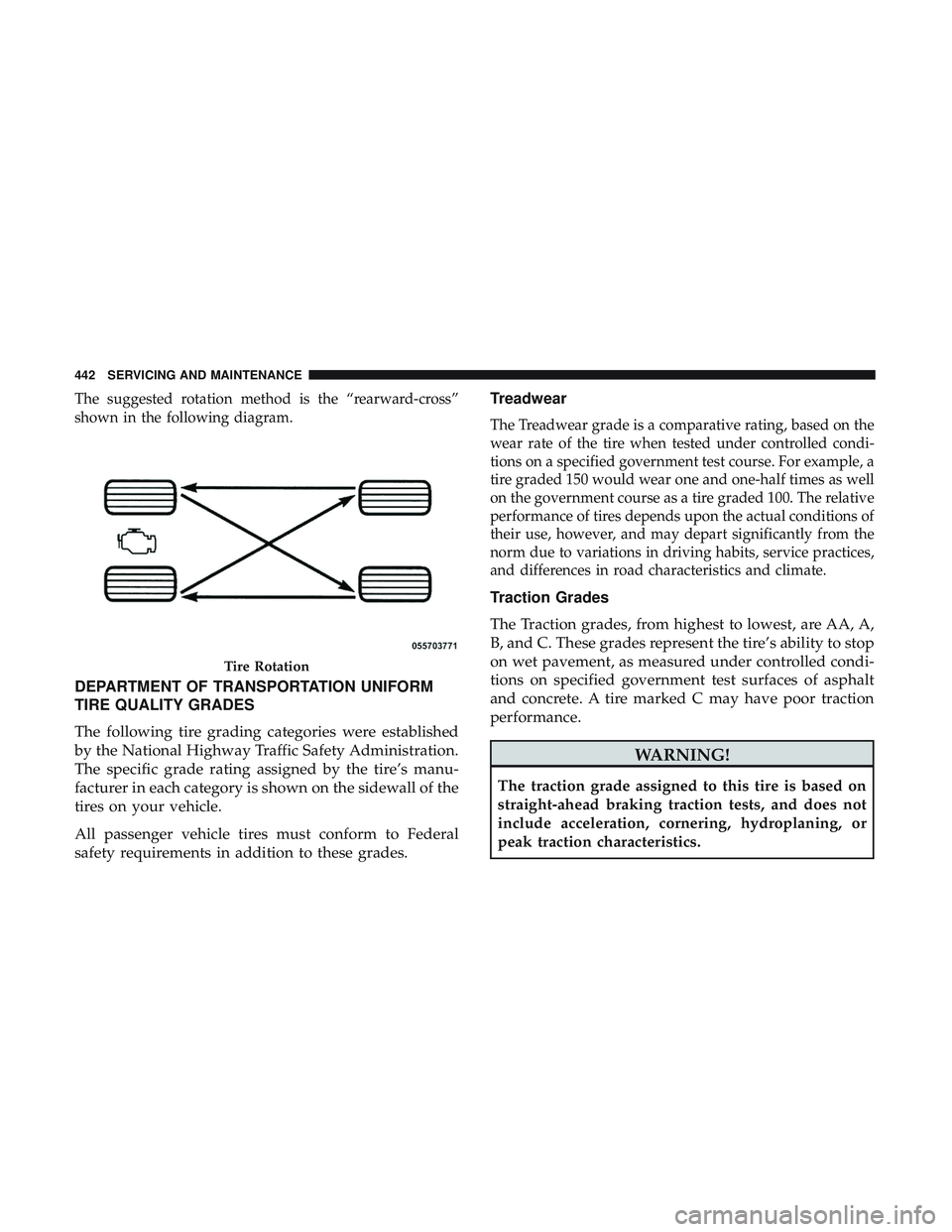
The suggested rotation method is the “rearward-cross”
shown in the following diagram.
DEPARTMENT OF TRANSPORTATION UNIFORM
TIRE QUALITY GRADES
The following tire grading categories were established
by the National Highway Traffic Safety Administration.
The specific grade rating assigned by the tire’s manu-
facturer in each category is shown on the sidewall of the
tires on your vehicle.
All passenger vehicle tires must conform to Federal
safety requirements in addition to these grades.Treadwear
The Treadwear grade is a comparative rating, based on the
wear rate of the tire when tested under controlled condi-
tions on a specified government test course. For example, a
tire graded 150 would wear one and one-half times as well
on the government course as a tire graded 100. The relative
performance of tires depends upon the actual conditions of
their use, however, and may depart significantly from the
norm due to variations in driving habits, service practices,
and differences in road characteristics and climate.
Traction Grades
The Traction grades, from highest to lowest, are AA, A,
B, and C. These grades represent the tire’s ability to stop
on wet pavement, as measured under controlled condi-
tions on specified government test surfaces of asphalt
and concrete. A tire marked C may have poor traction
performance.
WARNING!
The traction grade assigned to this tire is based on
straight-ahead braking traction tests, and does not
include acceleration, cornering, hydroplaning, or
peak traction characteristics.
Tire Rotation
442 SERVICING AND MAINTENANCE
Page 499 of 568
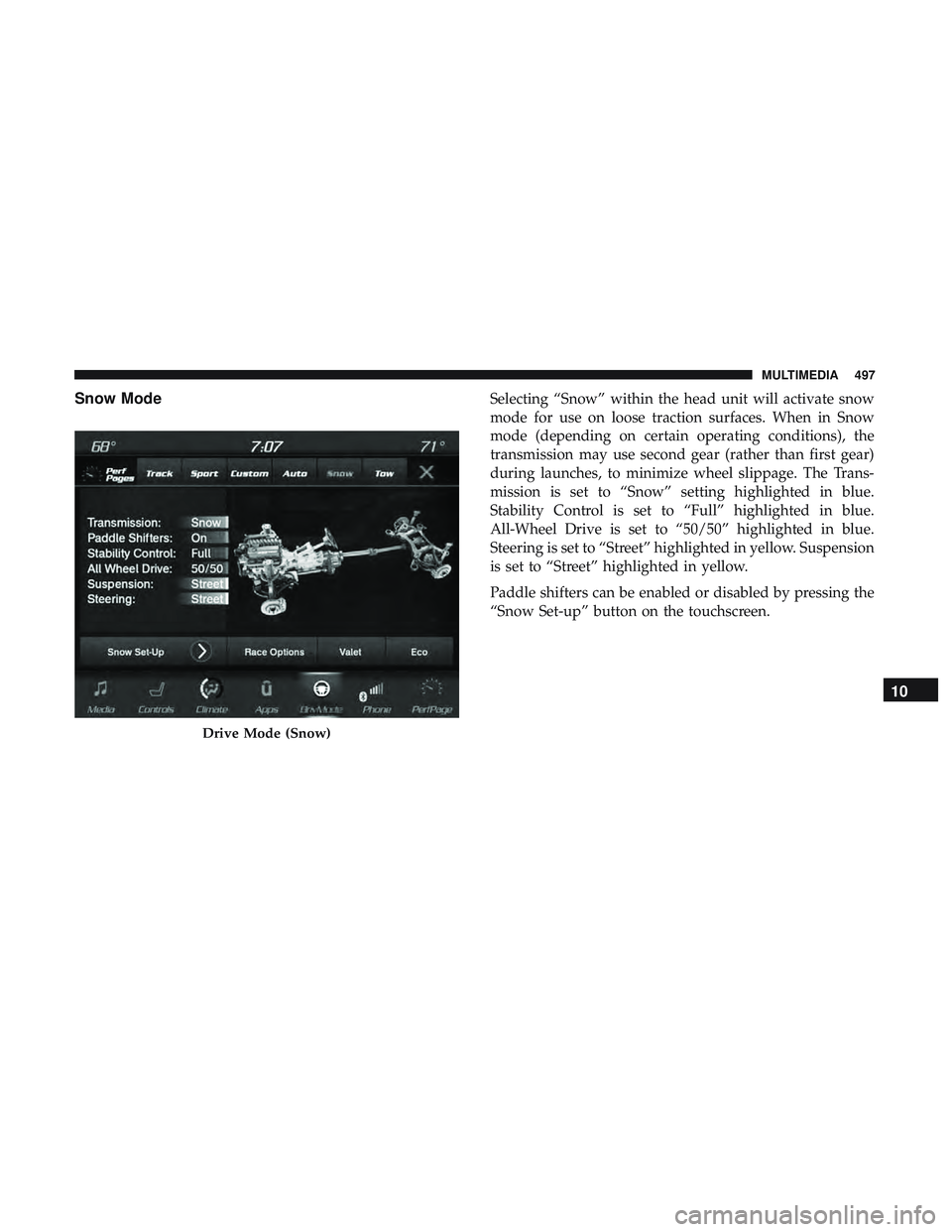
Snow ModeSelecting “Snow” within the head unit will activate snow
mode for use on loose traction surfaces. When in Snow
mode (depending on certain operating conditions), the
transmission may use second gear (rather than first gear)
during launches, to minimize wheel slippage. The Trans-
mission is set to “Snow” setting highlighted in blue.
Stability Control is set to “Full” highlighted in blue.
All-Wheel Drive is set to “50/50” highlighted in blue.
Steering is set to “Street” highlighted in yellow. Suspension
is set to “Street” highlighted in yellow.
Paddle shifters can be enabled or disabled by pressing the
“Snow Set-up” button on the touchscreen.
Drive Mode (Snow)
10
MULTIMEDIA 497
Page 559 of 568
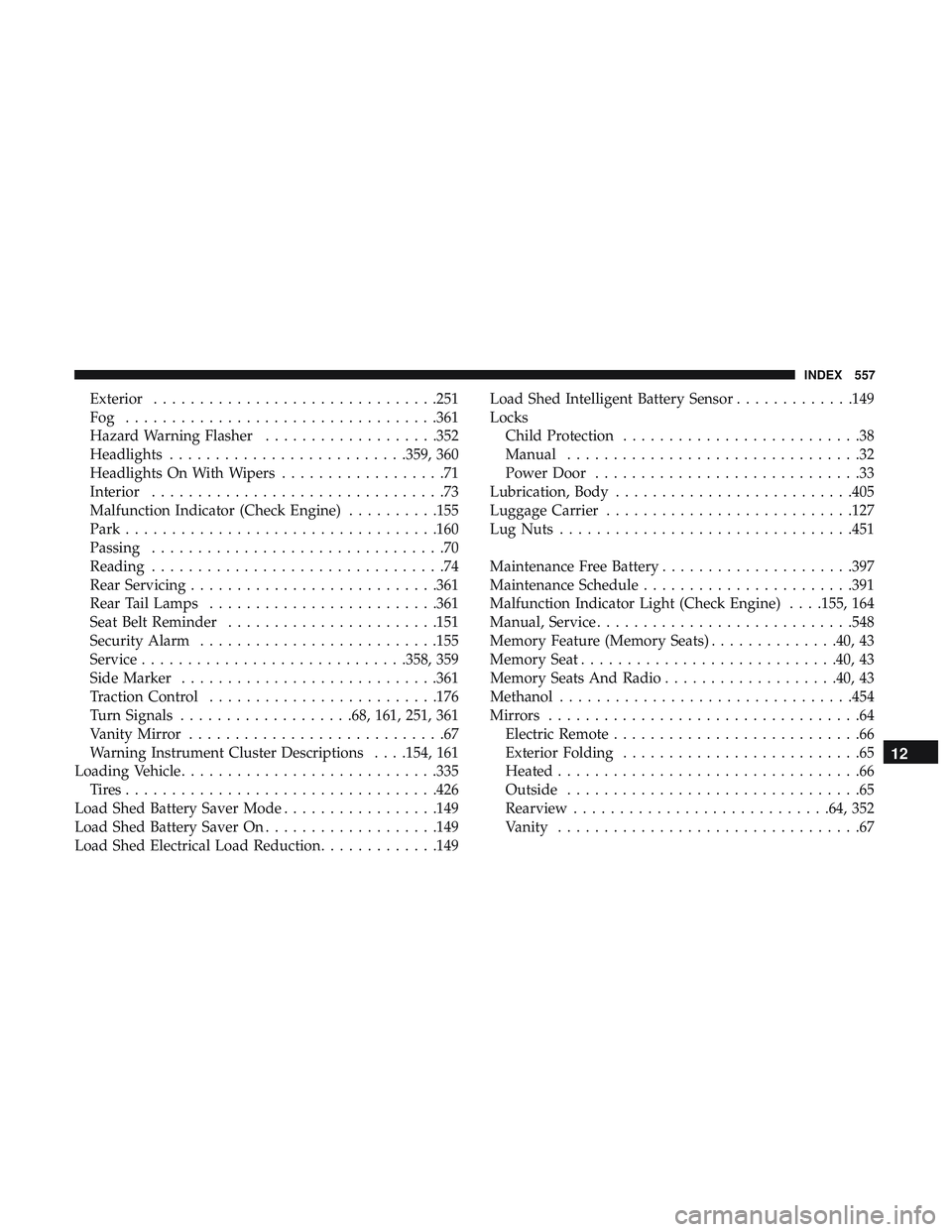
Exterior...............................251
Fog ..................................361
Hazard Warning Flasher ...................352
Headlights ..........................359, 360
Headlights On With Wipers ..................71
Interior ................................73
Malfunction Indicator (Check Engine) ..........155
Park ................................. .160
Passing ................................70
Reading ................................74
Rear Servicing .......................... .361
Rear Tail Lamps ........................ .361
Seat Belt Reminder .......................151
Security Alarm ..........................155
Service ............................ .358, 359
Side Marker ............................361
Traction Control ........................ .176
Turn Signals ...................68, 161, 251, 361
Vanity Mirror ............................67
Warning Instrument Cluster Descriptions . . . .154, 161
Loading Vehicle ............................335
Tires................................. .426
Load Shed Battery Saver Mode .................149
Load Shed Battery Saver On ...................149
Load Shed Electrical Load Reduction .............149Load Shed Intelligent Battery Sensor
.............149
Locks Child Protection ..........................38
Manual ................................32
Power Door .............................33
Lubrication, Body ..........................405
Luggage Carrier .......................... .127
Lug Nuts ............................... .451
Maintenance Free Battery .....................397
Maintenance Schedule .......................391
Malfunction Indicator Light (Check Engine) . . . .155, 164
Manual, Service ............................548
Memory Feature (Memory Seats) ..............40, 43
Memory Seat ............................40, 43
Memory
Seats And Radio ...................40, 43
Methanol ............................... .454
Mirrors ..................................64
Electric Remote ...........................66
Exterior Folding ..........................65
Heated .................................66
Outside ................................65
Rearview ............................64, 352
Vanity .................................67
12
INDEX 557
Page 564 of 568
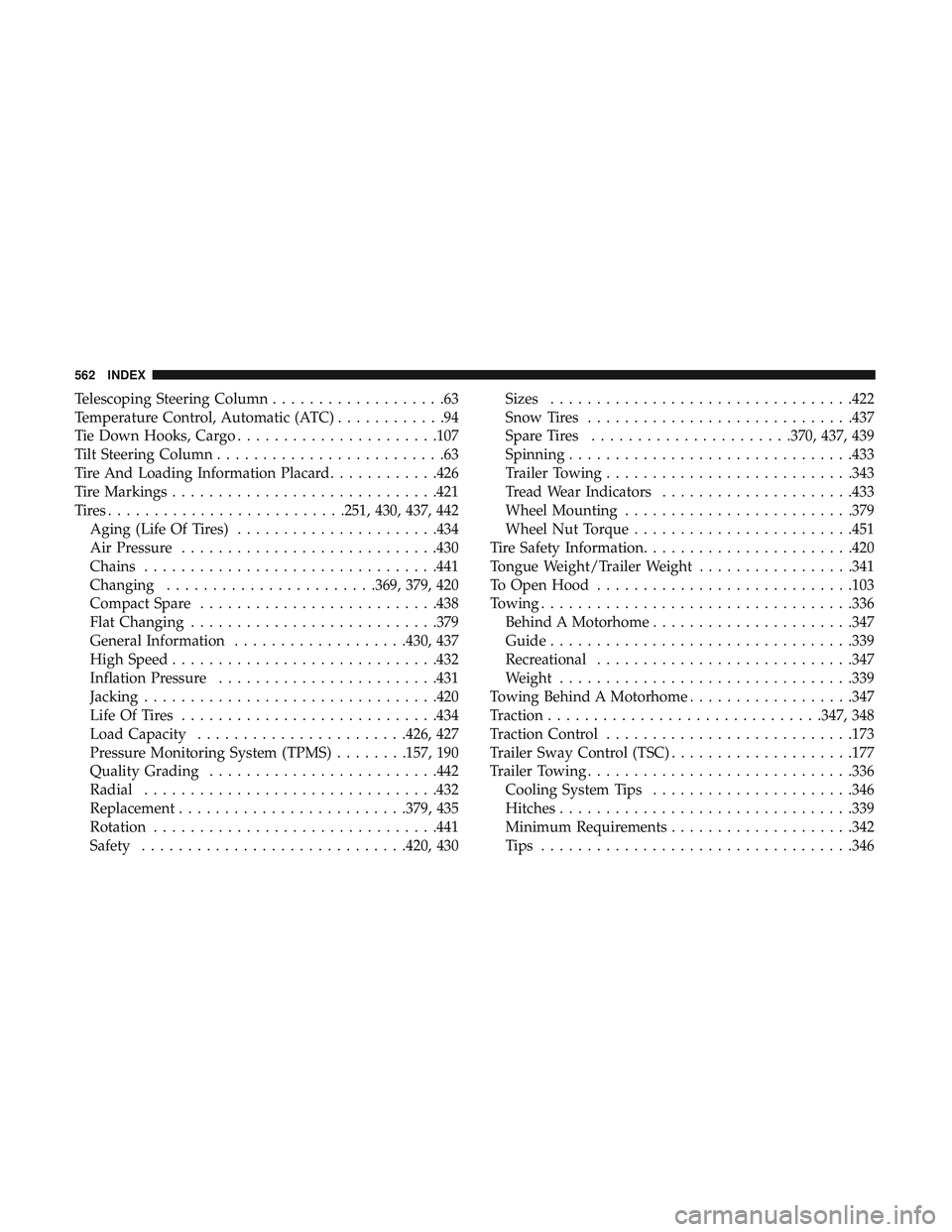
Telescoping Steering Column...................63
Temperature Control, Automatic (ATC) ............94
Tie Down Hooks, Cargo ..................... .107
Tilt Steering Column .........................63
Tire And Loading Information Placard ............426
Tire Markings ............................ .421
Tires......................... .251, 430, 437, 442
Aging (Life Of Tires) ..................... .434
Air Pressure ............................430
Chains ............................... .441
Changing .......................369, 379, 420
Compact Spare ..........................438
Flat Changing .......................... .379
General Information ...................430, 437
High Speed ............................ .432
Inflation Pressure ........................431
Jacking ............................... .420
Life Of Tires ............................434
Load Capacity .......................426, 427
Pressure Monitoring System (TPMS) ........157, 190
Quality Grading ........................ .442
Radial ............................... .432
Replacement ........................ .379, 435
Rotation ...............................441
Safety ............................ .420, 430Sizes
.................................422
Snow Tires ............................ .437
Spare Tires ..................... .370, 437, 439
Spinning ...............................433
Trailer Towing .......................... .343
Tread Wear Indicators .....................433
Wheel Mounting ........................ .379
Wheel Nut Torque ........................451
Tire Safety Information .......................420
Tongue Weight/Trailer Weight .................341
To Open Hood ............................103
T owing ................................. .336
Behind
A Motorhome ..................... .347
Guide .................................339
Recreational ............................347
Weight ............................... .339
Towing Behind A Motorhome ..................347
Traction ............................. .347, 348
Traction Control .......................... .173
Trailer Sway Control (TSC) ....................177
Trailer Towing ............................ .336
Cooling System Tips ..................... .346
Hitches ............................... .339
Minimum Requirements ....................342
Tips ................................. .346
562 INDEX