window DODGE DURANGO SRT 2018 User Guide
[x] Cancel search | Manufacturer: DODGE, Model Year: 2018, Model line: DURANGO SRT, Model: DODGE DURANGO SRT 2018Pages: 568, PDF Size: 6.54 MB
Page 69 of 568
NOTE:The Tilt Side Mirrors In Reverse feature is not
turned on when delivered from the factory. The Tilt Side
Mirrors In Reverse feature can be turned on and off using
the Uconnect System. Refer to “Uconnect Settings” in
“Multimedia” for further information.
Illuminated Vanity Mirrors
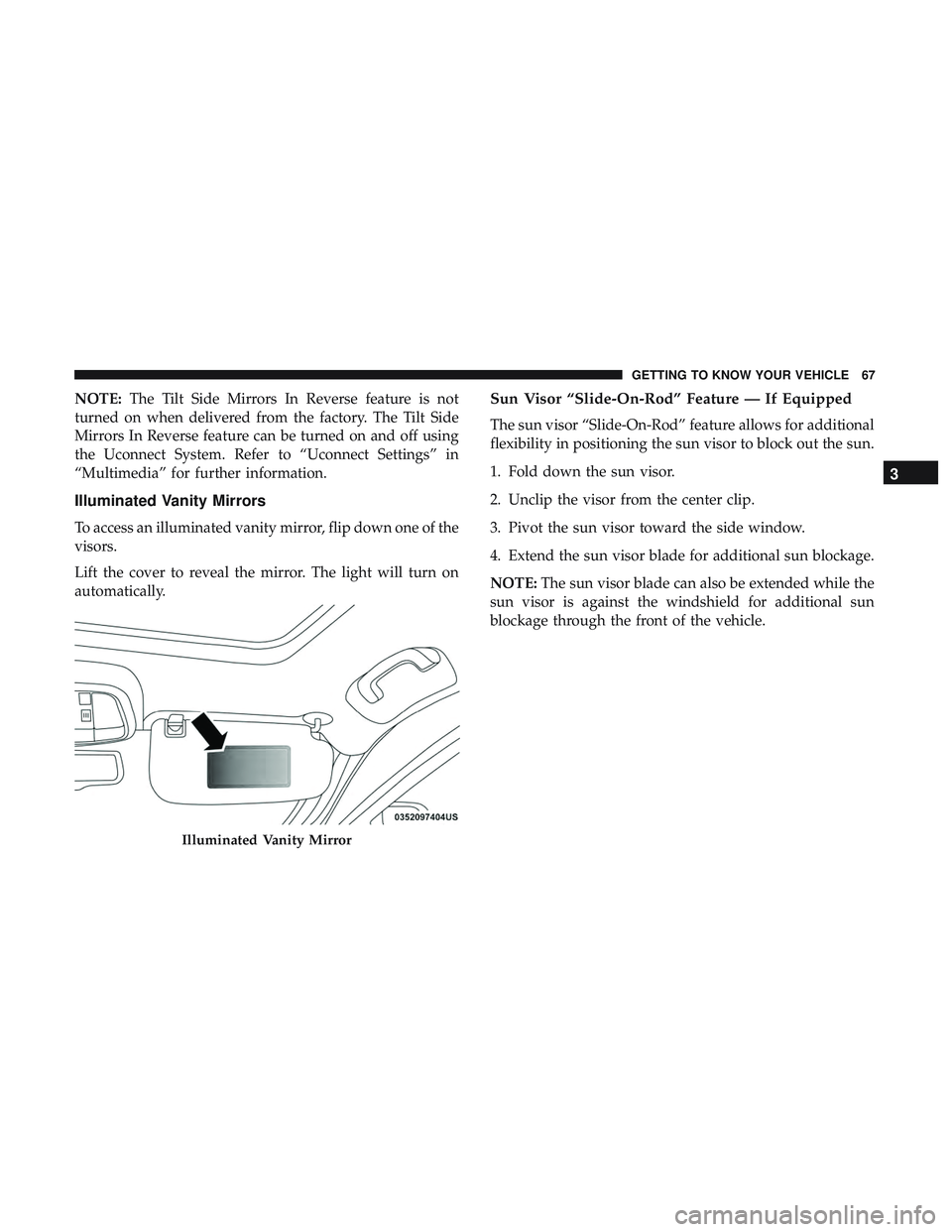
To access an illuminated vanity mirror, flip down one of the
visors.
Lift the cover to reveal the mirror. The light will turn on
automatically.
Sun Visor “Slide-On-Rod” Feature — If Equipped
The sun visor “Slide-On-Rod” feature allows for additional
flexibility in positioning the sun visor to block out the sun.
1. Fold down the sun visor.
2. Unclip the visor from the center clip.
3. Pivot the sun visor toward the side window.
4. Extend the sun visor blade for additional sun blockage.
NOTE: The sun visor blade can also be extended while the
sun visor is against the windshield for additional sun
blockage through the front of the vehicle.
Illuminated Vanity Mirror
3
GETTING TO KNOW YOUR VEHICLE 67
Page 78 of 568
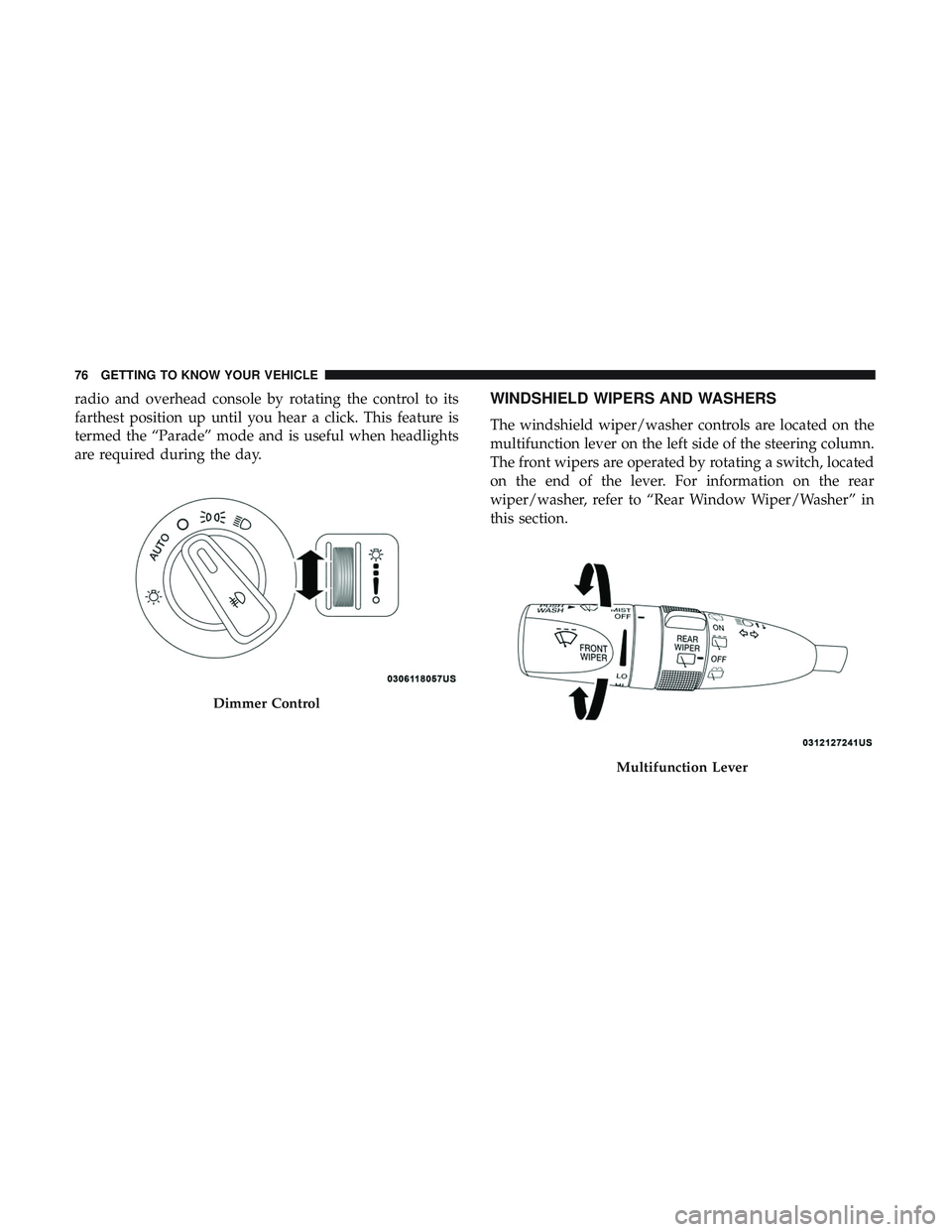
radio and overhead console by rotating the control to its
farthest position up until you hear a click. This feature is
termed the “Parade” mode and is useful when headlights
are required during the day.WINDSHIELD WIPERS AND WASHERS
The windshield wiper/washer controls are located on the
multifunction lever on the left side of the steering column.
The front wipers are operated by rotating a switch, located
on the end of the lever. For information on the rear
wiper/washer, refer to “Rear Window Wiper/Washer” in
this section.
Dimmer Control
Multifunction Lever
76 GETTING TO KNOW YOUR VEHICLE
Page 82 of 568
NOTE:
•The Rain Sensing feature will not operate when the
wiper switch is in the low or high-speed position.
• The Rain Sensing feature may not function properly
when ice, or dried salt water is present on the wind-
shield.
• Use of Rain-X or products containing wax or silicone
may reduce Rain Sensing performance.
• The Rain Sensing feature can be turned on and off using
the Uconnect System, refer to “Uconnect Settings” in
“Multimedia” for further information.
The Rain Sensing system has protection features for the
wiper blades and arms, and will not operate under the
following conditions:
• Low Ambient Temperature — When the ignition is first
turned ON, the Rain Sensing system will not operate
until the wiper switch is moved, vehicle speed is greater
than 3 mph (5 km/h), or the outside temperature is
greater than 32°F (0°C). •
Transmission In NEUTRAL Position — When the igni-
tion is ON, and the automatic transmission is in the
NEUTRAL position, the Rain Sensing system will not
operate until the wiper switch is moved, vehicle speed is
greater than 3 mph (5 km/h), or the gear selector is
moved out of the NEUTRAL position.
Remote Start Mode Inhibit — On vehicles equipped with
Remote Starting system, Rain Sensing wipers are not
operational when the vehicle is in the remote start mode.
Once the operator is in the vehicle and has placed the
ignition switch in the RUN position, rain sensing wiper
operation can resume, if it has been selected, and no other
inhibit conditions (mentioned previously) exist.
Rear Window Wiper/Washer
The rear wiper/washer controls are located on the multi-
function lever on the left side of the steering column. The
rear wiper/washer is operated by rotating a switch, located
at the middle of the lever.
80 GETTING TO KNOW YOUR VEHICLE
Page 85 of 568
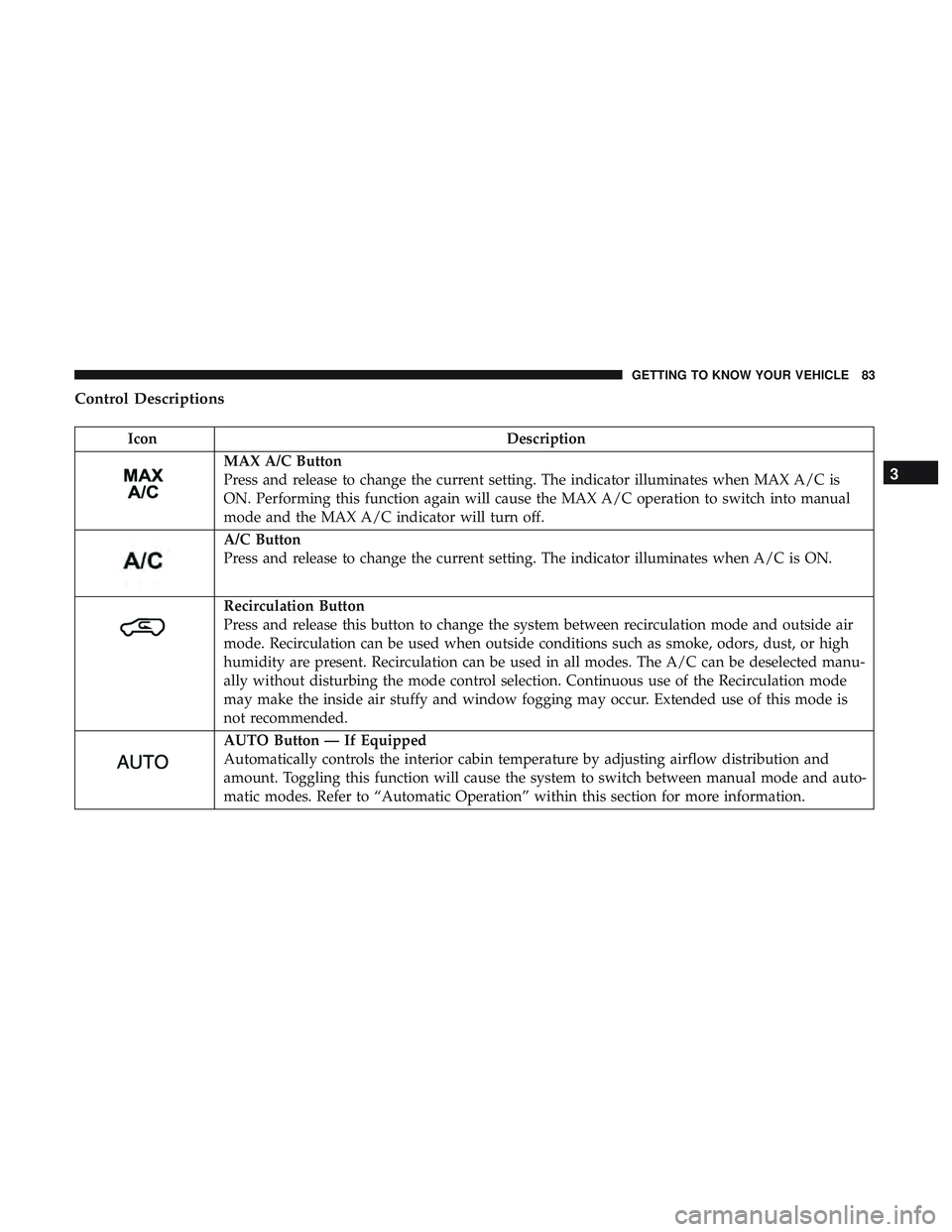
Control Descriptions
IconDescription
MAX A/C Button
Press and release to change the current setting. The indicator illuminates when MAX A/C is
ON. Performing this function again will cause the MAX A/C operation to switch into manual
mode and the MAX A/C indicator will turn off.
A/C Button
Press and release to change the current setting. The indicator illuminates when A/C is ON.
Recirculation Button
Press and release this button to change the system between recirculation mode and outside air
mode. Recirculation can be used when outside conditions such as smoke, odors, dust, or high
humidity are present. Recirculation can be used in all modes. The A/C can be deselected manu-
ally without disturbing the mode control selection. Continuous use of the Recirculation mode
may make the inside air stuffy and window fogging may occur. Extended use of this mode is
not recommended.
AUTO Button — If Equipped
Automatically controls the interior cabin temperature by adjusting airflow distribution and
amount. Toggling this function will cause the system to switch between manual mode and auto-
matic modes. Refer to “Automatic Operation” within this section for more information.
3
GETTING TO KNOW YOUR VEHICLE 83
Page 86 of 568
IconDescription
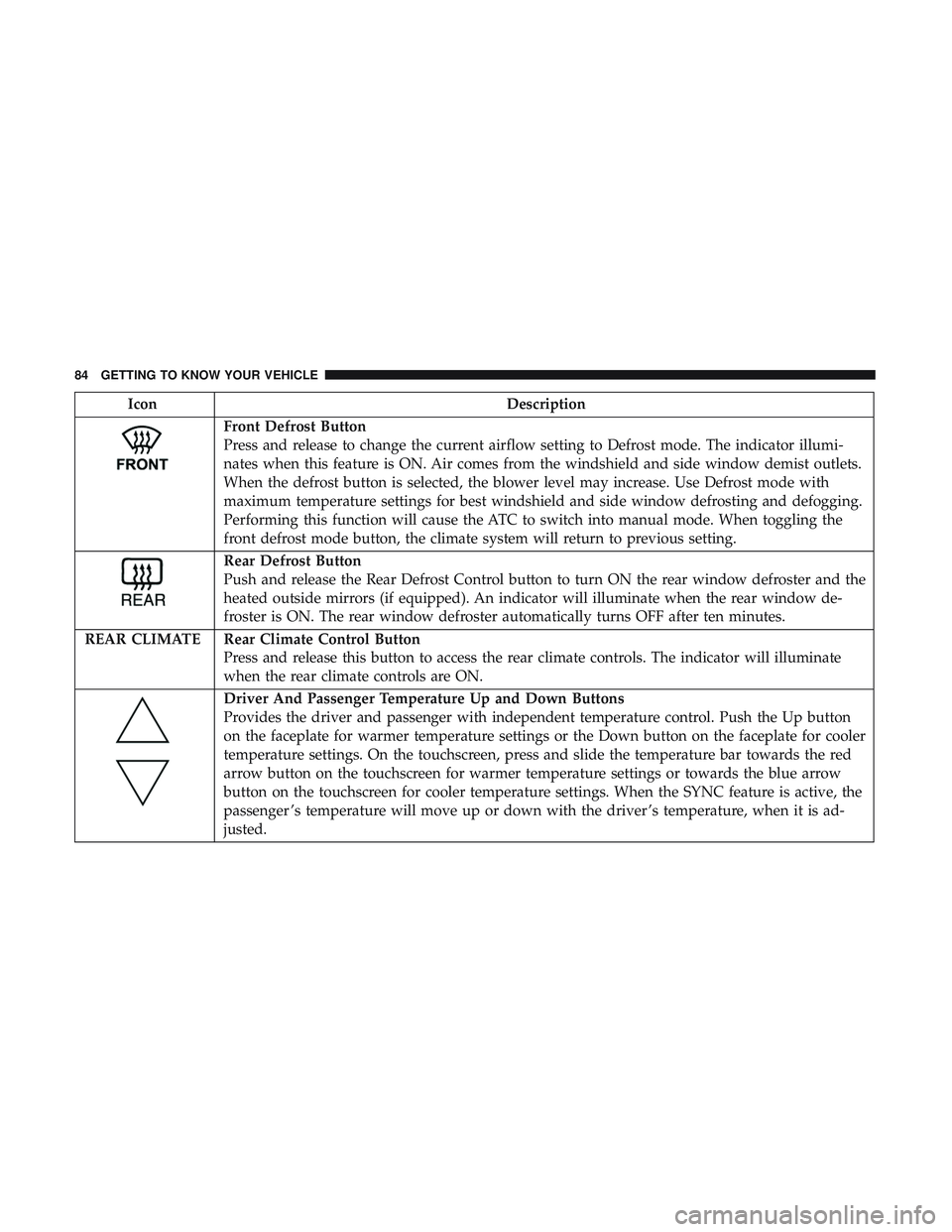
Front Defrost Button
Press and release to change the current airflow setting to Defrost mode. The indicator illumi-
nates when this feature is ON. Air comes from the windshield and side window demist outlets.
When the defrost button is selected, the blower level may increase. Use Defrost mode with
maximum temperature settings for best windshield and side window defrosting and defogging.
Performing this function will cause the ATC to switch into manual mode. When toggling the
front defrost mode button, the climate system will return to previous setting.
Rear Defrost Button
Push and release the Rear Defrost Control button to turn ON the rear window defroster and the
heated outside mirrors (if equipped). An indicator will illuminate when the rear window de-
froster is ON. The rear window defroster automatically turns OFF after ten minutes.
REAR CLIMATE Rear Climate Control Button Press and release this button to access the rear climate controls. The indicator will illuminate
when the rear climate controls are ON.
Driver And Passenger Temperature Up and Down Buttons
Provides the driver and passenger with independent temperature control. Push the Up button
on the faceplate for warmer temperature settings or the Down button on the faceplate for cooler
temperature settings. On the touchscreen, press and slide the temperature bar towards the red
arrow button on the touchscreen for warmer temperature settings or towards the blue arrow
button on the touchscreen for cooler temperature settings. When the SYNC feature is active, the
passenger ’s temperature will move up or down with the driver ’s temperature, when it is ad-
justed.
84 GETTING TO KNOW YOUR VEHICLE
Page 88 of 568
IconDescription
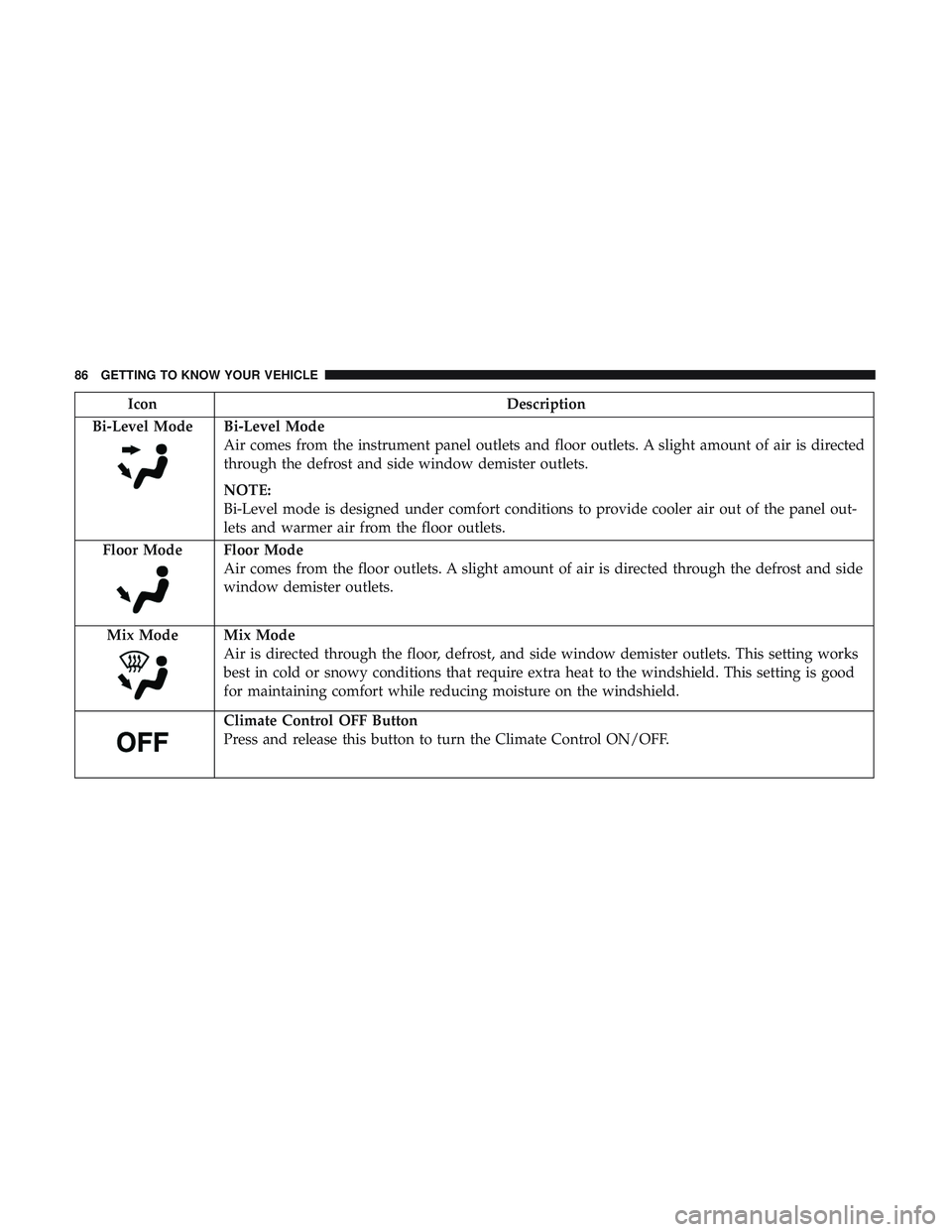
Bi-Level Mode
Bi-Level Mode
Air comes from the instrument panel outlets and floor outlets. A slight amount of air is directed
through the defrost and side window demister outlets.
NOTE:
Bi-Level mode is designed under comfort conditions to provide cooler air out of the panel out-
lets and warmer air from the floor outlets.
Floor Mode
Floor Mode
Air comes from the floor outlets. A slight amount of air is directed through the defrost and side
window demister outlets.
Mix Mode
Mix Mode
Air is directed through the floor, defrost, and side window demister outlets. This setting works
best in cold or snowy conditions that require extra heat to the windshield. This setting is good
for maintaining comfort while reducing moisture on the windshield.
Climate Control OFF Button
Press and release this button to turn the Climate Control ON/OFF.
86 GETTING TO KNOW YOUR VEHICLE
Page 95 of 568
Climate Control Functions
A/C (Air Conditioning)
The Air Conditioning (A/C) button allows the operator to
manually activate or deactivate the air conditioning sys-
tem. When the air conditioning system is turned on, cool
dehumidified air will flow through the outlets into the
cabin. For improved fuel economy, press the A/C button to
turn off the air conditioning and manually adjust the
blower and airflow mode settings. Also, make sure to select
only Panel, Bi-Level, or Floor modes.
NOTE:
•For Manual Climate Controls, if the system is in Mix,
Floor or Defrost Mode, the A/C can be turned off, but
the A/C system shall remain active to prevent fogging of
the windows.
• If fog or mist appears on the windshield or side glass,
select Defrost mode and adjust blower speed if needed.
• If your air conditioning performance seems lower than
expected, check the front of the A/C condenser (located
in front of the radiator), for an accumulation of dirt or
insects. Clean with a gentle water spray from the front of
the radiator and through the condenser. MAX A/C
MAX A/C sets the control for maximum cooling perfor-
mance.
Press and release to toggle between MAX A/C and the
prior settings. The button illuminates when MAX A/C is
on.
In MAX A/C, the blower level and mode position can be
adjusted to desired user settings. Pressing other settings
will cause the MAX A/C operation to switch to the selected
setting and MAX A/C to exit.
Recirculation
When outside air contains smoke, odors, or high humidity,
or if rapid cooling is desired, you may wish to recirculate
interior air by pressing the recirculation control button. The
recirculation indicator will illuminate when this button is
selected. Press the button a second time to turn off the
recirculation mode and allow outside air into the vehicle.
NOTE:
In cold weather, use of recirculation mode may lead
to excessive window fogging. The recirculation feature
may be unavailable (button on the touchscreen greyed out)
if conditions exist that could create fogging on the inside of
the windshield.
3
GETTING TO KNOW YOUR VEHICLE 93
Page 97 of 568
CAUTION!
Interior air enters the Rear Automatic Temperature
Control System through an intake grille, located in the
right side trim panel behind the third row seats. The
heater outlets are located in the right side trim panel,
just behind the sliding door. Do not block or place
objects directly in front of the inlet grille or heater
outlets. The electrical system could overload causing
damage to the blower motor.
Rear Temperature Control
To change the temperature in the rear of the vehicle, push
the temperature buttons. The rear temperature settings are
displayed in the rear ATC panel.
When rear controls are locked by the front system, the Rear
Temperature Lock symbol on the ATC panel is illuminated
and any rear overhead adjustments are ignored.
When the Sync feature is active, the rear temperature is
synchronized to the driver ’s temperature setting. If the rear
temperature is changed, the Sync feature will deactivate.
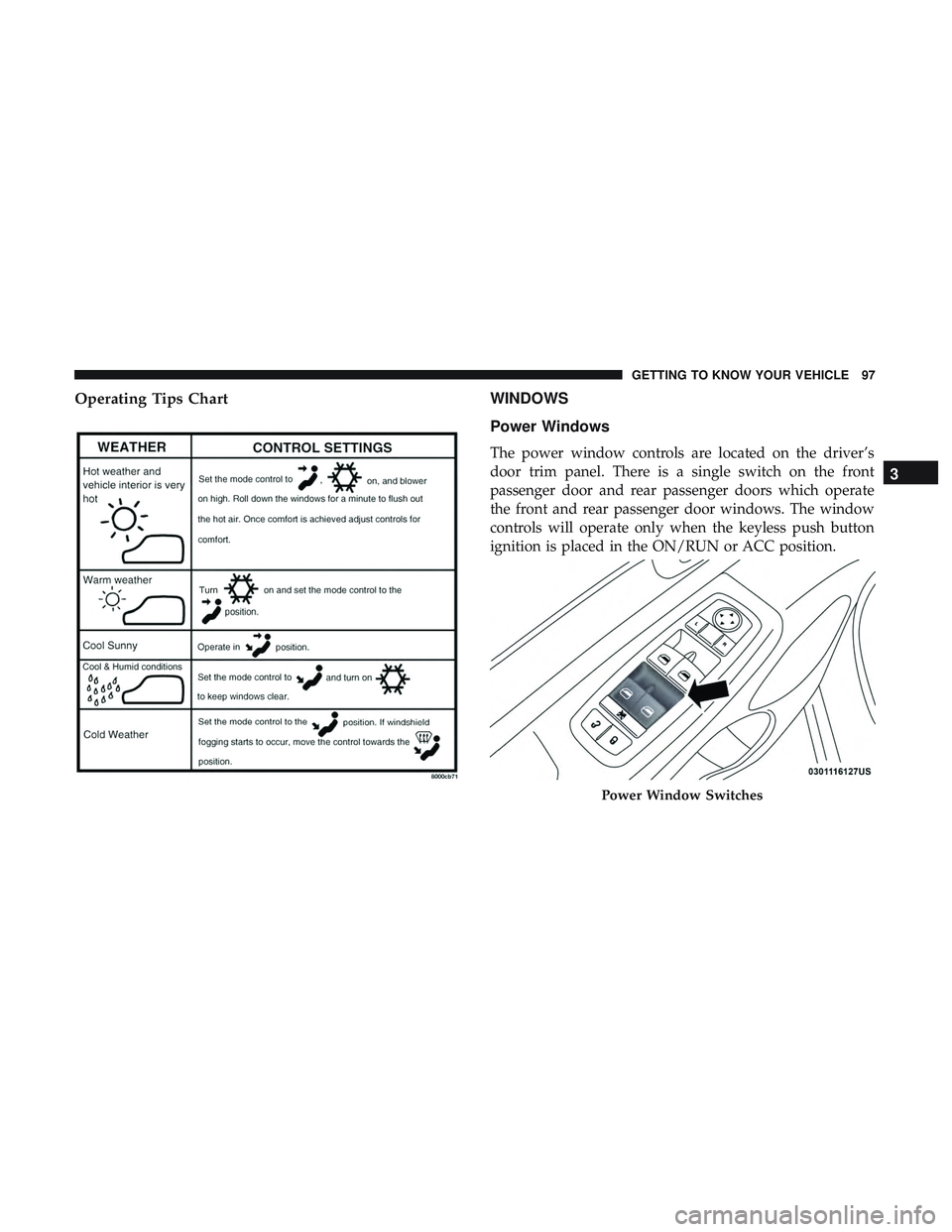
Operating Tips
NOTE:Refer to the chart at the end of this section for
suggested control settings for various weather conditions.
Summer Operation
The engine cooling system must be protected with a
high-quality antifreeze coolant to provide proper corrosion
protection and to protect against engine overheating. A
solution of 50% OAT (Organic Additive Technology) cool-
ant that meets the requirements of FCA Material Standard
MS.90032 and 50% water is recommended. Refer to “Fluids
and Lubricants” in “Technical Specifications” for proper
coolant selection.
Winter Operation
Use of the Air Recirculation mode during winter months is
not recommended because it may cause window fogging.
Vacation/Storage
Before you store your vehicle, or keep it out of service (i.e.,
vacation) for two weeks or more, run the air conditioning
system at idle for about five minutes, in fresh air with the
blower setting on high. This will ensure adequate system
lubrication to minimize the possibility of compressor dam-
age when the system is started again.
3
GETTING TO KNOW YOUR VEHICLE 95
Page 98 of 568
Window Fogging
Interior fogging on the windshield can be quickly removed by
turning the mode selector to Defrost. The Defrost/Floor mode
can be used to maintain a clear windshield and provide
sufficient heating. If side window fogging becomes objection-
able, increase blower speed to improve airflow and clearing of
the side windows. Vehicle windows tend to fog on the inside
in mild but rainy or humid weather.
NOTE:
•Recirculate without A/C should not be used for long
periods, as fogging may occur.
• Automatic Temperature Controls (ATC) will automati-
cally adjust the climate control settings to reduce or
eliminate window fogging on the front windshield.
When this occurs, recirculation will be unavailable.
CAUTION!
Failure to follow these cautions can cause damage to
the heating elements:
•Use care when washing the inside of the rear win-
dow. Do not use abrasive window cleaners on the
interior surface of the window. Use a soft cloth and a
(Continued)
CAUTION! (Continued)
mild washing solution, wiping parallel to the heat-
ing elements. Labels can be peeled off after soaking
with warm water.
• Do not use scrapers, sharp instruments, or abrasive
window cleaners on the interior surface of the win-
dow.
• Keep all objects a safe distance from the window.
Outside Air Intake
Make sure the air intake, located directly in front of the
windshield, is free of obstructions, such as leaves. Leaves
collected in the air intake may reduce airflow, and if they
enter the plenum, they could plug the water drains. In
Winter months, make sure the air intake is clear of ice,
slush, and snow.
A/C Air Filter
The climate control system filters outside air containing
dust, pollen and some odors. Strong odors cannot be totally
filtered out. Refer to “Dealer Service” in “Servicing And
Maintenance” for filter replacement instructions.
96 GETTING TO KNOW YOUR VEHICLE
Page 99 of 568
Operating Tips ChartWINDOWS
Power Windows
The power window controls are located on the driver’s
door trim panel. There is a single switch on the front
passenger door and rear passenger doors which operate
the front and rear passenger door windows. The window
controls will operate only when the keyless push button
ignition is placed in the ON/RUN or ACC position.
Power Window Switches
3
GETTING TO KNOW YOUR VEHICLE 97