door lock DODGE DURANGO SRT 2018 Owner's Manual
[x] Cancel search | Manufacturer: DODGE, Model Year: 2018, Model line: DURANGO SRT, Model: DODGE DURANGO SRT 2018Pages: 568, PDF Size: 6.54 MB
Page 42 of 568
NOTE:For emergency exit with the system engaged,
move the lock knob up (unlocked position), roll down the
window, and open the door with the outside door handle.
SEATS
Seats are a part of the Occupant Restraint System of the
vehicle.
WARNING!
• It is dangerous to ride in a cargo area, inside or
outside of a vehicle. In a collision, people riding in
these areas are more likely to be seriously injured or
killed.
• Do not allow people to ride in any area of your
vehicle that is not equipped with seats and seat belts.
In a collision, people riding in these areas are more
likely to be seriously injured or killed.
• Be sure everyone in your vehicle is in a seat and
using a seat belt properly.
Power Adjustment (Front Seats)
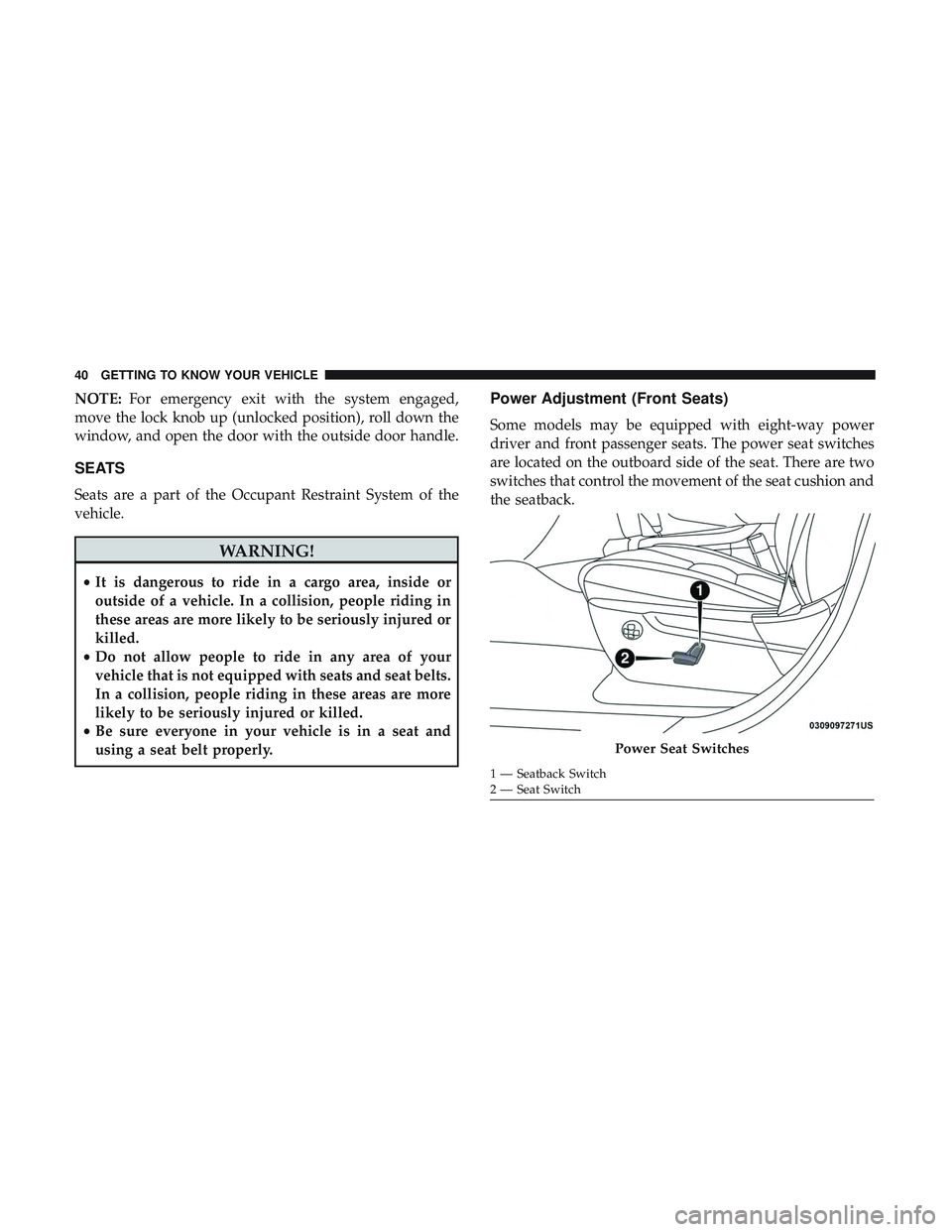
Some models may be equipped with eight-way power
driver and front passenger seats. The power seat switches
are located on the outboard side of the seat. There are two
switches that control the movement of the seat cushion and
the seatback.
Power Seat Switches
1 — Seatback Switch
2 — Seat Switch
40 GETTING TO KNOW YOUR VEHICLE
Page 65 of 568
STEERING WHEEL
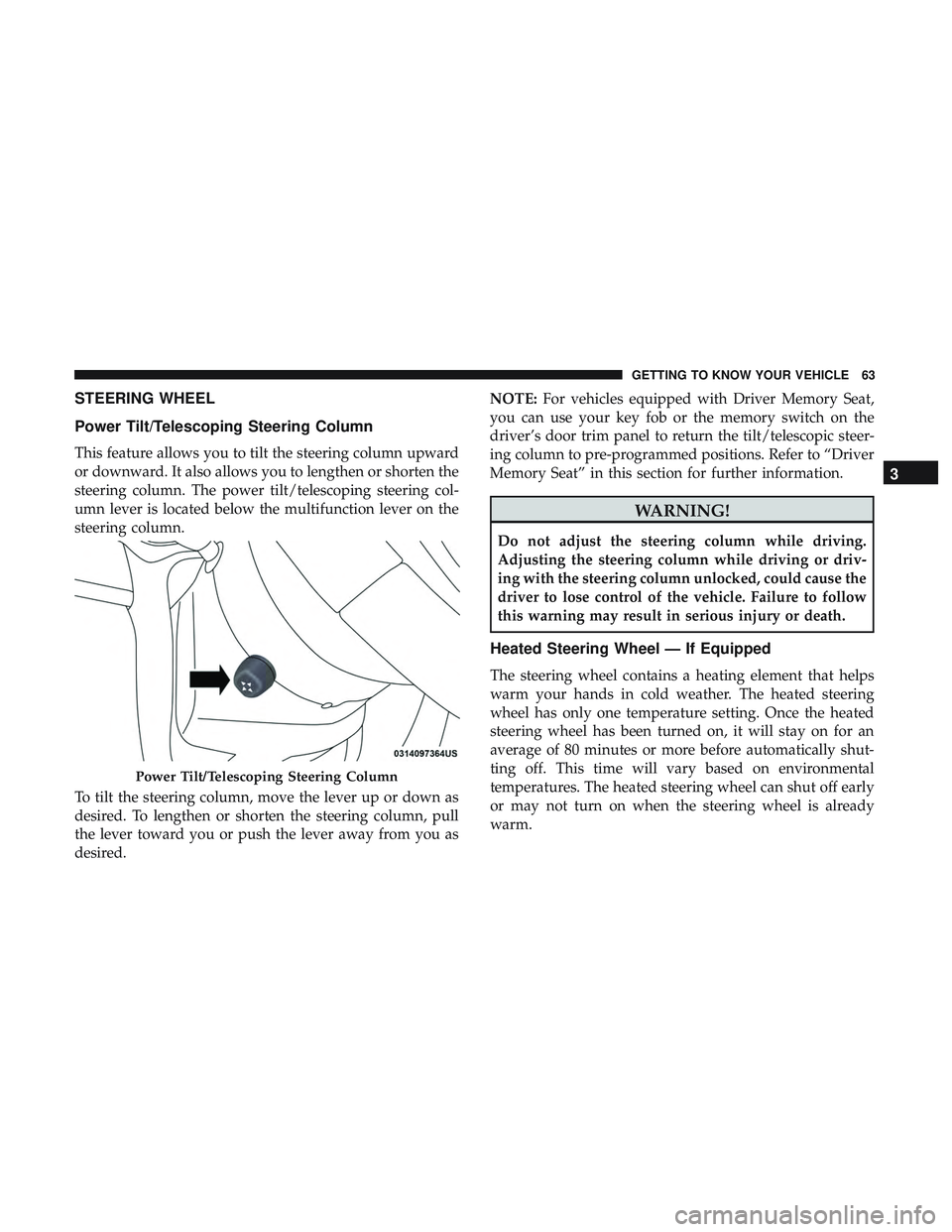
Power Tilt/Telescoping Steering Column
This feature allows you to tilt the steering column upward
or downward. It also allows you to lengthen or shorten the
steering column. The power tilt/telescoping steering col-
umn lever is located below the multifunction lever on the
steering column.
To tilt the steering column, move the lever up or down as
desired. To lengthen or shorten the steering column, pull
the lever toward you or push the lever away from you as
desired.NOTE:
For vehicles equipped with Driver Memory Seat,
you can use your key fob or the memory switch on the
driver’s door trim panel to return the tilt/telescopic steer-
ing column to pre-programmed positions. Refer to “Driver
Memory Seat” in this section for further information.
WARNING!
Do not adjust the steering column while driving.
Adjusting the steering column while driving or driv-
ing with the steering column unlocked, could cause the
driver to lose control of the vehicle. Failure to follow
this warning may result in serious injury or death.
Heated Steering Wheel — If Equipped
The steering wheel contains a heating element that helps
warm your hands in cold weather. The heated steering
wheel has only one temperature setting. Once the heated
steering wheel has been turned on, it will stay on for an
average of 80 minutes or more before automatically shut-
ting off. This time will vary based on environmental
temperatures. The heated steering wheel can shut off early
or may not turn on when the steering wheel is already
warm.
Power Tilt/Telescoping Steering Column
3
GETTING TO KNOW YOUR VEHICLE 63
Page 73 of 568
Parking Lights And Panel Lights
To turn on the parking lights and instrument panel
lights, rotate the headlight switch clockwise. To turn
off the parking lights, rotate the headlight switch back to
the O (off) position.
Headlights On Automatically With Wipers
If your vehicle is equipped with Automatic Headlights, it
also has this customer-programmable feature. When your
headlights are in the automatic mode and the engine is
running, they will automatically turn on when the wiper
system is on. This feature is programmable through the
Uconnect system. Refer to “Uconnect Settings” in “Multi-
media” for further information.
NOTE: When your headlights come on during the day-
time, the vehicle will monitor outside brightness and
decide if the instrument panel needs to be dimmed or not.
Refer to “Interior Lights” in “Getting To Know Your
Vehicle” for further information.
Headlight Delay
To aid in your exit, your vehicle is equipped with a
headlight delay that will leave the headlights on for
approximately 90 seconds. This delay is initiated when the
ignition is turned OFF while the headlight switch is on, and
then the headlight switch is cycled off. Headlight delay can
be cancelled by either turning the headlight switch on then
off, or by turning the ignition ON.
NOTE: The headlight delay time is programmable through
the Uconnect System. Refer to “Uconnect Settings” in
“Multimedia” for further information.
Lights-On Reminder
If the headlights, parking lights, or cargo lights are left on
after the ignition is turned OFF, a chime will sound when
the driver ’s door is opened.
3
GETTING TO KNOW YOUR VEHICLE 71
Page 76 of 568
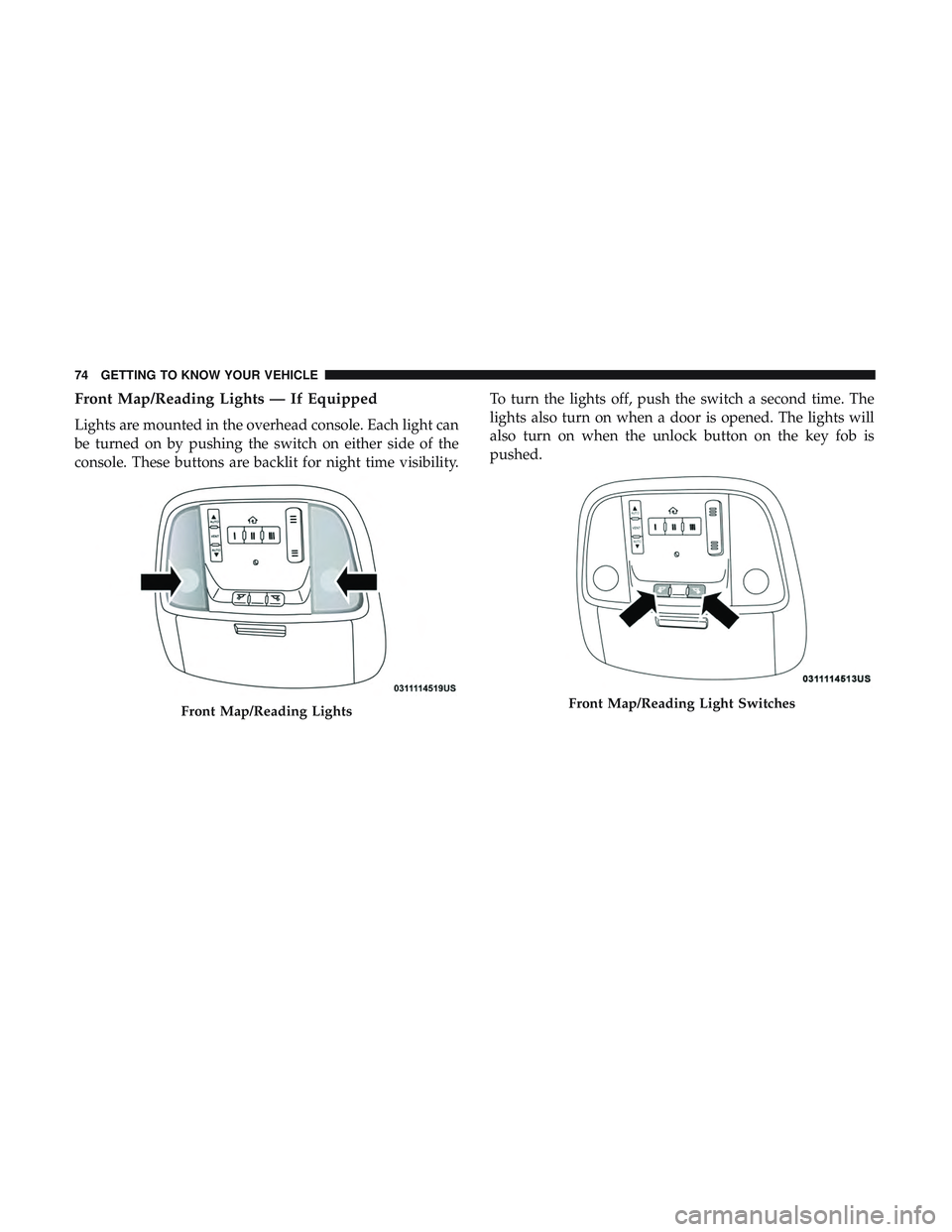
Front Map/Reading Lights — If Equipped
Lights are mounted in the overhead console. Each light can
be turned on by pushing the switch on either side of the
console. These buttons are backlit for night time visibility.To turn the lights off, push the switch a second time. The
lights also turn on when a door is opened. The lights will
also turn on when the unlock button on the key fob is
pushed.
Front Map/Reading LightsFront Map/Reading Light Switches
74 GETTING TO KNOW YOUR VEHICLE
Page 77 of 568
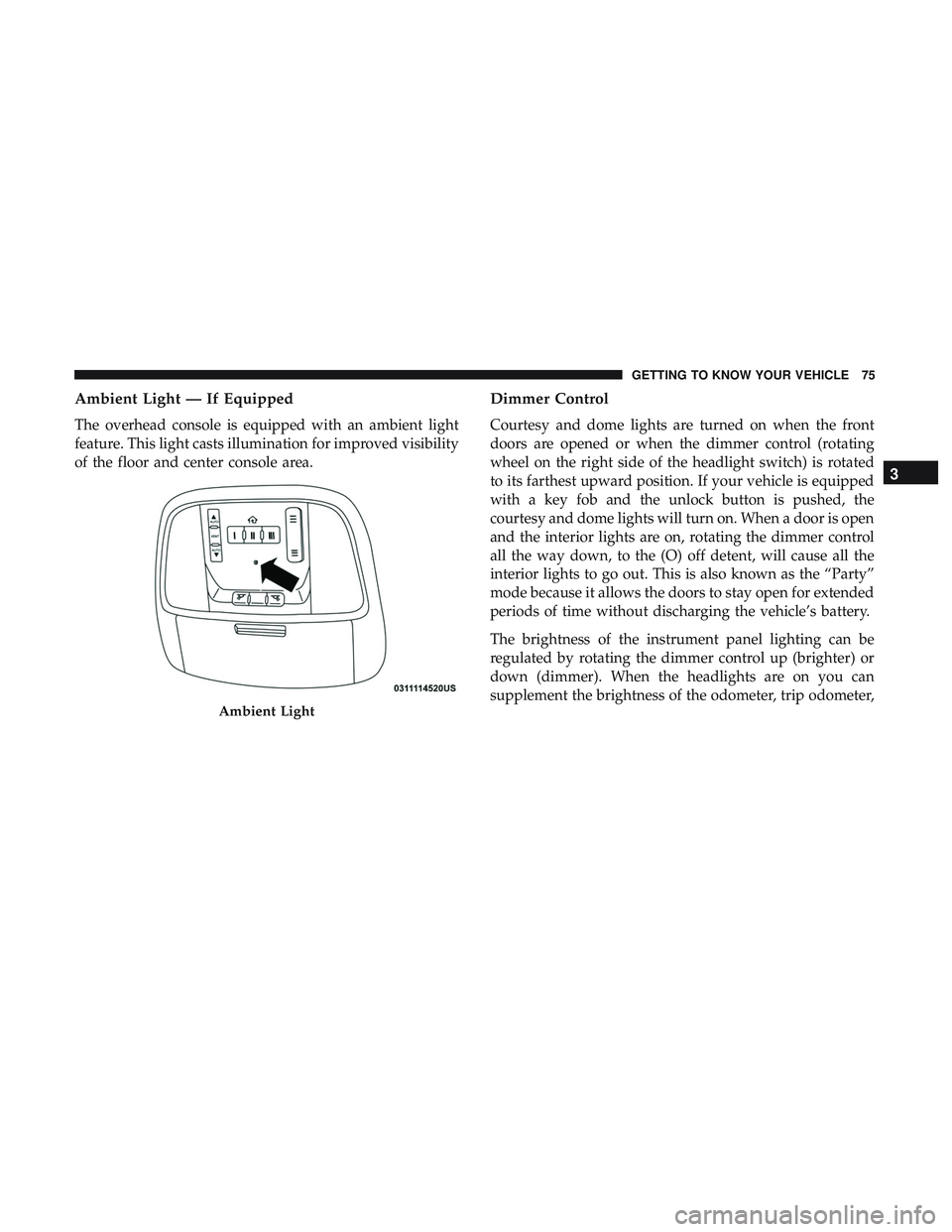
Ambient Light — If Equipped
The overhead console is equipped with an ambient light
feature. This light casts illumination for improved visibility
of the floor and center console area.
Dimmer Control
Courtesy and dome lights are turned on when the front
doors are opened or when the dimmer control (rotating
wheel on the right side of the headlight switch) is rotated
to its farthest upward position. If your vehicle is equipped
with a key fob and the unlock button is pushed, the
courtesy and dome lights will turn on. When a door is open
and the interior lights are on, rotating the dimmer control
all the way down, to the (O) off detent, will cause all the
interior lights to go out. This is also known as the “Party”
mode because it allows the doors to stay open for extended
periods of time without discharging the vehicle’s battery.
The brightness of the instrument panel lighting can be
regulated by rotating the dimmer control up (brighter) or
down (dimmer). When the headlights are on you can
supplement the brightness of the odometer, trip odometer,
Ambient Light
3
GETTING TO KNOW YOUR VEHICLE 75
Page 97 of 568
CAUTION!
Interior air enters the Rear Automatic Temperature
Control System through an intake grille, located in the
right side trim panel behind the third row seats. The
heater outlets are located in the right side trim panel,
just behind the sliding door. Do not block or place
objects directly in front of the inlet grille or heater
outlets. The electrical system could overload causing
damage to the blower motor.
Rear Temperature Control
To change the temperature in the rear of the vehicle, push
the temperature buttons. The rear temperature settings are
displayed in the rear ATC panel.
When rear controls are locked by the front system, the Rear
Temperature Lock symbol on the ATC panel is illuminated
and any rear overhead adjustments are ignored.
When the Sync feature is active, the rear temperature is
synchronized to the driver ’s temperature setting. If the rear
temperature is changed, the Sync feature will deactivate.
Operating Tips
NOTE:Refer to the chart at the end of this section for
suggested control settings for various weather conditions.
Summer Operation
The engine cooling system must be protected with a
high-quality antifreeze coolant to provide proper corrosion
protection and to protect against engine overheating. A
solution of 50% OAT (Organic Additive Technology) cool-
ant that meets the requirements of FCA Material Standard
MS.90032 and 50% water is recommended. Refer to “Fluids
and Lubricants” in “Technical Specifications” for proper
coolant selection.
Winter Operation
Use of the Air Recirculation mode during winter months is
not recommended because it may cause window fogging.
Vacation/Storage
Before you store your vehicle, or keep it out of service (i.e.,
vacation) for two weeks or more, run the air conditioning
system at idle for about five minutes, in fresh air with the
blower setting on high. This will ensure adequate system
lubrication to minimize the possibility of compressor dam-
age when the system is started again.
3
GETTING TO KNOW YOUR VEHICLE 95
Page 101 of 568
Remove the obstacle and use the window switch again to
close the window. Any impact due to rough road condi-
tions may trigger the auto reverse function unexpectedly
during Auto-Up. If this happens, pull the switch lightly to
the first detent and hold it to close the window manually.
WARNING!
There is no auto-reverse protection when the window
is almost closed. Be sure to clear all objects from the
window before closing.
Reset Auto-Up
Should the Auto-Up feature stop working, the window
may need to be reset. To reset Auto-Up:
1. Make sure the door is fully closed.
2. Pull the window switch up to close the window com-pletely and continue to hold the switch up for an
additional two seconds after the window is closed.
3. Push the window switch down firmly to the second detent to open the window completely and continue to
hold the switch down for an additional two seconds
after the window is fully open.
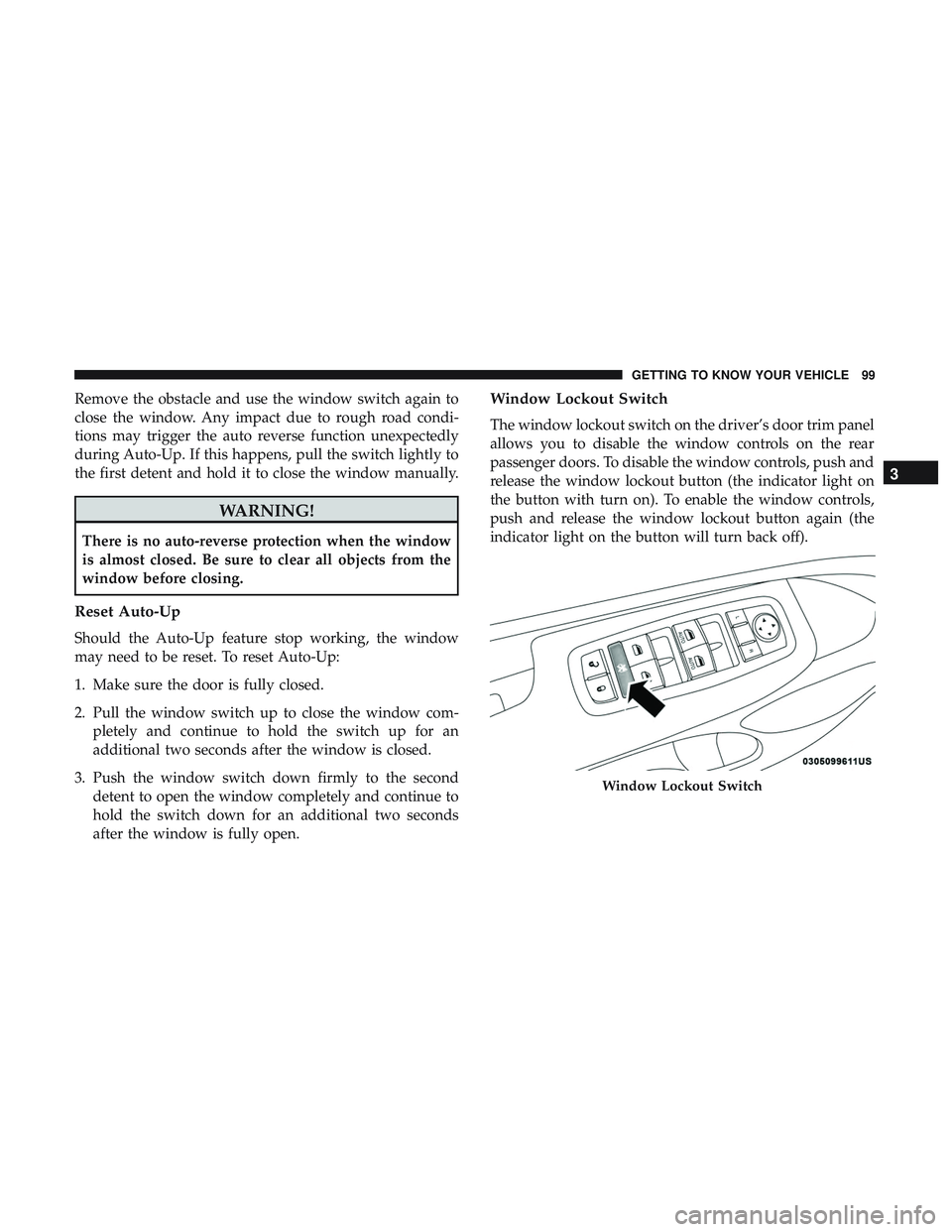
Window Lockout Switch
The window lockout switch on the driver’s door trim panel
allows you to disable the window controls on the rear
passenger doors. To disable the window controls, push and
release the window lockout button (the indicator light on
the button with turn on). To enable the window controls,
push and release the window lockout button again (the
indicator light on the button will turn back off).
Window Lockout Switch
3
GETTING TO KNOW YOUR VEHICLE 99
Page 115 of 568
Using HomeLink
To operate, switch the ignition to the ON/RUN position
and the press and release the programmed HomeLink
button. Activation will now occur for the programmed
device (i.e., garage door opener, gate operator, security
system, entry door lock, home/office lighting, etc.,). The
hand-held transmitter of the device may also be used at
any time. If the ignition is switched to the OFF position,
HomeLink will remain active for three minutes. During
this time, if the vehicle is locked, HomeLink is disabled.
Security
It is advised to erase all channels before you sell or turn in
your vehicle.
To do this, push and hold the two outside buttons for 20
seconds until the red indicator flashes.
NOTE:All channels will be erased. Individual channels
cannot be erased.
The HomeLink Universal Transceiver is disabled when the
Vehicle Security Alarm is active.
Troubleshooting Tips
If you are having trouble programming HomeLink, here
are some of the most common solutions:
• Replace the battery in the Garage Door Opener hand-
held transmitter.
• Push the LEARN button on the Garage Door Opener to
complete the training for a Rolling Code.
• Did you unplug the device for programming and re-
member to plug it back in?
If you have any problems, or require assistance, please call
toll-free 1-800-355-3515 or, on the Internet at HomeLink.com
for information or assistance.
WARNING!
•Vehicle exhaust contains carbon monoxide, a danger-
ous gas. Do not run your vehicle in the garage while
programming the transceiver. Exhaust gas can cause
serious injury or death.
•
Your motorized door or gate will open and close while
you are programming the universal transceiver. Do not
program the transceiver if people, pets or other objects
(Continued)
3
GETTING TO KNOW YOUR VEHICLE 113
Page 223 of 568
•As the air bags deflate, you may see some smoke-like
particles. The particles are a normal by-product of the
process that generates the non-toxic gas used for air bag
inflation. These airborne particles may irritate the skin,
eyes, nose, or throat. If you have skin or eye irritation,
rinse the area with cool water. For nose or throat
irritation, move to fresh air. If the irritation continues,
see your doctor. If these particles settle on your clothing,
follow the garment manufacturer ’s instructions for
cleaning.
Do not drive your vehicle after the air bags have deployed.
If you are involved in another collision, the air bags will
not be in place to protect you.
WARNING!
Deployed air bags and seat belt pretensioners cannot
protect you in another collision. Have the air bags, seat
belt pretensioners, and the seat belt retractor assem-
blies replaced by an authorized dealer immediately.
Also, have the Occupant Restraint Controller System
serviced as well. NOTE:
•
Air bag covers may not be obvious in the interior trim,
but they will open during air bag deployment.
• After any collision, the vehicle should be taken to an
authorized dealer immediately.
Enhanced Accident Response System
In the event of an impact, if the communication network
remains intact, and the power remains intact, depending
on the nature of the event, the ORC will determine whether
to have the Enhanced Accident Response System perform
the following functions:
•Cut off fuel to the engine (If Equipped)
• Cut off battery power to the electric motor (If Equipped)
• Flash hazard lights as long as the battery has power
• Turn on the interior lights, which remain on as long as
the battery has power or for 15 minutes from the
intervention of the Enhanced Accident Response Sys-
tem.
• Unlock the power door locks.5
SAFETY 221
Page 224 of 568
Your vehicle may also be designed to perform any of these
other functions in response to the Enhanced Accident
Response System:
•Turn off the Fuel Filter Heater, Turn off the HVAC
Blower Motor, Close the HVAC Circulation Door
• Cut off battery power to the:
• Engine
• Electric Motor (if equipped)
• Electric power steering
• Brake booster
• Electric park brake
• Automatic transmission gear selector
• Horn
• Front wiper
• Headlamp washer pump NOTE:
After an accident, remember to cycle the ignition
to the STOP (OFF/LOCK) position and remove the key
from the ignition switch to avoid draining the battery.
Carefully check the vehicle for fuel leaks in the engine
compartment and on the ground near the engine compart-
ment and fuel tank before resetting the system and starting
the engine. If there are no fuel leaks or damage to the
vehicle electrical devices (e.g. headlights) after an accident,
reset the system by following the procedure described
below. If you have any doubt, contact an authorized dealer.
Enhanced Accident Response System Reset
Procedure
In order to reset the Enhanced Accident Response System
functions after an event, the ignition switch must be
changed from ignition START or ON/RUN to ignition OFF.
Carefully check the vehicle for fuel leaks in the engine
compartment and on the ground near the engine compart-
ment and fuel tank before resetting the system and starting
the engine.
222 SAFETY