power steering DODGE DURANGO SRT 2018 Owner's Manual
[x] Cancel search | Manufacturer: DODGE, Model Year: 2018, Model line: DURANGO SRT, Model: DODGE DURANGO SRT 2018Pages: 568, PDF Size: 6.54 MB
Page 474 of 568
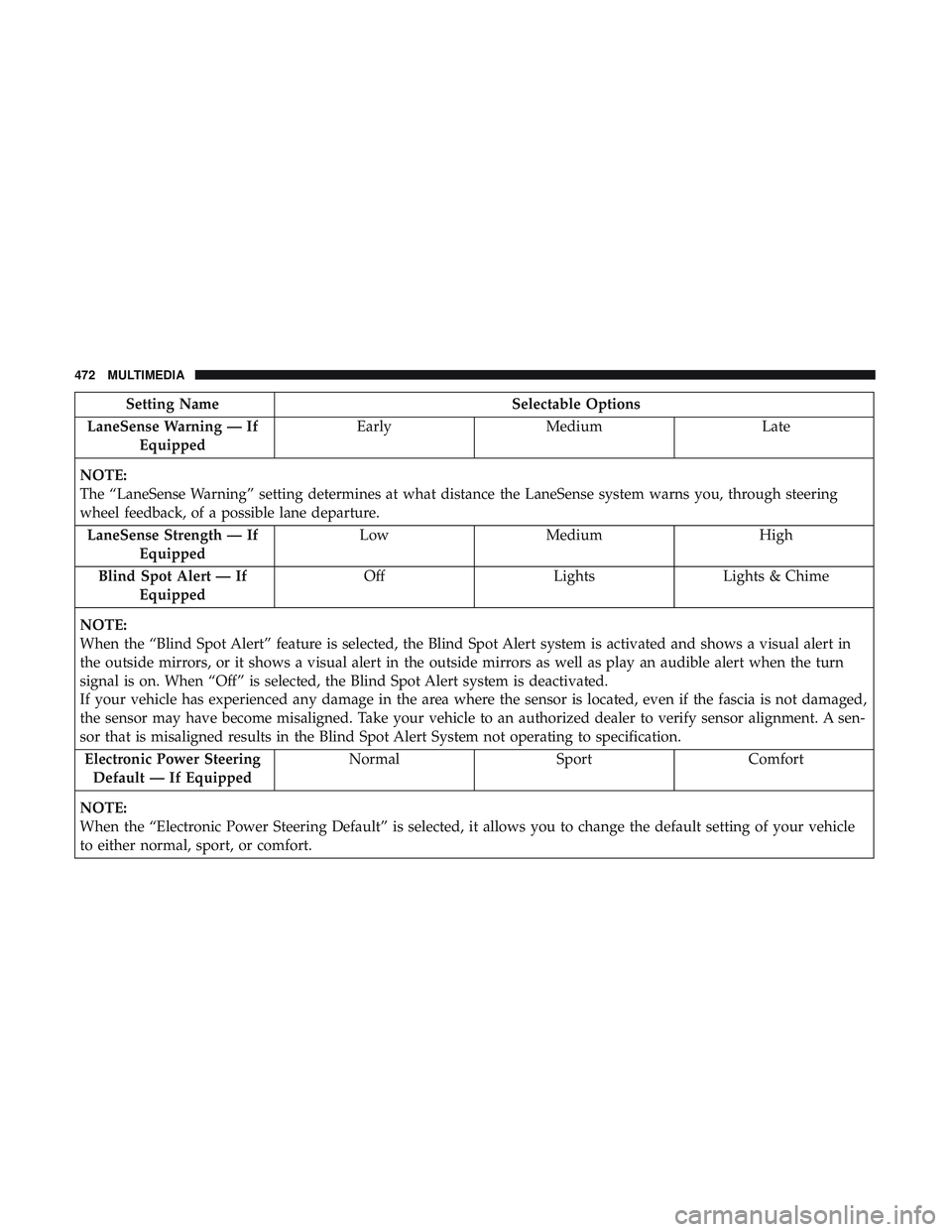
Setting NameSelectable Options
LaneSense Warning — If Equipped Early
Medium Late
NOTE:
The “LaneSense Warning” setting determines at what distance the LaneSense system warns you, through steering
wheel feedback, of a possible lane departure. LaneSense Strength — If Equipped Low
Medium High
Blind Spot Alert — If Equipped Off
LightsLights & Chime
NOTE:
When the “Blind Spot Alert” feature is selected, the Blind Spot Alert system is activated and shows a visual alert in
the outside mirrors, or it shows a visual alert in the outside mirrors as well as play an audible alert when the turn
signal is on. When “Off” is selected, the Blind Spot Alert system is deactivated.
If your vehicle has experienced any damage in the area where the sensor is located, even if the fascia is not damaged,
the sensor may have become misaligned. Take your vehicle to an authorized dealer to verify sensor alignment. A sen-
sor that is misaligned results in the Blind Spot Alert System not operating to specification. Electronic Power Steering Default — If Equipped Normal
SportComfort
NOTE:
When the “Electronic Power Steering Default” is selected, it allows you to change the default setting of your vehicle
to either normal, sport, or comfort.
472 MULTIMEDIA
Page 479 of 568
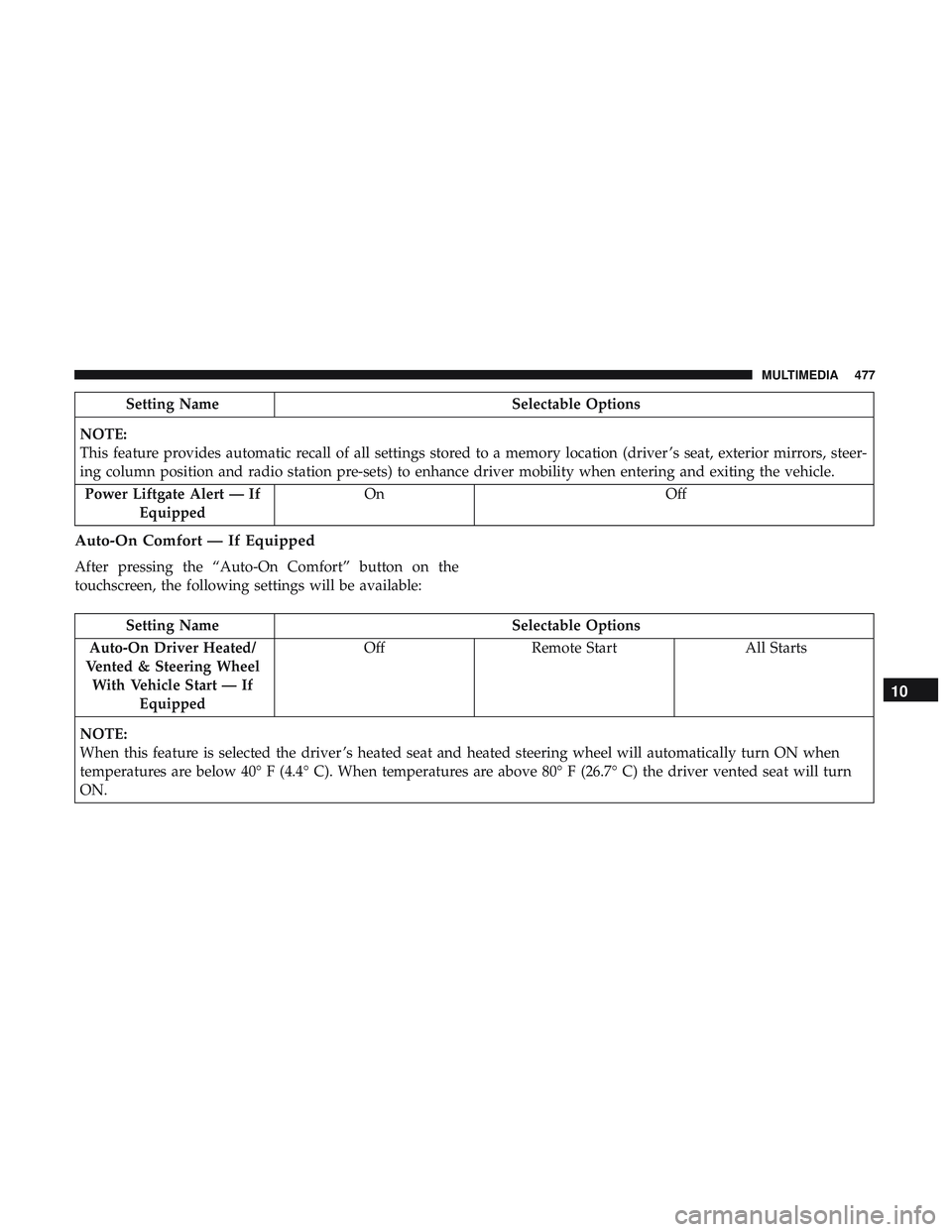
Setting NameSelectable Options
NOTE:
This feature provides automatic recall of all settings stored to a memory location (driver ’s seat, exterior mirrors, steer-
ing column position and radio station pre-sets) to enhance driver mobility when entering and exiting the vehicle. Power Liftgate Alert — If Equipped On
Off
Auto-On Comfort — If Equipped
After pressing the “Auto-On Comfort” button on the
touchscreen, the following settings will be available:
Setting Name Selectable Options
Auto-On Driver Heated/
Vented & Steering Wheel With Vehicle Start — If Equipped Off
Remote Start All Starts
NOTE:
When this feature is selected the driver ’s heated seat and heated steering wheel will automatically turn ON when
temperatures are below 40° F (4.4° C). When temperatures are above 80° F (26.7° C) the driver vented seat will turn
ON.
10
MULTIMEDIA 477
Page 488 of 568
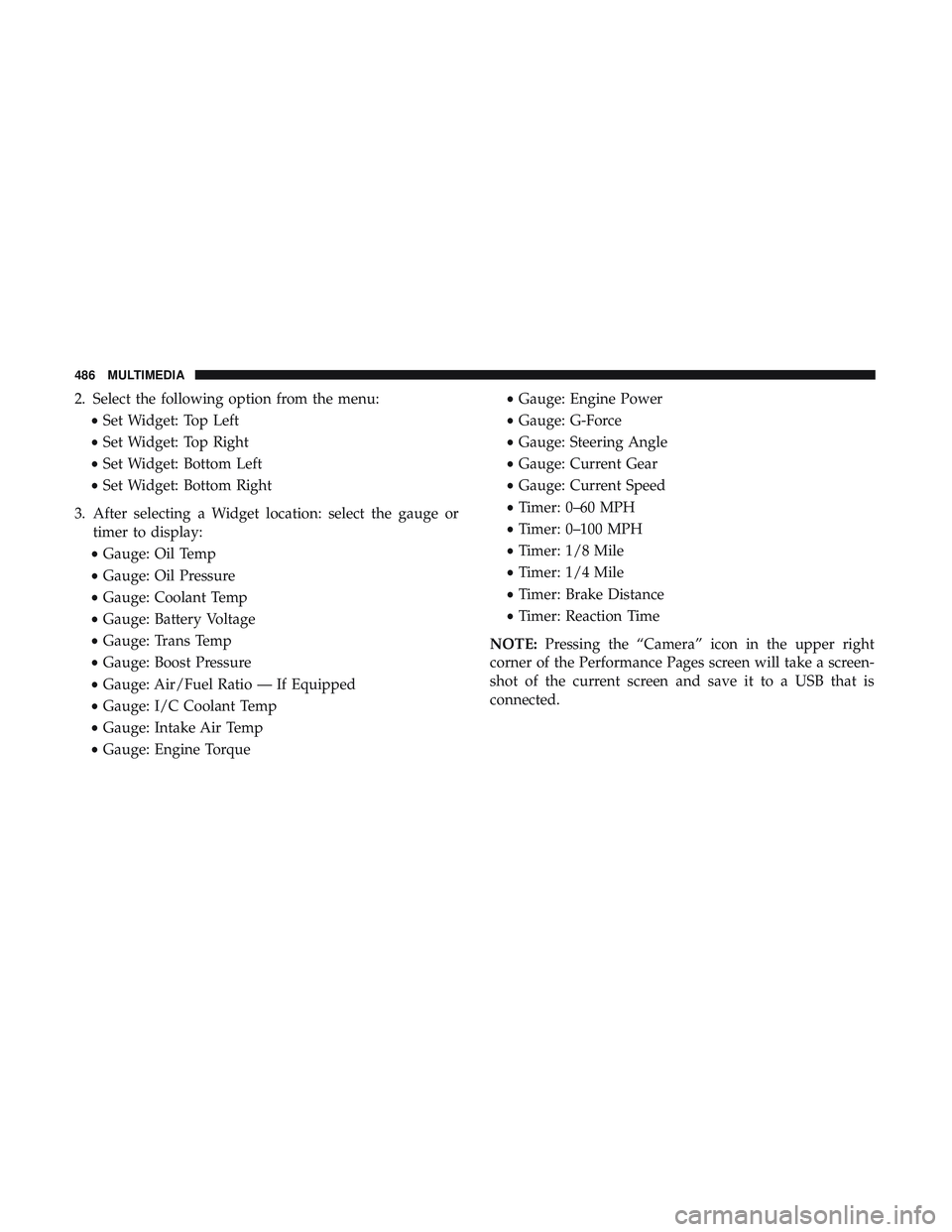
2. Select the following option from the menu:•Set Widget: Top Left
• Set Widget: Top Right
• Set Widget: Bottom Left
• Set Widget: Bottom Right
3. After selecting a Widget location: select the gauge or timer to display:
• Gauge: Oil Temp
• Gauge: Oil Pressure
• Gauge: Coolant Temp
• Gauge: Battery Voltage
• Gauge: Trans Temp
• Gauge: Boost Pressure
• Gauge: Air/Fuel Ratio — If Equipped
• Gauge: I/C Coolant Temp
• Gauge: Intake Air Temp
• Gauge: Engine Torque •
Gauge: Engine Power
• Gauge: G-Force
• Gauge: Steering Angle
• Gauge: Current Gear
• Gauge: Current Speed
• Timer: 0–60 MPH
• Timer: 0–100 MPH
• Timer: 1/8 Mile
• Timer: 1/4 Mile
• Timer: Brake Distance
• Timer: Reaction Time
NOTE: Pressing the “Camera” icon in the upper right
corner of the Performance Pages screen will take a screen-
shot of the current screen and save it to a USB that is
connected.
486 MULTIMEDIA
Page 494 of 568
•Steering Wheel Angle
Steering Wheel Angle utilizes the steering angle sensor to
measure the degree of the steering wheel relative to zero.
The zero degree measurement indicates a steering wheel
straight ahead position. When the steering angle value is
negative, a turn to the left is indicated, and when the
steering angle value is positive, a turn to the right is
indicated.
The friction circle display shows instantaneous G-Force as
a highlight and previous G-Force as dots within the circle.
The system records previous G-Force for three minutes. If
there are multiple samples at a given point, the color of the
dot will darken from blue to red. Vectors more frequent
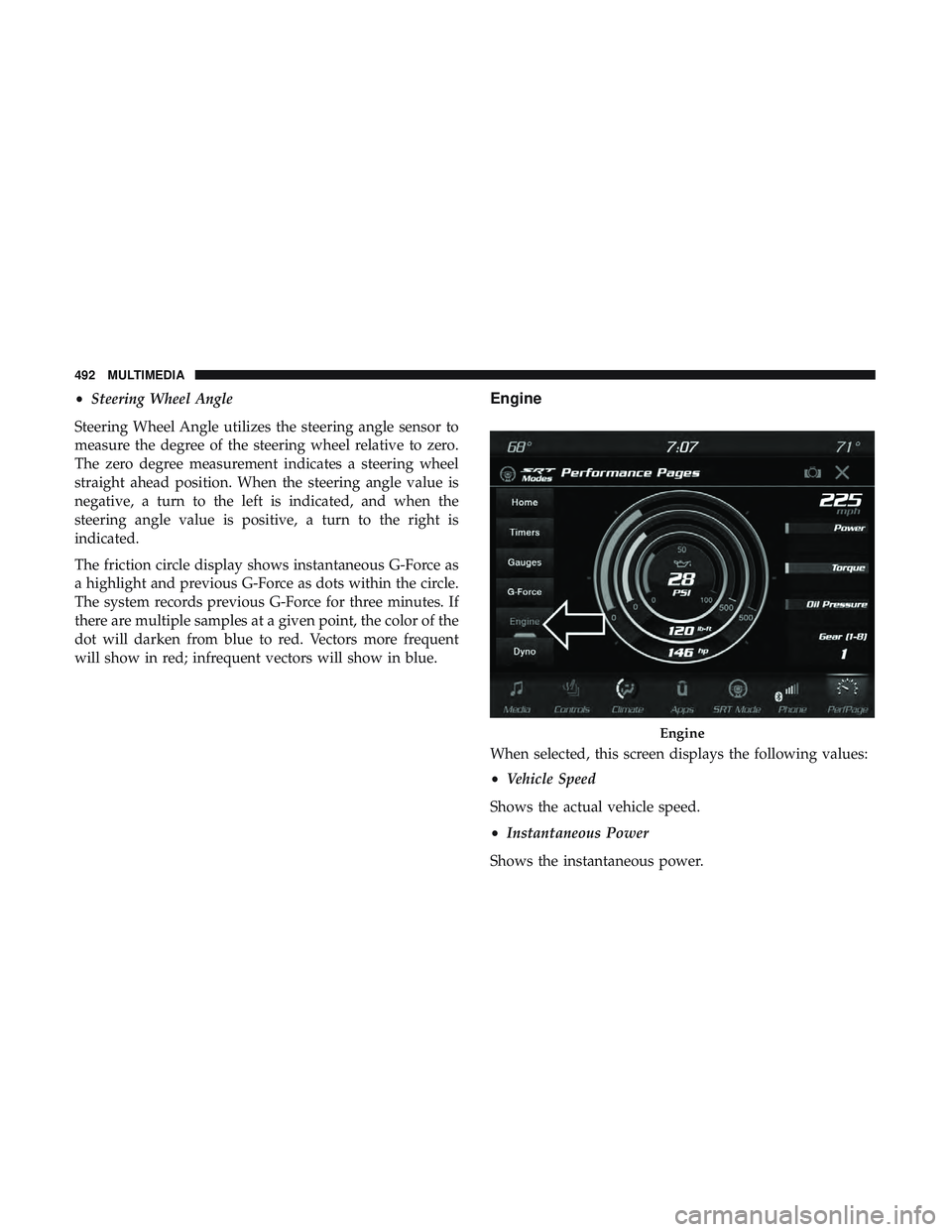
will show in red; infrequent vectors will show in blue.Engine
When selected, this screen displays the following values:
• Vehicle Speed
Shows the actual vehicle speed.
• Instantaneous Power
Shows the instantaneous power.
Engine
492 MULTIMEDIA
Page 505 of 568
Factory Default” button on the touchscreen to change back
to factory settings, or press the “Shift Light Off” button on
the touchscreen to turn the system off completely.
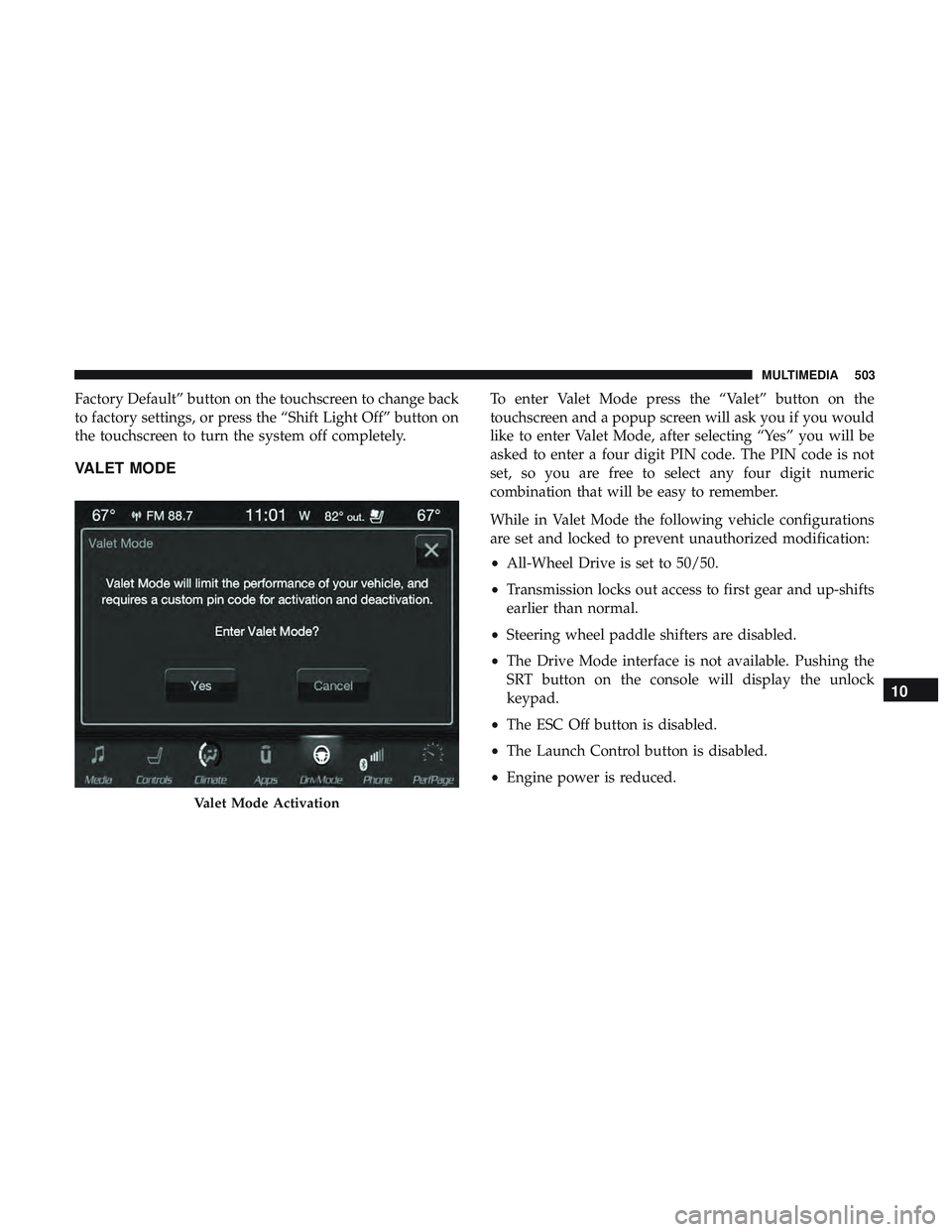
VALET MODE
To enter Valet Mode press the “Valet” button on the
touchscreen and a popup screen will ask you if you would
like to enter Valet Mode, after selecting “Yes” you will be
asked to enter a four digit PIN code. The PIN code is not
set, so you are free to select any four digit numeric
combination that will be easy to remember.
While in Valet Mode the following vehicle configurations
are set and locked to prevent unauthorized modification:
•All-Wheel Drive is set to 50/50.
• Transmission locks out access to first gear and up-shifts
earlier than normal.
• Steering wheel paddle shifters are disabled.
• The Drive Mode interface is not available. Pushing the
SRT button on the console will display the unlock
keypad.
• The ESC Off button is disabled.
• The Launch Control button is disabled.
• Engine power is reduced.
Valet Mode Activation
10
MULTIMEDIA 503
Page 540 of 568
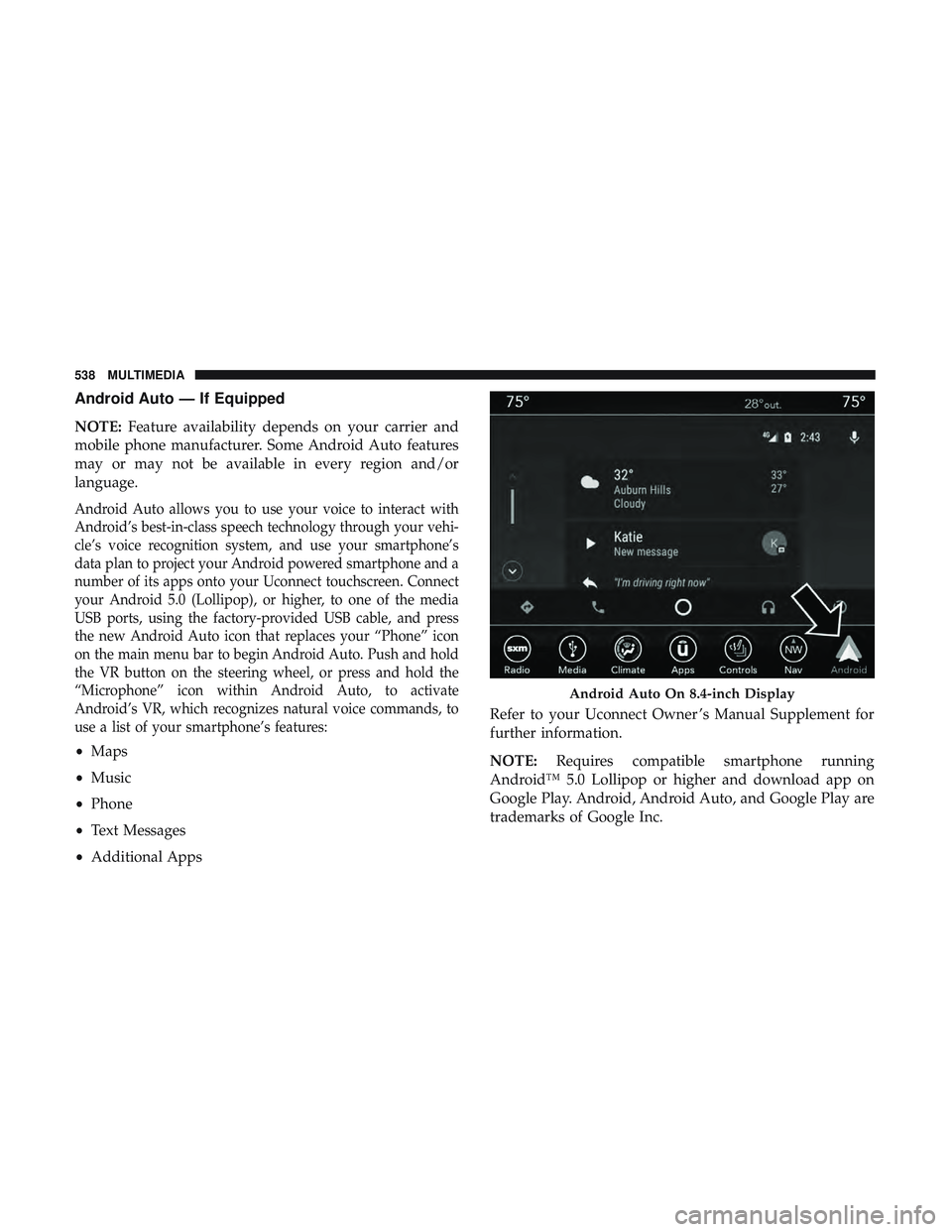
Android Auto — If Equipped
NOTE:Feature availability depends on your carrier and
mobile phone manufacturer. Some Android Auto features
may or may not be available in every region and/or
language.
Android Auto allows you to use your voice to interact with
Android’s best-in-class speech technology through your vehi-
cle’s voice recognition system, and use your smartphone’s
data plan to project your Android powered smartphone and a
number of its apps onto your Uconnect touchscreen. Connect
your Android 5.0 (Lollipop), or higher, to one of the media
USB ports, using the factory-provided USB cable, and press
the new Android Auto icon that replaces your “Phone” icon
on the main menu bar to begin Android Auto. Push and hold
the VR button on the steering wheel, or press and hold the
“Microphone” icon within Android Auto, to activate
Android’s VR, which recognizes natural voice commands, to
use a list of your smartphone’s features:
• Maps
• Music
• Phone
• Text Messages
• Additional Apps Refer to your Uconnect Owner ’s Manual Supplement for
further information.
NOTE:
Requires compatible smartphone running
Android™ 5.0 Lollipop or higher and download app on
Google Play. Android, Android Auto, and Google Play are
trademarks of Google Inc.
Android Auto On 8.4-inch Display
538 MULTIMEDIA
Page 561 of 568
Outlet (Auxiliary Electrical Outlet)............122
Seats ..................................40
Steering ...............................281
Sunroof ...............................100
Tilt/Telescoping Steering Column ..............63
Windows ...............................97
Power Seats Down ...............................41, 42
Forward ............................ .41, 42
Rearward ............................41, 42
Up .................................41, 42
Pregnant Women And Seat Belts ................205
Preparation For Jacking ..................... .373
Pretensioners Seat Belts ............................. .206
Radial Ply Tires ............................432
Radiator Cap (Coolant Pressure Cap) .............415
Radio Frequency General Information ................22, 28, 29, 38
Radio Operation .......................... .525
Radio Remote Controls ..................... .506
Rain Sensitive Wiper System ...................79
Rear Air Conditioning ........................90
Rear Axle (Differential) ..................... .419Rear Camera
............................. .330
Rear Cross Path ............................184
Rear Cupholders .......................... .120
Rear ParkSense System ...................305, 314
Rear Seats, Folding ..........................50
Rear Wiper/Washer ..........................80
Recreational Towing ........................ .347
Reformulated Gasoline .......................453
Refrigerant ...............................401
Release, Hood ............................ .103
Reminder, Seat Belt ........................ .198
Remote Control Starting System ...........................25
Remote Keyless Entry ........................18
Arm The Alarm ..........................30
Disarm The Alarm ........................30
Programming Additional Key Fobs ..........22,29
Remote
Sound System (Radio) Control ...........506
Remote Starting Exit Remote Start Mode .....................27
Remote Starting System .......................25
Replacement Bulbs ........................ .358
Replacement Keys ........................22, 29
Replacement Tires ..........................435
Reporting Safety Defects .....................547
12
INDEX 559
Page 563 of 568
Sentry KeyKey Programming .........................29
Sentry Key (Immobilizer) ......................28
Sentry Key Replacement ....................22, 29
Service Assistance ..........................544
Service Contract .......................... .546
Service Manuals .......................... .548
Shifting .................................266
Automatic Transmission ................266, 268
Shoulder Belts ............................ .200
Signals, Turn .......................161, 251, 361
Siri .................................... .536
SiriusXM Guardian Vehicle Health Alert .......................535
Snow Chains (Tire Chains) ....................441
Snow Tires ...............................437
Spare Tires .....................370, 437, 438, 439
Spark Plugs ............................. .457
Specifications Fuel (Gasoline) ..........................457
Oil...................................457
Speed Control Accel/Decel ........................ .283, 284
Accel/Decel (ACC Only) ...................290
Cancel ............................... .285Resume
...............................285
Set ...................................283
Speed Control (Cruise Control) ..............282, 285
Starting ............................25, 257, 258
Button .................................23
Cold Weather .......................... .262
Engine Fails To Start ..................... .261
Remote ................................25
Starting And Operating ...................257, 258
Starting Procedures ..................... .257, 258
Steering ..................................63
Power ............................... .281
Tilt Column .............................63
Wheel, Heated ...........................63
Wheel, Tilt ..............................63
Steering Wheel
Audio Controls .................506
Steering Wheel Mounted Sound System Controls . . . .506
Storage, Vehicle .............................95
Sunglasses Storage ..........................127
Sun Roof ............................... .100
Sun Visor .................................67
Sway Control, Trailer ........................177
Synthetic Engine Oil ........................399
System, Remote Starting ......................25
12
INDEX 561