battery DODGE DURANGO SRT 2019 Workshop Manual
[x] Cancel search | Manufacturer: DODGE, Model Year: 2019, Model line: DURANGO SRT, Model: DODGE DURANGO SRT 2019Pages: 572, PDF Size: 6.59 MB
Page 449 of 572
•Clean and protect polished metal parts by applying
protective waxes.
• Apply talcum powder to the front and rear wiper blades
and leave raised from the glass.
• Cover the vehicle with an appropriate cover taking care
not to damage the painted surface by dragging across
dirty surfaces. Do not use plastic sheeting which will not
allow the evaporation of moisture present on the surface
of the vehicle.
• Inflate the tires at a pressure of +7.25 psi (+0.5 bar)
higher than recommended on the tire placard and check
it periodically.
• Do not drain the engine cooling system.
• Whenever you leave the vehicle is stationary for two
weeks or more, run idle the engine for approximately
five minutes, with the air conditioning system on and
high fan speed. This will ensure a proper lubrication of
the system, thus minimizing the possibility of damage to
the compressor when the vehicle is put back into opera-
tion.CAUTION!
Before removal of the positive and negative terminals
to the battery, wait at least a minute with ignition
switch in the OFF position and close the driver ’s door.
When reconnecting the positive and negative terminals
to the battery be sure the ignition switch is in the OFF
position and the driver ’s door is closed.
Battery Storage Mode
With the ignition in the ON position, engine not running,
navigate to the battery gauge page on the instrument
cluster display, then press and hold the OK button. The
vehicle will be put into battery storage mode, which will
greatly increase the amount of time the vehicle can sit and
restart without needing to disconnect the battery. Going
into battery storage mode will increase the amount of time
between starts to about 60 days.
NOTE: The key fob buttons will not work while the
vehicle is in battery storage mode, pulling the door handle
will wake the vehicle and allow it to recognize the key fob
to unlock the door.
8
SERVICING AND MAINTENANCE 447
Page 493 of 572
When Home is selected, a series of widgets (gauges) can be
customized by the user. Follow these steps to change a
widget:
1. Pressing any of the gauges allows you to switch thedisplay.
2. Press the pencil icon and select the following option from the menu:
• Set Widget: Top Left
• Set Widget: Top Right
• Set Widget: Bottom Left
• Set Widget: Bottom Right
3. After selecting a Widget location: select the gauge or timer to display:
• Gauge: Oil Temp
• Gauge: Oil Pressure
• Gauge: Coolant Temp
• Gauge: Battery Voltage
• Gauge: Trans Temp
• Gauge: Boost Pressure — If Equipped
• Gauge: Air/Fuel Ratio — If Equipped
• Gauge: I/C Coolant Temp — If Equipped
• Gauge: Intake Air Temp •
Gauge: Engine Torque
• Gauge: Engine Power
• Gauge: G-Force
• Gauge: Steering Angle
• Gauge: Current Gear
• Gauge: Current Speed
• Timer: 0–60 MPH
• Timer: 0–100 MPH
• Timer: 60 ft — If Equipped
• Timer: 1/8 Mile
• Timer: 1/4 Mile
• Timer: Brake Distance
• Timer: Reaction Time
NOTE: Pressing the “Camera” icon in the upper right
corner of the Performance Pages screen will take a screen-
shot of the current screen and save it to a USB that is
connected.
10
MULTIMEDIA 491
Page 497 of 572
•Oil Pressure
Shows the actual oil pressure.
• Coolant Temperature
Shows the actual coolant temperature.
• Battery Voltage
Shows the actual battery voltage.
• Trans Oil Temp
Shows the current transmission oil temperature.
• Intake Air Temperature
Shows the actual air intake temperature.
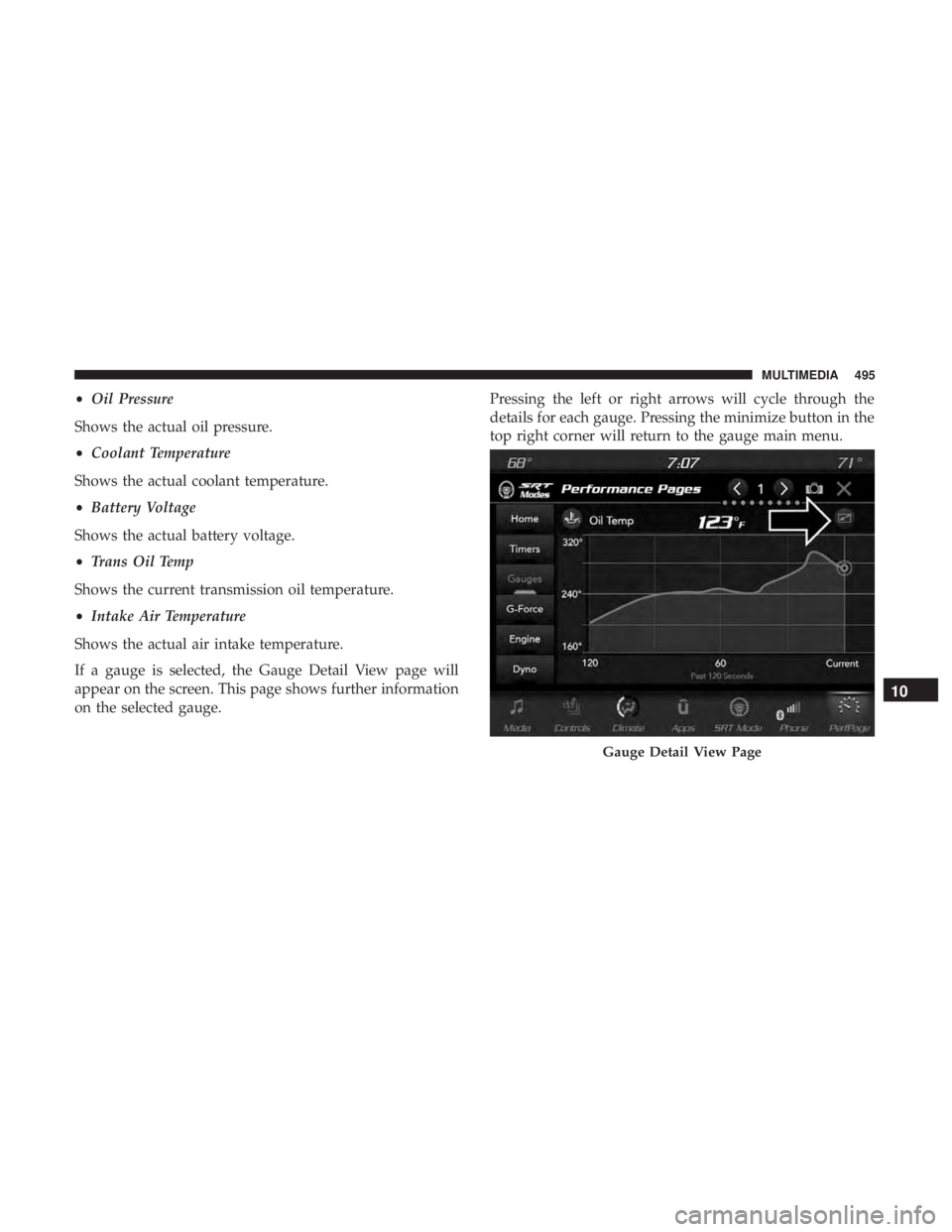
If a gauge is selected, the Gauge Detail View page will
appear on the screen. This page shows further information
on the selected gauge. Pressing the left or right arrows will cycle through the
details for each gauge. Pressing the minimize button in the
top right corner will return to the gauge main menu.
Gauge Detail View Page
10
MULTIMEDIA 495
Page 510 of 572
Factory Default” button on the touchscreen to change back
to factory settings, or press the “Shift Light Off” button on
the touchscreen to turn the system off completely.
Race Cooldown — If Equipped
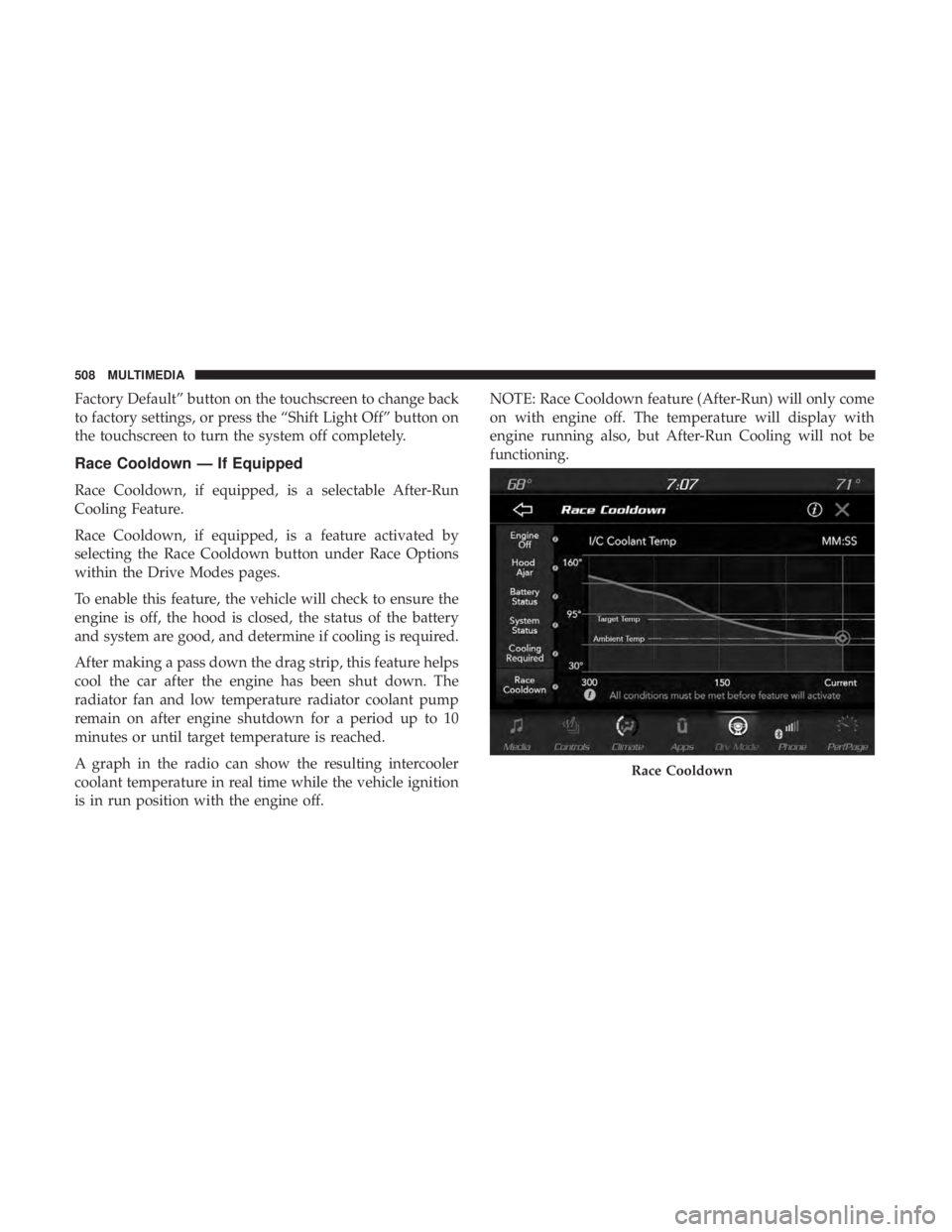
Race Cooldown, if equipped, is a selectable After-Run
Cooling Feature.
Race Cooldown, if equipped, is a feature activated by
selecting the Race Cooldown button under Race Options
within the Drive Modes pages.
To enable this feature, the vehicle will check to ensure the
engine is off, the hood is closed, the status of the battery
and system are good, and determine if cooling is required.
After making a pass down the drag strip, this feature helps
cool the car after the engine has been shut down. The
radiator fan and low temperature radiator coolant pump
remain on after engine shutdown for a period up to 10
minutes or until target temperature is reached.
A graph in the radio can show the resulting intercooler
coolant temperature in real time while the vehicle ignition
is in run position with the engine off.NOTE: Race Cooldown feature (After-Run) will only come
on with engine off. The temperature will display with
engine running also, but After-Run Cooling will not be
functioning.
Race Cooldown
508 MULTIMEDIA
Page 511 of 572
This feature will automatically deactivate after extended
driving at road speeds, or when one or more of the
following conditions apply:
•If coolant temperatures reaches the target temperature
and cooling is no longer required.
• If battery voltage or state of charge drops below a
threshold.
• The hood is opened.VALET MODE
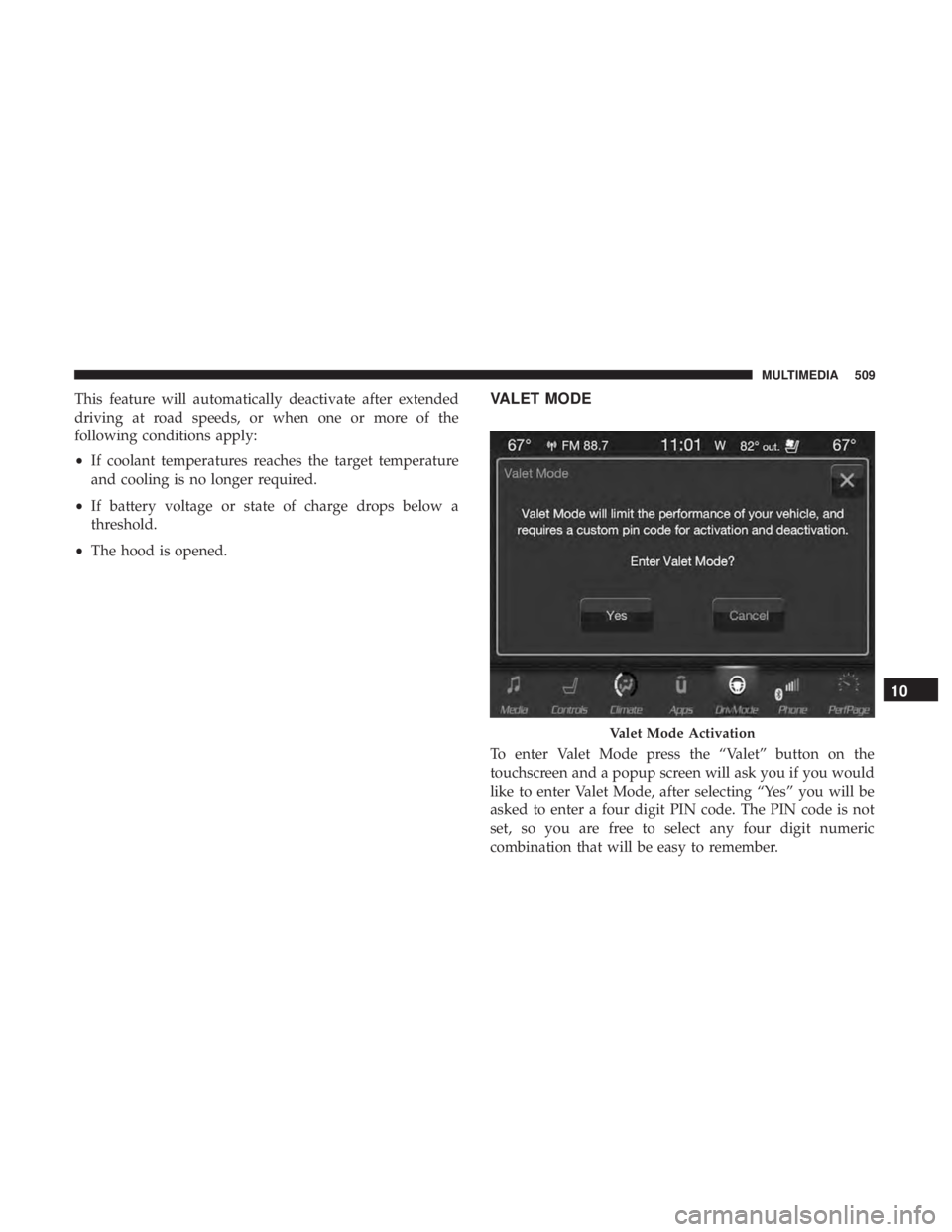
To enter Valet Mode press the “Valet” button on the
touchscreen and a popup screen will ask you if you would
like to enter Valet Mode, after selecting “Yes” you will be
asked to enter a four digit PIN code. The PIN code is not
set, so you are free to select any four digit numeric
combination that will be easy to remember.
Valet Mode Activation
10
MULTIMEDIA 509
Page 513 of 572
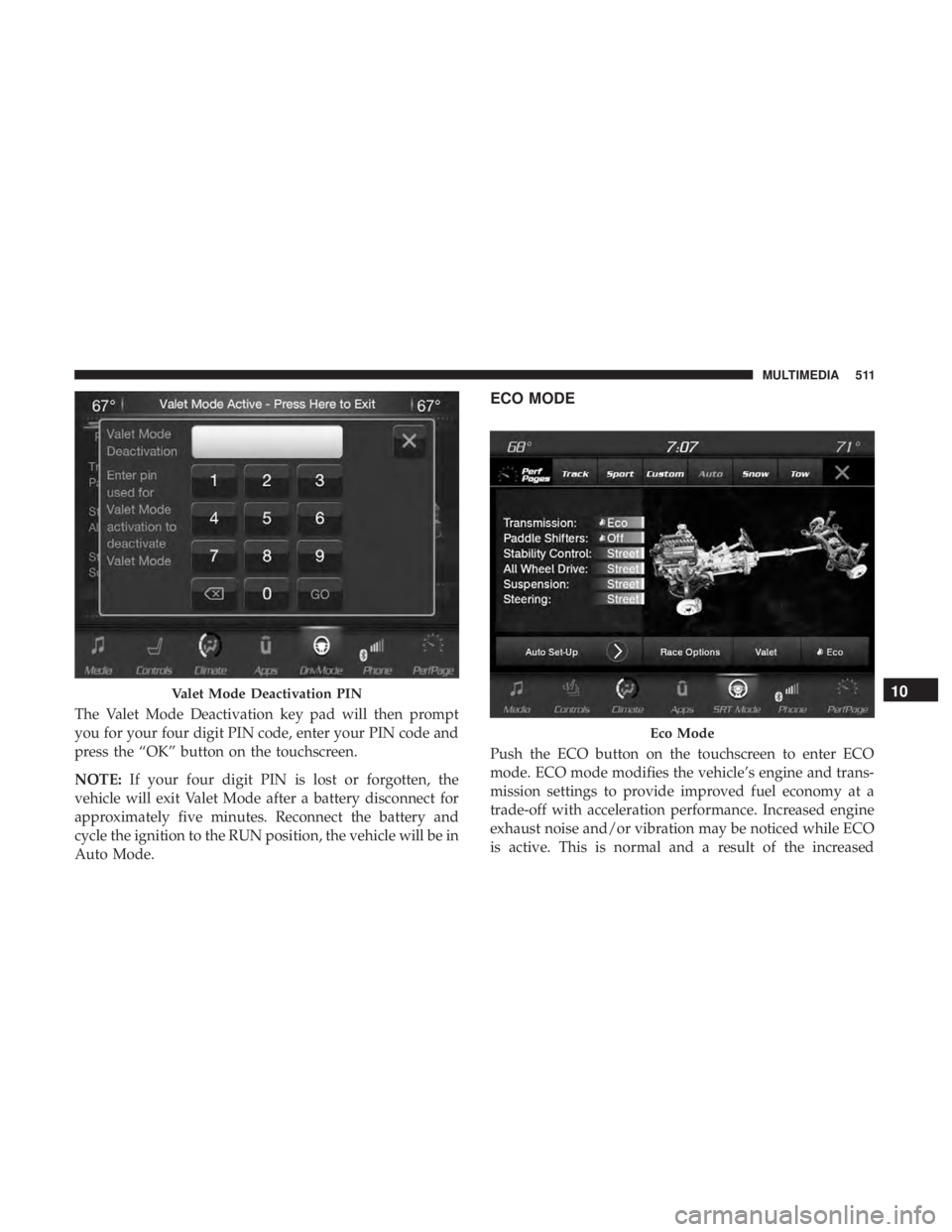
The Valet Mode Deactivation key pad will then prompt
you for your four digit PIN code, enter your PIN code and
press the “OK” button on the touchscreen.
NOTE:If your four digit PIN is lost or forgotten, the
vehicle will exit Valet Mode after a battery disconnect for
approximately five minutes. Reconnect the battery and
cycle the ignition to the RUN position, the vehicle will be in
Auto Mode.
ECO MODE
Push the ECO button on the touchscreen to enter ECO
mode. ECO mode modifies the vehicle’s engine and trans-
mission settings to provide improved fuel economy at a
trade-off with acceleration performance. Increased engine
exhaust noise and/or vibration may be noticed while ECO
is active. This is normal and a result of the increased
Valet Mode Deactivation PIN
Eco Mode
10
MULTIMEDIA 511
Page 515 of 572
Media Mode
Pushing the top of the switch once goes to the next track on
the selected media (AUX/USB/Bluetooth). Pushing the
bottom of the switch once goes to the beginning of the
current track, or to the beginning of the previous track if it
is within eight seconds after the current track begins to
play.
IPOD/USB/MP3 CONTROL — IF EQUIPPED
This feature allows an iPod or external USB device to be
plugged into the USB port, located inside the storage area
on the center stack of the instrument panel.
iPod control supports Mini, 4G, Photo, Nano, 5G iPod and
iPhone devices. Some iPod software versions may not fully
support the iPod control features. Please visit Apple’s
website for software updates.
For further information, refer to the Uconnect Owner ’s
Manual Supplement.
Connecting The iPod Or External USB Device
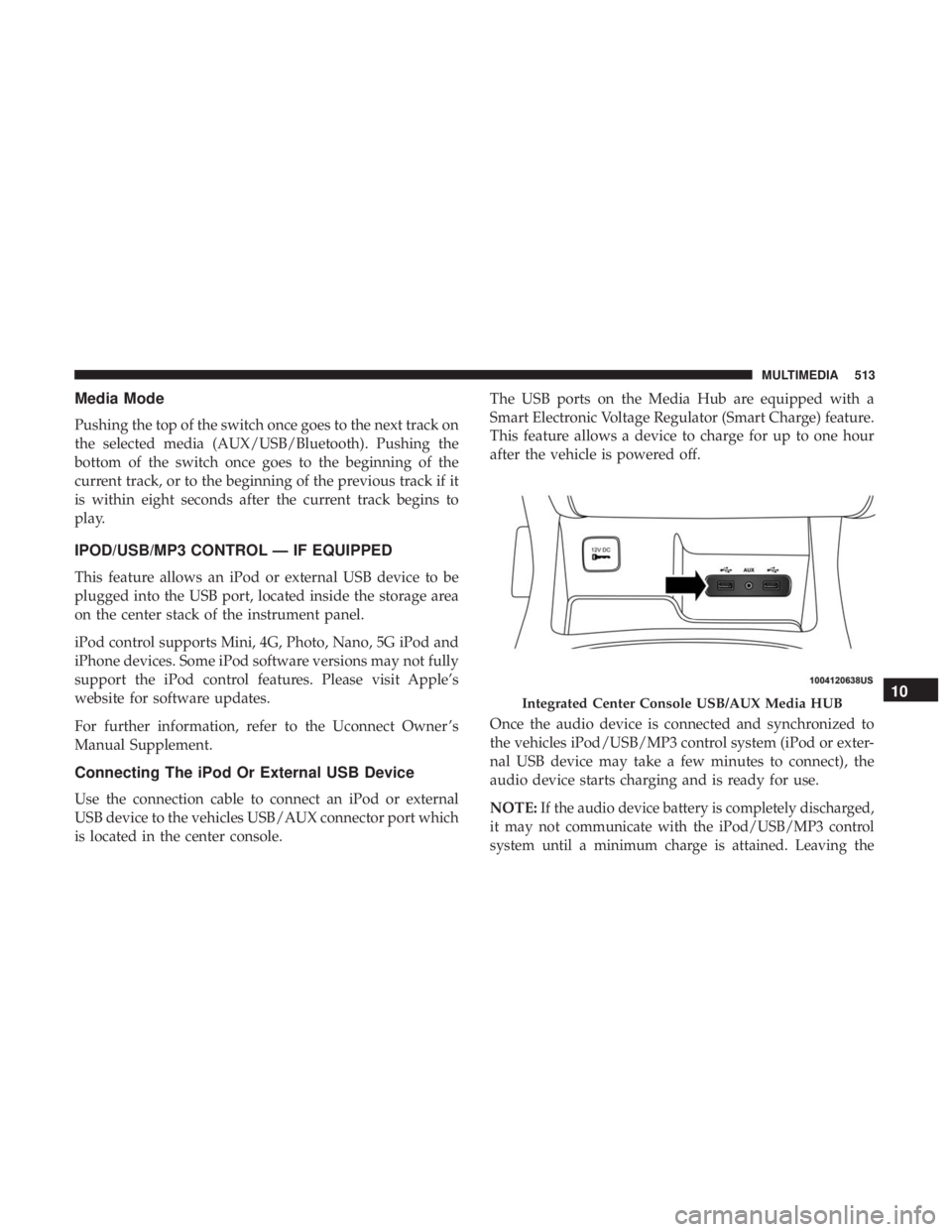
Use the connection cable to connect an iPod or external
USB device to the vehicles USB/AUX connector port which
is located in the center console.The USB ports on the Media Hub are equipped with a
Smart Electronic Voltage Regulator (Smart Charge) feature.
This feature allows a device to charge for up to one hour
after the vehicle is powered off.
Once the audio device is connected and synchronized to
the vehicles iPod/USB/MP3 control system (iPod or exter-
nal USB device may take a few minutes to connect), the
audio device starts charging and is ready for use.
NOTE:If the audio device battery is completely discharged,
it may not communicate with the iPod/USB/MP3 control
system until a minimum charge is attained. Leaving the
Integrated Center Console USB/AUX Media HUB10
MULTIMEDIA 513
Page 516 of 572
audio device connected to the iPod/USB/MP3 control sys-
tem may charge it to the required level.
Using This Feature
By using an iPod cable, or an external USB device to
connect to the USB port:
•The audio device can be played on the vehicle’s sound
system, providing metadata (artist, track title, album,
etc.) information on the radio display.
• The audio device can be controlled using the radio
buttons to Play, Browse, and List the iPod contents.
• The audio device battery charges when plugged into the
USB/AUX connector (if supported by the specific audio
device).
NOTE: For further information, refer to the Uconnect
Owner ’s Manual Supplement.
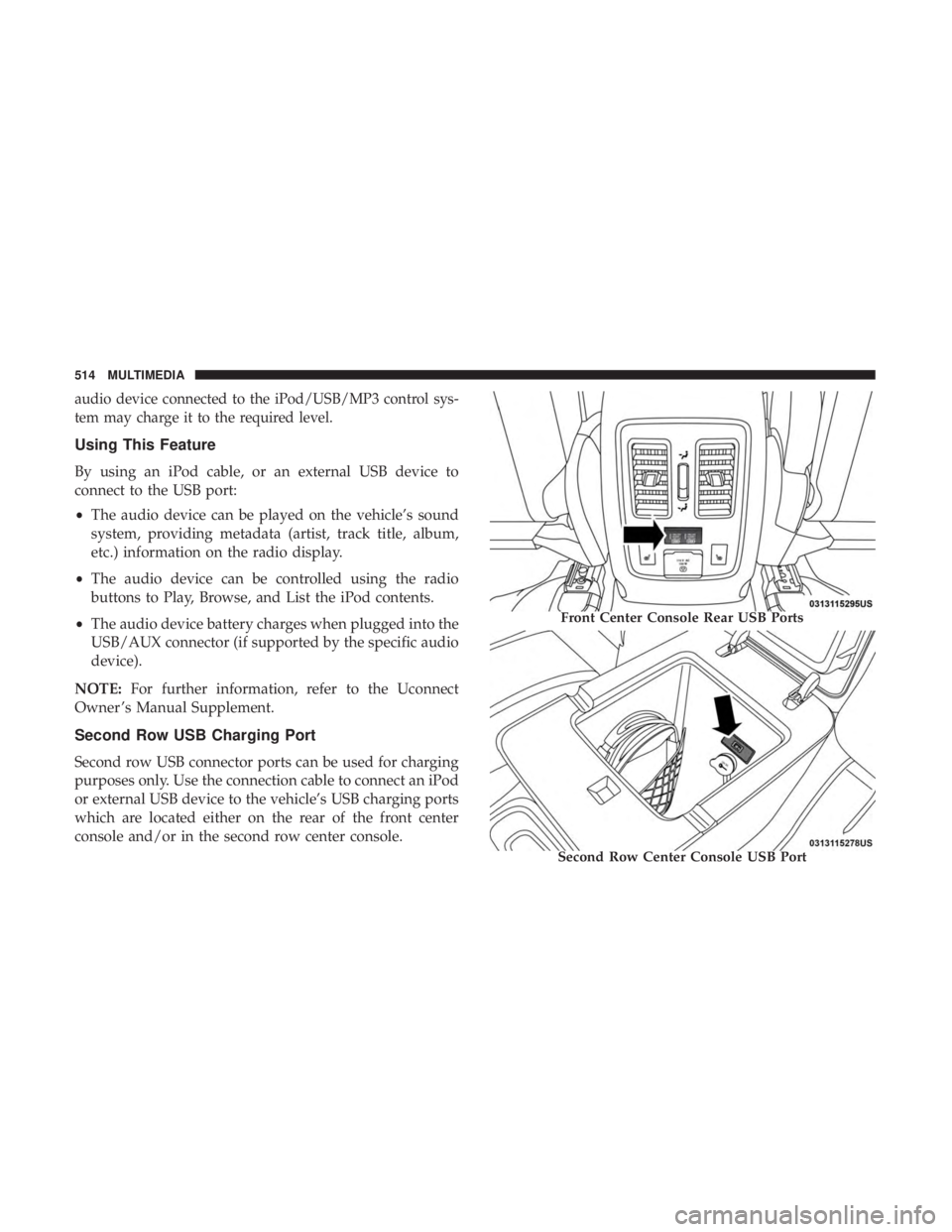
Second Row USB Charging Port
Second row USB connector ports can be used for charging
purposes only. Use the connection cable to connect an iPod
or external USB device to the vehicle’s USB charging ports
which are located either on the rear of the front center
console and/or in the second row center console.
Front Center Console Rear USB Ports
Second Row Center Console USB Port
514 MULTIMEDIA
Page 526 of 572
Controls
The headphone power indicator and controls are located
on the right ear cup.
NOTE:The rear video system must be turned on before
sound can be heard from the headphones. To conserve
battery life, the headphones will automatically turn off
approximately three minutes after the rear video system is
turned off.
Changing the Audio Mode for Headphones
1. Ensure the Remote Control channel/screen selector switch is in the same position as the headphone selector
switch.
NOTE: •When both the headphone and the remote control
channel selector switches are on Channel 1, the Re-
mote is controlling Channel 1 and the headphones are
tuned to the audio on Channel 1.
• When both the headphone and the remote control
channel selector switches are on Channel 2, the Re-
mote is controlling Channel 2 and the headphones are
tuned to the audio on Channel 2. 2. Push the SOURCE button on the remote control.
3. Pushing the SOURCE button will advance to the next
mode.
4. When the Mode Selection menu appears on screen, use the cursor buttons on the remote control to navigate to
the available modes and push the OK button to select
the new mode.
5. To cancel out of the Mode Selection menu, push the BACK button on the remote control.
Replacing The Headphone Batteries
Each set of headphones requires two AAA batteries for
operation. To replace the batteries:
1. Locate the battery compartment on the left ear cup ofthe headphones, and then slide the battery cover down-
ward.
2. Replace the batteries, making sure to orient them ac- cording to the polarity diagram shown.
3. Replace the battery compartment cover.
524 MULTIMEDIA
Page 557 of 572
Anti-Lock Warning Light.....................161
Apple CarPlay ........................... .543
Arming System Security Alarm ...........................32
Assist, Hill Start .......................... .172
Audio Systems (Radio) ...................... .466
Auto Down Power Windows ...................98
Automatic Headlights ........................72
Automatic High Beams .......................71
Automatic Temperature Control (ATC) ............94
Automatic Transmission ..................258, 269
Adding Fluid ....................... .422, 462
Autostick ............................. .275
Fluid And Filter Change ...................422
Fluid Change .......................... .422
Fluid Level Check .....................421, 422
Fluid Type ......................... .421, 462
Gear Ranges ........................... .270
Special Additives ........................ .421
Automatic Transmission Limp Home Mode ........274
Autostick ............................... .275
Auxiliary Driving Systems ....................180
Auxiliary Electrical Outlet (Power Outlet) .........122
Auxiliary Power Outlet ..................... .122Axle Lubrication
.......................... .462
Battery .............................. .155, 399
Charging System Light ....................155
Keyless Key Fob Replacement ................21
Battery Saver Feature .........................74
Belts, Seat ............................... .251
Blind Spot Monitoring ...................... .180
Body Mechanism Lubrication ..................408
B-Pillar Location .......................... .429
Brake Assist System ........................ .172
Brake Control System, Electronic ................171
Brake Fluid .......................... .420, 462
Brake System ......................... .420, 455
Anti-Lock
(ABS) ........................ .455
Fluid Check ........................ .420, 462
Master Cylinder ........................ .420
Parking .............................. .265
Warning Light .......................... .154
Brake/Transmission Interlock ..................268
Bulb Replacement ...................... .360, 361
Bulbs, Light ............................. .254
Camera, Rear ............................ .329
Capacities, Fluid .......................... .460
12
INDEX 555