CD changer DODGE GRAND CARAVAN 2004 User Guide
[x] Cancel search | Manufacturer: DODGE, Model Year: 2004, Model line: GRAND CARAVAN, Model: DODGE GRAND CARAVAN 2004Pages: 397, PDF Size: 7.59 MB
Page 183 of 397
Random Play (RND)
Press the Random button to play the tracks on the
selected disc in random order for an interesting change of
pace.
Random can be cancelled by pressing the button a second
time or by ejecting the CD from the changer.
CD Diagnostic Indicators
When driving over a very rough road, the CD player may
skip momentarily. Skipping will not damage the disc or
the player, and play will resume automatically.
As a safeguard and to protect your CD player, one of the
following warning symbols may appear on your display.
A CD HOT symbol indicates the player is too hot.
CD HOT will pause the operation. Play can be resumed
when the operating temperature is corrected or another
MODE is selected. An ERR symbol will appear on the display if the laser is
unable to read the Disc data for the following reasons:
² Excessive vibration
² Disc inserted upside down
² Damaged disc
² Water condensation on optics UNDERSTANDING YOUR INSTRUMENT PANEL 183
4
Page 184 of 397
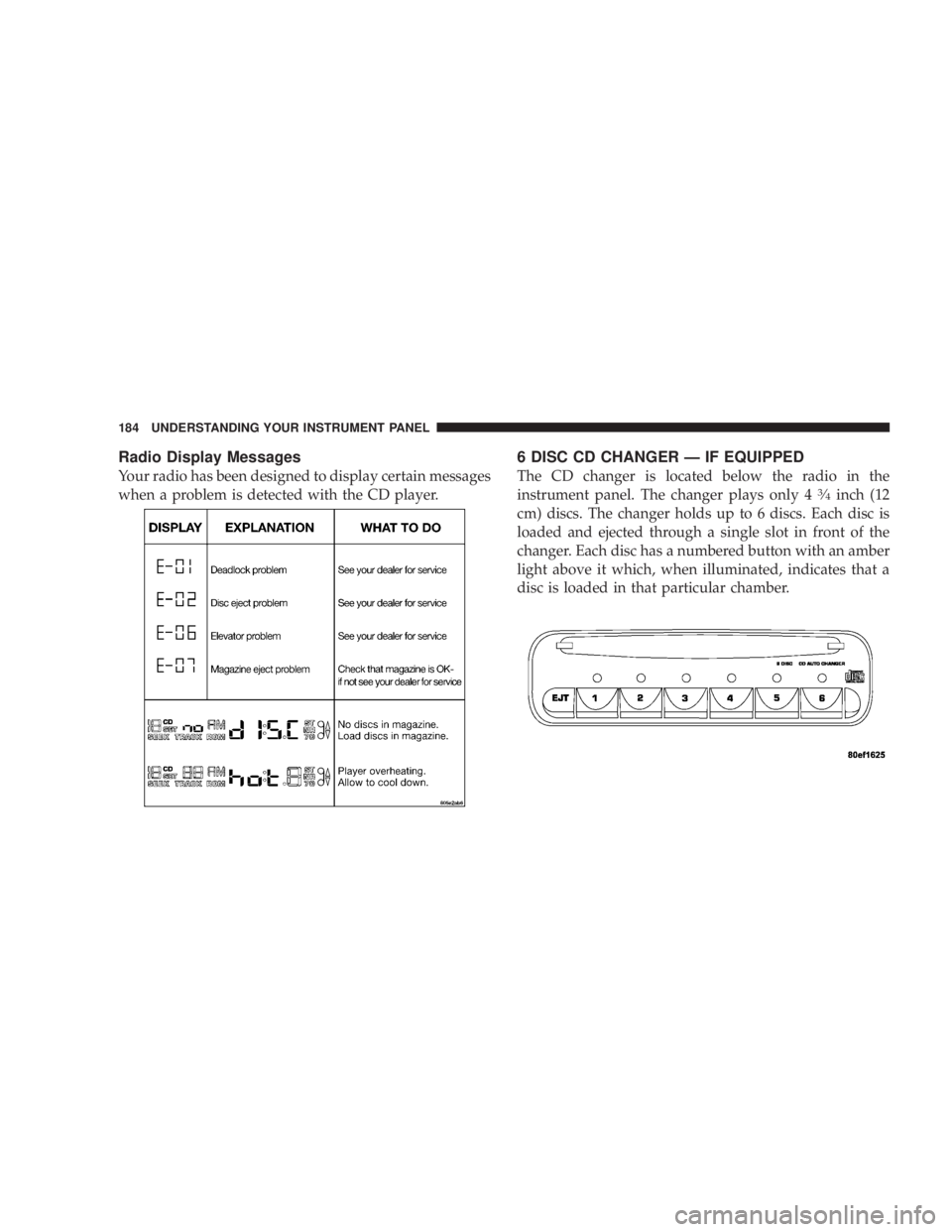
Radio Display Messages
Your radio has been designed to display certain messages
when a problem is detected with the CD player. 6 DISC CD CHANGER Ð IF EQUIPPED
The CD changer is located below the radio in the
instrument panel. The changer plays only 4 3
¤ 4
inch (12
cm) discs. The changer holds up to 6 discs. Each disc is
loaded and ejected through a single slot in front of the
changer. Each disc has a numbered button with an amber
light above it which, when illuminated, indicates that a
disc is loaded in that particular chamber.184 UNDERSTANDING YOUR INSTRUMENT PANEL
Page 185 of 397
Loading the CD Changer
When inserting the first CD into the changer if the radio
is on, wait until the single slot is illuminated on both
sides and simply insert the first disc.
To insert additional CDs into the changer, the instructions
follow:
1. Select and press any numbered button without an
illuminated light above it.
2. Insert the CD while the light above the chosen button
is flashing and the two lights on either side of the slot are
illuminated.
3. Upon insertion, the CD will begin to play, and both the
button light and the lights in the corner of the loading
slot will illuminate.
4. Repeat the process for loading any additional CDs.
The CD player will stop while additional CDs are loaded. Playing Discs
The radio will show the CD number, the CD track
number, and the Track Time Elapsed while the radio is in
the CD mode. If more than one CD is loaded in the
changer, the changer will automatically play the next disc
after playing the last track of the current disc.
Seek Button
Press the top of this button on the radio once to play the
next track. Press the bottom of the button once to return
to the beginning of the current track. Press the bottom of
the button twice to play the previous track.
FF/TUNE/RW
Press the FF (fast forward) button and the CD player will
fast forward through the tracks until the button is re-
leased. Press the RW (rewind) button and the CD player
will reverse through the tracks until the button is re-
leased. UNDERSTANDING YOUR INSTRUMENT PANEL 185
4
Page 186 of 397
Mode Button
Press this button to toggle between radio and cd modes.
Program Button 1
Press this button to play the next available disc.
Program Button 4 (Random Play)
Press this button while the CD is playing to activate
Random Play. This feature plays the selections on the
current compact disc in random order to provide an
interesting change of pace. The CD changer stays in the
random play mode when changing to the next disc.
NOTE: The changer will not random play between
discs.
Press the top of the Seek button once to move to the next
randomly selected track. Press the bottom of the Seek
button to go back to the beginning of the track.
Press button 4 a second time to stop random play. Program Button 5
Press this button to play the previous disc.
Time Button
Press this button to switch between time of day and CD
track time.
Changing Modes
While in the radio mode, if a cassette is loaded, press the
Mode button to switch to the tape mode. If a CD is
loaded, press the Mode button to select the CD mode. If
neither a tape nor CD is loaded, the radio will ignore the
command.
² Inserting either a tape or CD automatically starts that
mode of play.
² Pressing the AM/FM button while in the tape or CD
mode will select the radio mode.
² If in the CD mode and the last CD is ejected, the radio
will tune to the last station selected.186 UNDERSTANDING YOUR INSTRUMENT PANEL
Page 187 of 397
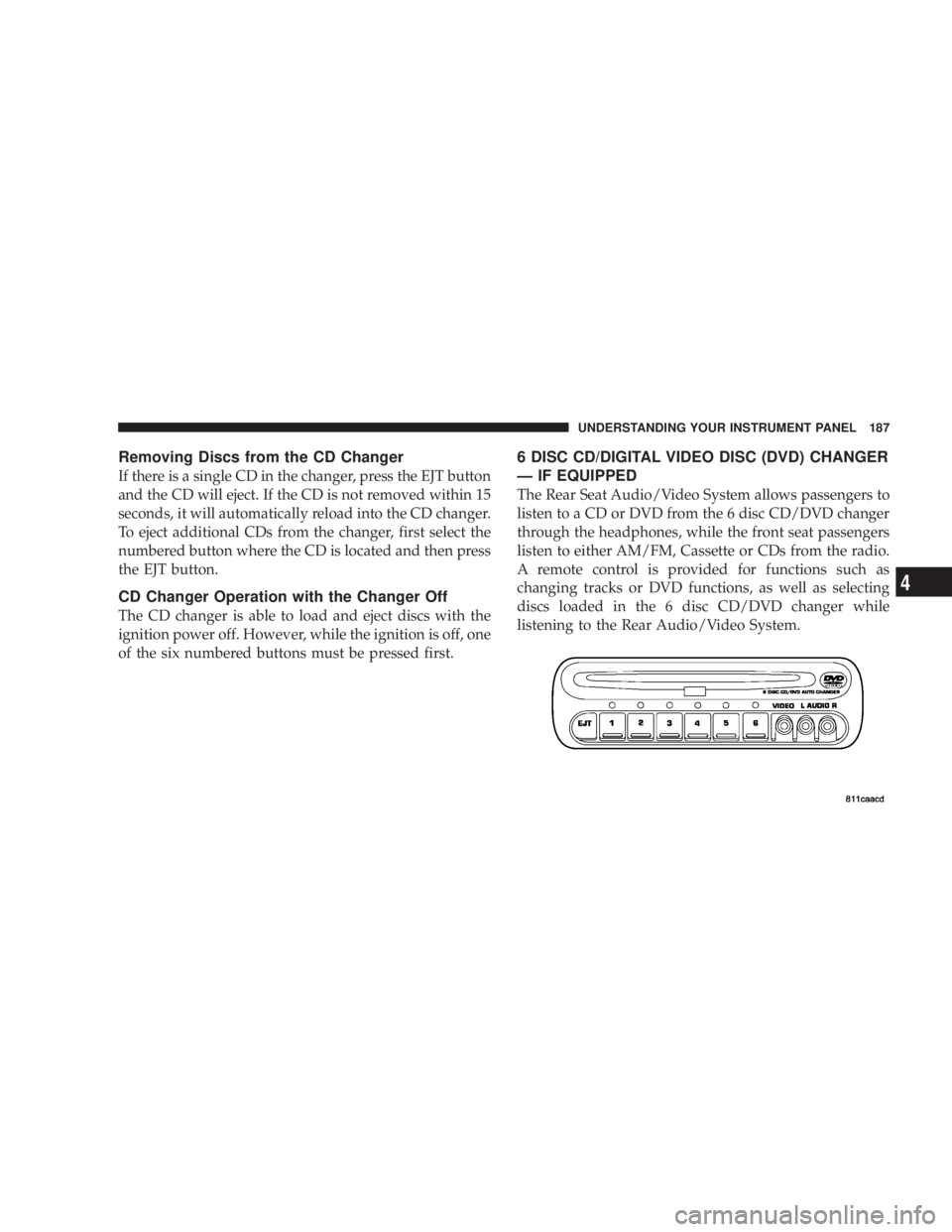
Removing Discs from the CD Changer
If there is a single CD in the changer, press the EJT button
and the CD will eject. If the CD is not removed within 15
seconds, it will automatically reload into the CD changer.
To eject additional CDs from the changer, first select the
numbered button where the CD is located and then press
the EJT button.
CD Changer Operation with the Changer Off
The CD changer is able to load and eject discs with the
ignition power off. However, while the ignition is off, one
of the six numbered buttons must be pressed first. 6 DISC CD/DIGITAL VIDEO DISC (DVD) CHANGER
Ð IF EQUIPPED
The Rear Seat Audio/Video System allows passengers to
listen to a CD or DVD from the 6 disc CD/DVD changer
through the headphones, while the front seat passengers
listen to either AM/FM, Cassette or CDs from the radio.
A remote control is provided for functions such as
changing tracks or DVD functions, as well as selecting
discs loaded in the 6 disc CD/DVD changer while
listening to the Rear Audio/Video System. UNDERSTANDING YOUR INSTRUMENT PANEL 187
4
Page 188 of 397
Operating Instructions Ð CD/DVD Changer
Loading The CD/DVD Changer
The CD/DVD changer is a multi-disc changer,
and will accept up to six discs. Gently insert
one disc into the CD/DVD changer with the
label facing up. The disc will automatically be
pulled into the CD/DVD changer.
To insert additional discs into the changer, follow the
instructions shown:
1. Select and press any numbered button without an
illuminated light above it.
2. Insert the disc while the light above the chosen button
is flashing and the light below the loading slot is illumi-
nated.
3. Upon insertion, the disc will begin to play, and both
the button light and the light below the loading slot will
illuminate. 4. Repeat the process for loading any additional CD/
DVDs. The CD/DVD changer will stop while additional
CD/DVDs are loaded.
If the volume control is ON, the unit will switch from
radio to CD/DVD mode and begin to play. The radio
display will show the chapter number and index time in
hours and minutes of the DVD, and the track number,
minutes and second of the CD. Play will begin automati-
cally in approximately 20 seconds. If the DVD does not
play automatically, press the ªENTERº button on the
remote control or on the side of the video screen to select
play from the menu options.
NOTE:
² You may eject a disc with the radio OFF. The ignition
switch must be in the ON or ACC position to insert a
disc with the radio OFF.188 UNDERSTANDING YOUR INSTRUMENT PANEL
Page 189 of 397
² If you insert a disc with the ignition ON and the radio
OFF, the DVD will automatically be pulled into the
DVD changer and the display will show the time of
day.
EJECT (EJT) Button
If there is a single disc in the changer, press the EJT
button and the disc will eject. The unit will switch to the
radio mode. If you do not remove the disc within 10
seconds, it will be reloaded and the display will show
PAUSE. The radio mode will continue to operate.
To eject additional discs from the changer, first select the
numbered button where the disc is located and then press
the EJT button.
The disc can be ejected with the radio OFF. Operating Instructions Ð Remote Control
Power Button (PWR)
Pressing the ªPOWERº button will turn the rear audio/
video system ON/OFF. The headphone symbol will flash
for approximately 5 seconds in the radio display and
sound can be heard from the headphones.
NOTE:
² The power button on the headphones must be turned
ON before sound can be heard from the headphones.
² When the rear audio/video system is ON, sound can
only be heard from the front speakers. The rear
speakers will turn back on when the rear audio/video
system is turned OFF. UNDERSTANDING YOUR INSTRUMENT PANEL 189
4
Page 190 of 397
MENU Button
This button only functions in the DVD video mode. Press
this button once to go to the on-screen menu, press the
button a second time to go to the main menu. When the
DVD is in stop mode, pressing the menu button for 3
seconds will display the set-up screen.
PAUSE/STOP/ PLAY Button
This button only functions in the DVD video mode. Press
this button once to pause the video, press a second time
to play the video. Press and hold this button for more
than 6 seconds to stop playing the video.
ENTER/ARROW Buttons
These buttons only function in the DVD video mode. Use
the ªENTERº button to play the DVD video or to enter
selections from the menu screens. Use the arrow buttons
to toggle through the menu screen options.
MODE Button
No Function SEEK Button
² CD/DVD changer
Press the right side of the ªSEEKº button for the next
chapter or track on the disc. Press the left side to return to
the beginning of the current chapter or track. Press the
left side of the ªSEEKº button twice within 2 seconds to
return to the previous chapter or track. Each press of the
ªSEEKº button up or down will toggle through the
chapters or tracks.
FF/RW Button
² CD/DVD changer
Press and hold ªFFº (Fast Forward) once and the CD/
DVD changer will begin to fast forward until the FF
button is released. The RW (Reverse) button works in a
similar manner.
Program Button (PROG)
No Function190 UNDERSTANDING YOUR INSTRUMENT PANEL
Page 193 of 397
Power Button
Pressing the power button will turn the headphones
ON/OFF.
NOTE:
² The headphones will turn off automatically and the
red LED will illuminate for approximately 2 minutes
when the radio or rear audio/video system is turned
off.
² The rear audio/video system must be turned ON
before sound can be heard from the headphones.
Volume Control
Rotate the volume control upward to increase the vol-
ume. Scan Button
Pressing the scan button will automatically find the
audio signal that is transmitted from the CD/DVD
changer when the rear audio/video system and the
headphones are on. This button is used only if the
headphones are locked on to a source other than the
vehicle's radio.
NOTE: When the ªGREEN LEDº is showing the head-
phones are receiving the audio signal. When the ªRED
LEDº is showing the headphones are searching for the
audio signal UNDERSTANDING YOUR INSTRUMENT PANEL 193
4
Page 194 of 397
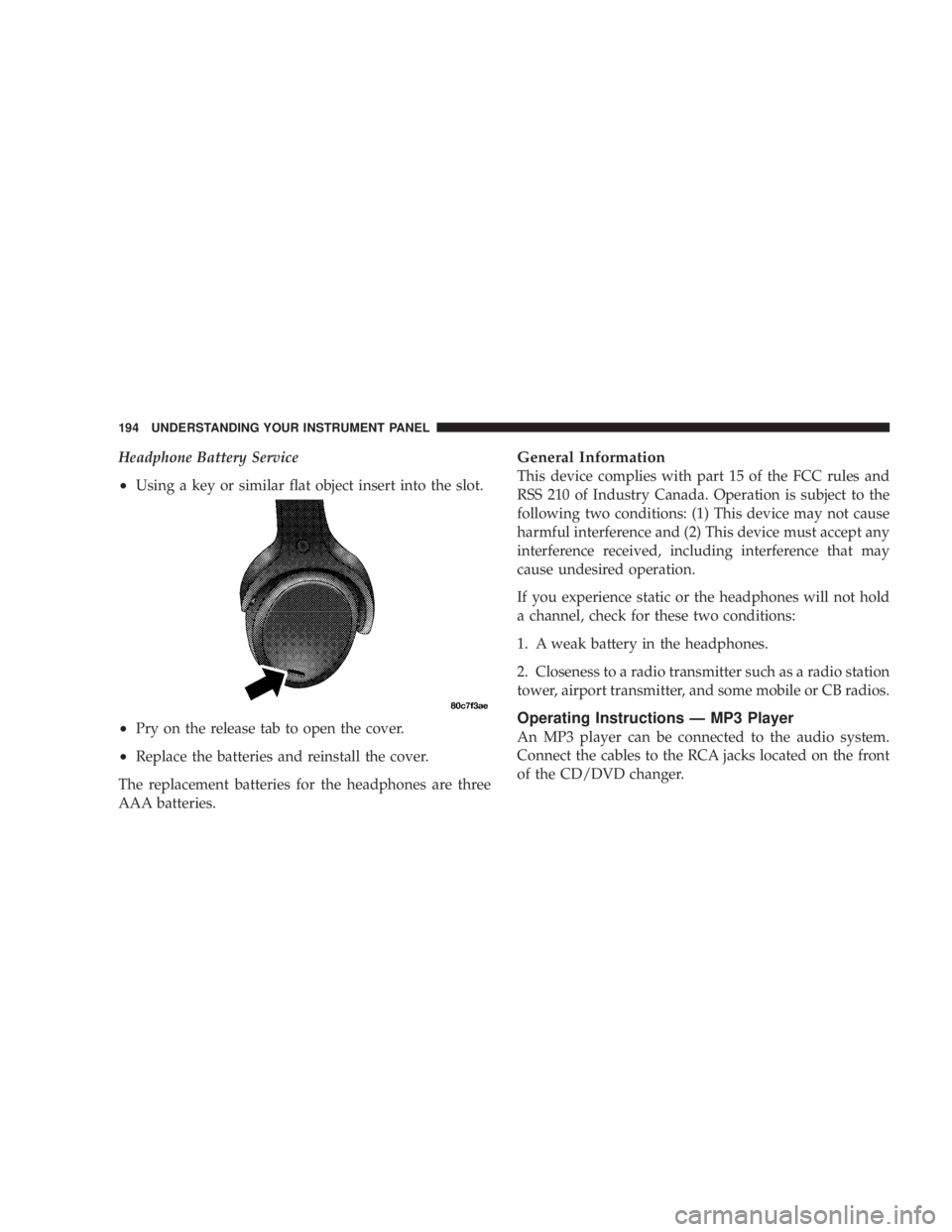
Headphone Battery Service
² Using a key or similar flat object insert into the slot.
² Pry on the release tab to open the cover.
² Replace the batteries and reinstall the cover.
The replacement batteries for the headphones are three
AAA batteries. General Information
This device complies with part 15 of the FCC rules and
RSS 210 of Industry Canada. Operation is subject to the
following two conditions: (1) This device may not cause
harmful interference and (2) This device must accept any
interference received, including interference that may
cause undesired operation.
If you experience static or the headphones will not hold
a channel, check for these two conditions:
1. A weak battery in the headphones.
2. Closeness to a radio transmitter such as a radio station
tower, airport transmitter, and some mobile or CB radios.
Operating Instructions Ð MP3 Player
An MP3 player can be connected to the audio system.
Connect the cables to the RCA jacks located on the front
of the CD/DVD changer.194 UNDERSTANDING YOUR INSTRUMENT PANEL