lights DODGE GRAND CARAVAN 2004 Owner's Manual
[x] Cancel search | Manufacturer: DODGE, Model Year: 2004, Model line: GRAND CARAVAN, Model: DODGE GRAND CARAVAN 2004Pages: 397, PDF Size: 7.59 MB
Page 110 of 397
WARNING!Speed Control can be dangerous where the system
can't maintain a constant speed. Your vehicle could
go too fast for the conditions, and you could lose
control. An accident could be the result. Don't use
Speed Control in heavy traffic or on roads that are
winding, icy, snow-covered, or slippery.
OVERHEAD CONSOLE Ð IF EQUIPPED
The overhead console can contain courtesy/reading
lights, an optional universal garage door opener
(HomeLink t ), storage for sunglasses, compass/
temperature display, a mini-trip computer, optional elec-
tronic vehicle information center (EVIC), power sliding
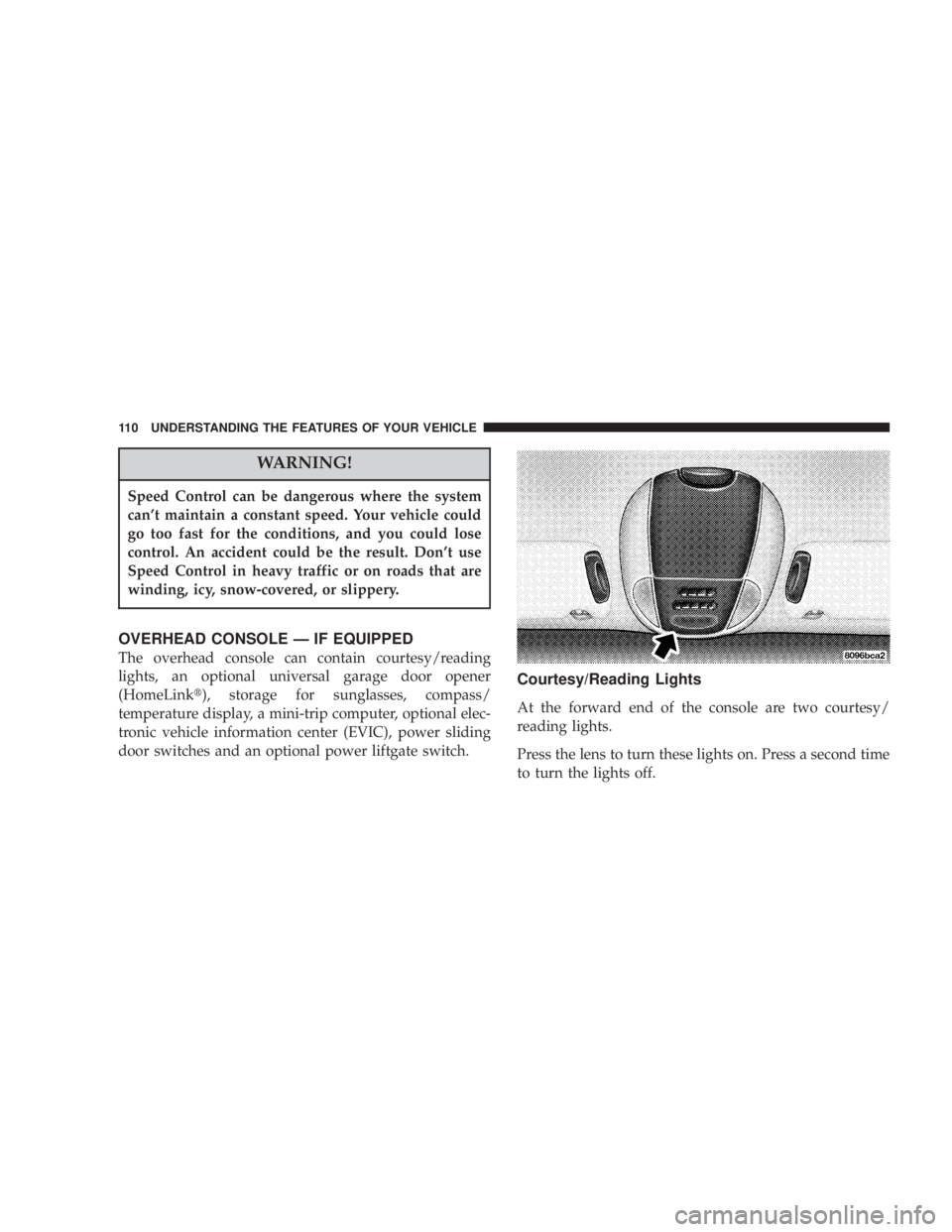
door switches and an optional power liftgate switch. Courtesy/Reading Lights
At the forward end of the console are two courtesy/
reading lights.
Press the lens to turn these lights on. Press a second time
to turn the lights off.110 UNDERSTANDING THE FEATURES OF YOUR VEHICLE
Page 111 of 397
The lights also turn on when a front door, a sliding door
or the liftgate is opened. If your vehicle is equipped with
Remote Keyless Entry, the lights will also turn on when
the unlock button on the transmitter is pressed.
The area around the instrument panel cupholders is also
illuminated from a light in the overhead console. This
light is turned on when the headlight switch is on and
will adjust in brightness when the dimmer control is
rotated up or down.
Sunglass Storage
At the rear of the console a compartment is provided for
the storage of two pair of sunglasses.
Press the door latch to open the compartment. The door
will slowly rotate to an open position. Compass/Temperature Display
This display provides the outside temperature and one of
eight compass readings to indicate the direction the
vehicle is facing.
WARNING!Even if the display still reads a few degrees above
32ÉF ( 0ÉC), the road surface may be icy, particularly
in woods or on bridges. Drive carefully under such
conditions to prevent an accident and possible per-
sonal injury or property damage.
Automatic Compass Calibration
This compass is self calibrating which eliminates the
need to manually set the compass. When the vehicle is
new, the compass may appear erratic and the ªCALº
symbol will be displayed. After completing three 360É UNDERSTANDING THE FEATURES OF YOUR VEHICLE 111
3
Page 118 of 397
Remote Linked To Memory (Available with
Memory Seat and Pedals Only)
When this feature is selected, pressing the Unlock button
on any Remote Keyless Entry transmitter already linked
to memory will return the driver's seat, driver's outside
mirror, adjustable brake and accelerator pedals, and
radio station presets to their memory set positions.
If this feature is not selected, the driver's seat, driver's
mirror, adjustable pedals, and radio settings can only
return to their memory set positions using the memory
recall buttons (1or 2) on the driver's door panel.
Any transmitter linked to memory will remain linked,
but will not recall the memory positions. The transmitter
memory recall function will operate again when this
feature is selected. Refer to Driver Memory System for
more information. Pressing the 9 STEP 9 button when in
this mode will select between 9 Ye s 9 or 9 No 9 . Sound Horn On Lock
When this feature is selected a short horn sound will
occur when the remote keyless entry ªLockº button is
pressed. This feature may be selected with or without the
flash lights on LOCK/UNLOCK feature. Pressing the
ªSTEPº button when in this display will select ªYesº or
ªNo.º
Flash Lights On Lock/Unlock?
When this feature is selected, the front and rear turn
signals will flash when the doors are locked or unlocked
using the remote keyless entry transmitter. This feature
may be selected with or without the sound horn on lock
feature selected. Pressing the ªSTEPº button when in this
display will select ªYesº or ªNo.º
Headlamp Delay
When this feature is selected the driver can choose, when
exiting the vehicle, to have the headlamps remain on for118 UNDERSTANDING THE FEATURES OF YOUR VEHICLE
Page 119 of 397
30, 60, or 90 seconds, or not remain on. Pressing the
ªSTEPº button when in this display will select 30, 60, 90,
or ªOFF.º
Headlamp On With Wipers (Available with Auto
Headlights Only)
When this feature is selected and the headlight switch
has been moved to the ªAUTOº position, the engine is
running and, the front wipers are turned on for 10
seconds, the headlights will turn ON. The display will
remain on Parade Mode (Daytime Brightness) for ease of
viewing. Pressing the ªSTEPº button when in this display
will select ªYesº or ªNo.º
Power Accessory Delay
When this feature is selected, accessory power will be
supplied for up to 45 seconds for the power windows, radio, power vent windows, power outlets, and remov-
able center console, when the ignition switch is turned off
or until the key is removed and either front door is
opened.
GARAGE DOOR OPENER Ð IF EQUIPPED
The HomeLink t Universal Transceiver replaces up to
three remote controls (hand held transmitters) that oper-
ate devices such as garage door openers, motorized
gates, or home lighting. It triggers these devices at the
push of a button. The Universal Transceiver operates off
your vehicle's battery and charging system; no batteries
are needed.
For additional information on HomeLink t , call 1±800±
355±3515, or on the internet at www.homelink.com. UNDERSTANDING THE FEATURES OF YOUR VEHICLE 119
3
Page 129 of 397
Electrical Outlet Use With Engine Off
CAUTION!² Many accessories that can be plugged in draw power
from the vehicle's battery, even when not in use (i.e.
cellular phones, etc.). Eventually, if plugged in long
enough, the vehicle's battery will discharge sufficiently
to degrade battery life and/or prevent engine starting.
² Accessories that draw higher power (i.e. coolers,
vacuum cleaners, lights, etc.), will degrade the battery
even more quickly. Only use these intermittently and
with greater caution.
² After the use of high power draw accessories, or long
periods of the vehicle not being started (with accesso-
ries still plugged in), the vehicle must be driven a
sufficient length of time to allow the alternator to
recharge the vehicle's battery.
² Power outlets are designed for accessory plugs only. Do
not hang any type of accessory or accessory bracket from
the plug. Improper use of the power outlet can cause
damage not covered by your warranty. CONVENIENCE TRAY DRAWER AND CUP
HOLDERS
Instrument Panel Cup Holders
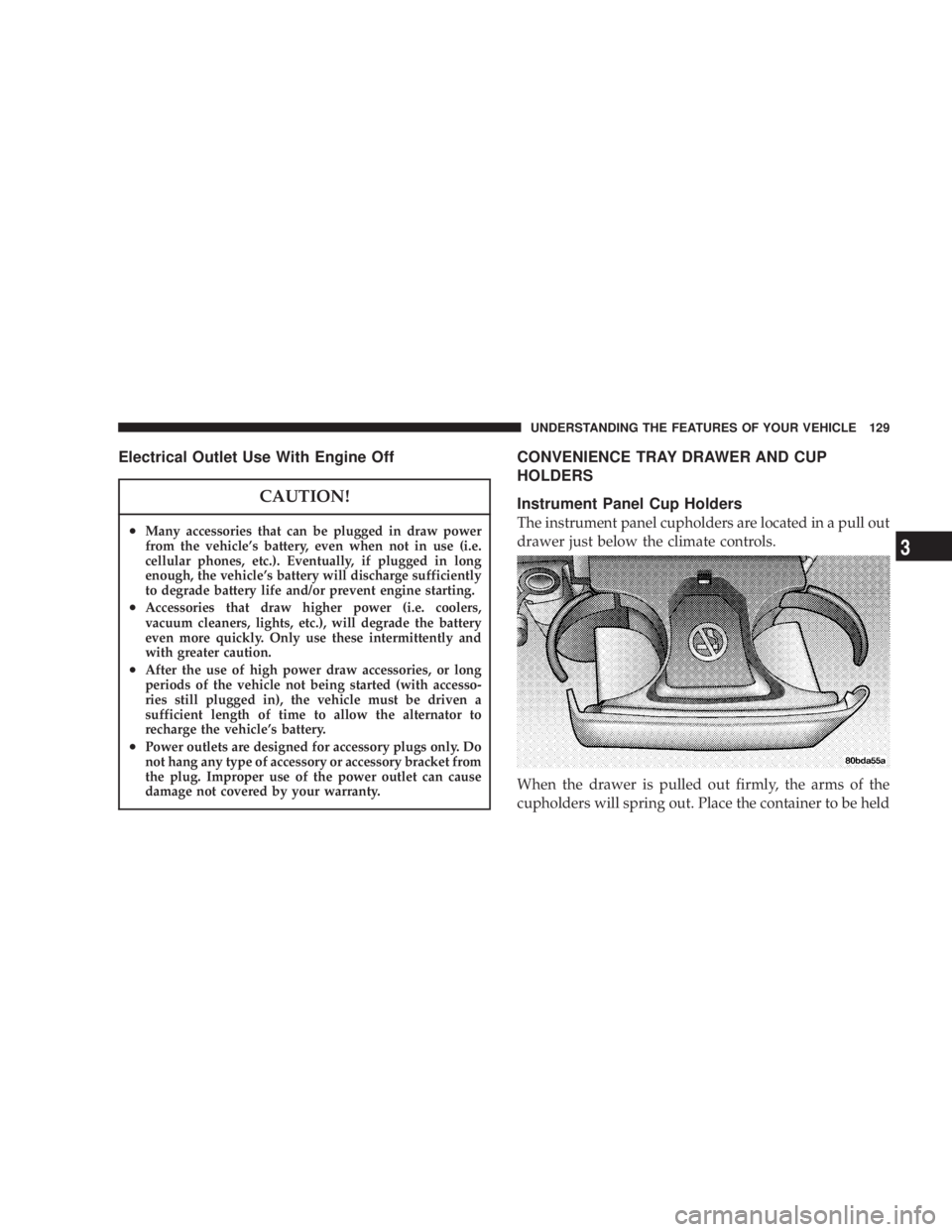
The instrument panel cupholders are located in a pull out
drawer just below the climate controls.
When the drawer is pulled out firmly, the arms of the
cupholders will spring out. Place the container to be held UNDERSTANDING THE FEATURES OF YOUR VEHICLE 129
3
Page 135 of 397
CAUTION!² Many accessories that can be plugged in draw
power from the vehicle's battery, even when not
in use (i.e. cellular phones, etc.). Eventually, if
plugged in long enough, the vehicle's battery will
discharge sufficiently to degrade battery life
and/or prevent engine starting.
² Accessories that draw higher power (i.e. coolers,
vacuum cleaners, lights, etc.), will degrade the
battery even more quickly. Only use these inter-
mittently and with greater caution.
² After the use of high power draw accessories, or
long periods of the vehicle not being started (with
accessories still plugged in), the vehicle must be
driven a sufficient length of time to allow the
generator to recharge the vehicle's battery. Rear Compartment Storage Bins
Your vehicle may be equipped with open storage bins
located in each rear trim panel or your vehicle may be
equipped with storage bins located under the armrest in
each rear trim panel.
Cargo Area Storage
The seats in your vehicle are in-line which enables you to
stow long objects, such as lumber or skis, on the floor
without moving the seats.
NOTE: With all rear seat backs folded, a 4x8 foot sheet
of building material may be stored in the long-wheelbase
body style on top of the folded seats with the liftgate
closed. The front seats must be moved slightly forward of
the rearmost position. If the rear seats are removed no
front seat adjustment is needed and more than one 4x8
sheet of building material may be stored. UNDERSTANDING THE FEATURES OF YOUR VEHICLE 135
3
Page 158 of 397
When the tire pressure monitoring system warning light
is lit, one or more of your tires is significantly underin-
flated. You should stop and check your tires as soon as
possible, and inflate them to the proper pressure as
indicated on the tire and loading information placard.
Driving on a significantly underinflated tire causes the
tire to overheat and can lead to tire failure. Underinfla-
tion also reduces fuel efficiency and tire tread life, and
may affect the vehicle's handling and stopping ability.
Each tire, including the spare, should be checked
monthly when cold and set to the recommended inflation
pressure as specified in the tire and loading information
placard and owner's manual. 24. Turn Signal Indicators Ð Base Cluster Only
The arrow will flash with the exterior turn signal
when the turn signal lever is operated.
If the vehicle electronics sense that the vehicle has
traveled about one mile with the turn signals on, a chime
will sound to alert you to turn the signals off. If either
indicator flashes at a rapid rate, check for a defective
outside light bulb.
25. High Beam Light Ð Base Cluster Only
This light shows that the headlights are on high
beam. Pull the turn signal lever towards the
steering wheel to switch the headlights from high or low
beam.158 UNDERSTANDING YOUR INSTRUMENT PANEL
Page 159 of 397
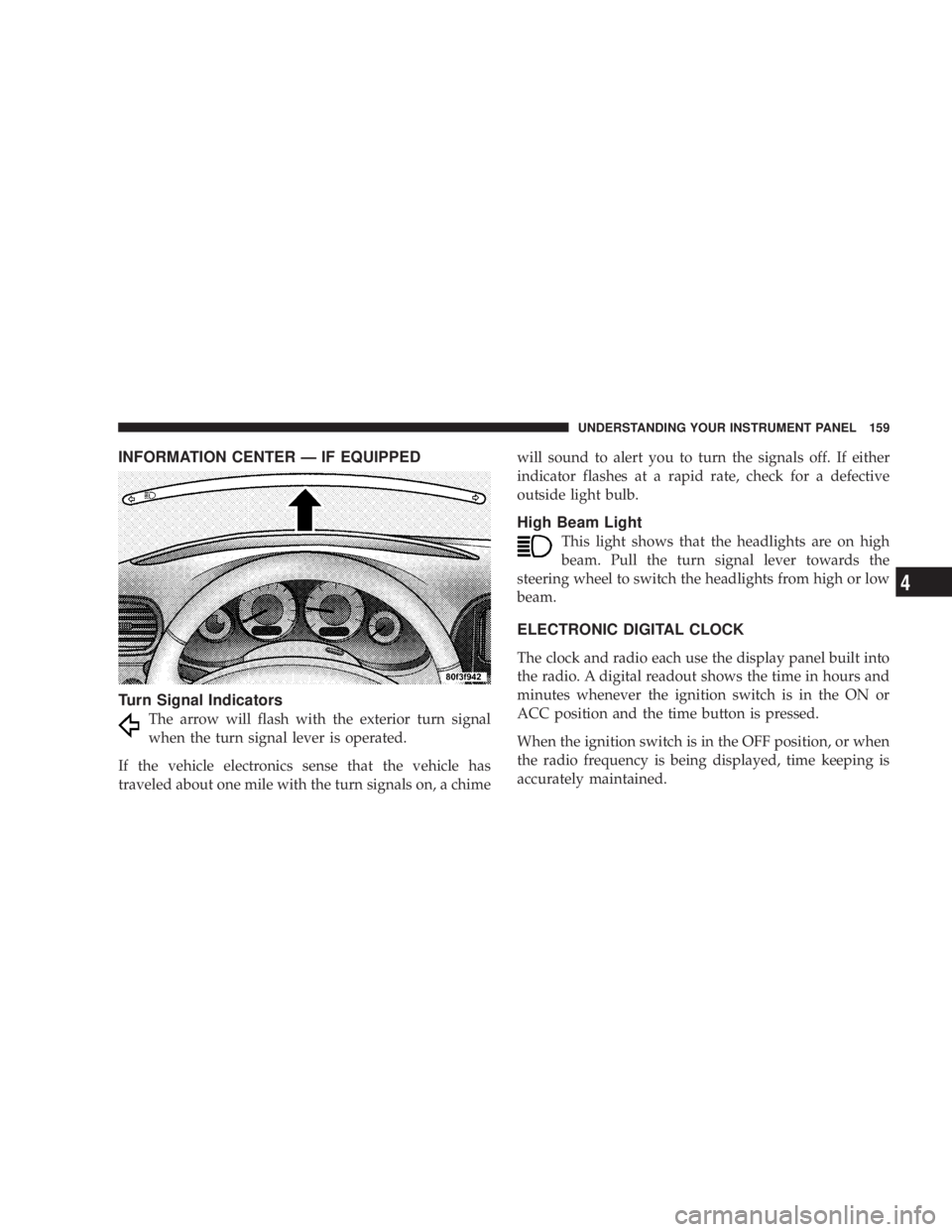
INFORMATION CENTER Ð IF EQUIPPED
Turn Signal Indicators
The arrow will flash with the exterior turn signal
when the turn signal lever is operated.
If the vehicle electronics sense that the vehicle has
traveled about one mile with the turn signals on, a chime will sound to alert you to turn the signals off. If either
indicator flashes at a rapid rate, check for a defective
outside light bulb.
High Beam Light
This light shows that the headlights are on high
beam. Pull the turn signal lever towards the
steering wheel to switch the headlights from high or low
beam.
ELECTRONIC DIGITAL CLOCK
The clock and radio each use the display panel built into
the radio. A digital readout shows the time in hours and
minutes whenever the ignition switch is in the ON or
ACC position and the time button is pressed.
When the ignition switch is in the OFF position, or when
the radio frequency is being displayed, time keeping is
accurately maintained. UNDERSTANDING YOUR INSTRUMENT PANEL 159
4
Page 185 of 397
Loading the CD Changer
When inserting the first CD into the changer if the radio
is on, wait until the single slot is illuminated on both
sides and simply insert the first disc.
To insert additional CDs into the changer, the instructions
follow:
1. Select and press any numbered button without an
illuminated light above it.
2. Insert the CD while the light above the chosen button
is flashing and the two lights on either side of the slot are
illuminated.
3. Upon insertion, the CD will begin to play, and both the
button light and the lights in the corner of the loading
slot will illuminate.
4. Repeat the process for loading any additional CDs.
The CD player will stop while additional CDs are loaded. Playing Discs
The radio will show the CD number, the CD track
number, and the Track Time Elapsed while the radio is in
the CD mode. If more than one CD is loaded in the
changer, the changer will automatically play the next disc
after playing the last track of the current disc.
Seek Button
Press the top of this button on the radio once to play the
next track. Press the bottom of the button once to return
to the beginning of the current track. Press the bottom of
the button twice to play the previous track.
FF/TUNE/RW
Press the FF (fast forward) button and the CD player will
fast forward through the tracks until the button is re-
leased. Press the RW (rewind) button and the CD player
will reverse through the tracks until the button is re-
leased. UNDERSTANDING YOUR INSTRUMENT PANEL 185
4
Page 276 of 397
² The trailer tongue load must be considered as part of
the combined weight of occupants and cargo, and
should never exceed the weight referenced on the Tire
and Loading Information placard. Refer to the Tire±
Safety Information Section in this manual.
² The ªDº range can be selected when towing. However,
if frequent shifting occurs while in this range, the ª3º
range must be selected.
NOTE: Using the ª3º range while operating the vehicle
under heavy operating conditions will improve perfor-
mance and extend transaxle life by reducing excessive
shifting and heat build up.
WARNING!Connecting trailer brakes to your vehicle's hydraulic
brake lines can overload your brake system and
cause it to fail. You might not have brakes when you
need them and could have an accident. ² Do not attempt to tow a trailer while using a compact
spare tire.
² Whenever you pull a trailer, regardless of the trailer
size, stop lights and turn signals on the trailer are
recommended for motoring safety.
² The automatic transaxle fluid and filter should be
changed if you REGULARLY tow a trailer for more
than 45 minutes of continuous operation. See Schedule
ªBº in section 8 of this manual for transaxle fluid
change intervals.
NOTE: Check the automatic transaxle fluid level before
towing. Fluid discoloration, or a burnt odor, shows the
need for a transmission fluid and filter change.276 STARTING AND OPERATING