radio DODGE GRAND CARAVAN 2009 5.G Owners Manual
[x] Cancel search | Manufacturer: DODGE, Model Year: 2009, Model line: GRAND CARAVAN, Model: DODGE GRAND CARAVAN 2009 5.GPages: 535, PDF Size: 18.61 MB
Page 17 of 535
the vehicle. The system will shut the engine off in two
seconds if an invalid RKE transmitter is used to start the
engine.
After turning the ignition switch to the ON position, the
Vehicle Security Light will turn on for three seconds for a
bulb check. If the light remains on after the bulb check, it
indicates that there is a problem with the electronics. In
addition, if the light begins to flash after the bulb check,
it indicates that someone used an invalid RKE transmitter
to start the engine. Either of these conditions will result in
the engine being shut off after two seconds.
If the Vehicle Security Light turns on during normal
vehicle operation (vehicle running for longer than 10 sec-
onds), it indicates that there is a fault in the electronics.
Should this occur, have the vehicle serviced as soon as
possible by an authorized dealer.NOTE:
The Sentry Keyt
Immobilizer system is not compatible
with aftermarket remote starting systems. Use of these
systems may result in vehicle starting problems and
loss of security protection.
Exxon/Mobil/Esso Speedpass™, additional RKE
transmitters, or any other transponder-equipped com-
ponents on the same key chain will notcause a fault
unless the additional part is physically held against
the RKE transmitter being used to start the vehicle.
Cell phones, pagers, or other Radio Frequency (RF)
electronics will not cause interference with this system.
All of the RKE transmitters provided with your new
vehicle have been programmed to the vehicle electronics.
THINGS TO KNOW BEFORE STARTING YOUR VEHICLE 15 2
Page 21 of 535
Security System Manual OverrideThe Vehicle Security Alarm will not arm if you lock the
doors using the manual door lock plunger.
ILLUMINATED ENTRY SYSTEM — IF EQUIPPED
The courtesy lights will turn on when you use the
Remote Keyless Entry (RKE) transmitter or open the
doors. This feature is only available if you have RKE.
The lights will fade to off after approximately 30 seconds
or they will immediately fade to off once the ignition
switch is turned ON.
NOTE:
The front courtesy overhead console and liftgate lights
do not turn on if the dimmer control is in the interior
lights ON position (extreme top position).
The Illuminated Entry System will not operate if the
dimmer control is in the extreme downward position.
REMOTE KEYLESS ENTRY (RKE) — IF
EQUIPPED
This system allows you to lock or unlock the doors and
liftgate, and activate the Panic Alarm, optional power
liftgate, left power sliding door, and right power sliding
door from distances up to approximately 66 ft (20 m)
using a hand-held radio RKE transmitter. The RKE
transmitter does not need to be pointed at the vehicle to
activate the system.
NOTE:
Inserting the RKE transmitter with Integrated
Key into the ignition switch disables all buttons on that
transmitter; however, the buttons on the remaining trans-
mitters will continue to work. Driving at speeds 5 mph
(8 km/h) and above disables all RKE transmitter buttons
for all RKE transmitters.
Two RKE transmitters may be supplied with the vehicle.
Vehicles built without the powered options will be
THINGS TO KNOW BEFORE STARTING YOUR VEHICLE 19 2
Page 25 of 535
NOTE:Pressing the LOCK button on the RKE transmit-
ter while you are in the vehicle will activate the Vehicle
Security Alarm. Opening a door with the Vehicle Security
Alarm activated will cause the alarm to sound. Press the
UNLOCK button to deactivate the Vehicle Security Alarm.
Using the Panic Alarm
To turn the Panic Alarm feature on or off, press and hold
the PANIC button on the RKE transmitter for at least one
second and release. When the Panic Alarm is on, the
headlights and park lights will flash, the horn will pulse
on and off, and the interior lights will turn on.
The Panic Alarm will stay on for three minutes unless
you turn it off by pressing the PANIC button a second
time, or you turn the ignition switch to the ON position.
NOTE: When you turn off the Panic Alarm by pressing
the PANIC button a second time, you may have to be
closer to the vehicle due to the Radio Frequency (RF)
noises of the system.
Power Open/Close Power Liftgate — If Equipped
Press the LIFTGATE button twice on the RKE transmitter
within five seconds to Open/Close the Power Liftgate.
The liftgate will beep for three seconds and then open/
close. If the button is pushed while the liftgate is being
power closed, the liftgate will reverse to the full open
position.
If the liftgate is locked and is not equipped with a
powered liftgate, pressing the LIFTGATE button twice
will result in the liftgate becoming unlocked for 30 sec-
onds allowing you to manually access the liftgate area.
The power liftgate may also be opened and closed by
pressing the LIFTGATE button located on the overhead
console.
If equipped with a rear interior switch on the left rear
pillar, pushing this switch once will close the liftgate only.
The liftgate cannot be opened from this switch.
THINGS TO KNOW BEFORE STARTING YOUR VEHICLE 23 2
Page 28 of 535
NOTE:
Perchlorate Material — special handling may apply.
See: www.dtsc.ca.gov/hazardouswaste/perchlorate.
Do not touch the battery terminals that are on the back
housing or the printed circuit board.
1. Battery access is through a door located on the back of
the RKE transmitter. Insert a small, flat-bladed screw-
driver into the slot and gently pry open the access door.
2. Remove and replace the battery. Avoid touching the
new battery with your fingers. Skin oils may cause
battery deterioration. If you touch the battery, clean it
with rubbing alcohol.
3. Reposition the access door panel over the battery
opening and snap into place.
General Information
This device complies with Part 15 of the FCC rules and
RSS 210 of Industry Canada. Operation is subject to the
following conditions:
This device may not cause harmful interference.
This device must accept any interference received,
including interference that may cause undesired
operation.
If your RKE transmitter fails to operate from a normal
distance, check for these two conditions.
1. A weak battery in the RKE transmitter. The expected
life of the battery is approximately three years.
2. Closeness to a radio transmitter such as a radio station
tower, airport transmitter, and some mobile or CB radios.
26 THINGS TO KNOW BEFORE STARTING YOUR VEHICLE
Page 100 of 535
mElectronic Speed Control — If Equipped . . . . . 188
▫ To Activate . . . . . . . . . . . . . . . . . . . . . . . . . 188
▫ To Set At A Desired Speed . . . . . . . . . . . . . . 189
▫ Deactivating Electronic Speed Control . . . . . . 189
▫ Resuming Speed . . . . . . . . . . . . . . . . . . . . . 189
▫ Varying The Speed Setting . . . . . . . . . . . . . . 189
▫ Accelerating To Pass . . . . . . . . . . . . . . . . . . 190
m Rear Park Assist — If Equipped . . . . . . . . . . . 191
▫ Rear Park Assist Sensors . . . . . . . . . . . . . . . 191
m Rear Backup Camera System —
If Equipped . . . . . . . . . . . . . . . . . . . . . . . . . . 196
▫ Turning The Rear Camera On Or Off — With
Navigation Radio . . . . . . . . . . . . . . . . . . . . 197 ▫
Turning The Rear Camera On Or Off —
Without Navigation Radio . . . . . . . . . . . . . . 198
m Overhead Consoles . . . . . . . . . . . . . . . . . . . . 198
▫ Front Overhead Console . . . . . . . . . . . . . . . 198
m Garage Door Opener — If Equipped . . . . . . . . 201
▫ Programming HomeLinkt . . . . . . . . . . . . . . 203
▫ Gate Operator/Canadian Programming . . . . 206
▫ Security . . . . . . . . . . . . . . . . . . . . . . . . . . . 206
▫ Troubleshooting Tips . . . . . . . . . . . . . . . . . . 207
▫ General Information . . . . . . . . . . . . . . . . . . 207
m Power Sunroof — If Equipped . . . . . . . . . . . . 207
▫ Power Sunroof Operation . . . . . . . . . . . . . . 208
m Electrical Power Outlets — If Equipped . . . . . . 210
98 UNDERSTANDING THE FEATURES OF YOUR VEHICLE
Page 109 of 535
The BSM system can also be configured to sound an
audible (chime) alert and mute the radio to notify the
driver of objects that have entered the detection zones.
Refer to “Modes Of Operation” in this section.
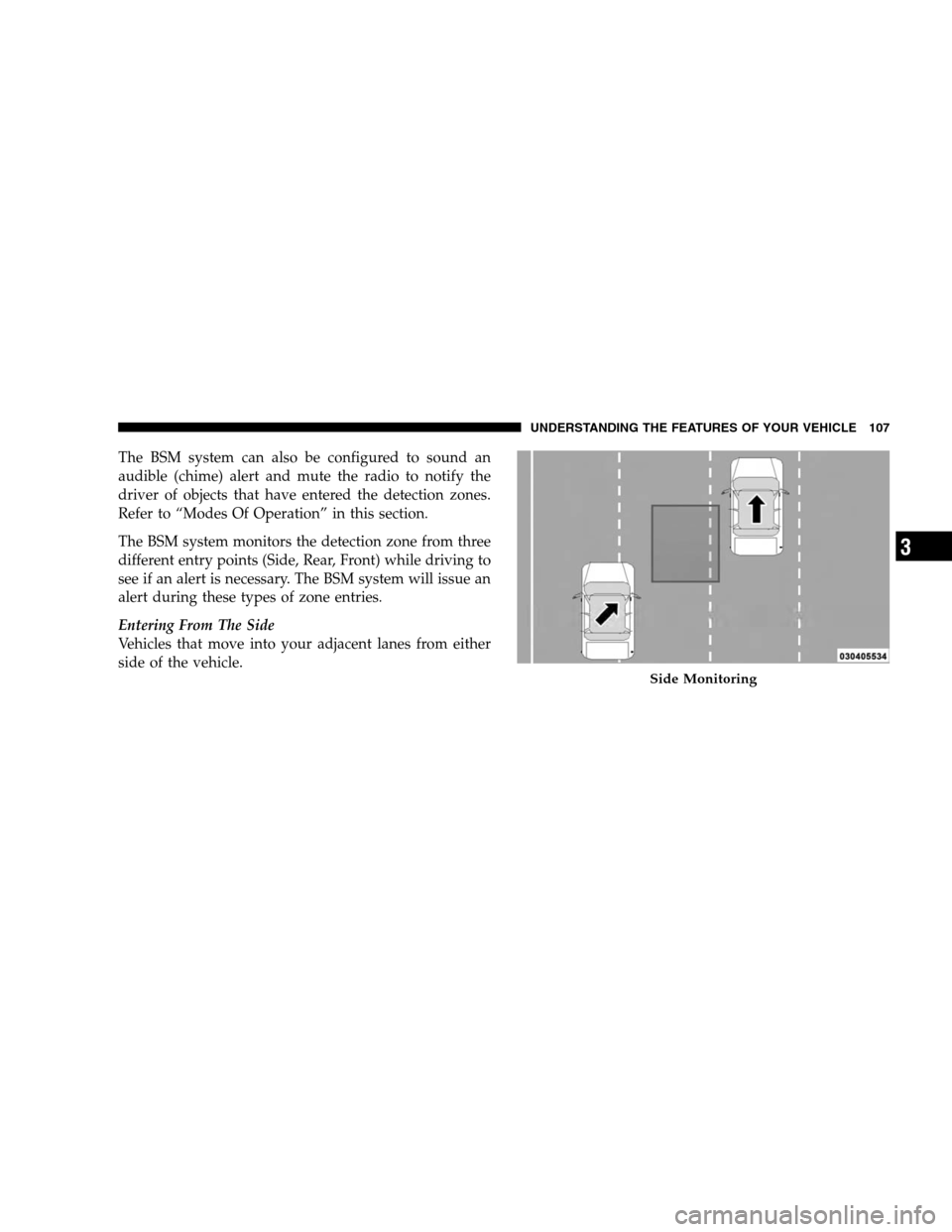
The BSM system monitors the detection zone from three
different entry points (Side, Rear, Front) while driving to
see if an alert is necessary. The BSM system will issue an
alert during these types of zone entries.
Entering From The Side
Vehicles that move into your adjacent lanes from either
side of the vehicle.Side Monitoring
UNDERSTANDING
THE FEATURES OF YOUR VEHICLE 107 3
Page 113 of 535
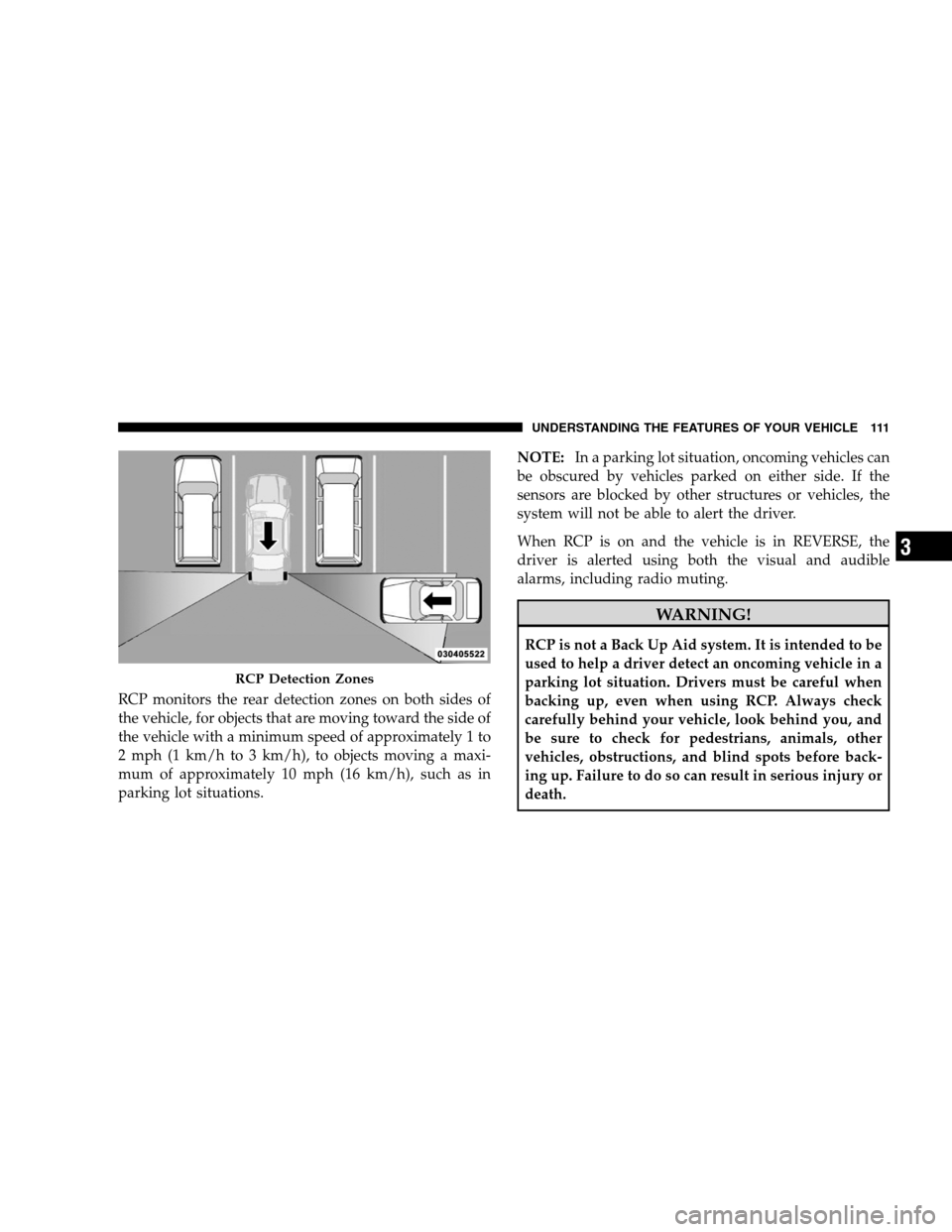
RCP monitors the rear detection zones on both sides of
the vehicle, for objects that are moving toward the side of
the vehicle with a minimum speed of approximately 1 to
2 mph (1 km/h to 3 km/h), to objects moving a maxi-
mum of approximately 10 mph (16 km/h), such as in
parking lot situations.NOTE:
In a parking lot situation, oncoming vehicles can
be obscured by vehicles parked on either side. If the
sensors are blocked by other structures or vehicles, the
system will not be able to alert the driver.
When RCP is on and the vehicle is in REVERSE, the
driver is alerted using both the visual and audible
alarms, including radio muting. WARNING!
RCP is not a Back Up Aid system. It is intended to be
used to help a driver detect an oncoming vehicle in a
parking lot situation. Drivers must be careful when
backing up, even when using RCP. Always check
carefully behind your vehicle, look behind you, and
be sure to check for pedestrians, animals, other
vehicles, obstructions, and blind spots before back-
ing up. Failure to do so can result in serious injury or
death.
RCP Detection Zones
UNDERSTANDING
THE FEATURES OF YOUR VEHICLE 111 3
Page 114 of 535
Modes Of OperationThree selectable modes of operation are available in the
Electronic Vehicle Information Center (EVIC). Refer to
“Personal Settings (Customer-Programmable Features)
under
9Electronic Vehicle Information Center (EVIC)” in
Section 4.
Blind Spot Alert
When operating in Blind Spot Alert mode, the BSM
system will provide a visual alert in the appropriate side
view mirror based on a detected object. However, when
the system is operating in RCP, the system will respond
with both visual and audible alerts when a detected
object is present. Whenever an audible alert is requested,
the radio is muted.
Blind Spot Alert Lights/Chime
When operating in Blind Spot Alert Lights/Chime, the
BSM system will provide a visual alert in the appropriate
side view mirror based on a detected object. If the turn signal is then activated, and it corresponds to an alert
present on that side of the vehicle, an audible chime will
also be sounded. Whenever a turn signal and detected
object are present on the same side at the same time, both
the visual and audio alerts will be issued. In addition to
the audible alert the radio (if on) will also be muted.
NOTE:
Whenever an audible alert is requested by the BSM
system, the radio is also muted.
If the Hazard Flashers are on, the system will request
the appropriate visual alert only.
When the system is in RCP, the system shall respond
with both visual and audible alerts when a detected
object is present. Whenever an audible alert is re-
quested, the radio is also muted. Turn/hazard signal
status is ignored; the RCP state always requests the
chime.
112 UNDERSTANDING THE FEATURES OF YOUR VEHICLE
Page 115 of 535
Blind Spot Alert Off
When the BSM system is turned off there will be no
visual or audible alerts from either the BSM or RCP
systems.
NOTE:The BSM system will store the current operating
mode when the vehicle is shut off. Each time the vehicle
is started the previously stored mode will be recalled and
used.
uconnectT phone — IF EQUIPPED
NOTE: The sales code RER and REU radios contain an
integrated uconnectt phone. Refer to your “Navigation
User’s Manual” for uconnectt phone operating instruc-
tions for these radios. Radio sales code can be located
on the lower right corner of the Radio faceplate.
uconnectt phone is a voice-activated, hands-free, in-
vehicle communications system. uconnectt allows you to
dial a phone number with your cellular phone using simple voice commands (e.g.,
9Call”{“Mike” {”Work9 or
9Dial” {“248-555-12129). Your cellular phone’s audio is
transmitted through your vehicle’s audio system; the
system will automatically mute your radio when using
the uconnectt phone.
NOTE: The uconnectt phone requires a cellular phone
equipped with the Bluetootht 9Hands-Free Profile,9 Ver-
sion 0.96 or higher. See the uconnectt website for sup-
ported phones.
For uconnectt customer support, visit the following
websites:
www.chrysler.com/uconnect
www.dodge.com/uconnect
www.jeep.com/uconnect
or call 1–877–855–8400
UNDERSTANDING THE FEATURES OF YOUR VEHICLE 113 3
Page 116 of 535
uconnecttallows you to transfer calls between the sys-
tem and your cellular phone as you enter or exit your
vehicle and enables you to mute the system’s microphone
for private conversation.
The uconnectt phone is driven through your Bluetootht
“Hands-Free Profile” cellular phone. uconnectt features
Bluetootht technology - the global standard that enables
different electronic devices to connect to each other
without wires or a docking station, so uconnectt phone
works no matter where you stow your cellular phone (be
it your purse, pocket, or briefcase), as long as your phone
is turned on and has been paired to the vehicle’s
uconnectt phone. The uconnectt phone allows up to
seven cellular phones to be linked to the system. Only
one linked (or paired) cellular phone can be used with the
system at a time. The system is available in English,
Spanish, or French languages. Phone Button
The rearview mirror contains the microphone
for the system (depending on the type of
mirror and radio equipped), and either the
radio or the mirror has the two control buttons
(PHONE Button and VOICE RECOGNITION button)
that will enable you to access the system.
Voice Recognition Button
Actual button location may vary with the ra-
dio. The individual buttons are described in the
“Operation” section.
The uconnectt phone can be used with any Hands-Free
Profile certified Bluetootht cellular phone. See the
uconnectt website for supported phones. If your cellular
phone supports a different profile (e.g., Headset Profile)
you may not be able to use any uconnectt phone
features. Refer to your cellular service provider or the
phone manufacturer for details. 114 UNDERSTANDING THE FEATURES OF YOUR VEHICLE