seat memory DODGE GRAND CARAVAN 2009 5.G Owners Manual
[x] Cancel search | Manufacturer: DODGE, Model Year: 2009, Model line: GRAND CARAVAN, Model: DODGE GRAND CARAVAN 2009 5.GPages: 535, PDF Size: 18.61 MB
Page 97 of 535
UNDERSTANDING THE FEATURES OF YOUR VEHICLECONTENTS
m
Mirrors . . . . . . . . . . . . . . . . . . . . . . . . . . . . 100
▫ Inside Day/Night Mirror — If Equipped . . 100
▫ Automatic Dimming Mirror — If Equipped 100
▫ Outside Mirrors . . . . . . . . . . . . . . . . . . . . 101
▫ Driver’s Outside Automatic Dimming Mirror
— If Equipped . . . . . . . . . . . . . . . . . . . . . . 102
▫ Outside Mirror Folding Feature . . . . . . . . . 102
▫ Power Mirrors — If Equipped . . . . . . . . . . 102
▫ Heated Mirrors — If Equipped . . . . . . . . . 103 ▫
Tilt Mirrors In Reverse
(Available With Memory Seat Only) — If
Equipped . . . . . . . . . . . . . . . . . . . . . . . . . . 103
▫ Illuminated Vanity Mirrors — If
Equipped . . . . . . . . . . . . . . . . . . . . . . . . . . 104
m Blind Spot Monitoring — If Equipped . . . . . . 104
▫ Rear Cross Path . . . . . . . . . . . . . . . . . . . . 110
▫ Modes Of Operation . . . . . . . . . . . . . . . . . 112
m uconnectt phone — If Equipped . . . . . . . . . . 113
▫ Operation . . . . . . . . . . . . . . . . . . . . . . . . 115 3
Page 99 of 535
mDriver Memory Seat — If Equipped . . . . . . . . 170
▫ Setting Memory Positions And Linking RKE
Transmitter To Memory . . . . . . . . . . . . . . . . 171
▫ Easy Entry/Exit Seat
(Available With Memory Seat Only) . . . . . . . 173
m To Open And Close The Hood . . . . . . . . . . . . 175
m Lights . . . . . . . . . . . . . . . . . . . . . . . . . . . . . 176
▫ Interior Lighting . . . . . . . . . . . . . . . . . . . . . 177
▫ Parking Lights . . . . . . . . . . . . . . . . . . . . . . 178
▫ Headlights . . . . . . . . . . . . . . . . . . . . . . . . . 179
▫ Automatic Headlights — If Equipped . . . . . . 179
▫ Headlights On With Wipers —
If Equipped . . . . . . . . . . . . . . . . . . . . . . . . 179
▫ Headlight Delay — If Equipped . . . . . . . . . . 180 ▫
Daytime Running Lights
(Canada/Fleet Vehicles Only) . . . . . . . . . . . . 181
▫ Front Fog Lights — If Equipped . . . . . . . . . . 181
▫ Battery Protection . . . . . . . . . . . . . . . . . . . . 181
▫ Multifunction Lever . . . . . . . . . . . . . . . . . . 182
▫ Turn Signals . . . . . . . . . . . . . . . . . . . . . . . . 182
▫ Lane Change Assist . . . . . . . . . . . . . . . . . . . 183
▫ High Beam/Low Beam Select Switch . . . . . . 183
▫ Flash-To-Pass . . . . . . . . . . . . . . . . . . . . . . . 183
m Windshield Wiper And Washers . . . . . . . . . . . 183
m Tilt Steering Column — If Equipped . . . . . . . . 185
m Adjustable Pedals — If Equipped . . . . . . . . . . 186
UNDERSTANDING THE FEATURES OF YOUR VEHICLE 97 3
Page 105 of 535
Select a mirror and press one of the four arrows for the
direction you want the mirror to move.
Driver’s power mirror preselected positions can be con-
trolled by the optional Driver Memory Seat Feature.
Refer to “Driver Memory Seat” in Section 3.
Heated Mirrors — If Equipped
These mirrors are heated to melt frost or ice. This
feature is activated whenever you turn on the rear
window defroster. Refer to “Rear Window Features” in
this section, for further information.
Tilt Mirrors in Reverse (Available with Memory
Seat Only) — If Equipped
Tilt Mirrors in Reverse provides automatic outside mirror
positioning which will aid the driver’s view of the ground rearward of the front doors. The outside mirrors
will move slightly downward from the present position
when the vehicle is shifted into REVERSE. The outside
mirrors will then return to the original position when the
vehicle is shifted out of REVERSE position. Each stored
memory setting will have an associated Tilt Mirrors in
Reverse position.
NOTE:
The Tilt Mirrors in Reverse feature is not en-
abled when delivered from the factory. The Tilt Mirrors in
Reverse feature can be enabled or disabled in the Elec-
tronic Vehicle Information Center (EVIC). Refer to “Tilt
Mirrors in Reverse” under “Customer-Programmable
Features” under “Electronic Vehicle Information Center
(EVIC) in Section 4. UNDERSTANDING THE FEATURES OF YOUR VEHICLE 103
3
Page 172 of 535
WARNING!To avoid serious injury or death, NEVER operate the
vehicle with occupants in the third row seat while in
the tailgate mode.
DRIVER MEMORY SEAT — IF EQUIPPED
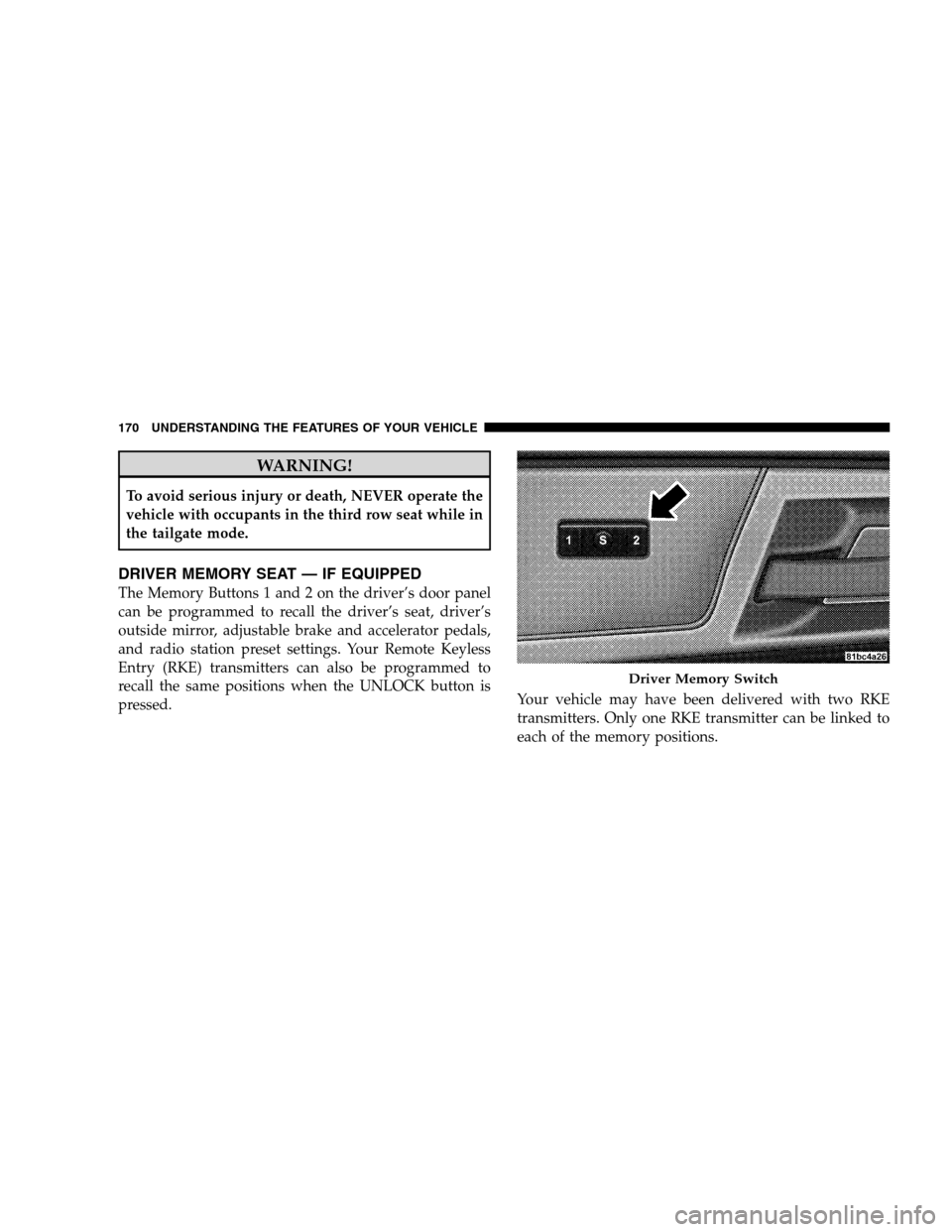
The Memory Buttons 1 and 2 on the driver’s door panel
can be programmed to recall the driver’s seat, driver’s
outside mirror, adjustable brake and accelerator pedals,
and radio station preset settings. Your Remote Keyless
Entry (RKE) transmitters can also be programmed to
recall the same positions when the UNLOCK button is
pressed.
Your vehicle may have been delivered with two RKE
transmitters. Only one RKE transmitter can be linked to
each of the memory positions. Driver Memory Switch
170 UNDERST
ANDING THE FEATURES OF YOUR VEHICLE
Page 173 of 535
Setting Memory Positions and Linking RKE
Transmitter
to Memory
NOTE:Each time the SET (S) button and a numbered
button (1 or 2) is pressed, you erase the memory settings
for that button and store a new one.
1. Insert the ignition key and turn the ignition switch to
the ON position.
2. Press the driver door MEMORY button number 1 if
you are setting the memory for driver 1, or button
number 2 if you are setting the memory for driver 2. The
system will recall any stored settings. Wait for the system
to complete the memory recall before continuing to
Step 3.
3. Adjust the driver’s seat, recliner, and driver’s side-
view mirror to the desired positions.
4. Adjust the brake and accelerator pedals to the desired
positions. 5. Turn on the radio and set the radio station presets (up
to 10 AM and 10 FM stations can be set).
6. Turn the ignition switch to the OFF position and
remove the key.
7. Press and release the SET (S) button located on the
driver’s door.
8. Within five seconds, press and release MEMORY
button 1 or 2 on the driver’s door. The next step must be
performed within 10 seconds if you desire to also use a
RKE transmitter to recall memory positions.
9. Press and release the LOCK button on one of the RKE
transmitters.
10. Insert the ignition key and turn the ignition switch to
the ON position.
UNDERSTANDING THE FEATURES OF YOUR VEHICLE 171 3
Page 174 of 535
11. Select9Remote Linked to Memory9 in the Electronic
Vehicle Information Center (EVIC) and enter “Yes”. Refer
to the “Customer-Programmable Features” in the “Elec-
tronic Vehicle Information Center (EVIC)” section for
more information.
12. Repeat the above steps to set the next Memory
position using the other numbered Memory button or to
link another RKE transmitter to memory.
Memory Position Recall
NOTE: The vehicle must be in PARK to recall memory
positions. If a recall is attempted when the vehicle is not
in PARK, a message will be displayed in the EVIC.
To recall the memory settings for driver one, press
MEMORY button 1 on the driver’s door or the UNLOCK
button on the RKE transmitter linked to memory position
1. To recall the memory setting for driver two, press
MEMORY button 2 on the driver’s door or the UNLOCK
button on the RKE transmitter linked to Memory Position
2.
A recall can be cancelled by pressing any of the
MEMORY buttons on the driver’s door during a recall (S,
1, or 2). When a recall is cancelled, the driver’s seat,
driver’s mirror, and the pedals stop moving. A delay of
one second will occur before another recall can be
selected.To Disable RKE Transmitter Linked to Memory
1. Turn the ignition switch to the OFF position and
remove the key.
2. Press and release MEMORY button 1. The system will
recall any memory settings stored in position 1. Wait for
the system to complete the memory recall before continu-
ing to Step 3.
172 UNDERSTANDING THE FEATURES OF YOUR VEHICLE
Page 175 of 535
3. Press and release the memory SET (S) button located
on the driver’s door. A chime will sound signaling that
you are in the memory set mode.
4. Within five seconds, press and release MEMORY
button 1 on the driver’s door. A chime will sound
signaling to you that the driver memory has been set.
5. Within five seconds, press and release the UNLOCK
button on the RKE transmitter. A chime will sound
signaling to you that the RKE transmitter link has been
successfully disabled.
To disable another RKE transmitter linked to either
Memory Position, repeat Steps 1 to 5 for each RKE
transmitter.
NOTE:Once programmed, all RKE transmitters linked
to memory can be easily enabled or disabled at one time. Refer to the Remote Linked to Memory
9Customer-
Programmable Features9 in the Electronic Vehicle Infor-
mation Center (EVIC) for more information.
Easy Entry/Exit Seat (Available with Memory Seat
ONLY)
This feature provides automatic driver seat positioning to
enhance driver mobility when entering and exiting the
vehicle.
The distance the driver seat moves depends on where
you have the driver seat positioned when you remove the
key from the ignition switch.
When you remove the key from the ignition switch,
the driver seat will move about 2.4 in (60 mm)
rearward if the driver seat position is greater than or
equal to 2.7 in (67.7 mm) forward of the rear stop. The
seat will return to its previously set position when you
insert the key into the ignition switch and turn it out of
the LOCK position.
UNDERSTANDING THE FEATURES OF YOUR VEHICLE 173 3
Page 176 of 535
When you remove the key from the ignition switch the
driver seat will move to a position 0.3 in (7.7 mm)
forward of the rear stop if the driver seat position is
between 0.9 – 2.7 in (22.7 – 67.7 mm) forward of the
rear stop. The seat will return to its previously set
position when you insert the key into the ignition
switch and turn it out of the LOCK position.
The Easy Entry/Easy Exit feature is disabled when the
driver seat position is less than 0.9 in (22.7 mm)
forward of the rear stop. At this position, there is no
benefit to the driver by moving the seat for Easy Exit
or Easy Entry.
Each stored memory setting will have an associated Easy
Entry and Easy Exit Position.
NOTE:
The Easy Entry/Easy Exit feature can be en-
abled or disabled through the programmable features in
the Electronic Vehicle Information Center (EVIC). If your
vehicle is not equipped with an EVIC, your dealership
can activate/deactivate this feature for you. For details,
refer to “Automatically Move Seat Back on Exit,” section
of this manual.
174 UNDERSTANDING THE FEATURES OF YOUR VEHICLE
Page 266 of 535
Auto UNLK On ExitWhen ON is selected, all doors will unlock when the
vehicle is stopped and the transmission is in the PARK or
NEUTRAL position and the driver’s door is opened. To
make your selection, press and release the RESET button
until ON or OFF appears.
RKE Unlock
When
Driver Door 1st Press is selected, only the driver’s
door will unlock on the first press of the Remote Keyless
Entry (RKE) transmitter UNLOCK button. When Driver
Door 1st Press is selected, you must press the RKE
transmitter UNLOCK button twice, to unlock the passen-
ger’s doors. When All Doors 1st Press is selected, all of
the doors will unlock on the first press of the RKE
transmitter UNLOCK button. To make your selection,
press and release the RESET button until “Driver Door
1st Press” or “All Doors 1st Press” appears.
RKE Linked To Memory
When this feature is selected the memory seat, mirror,
and radio settings will return to the memory set position
when the RKE transmitter UNLOCK button is pressed. If
this feature is not selected then the memory seat, mirror,
and radio settings can only return to the memory set
position using the door mounted switch. Pressing the
RESET button when in this display will select 9Yes9or
9No.9
Flash Lamp Lock
When ON is selected, the front and rear turn signals will
flash when the doors are locked or unlocked with the
RKE transmitter. This feature may be selected with or
without the sound horn on lock feature selected. To make
your selection, press and release the RESET button until
ON or OFF appears.
264 UNDERSTANDING YOUR INSTRUMENT PANEL
Page 267 of 535
Headlamp Off DelayWhen this feature is selected, the driver can choose to
have the headlights remain on for 0, 30, 60, or 90 seconds
when exiting the vehicle. To make your selection, press
and release the RESET button until 0, 30, 60, or 90
appears.
Easy Exit Seat
This feature provides automatic driver seat positioning to
enhance driver mobility when entering and exiting the
vehicle. To make your selection, press and release the
RESET button until YES (Y) or NO (N) appears.
NOTE:
The seat will return to the memorized seat
location (if Recall Memory with Remote Key Unlock is set
to ON) when the RKE transmitter is used to unlock the
door. Refer to “Easy Entry/Exit Seat” under “Driver
Memory Seat” in Section 3 of this manual for more
information.
Tilt MIRR. In Reverse
When this feature is selected and the vehicle is placed in
a reverse gear, the side mirrors tilt downward to allow
the driver to see into the previous blind spot and avoid
objects in close proximity to the rear of the vehicle.
Key-Off Power Delay
When this feature is selected, the power window
switches, radio, hands-free system (if equipped), DVD
video system (if equipped), power sunroof (if equipped),
and power outlets will remain active for up to 10 minutes
after the ignition switch is turned OFF. Opening a vehicle
door will cancel this feature. To make your selection,
press and release the RESET button until Off, 45 sec.,
5 min., or 10 min. appears.
ILLUMIN. Approach
When this feature is selected, the headlights will activate
and remain on for up to 90 seconds when the doors are
UNDERSTANDING YOUR INSTRUMENT PANEL 265 4