lock DODGE GRAND CARAVAN 2010 5.G Owner's Manual
[x] Cancel search | Manufacturer: DODGE, Model Year: 2010, Model line: GRAND CARAVAN, Model: DODGE GRAND CARAVAN 2010 5.GPages: 530, PDF Size: 8.54 MB
Page 34 of 530
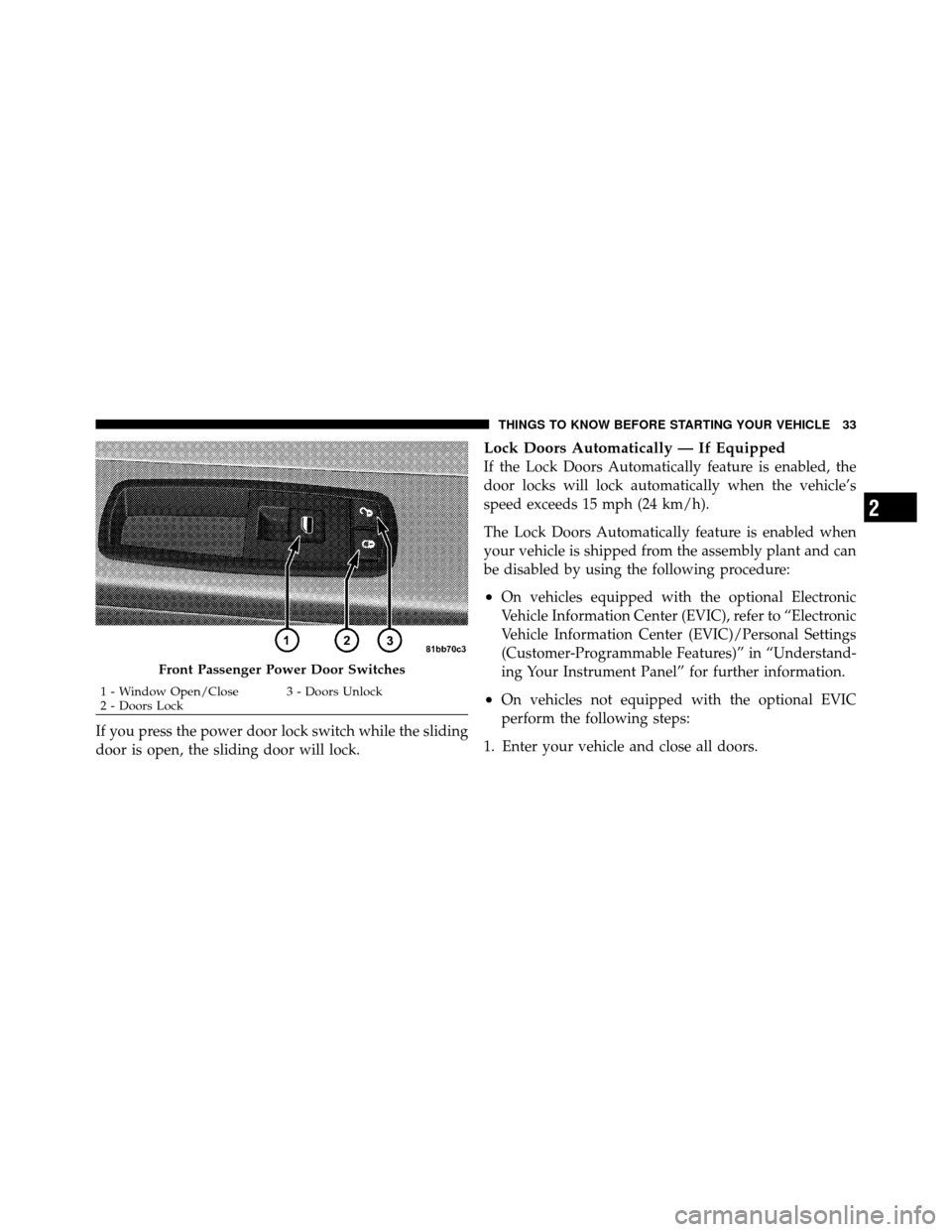
If you press the power door lock switch while the sliding
door is open, the sliding door will lock.
Lock Doors Automatically — If Equipped
If the Lock Doors Automatically feature is enabled, the
door locks will lock automatically when the vehicle’s
speed exceeds 15 mph (24 km/h).
The Lock Doors Automatically feature is enabled when
your vehicle is shipped from the assembly plant and can
be disabled by using the following procedure:
•On vehicles equipped with the optional Electronic
Vehicle Information Center (EVIC), refer to “Electronic
Vehicle Information Center (EVIC)/Personal Settings
(Customer-Programmable Features)” in “Understand-
ing Your Instrument Panel” for further information.
•On vehicles not equipped with the optional EVIC
perform the following steps:
1. Enter your vehicle and close all doors.
Front Passenger Power Door Switches
1 - Window Open/Close 3 - Doors Unlock
2 - Doors Lock
2
THINGS TO KNOW BEFORE STARTING YOUR VEHICLE 33
Page 35 of 530
2. Fasten your seat belt. (Fastening the seat belt will
cancel any chiming that may confuse you during this
programming procedure.)
3. Place the Key Fob into the ignition.
4. Within 15-seconds, cycle the ignition Key Fob from the
LOCK position to the ON/RUN position a minimum of
five times, ending in the ON position(do not start the
engine).
5. Within 30 seconds, press the driver’s door lock switch
in the LOCK direction.
6. A single chime will be heard to indicate the feature has
been disabled.
7. To reactivate this feature, repeat the above steps.
8. If a chime is not heard, the program mode was
canceled before the feature could be disabled. If neces-
sary, repeat the previous procedure. The Lock Doors Automatically at 15 mph (24 km/h)
feature can be reactivated by repeating the above men-
tioned procedure or by performing the procedure in the
EVIC (if equipped), Personal Settings (Customer-
Programmable Features).
Unlock Doors Automatically On Exit —
If Equipped
The Unlock Doors Automatically On Exit feature unlocks
all of the vehicle doors when any door is opened. This
will occur only after the shift lever has been shifted into
the PARK position, after the vehicle has been driven (the
shift lever has been shifted out of PARK and all doors
closed).
The Unlock Doors Automatically On Exit feature will not
operate if there is any manual operation of the power
door locks (lock or unlock).
34 THINGS TO KNOW BEFORE STARTING YOUR VEHICLE
Page 36 of 530
•On vehicles equipped with the optional Electronic
Vehicle Information Center (EVIC), refer to “Electronic
Vehicle Information Center (EVIC)/Personal Settings
(Customer-Programmable Features)” in “Understand-
ing Your Instrument Panel” for further information.
•On vehicles not equipped with the optional EVIC
perform the following steps:
1. Enter your vehicle and close all doors.
2. Fasten your seat belt. (Fastening the seat belt will
cancel any chimes that may be confusing during this
programming procedure.)
3. Insert the Key Fob into the ignition switch.
4. Within 15-seconds, cycle the ignition Key Fob from the
LOCK position to the ON/RUN position a minimum of
five times ending in the ON position (do not start the
engine). 5. Within 30 seconds, press the driver’s door lock switch
in the UNLOCK direction.
6. A single chime will sound to indicate the feature has
been changed.
7. To reactivate this feature, repeat the above steps.
8. If a chime is not heard, the program mode was
canceled before the feature could be changed. If neces-
sary, repeat the previous procedure.
The Unlock Doors Automatically On Exit feature can be
reactivated by repeating the above mentioned procedure
or by performing the procedure in the EVIC, Customer-
Programmable Features on vehicles so equipped.
NOTE:
Use the Lock Doors Automatically at 15 mph
(24 km/h) and Unlock Doors Automatically On Exit
features in accordance with local laws.
2
THINGS TO KNOW BEFORE STARTING YOUR VEHICLE 35
Page 38 of 530
NOTE:Power Window switches will also remain active
for up to 10 minutes after the ignition switch has been
turned to LOCK, depending upon the accessory delay
setting. Opening a front door will cancel this feature.
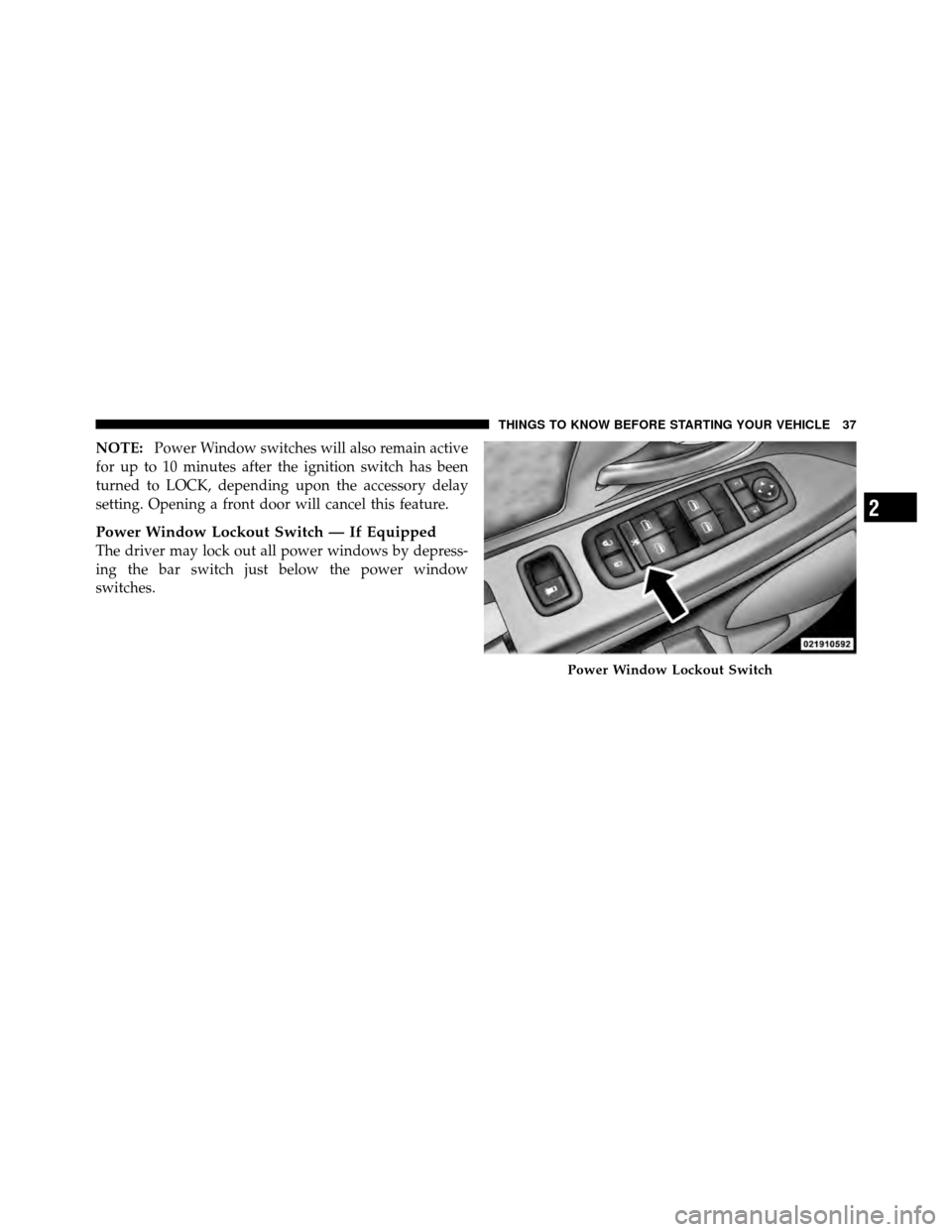
Power Window Lockout Switch — If Equipped
The driver may lock out all power windows by depress-
ing the bar switch just below the power window
switches.
Power Window Lockout Switch
2
THINGS TO KNOW BEFORE STARTING YOUR VEHICLE 37
Page 39 of 530
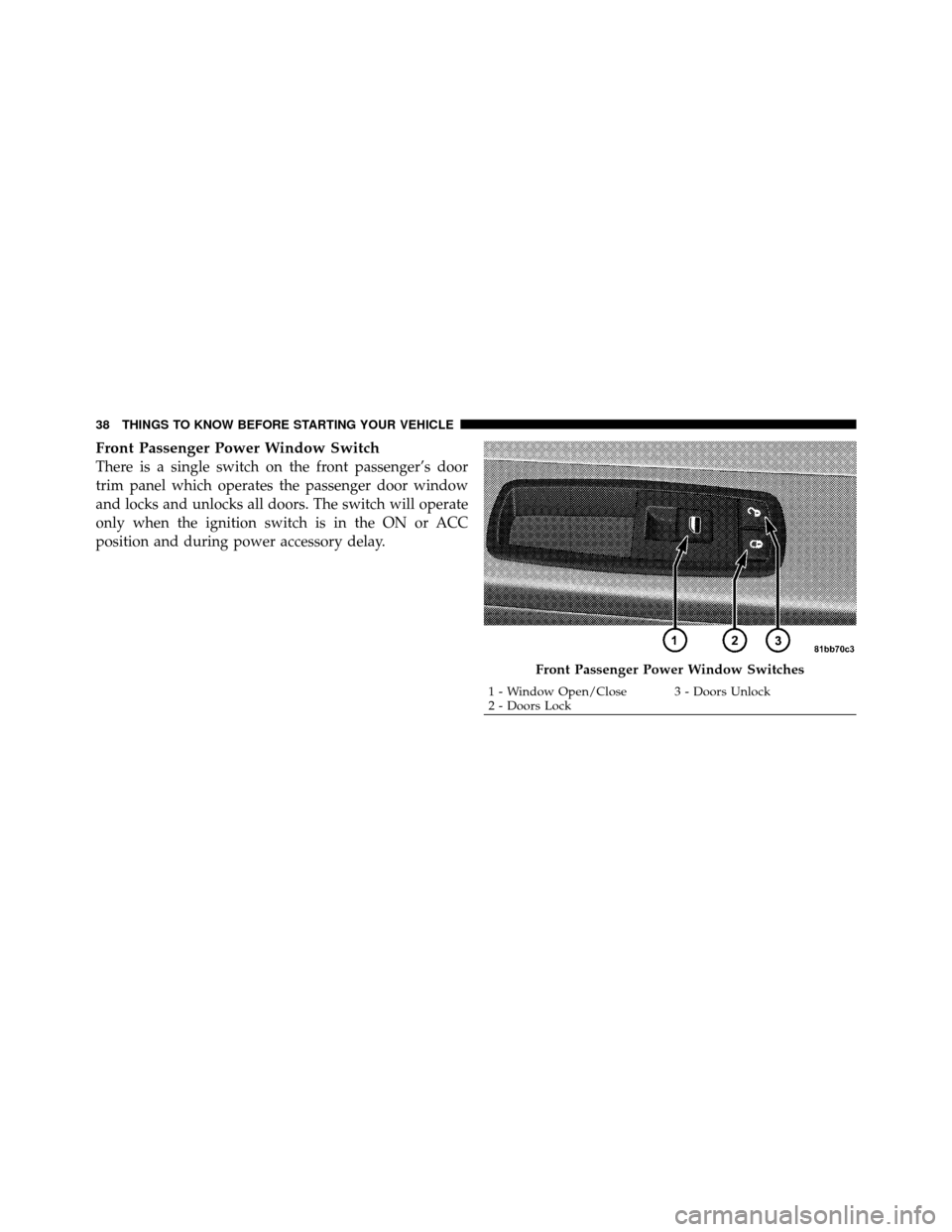
Front Passenger Power Window Switch
There is a single switch on the front passenger’s door
trim panel which operates the passenger door window
and locks and unlocks all doors. The switch will operate
only when the ignition switch is in the ON or ACC
position and during power accessory delay.
Front Passenger Power Window Switches
1 - Window Open/Close 3 - Doors Unlock
2 - Doors Lock
38 THINGS TO KNOW BEFORE STARTING YOUR VEHICLE
Page 40 of 530
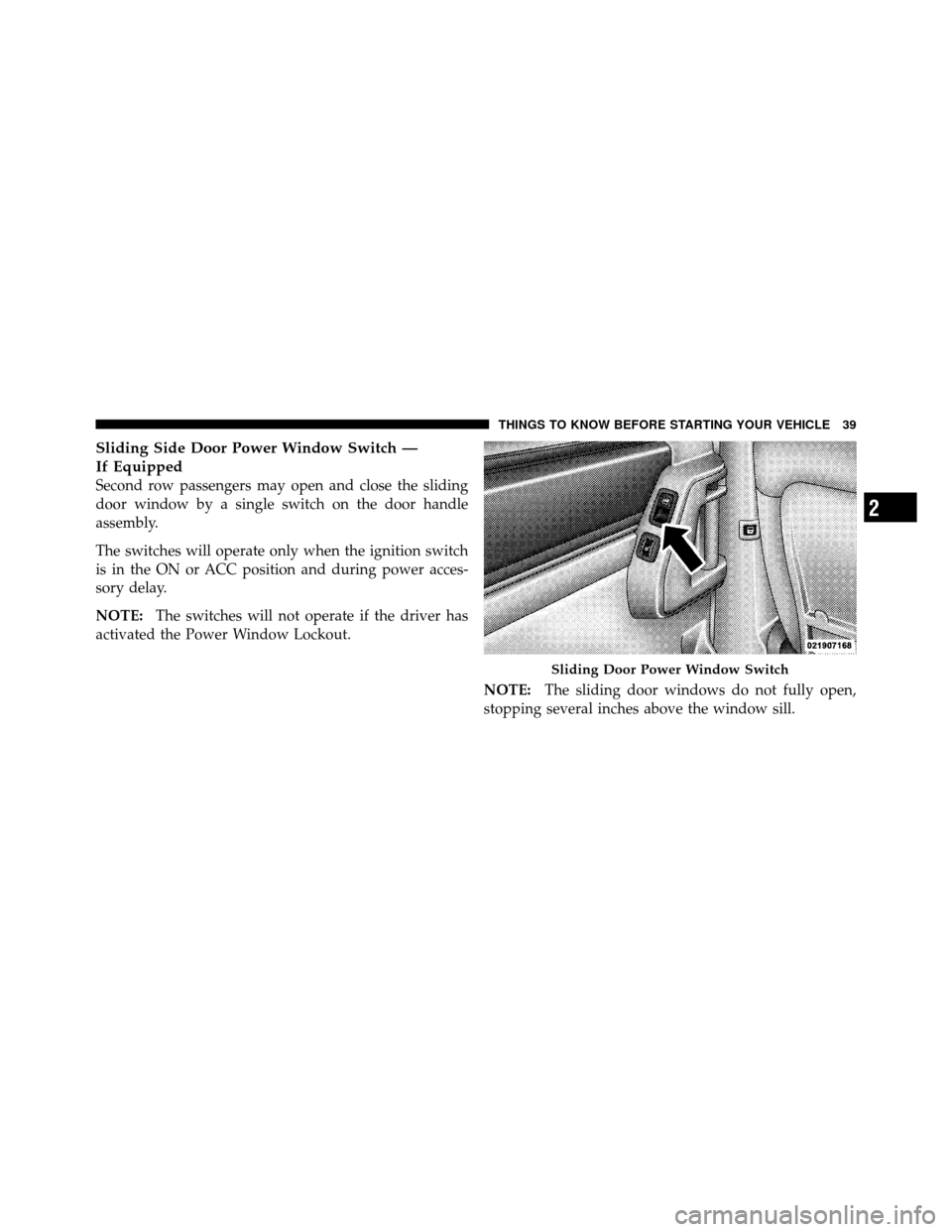
Sliding Side Door Power Window Switch —
If Equipped
Second row passengers may open and close the sliding
door window by a single switch on the door handle
assembly.
The switches will operate only when the ignition switch
is in the ON or ACC position and during power acces-
sory delay.
NOTE:The switches will not operate if the driver has
activated the Power Window Lockout.
NOTE:The sliding door windows do not fully open,
stopping several inches above the window sill.
Sliding Door Power Window Switch
2
THINGS TO KNOW BEFORE STARTING YOUR VEHICLE 39
Page 41 of 530
Auto-Down Feature — If Equipped
The front window switches may be equipped with an
Auto-Down feature. Press the window switch past the
detent, release, and the window will go down automati-
cally.
To open the window part way, press the window switch
part way and release it when you want the window to
stop.
The power window switches remain active for up to
10 minutes (depending on the accessory delay setting)
after the ignition switch has been turned to LOCK.
Opening a vehicle front door will cancel this feature.
Auto Up Feature With Anti–Pinch Protection —
If Equipped
The front Driver switch may be equipped with an Auto
Up feature. Lift the window switch to the second detent,
release, and the window will go up automatically.To stop the window from going all the way up during the
Auto Up operation, push down on the switch briefly.
To close the window part way, lift the window switch to
the first detent and release when you want the window to
stop.
NOTE:
•If the window runs into any obstacle during auto-
closure, it will reverse direction and then go back
down. Remove the obstacle and use the window
switch again to close the window.
•Any impact due to rough road conditions may trigger
the auto reverse function unexpectedly during auto-
closure. If this happens, pull the switch lightly to the
first detent and hold to close window manually.
40 THINGS TO KNOW BEFORE STARTING YOUR VEHICLE
Page 44 of 530
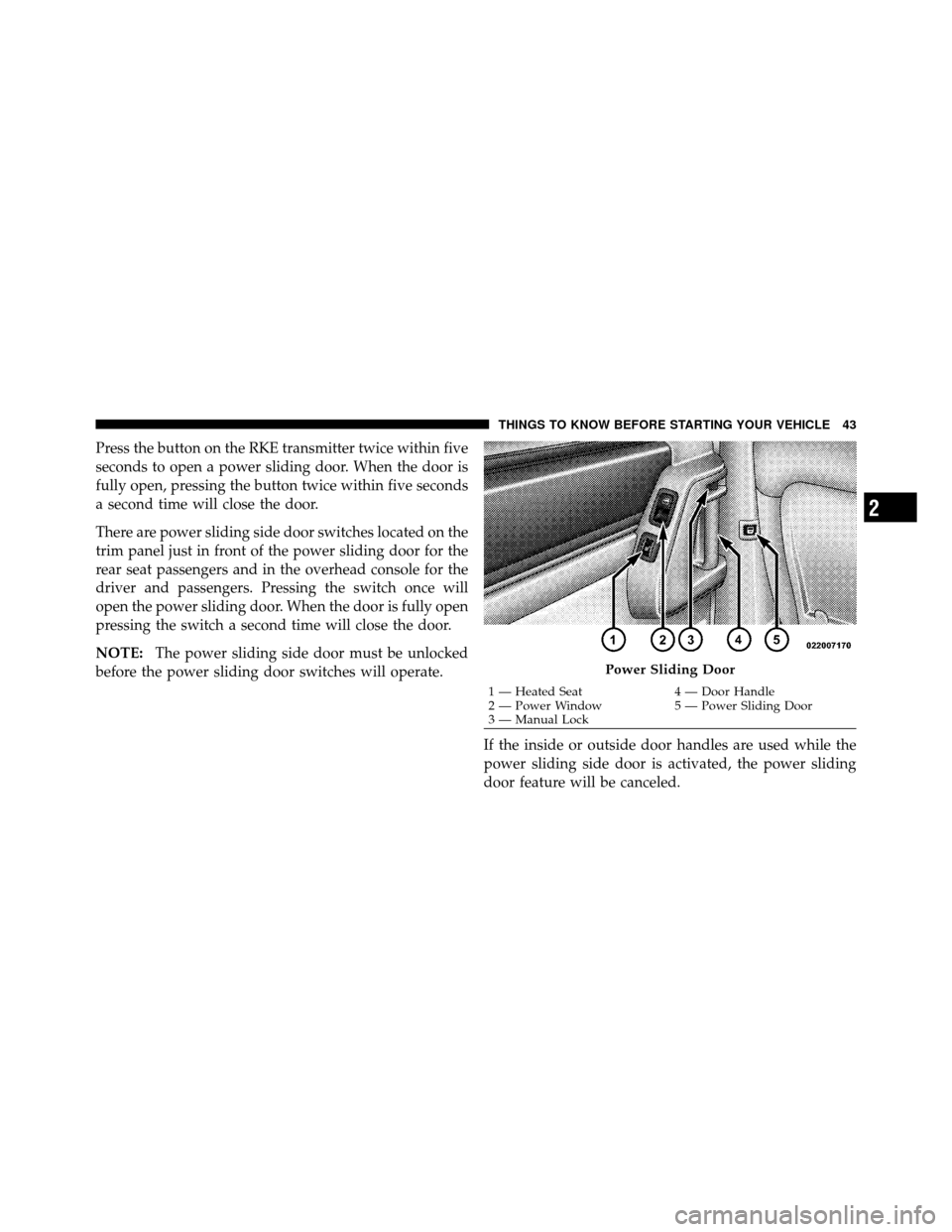
Press the button on the RKE transmitter twice within five
seconds to open a power sliding door. When the door is
fully open, pressing the button twice within five seconds
a second time will close the door.
There are power sliding side door switches located on the
trim panel just in front of the power sliding door for the
rear seat passengers and in the overhead console for the
driver and passengers. Pressing the switch once will
open the power sliding door. When the door is fully open
pressing the switch a second time will close the door.
NOTE:The power sliding side door must be unlocked
before the power sliding door switches will operate.
If the inside or outside door handles are used while the
power sliding side door is activated, the power sliding
door feature will be canceled.
Power Sliding Door
1 — Heated Seat4 — Door Handle
2 — Power Window 5 — Power Sliding Door
3 — Manual Lock
2
THINGS TO KNOW BEFORE STARTING YOUR VEHICLE 43
Page 45 of 530
To avoid unintentional operation of the power sliding doors
from the rear seats, press the power sliding door master
lock button, located in the overhead console, to disable the
switches and handles for the rear seat passengers.
NOTE:
•The power sliding side door switches will not open if
the shift lever is in gear or the vehicle speed is above
0 mph (0 km/h). To close the power sliding door with
the shift lever in gear and vehicle speed at 0 mph
(0 km/h), the brake must be pressed.
•If anything obstructs the power sliding side door
while it is closing or opening, the door will automati-
cally reverse to the closed or open position, provided
it meets sufficient resistance.
•If the power sliding side door is not in the full open or
close position, it will fully open when a power sliding
door switch is pressed. To close the door, wait until it
is fully open and then press the switch again.
•If the power sliding door encounters multiple obstruc-
tions within the same cycle, the system will automati-
cally stop and must be opened or closed manually.
WARNING!
You, or others, could be injured if caught in the path
of the sliding door. Make sure the door path is clear
before closing the door.
Power Sliding Side Door Open Flash
The left and right exterior hazard lights will flash for
12 seconds when either sliding door is opened. This will
alert other drivers in the area that passenger(s) could be
entering or exiting the vehicle.
The Sliding Side Door Open Flash can be enabled or
disabled by performing the following procedure:
1. Place the Key Fob in the ignition switch.
44 THINGS TO KNOW BEFORE STARTING YOUR VEHICLE
Page 46 of 530
2. Cycle the ignition switch ON/LOCK five times ending
in the ON position(do not start the engine).
3. Within 10 seconds of the final cycle, press the HAZ-
ARD switch.
4. A single chime will sound to signify that you have
successfully completed the programming.
You can turn the feature back on by repeating the
previous procedure.
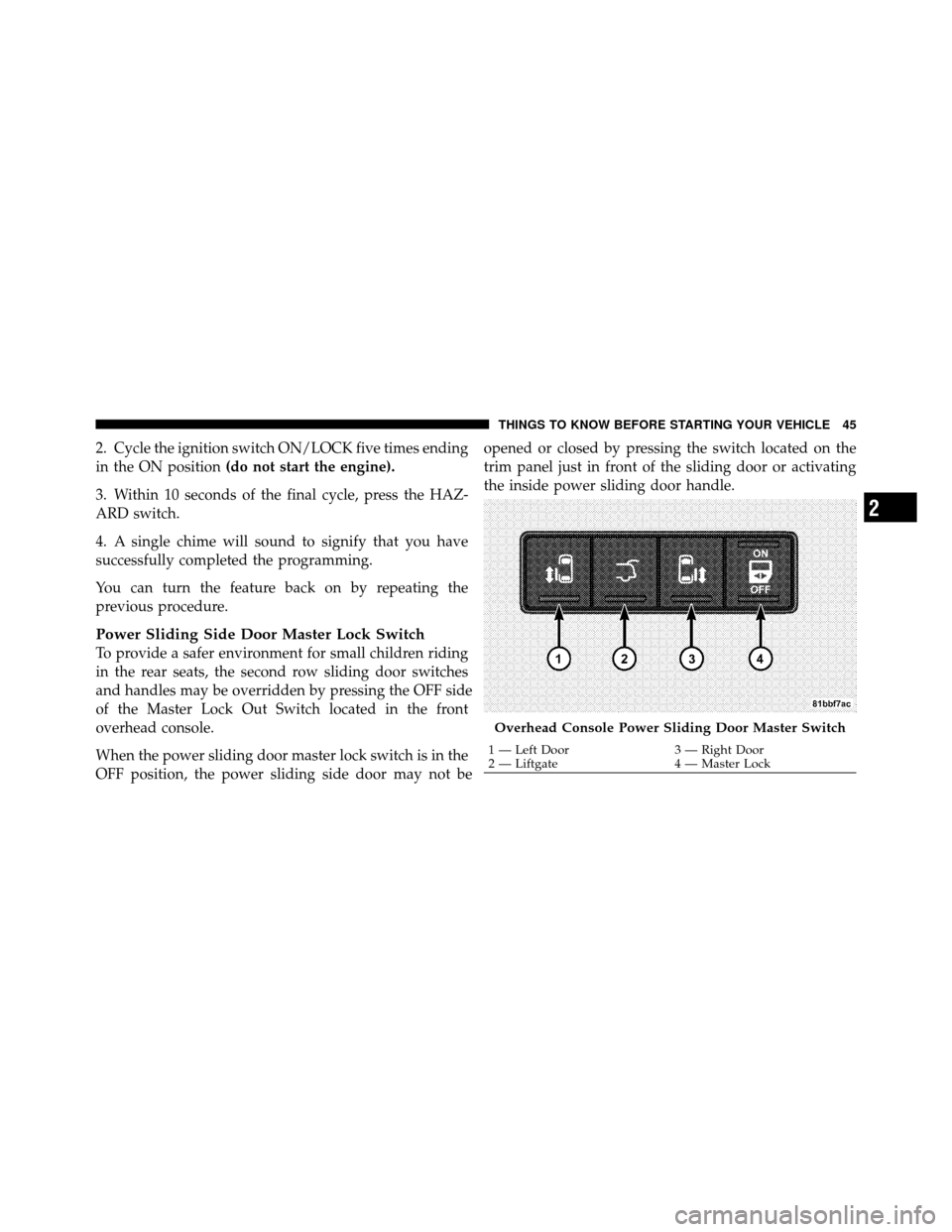
Power Sliding Side Door Master Lock Switch
To provide a safer environment for small children riding
in the rear seats, the second row sliding door switches
and handles may be overridden by pressing the O
FF side
of the Master Lock Out Switch located in the front
overhead console.
When the power sliding door master lock switch is in the
O
FF position, the power sliding side door may not be
opened or closed by pressing the switch located on the
trim panel just in front of the sliding door or activating
the inside power sliding door handle.
Overhead Console Power Sliding Door Master Switch
1 — Left Door
3 — Right Door
2 — Liftgate 4 — Master Lock
2
THINGS TO KNOW BEFORE STARTING YOUR VEHICLE 45