lock DODGE GRAND CARAVAN 2013 5.G Owners Manual
[x] Cancel search | Manufacturer: DODGE, Model Year: 2013, Model line: GRAND CARAVAN, Model: DODGE GRAND CARAVAN 2013 5.GPages: 683, PDF Size: 5.5 MB
Page 408 of 683
Locking The Remote Control
All remote control functionality can be disabled as a
parental control feature.
•To disable the Remote Control from making any
changes, press the Video Lock button on the DVD
player (if equipped). If the vehicle is not equipped
with a DVD player, follow the radio’s instructions to
turn Video Lock on. The radio and the video screen(s)
indicate when Video Lock is active.
•Pressing the Video Lock again or turning the ignition
OFF turns Video Lock OFF and allows remote control
operation of the VES™.
Replacing The Remote Control Batteries
The remote control requires two AAA batteries for op-
eration. To replace the batteries:
•Locate the battery compartment on the back of the
remote, then slide the battery cover downward.
•Replace the batteries, making sure to orient them
according to the polarity diagram shown.
•Replace the battery compartment cover.
406 UNDERSTANDING YOUR INSTRUMENT PANEL
Page 415 of 683
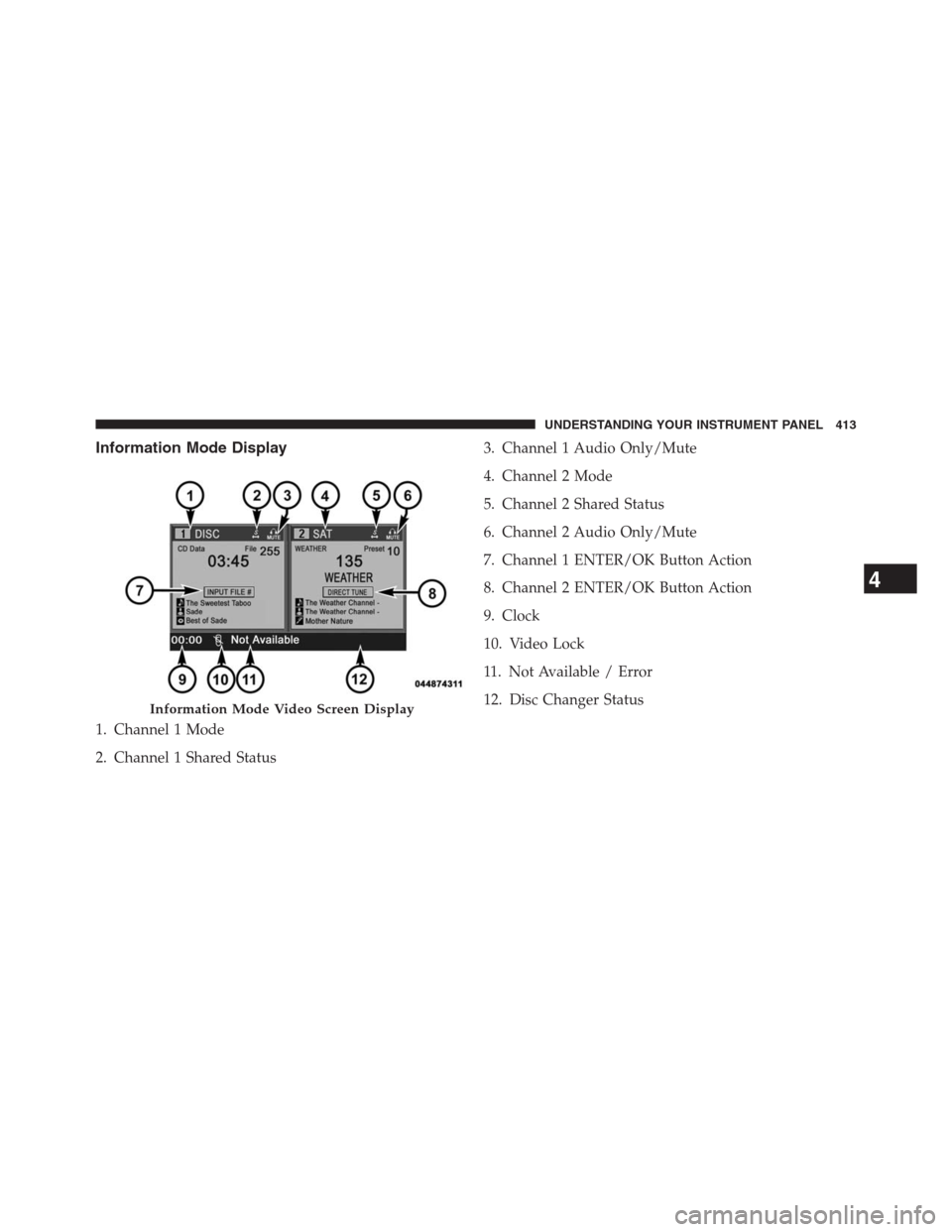
Information Mode Display
1. Channel 1 Mode
2. Channel 1 Shared Status3. Channel 1 Audio Only/Mute
4. Channel 2 Mode
5. Channel 2 Shared Status
6. Channel 2 Audio Only/Mute
7. Channel 1 ENTER/OK Button Action
8. Channel 2 ENTER/OK Button Action
9. Clock
10. Video Lock
11. Not Available / Error
12. Disc Changer Status
Information Mode Video Screen Display
4
UNDERSTANDING YOUR INSTRUMENT PANEL 413
Page 431 of 683
STEERING WHEEL AUDIO CONTROLS — IF
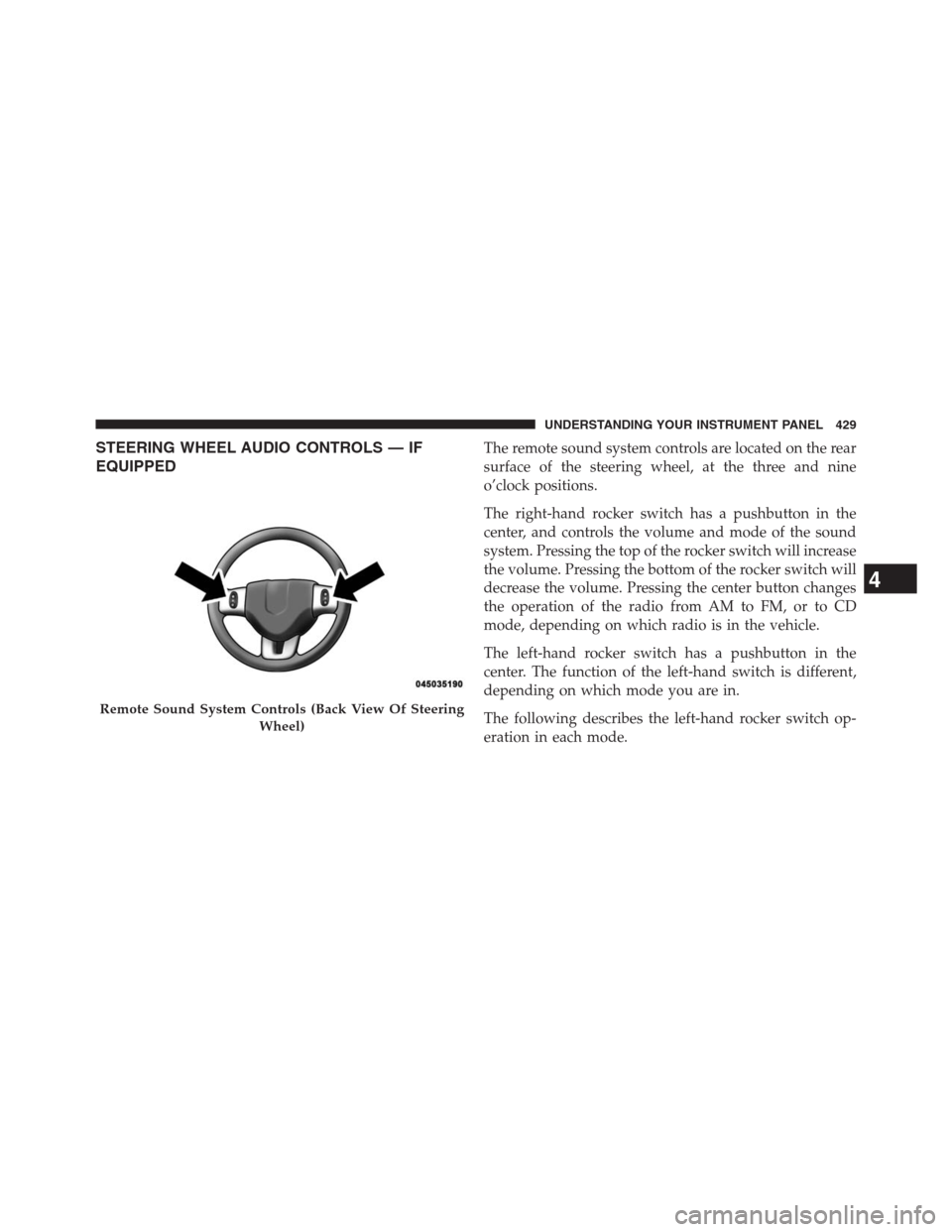
EQUIPPEDThe remote sound system controls are located on the rear
surface of the steering wheel, at the three and nine
o’clock positions.
The right-hand rocker switch has a pushbutton in the
center, and controls the volume and mode of the sound
system. Pressing the top of the rocker switch will increase
the volume. Pressing the bottom of the rocker switch will
decrease the volume. Pressing the center button changes
the operation of the radio from AM to FM, or to CD
mode, depending on which radio is in the vehicle.
The left-hand rocker switch has a pushbutton in the
center. The function of the left-hand switch is different,
depending on which mode you are in.
The following describes the left-hand rocker switch op-
eration in each mode.
Remote Sound System Controls (Back View Of Steering
Wheel)
4
UNDERSTANDING YOUR INSTRUMENT PANEL 429
Page 437 of 683
CAUTION!
Failure to follow these cautions can cause damage to
the heating elements:
•Use care when washing the inside of the rear
window. Do not use abrasive window cleaners on
the interior surface of the window. Use a soft cloth
and a mild washing solution, wiping parallel to the
heating elements. Labels can be peeled off after
soaking with warm water.
•Do not use scrapers, sharp instruments, or abrasive
window cleaners on the interior surface of the
window.
•Keep all objects a safe distance from the window.9. Recirculation Control Button
Press this button to choose between outside air
intake or recirculation of the air inside the
vehicle. A lamp will illuminate when you are in
Recirculation mode. Only use the Recirculation
mode to temporarily block out any outside odors, smoke,
or dust, and to cool the interior rapidly upon initial
start-up in very hot or humid weather.
NOTE:
•If the Recirculation button is pressed when the system
is in Defrost mode the Recirculation LED indicator will
flash 3 times to indicate Recirculation mode is not
allowed.
•In Floor and Mix mode the system will turn off
Recirculation mode after five minutes of operation.
You can select Recirculation mode again if desired.
4
UNDERSTANDING YOUR INSTRUMENT PANEL 435
Page 440 of 683
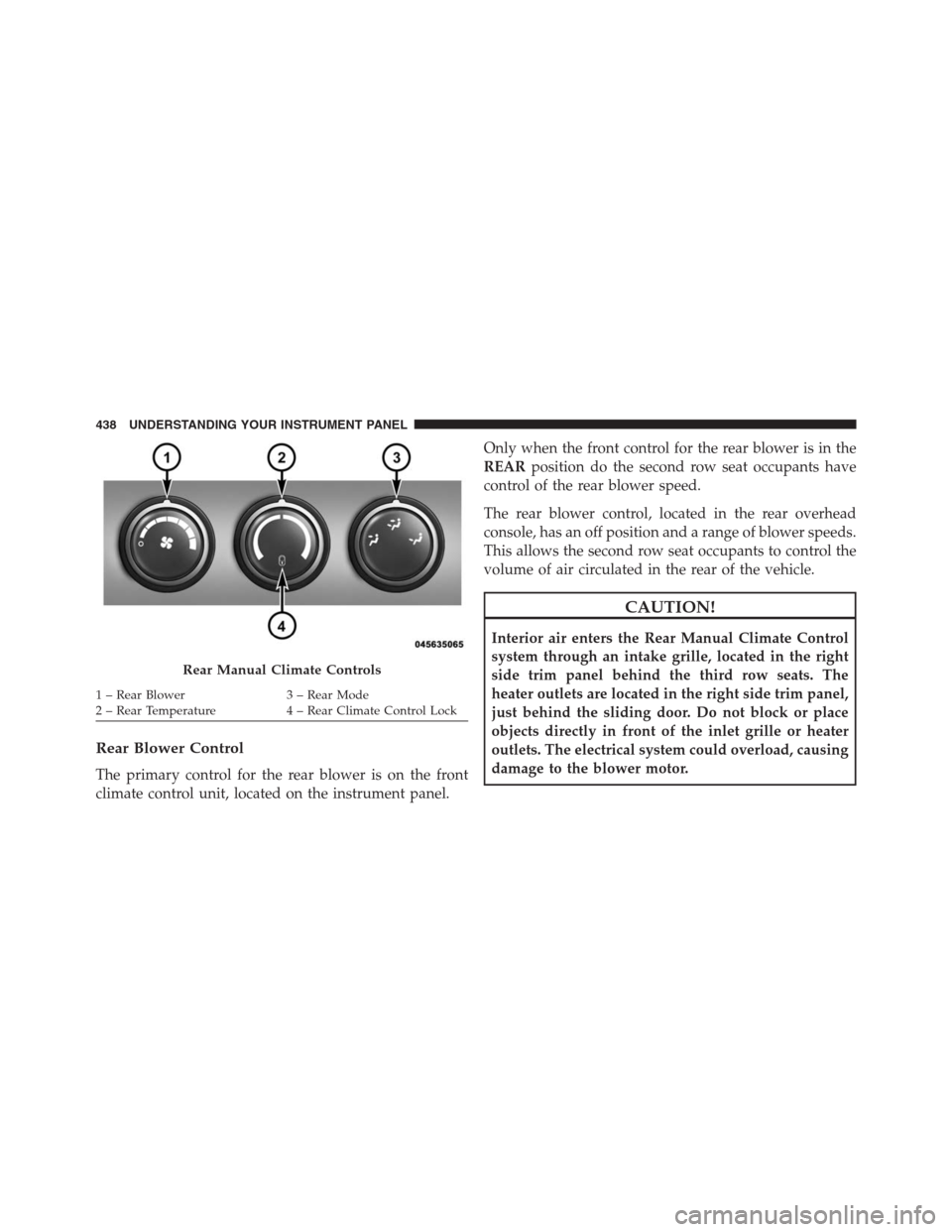
Rear Blower Control
The primary control for the rear blower is on the front
climate control unit, located on the instrument panel.Only when the front control for the rear blower is in the
REARposition do the second row seat occupants have
control of the rear blower speed.
The rear blower control, located in the rear overhead
console, has an off position and a range of blower speeds.
This allows the second row seat occupants to control the
volume of air circulated in the rear of the vehicle.
CAUTION!
Interior air enters the Rear Manual Climate Control
system through an intake grille, located in the right
side trim panel behind the third row seats. The
heater outlets are located in the right side trim panel,
just behind the sliding door. Do not block or place
objects directly in front of the inlet grille or heater
outlets. The electrical system could overload, causing
damage to the blower motor.
Rear Manual Climate Controls
1 – Rear Blower 3 – Rear Mode
2 – Rear Temperature 4 – Rear Climate Control Lock 438 UNDERSTANDING YOUR INSTRUMENT PANEL
Page 441 of 683
Rear Temperature Control
The rear mode selectionREAR,allows the settings to be
controlled by the rear mode control knob.
To change the temperature in the rear of the vehicle,
rotate the temperature control knob counterclockwise for
cold air, and clockwise for heated air.
When rear controls are locked by the front system, the
lock symbol on the temperature knob is illuminated, and
the rear overhead adjustments are inoperable.
Rear Mode Control
Headliner Mode
Air comes from the outlets in the headliner. Each
of these outlets can be individually adjusted to
direct the flow of air. Moving the air vanes of the outlets
to one side will shut off the airflow.Bi-Level Mode
Air comes from both the headliner outlets and the
floor outlets.
NOTE:In many temperature positions, the Bi-Level
mode is designed to provide cooler air out of the head-
liner outlets and warmer air from the floor outlets.
Floor Mode
Air comes from the floor outlets.
4
UNDERSTANDING YOUR INSTRUMENT PANEL 439
Page 444 of 683
10. Rear Control Button
Provides toggle operation between front control screen
and rear control screen. Push the button to activate the
rear climate control screen and allow the front seat
occupants control over the rear climate settings.
11. Rear Lock
Press and release the Rear Lock button on the front ATC
panel to lock and unlock the rear climate controls.
12. Auto Temperature Control Button
Controls airflow temperature, distribution, volume, and
the amount of air recirculation automatically. Press and
release to select. Refer to “Automatic Operation” for
more information. Performing this function will cause
the ATC to switch between manual mode and automatic
modes.13. Climate Control OFF Button
Press and release to turn the Climate Control OFF. If the
control is OFF, press any button to turn the control ON.
14. Blower Control
There are seven blower speeds, the blower speed in-
creases as you move the control to the right from the
lowest blower setting. Performing this function will
cause the ATC to switch into manual mode.
15. Mode Control Button
Press and release to select between Modes (Panel, Bi-
Level, Floor, Mix). Performing this function will cause the
ATC to switch into manual mode.
16. Recirculation Control Button
Press and release to change the current setting, the
indicator illuminates when ON.
442 UNDERSTANDING YOUR INSTRUMENT PANEL
Page 448 of 683
selected. Push the button a second time to turn off the
Recirculation mode LED and allow outside air into the
vehicle.
NOTE:In cold weather, use of the Recirculation mode
may lead to excessive window fogging. The Recirculation
mode is not allowed in Defrost mode to improve window
clearing operation. Recirculation will be disabled auto-
matically if this mode is selected.
Manual Operation
This system offers a full complement of manual override
features. The AUTO symbol in the front ATC display will
be turned off when the system is being used in the
manual mode.
NOTE:Each of these features operate independently
from each other. If any one feature is controlled manually,
the temperature doors will continue to operate automati-
cally.Blower Control
There are seven fixed blower speeds.
Use the outer dial control to regulate the
amount of air forced through the system
in any mode you select. The blower
speed increases as you move the control
clockwise and decreases when you move
the control counter-clockwise.
The blower fan speed can be set to any fixed speed by
adjusting the blower control outer dial. The fan will now
operate at a fixed speed until additional speeds are
selected. This allows the front occupants to control the
volume of air circulated in the vehicle and cancel the
Auto mode.
The operator can also select the direction of the airflow
by selecting one of the following positions.
446 UNDERSTANDING YOUR INSTRUMENT PANEL
Page 450 of 683
NOTE:While operating in the other modes, the system
will not automatically sense the presence of fog, mist or
ice on the windshield. DEFROST mode must be manually
selected to clear the windshield and side glass.
Air Conditioning (A/C)
•
The Air Conditioning (A/C) button allows the operator to
manually activate or deactivate the air conditioning sys-
tem. When in A/C mode and the ATC is set to a cool
temperature, dehumidified air flows through the air
outlets. If Economy mode is desired, press the A/C
button to turn off the A/C mode in the ATC display and
deactivate the A/C system.
NOTE:
•
If the system is in Mix, Floor or Defrost Mode, the A/C
can be turned off, but the A/C system shall remain active
to prevent fogging of the windows.
•If fog or mist appears on the windshield or side glass,
select Defrost mode and increase blower speed.
Rear Automatic Temperature Control (ATC) — If
Equipped
The rear ATC system has floor air outlets at the rear of the
right side sliding door, and overhead outlets at each
outboard rear seating position. The system provides
heated air through the floor outlets or cool, dehumidified
air through the headliner outlets.
The rear system temperature control is on the front ATC
panel located on the instrument panel.
Pressing the Rear Temperature Lock button on the front
ATC panel, illuminates a lock symbol in the rear display.
The rear temperature and air source are controlled from
the front ATC panel.
Rear second row occupants can only adjust the rear ATC
control when the Rear Temperature Lock button is turned off.
The rear ATC system is located in the headliner, near the
center of the vehicle.
448 UNDERSTANDING YOUR INSTRUMENT PANEL
Page 451 of 683
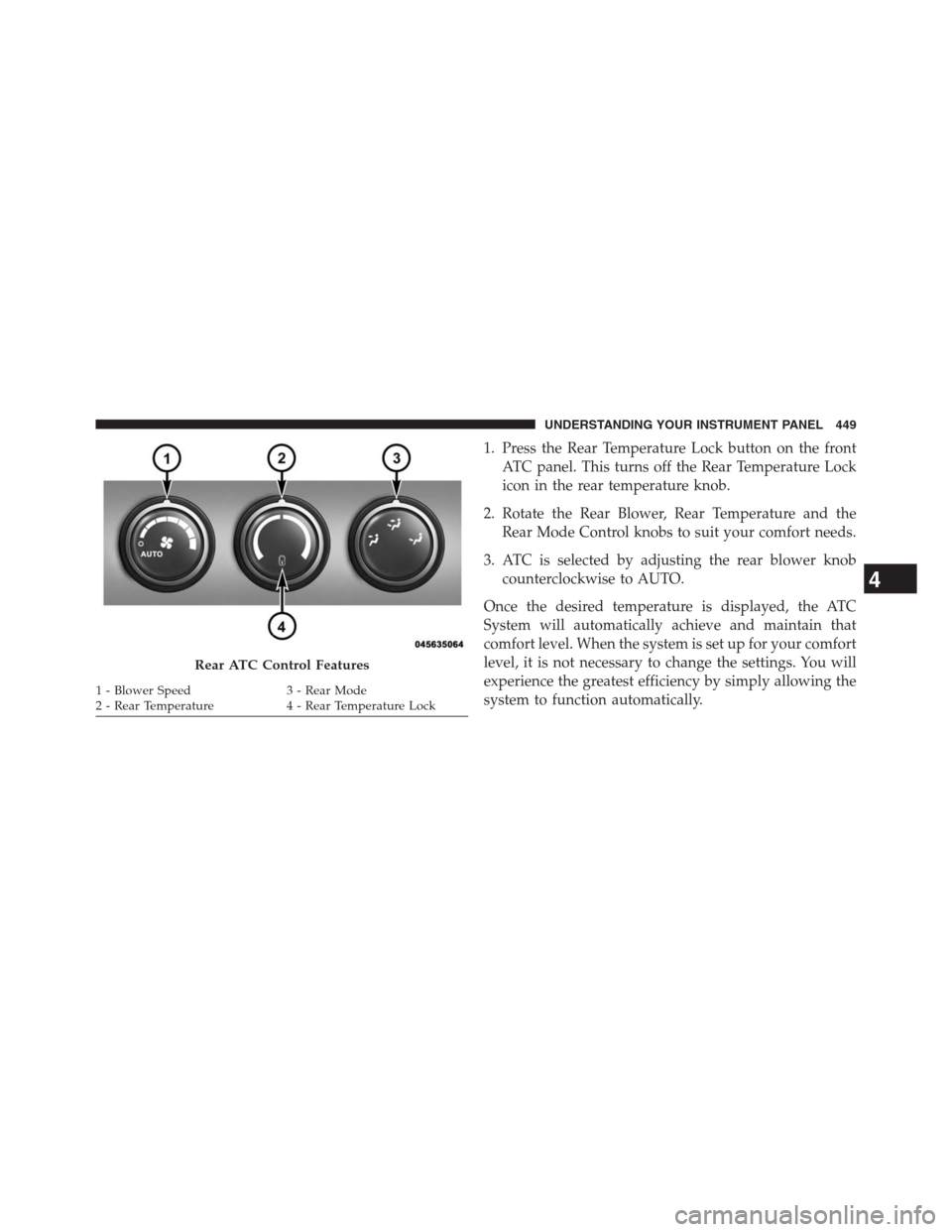
1. Press the Rear Temperature Lock button on the front
ATC panel. This turns off the Rear Temperature Lock
icon in the rear temperature knob.
2. Rotate the Rear Blower, Rear Temperature and the
Rear Mode Control knobs to suit your comfort needs.
3. ATC is selected by adjusting the rear blower knob
counterclockwise to AUTO.
Once the desired temperature is displayed, the ATC
System will automatically achieve and maintain that
comfort level. When the system is set up for your comfort
level, it is not necessary to change the settings. You will
experience the greatest efficiency by simply allowing the
system to function automatically.
Rear ATC Control Features
1 - Blower Speed 3 - Rear Mode
2 - Rear Temperature 4 - Rear Temperature Lock
4
UNDERSTANDING YOUR INSTRUMENT PANEL 449