Blower DODGE GRAND CARAVAN 2013 5.G Owner's Manual
[x] Cancel search | Manufacturer: DODGE, Model Year: 2013, Model line: GRAND CARAVAN, Model: DODGE GRAND CARAVAN 2013 5.GPages: 683, PDF Size: 5.5 MB
Page 450 of 683
NOTE:While operating in the other modes, the system
will not automatically sense the presence of fog, mist or
ice on the windshield. DEFROST mode must be manually
selected to clear the windshield and side glass.
Air Conditioning (A/C)
•
The Air Conditioning (A/C) button allows the operator to
manually activate or deactivate the air conditioning sys-
tem. When in A/C mode and the ATC is set to a cool
temperature, dehumidified air flows through the air
outlets. If Economy mode is desired, press the A/C
button to turn off the A/C mode in the ATC display and
deactivate the A/C system.
NOTE:
•
If the system is in Mix, Floor or Defrost Mode, the A/C
can be turned off, but the A/C system shall remain active
to prevent fogging of the windows.
•If fog or mist appears on the windshield or side glass,
select Defrost mode and increase blower speed.
Rear Automatic Temperature Control (ATC) — If
Equipped
The rear ATC system has floor air outlets at the rear of the
right side sliding door, and overhead outlets at each
outboard rear seating position. The system provides
heated air through the floor outlets or cool, dehumidified
air through the headliner outlets.
The rear system temperature control is on the front ATC
panel located on the instrument panel.
Pressing the Rear Temperature Lock button on the front
ATC panel, illuminates a lock symbol in the rear display.
The rear temperature and air source are controlled from
the front ATC panel.
Rear second row occupants can only adjust the rear ATC
control when the Rear Temperature Lock button is turned off.
The rear ATC system is located in the headliner, near the
center of the vehicle.
448 UNDERSTANDING YOUR INSTRUMENT PANEL
Page 451 of 683
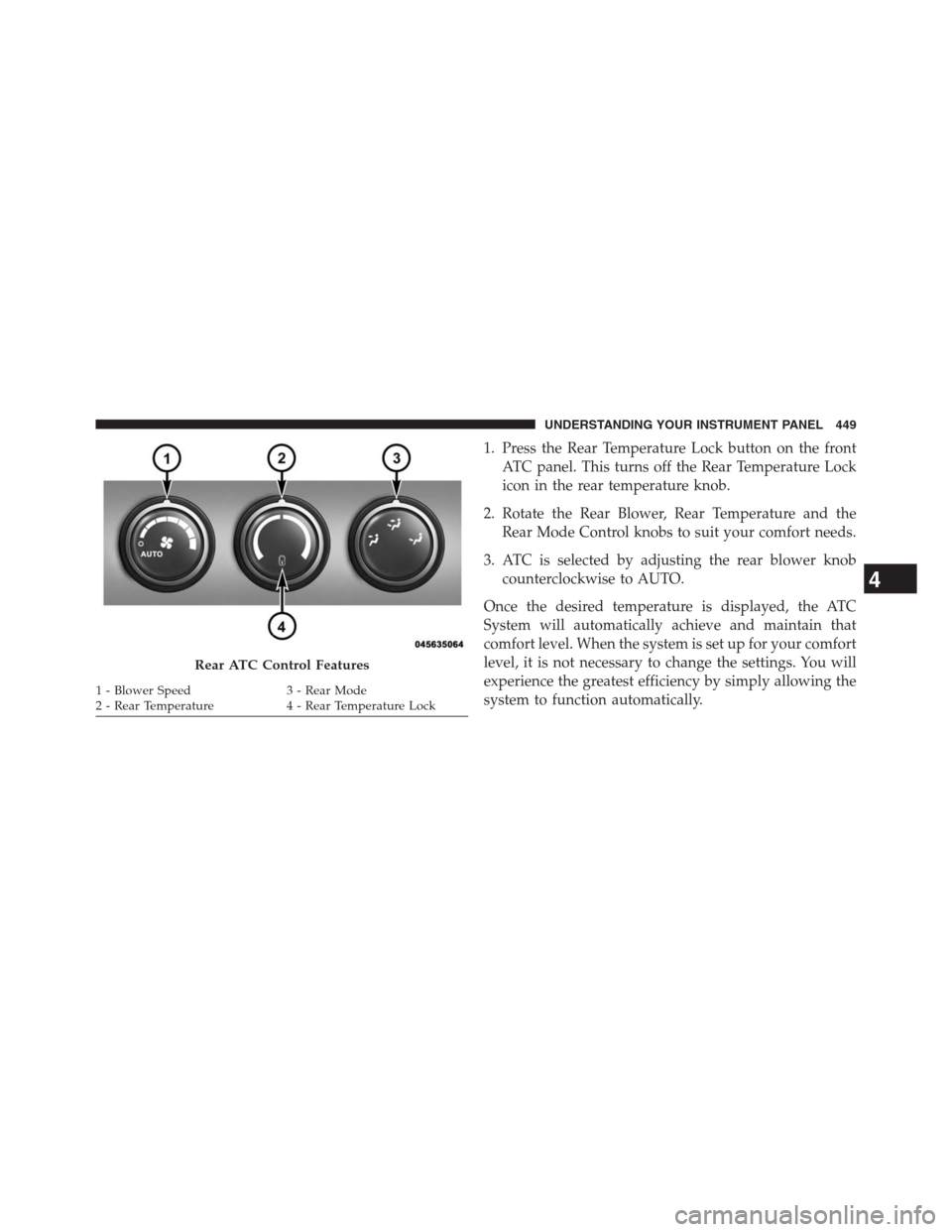
1. Press the Rear Temperature Lock button on the front
ATC panel. This turns off the Rear Temperature Lock
icon in the rear temperature knob.
2. Rotate the Rear Blower, Rear Temperature and the
Rear Mode Control knobs to suit your comfort needs.
3. ATC is selected by adjusting the rear blower knob
counterclockwise to AUTO.
Once the desired temperature is displayed, the ATC
System will automatically achieve and maintain that
comfort level. When the system is set up for your comfort
level, it is not necessary to change the settings. You will
experience the greatest efficiency by simply allowing the
system to function automatically.
Rear ATC Control Features
1 - Blower Speed 3 - Rear Mode
2 - Rear Temperature 4 - Rear Temperature Lock
4
UNDERSTANDING YOUR INSTRUMENT PANEL 449
Page 452 of 683
NOTE:
•It is not necessary to move the temperature settings for
cold or hot vehicles. The system automatically adjusts
the temperature, mode and fan speed to provide
comfort as quickly as possible.
•The temperature can be displayed in English or Metric
units by selecting the “Display Units of Measure in”
customer-programmable feature. Refer to the “Elec-
tronic Vehicle Information Center (EVIC) — Customer-
Programmable Features” in this Section.Rear Blower Control
The rear blower control knob can be manually set to off,
or any fixed blower speed, by rotating the knob from low
to high. This allows the rear seat occupants to control the
volume of air circulated in the rear of the vehicle.
CAUTION!
Interior air enters the Rear Automatic Temperature
Control System through an intake grille, located in
the right side trim panel behind the third row seats.
The heater outlets are located in the right side trim
panel, just behind the sliding door. Do not block or
place objects directly in front of the inlet grille or
heater outlets. The electrical system could overload
causing damage to the blower motor.
450 UNDERSTANDING YOUR INSTRUMENT PANEL
Page 455 of 683
Vacation/Storage
Before you store your vehicle, or keep it out of service
(i.e., vacation) for two weeks or more, run the air
conditioning system at idle for about five minutes, in
fresh air with the blower setting on high. This will ensure
adequate system lubrication to minimize the possibility
of compressor damage when the system is started again.
Window Fogging
Vehicle windows tend to fog on the inside in mild, rainy
and/or humid weather. To clear the windows, select
Defrost or Mix mode and increase the front blower speed.
Do not use the Recirculation mode without A/C for long
periods, as fogging may occur.
Outside Air Intake
Make sure the air intake, located directly in front of the
windshield, is free of obstructions such as leaves. Leaves
collected in the air intake may reduce airflow, and if they
enter the plenum, they could plug the water drains. In
Winter months, make sure the air intake is clear of ice,
slush, and snow.
4
UNDERSTANDING YOUR INSTRUMENT PANEL 453
Page 562 of 683
HAZARD WARNING FLASHERS
The Hazard Warning flasher switch is located in the
lower center area of the instrument panel.
Press the switch to turn on the Hazard Warning
flasher. When the switch is activated, all direc-
tional turn signals will flash on and off to warn oncoming
traffic of an emergency. Press the switch a second time to
turn off the Hazard Warning flashers.
This is an emergency warning system and it should not
be used when the vehicle is in motion. Use it when your
vehicle is disabled and it is creating a safety hazard for
other motorists.
When you must leave the vehicle to seek assistance, the
Hazard Warning flashers will continue to operate even
though the ignition is placed in the OFF position.
NOTE:With extended use the Hazard Warning flashers
may wear down your battery.
IF YOUR ENGINE OVERHEATS
In any of the following situations, you can reduce the
potential for overheating by taking the appropriate action.
•On the highways — slow down.
•In city traffic — while stopped, place the transmission
in NEUTRAL, but do not increase engine idle speed.
NOTE:There are steps that you can take to slow down
an impending overheat condition:
•If your air conditioner (A/C) is on, turn it off. The A/C
system adds heat to the engine cooling system and
turning the A/C off can help remove this heat.
•
You can also turn the temperature control to maximum
heat, the mode control to floor and the blower control to
high. This allows the heater core to act as a supplement to
the radiator and aids in removing heat from the engine
cooling system.
560 WHAT TO DO IN EMERGENCIES
Page 607 of 683
Refrigerant Recovery And Recycling
R-134a Air Conditioning Refrigerant is a hydrofluoro-
carbon (HFC) that is endorsed by the Environmental
Protection Agency and is an ozone-saving product. How-
ever, the manufacturer recommends that air conditioning
service be performed by authorized dealer or other
service facilities using recovery and recycling equipment.
NOTE:Use only manufacturer approved A/C system
sealers, stop leak products, seal conditioners, compressor
oil, and refrigerants.
A/C Air Filter
Refer to the “Maintenance Schedule” for the proper main-
tenance intervals.
WARNING!
Do not remove the A/C air filter while the blower is
operating or personal injury may result.
The A/C air filter is located in the fresh air inlet behind
the glove box. Perform the following procedure to re-
place the filter:
1. Open the glove compartment and remove all contents.
2. Push in on the sides of the glove compartment and
lower the door.
3. Pivot the glove compartment downward.
7
MAINTAINING YOUR VEHICLE 605
Page 630 of 683
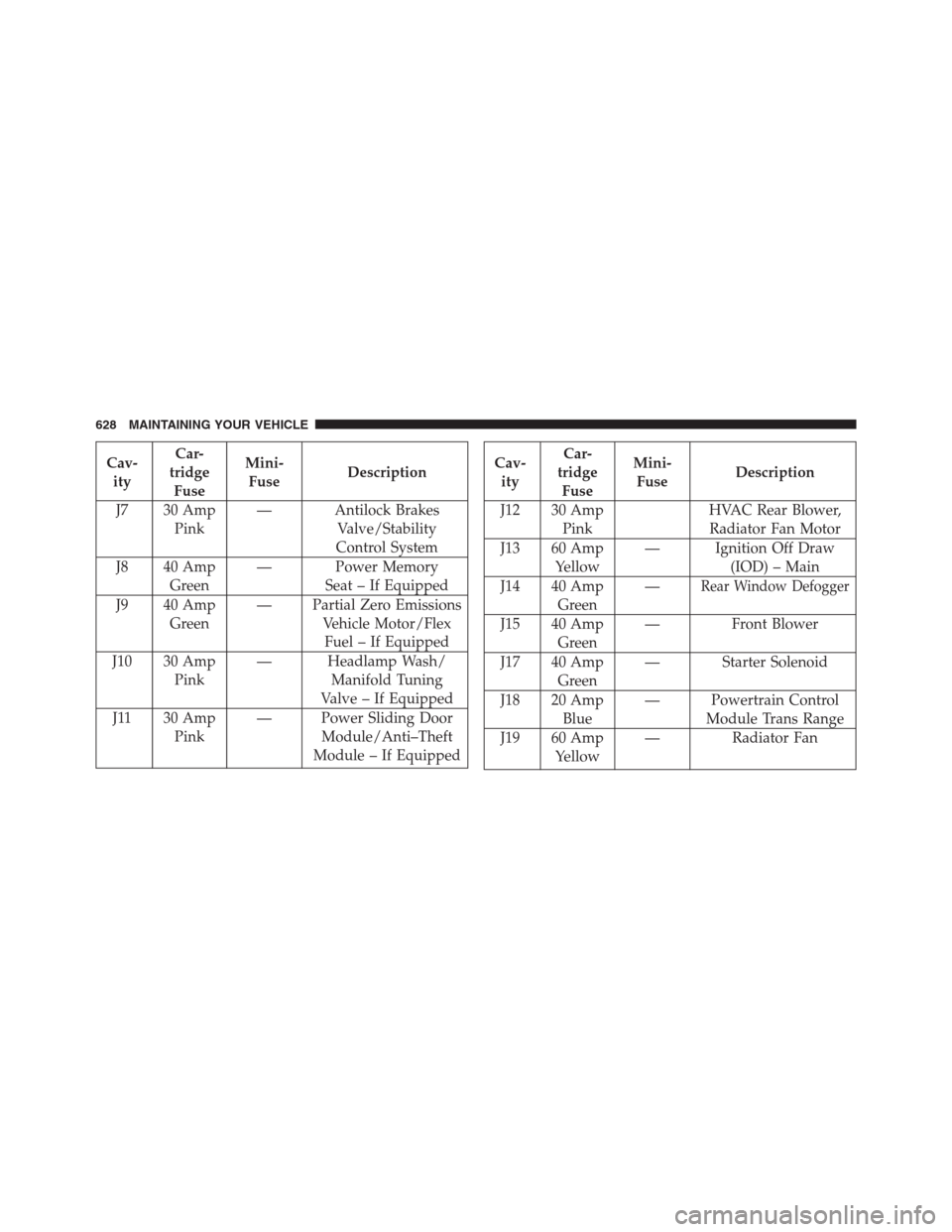
Cav-
ityCar-
tridge
FuseMini-
FuseDescription
J7 30 Amp
Pink— Antilock Brakes
Valve/Stability
Control System
J8 40 Amp
Green— Power Memory
Seat – If Equipped
J9 40 Amp
Green— Partial Zero Emissions
Vehicle Motor/Flex
Fuel – If Equipped
J10 30 Amp
Pink— Headlamp Wash/
Manifold Tuning
Valve – If Equipped
J11 30 Amp
Pink— Power Sliding Door
Module/Anti–Theft
Module – If EquippedCav-
ityCar-
tridge
FuseMini-
FuseDescription
J12 30 Amp
PinkHVAC Rear Blower,
Radiator Fan Motor
J13 60 Amp
Yellow— Ignition Off Draw
(IOD) – Main
J14 40 Amp
Green—
Rear Window Defogger
J15 40 Amp
Green— Front Blower
J17 40 Amp
Green— Starter Solenoid
J18 20 Amp
Blue— Powertrain Control
Module Trans Range
J19 60 Amp
Yellow— Radiator Fan
628 MAINTAINING YOUR VEHICLE
Page 635 of 683
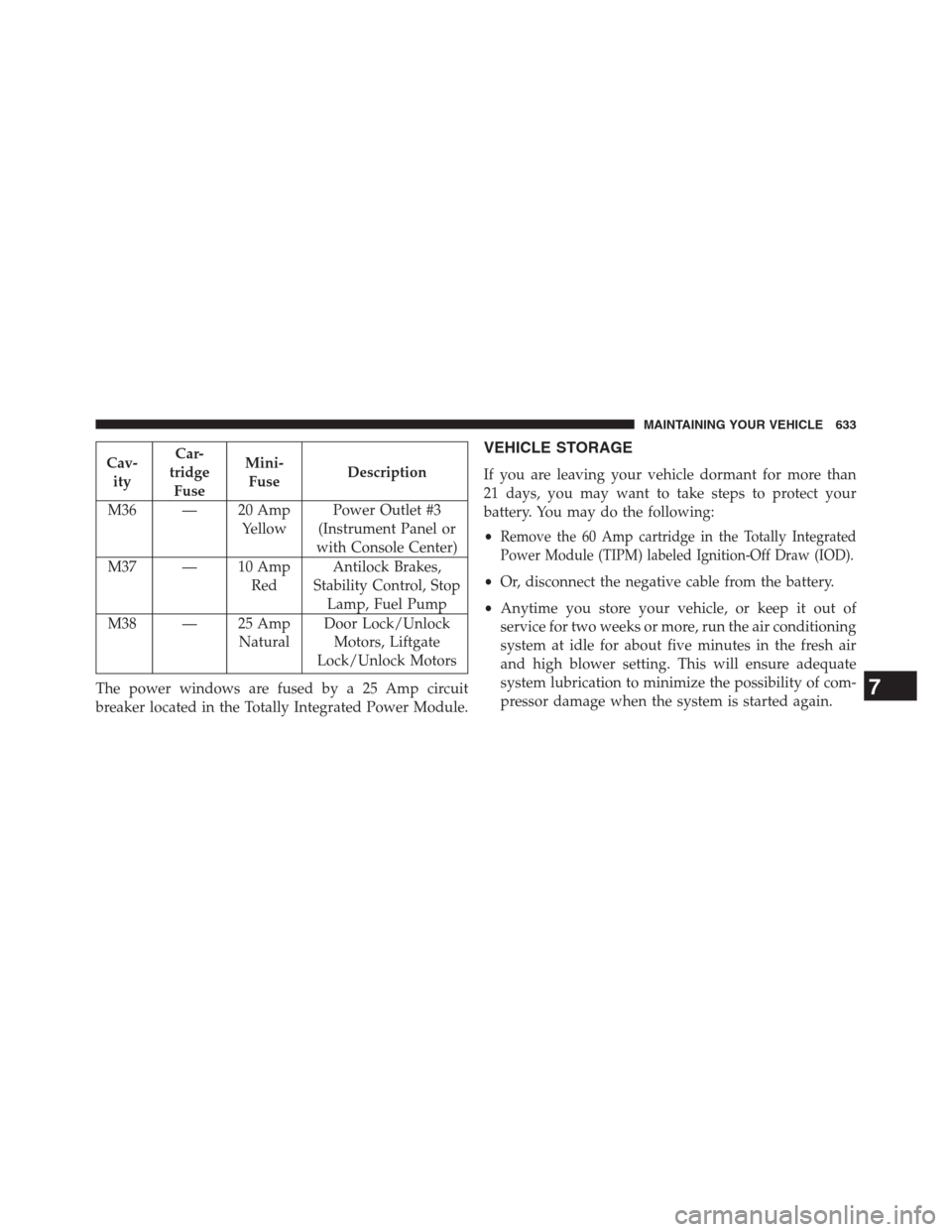
Cav-
ityCar-
tridge
FuseMini-
FuseDescription
M36 — 20 Amp
YellowPower Outlet #3
(Instrument Panel or
with Console Center)
M37 — 10 Amp
RedAntilock Brakes,
Stability Control, Stop
Lamp, Fuel Pump
M38 — 25 Amp
NaturalDoor Lock/Unlock
Motors, Liftgate
Lock/Unlock Motors
The power windows are fused by a 25 Amp circuit
breaker located in the Totally Integrated Power Module.VEHICLE STORAGE
If you are leaving your vehicle dormant for more than
21 days, you may want to take steps to protect your
battery. You may do the following:
•
Remove the 60 Amp cartridge in the Totally Integrated
Power Module (TIPM) labeled Ignition-Off Draw (IOD).
•Or, disconnect the negative cable from the battery.
•Anytime you store your vehicle, or keep it out of
service for two weeks or more, run the air conditioning
system at idle for about five minutes in the fresh air
and high blower setting. This will ensure adequate
system lubrication to minimize the possibility of com-
pressor damage when the system is started again.
7
MAINTAINING YOUR VEHICLE 633