stop start DODGE GRAND CARAVAN 2013 5.G Owner's Manual
[x] Cancel search | Manufacturer: DODGE, Model Year: 2013, Model line: GRAND CARAVAN, Model: DODGE GRAND CARAVAN 2013 5.GPages: 683, PDF Size: 5.5 MB
Page 466 of 683
ENGINE BLOCK HEATER — IF EQUIPPED
The engine block heater warms the engine, and permits
quicker starts in cold weather. Connect the cord to a
standard 110-115 Volt AC electrical outlet with a
grounded, three-wire extension cord.
The engine block heater must be plugged in at least one
hour to have an adequate warming effect on the engine.
The engine block heater cord is routed under the hood on
the driver’s side of the vehicle. It has a removable cap
that is located on the driver side of the Integrated Power
Module.
WARNING!
Remember to disconnect the engine block heater
cord before driving. Damage to the 110-115 Volt
electrical cord could cause electrocution.
AUTOMATIC TRANSMISSION
CAUTION!
Damage to the transmission may occur if the follow-
ing precautions are not observed:
•Shift into PARK only after the vehicle has come to
a complete stop.
•Shift into or out of REVERSE only after the vehicle
has come to a complete stop and the engine is at
idle speed.
•Do not shift between PARK, REVERSE, NEU-
TRAL, or DRIVE when the engine is above idle
speed.
•Before shifting into any gear, make sure your foot
is firmly pressing the brake pedal.
NOTE:You must press and hold the brake pedal while
shifting out of PARK.
464 STARTING AND OPERATING
Page 468 of 683
Key Ignition Park Interlock
This vehicle is equipped with a Key Ignition Park Inter-
lock which requires the shift lever to be placed in PARK
before the ignition switch can be turned to the LOCK/
OFF position. The key fob can only be removed from the
ignition when the ignition is in the LOCK/OFF position,
and the shift lever is locked in PARK whenever the
ignition switch is in the LOCK/OFF position.
NOTE:If a malfunction occurs, the system will trap the
key fob in the ignition switch to warn you that this safety
feature is inoperable. The engine can be started and
stopped but the key fob cannot be removed until you
obtain service.
Brake/Transmission Shift Interlock System
This vehicle is equipped with a Brake Transmission Shift
Interlock System (BTSI) that holds the transmission
shifter in PARK unless the brakes are applied. To shift the
transmission out of PARK, the engine must be running
and the brake pedal must be pressed.
In 8-speed vehicles, the brake pedal must also be pressed
to shift from NEUTRAL into DRIVE or REVERSE when
the vehicle is stopped or moving at low speeds.
Fuel Economy (ECON) Mode
The Fuel Economy (ECON) mode can improve the vehi-
cle’s overall fuel economy during normal driving condi-
tions. Press the “econ” switch in the center stack of the
instrument panel and a green light will indicate the
ECON mode is engaged.
466 STARTING AND OPERATING
Page 470 of 683
Six-Speed Automatic Transmission
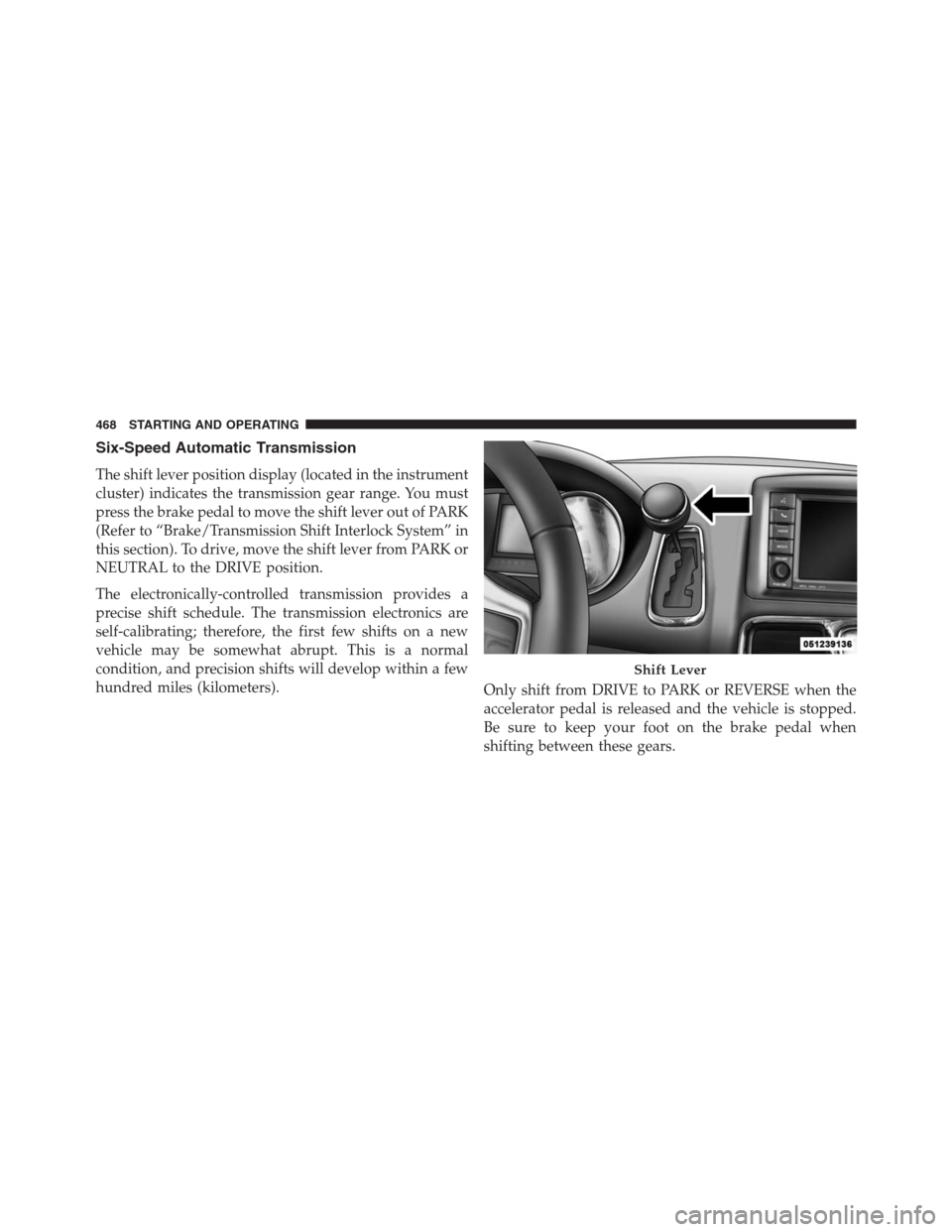
The shift lever position display (located in the instrument
cluster) indicates the transmission gear range. You must
press the brake pedal to move the shift lever out of PARK
(Refer to “Brake/Transmission Shift Interlock System” in
this section). To drive, move the shift lever from PARK or
NEUTRAL to the DRIVE position.
The electronically-controlled transmission provides a
precise shift schedule. The transmission electronics are
self-calibrating; therefore, the first few shifts on a new
vehicle may be somewhat abrupt. This is a normal
condition, and precision shifts will develop within a few
hundred miles (kilometers).
Only shift from DRIVE to PARK or REVERSE when the
accelerator pedal is released and the vehicle is stopped.
Be sure to keep your foot on the brake pedal when
shifting between these gears.
Shift Lever
468 STARTING AND OPERATING
Page 473 of 683
WARNING!(Continued)
•Allowing children to be alone in a vehicle unat-
tended is dangerous for a number of reasons.
A child or others could be seriously or fatally
injured. Children should be warned not to touch
the parking brake, brake pedal or the shift lever.
•Do not leave the ignition key/key fob in or near the
vehicle, or in a location accessible to children.
A child could operate power windows, other con-
trols, or move the vehicle.
The following indicators should be used to ensure that
you have engaged the shift lever into the PARK position:
•When shifting into PARK, firmly move the shift lever
all the way forward and to the left until it stops and is
fully seated.•Look at the shift lever position display and verify that
it indicates the PARK position.
•With brake pedal released, verify that the shift lever
will not move out of PARK.
CAUTION!
•Before moving the shift lever out of PARK, you
must turn the ignition switch from the OFF posi-
tion to the ON/RUN position, and also press the
brake pedal. Otherwise, damage to the shift lever
could result.
•DO NOT race the engine when shifting from
PARK or NEUTRAL into another gear range, as this
can damage the drivetrain.
5
STARTING AND OPERATING 471
Page 474 of 683
REVERSE
This range is for moving the vehicle backward. Shift into
REVERSE only after the vehicle has come to a complete
stop.
NEUTRAL
Use this range when the vehicle is standing for prolonged
periods with the engine running. The engine may be
started in this range. Apply the parking brake and shift
the transmission into PARK if you must leave the vehicle.
WARNING!
Do not coast in NEUTRAL and never turn off the
ignition to coast down a hill. These are unsafe
practices that limit your response to changing traffic
or road conditions. You might lose control of the
vehicle and have a collision.
CAUTION!
Towing the vehicle, coasting, or driving for any other
reason with the transmission in NEUTRAL can cause
severe transmission damage. Refer to “Recreational
Towing” in “Starting And Operating” and “Towing A
Disabled Vehicle” in “What To Do In Emergencies”
for further information.
DRIVE
This range should be used for most city and highway
driving. It provides the smoothest upshifts and down-
shifts, and the best fuel economy. The transmission
automatically upshifts through underdrive first, second,
third, and fourth gears, direct fifth gear and overdrive
sixth gear. The DRIVE position provides optimum driv-
ing characteristics under all normal operating conditions.
472 STARTING AND OPERATING
Page 476 of 683
In the event of a momentary problem, the transmission
can be reset to regain all forward gears by performing the
following steps:
1. Stop the vehicle.
2. Shift the transmission into PARK.
3. Turn the ignition switch to the LOCK/OFF position.
4. Wait approximately 10 seconds.
5. Restart the engine.
6. Shift into the desired gear range. If the problem is no
longer detected, the transmission will return to normal
operation.
NOTE:Even if the transmission can be reset, we recom-
mend that you visit your authorized dealer at your
earliest possible convenience. Your authorized dealer has
diagnostic equipment to determine if the problem could
recur.If the transmission cannot be reset, authorized dealer
service is required.
Electronic Range Select (ERS) Operation
The Electronic Range Select (ERS) shift control allows the
driver to limit the highest available gear when the shift
lever is in the DRIVE position. For example, if you shift the
transmission into 3 (third gear), the transmission will not
shift above third gear (except to prevent engine overspeed),
but will shift down into second and first gear normally.
You can switch between DRIVE and ERS mode at any
vehicle speed. When the shift lever is in the DRIVE
position, the transmission will operate automatically, shift-
ing between all available gears. Tapping the shift lever to
the left (-) will activate ERS mode, display the current gear
in the instrument cluster, and maintain that gear as the top
available gear. Once in ERS mode, tapping the shift lever to
the left (-) or right (+) will change the top available gear.
474 STARTING AND OPERATING
Page 479 of 683
DRIVING ON SLIPPERY SURFACES
Acceleration
Rapid acceleration on snow covered, wet, or other slip-
pery surfaces may cause the driving wheels to pull
erratically to the right or left. This phenomenon occurs
when there is a difference in the surface traction under
the front (driving) wheels.
WARNING!
Rapid acceleration on slippery surfaces is dangerous.
Unequal traction can cause sudden pulling of the
front wheels. You could lose control of the vehicle
and possibly have a collision. Accelerate slowly and
carefully whenever there is likely to be poor traction
(ice, snow, wet, mud, loose sand, etc.).
Traction
When driving on wet or slushy roads, it is possible for a
wedge of water to build up between the tire and road
surface. This is hydroplaning and may cause partial or
complete loss of vehicle control and stopping ability. To
reduce this possibility, the following precautions should
be observed:
1. Slow down during rainstorms or when the roads are
slushy.
2. Slow down if the road has standing water or puddles.
3. Replace the tires when tread wear indicators first
become visible.
4. Keep tires properly inflated.
5. Maintain sufficient distance between your vehicle and
the vehicle in front of you to avoid a collision in a
sudden stop.
5
STARTING AND OPERATING 477
Page 481 of 683
CAUTION!(Continued)
•Driving through standing water may cause damage
to your vehicle’s drivetrain components. Always
inspect your vehicle’s fluids (i.e., engine oil, trans-
mission, axle, etc.) for signs of contamination
(i.e., fluid that is milky or foamy in appearance)
after driving through standing water. Do not con-
tinue to operate the vehicle if any fluid appears
contaminated, as this may result in further damage.
Such damage is not covered by the New Vehicle
Limited Warranty.
•Getting water inside your vehicle’s engine can
cause it to lock up and stall out, and cause serious
internal damage to the engine. Such damage is not
covered by the New Vehicle Limited Warranty.
WARNING!
•Driving through standing water limits your vehi-
cle’s traction capabilities. Do not exceed 5 mph
(8 km/h) when driving through standing water.
•Driving through standing water limits your vehi-
cle’s braking capabilities, which increases stopping
distances. Therefore, after driving through stand-
ing water, drive slowly and lightly press on the
brake pedal several times to dry the brakes.
•Getting water inside your vehicle’s engine can
cause it to lock up and stall out, and leave you
stranded.
•Failure to follow these warnings may result in
injuries that are serious or fatal to you, your pas-
sengers, and others around you.
5
STARTING AND OPERATING 479
Page 486 of 683
ABS is activated during braking under certain road or
stopping conditions. ABS-inducing conditions can in-
clude ice, snow, gravel, bumps, railroad tracks, loose
debris, or panic stops.
You may experience the following when the brake system
goes into anti-lock:
•The ABS motor running (it may continue to run for a
short time after the stop)
•A clicking sound of solenoid valves
•Brake pedal pulsations
•A slight drop or fall away of the brake pedal at the end
of the stopWARNING!
•The Anti-Lock Brake System contains sophisti-
cated electronic equipment that may be susceptible
to interference caused by improperly installed, or
high output radio transmitting equipment. This
interference can cause possible loss of anti-lock
braking capability. Installation of such equipment
should be performed by qualified professionals.
•Pumping of the Anti-Lock Brakes will diminish
their effectiveness and may lead to a collision.
Pumping makes the stopping distance longer. Just
press firmly on your brake pedal when you need to
slow down or stop.
•The Anti-Lock Brake System cannot prevent colli-
sions, including those resulting from excessive
speed in turns, following another vehicle too
closely, or hydroplaning.
(Continued)
484 STARTING AND OPERATING
Page 489 of 683
WARNING!
•The TCS cannot prevent the natural laws of physics
from acting on the vehicle, nor can it increase the
traction afforded.
•The TCS cannot prevent collisions, including those
resulting from excessive speed in turns, or hydro-
planing.
•The capabilities of a TCS-equipped vehicle must
never be exploited in a reckless or dangerous
manner, which could jeopardize the user’s safety or
the safety of others.
Brake Assist System (BAS)
The Brake Assist System (BAS) is designed to optimize
the vehicle’s braking capability during emergency brak-
ing maneuvers. The system detects an emergency brak-
ing situation by sensing the rate and amount of brake
application, and then applies optimum pressure to the
brakes. This can help reduce braking distances. The BAS
complements the ABS. Applying the brakes very quickly
results in the best BAS assistance. To receive the benefit of
the system, you must apply continuous braking pressure
during the stopping sequence. Do not reduce brake pedal
pressure unless braking is no longer desired. Once the
brake pedal is released, the BAS is deactivated.
5
STARTING AND OPERATING 487