lock DODGE GRAND CARAVAN 2013 5.G Service Manual
[x] Cancel search | Manufacturer: DODGE, Model Year: 2013, Model line: GRAND CARAVAN, Model: DODGE GRAND CARAVAN 2013 5.GPages: 683, PDF Size: 5.5 MB
Page 72 of 683
CAUTION!
All occupants, including the driver, should not oper-
ate a vehicle or sit in a vehicle’s seat until the head
restraints are placed in their proper positions in order
to minimize the risk of neck injury in the event of a
collision.
NOTE:For more information on properly adjusting and
positioning the head restraint, refer to “Adjusting Active
Head Restraints” in “Understanding The Features Of
Your Vehicle”.
Resetting Active Head Restraints (AHR)
If the Active Head Restraints are triggered in a collision,
you must reset the head restraint on the driver ’s and
front passenger seat. You can recognize when the Active
Head Restraint has been triggered by the fact that they
have moved forward (as shown in step three of the
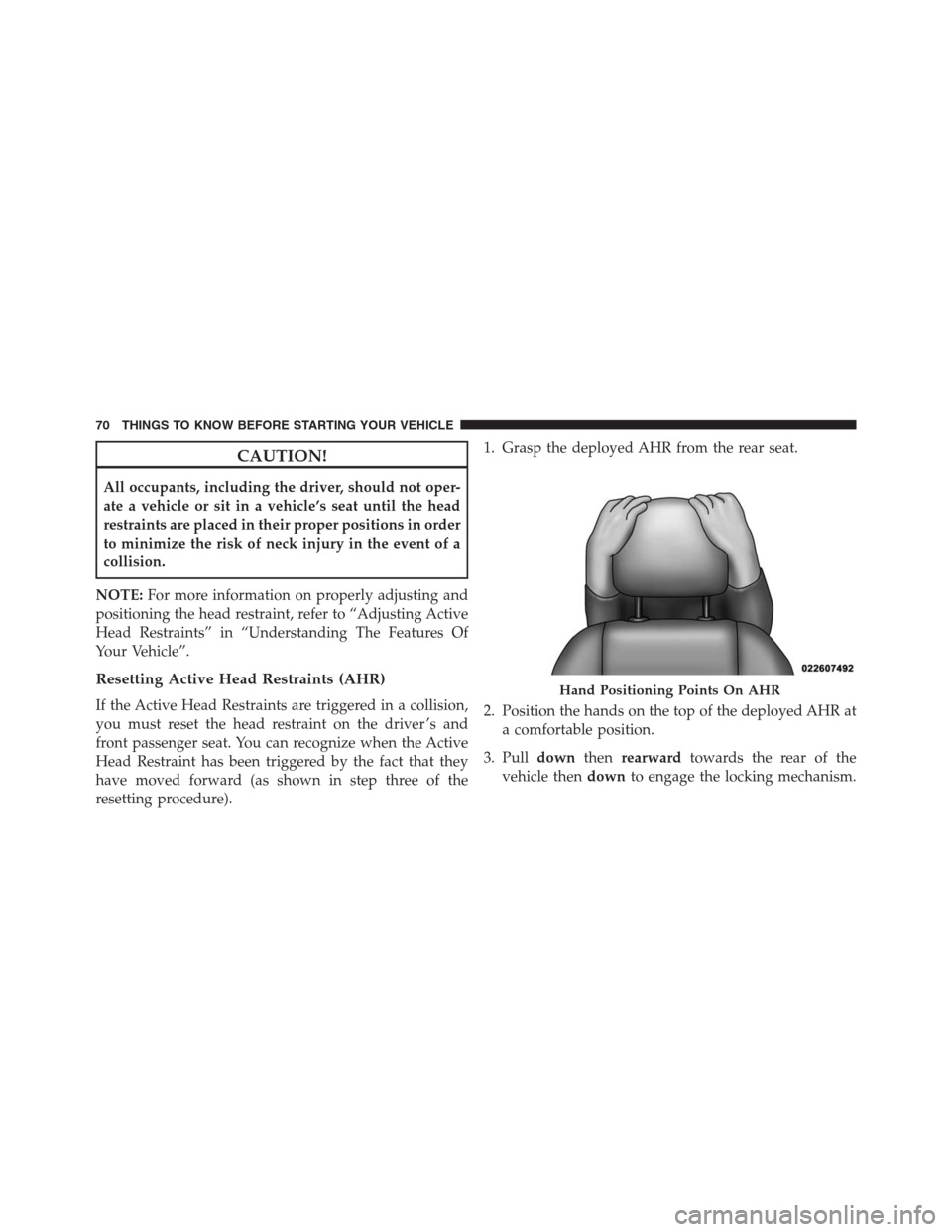
resetting procedure).1. Grasp the deployed AHR from the rear seat.
2. Position the hands on the top of the deployed AHR at
a comfortable position.
3. Pulldownthenrearwardtowards the rear of the
vehicle thendownto engage the locking mechanism.Hand Positioning Points On AHR
70 THINGS TO KNOW BEFORE STARTING YOUR VEHICLE
Page 73 of 683
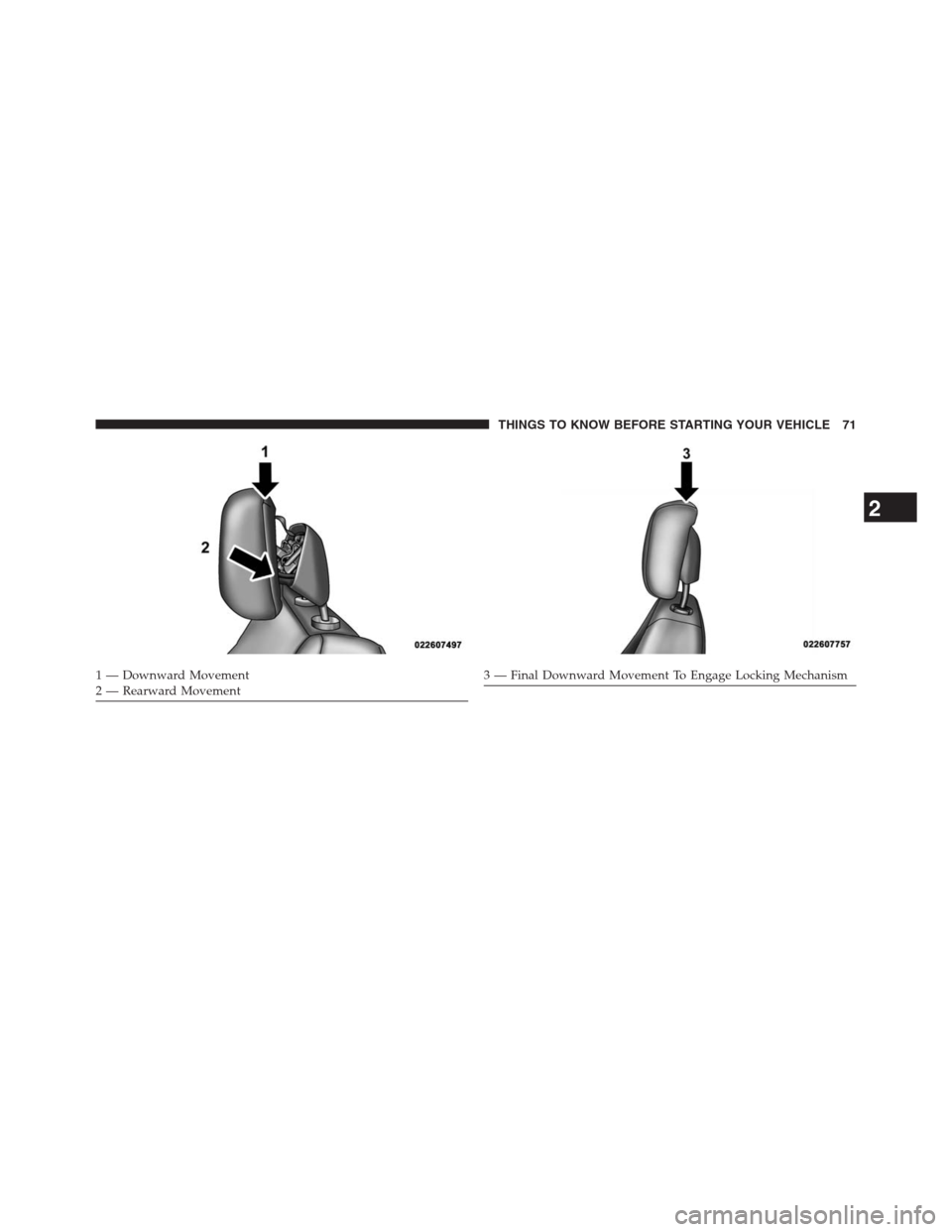
1 — Downward Movement
2 — Rearward Movement3 — Final Downward Movement To Engage Locking Mechanism
2
THINGS TO KNOW BEFORE STARTING YOUR VEHICLE 71
Page 74 of 683
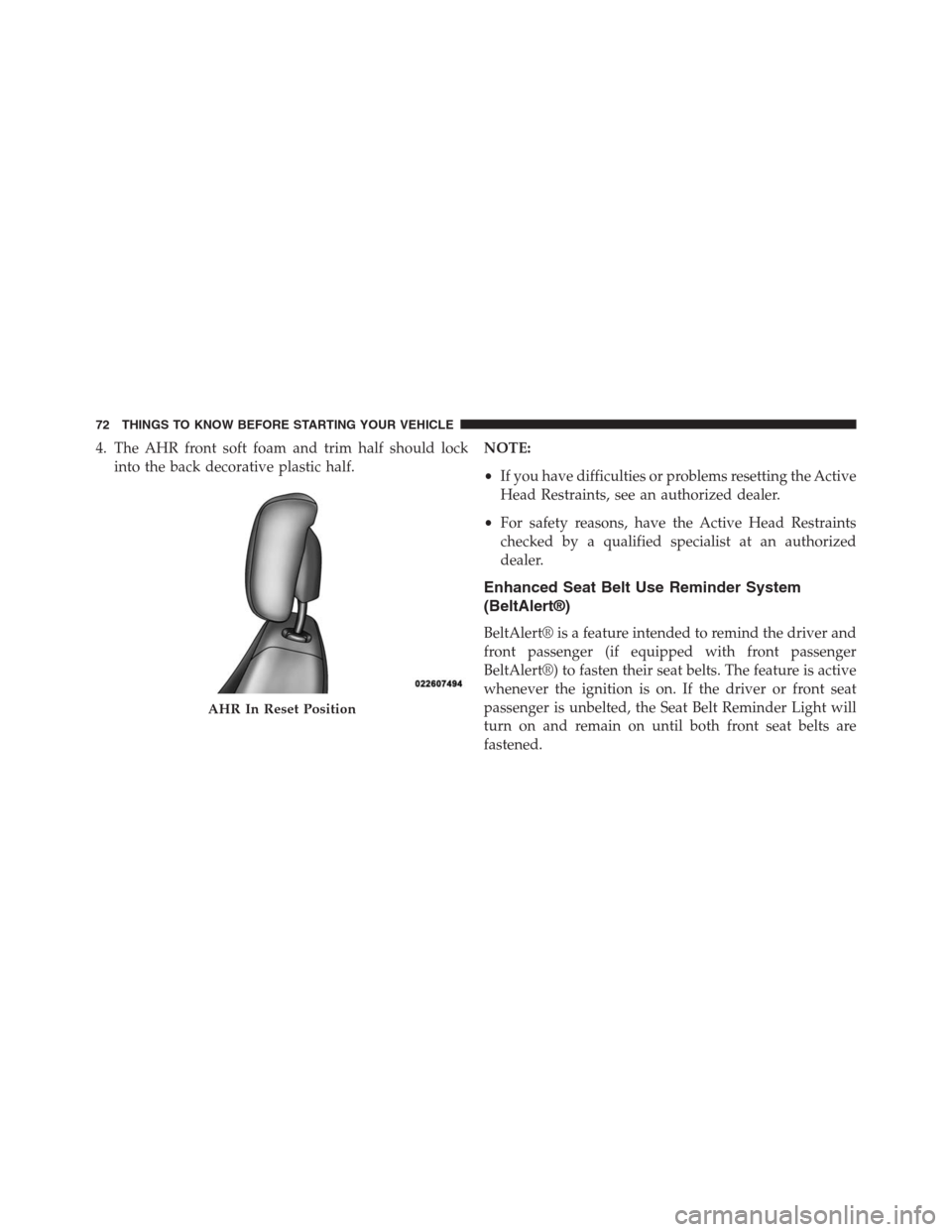
4. The AHR front soft foam and trim half should lock
into the back decorative plastic half.NOTE:
•If you have difficulties or problems resetting the Active
Head Restraints, see an authorized dealer.
•For safety reasons, have the Active Head Restraints
checked by a qualified specialist at an authorized
dealer.
Enhanced Seat Belt Use Reminder System
(BeltAlert®)
BeltAlert® is a feature intended to remind the driver and
front passenger (if equipped with front passenger
BeltAlert®) to fasten their seat belts. The feature is active
whenever the ignition is on. If the driver or front seat
passenger is unbelted, the Seat Belt Reminder Light will
turn on and remain on until both front seat belts are
fastened.
AHR In Reset Position
72 THINGS TO KNOW BEFORE STARTING YOUR VEHICLE
Page 81 of 683
NOTE:
•Should a vehicle rollover occur, the pretensioners
and/or SAB and SABIC air bags on both sides of the
vehicle may deploy.
•Air Bag covers may not be obvious in the interior trim,
but they will open during air bag deployment.
•
Being too close to the SAB and SABIC air bags during
deployment could cause you to be severely injured or
killed.
The system includes side impact sensors that are cali-
brated to deploy the side air bags during impacts that
require air bag occupant protection.
WARNING!
•Your vehicle is equipped with left and right Supple-
mental Side Air Bag Inflatable Curtain (SABIC), do
not stack luggage or other cargo up high enough to
block the location of the SABIC. The area where the
SABIC is located should remain free from any ob-
structions.
•Do not use accessory seat covers or place objects
between you and the side air bags; the performance
could be adversely affected and/or objects could be
pushed into you, causing serious injury.
(Continued)
2
THINGS TO KNOW BEFORE STARTING YOUR VEHICLE 79
Page 87 of 683
Because air bag sensors estimate deceleration over time,
vehicle speed and damage are not good indicators of
whether or not an air bag should have deployed.
NOTE:In a rollover the pretensioners and/or SAB and
SABIC air bags may deploy on both sides of the vehicle.
Front And Side Impact Sensors
In front and side impacts, impact sensors can aid the
ORC in determining appropriate response to impact
events.
Enhanced Accident Response System
In the event of an impact causing air bag deployment, if
the communication network remains intact, and the
power remains intact, depending on the nature of the
event the ORC will determine whether to have the
Enhanced Accident Response System perform the follow-
ing functions:
Cut off fuel to the engine.Flash hazard lights as long as the battery has power or
until the ignition key is turned off.
Turn on the interior lights, which remain on as long as the
battery has power or until the ignition key is removed.
Unlock the doors automatically.
In order to reset the Enhanced Accident Response System
functions after an event, the ignition switch must be
changed from IGN ON to IGN OFF.
If A Deployment Occurs
The Advanced Front Air Bags are designed to deflate
immediately after deployment.
NOTE:Front and/or side air bags will not deploy in all
collisions. This does not mean something is wrong with
the air bag system.
2
THINGS TO KNOW BEFORE STARTING YOUR VEHICLE 85
Page 90 of 683
Air Bag Warning Light
You will want to have the air bags ready to
inflate for your protection in a collision. The Air
Bag Warning Light monitors the internal circuits
and interconnecting wiring associated with air
bag system electrical components. While the air bag system
is designed to be maintenance free, if any of the following
occurs, have an authorized dealer service the air bag
system immediately.
•The Air Bag Warning Light does not come on for
approximately four to eight seconds when the ignition
switch is first turned to ON/RUN.
•The Air Bag Warning Light remains on after the
approximate four to eight-second interval.
•The Air Bag Warning Light comes on intermittently or
remains on while driving.NOTE:If the speedometer, tachometer, or any engine
related gauges are not working, the Occupant Restraint
Controller (ORC) may also be disabled. The air bags may
not be ready to inflate for your protection. Promptly
check the fuse block for blown fuses. Refer to the label
located on the inside of the fuse block cover for the
proper air bag fuses. See your authorized dealer if the
fuse is good.
Event Data Recorder (EDR)
This vehicle is equipped with an event data recorder
(EDR). The main purpose of an EDR is to record, in
certain crash or near crash-like situations, such as an air
bag deployment or hitting a road obstacle, data that will
assist in understanding how a vehicle’s systems per-
formed. The EDR is designed to record data related to
vehicle dynamics and safety systems for a short period of
88 THINGS TO KNOW BEFORE STARTING YOUR VEHICLE
Page 105 of 683
Center Seat LATCH
If a child restraint installed in the center position blocks
the seat belt webbing or buckle for the outboard position,
do not use that outboard position. If a child seat in the
center position blocks the outboard LATCH anchors or
seat belt, do not install a child seat in that outboard
position.
WARNING!
Never use the same lower anchorage to attach more
than one child restraint. Please refer to “Installing
The LATCH-Compatible Child Restraint System” for
typical installation instructions.
Always follow the directions of the child restraint manu-
facturer when installing your child restraint. Not all child
restraint systems will be installed as described here.
To Install A LATCH-compatible Child Restraint
1.If the selected seating position has a Switchable Auto-
matic Locking Retractor (ALR) seat belt, stow the seat
belt, following the instructions below. See the section
“Installing Child Restraints Using the Vehicle Seat Belt”
to check what type of seat belt each seating position has.
2. Loosen the adjusters on the lower straps and on the
tether strap of the child seat so that you can more
easily attach the hooks or connectors to the vehicle
anchorages.
3. Place the child seat between the lower anchorages for
that seating position. For some second row seats, you
may need to recline the seat and / or raise the head
restraint to get a better fit.
2
THINGS TO KNOW BEFORE STARTING YOUR VEHICLE 103
Page 106 of 683
4. Attach the lower hooks or connectors of the child
restraint to the lower anchorages in the selected seat-
ing position.
5. If the child restraint has a tether strap, connect it to the
top tether anchorage. See the section “Installing Child
Restraints Using the Top Tether Anchorage” for direc-
tions to attach a tether anchor.
6. Tighten all of the straps as you push the child restraint
rearward and downward into the seat. Remove slack
in the straps according to the child restraint manufac-
turer ’s instructions.
7. Test that the child restraint is installed tightly by
pulling back and forth on the child seat at the belt
path. It should not move more than 1 inch (25.4 mm)
in any direction.How To Stow An Unused ALR Seatbelt
When using the LATCH attaching system to install a child
restraint, stow all ALR seat belts that are not being used by
other occupants or being used to secure child restraints. An
unused belt could injure a child if they play with it and
accidentally lock the seatbelt retractor. Before installing a
child restraint using the LATCH system, buckle the seat
belt behind the child restraint and out of the child’s reach.
If the buckled seat belt interferes with the child restraint
installation, instead of buckling it behind the child re-
straint, route the seat belt through the child restraint belt
path and then buckle it. Do not lock the seatbelt. Remind
all children in the vehicle that the seat belts are not toys and
that they should not play with them.
104 THINGS TO KNOW BEFORE STARTING YOUR VEHICLE
Page 107 of 683
WARNING!
Improper installation of a child restraint to the
LATCH anchorages can lead to failure of the re-
straint. The child could be badly injured or killed.
Follow the child restraint manufacturer ’s directions
exactly when installing an infant or child restraint.
Installing Child Restraints Using The Vehicle
Seat Belt
The seat belts in the passenger seating positions are
equipped with either a Switchable Automatic Locking
Retractor (ALR) or a cinching latch plate or both. Both
types of seat belts are designed to keep the lap portion of
the seat belt tight around the child restraint so that it isnot necessary to use a locking clip. The ALR retractor can
be “switched” into a locked mode by pulling all of the
webbing out of the retractor and then letting the webbing
retract back into the retractor. If it is locked, the ALR will
make a clicking noise while the webbing is pulled back
into the retractor. For additional information on ALR,
refer to the “Automatic Locking Mode” description un-
der “Occupant Restraints.” The cinching latch plate is
designed to hold the lap portion of the seatbelt tight
when webbing is pulled tight and straight through a
child restraint’s belt path. Please see the table below and
the following sections for more information about both
types of seat belts.
2
THINGS TO KNOW BEFORE STARTING YOUR VEHICLE 105
Page 110 of 683
Installing A Child Restraint with a Switchable
Automatic Locking Retractor (ALR)
1. Place the child seat in the center of the seating
position. For some second row seats, you may need to
recline the seat and/or raise the head restraint to get a
better fit.
2. Pull enough of the seat belt webbing from the retractor
to pass it through the belt path of the child restraint.
Do not twist the belt webbing in the belt path.
3. Slide the latch plate into the buckle until you hear a
“click.”
4. Pull on the webbing to make the lap portion tight
against the child seat.5. To lock the seat belt, pull down on the shoulder part of
the belt until you have pulled all the seat belt webbing
out of the retractor. Then, allow the webbing to retract
back into the retractor. As the webbing retracts, you
will hear a clicking sound. This means the seat belt is
now in the Automatic Locking mode.
6. Try to pull the webbing out of the retractor. If it is
locked, you should not be able to pull out any web-
bing. If the retractor is not locked, repeat step 5.
7. Finally, pull up on any excess webbing to tighten the
lap portion around the child restraint while you push
the child restraint rearward and downward into the
vehicle seat.
108 THINGS TO KNOW BEFORE STARTING YOUR VEHICLE