clock DODGE GRAND CARAVAN 2014 5.G User Guide
[x] Cancel search | Manufacturer: DODGE, Model Year: 2014, Model line: GRAND CARAVAN, Model: DODGE GRAND CARAVAN 2014 5.GPages: 698, PDF Size: 5.56 MB
Page 433 of 698
Trademark
•Blu-ray Disc™, Blu-ray™ and the logos are trademarks
of the Blu-ray Disc Association.
• Java is a registered trademark of Oracle and/or its
affiliates.
CAUTION!
Use of controls or adjustments or performance of
procedures other than those specified herein may
result in hazardous radiation exposure.
STEERING WHEEL AUDIO CONTROLS — IF
EQUIPPED
The remote sound system controls are located on the rear
surface of the steering wheel, at the three and nine
o’clock positions.
Remote Sound System Controls (Back View Of Steering
Wheel)
4
UNDERSTANDING YOUR INSTRUMENT PANEL 431
Page 443 of 698
CAUTION!(Continued)
just behind the sliding door. Do not block or place
objects directly in front of the inlet grille or heater
outlets. The electrical system could overload, causing
damage to the blower motor.
Rear Temperature Control
The rear mode selection REAR,allows the settings to be
controlled by the rear mode control knob.
To change the temperature in the rear of the vehicle,
rotate the temperature control knob counterclockwise for
cold air, and clockwise for heated air.
When rear controls are locked by the front system, the
lock symbol on the temperature knob is illuminated, and
the rear overhead adjustments are inoperable.
Rear Mode Control
Headliner Mode
Air comes from the outlets in the headliner. Each
of these outlets can be individually adjusted to
direct the flow of air. Moving the air vanes of the outlets
to one side will shut off the airflow.
Bi-Level Mode
Air comes from both the headliner outlets and the
floor outlets.
NOTE: In many temperature positions, the Bi-Level
mode is designed to provide cooler air out of the head-
liner outlets and warmer air from the floor outlets.
Floor Mode
Air comes from the floor outlets.
4
UNDERSTANDING YOUR INSTRUMENT PANEL 441
Page 452 of 698
1. Press the Rear Temperature Lock button on the frontATC panel. This turns off the Rear Temperature Lock
icon in the rear temperature knob.
2. Rotate the Rear Blower, Rear Temperature and the Rear Mode Control knobs to suit your comfort needs.
3. ATC is selected by adjusting the rear blower knob counterclockwise to AUTO.
Once the desired temperature is displayed, the ATC
System will automatically achieve and maintain that
comfort level. When the system is set up for your comfort
level, it is not necessary to change the settings. You will
experience the greatest efficiency by simply allowing the
system to function automatically. NOTE:
•
It is not necessary to move the temperature settings for
cold or hot vehicles. The system automatically adjusts
the temperature, mode and fan speed to provide
comfort as quickly as possible.
• The temperature can be displayed in English or Metric
units by selecting the “Display Units of Measure in”
customer-programmable feature. Refer to the “Elec-
tronic Vehicle Information Center (EVIC) — Customer-
Programmable Features” in this Section.
Rear Blower Control
The rear blower control knob can be manually set to off,
or any fixed blower speed, by rotating the knob from low
to high. This allows the rear seat occupants to control the
volume of air circulated in the rear of the vehicle.
450 UNDERSTANDING YOUR INSTRUMENT PANEL
Page 453 of 698
CAUTION!
Interior air enters the Rear Automatic Temperature
Control System through an intake grille, located in
the right side trim panel behind the third row seats.
The heater outlets are located in the right side trim
panel, just behind the sliding door. Do not block or
place objects directly in front of the inlet grille or
heater outlets. The electrical system could overload
causing damage to the blower motor.
Rear Temperature Control
To change the temperature in the rear of the vehicle,
rotate the temperature knob counterclockwise to lower
the temperature, and clockwise to increase the tempera-
ture. The rear temperature settings are displayed in the
front ATC panel.When rear controls are locked by the front system, the
Rear Temperature Lock symbol on the temperature knob
is illuminated and any rear overhead adjustments are
ignored.
Rear Mode Control
•
Headliner Mode
Air comes from the outlets in the headliner. Each
of these outlets can be individually adjusted to
direct the flow of air. Moving the air vanes of the outlets
to one side will shut off the airflow.
• Bi-Level Mode
Air comes from both the headliner outlets and the
floor outlets.
4
UNDERSTANDING YOUR INSTRUMENT PANEL 451
Page 594 of 698
3. Align the valve notch in the wheel cover with thevalve stem on the wheel. Install the cover by hand,
snapping the cover over the two lug nuts. Do not use
a hammer or excessive force to install the cover.
4. Install the remaining lug nuts with the cone shaped end of the nut toward the wheel. Lightly tighten the
lug nuts.
WARNING!
To avoid the risk of forcing the vehicle off the jack,
do not tighten the wheel nuts fully until the vehicle
has been lowered. Failure to follow this warning may
result in personal injury.
5. Lower the vehicle to the ground by turning the jack handle counterclockwise. 6. Refer to “Torque Specifications” in this section for
proper wheel lug nut torque.
7. After 25 miles (40 km) check the lug nut torque with a torque wrench to ensure that all lug nuts are properly
seated against the wheel.
Vehicles Without Wheel Covers
1. Mount the road tire on the axle.
2. Install the remaining lug nuts with the cone shapedend of the nut toward the wheel. Lightly tighten the
lug nuts.
WARNING!
To avoid the risk of forcing the vehicle off the jack,
do not tighten the wheel nuts fully until the vehicle
has been lowered. Failure to follow this warning may
result in personal injury.
592 WHAT TO DO IN EMERGENCIES
Page 595 of 698
3. Lower the vehicle to the ground by turning the jackhandle counterclockwise.
4. Refer to “Torque Specifications” in this section for proper wheel lug nut torque.
5. After 25 miles (40 km) check the lug nut torque with a torque wrench to ensure that all lug nuts are properly
seated against the wheel.
JUMP-STARTING
If your vehicle has a discharged battery it can be jump-
started using a set of jumper cables and a battery in
another vehicle or by using a portable battery booster
pack. Jump-starting can be dangerous if done improperly
so please follow the procedures in this section carefully.
NOTE: When using a portable battery booster pack
follow the manufacturer ’s operating instructions and
precautions.
CAUTION!
Do not use a portable battery booster pack or any
other booster source with a system voltage greater
than 12 Volts or damage to the battery, starter motor,
alternator or electrical system may occur.
WARNING!
Do not attempt jump-starting if the battery is frozen.
It could rupture or explode and cause personal injury.
6
WHAT TO DO IN EMERGENCIES 593
Page 647 of 698
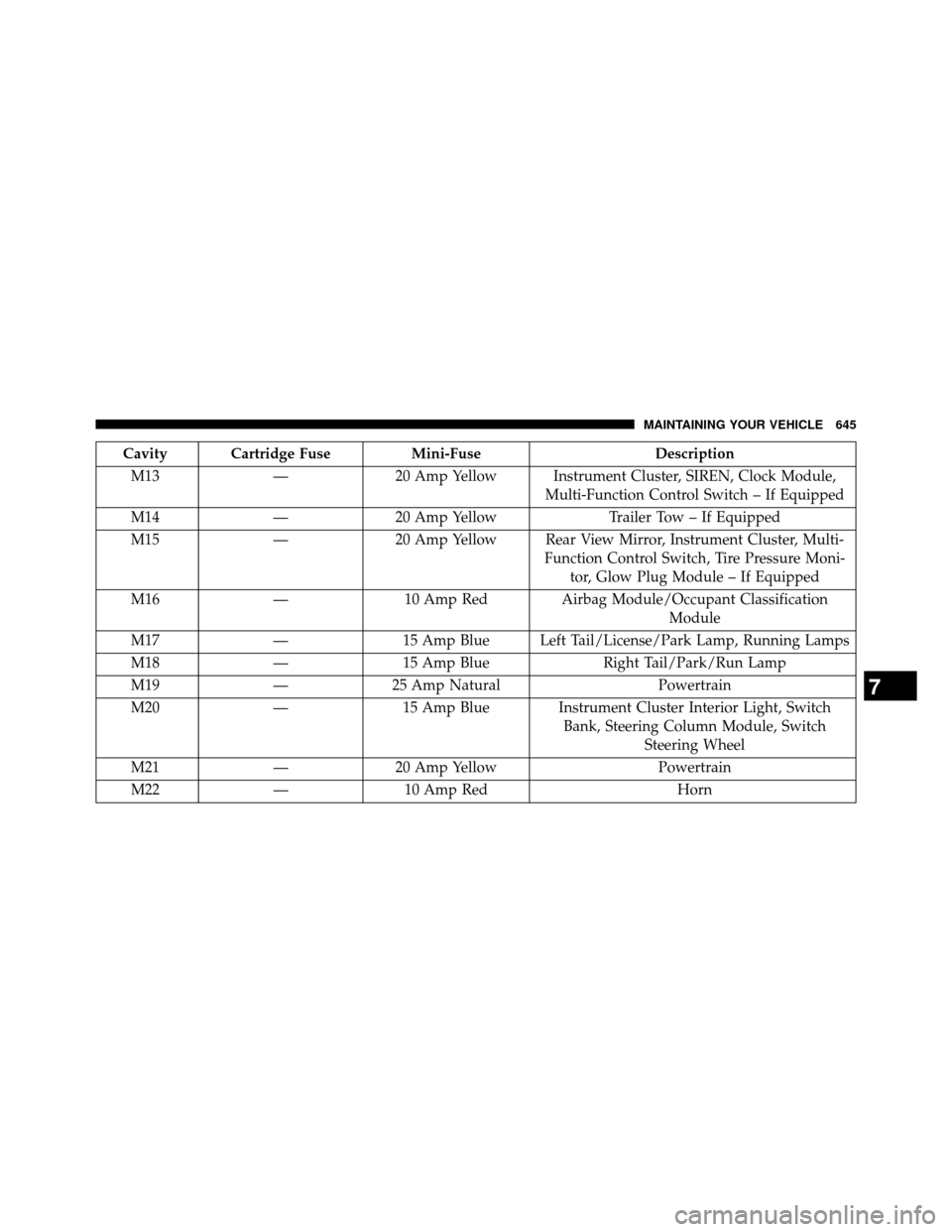
Cavity Cartridge FuseMini-FuseDescription
M13 —20 Amp Yellow Instrument Cluster, SIREN, Clock Module,
Multi-Function Control Switch – If Equipped
M14 —20 Amp Yellow Trailer Tow – If Equipped
M15 —20 Amp Yellow Rear View Mirror, Instrument Cluster, Multi-
Function Control Switch, Tire Pressure Moni-tor, Glow Plug Module – If Equipped
M16 —10 Amp Red Airbag Module/Occupant Classification
Module
M17 —15 Amp Blue Left Tail/License/Park Lamp, Running Lamps
M18 —15 Amp Blue Right Tail/Park/Run Lamp
M19 —25 Amp Natural Powertrain
M20 —15 Amp Blue Instrument Cluster Interior Light, Switch
Bank, Steering Column Module, SwitchSteering Wheel
M21 —20 Amp Yellow Powertrain
M22 —10 Amp Red Horn
7
MAINTAINING YOUR VEHICLE 645
Page 680 of 698
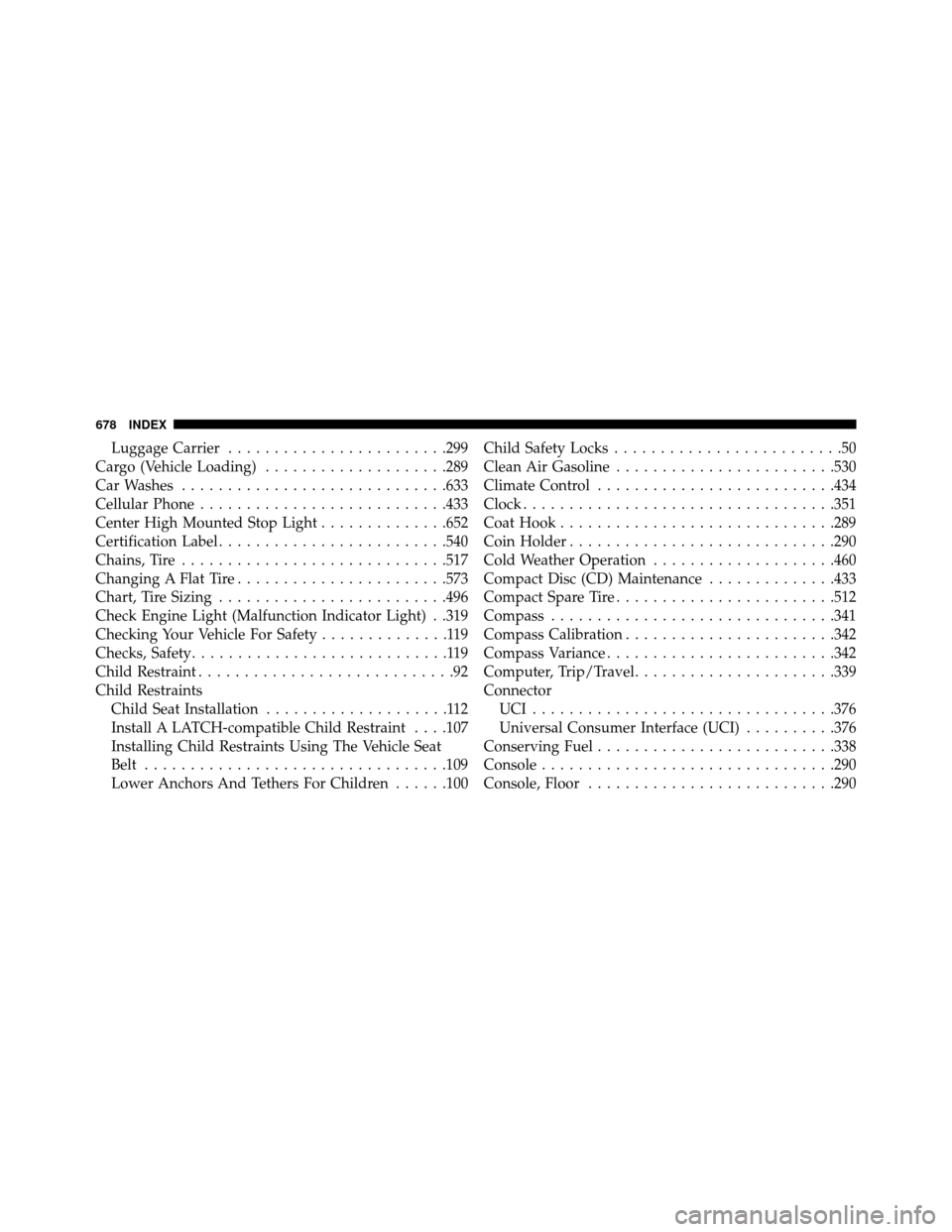
Luggage Carrier........................299
Cargo (Vehicle Loading) ....................289
Car Washes .............................633
Cellular Phone ...........................433
Center High Mounted Stop Light ..............652
Certification Label .........................540
Chains, Tire .............................517
Changing A Flat Tire .......................573
Chart, Tire Sizing .........................496
Check Engine Light (Malfunction Indicator Light) . .319
Checking Your Vehicle For Safety ..............119
Checks, Safety ............................119
Child Restraint ............................92
Child Restraints Child Seat Installation ....................112
Install A LATCH-compatible Child Restraint ....107
Installing Child Restraints Using The Vehicle Seat
Belt .................................109
Lower Anchors And Tethers For Children ......100Child Safety Locks
.........................50
Clean Air Gasoline ........................530
Climate Control ..........................434
Clock..................................351
Coat Hook ..............................289
CoinHolder.............................290
Cold Weather Operation ....................460
Compact Disc (CD) Maintenance ..............433
Compact Spare Tire ........................512
Compass ...............................341
Compass Calibration .......................342
Compass Variance .........................342
Computer, Trip/Travel ......................339
Connector UCI.................................376
Universal Consumer Interface (UCI) ..........376
Conserving Fuel ..........................338
Console ................................290
Console, Floor ...........................290
678 INDEX
Page 692 of 698
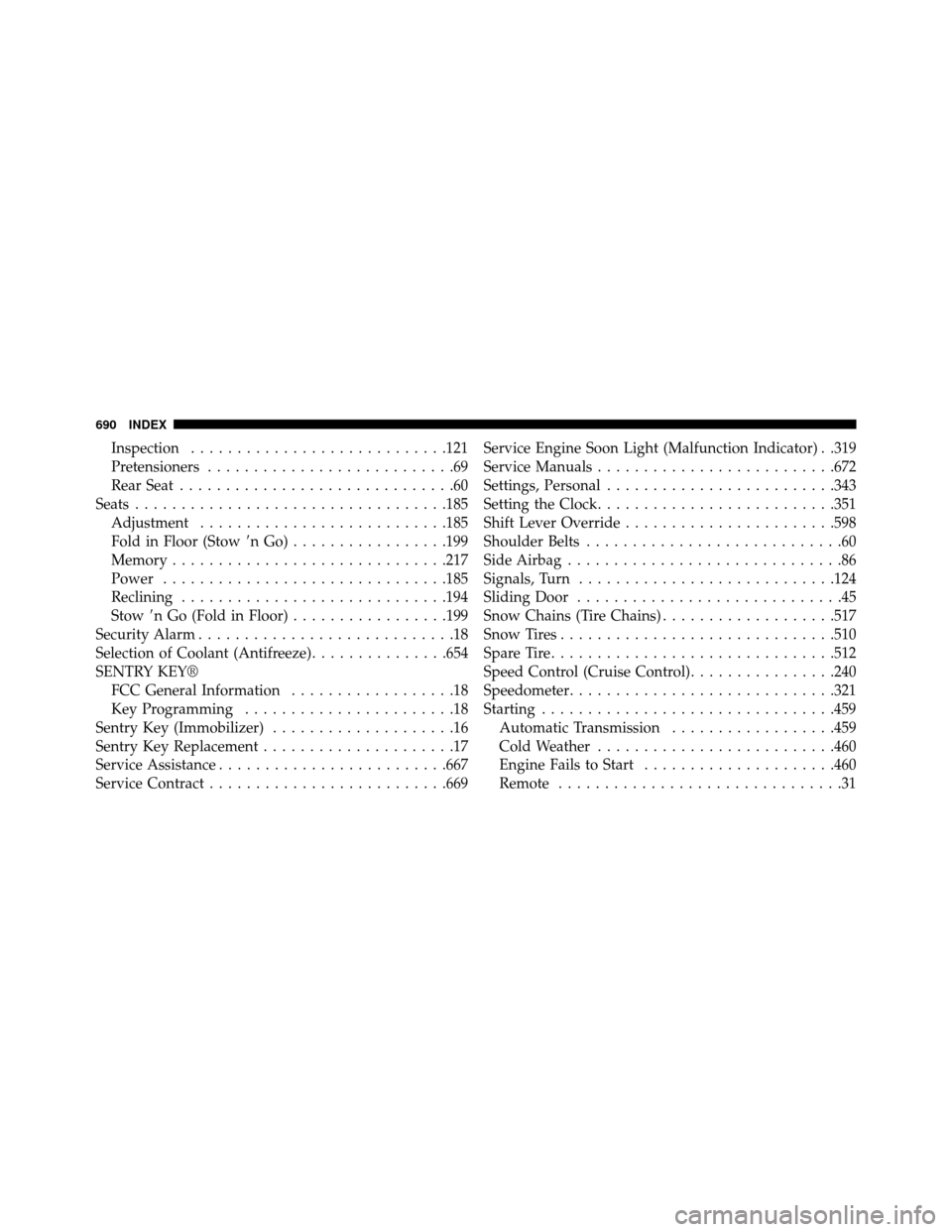
Inspection............................121
Pretensioners ...........................69
Rear Seat ..............................60
Seats ..................................185
Adjustment ...........................185
Fold in Floor (Stow nGo).................199
Memory ..............................217
Power ...............................185
Reclining .............................194
Stow n Go (Fold in Floor) .................199
Security Alarm ............................18
Selection of Coolant (Antifreeze) ...............654
SENTRY KEY® FCC General Information ..................18
Key Programming .......................18
Sentry Key (Immobilizer) ....................16
Sentry Key Replacement .....................17
Service Assistance .........................667
Service Contract ..........................669 Service Engine Soon Light (Malfunction Indicator) . .319
Service Manuals
..........................672
Settings, Personal .........................343
Setting the Clock ..........................351
Shift Lever Override .......................598
Shoulder Belts ............................60
Side Airbag ..............................86
Signals, Turn ............................124
Sliding Door .............................45
Snow Chains (Tire Chains) ...................517
Snow Tires ..............................510
Spare Tire ...............................512
Speed Control (Cruise Control) ................240
Speedometer .............................321
Starting ................................459 Automatic Transmission ..................459
Cold Weather ..........................460
Engine Fails to Start .....................460
Remote ...............................31
690 INDEX