Driver seat DODGE GRAND CARAVAN 2014 5.G Service Manual
[x] Cancel search | Manufacturer: DODGE, Model Year: 2014, Model line: GRAND CARAVAN, Model: DODGE GRAND CARAVAN 2014 5.GPages: 698, PDF Size: 5.56 MB
Page 347 of 698
PARK or NEUTRAL position and the driver’s door is
opened. To make your selection, press and release the
Right arrow button until a check-mark appears next to
the feature showing the system has been activated, or the
check-mark is removed showing the system has been
deactivated.
Remote Unlock Sequence
WhenUnlock Driver Door Only On 1st Press is selected,
only the driver ’s door will unlock on the first press of the
Remote Keyless Entry (RKE) transmitter UNLOCK button.
When Unlock Driver Door Only On 1st Press, you must
press the RKE transmitter UNLOCK button twice, to
unlock the passenger ’s doors. When Unlock All Doors On
1st Press is selected, all of the doors will unlock on the first
press of the RKE transmitter UNLOCK button. To make
your selection, press and release the RIGHT arrow button
until a check-mark appears next to the feature showing the
system has been activated or the check-mark is removed
showing the system has been deactivated.
RKE Linked To Memory- If Equipped
When this feature is selected the memory seat, mirror,
and radio settings will return to the memory set position
when the RKE transmitter UNLOCK button is pressed. If
this feature is not selected then the memory seat, mirror,
and radio settings can only return to the memory set
position using the door mounted switch. To make your
selection, press and release the SELECT button until a
check-mark appears next to the feature showing the
system has been activated or the check-mark is removed
showing the system has been deactivated.
Remote Start Comfort Sys.
When this feature is selected and the remote start is
activated, the heated steering wheel and driver heated
seat features will automatically turn on in cold weather.
4
UNDERSTANDING YOUR INSTRUMENT PANEL 345
Page 350 of 698
highlighted, then press and release the SELECT button
until a check-mark appears next to the setting, showing
that the setting has been selected.
Hill Start Assist (HSA) — If Equipped
When on is selected, the HSA system is active. Refer to
“Electronic Brake Control System” in “Starting And
Operating” for system function and operating informa-
tion. To make your selection, press and release the
SELECT button until “ON” or “OFF” appears.
Flashers With Sliding Door
When this feature is selected the signal lamps activate
when power or manual sliding doors are in operation,
signaling other drivers that someone may be exiting or
entering the vehicle. To make your selection, press and
release the SELECT button until a check-mark appears
next to the feature showing the system has been activated
or the check-mark is removed showing the system has
been deactivated.
Keyless Enter-N-Go™ (Passive Entry)
This feature allows you to lock and unlock the vehicle’s
door(s) without having to press the RKE transmitter lock
or unlock buttons. To make your selection, press and
release the SELECT button until a check-mark appears
next to the feature showing the system has been activated
or the check-mark is removed showing the system has
been deactivated. Refer to “Keyless Enter-N-Go™” in
“Things To Know Before Starting Your Vehicle”.
Easy Exit Seat
This feature provides automatic driver seat positioning to
enhance driver mobility when entering and exiting the
vehicle. To make your selection, press and release the
SELECT button until a check-mark appears next to the
feature showing the system has been activated or the
check-mark is removed showing the system has been
deactivated.
348 UNDERSTANDING YOUR INSTRUMENT PANEL
Page 351 of 698
NOTE:The seat will return to the memorized seat
location (if Recall Memory with Remote Key Unlock is set
to ON) when the RKE transmitter is used to unlock the
door. Refer to “Driver Memory Seat” in “Understanding
The Features Of Your Vehicle” for further information.
Calibrate Compass
Refer to “Automatic Compass Calibration” in “Electronic
Vehicle Information (EVIC)” in “Understanding Your
Instrument Panel” for more information.
Compass Variance
Refer to “Compass/Temperature Display” in “Electronic
Vehicle Information (EVIC)” in “Understanding Your
Instrument Panel” for more information.
Uconnect® 730N/430/430N CD/DVD/HDD/NAV —
IF EQUIPPED
Refer to your Uconnect® Supplement Manual for de-
tailed operating instructions.
Operating Instructions (Voice Command System)
— If Equipped
Refer to “Voice Command” for further details.
Operating Instructions (Uconnect® Phone) — If
Equipped
Refer to “Uconnect® Phone” for further details.
4
UNDERSTANDING YOUR INSTRUMENT PANEL 349
Page 444 of 698
Automatic Temperature Control (ATC) — If
Equipped
•Front Three-Zone ATC allows both driver and front
passenger seat occupant, and rear seat occupants to
select individual comfort settings.
• When occupants in the vehicle select the AUTO mode
operation, a comfort temperature can be set by using
the temperature up and down buttons, and the auto
blower operation will be set automatically.
• The system can be controlled manually, if desired.
• SYNC feature links the controls for all three zones,
allowing one comfort setting (driver setting) for the
cabin, if desired.
The Three-Zone ATC system automatically maintains the
interior comfort level desired by the driver and all
passengers. The system automatically adjusts the air temperature, the airflow volume, amount of outside air
recirculation and the airflow direction. This maintains a
comfortable temperature, even under changing condi-
tions.
Front ATC Panel
442 UNDERSTANDING YOUR INSTRUMENT PANEL
Page 447 of 698
17. SYNC Button
Press and release to control the temperature setting for all
three zones from the driver temperature control.
18. Driver Temperature Control Up/Down Button
Provides the driver with independent temperature con-
trol. Push the top button for warmer temperatures or the
lower button for cooler temperature settings.
Automatic Operation
1. Press the AUTO button on the front ATC Panel and thewords Front Auto will illuminate in the front ATC
display, along with two temperatures for the driver
and front passenger. The system will then automati-
cally regulate the amount of airflow.
2. Next, adjust the temperature you would like the system to maintain, by adjusting the driver, front
passenger, and rear seat rotary temperature knobs. Once the desired temperature is displayed, the system
will achieve and automatically maintain that comfort
level.
3. When the system is set up for your comfort level, it is not necessary to change the settings. You will experi-
ence the greatest efficiency by simply allowing the
system to function automatically.
NOTE:
• It is not necessary to move the temperature settings for
cold or hot vehicles. The system automatically adjusts
the temperature, mode and fan speed to provide
comfort as quickly as possible.
• The temperature can be displayed in English or Metric
units by selecting the “Display Units of Measure in”
customer-programmable feature. Refer to the “Elec-
tronic Vehicle Information Center (EVIC) — Customer-
Programmable Features” in this Section.
4
UNDERSTANDING YOUR INSTRUMENT PANEL 445
Page 542 of 698
If the problem continues, the message will appear the
next time the vehicle is started. See your authorized
dealer as soon as possible.
VEHICLE LOADING
As required by National Highway Traffic Safety Admin-
istration regulations, your vehicle has a certification label
affixed to the driver’s side door or B-Pillar.
If seats are removed for carrying cargo, do not exceed the
specified GVWR and GAWR.
Vehicle Certification Label
Your vehicle has a Vehicle Certification Label affixed to
the drivers side B-Pillar or the rear of the driver ’s door.
The label contains the following information:
•Name of manufacturer
• Month and year of manufacture •
Gross Vehicle Weight Rating (GVWR)
• Gross Axle Weight Rating (GAWR) front
• Gross Axle Weight Rating (GAWR) rear
• Vehicle Identification Number (VIN)
• Type of Vehicle
• Month Day and Hour of Manufacture (MDH)
The bar code allows a computer scanner to read the VIN.
Gross Vehicle Weight Rating (GVWR)
The GVWR is the total allowable weight of your vehicle.
This includes driver, passengers, and cargo. The total
load must be limited so that you do not exceed the
GVWR.
540 STARTING AND OPERATING
Page 644 of 698
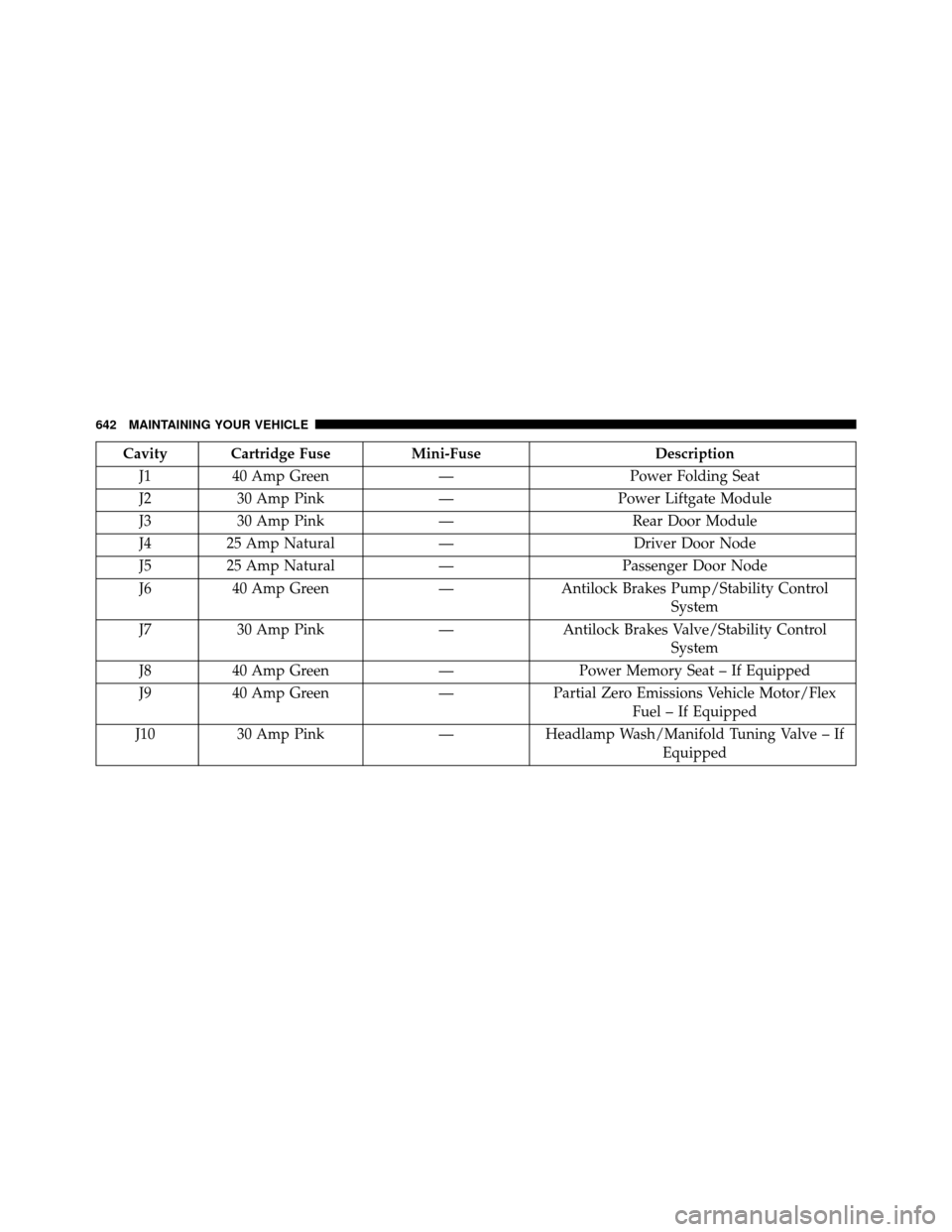
Cavity Cartridge FuseMini-FuseDescription
J1 40 Amp Green —Power Folding Seat
J2 30 Amp Pink —Power Liftgate Module
J3 30 Amp Pink —Rear Door Module
J4 25 Amp Natural —Driver Door Node
J5 25 Amp Natural —Passenger Door Node
J6 40 Amp Green —Antilock Brakes Pump/Stability Control
System
J7 30 Amp Pink —Antilock Brakes Valve/Stability Control
System
J8 40 Amp Green —Power Memory Seat – If Equipped
J9 40 Amp Green —Partial Zero Emissions Vehicle Motor/Flex
Fuel – If Equipped
J10 30 Amp Pink —Headlamp Wash/Manifold Tuning Valve – If
Equipped
642 MAINTAINING YOUR VEHICLE