clock DODGE GRAND CARAVAN 2015 5.G User Guide
[x] Cancel search | Manufacturer: DODGE, Model Year: 2015, Model line: GRAND CARAVAN, Model: DODGE GRAND CARAVAN 2015 5.GPages: 703, PDF Size: 19.83 MB
Page 415 of 703
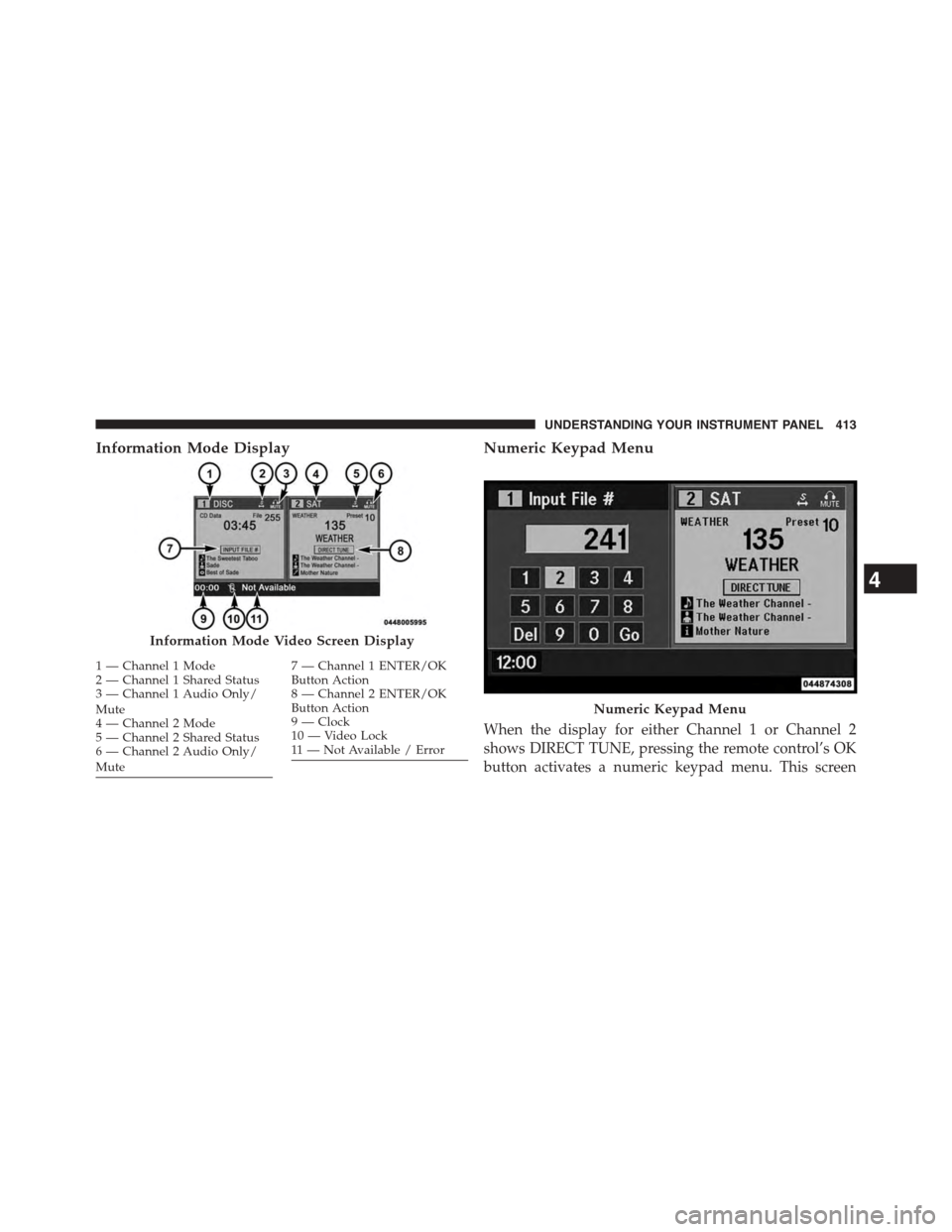
Information Mode DisplayNumeric Keypad Menu
When the display for either Channel 1 or Channel 2
shows DIRECT TUNE, pressing the remote control’s OK
button activates a numeric keypad menu. This screen
Information Mode Video Screen Display
1—Channel1Mode2—Channel1SharedStatus3—Channel1AudioOnly/Mute4—Channel2Mode5—Channel2SharedStatus6—Channel2AudioOnly/Mute
7—Channel1ENTER/OKButton Action8—Channel2ENTER/OKButton Action9—Clock10 — Video Lock11 — Not Available / Error
Numeric Keypad Menu
4
UNDERSTANDING YOUR INSTRUMENT PANEL 413
Page 432 of 703
STEERING WHEEL AUDIO CONTROLS — IF
EQUIPPED
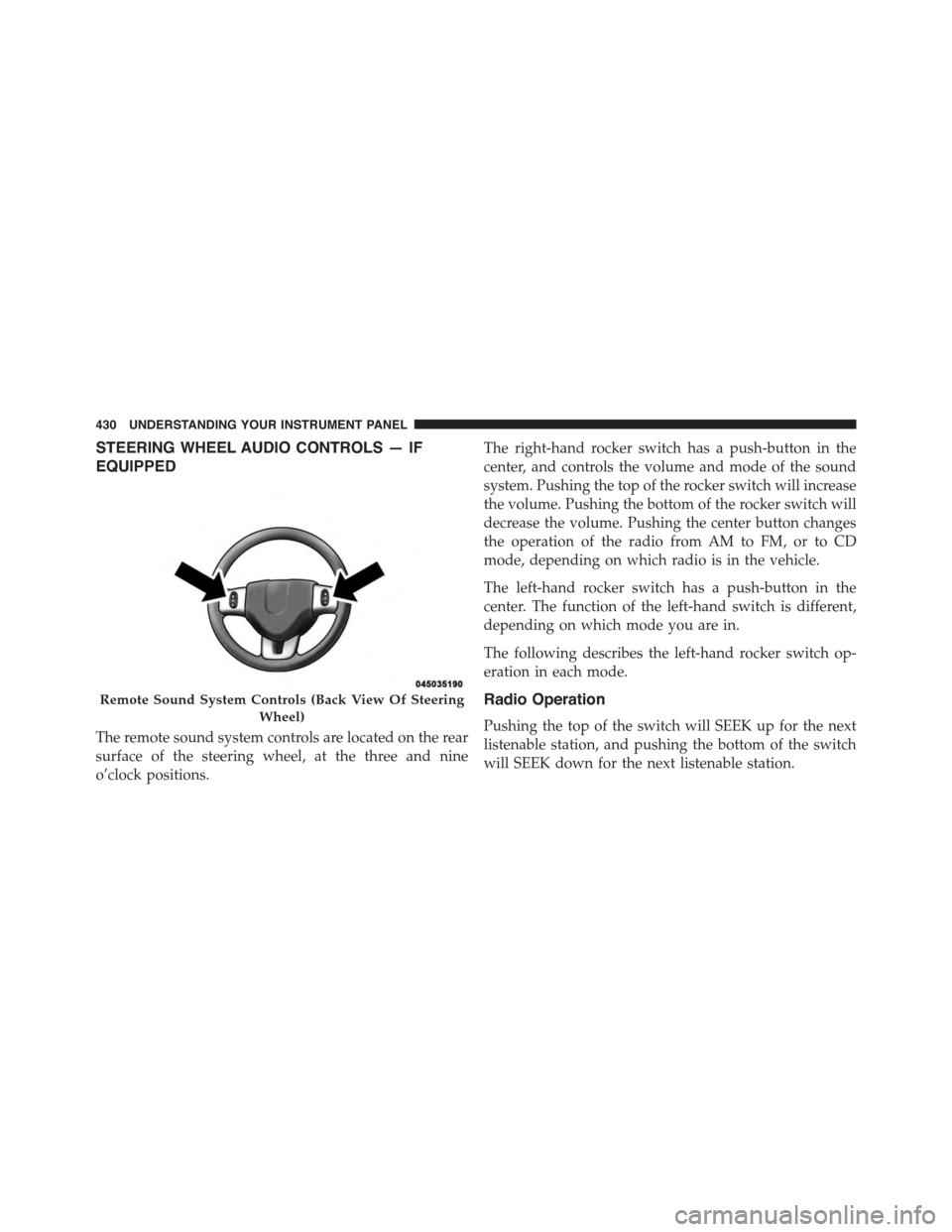
The remote sound system controls are located on the rear
surface of the steering wheel, at the three and nine
o’clock positions.
The right-hand rocker switch has a push-button in the
center, and controls the volume and mode of the sound
system. Pushing the top of the rocker switch will increase
the volume. Pushing the bottom of the rocker switch will
decrease the volume. Pushing the center button changes
the operation of the radio from AM to FM, or to CD
mode, depending on which radio is in the vehicle.
The left-hand rocker switch has a push-button in the
center. The function of the left-hand switch is different,
depending on which mode you are in.
The following describes the left-hand rocker switch op-
eration in each mode.
Radio Operation
Pushing the top of the switch will SEEK up for the next
listenable station, and pushing the bottom of the switch
will SEEK down for the next listenable station.
Remote Sound System Controls (Back View Of Steering
Wheel)
430 UNDERSTANDING YOUR INSTRUMENT PANEL
Page 441 of 703
Rear Blower Control
The primary control for the rear blower is on the front
climate control unit, located on the instrument panel.
Only when the front control for the rear blower is in the
REARposition do the second row seat occupants have
control of the rear blower speed.
The rear blower control, located in the rear overhead
console, has an off position and a range of blower speeds.
This allows the second row seat occupants to control the
volume of air circulated in the rear of the vehicle.
CAUTION!
Interior air enters the Rear Manual Climate Control
system through an intake grille, located in the right
side trim panel behind the third row seats. The
heater outlets are located in the right side trim panel,
(Continued)
CAUTION!(Continued)
just behind the sliding door. Do not block or place
objects directly in front of the inlet grille or heater
outlets. The electrical system could overload, causing
damage to the blower motor.
Rear Temperature Control
The rear mode selectionREAR,allows the settings to be
controlled by the rear mode control knob.
To change the temperature in the rear of the vehicle,
rotate the temperature control knob counterclockwise for
cold air, and clockwise for heated air.
When rear controls are locked by the front system, the
lock symbol on the temperature knob is illuminated, and
the rear overhead adjustments are inoperable.
4
UNDERSTANDING YOUR INSTRUMENT PANEL 439
Page 451 of 703
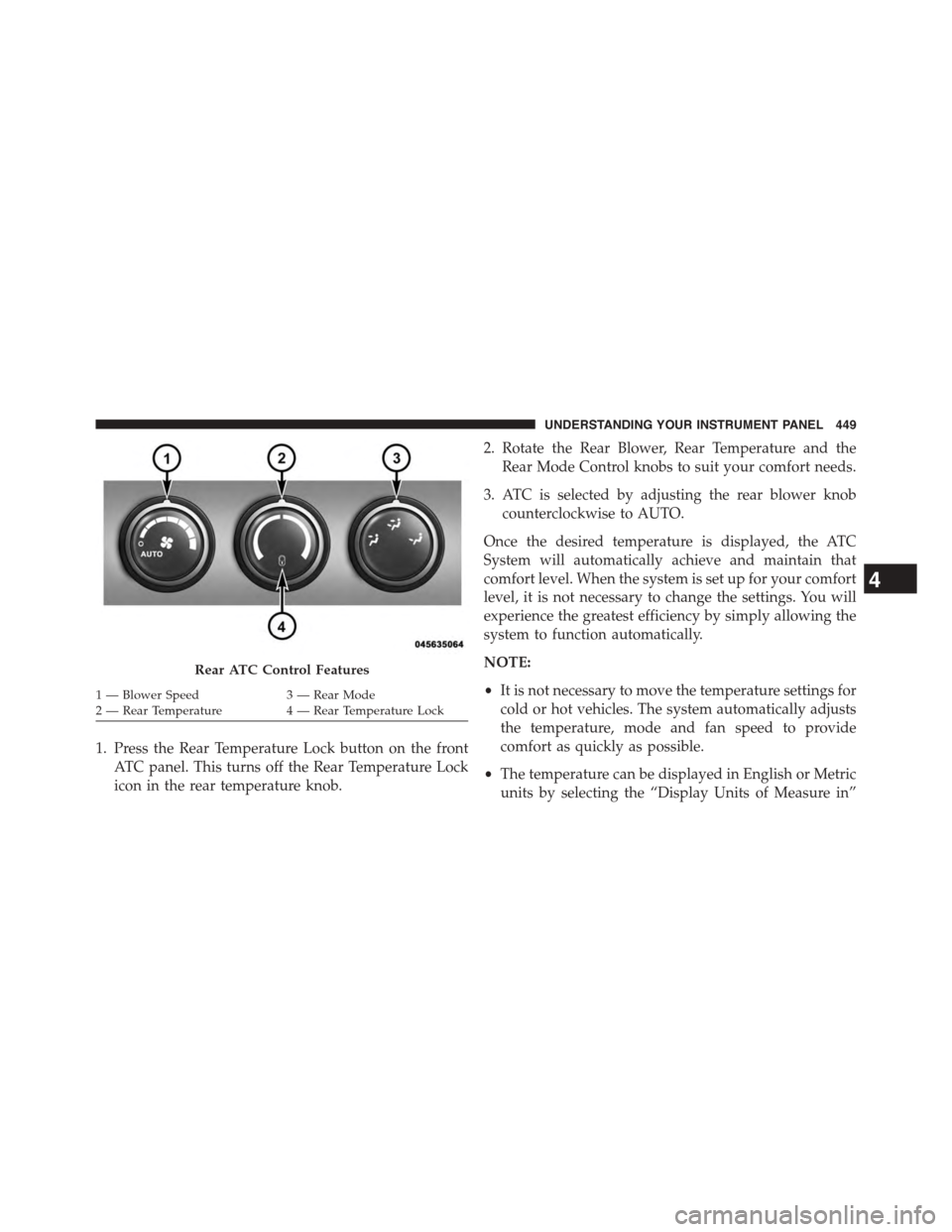
1. Press the Rear Temperature Lock button on the front
ATC panel. This turns off the Rear Temperature Lock
icon in the rear temperature knob.
2. Rotate the Rear Blower, Rear Temperature and the
Rear Mode Control knobs to suit your comfort needs.
3. ATC is selected by adjusting the rear blower knob
counterclockwise to AUTO.
Once the desired temperature is displayed, the ATC
System will automatically achieve and maintain that
comfort level. When the system is set up for your comfort
level, it is not necessary to change the settings. You will
experience the greatest efficiency by simply allowing the
system to function automatically.
NOTE:
•It is not necessary to move the temperature settings for
cold or hot vehicles. The system automatically adjusts
the temperature, mode and fan speed to provide
comfort as quickly as possible.
•The temperature can be displayed in English or Metric
units by selecting the “Display Units of Measure in”
Rear ATC Control Features
1—BlowerSpeed3—RearMode2—RearTemperature4—RearTemperatureLock
4
UNDERSTANDING YOUR INSTRUMENT PANEL 449
Page 452 of 703
customer-programmable feature. Refer to the “Elec-
tronic Vehicle Information Center (EVIC) — Customer-
Programmable Features” in this Section.
Rear Blower Control
The rear blower control knob can be manually set to off,
or any fixed blower speed, by rotating the knob from low
to high. This allows the rear seat occupants to control the
volume of air circulated in the rear of the vehicle.
CAUTION!
Interior air enters the Rear Automatic Temperature
Control System through an intake grille, located in
the right side trim panel behind the third row seats.
The heater outlets are located in the right side trim
panel, just behind the sliding door. Do not block or
place objects directly in front of the inlet grille or
heater outlets. The electrical system could overload
causing damage to the blower motor.
Rear Temperature Control
To change the temperature in the rear of the vehicle,
rotate the temperature knob counterclockwise to lower
the temperature, and clockwise to increase the tempera-
ture. The rear temperature settings are displayed in the
front ATC panel.
When rear controls are locked by the front system, the
Rear Temperature Lock symbol on the temperature knob
is illuminated and any rear overhead adjustments are
ignored.
Rear Mode Control
•Headliner Mode
Air comes from the outlets in the headliner. Each
of these outlets can be individually adjusted to
direct the flow of air. Moving the air vanes of the outlets
to one side will shut off the airflow.
450 UNDERSTANDING YOUR INSTRUMENT PANEL
Page 595 of 703
snapping the cover over the two lug nuts. Do not use
a hammer or excessive force to install the cover.
4. Install the remaining lug nuts with the cone shaped
end of the nut toward the wheel. Lightly tighten the
lug nuts.
WARNING!
To avoid the risk of forcing the vehicle off the jack,
do not tighten the wheel nuts fully until the vehicle
has been lowered. Failure to follow this warning may
result in personal injury.
5. Lower the vehicle to the ground by turning the jack
handle counterclockwise.
6. Refer to “Torque Specifications” in this section for
proper wheel lug nut torque.
7. After 25 miles (40 km) check the lug nut torque with a
torque wrench to ensure that all lug nuts are properly
seated against the wheel.
Vehicles Without Wheel Covers
1. Mount the road tire on the axle.
2. Install the remaining lug nuts with the cone shaped
end of the nut toward the wheel. Lightly tighten the
lug nuts.
WARNING!
To avoid the risk of forcing the vehicle off the jack,
do not tighten the wheel nuts fully until the vehicle
has been lowered. Failure to follow this warning may
result in personal injury.
3. Lower the vehicle to the ground by turning the jack
handle counterclockwise.
6
WHAT TO DO IN EMERGENCIES 593
Page 648 of 703
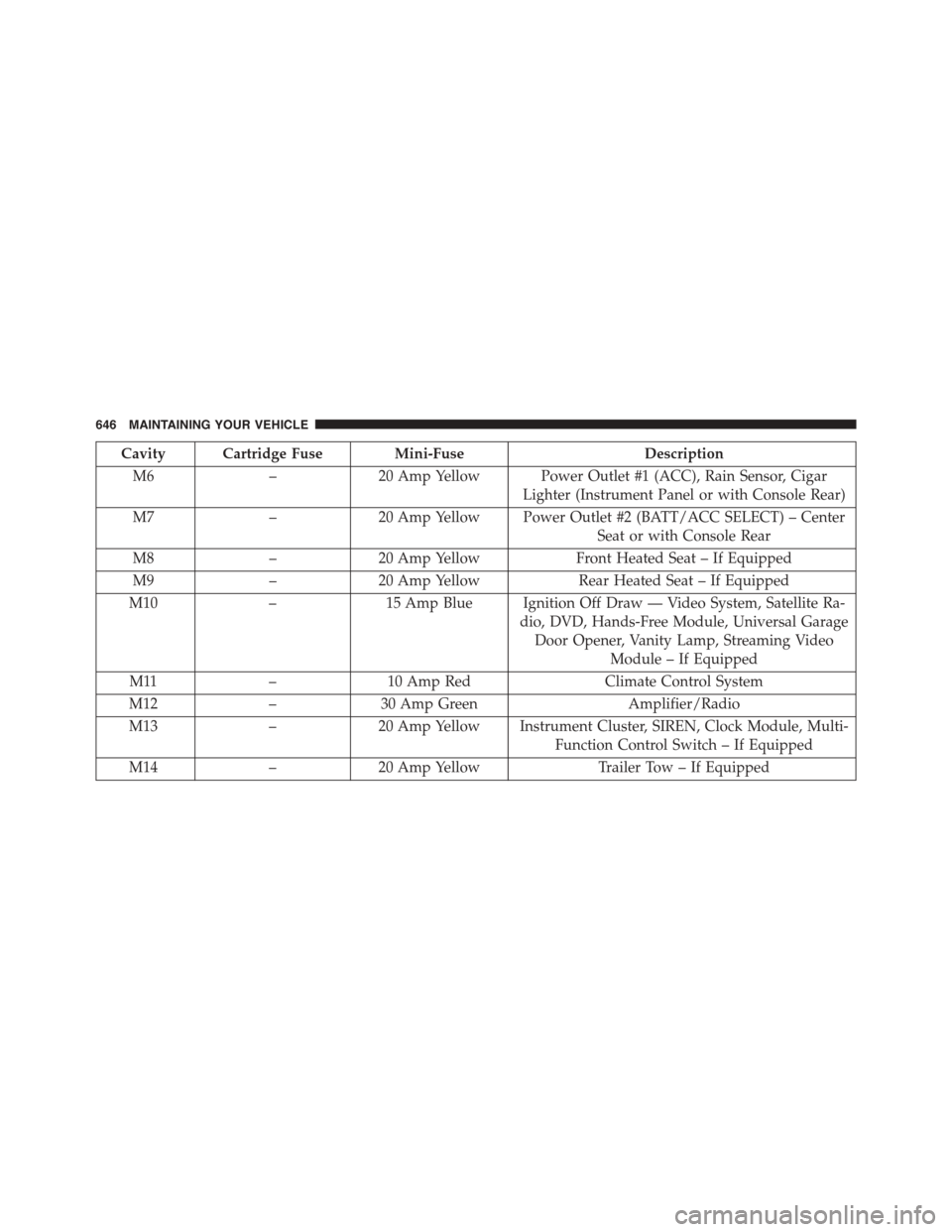
Cavity Cartridge Fuse Mini-FuseDescription
M6–20 Amp Yellow Power Outlet #1 (ACC), Rain Sensor, Cigar
Lighter (Instrument Panel or with Console Rear)
M7–20 Amp Yellow Power Outlet #2 (BATT/ACC SELECT) – Center
Seat or with Console Rear
M8–20 Amp YellowFront Heated Seat – If Equipped
M9–20 Amp YellowRear Heated Seat – If Equipped
M10–15 Amp Blue Ignition Off Draw — Video System, Satellite Ra-
dio, DVD, Hands-Free Module, Universal Garage
Door Opener, Vanity Lamp, Streaming Video
Module – If Equipped
M11–10 Amp RedClimate Control System
M12–30 Amp GreenAmplifier/Radio
M13–20 Amp Yellow Instrument Cluster, SIREN, Clock Module, Multi-
Function Control Switch – If Equipped
M14–20 Amp YellowTrailer Tow – If Equipped
646 MAINTAINING YOUR VEHICLE
Page 685 of 703
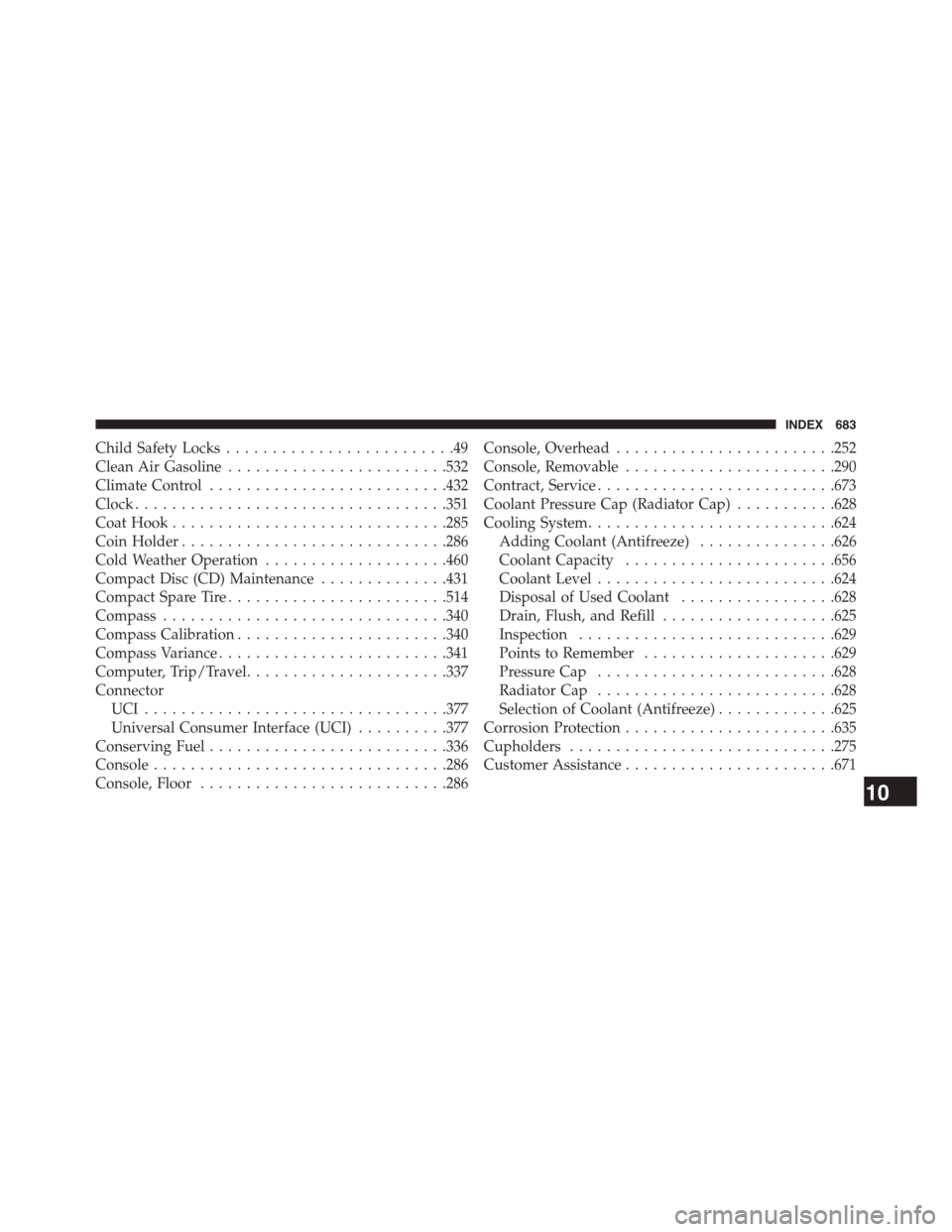
Child Safety Locks.........................49
Clean Air Gasoline........................532
Climate Control..........................432
Clock..................................351
Coat Hook..............................285
Coin Holder.............................286
Cold Weather Operation....................460
Compact Disc (CD) Maintenance..............431
Compact Spare Tire........................514
Compass...............................340
Compass Calibration.......................340
Compass Variance.........................341
Computer, Trip/Travel......................337
Connector
UCI . . . . . . . . . . . . . . . . . . . . . . . . . . . . . . . ..377
Universal Consumer Interface (UCI)..........377
Conserving Fuel..........................336
Console................................286
Console, Floor...........................286
Console, Overhead........................252
Console, Removable.......................290
Contract, Service..........................673
Coolant Pressure Cap (Radiator Cap)...........628
Cooling System...........................624
Adding Coolant (Antifreeze)...............626
Coolant Capacity.......................656
Coolant Level..........................624
Disposal of Used Coolant.................628
Drain, Flush, and Refill...................625
Inspection............................629
Points to Remember.....................629
Pressure Cap..........................628
Radiator Cap..........................628
Selection of Coolant (Antifreeze).............625
Corrosion Protection.......................635
Cupholders.............................275
CustomerAssistance.......................671
10
INDEX 683
Page 697 of 703
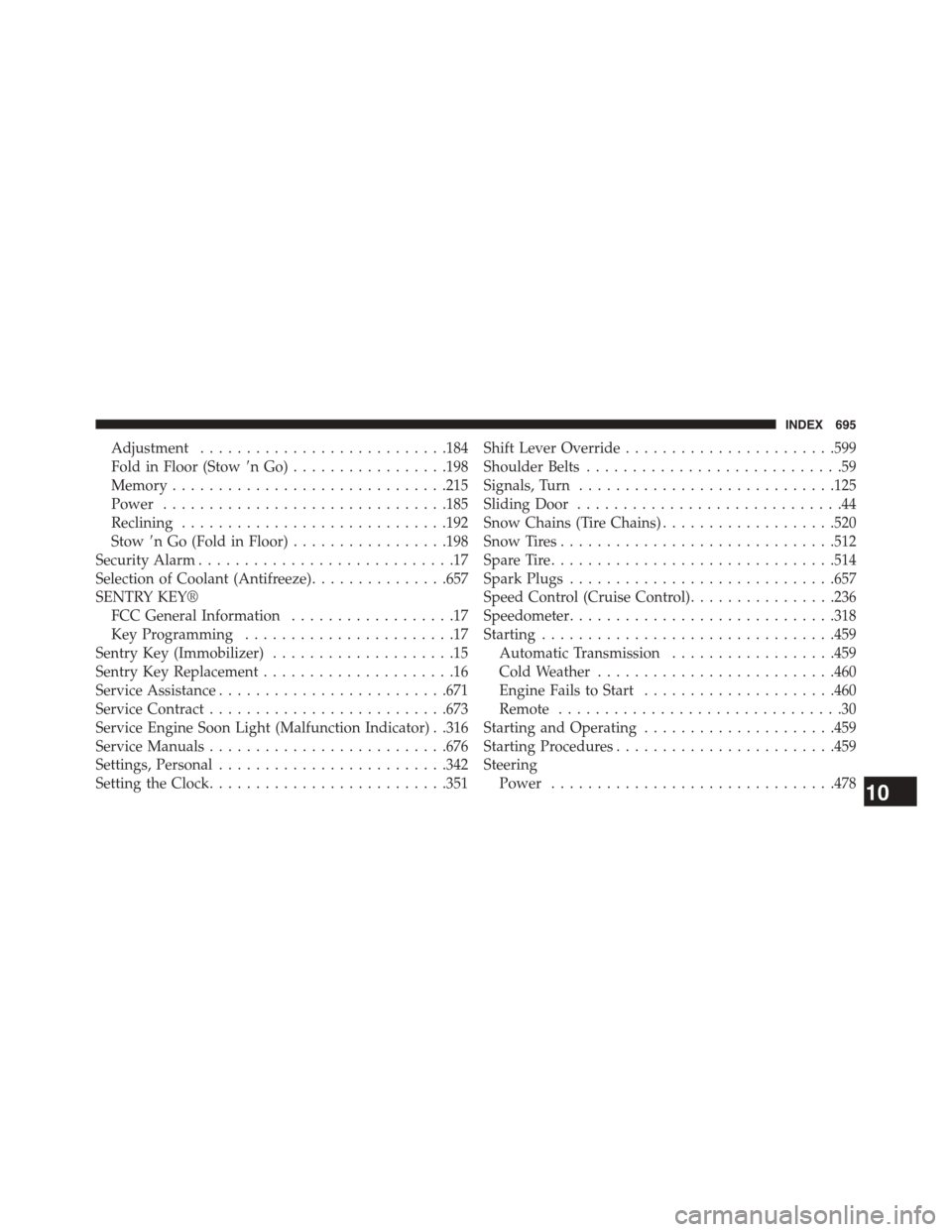
Adjustment...........................184
Fold in Floor (Stow(nGo).................198
Memory..............................215
Power...............................185
Reclining.............................192
Stow(n Go (Fold in Floor).................198
Security Alarm............................17
Selection of Coolant (Antifreeze)...............657
SENTRY KEY®
FCC General Information..................17
Key Programming.......................17
Sentry Key (Immobilizer)....................15
Sentry Key Replacement.....................16
Service Assistance.........................671
Service Contract..........................673
Service Engine Soon Light (Malfunction Indicator) . .316
Service Manuals..........................676
Settings, Personal.........................342
Setting the Clock..........................351
Shift Lever Override.......................599
Shoulder Belts............................59
Signals, Turn............................125
Sliding Door.............................44
Snow Chains (Tire Chains)...................520
Snow Tires..............................512
Spare Tire...............................514
Spark Plugs.............................657
Speed Control (Cruise Control)................236
Speedometer.............................318
Starting................................459
Automatic Transmission..................459
Cold Weather..........................460
Engine Fails to Start.....................460
Remote...............................30
Starting and Operating.....................459
Starting Procedures........................459
Steering
Power...............................47810
INDEX 695