wheel DODGE GRAND CARAVAN 2015 5.G User Guide
[x] Cancel search | Manufacturer: DODGE, Model Year: 2015, Model line: GRAND CARAVAN, Model: DODGE GRAND CARAVAN 2015 5.GPages: 703, PDF Size: 19.83 MB
Page 210 of 703
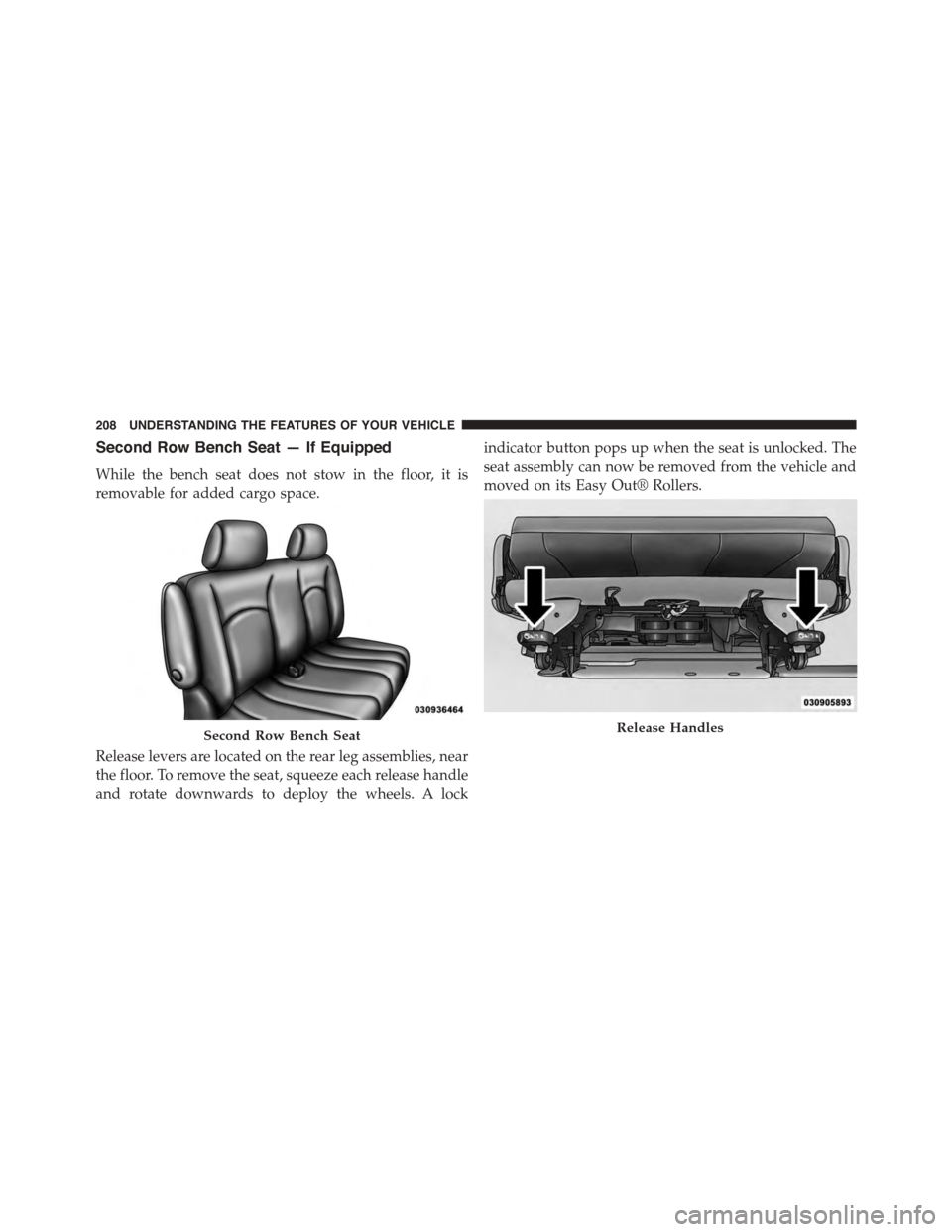
Second Row Bench Seat — If Equipped
While the bench seat does not stow in the floor, it is
removable for added cargo space.
Release levers are located on the rear leg assemblies, near
the floor. To remove the seat, squeeze each release handle
and rotate downwards to deploy the wheels. A lock
indicator button pops up when the seat is unlocked. The
seat assembly can now be removed from the vehicle and
moved on its Easy Out® Rollers.
Second Row Bench SeatRelease Handles
208 UNDERSTANDING THE FEATURES OF YOUR VEHICLE
Page 235 of 703
•Neutral Wipe Inhibit— The Rain Sensing feature will
not operate when the ignition is ON, and the transmis-
sion shift lever is in the NEUTRAL position, and the
vehicle speed is less than 5 mph (8 km/h), unless the
wiper control on the multifunction lever is moved or
the shift lever is moved out of the NEUTRAL position.
•Remote Start Mode Inhibit— On vehicles equipped
with Remote Starting system, Rain Sensing wipers are
not operational when the vehicle is in the remote start
mode. Once the operator is in the vehicle and has
placed the ignition switch in the RUN position, rain
sensing wiper operation can resume, if it has been
selected, and no other inhibit conditions (mentioned
previously) exist.
TILT/TELESCOPING STEERING COLUMN
This feature allows you to tilt the steering column
upward or downward. It also allows you to lengthen or
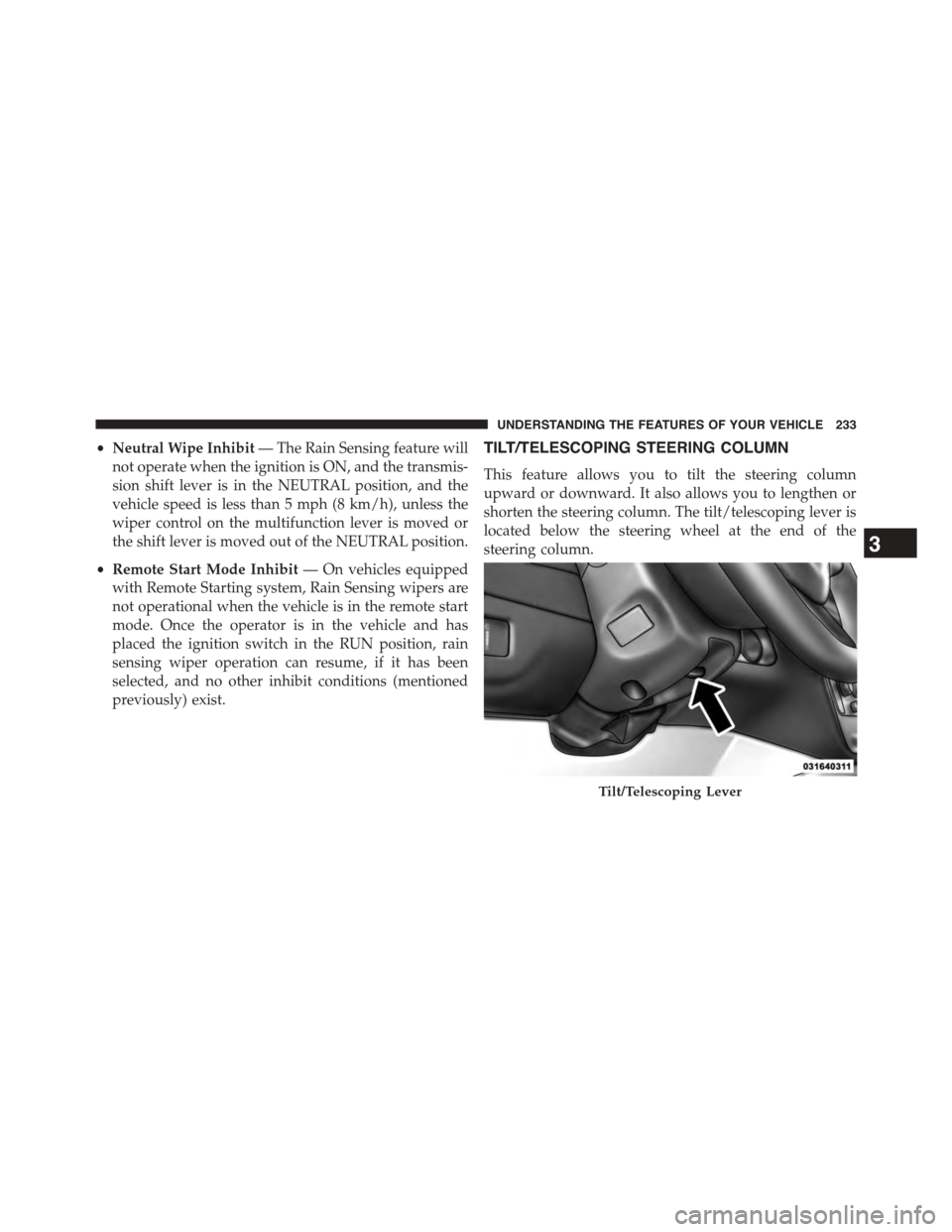
shorten the steering column. The tilt/telescoping lever is
located below the steering wheel at the end of the
steering column.
Tilt/Telescoping Lever
3
UNDERSTANDING THE FEATURES OF YOUR VEHICLE 233
Page 236 of 703
To unlock the steering column, push the lever downward
(toward the floor). To tilt the steering column, move the
steering wheel upward or downward as desired. To
lengthen or shorten the steering column, pull the steering
wheel outward or push it inward as desired. To lock the
steering column in position, push the lever upward until
fully engaged.
WARNING!
Do not adjust the steering column while driving.
Adjusting the steering column while driving or driv-
ing with the steering column unlocked, could cause
the driver to lose control of the vehicle. Failure to
follow this warning may result in serious injury or
death.
HEATED STEERING WHEEL — IF EQUIPPED
The steering wheel contains a heating element that helps
warm your hands in cold weather. The heated steering
wheel has only one temperature setting. Once the heated
steering wheel has been turned on it will operate for
approximately 30 to 80 minutes before automatically
shutting off. The heated steering wheel can shut off early
or may not turn on when the steering wheel is already
warm.
The heated steering wheel control button is located on
the center of the instrument panel below the climate
controls.
•Press the heated steering wheel buttononce to
turn the heating element ON.
234 UNDERSTANDING THE FEATURES OF YOUR VEHICLE
Page 237 of 703
•Press the heated steering wheel buttona second
time to turn the heating element OFF.
NOTE:The engine must be running for the heated
steering wheel to operate.
Vehicles Equipped With Remote Start
On models that are equipped with remote start, the
heated steering wheel can be programed to come on
during a remote start. Refer to “Electronic Vehicle Infor-
mation Center (EVIC)” in “Understanding Your Instru-
ment Panel” for further information.
WARNING!
•Persons who are unable to feel pain to the skin
because of advanced age, chronic illness, diabetes,
spinal cord injury, medication, alcohol use, exhaus-
tion, or other physical conditions must exercise
care when using the steering wheel heater. It may
cause burns even at low temperatures, especially if
used for long periods.
•Do not place anything on the steering wheel that
insulates against heat, such as a blanket or steering
wheel covers of any type and material. This may
cause the steering wheel heater to overheat.
3
UNDERSTANDING THE FEATURES OF YOUR VEHICLE 235
Page 238 of 703
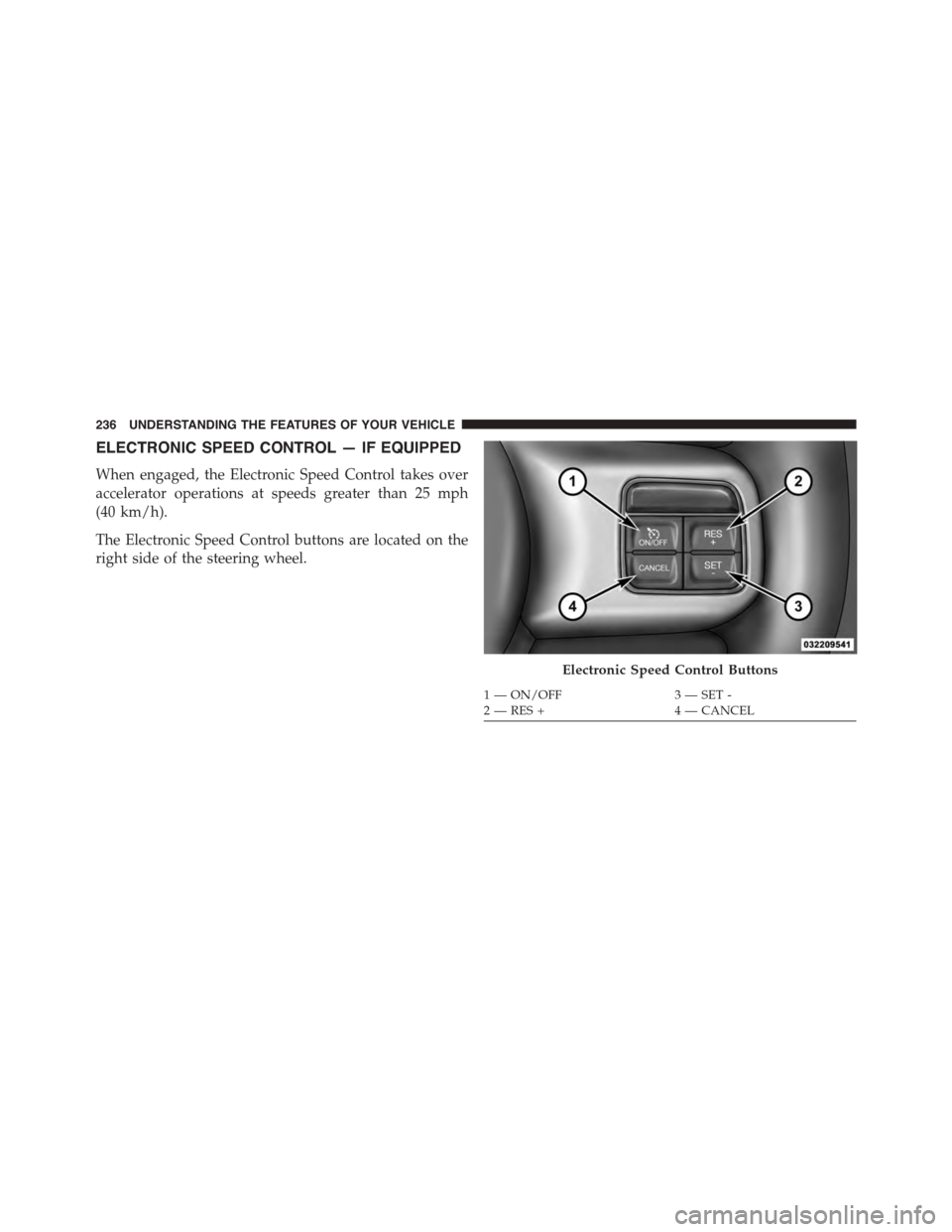
ELECTRONIC SPEED CONTROL — IF EQUIPPED
When engaged, the Electronic Speed Control takes over
accelerator operations at speeds greater than 25 mph
(40 km/h).
The Electronic Speed Control buttons are located on the
right side of the steering wheel.
Electronic Speed Control Buttons
1—ON/OFF3—SET-2—RES+4—CANCEL
236 UNDERSTANDING THE FEATURES OF YOUR VEHICLE
Page 308 of 703
▫Listen To An Audio Source While A Video Is
Playing.............................397
▫Important Notes For Dual Video Screen
System.............................400
▫VES™ Remote Control — If Equipped.......401
▫Blu-ray™ Player Remote Control — If
Equipped...........................403
▫Remote Control Storage.................405
▫Locking The Remote Control.............406
▫Replacing The Remote Control Batteries......406
▫Headphones Operation.................407
▫Blu-ray™ Headphones Operation..........408
▫Controls............................409
▫Replacing The Headphone Batteries.........410
▫Unwired® Stereo Headphone Lifetime Limited
Warranty...........................410
▫System Information....................411
!STEERING WHEEL AUDIO CONTROLS — IF
EQUIPPED...........................430
▫Radio Operation......................430
▫CD Player...........................431
!CD/DVD/Blu-ray™ Disc MAINTENANCE . . . .431
!RADIO OPERATION AND MOBILE PHONES . .432
▫General Information...................432
!CLIMATE CONTROLS...................432
▫Manual Heating And Air Conditioning System —
If Equipped.........................433
▫Rear Manual Climate Control — If Equipped . .438
306 UNDERSTANDING YOUR INSTRUMENT PANEL
Page 314 of 703
6. Odometer Display/Electronic Vehicle Information
Center (EVIC) — If Equipped
Odometer Display / Trip Odometer DisplayThe odom-
eter display shows the total distance the vehicle has been
driven.
U.S. Federal regulations require that upon transfer of
vehicle ownership, the seller certify to the purchaser the
correct mileage that the vehicle has been driven. If your
odometer needs to be repaired or serviced, the repair
technician should leave the odometer reading the same
as it was before the repair or service. If s/he cannot do so,
then the odometer must be set at zero, and a sticker must
be placed in the door jamb stating what the mileage was
before the repair or service. It is a good idea for you to
make a record of the odometer reading before the repair/
service, so that you can be sure that it is properly reset, or
that the door jamb sticker is accurate if the odometer
must be reset at zero.
This also displays Trip A and Trip B, DTE, MPG or
L/100km, OAT (Outside Air Temperature) information to
Base Cluster, use STEP and RESET button (on steering
wheel) to access or reset the display.
Message Display Area
When the appropriate conditions exist, the following
odometer messages will display:
door.............................Door Ajar
gATE..........................Liftgate Ajar
LoW tirE....................LowTirePressure
gASCAP......................Fuel Cap Fault
noFUSE..........................Fuse Fault
312 UNDERSTANDING YOUR INSTRUMENT PANEL
Page 315 of 703
CHAngE OIL..............OilChange Required
LoCOOL.......................LowCoolant
NOTE:Some of the above warnings will be displayed in
the Electronic Vehicle Information Center Display Area
located in the instrument cluster.
Refer to ”Electronic Vehicle Information Center (EVIC) —
If Equipped” in this section for further information.
LoW tirE
When the appropriate condition exists, the odometer
display will toggle between LoW and tirE for three
cycles.
gASCAP
If the vehicle diagnostic system determines that the fuel
filler cap is loose, improperly installed, or damaged, a
“gASCAP” message will display in the odometer display
area. Tighten the fuel filler cap properly and push the
STEP button on the steering wheel to turn off the
message. If the problem continues, the message will
appear the next time the vehicle is started.
noFUSE
If the vehicle diagnostic system determines that the
Ignition Off Draw (IOD) fuse is improperly installed, or
damaged, a “noFUSE” message will display in the odom-
eter display area. For further information on fuses and
fuse locations refer to “Fuses” in “Maintaining Your
Vehicle”.
CHAngE OIL
Your vehicle is equipped with an engine oil change
indicator system. TheCHAngE OILmessage will flash in
the instrument cluster odometer for approximately 12
seconds, after a single chime has sounded, to indicate the
next scheduled oil change interval. The engine oil change
4
UNDERSTANDING YOUR INSTRUMENT PANEL 313
Page 318 of 703
approximately one minute and then remain continuously
illuminated. This sequence will continue upon subse-
quent vehicle start-ups as long as the malfunction exists.
When the malfunction indicator is illuminated, the sys-
tem may not be able to detect or signal low tire pressure
as intended. TPMS malfunctions may occur for a variety
of reasons, including the installation of replacement or
alternate tires or wheels on the vehicle that prevent the
TPMS from functioning properly. Always check the
TPMS malfunction telltale after replacing one or more
tires or wheels on your vehicle, to ensure that the
replacement or alternate tires and wheels allow the TPMS
to continue to function properly.
CAUTION!
The TPMS has been optimized for the original
equipment tires and wheels. TPMS pressures and
(Continued)
CAUTION!(Continued)
warning have been established for the tire size
equipped on your vehicle. Undesirable system opera-
tion or sensor damage may result when using re-
placement equipment that is not of the same size,
type, and/or style. Aftermarket wheels can cause
sensor damage. Do not use tire sealant from a can or
balance beads if your vehicle is equipped with a
TPMS, as damage to the sensors may result.
9. Malfunction Indicator Light (MIL)
The Malfunction Indicator Light (MIL) is part of
an Onboard Diagnostic system, called OBD, that
monitors engine and automatic transmission con-
trol systems. The light will illuminate when the key is in
the ON/RUN position, before engine start. If the bulb
does not come on when turning the key from OFF to
ON/RUN, have the condition checked promptly.
316 UNDERSTANDING YOUR INSTRUMENT PANEL
Page 328 of 703
The EVIC Menu items consists of the following:
•Fuel Economy
•Vehicle Speed
•Trip Info
•Tire PSI
•Vehicle Info
•Messages
•Units
•System Setup (Personal Settings)
•Turn Menu Off
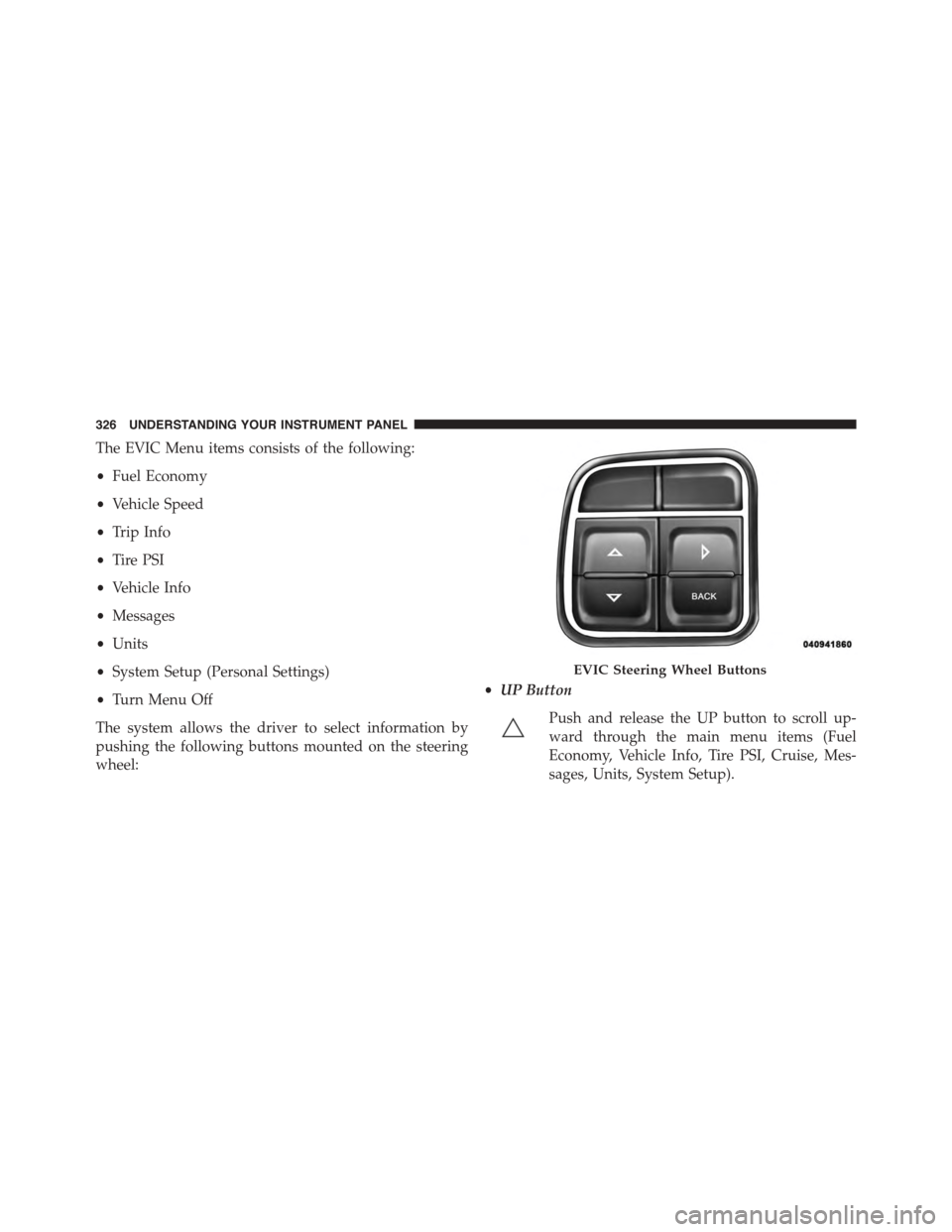
The system allows the driver to select information by
pushing the following buttons mounted on the steering
wheel:
•UP Button
Push and release the UP button to scroll up-
ward through the main menu items (Fuel
Economy, Vehicle Info, Tire PSI, Cruise, Mes-
sages, Units, System Setup).
EVIC Steering Wheel Buttons
326 UNDERSTANDING YOUR INSTRUMENT PANEL