stop start DODGE GRAND CARAVAN 2015 5.G Owner's Manual
[x] Cancel search | Manufacturer: DODGE, Model Year: 2015, Model line: GRAND CARAVAN, Model: DODGE GRAND CARAVAN 2015 5.GPages: 703, PDF Size: 19.83 MB
Page 395 of 703
NOTE:
•To view a DVD on the radio press the RADIO/MEDIA
button on the radio faceplate, then press the DISC tab
button on the touchscreen and then the VIEW VIDEO
button on the touchscreen.
•Viewing a DVD on the Touchscreen radio screen is not
available in all states/provinces. If available, the ve-
hicle must be stopped and the shift lever must be in the
PARK position for vehicles with an automatic trans-
mission. In vehicles with a manual transmission the
parking brake must be engaged.
•Pressing the screen on a Touchscreen radio while a
DVD is playing brings up basic remote control func-
tions for DVD play such as scene selection, Play, Pause,
FF, RW, and Stop. Pressing the X in the upper corner
will turn off the remote control screen functions.
Play A DVD Using The VES™ Player — If
Equipped
1. Insert the DVD with the label facing up. The VES™
player automatically selects the appropriate mode
after the disc is recognized and starts playing the
DVD.
NOTE:The VES™ player has basic DVD control func-
tion such as Menu, Play, Pause, FF, RW and Stop.
2. To watch a DVD on Screen 1 for second row passen-
gers, ensure the Remote Control and Headphone
switch is on Channel 1.
3. To watch a DVD on Screen 2 for third row passengers,
ensure the Remote Control and Headphone switch is
on Channel 2.
4
UNDERSTANDING YOUR INSTRUMENT PANEL 393
Page 398 of 703
NOTE:
•To view a DVD on the radio press the RADIO/MEDIA
button on the radio faceplate, then press the DISC tab
button on the touchscreen and then the VIEW VIDEO
button on the touchscreen.
•Viewing a DVD on the Touchscreen radio screen is not
available in all states/provinces. If available, the ve-
hicle must be stopped and the shift lever must be in the
PARK position for vehicles with an automatic trans-
mission. In vehicles with a manual transmission the
parking brake must be engaged.
Play A Blu-ray™ Disc Using The Blu-ray™ Player
— If Equipped
1. Insert the Blu-ray™ Disc with the label facing up. The
Blu-ray™ Player automatically selects the appropriate
mode after the disc is recognized and starts playing
the Blu-ray™ Disc.
NOTE:The Blu-ray™ Player has basic control functions
such as Menu, Play, Pause, FF, RW and Stop.
2. To watch a Blu-ray™ Disc on Screen 1 for second row
passengers, ensure the Remote Control and Head-
phone switch is on Channel 1.
3. To watch a Blu-ray™ Disc on Screen 2 for third row
passengers, ensure the Remote Control and Head-
phone switch is on Channel 2.
Using The Remote Control
1. Press the SOURCE button on the Blu-ray™ Player
Remote Control.
2. While looking at Screen 1 or 2, highlight Blu-ray™ by
either pressing Up/Down/Left/Right buttons or by
repeatedly pressing the SOURCE button, then press
OK on the Remote Control.
396 UNDERSTANDING YOUR INSTRUMENT PANEL
Page 406 of 703
(if equipped) and the VES™ mode is selected and the
disc is stopped, press the SETUP button to access the
Blu-ray™ Setup menu.
7.!!!– Press and release to jump to the next available
audio track or video chapter. Press and hold to fast
forward through the current audio track or video
chapter.
8.!/%(Play/Pause) – Begin/resume or pause disc play.
9. Four Colored Buttons – Press to access Blu-ray™ Disc
features.
10. POPUP/MENU – Press to access the Blu-ray™ main
menu when in Blu-ray™ or DVD mode. Press to start
Scan or start Random track functions in CD or HDD
modes.
11. KEYPAD – Press to navigate chapters or titles.
12.▪(Stop) – Stops disc play.
13.!""– Press and release to jump to the previous
audio track or video chapter. Press and hold to fast
rewind through the current audio track or video
chapter.
14. MUTE – Mutes headphone audio.
15. BACK – Press to exit out of menus or return to source
selection screen.
16.#– Press to navigate menus.
17. OK – Press to select the highlighted option in a menu.
18."– Press to navigate menus.
19.$– Press to navigate menus.
404 UNDERSTANDING YOUR INSTRUMENT PANEL
Page 420 of 703
•DivX Home Theater Profile 3.0 requires:
•Maximum resolution 720 x 480 @ 30fps or 720 x 576
@ 25fps
•Minimum resolution 16 x 16
•Maximum frame rate for progressive source 30
frames per second
•Maximum field rate for interlaced source 60 fields
per second
•To change the current chapter, use the remote control’s
or Blu-Ray™ Player ’s “Fast Forward” button to ad-
vance to the next chapter, or the “Fast Rewind” button
to return to the start of the current or previous chapter.
DVD/Blu-ray™/BD Region Codes
The DVD player/Blu-ray™ Player and many DVD/Blu-
ray™ Discs are coded by geographic region. These region
codes must match in order for the disc to play. If the
region code for the DVD/Blu-ray™ Disc does not match
the region code for the player, the disc will stop playing
and a warning will be displayed.
DVD Audio Support
When a DVD-Audio disc is inserted in the DVD player,
the DVD-Audio title on the disc is played by default
(most DVD-Audio discs also have a Video title, but the
Video title is ignored). All multi - channel program
material is automatically mixed down to two channels,
which may result in a lowered apparent volume level. If
you increase the volume level to account for this change
in level, remember to lower the volume before changing
the disc or to another mode.
Recorded Discs
The DVD player will play CD-R and CD-RW discs
recorded in CD-Audio or Video-CD format, or as a
CD-ROM containing MP3, WMA or AAC (Blu-ray™ Disc
418 UNDERSTANDING YOUR INSTRUMENT PANEL
Page 464 of 703
After Starting
The idle speed is controlled automatically and it will
decrease as the engine warms up.
ENGINE BLOCK HEATER — IF EQUIPPED
The engine block heater warms the engine, and permits
quicker starts in cold weather. Connect the cord to a
standard 110-115 Volt AC electrical outlet with a
grounded, three-wire extension cord.
The engine block heater must be plugged in at least one
hour to have an adequate warming effect on the engine.
The engine block heater cord is routed under the hood on
the driver’s side of the vehicle. It has a removable cap
that is located on the driver side of the Integrated Power
Module.
WARNING!
Remember to disconnect the engine block heater
cord before driving. Damage to the 110-115 Volt
electrical cord could cause electrocution.
AUTOMATIC TRANSMISSION
CAUTION!
Damage to the transmission may occur if the follow-
ing precautions are not observed:
•Shift into or out of PARK or REVERSE only after
the vehicle has come to a complete stop.
•Do not shift between PARK, REVERSE, NEU-
TRAL, or DRIVE when the engine is above idle
speed.
•Before shifting into any gear, make sure your foot
is firmly pressing the brake pedal.
462 STARTING AND OPERATING
Page 466 of 703
WARNING!(Continued)
•Never leave children alone in a vehicle, or with
access to an unlocked vehicle. Allowing children to
be in a vehicle unattended is dangerous for a
number of reasons. A child or others could be
seriously or fatally injured. Children should be
warned not to touch the parking brake, brake pedal
or the transmission gear selector.
•Do not leave the Key Fob in or near the vehicle (or
in a location accessible to children), and do not
leave the ignition (in a vehicle equipped with
Keyless Enter-NGo ™) in the ACC or ON/RUN
position. A child could operate power windows,
other controls, or move the vehicle.
Key Ignition Park Interlock
This vehicle is equipped with a Key Ignition Park Inter-
lock which requires the transmission to be in PARK
before the ignition switch can be turned to the LOCK/
OFF (key removal) position. The key fob can only be
removed from the ignition when the ignition is in the
LOCK/OFF position, and the transmission is locked in
PARK whenever the ignition switch is in the LOCK/OFF
position.
NOTE:If a malfunction occurs, the system will trap the
key fob in the ignition switch to warn you that this safety
feature is inoperable. The engine can be started and
stopped but the key fob cannot be removed until you
obtain service.
Brake/Transmission Shift Interlock System
This vehicle is equipped with a Brake Transmission Shift
Interlock System (BTSI) that holds the shift lever in PARK
unless the brakes are applied. To shift the transmission
out of PARK, the ignition switch must be turned to the
ON/RUN position (engine running or not) and the brake
pedal must be pressed.
464 STARTING AND OPERATING
Page 468 of 703
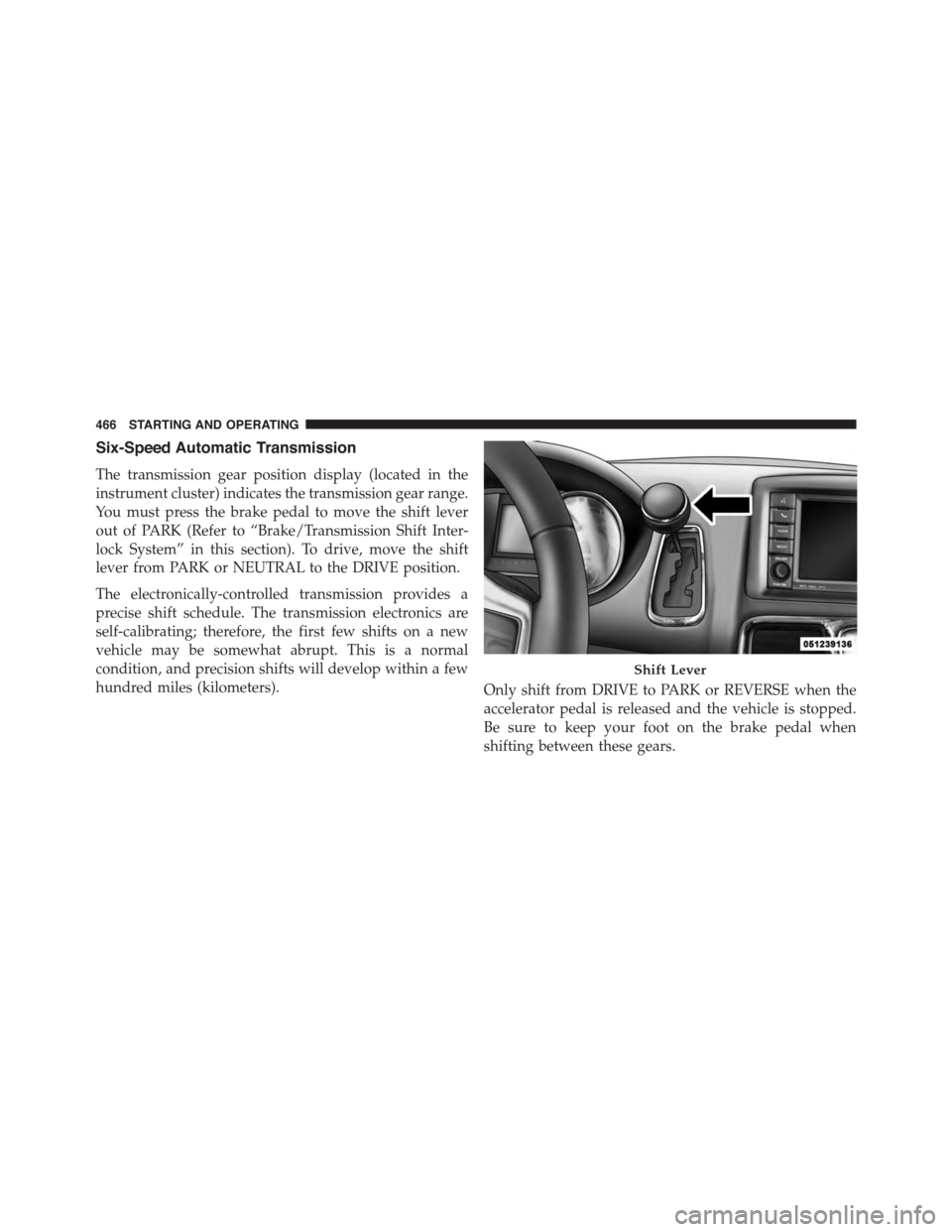
Six-Speed Automatic Transmission
The transmission gear position display (located in the
instrument cluster) indicates the transmission gear range.
You must press the brake pedal to move the shift lever
out of PARK (Refer to “Brake/Transmission Shift Inter-
lock System” in this section). To drive, move the shift
lever from PARK or NEUTRAL to the DRIVE position.
The electronically-controlled transmission provides a
precise shift schedule. The transmission electronics are
self-calibrating; therefore, the first few shifts on a new
vehicle may be somewhat abrupt. This is a normal
condition, and precision shifts will develop within a few
hundred miles (kilometers).Only shift from DRIVE to PARK or REVERSE when the
accelerator pedal is released and the vehicle is stopped.
Be sure to keep your foot on the brake pedal when
shifting between these gears.
Shift Lever
466 STARTING AND OPERATING
Page 471 of 703
WARNING!(Continued)
•Never leave children alone in a vehicle, or with
access to an unlocked vehicle. Allowing children to
be in a vehicle unattended is dangerous for a
number of reasons. A child or others could be
seriously or fatally injured. Children should be
warned not to touch the parking brake, brake pedal
or the shift lever.
•Do not leave the Key Fob in or near the vehicle, (or
in a location accessible to children) and do not
leave the ignition (in a vehicle equipped with
Keyless Enter-N-Go™) in the ACC or ON/RUN
position. A child could operate power windows,
other controls, or move the vehicle.
The following indicators should be used to ensure that
you have engaged the transmission into the PARK posi-
tion:
•When shifting into PARK, firmly move the shift lever
all the way forward and to the left until it stops and is
fully seated.
•Look at the transmission gear position display and
verify that it indicates the PARK position.
•With brake pedal released, verify that the shift lever
will not move out of PARK.
5
STARTING AND OPERATING 469
Page 472 of 703
CAUTION!
•Before moving the shift lever out of PARK, you
must turn the ignition switch from the LOCK/OFF
position to the ON/RUN position, and also press
the brake pedal. Otherwise, damage to the shift
lever could result.
•DO NOT race the engine when shifting from
PARK or NEUTRAL into another gear range, as this
can damage the drivetrain.
REVERSE (R)
This range is for moving the vehicle backward. Shift into
REVERSE only after the vehicle has come to a complete
stop.
NEUTRAL (N)
Use this range when the vehicle is standing for prolonged
periods with the engine running. The engine may be
started in this range. Apply the parking brake and shift
the transmission into PARK if you must leave the vehicle.
WARNING!
Do not coast in NEUTRAL and never turn off the
ignition to coast down a hill. These are unsafe
practices that limit your response to changing traffic
or road conditions. You might lose control of the
vehicle and have a collision.
CAUTION!
Towing the vehicle, coasting, or driving for any other
reason with the transmission in NEUTRAL can cause
severe transmission damage. Refer to “Recreational
Towing” in “Starting And Operating” and “Towing A
Disabled Vehicle” in “What To Do In Emergencies”
for further information.
470 STARTING AND OPERATING
Page 474 of 703
Transmission Limp Home Mode
Transmission function is monitored electronically for
abnormal conditions. If a condition is detected that could
result in transmission damage, Transmission Limp Home
Mode is activated. In this mode, the transmission remains
in third gear regardless of which forward gear is selected.
PARK, REVERSE, and NEUTRAL will continue to oper-
ate. The Malfunction Indicator Light (MIL) may be illu-
minated. Limp Home Mode allows the vehicle to be
driven to an authorized dealer for service without dam-
aging the transmission.
In the event of a momentary problem, the transmission
can be reset to regain all forward gears by performing the
following steps:
1. Stop the vehicle.
2. Shift the transmission into PARK.
3. Turn the ignition switch to the OFF position.
4. Wait approximately 10 seconds.
5. Restart the engine.
6. Shift into the desired gear range. If the problem is no
longer detected, the transmission will return to normal
operation.
NOTE:Even if the transmission can be reset, we recom-
mend that you visit your authorized dealer at your
earliest possible convenience. Your authorized dealer has
diagnostic equipment to determine if the problem could
recur.
If the transmission cannot be reset, authorized dealer
service is required.
472 STARTING AND OPERATING