clock DODGE GRAND CARAVAN 2016 5.G User Guide
[x] Cancel search | Manufacturer: DODGE, Model Year: 2016, Model line: GRAND CARAVAN, Model: DODGE GRAND CARAVAN 2016 5.GPages: 707, PDF Size: 5.24 MB
Page 391 of 707
through the list faster. During fast scroll, a slight delay
in updating the information on the radio display may
be noticeable.
During all List modes, the iPod displays all lists in
“wrap-around” mode. So if the track is at the bottom of
the list, just turn the wheel backward (counterclockwise)
to get to the track faster.
In List mode, the radio PRESETbuttons are used as
shortcuts to the following lists on the iPod or external
USB device:
• Preset 1 – Playlists
• Preset 2 – Artists
• Preset 3 – Albums
• Preset 4 – Genres
• Preset 5 – Audiobooks
• Preset 6 – Podcasts Pushing a PRESET button will display the current list on
the top line and the first item in that list on the second
line.
To exit List mode without selecting a track, push the
same
PRESET button again to go back to Play mode.
LIST button: The LISTbutton will display the top level
menu of the iPod or external USB device.
• Turn the TUNEcontrol knob to list the top-menu item
to be selected and push the TUNEcontrol knob. This
will display the next sub-menu list item on the audio
device, then follow the same steps to go to the desired
track in that list. Not all iPod or external USB device
sub-menu levels are available on this system.
MUSIC TYPE button: TheMUSIC TYPE button is
another shortcut button to the genre listing on your audio
device.
4
UNDERSTANDING YOUR INSTRUMENT PANEL 389
Page 423 of 707
Information Mode DisplayNumeric Keypad Menu
Information Mode Video Screen Display
1 — Channel 1 Mode
2 — Channel 1 Shared Status
3
— Channel 1 Audio Only/Mute4 — Channel 2 Mode
5 — Channel 2 Shared Status
6 — Channel 2 Audio Only/Mute
7 — Channel 1 ENTER/OK
Button Action
8 — Channel 2 ENTER/OK
Button Action
9 — Clock
10 — Video Lock
11 — Not Available / Error
Numeric Keypad Menu
4
UNDERSTANDING YOUR INSTRUMENT PANEL 421
Page 440 of 707
The remote sound system controls are located on the rear
surface of the steering wheel, at the three and nine
o’clock positions.
The right-hand rocker switch has a push-button in the
center, and controls the volume and mode of the sound
system. Pushing the top of the rocker switch will increase
the volume. Pushing the bottom of the rocker switch will
decrease the volume. Pushing the center button changes
the operation of the radio from AM to FM, or to CD
mode, depending on which radio is in the vehicle.
The left-hand rocker switch has a push-button in the
center. The function of the left-hand switch is different,
depending on which mode you are in.
The following describes the left-hand rocker switch op-
eration in each mode.Radio Operation
Pushing the top of the switch will SEEK up for the next
listenable station, and pushing the bottom of the switch
will SEEK down for the next listenable station.
The button located in the center of the left-hand switch
will tune to the next preset station that you have pro-
grammed in the radio preset push-button.
CD Player
Pushing the top of the switch once will go to the next
track on the CD. Pushing the bottom of the switch once
will go to the beginning of the current track, or to the
beginning of the previous track if it is within one second
after the current track begins to play.
If you push the switch up or down twice it plays the
second track; three times, it will play the third, etc.
The button in the center of the left-hand switch has no
function in this mode.
438 UNDERSTANDING YOUR INSTRUMENT PANEL
Page 449 of 707
CAUTION!(Continued)
just behind the sliding door. Do not block or place
objects directly in front of the inlet grille or heater
outlets. The electrical system could overload, causing
damage to the blower motor.
Rear Temperature Control
The rear mode selection REAR,allows the settings to be
controlled by the rear mode control knob.
To change the temperature in the rear of the vehicle,
rotate the temperature control knob counterclockwise for
cold air, and clockwise for heated air.
When rear controls are locked by the front system, the
lock symbol on the temperature knob is illuminated, and
the rear overhead adjustments are inoperable.
Rear Mode Control
Headliner Mode
Air comes from the outlets in the headliner. Each
of these outlets can be individually adjusted to
direct the flow of air. Moving the air vanes of the outlets
to one side will shut off the airflow.
Bi-Level Mode
Air comes from both the headliner outlets and the
floor outlets.
NOTE: In many temperature positions, the Bi-Level
mode is designed to provide cooler air out of the head-
liner outlets and warmer air from the floor outlets.
Floor Mode
Air comes from the floor outlets.
4
UNDERSTANDING YOUR INSTRUMENT PANEL 447
Page 458 of 707
The rear ATC system is located in the headliner, near the
center of the vehicle.1. Push the Rear Temperature Lock button on the front
ATC panel. This turns off the Rear Temperature Lock
icon in the rear temperature knob.
2. Rotate the Rear Blower, Rear Temperature and the Rear Mode Control knobs to suit your comfort needs.
3. ATC is selected by adjusting the rear blower knob counterclockwise to AUTO.
Once the desired temperature is displayed, the ATC
System will automatically achieve and maintain that
comfort level. When the system is set up for your comfort
level, it is not necessary to change the settings. You will
experience the greatest efficiency by simply allowing the
system to function automatically.
Rear ATC Control Features
1 — Blower Speed 3 — Rear Mode
2 — Rear Temperature 4 — Rear Temperature Lock
456 UNDERSTANDING YOUR INSTRUMENT PANEL
Page 459 of 707
NOTE:
•It is not necessary to move the temperature settings.
The system automatically adjusts the temperature,
mode and fan speed to provide comfort as quickly as
possible.
• The temperature can be displayed in English or Metric
units by selecting the “Display Units of Measure in”
customer-programmable feature. Refer to the “Elec-
tronic Vehicle Information Center (EVIC) — Customer-
Programmable Features” in this Section.
Rear Blower Control
The rear blower control knob can be manually set to off,
or any fixed blower speed, by rotating the knob from low
to high. This allows the rear seat occupants to control the
volume of air circulated in the rear of the vehicle.
CAUTION!
Interior air enters the Rear Automatic Temperature
Control System through an intake grille, located in
the right side trim panel behind the third row seats.
The heater outlets are located in the right side trim
panel, just behind the sliding door. Do not block or
place objects directly in front of the inlet grille or
heater outlets. The electrical system could overload
causing damage to the blower motor.
Rear Temperature Control
To change the temperature in the rear of the vehicle,
rotate the temperature knob counterclockwise to lower
the temperature, and clockwise to increase the tempera-
ture. The rear temperature settings are displayed in the
front ATC panel.
4
UNDERSTANDING YOUR INSTRUMENT PANEL 457
Page 601 of 707
3. Align the valve notch in the wheel cover with thevalve stem on the wheel. Install the cover by hand, snapping the cover over the two lug nuts. Do not use
a hammer or excessive force to install the cover.
4. Install the remaining lug nuts with the cone shaped end of the nut toward the wheel. Lightly tighten the
lug nuts.
WARNING!
To avoid the risk of forcing the vehicle off the jack,
do not tighten the wheel nuts fully until the vehicle
has been lowered. Failure to follow this warning may
result in serious injury.
5. Lower the vehicle to the ground by turning the jack handle counterclockwise.
6. Refer to “Torque Specifications” in this section for proper wheel lug nut torque.
Tire And Wheel Cover Or Center Cap
1 — Valve Stem 4 — Wheel Cover
2 — Valve Notch 5 — Mounting Stud
3 — Wheel Lug Nut
6
WHAT TO DO IN EMERGENCIES 599
Page 602 of 707
7. After 25 miles (40 km) check the lug nut torque with atorque wrench to ensure that all lug nuts are properly
seated against the wheel.
Vehicles Without Wheel Covers
1. Mount the road tire on the axle.
2. Install the remaining lug nuts with the cone shapedend of the nut toward the wheel. Lightly tighten the
lug nuts.
WARNING!
To avoid the risk of forcing the vehicle off the jack,
do not tighten the wheel nuts fully until the vehicle
has been lowered. Failure to follow this warning may
result in serious injury.
3. Lower the vehicle to the ground by turning the jack handle counterclockwise. 4. Refer to “Torque Specifications” in this section for
proper wheel lug nut torque.
5. After 25 miles (40 km) check the lug nut torque with a torque wrench to ensure that all lug nuts are properly
seated against the wheel.
JUMP-STARTING
If your vehicle has a discharged battery it can be jump-
started using a set of jumper cables and a battery in
another vehicle or by using a portable battery booster
pack. Jump-starting can be dangerous if done improperly
so please follow the procedures in this section carefully.
NOTE: When using a portable battery booster pack
follow the manufacturer ’s operating instructions and
precautions.
600 WHAT TO DO IN EMERGENCIES
Page 653 of 707
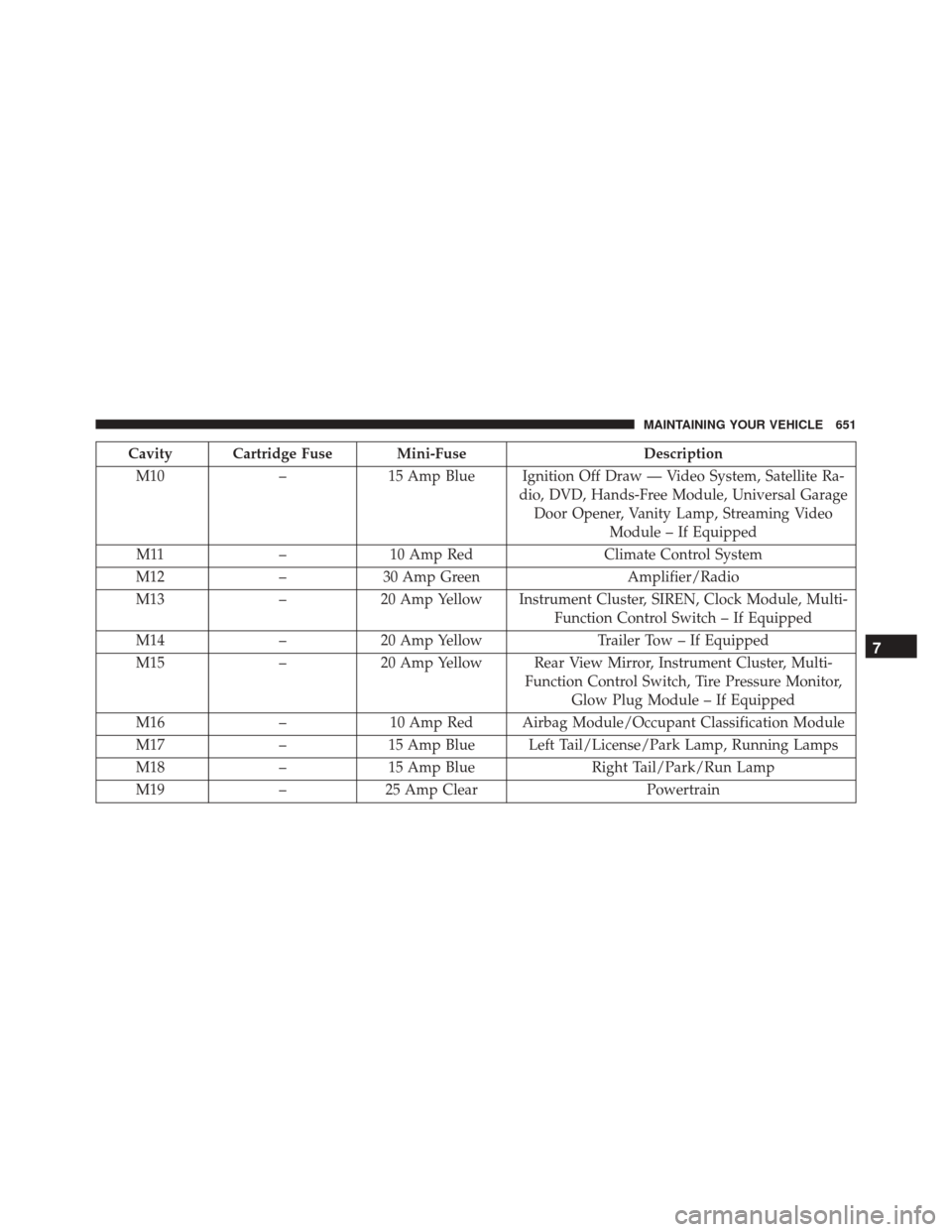
Cavity Cartridge Fuse Mini-FuseDescription
M10 –15 Amp Blue Ignition Off Draw — Video System, Satellite Ra-
dio, DVD, Hands-Free Module, Universal GarageDoor Opener, Vanity Lamp, Streaming Video Module – If Equipped
M11 –10 Amp Red Climate Control System
M12 –30 Amp Green Amplifier/Radio
M13 –20 Amp Yellow Instrument Cluster, SIREN, Clock Module, Multi-
Function Control Switch – If Equipped
M14 –20 Amp Yellow Trailer Tow – If Equipped
M15 –20 Amp Yellow Rear View Mirror, Instrument Cluster, Multi-
Function Control Switch, Tire Pressure Monitor,Glow Plug Module – If Equipped
M16 –10 Amp Red Airbag Module/Occupant Classification Module
M17 –15 Amp Blue Left Tail/License/Park Lamp, Running Lamps
M18 –15 Amp Blue Right Tail/Park/Run Lamp
M19 –25 Amp Clear Powertrain
7
MAINTAINING YOUR VEHICLE 651
Page 689 of 707
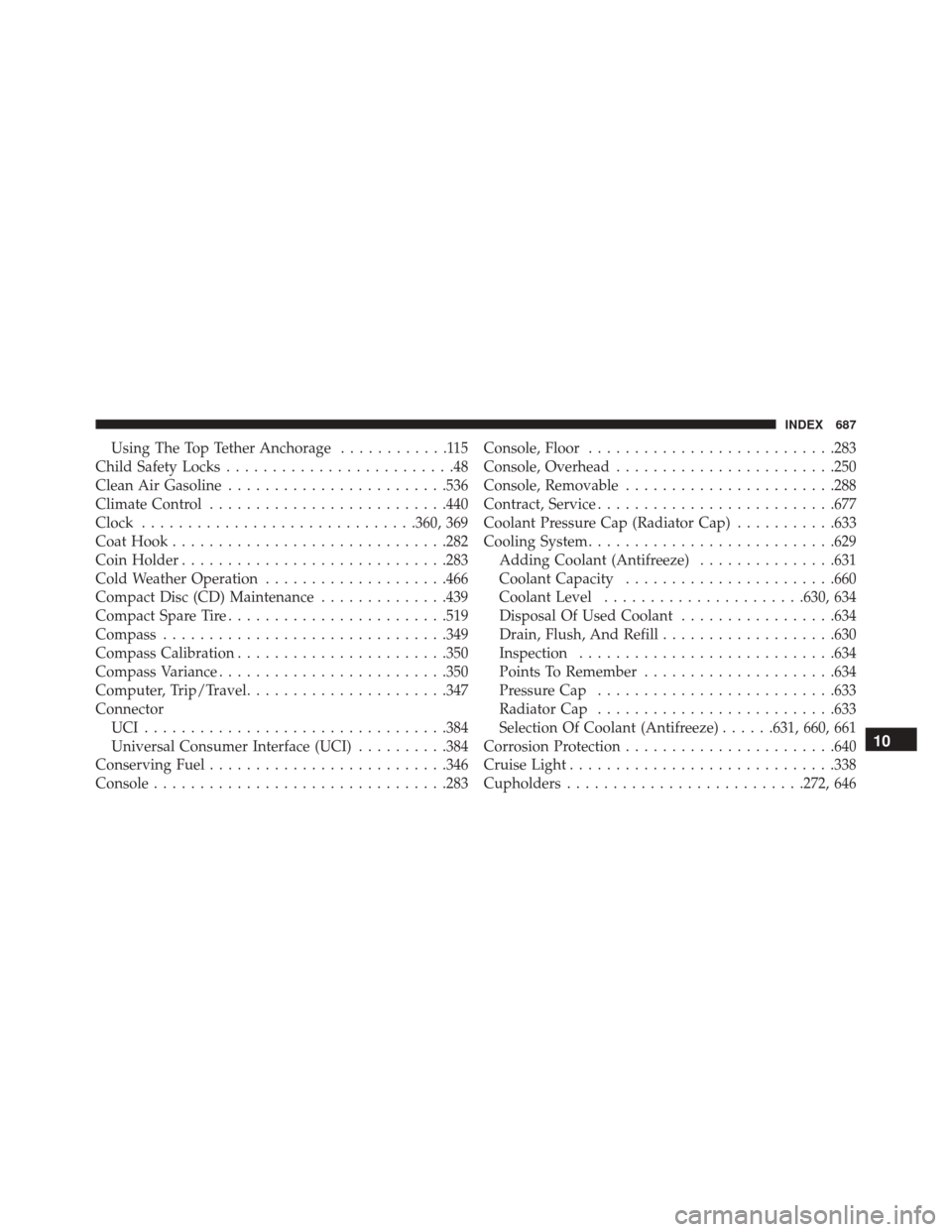
Using The Top Tether Anchorage............115
Child Safety Locks .........................48
Clean Air Gasoline ....................... .536
Climate Control ......................... .440
Clock ............................. .360, 369
Coat Hook ............................. .282
Coin Holder ............................ .283
Cold Weather Operation ....................466
Compact Disc (CD) Maintenance ..............439
Compact Spare Tire ....................... .519
Compass .............................. .349
Compass Calibration ...................... .350
Compass Variance ........................ .350
Computer, Trip/Travel ..................... .347
Connector UCI................................ .384
Universal Consumer Interface (UCI) ..........384
Conserving Fuel ......................... .346
Console ............................... .283Console, Floor
.......................... .283
Console, Overhead ....................... .250
Console, Removable ...................... .288
Contract, Service ......................... .677
Coolant Pressure Cap (Radiator Cap) ...........633
Cooling System .......................... .629
Adding Coolant (Antifreeze) ...............631
Coolant Capacity ...................... .660
Coolant Level ..................... .630, 634
Disposal Of Used Coolant .................634
Drain, Flush, And Refill ...................630
Inspection ........................... .634
Points To Remember .....................634
Pressure Cap ......................... .633
Radiator Cap ......................... .633
Selection Of Coolant (Antifreeze) ......631, 660, 661
Corrosion Protection ...................... .640
Cr
uise Light ............................ .338
Cupholders ......................... .272, 64610
INDEX 687