change time DODGE GRAND CARAVAN 2017 5.G Owner's Guide
[x] Cancel search | Manufacturer: DODGE, Model Year: 2017, Model line: GRAND CARAVAN, Model: DODGE GRAND CARAVAN 2017 5.GPages: 530, PDF Size: 5.01 MB
Page 323 of 530
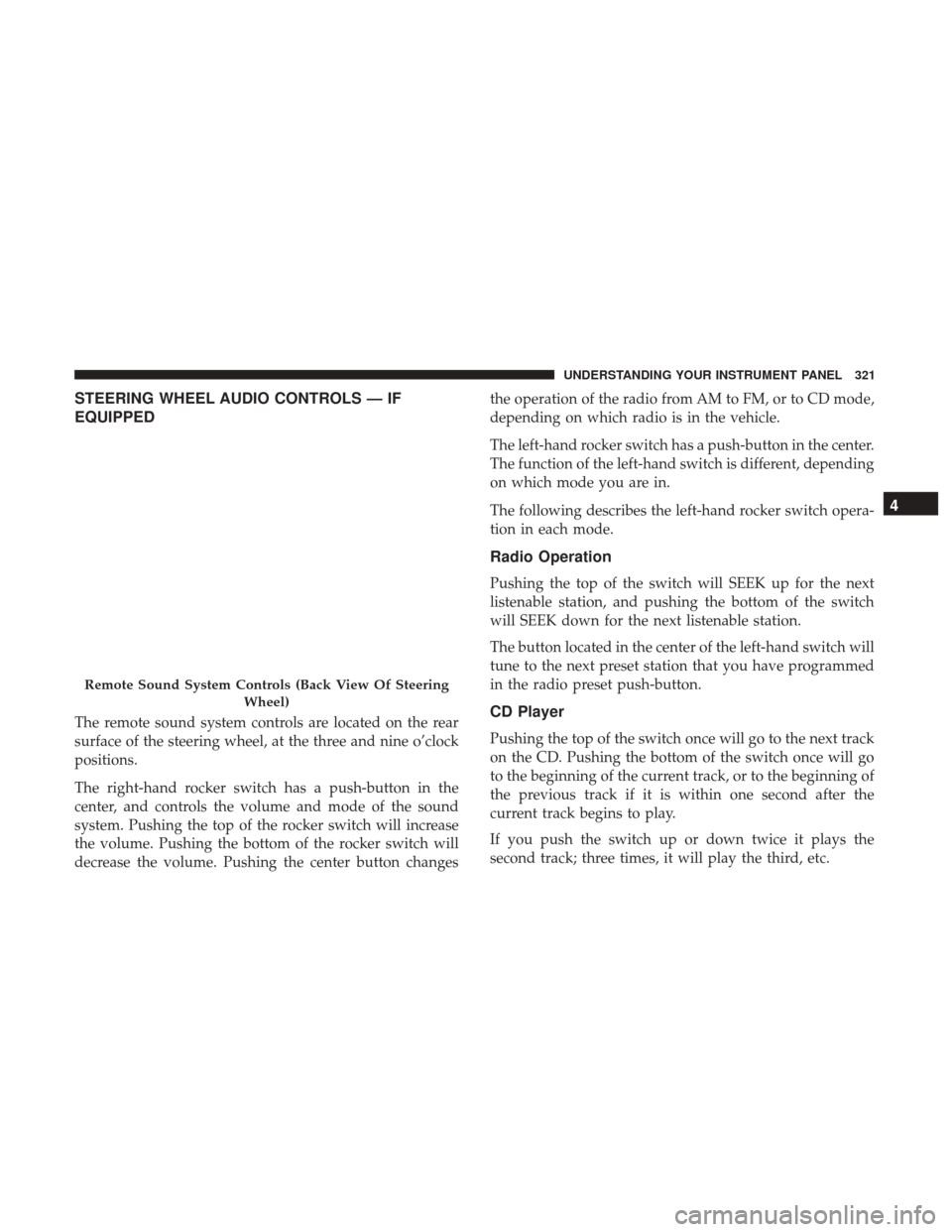
STEERING WHEEL AUDIO CONTROLS — IF
EQUIPPED
The remote sound system controls are located on the rear
surface of the steering wheel, at the three and nine o’clock
positions.
The right-hand rocker switch has a push-button in the
center, and controls the volume and mode of the sound
system. Pushing the top of the rocker switch will increase
the volume. Pushing the bottom of the rocker switch will
decrease the volume. Pushing the center button changesthe operation of the radio from AM to FM, or to CD mode,
depending on which radio is in the vehicle.
The left-hand rocker switch has a push-button in the center.
The function of the left-hand switch is different, depending
on which mode you are in.
The following describes the left-hand rocker switch opera-
tion in each mode.
Radio Operation
Pushing the top of the switch will SEEK up for the next
listenable station, and pushing the bottom of the switch
will SEEK down for the next listenable station.
The button located in the center of the left-hand switch will
tune to the next preset station that you have programmed
in the radio preset push-button.
CD Player
Pushing the top of the switch once will go to the next track
on the CD. Pushing the bottom of the switch once will go
to the beginning of the current track, or to the beginning of
the previous track if it is within one second after the
current track begins to play.
If you push the switch up or down twice it plays the
second track; three times, it will play the third, etc.
Remote Sound System Controls (Back View Of Steering
Wheel)
4
UNDERSTANDING YOUR INSTRUMENT PANEL 321
Page 328 of 530
9. Recirculation Control ButtonPush this button to choose between outside air
intake or recirculation of the air inside the ve-
hicle. An indicator light will illuminate when
you are in Recirculation mode. Only use the
Recirculation mode to temporarily block out any outside
odors, smoke, or dust, and to cool the interior rapidly upon
initial start-up in very hot or humid weather.
NOTE:
•If the Recirculation button is pushed when the system
is in Defrost mode the Recirculation LED indicator will
flash three times to indicate Recirculation mode is not
allowed.
• Continuous use of the Recirculation mode may make
the inside air stuffy and window fogging may occur.
Extended use of this mode is not recommended.
• In cold or damp weather, the use of the Recirculation
mode will cause windows to fog on the inside because
of moisture buildup inside the vehicle. For maximum
defogging, select the outside air position.
• In order to prevent fogging, when the Recirculation
button is pushed and the mode control is set to Panel,
the A/C will engage automatically. •
The A/C can be deselected manually without disturb-
ing the mode control selection.
10. Air Conditioning (A/C) Button
Push and release to change the current setting.
The indicator illuminates when ON.
NOTE: If your air conditioning performance seems lower
than expected, check the front of the A/C condenser
(located in front of the radiator), for an accumulation of dirt
or insects. Clean with a gentle water spray from behind the
radiator and through the condenser. Fabric front fascia
protectors may reduce airflow to the condenser, reducing
air conditioning performance.
11. Floor Mode Button
Air is directed through the floor outlets with a small
amount through the defrost and side window de-
mist outlets.
12. Bi-Level Mode Button
Air is directed through the panel and floor outlets.
326 UNDERSTANDING YOUR INSTRUMENT PANEL
Page 369 of 530
“ESC Activation/Malfunction Indicator Light” also flashes
when TCS is active. If the “ESC Activation/Malfunction
Indicator Light” begins to flash during acceleration, ease
up on the accelerator and apply as little throttle as possible.
Be sure to adapt your speed and driving to the prevailing
road conditions.
NOTE:
•The “ESC Activation/Malfunction Indicator Light” and
the “ESC OFF Indicator Light” come on momentarily
each time the ignition switch is turned ON.
• Each time the ignition is turned ON, the ESC system will
be ON even if it was turned off previously.
• The ESC system will make buzzing or clicking sounds
when it is active. This is normal; the sounds will stop
when ESC becomes inactive following the maneuver
that caused the ESC activation.
The “ESC OFF Indicator Light” indicates the
customer has elected to have the Electronic Sta-
bility Control (ESC) in a reduced mode.Electronic Roll Mitigation (ERM)
This system anticipates the potential for wheel lift by
monitoring the driver ’s steering wheel input and the speed
of the vehicle. When ERM determines that the rate of
change of the steering wheel angle and vehicle’s speed are
sufficient to potentially cause wheel lift, it then applies the
appropriate brake and may also reduce engine power to
lessen the chance that wheel lift will occur. ERM can only
reduce the chance of wheel lift occurring during severe or
evasive driving maneuvers; it cannot prevent wheel lift
due to other factors, such as road conditions, leaving the
roadway, or striking objects or other vehicles.
WARNING!
Many factors, such as vehicle loading, road conditions
and driving conditions, influence the chance that
wheel lift or rollover may occur. ERM cannot prevent
all wheel lift or roll overs, especially those that involve
leaving the roadway or striking objects or other ve-
hicles. The capabilities of an ERM-equipped vehicle
must never be exploited in a reckless or dangerous
manner which could jeopardize the user’s safety or the
safety of others.
5
STARTING AND OPERATING 367
Page 466 of 530
oil level between the MIN and MAX markings on the
dipstick. Adding one quart of oil when the reading is at the
MIN mark will result in a MAX reading on these engines.
CAUTION!
Overfilling or underfilling will cause oil aeration, or
loss of oil pressure. This could damage your engine.
Change Engine Oil
The oil change indicator system will remind you that it is
time to take your vehicle in for scheduled maintenance.
Refer to the “Maintenance Schedule” for further informa-
tion.
NOTE:Under no circumstances should oil change inter-
vals exceed 10,000 miles (16,000 km), twelve months or 350
hours of engine run time, whichever comes first. The 350
hours of engine run or idle time is generally only a concern
for fleet customers.
Engine Oil Selection
For best performance and maximum protection under all
types of operating conditions, the manufacturer only rec-
ommends engine oils that are API Certified and meet the
requirements of FCA Material Standard MS-6395.
American Petroleum Institute (API) Engine Oil
Identification Symbol
This symbol means that the oil has been
certified by the American Petroleum In-
stitute (API). The manufacturer only rec-
ommends API Certified engine oils.
This symbol certifies 0W-20, 5W-20, 0W-
30, 5W-30 and 10W-30 engine oils.
CAUTION!
Do not use chemical flushes in your engine oil as the
chemicals can damage your engine. Such damage is not
covered by the New Vehicle Limited Warranty.
Engine Oil Viscosity (SAE Grade) — 3.6L Engine
MOPAR SAE 5W-20 engine oil approved to FCA Material
Standard MS-6395 such as Pennzoil, Shell Helix or equiva-
lent is recommended for all operating temperatures. This
engine oil improves low temperature starting and vehicle
fuel economy.
464 MAINTAINING YOUR VEHICLE
Page 468 of 530
Engine Air Cleaner Filter
Refer to the “Maintenance Schedule” in the “Maintenance
Schedules” section for the proper maintenance intervals.
WARNING!
The air induction system (air cleaner, hoses, etc.) can
provide a measure of protection in the case of engine
backfire. Do not remove the air induction system (air
cleaner, hoses, etc.) unless such removal is necessary
for repair or maintenance. Make sure that no one is
near the engine compartment before starting the ve-
hicle with the air induction system (air cleaner, hoses,
etc.) removed. Failure to do so can result in serious
personal injury.
Engine Air Cleaner Filter Selection
The quality of replacement engine air cleaner filters varies
considerably. Only high quality filters should be used to
assure most efficient service. MOPAR engine air cleaner
filters are a high quality filter and are recommended.
Exhaust System
The best protection against carbon monoxide entry into the
vehicle body is a properly maintained engine exhaust
system.
If you notice a change in the sound of the exhaust system;
or if the exhaust fumes can be detected inside the vehicle;
or when the underside or rear of the vehicle is damaged;
have an authorized technician inspect the complete ex-
haust system and adjacent body areas for broken, dam-
aged, deteriorated, or mispositioned parts. Open seams or
loose connections could permit exhaust fumes to seep into
the passenger compartment. In addition, have the exhaust
system inspected each time the vehicle is raised for lubri-
cation or oil change. Replace as required.
WARNING!
•Exhaust gases can injure or kill. They contain carbon
monoxide (CO), which is colorless and odorless.
Breathing it can make you unconscious and can even-
tually poison you. To avoid breathing CO, refer to
“Safety Tips/Exhaust Gas” in “Things To Know Before
Starting Your Vehicle” for further information.
(Continued)
466 MAINTAINING YOUR VEHICLE
Page 502 of 530
MAINTENANCE SCHEDULE
Your vehicle is equipped with an automatic oil change
indicator system. The oil change indicator system will
remind you that it is time to take your vehicle in for
scheduled maintenance.
Based on engine operation conditions, the oil change
indicator message will illuminate. This means that service
is required for your vehicle. Operating conditions such as
frequent short-trips, trailer tow, extremely hot or cold
ambient temperatures, and E85 fuel usage will influence
when the “Oil Change Required” message is displayed.
Severe Operating Conditions can cause the change oil
message to illuminate as early as 3,500 miles (5,600 km)
since last reset. Have your vehicle serviced as soon as
possible, within the next 500 miles (805 km).
Your authorized dealer will reset the oil change indicator
message after completing the scheduled oil change. If a
scheduled oil change is performed by someone other than
your authorized dealer, the message can be reset by
referring to the steps described under “Instrument Cluster
Display” in “Understanding Your Instrument Panel” for
further information.NOTE:
Under no circumstances should oil change inter-
vals exceed 10,000 miles (16,000 km), twelve months or 350
hours of engine run time, whichever comes first. The 350
hours of engine run or idle time is generally only a concern
for fleet customers.
Severe Duty All Models
Change Engine Oil at 4,000 miles (6,500 km) if the vehicle
is operated in a dusty and off road environment or is
operated predominately at idle or only very low engine
RPM’s. This type of vehicle use is considered Severe Duty.
Once A Month Or Before A Long Trip:
• Check engine oil level.
• Check windshield washer fluid level.
• Check tire pressure and look for unusual wear or
damage. Rotate tires at the first sign of irregular wear,
even if it occurs before the oil indicator system turns on.
• Check the fluid levels of the coolant reservoir, brake
master cylinder, and power steering and fill as needed.
• Check function of all interior and exterior lights.
500 MAINTENANCE SCHEDULES
Page 505 of 530
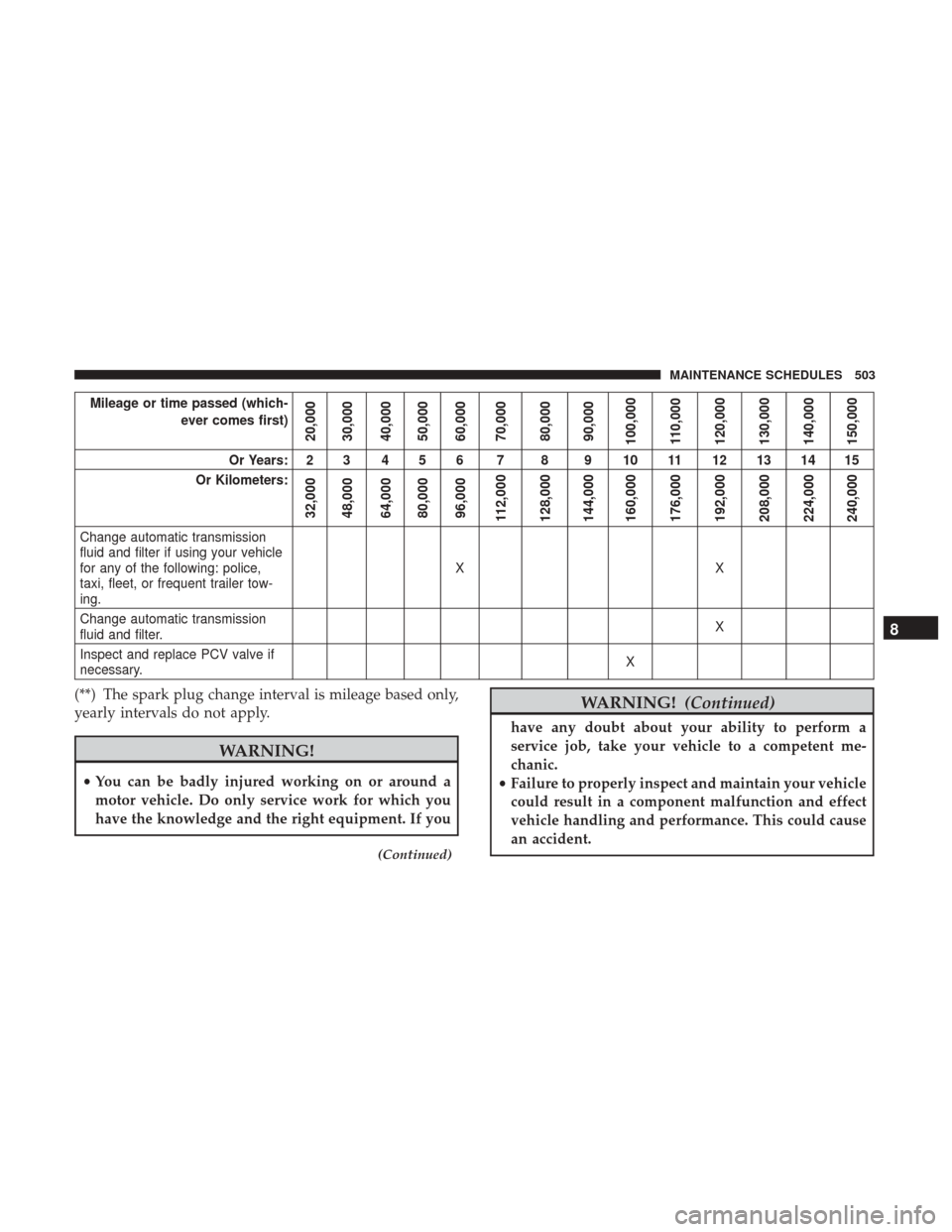
Mileage or time passed (which-ever comes first)
20,000
30,000
40,000
50,000
60,000
70,000
80,000
90,000
100,000
110,000
120,000
130,000
140,000
150,000
Or Years: 2 3 4 5 6 7 8 9 10 11 12 13 14 15
Or Kilometers:
32,000
48,000
64,000
80,000
96,000
112,000
128,000
144,000
160,000
176,000
192,000
208,000
224,000
240,000
Change automatic transmission
fluid and filter if using your vehicle
for any of the following: police,
taxi, fleet, or frequent trailer tow-
ing. XX
Change automatic transmission
fluid and filter. X
Inspect and replace PCV valve if
necessary. X
(**) The spark plug change interval is mileage based only,
yearly intervals do not apply.
WARNING!
•
You can be badly injured working on or around a
motor vehicle. Do only service work for which you
have the knowledge and the right equipment. If you
(Continued)
WARNING! (Continued)
have any doubt about your ability to perform a
service job, take your vehicle to a competent me-
chanic.
• Failure to properly inspect and maintain your vehicle
could result in a component malfunction and effect
vehicle handling and performance. This could cause
an accident.
8
MAINTENANCE SCHEDULES 503
Page 520 of 530
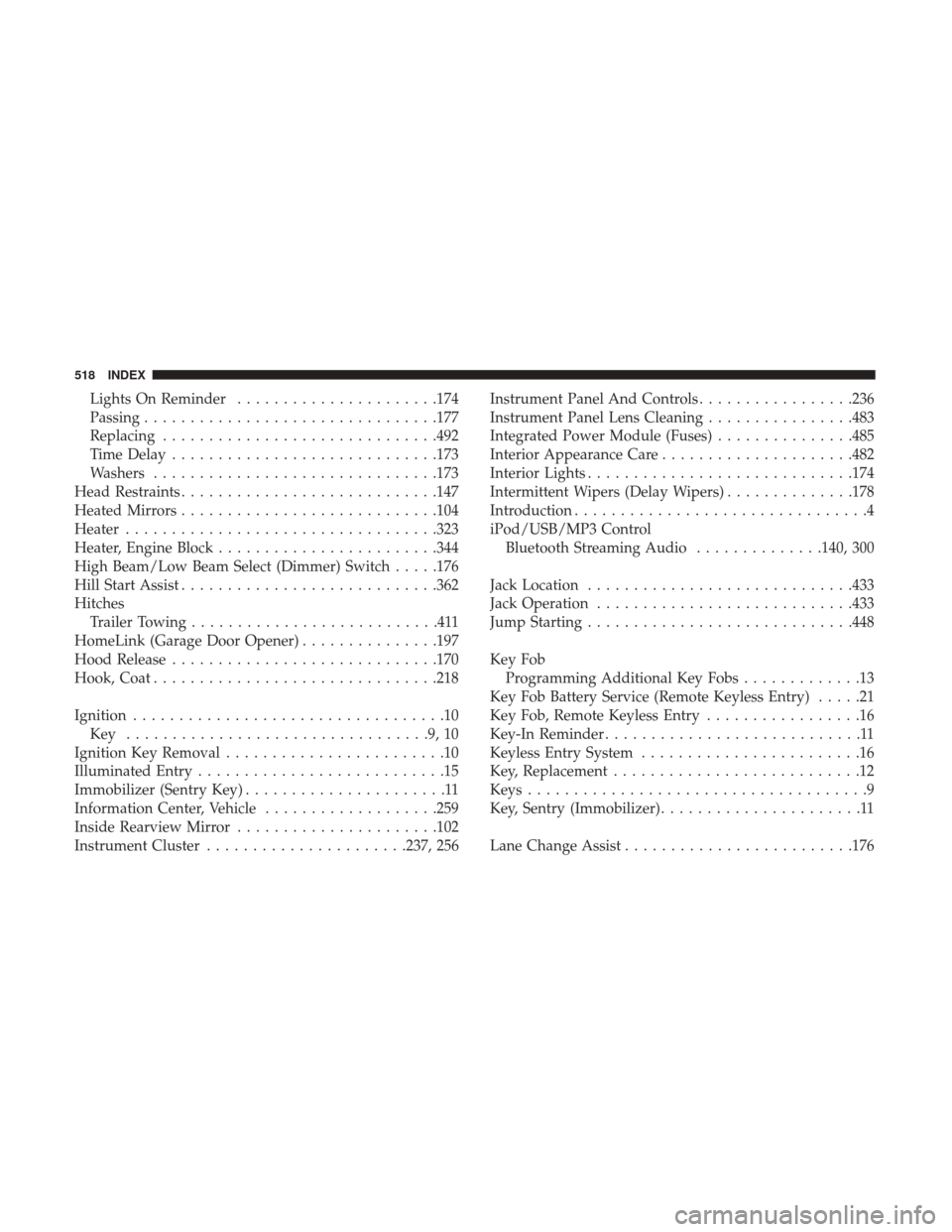
Lights On Reminder..................... .174
Passing ............................... .177
Replacing ............................. .492
Time Delay ............................ .173
Washers ...............................173
Head Restraints ............................147
Heated Mirrors ............................104
Heater ................................. .323
Heater, Engine Block ........................344
High Beam/Low Beam Select (Dimmer) Switch .....176
Hill Start Assist ............................362
Hitches Trailer Towing ...........................411
HomeLink (Garage Door Opener) ...............197
Hood Release ............................ .170
Hook, Coat ...............................218
Ignition ..................................10
Key .................................9,10
Ignition Key Removal ........................10
Illuminated Entry ...........................15
Immobilizer (Sentry Key) ......................11
Information Center, Vehicle ...................259
Inside Rearview Mirror ..................... .102
Instrument Cluster ..................... .237, 256Instrument Panel And Controls
.................236
Instrument Panel Lens Cleaning ................483
Integrated Power Module (Fuses) ...............485
Interior Appearance Care .....................482
Interior Lights ............................ .174
Intermittent Wipers (Delay Wipers) ..............178
Introduction ................................4
iPod/USB/MP3 Control Bluetooth Streaming Audio ..............140, 300
Jack Location ............................ .433
Jack Operation ............................433
Jump Starting ............................ .448
Key Fob Programming Additional Key Fobs .............13
Key Fob Battery Service (Remote Keyless Entry) .....21
Key Fob, Remote Keyless Entry .................1
6
Key-In Reminder ............................11
Keyless Entry System ........................16
Key, Replacement ...........................12
Keys .....................................9
Key, Sentry (Immobilizer) ......................11
Lane Change Assist ........................ .176
518 INDEX