window DODGE GRAND CARAVAN 2019 User Guide
[x] Cancel search | Manufacturer: DODGE, Model Year: 2019, Model line: GRAND CARAVAN, Model: DODGE GRAND CARAVAN 2019Pages: 490, PDF Size: 3.84 MB
Page 72 of 490
IconDescription
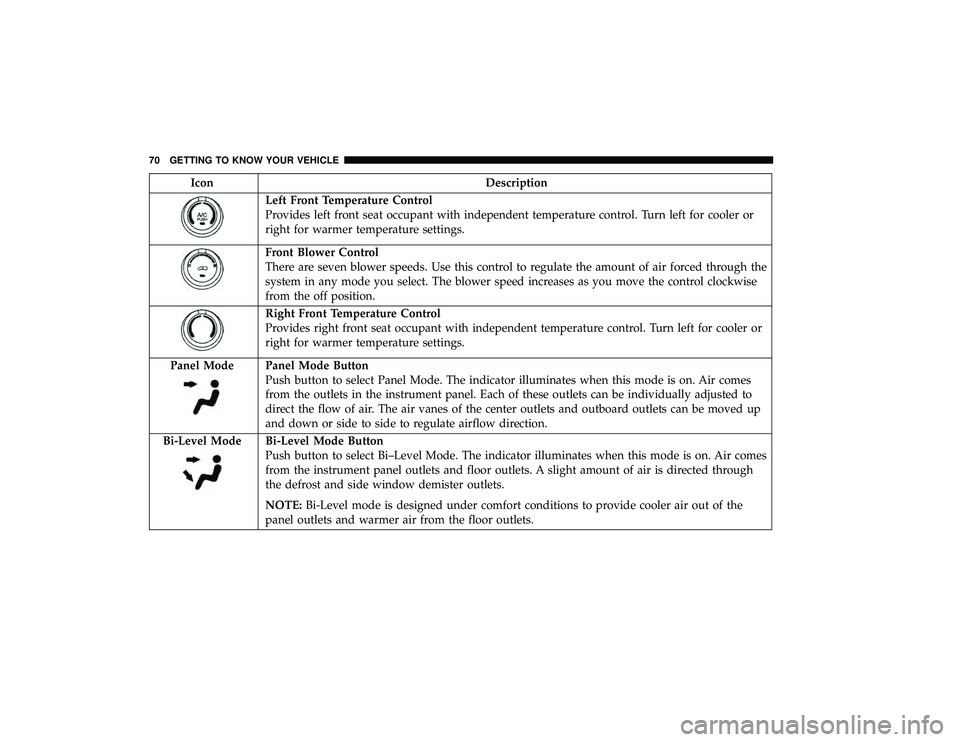
Left Front Temperature Control
Provides left front seat occupant with independent temperature control. Turn left for cooler or
right for warmer temperature settings.
Front Blower Control
There are seven blower speeds. Use this control to regulate the amount of air forced through the
system in any mode you select. The blower speed increases as you move the control clockwise
from the off position.
Right Front Temperature Control
Provides right front seat occupant with independent temperature control. Turn left for cooler or
right for warmer temperature settings.
Panel Mode
Panel Mode Button
Push button to select Panel Mode. The indicator illuminates when this mode is on. Air comes
from the outlets in the instrument panel. Each of these outlets can be individually adjusted to
direct the flow of air. The air vanes of the center outlets and outboard outlets can be moved up
and down or side to side to regulate airflow direction.
Bi-Level Mode
Bi-Level Mode Button
Push button to select Bi–Level Mode. The indicator illuminates when this mode is on. Air comes
from the instrument panel outlets and floor outlets. A slight amount of air is directed through
the defrost and side window demister outlets.
NOTE: Bi-Level mode is designed under comfort conditions to provide cooler air out of the
panel outlets and warmer air from the floor outlets.
70 GETTING TO KNOW YOUR VEHICLE
Page 73 of 490
IconDescription
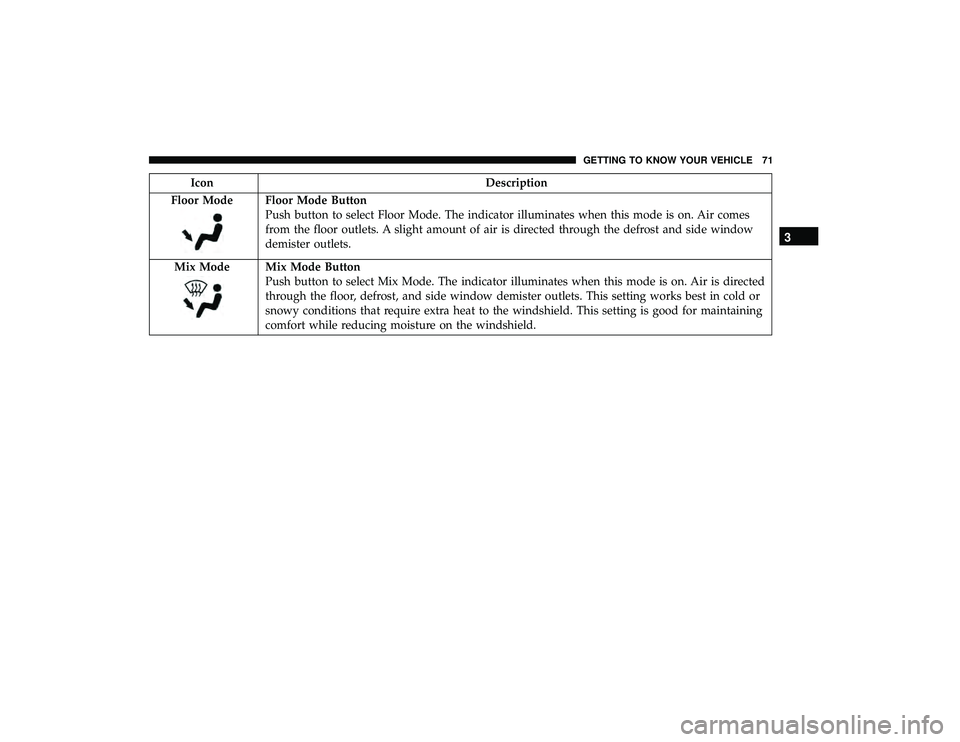
Floor Mode
Floor Mode Button
Push button to select Floor Mode. The indicator illuminates when this mode is on. Air comes
from the floor outlets. A slight amount of air is directed through the defrost and side window
demister outlets.
Mix Mode
Mix Mode Button
Push button to select Mix Mode. The indicator illuminates when this mode is on. Air is directed
through the floor, defrost, and side window demister outlets. This setting works best in cold or
snowy conditions that require extra heat to the windshield. This setting is good for maintaining
comfort while reducing moisture on the windshield.
3
GETTING TO KNOW YOUR VEHICLE 71
Page 79 of 490
IconDescription
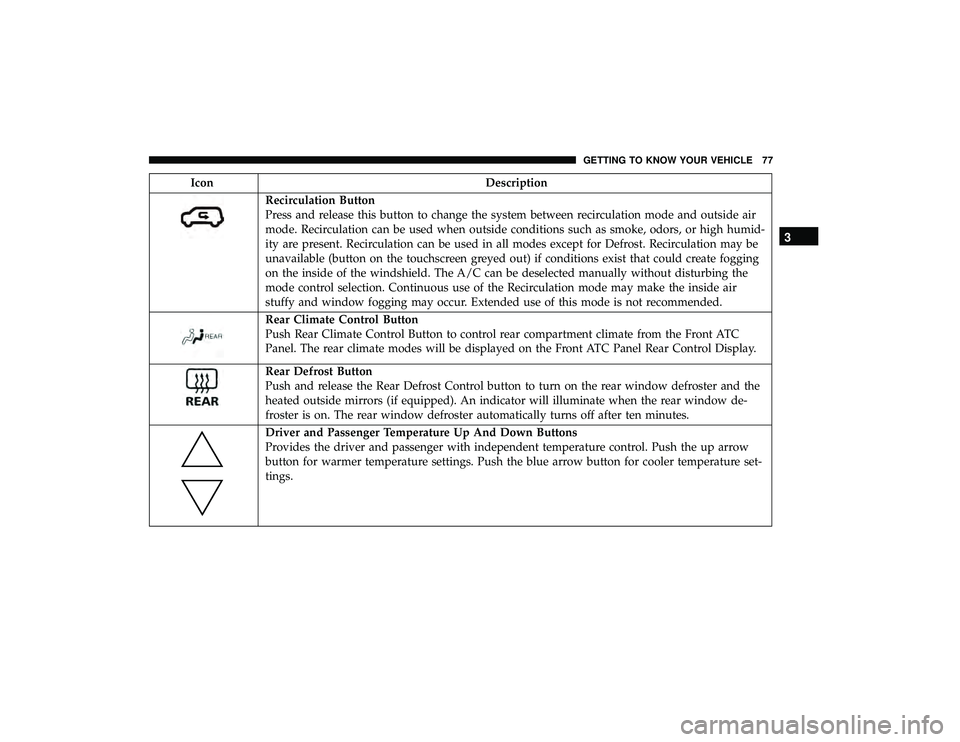
Recirculation Button
Press and release this button to change the system between recirculation mode and outside air
mode. Recirculation can be used when outside conditions such as smoke, odors, or high humid-
ity are present. Recirculation can be used in all modes except for Defrost. Recirculation may be
unavailable (button on the touchscreen greyed out) if conditions exist that could create fogging
on the inside of the windshield. The A/C can be deselected manually without disturbing the
mode control selection. Continuous use of the Recirculation mode may make the inside air
stuffy and window fogging may occur. Extended use of this mode is not recommended.
Rear Climate Control Button
Push Rear Climate Control Button to control rear compartment climate from the Front ATC
Panel. The rear climate modes will be displayed on the Front ATC Panel Rear Control Display.
Rear Defrost Button
Push and release the Rear Defrost Control button to turn on the rear window defroster and the
heated outside mirrors (if equipped). An indicator will illuminate when the rear window de-
froster is on. The rear window defroster automatically turns off after ten minutes.
Driver and Passenger Temperature Up And Down Buttons
Provides the driver and passenger with independent temperature control. Push the up arrow
button for warmer temperature settings. Push the blue arrow button for cooler temperature set-
tings.
3
GETTING TO KNOW YOUR VEHICLE 77
Page 80 of 490
IconDescription
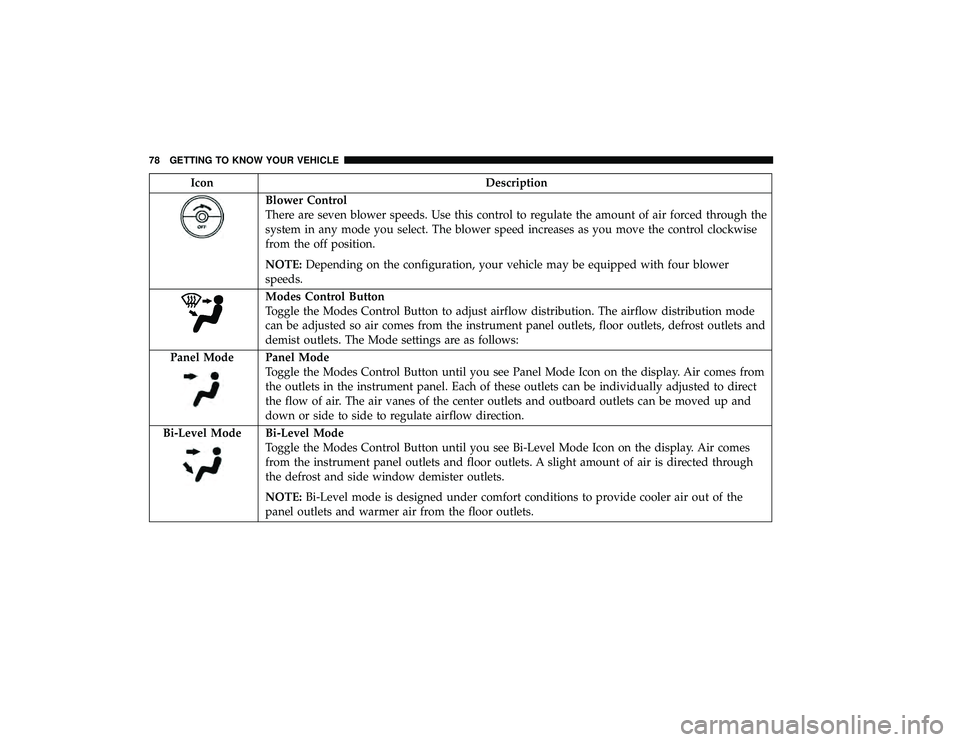
Blower Control
There are seven blower speeds. Use this control to regulate the amount of air forced through the
system in any mode you select. The blower speed increases as you move the control clockwise
from the off position.
NOTE:Depending on the configuration, your vehicle may be equipped with four blower
speeds.
Modes Control Button
Toggle the Modes Control Button to adjust airflow distribution. The airflow distribution mode
can be adjusted so air comes from the instrument panel outlets, floor outlets, defrost outlets and
demist outlets. The Mode settings are as follows:
Panel Mode
Panel Mode
Toggle the Modes Control Button until you see Panel Mode Icon on the display. Air comes from
the outlets in the instrument panel. Each of these outlets can be individually adjusted to direct
the flow of air. The air vanes of the center outlets and outboard outlets can be moved up and
down or side to side to regulate airflow direction.
Bi-Level Mode
Bi-Level Mode
Toggle the Modes Control Button until you see Bi-Level Mode Icon on the display. Air comes
from the instrument panel outlets and floor outlets. A slight amount of air is directed through
the defrost and side window demister outlets.
NOTE: Bi-Level mode is designed under comfort conditions to provide cooler air out of the
panel outlets and warmer air from the floor outlets.
78 GETTING TO KNOW YOUR VEHICLE
Page 81 of 490
IconDescription
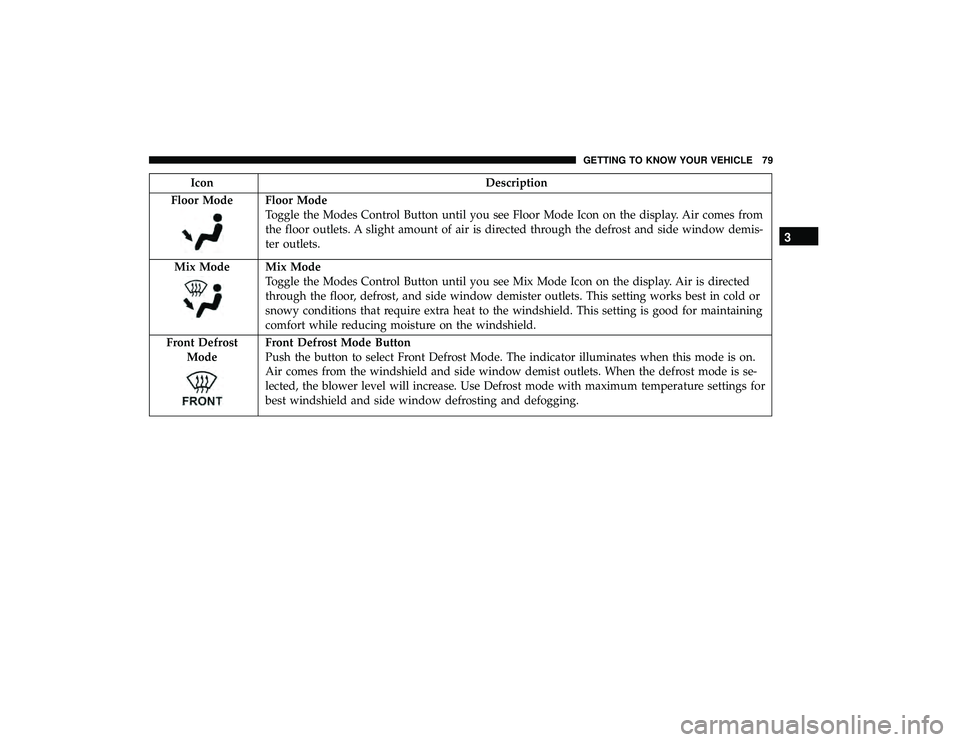
Floor Mode
Floor Mode
Toggle the Modes Control Button until you see Floor Mode Icon on the display. Air comes from
the floor outlets. A slight amount of air is directed through the defrost and side window demis-
ter outlets.
Mix Mode
Mix Mode
Toggle the Modes Control Button until you see Mix Mode Icon on the display. Air is directed
through the floor, defrost, and side window demister outlets. This setting works best in cold or
snowy conditions that require extra heat to the windshield. This setting is good for maintaining
comfort while reducing moisture on the windshield.
Front Defrost Mode
Front Defrost Mode Button
Push the button to select Front Defrost Mode. The indicator illuminates when this mode is on.
Air comes from the windshield and side window demist outlets. When the defrost mode is se-
lected, the blower level will increase. Use Defrost mode with maximum temperature settings for
best windshield and side window defrosting and defogging.
3
GETTING TO KNOW YOUR VEHICLE 79
Page 87 of 490
Climate Control Functions
A/C (Air Conditioning)
The Air Conditioning (A/C) button allows the operator to
manually activate or deactivate the air conditioning sys-
tem. When the air conditioning system is turned on, cool
dehumidified air will flow through the outlets into the
cabin. For improved fuel economy, press the A/C button to
turn off the air conditioning and manually adjust the
blower and airflow mode settings. Also, make sure to select
only Panel, Bi-Level, or Floor modes.
NOTE:
•For Manual Climate Controls, if the system is in Mix,
Floor or Defrost Mode, the A/C can be turned off, but
the A/C system shall remain active to prevent fogging of
the windows.
• If fog or mist appears on the windshield or side glass,
select Defrost mode, and increase blower speed if
needed.
• If your air conditioning performance seems lower than
expected, check the front of the A/C condenser (located
in front of the radiator), for an accumulation of dirt or
insects. Clean with a gentle water spray from the front of
the radiator and through the condenser. MAX A/C
MAX A/C sets the control for maximum cooling perfor-
mance.
Press and release to toggle between MAX A/C and the
prior settings. The button illuminates when MAX A/C is
on.
In MAX A/C, the blower level and mode position can be
adjusted to desired user settings. Pressing other settings
will cause the MAX A/C operation to switch to the selected
setting and MAX A/C to exit.
Recirculation
In cold weather, use of Recirculation mode may lead to
excessive window fogging. The Recirculation feature may
be unavailable (button on the touchscreen greyed out) if
conditions exist that could create fogging on the inside of
the windshield.
On systems with Manual Climate Controls, if equipped,
the Recirculation mode is not allowed in Defrost mode to
improve window clearing operation. Recirculation is dis-
abled automatically if this mode is selected. Attempting to
use Recirculation while in this mode causes the LED in the
control button to blink and then turns off.
3
GETTING TO KNOW YOUR VEHICLE 85
Page 89 of 490
Summer Operation
The engine cooling system must be protected with a
high-quality antifreeze coolant to provide proper corrosion
protection and to protect against engine overheating. OAT
coolant (conforming to MS.90032) is recommended. Refer
to “Fluids And Lubricants” in “Technical Specifications”
for proper coolant selection.
Winter Operation
To ensure the best possible heater and defroster perfor-
mance, make sure the engine cooling system is functioning
properly and the proper amount, type, and concentration
of coolant is used. Refer to “Fluids And Lubricants” in
“Technical Specifications” for proper coolant selection. Use
of the air Recirculation mode during Winter months is not
recommended, because it may cause window fogging.
Vacation/Storage
Before you store your vehicle, or keep it out of service (i.e.,
vacation) for two weeks or more, run the air conditioning
system at idle for about five minutes, in fresh air with the
blower setting on high. This will ensure adequate system
lubrication to minimize the possibility of compressor dam-
age when the system is started again.
Window Fogging
Vehicle windows tend to fog on the inside in mild, rainy,
and/or humid weather. To clear the windows, select De-
frost or Mix mode and increase the front blower speed. Do
not use the Recirculation mode without A/C for long
periods, as fogging may occur.
CAUTION!
Failure to follow these cautions can cause damage to
the heating elements:
•Use care when washing the inside of the rear win-
dow. Do not use abrasive window cleaners on the
interior surface of the window. Use a soft cloth and a
mild washing solution, wiping parallel to the heat-
ing elements. Labels can be peeled off after soaking
with warm water.
• Do not use scrapers, sharp instruments, or abrasive
window cleaners on the interior surface of the win-
dow.
• Keep all objects a safe distance from the window.
3
GETTING TO KNOW YOUR VEHICLE 87
Page 91 of 490
WINDOWS
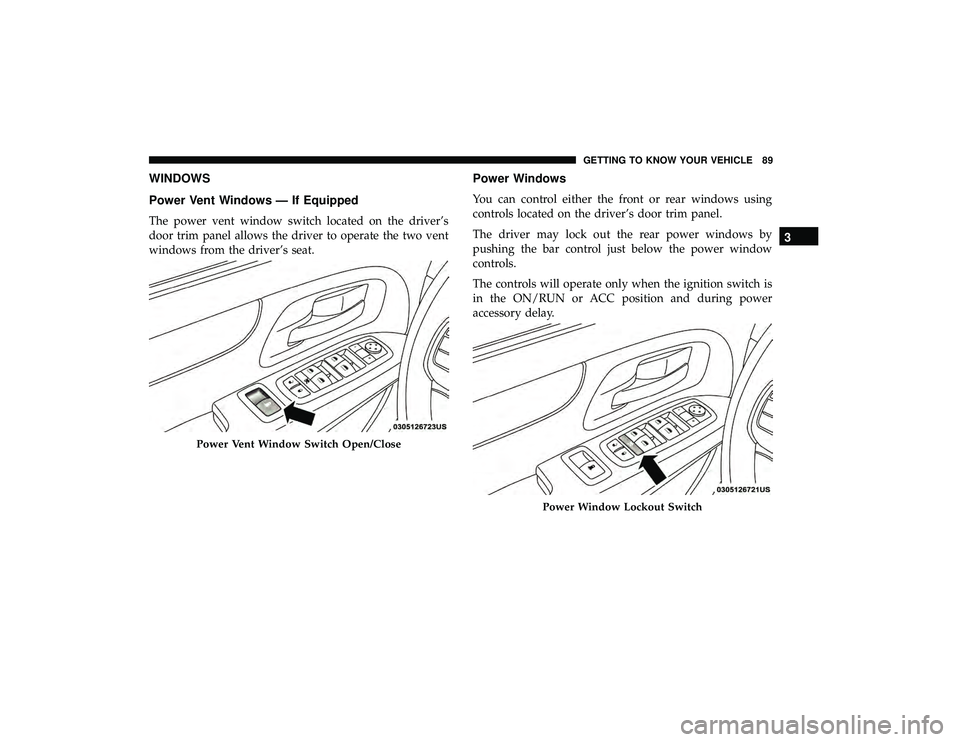
Power Vent Windows — If Equipped
The power vent window switch located on the driver’s
door trim panel allows the driver to operate the two vent
windows from the driver’s seat.
Power Windows
You can control either the front or rear windows using
controls located on the driver’s door trim panel.
The driver may lock out the rear power windows by
pushing the bar control just below the power window
controls.
The controls will operate only when the ignition switch is
in the ON/RUN or ACC position and during power
accessory delay.
Power Vent Window Switch Open/Close
Power Window Lockout Switch
3
GETTING TO KNOW YOUR VEHICLE 89
Page 92 of 490
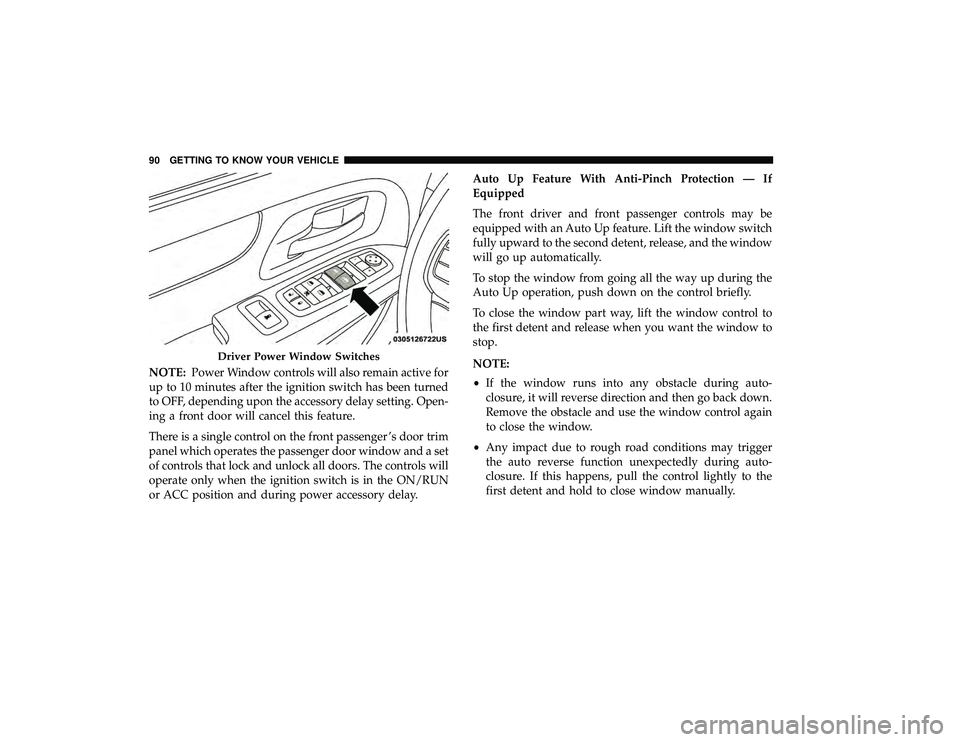
NOTE:Power Window controls will also remain active for
up to 10 minutes after the ignition switch has been turned
to OFF, depending upon the accessory delay setting. Open-
ing a front door will cancel this feature.
There is a single control on the front passenger ’s door trim
panel which operates the passenger door window and a set
of controls that lock and unlock all doors. The controls will
operate only when the ignition switch is in the ON/RUN
or ACC position and during power accessory delay. Auto Up Feature With Anti-Pinch Protection — If
Equipped
The front driver and front passenger controls may be
equipped with an Auto Up feature. Lift the window switch
fully upward to the second detent, release, and the window
will go up automatically.
To stop the window from going all the way up during the
Auto Up operation, push down on the control briefly.
To close the window part way, lift the window control to
the first detent and release when you want the window to
stop.
NOTE:
•
If the window runs into any obstacle during auto-
closure, it will reverse direction and then go back down.
Remove the obstacle and use the window control again
to close the window.
• Any impact due to rough road conditions may trigger
the auto reverse function unexpectedly during auto-
closure. If this happens, pull the control lightly to the
first detent and hold to close window manually.
Driver Power Window Switches
90 GETTING TO KNOW YOUR VEHICLE
Page 93 of 490
WARNING!
There is no anti-pinch protection when the window is
almost closed. To avoid personal injury be sure to clear
your arms, hands, fingers and all objects from the
window path before closing.
Auto Up Reset — If Equipped
To reactivate the Auto Up feature, perform the following
steps after vehicle power is restored:
1. Pull the window control up to close the window com- pletely and continue to hold the control up for an
additional two seconds after the window is closed.
2. Push the window control down firmly to the second detent to open the window completely and continue to
hold the control down for an additional two seconds
after the window is fully open.
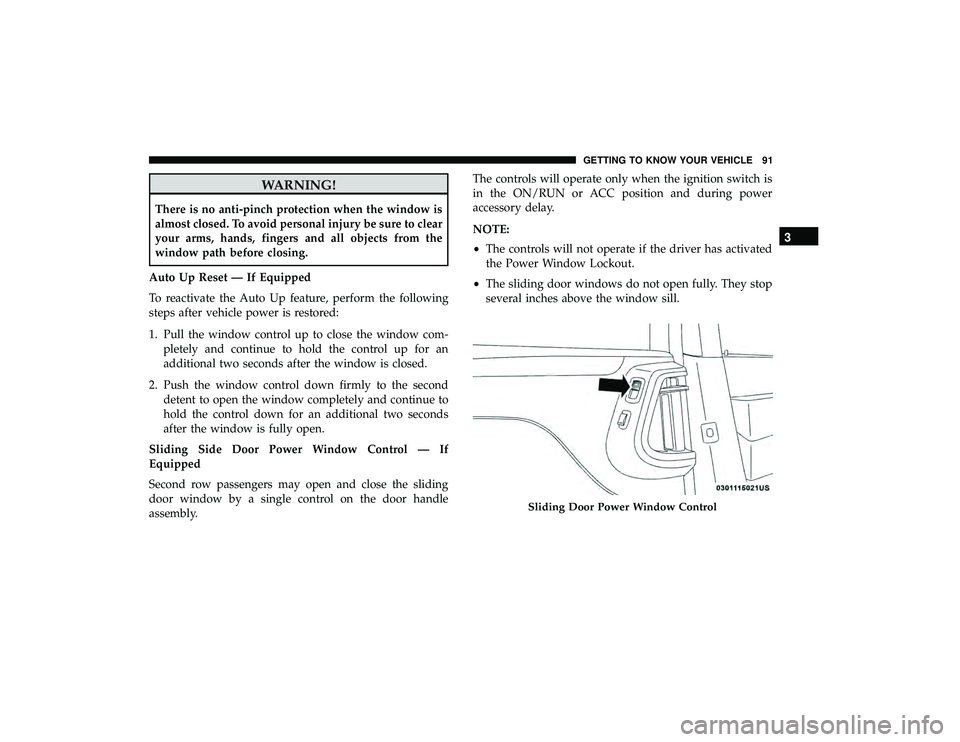
Sliding Side Door Power Window Control — If
Equipped
Second row passengers may open and close the sliding
door window by a single control on the door handle
assembly. The controls will operate only when the ignition switch is
in the ON/RUN or ACC position and during power
accessory delay.
NOTE:
•
The controls will not operate if the driver has activated
the Power Window Lockout.
• The sliding door windows do not open fully. They stop
several inches above the window sill.
Sliding Door Power Window Control
3
GETTING TO KNOW YOUR VEHICLE 91