warning DODGE GRAND CARAVAN 2019 Owners Manual
[x] Cancel search | Manufacturer: DODGE, Model Year: 2019, Model line: GRAND CARAVAN, Model: DODGE GRAND CARAVAN 2019Pages: 490, PDF Size: 3.84 MB
Page 405 of 490
CYBERSECURITY
Your vehicle may be a connected vehicle and may be
equipped with both wired and wireless networks. These
networks allow your vehicle to send and receive informa-
tion. This information allows systems and features in your
vehicle to function properly.
Your vehicle may be equipped with certain security fea-
tures to reduce the risk of unauthorized and unlawful
access to vehicle systems and wireless communications.
Vehicle software technology continues to evolve over time
and FCA US LLC, working with its suppliers, evaluates
and takes appropriate steps as needed. Similar to a com-
puter or other devices, your vehicle may require software
updates to improve the usability and performance of your
systems or to reduce the potential risk of unauthorized and
unlawful access to your vehicle systems.
The risk of unauthorized and unlawful access to your
vehicle systems may still exist, even if the most recent
version of vehicle software (such as Uconnect software) is
installed.
WARNING!
•It is not possible to know or to predict all of the
possible outcomes if your vehicle’s systems are
breached. It may be possible that vehicle systems,
including safety related systems, could be impaired
or a loss of vehicle control could occur that may
result in an accident involving serious injury or
death.
• ONLY insert media (e.g., USB, SD card, or CD) into
your vehicle if it came from a trusted source. Media
of unknown origin could possibly contain malicious
software, and if installed in your vehicle, it may
increase the possibility for vehicle systems to be
breached.
• As always, if you experience unusual vehicle behav-
ior, take your vehicle to your nearest authorized
dealer immediately.
10
MULTIMEDIA 403
Page 411 of 490
•Turning it clockwise (forward) and counterclockwise
(backward) scrolls through the lists, displaying the track
detail on the radio display. Once the track to be played
is highlighted on the radio display, push the TUNE
control knob to select and start playing the track. Turn-
ing the TUNEcontrol knob fast will scroll through the
list faster. During fast scroll, a slight delay in updating
the information on the radio display may be noticeable.
During all List modes, the iPod displays all lists in “wrap-
around” mode. So if the track is at the bottom of the list,
just turn the wheel backward (counterclockwise) to get to
the track faster.
In List mode, the radio PRESETbuttons are used as
shortcuts to the following lists on the iPod or external USB
device:
• Preset 1 – Playlists
• Preset 2 – Artists
• Preset 3 – Albums
• Preset 4 – Genres
• Preset 5 – Audiobooks
• Preset 6 – Podcasts Pushing a PRESET button will display the current list on
the top line and the first item in that list on the second line.
To exit List mode without selecting a track, push the same
PRESET
button again to go back to Play mode.
LIST button: The LISTbutton will display the top level
menu of the iPod or external USB device.
• Turn the TUNEcontrol knob to list the top-menu item to
be selected and push the TUNEcontrol knob. This will
display the next sub-menu list item on the audio device,
then follow the same steps to go to the desired track in
that list. Not all iPod or external USB device sub-menu
levels are available on this system.
MUSIC TYPE button: TheMUSIC TYPE button is another
shortcut button to the genre listing on your audio device.
WARNING!
Do not plug in or remove the iPod or external USB
device while driving. Failure to follow this warning
could result in an accident.
10
MULTIMEDIA 409
Page 426 of 490
3. To change the current audio mode, push the remotecontrol’s MODE button. This will automatically select
the next available audio mode without using the
MODE/SOURCE Select menu.
If the screen is closed and there is no audio heard, verify
that the headphones are turned on (the ON indicator is
illuminated) and the headphone selector switch is on the
desired channel. If the headphones are turned on, push the
remote control’s power button to turn audio on. If audio is
still not heard, check that fully charged batteries are
installed in the headphones.
Disc Formats
The DVD player is capable of playing the following types
of discs (12 cm or 8 cm diameter):
• DVD-Video discs (MPEG-2 video compression) (see
notes about DVD Region Codes)
• DVD-Audio discs (2 channel audio output only)
• Audio Compact Discs (CDs)
• CD Data discs with MP3 and WMA compressed audio
format files
• Video CDs (MPEG-1 video compression) DVD Region Codes
The DVD player and many DVD Discs are coded by
geographic region. These region codes must match in order
for the disc to play. If the region code for the DVD does not
match the region code for the player, the disc will stop
playing and a warning will be displayed.
DVD Audio Support
When a DVD-Audio disc is inserted in the DVD player, the
DVD-Audio title on the disc is played by default (most
DVD-Audio discs also have a Video title, but the Video title
is ignored). All multi-channel program material is auto-
matically mixed down to two channels, which may result
in a lowered apparent volume level. If you increase the
volume level to account for this change in level, remember
to lower the volume before changing the disc or to another
mode.
Recorded Discs
The DVD player will play CD-R and CD-RW discs re-
corded in CD-Audio or Video-CD format, or as a CD-ROM
containing MP3, WMA. The player will also play DVD-
Video content recorded to a DVD-R or DVD-RW disc.
DVD-ROM discs (either pressed or recorded) are not
supported.
424 MULTIMEDIA
Page 435 of 490
NOTE:The Uconnect Phone requires a mobile phone
equipped with the Bluetooth “Hands-Free Profile,” Version
0.96 or higher. See the Uconnect website for supported
phones. For Uconnect customer support:
• U.S. residents - visit UconnectPhone.com or call 1-877-
855-8400 (24 hours a day 7 days a week).
• Canadian Residents - visit UconnectPhone.com or call
1-800-465-2001 (English) or 1-800-387-9983 (French).
• Mon. – Fri., 8:00 am – 8:00 pm, ET
• Sat., 9:00 am – 5:00 pm, ET
• Sun., Closed
Uconnect Phone allows you to transfer calls between the
system and your mobile phone as you enter or exit your
vehicle and enables you to mute the system’s microphone
for private conversation.
The Uconnect Phone is driven through your Bluetooth
“Hands-Free Profile” mobile phone. Uconnect features
Bluetooth technology - the global standard that enables
different electronic devices to connect to each other with-
out wires or a docking station, so Uconnect Phone works
no matter where you stow your mobile phone (be it your
purse, pocket, or briefcase), as long as your phone is turned
on and has been paired to the vehicle’s Uconnect Phone.
The Uconnect Phone allows up to seven mobile phones to be linked to the system. Only one linked (or paired) mobile
phone can be used with the system at a time. The system is
available in English, Spanish, or French languages.
WARNING!
ALWAYS drive safely with your hands on the wheel.
You have full responsibility and assume all risks
related to the use of the Uconnect features and appli-
cations in this vehicle. Only use Uconnect when it is
safe to do so. Failure to do so may result in an accident
involving serious injury or death.
Uconnect Phone Button The radio or steering wheel controls (if
equipped) contain the two control buttons
(Uconnect Phone
button and Voice Com-
mand
button) that enables you to access the
system. When you push the button you hear the word
Uconnect followed by a BEEP. The beep is your signal to
give a command.
NOTE: The driver side upper windshield trim contains the
microphone for the Uconnect Phone.
10
MULTIMEDIA 433
Page 436 of 490
Voice Command Button
WARNING!
Any voice commanded system should be used only in
safe driving conditions following all applicable laws.
Your attention should be focused on safely operating
the vehicle. Failure to do so may result in a collision
causing serious injury or death.Actual button location may vary with the radio.
The individual buttons are described in the “Op-
eration” section.
The Uconnect Phone can be used with any Hands-Free
Profile certified Bluetooth mobile phone. See the Uconnect
website for supported phones. Refer to your mobile service
provider or the phone manufacturer for details.
The Uconnect Phone is fully integrated with the vehicle’s
audio system. The volume of the Uconnect Phone can be
adjusted either from the radio volume control knob or from
the steering wheel radio control (right switch), if so
equipped. The Uconnect display will be used for visual prompts from
the Uconnect Phone such as “CELL” or caller ID on certain
radios.Operation
Voice commands can be used to operate the Uconnect
Phone and to navigate through the Uconnect Phone menu
structure. Voice commands are required after most
Uconnect Phone prompts. You will be prompted for a
specific command and then guided through the available
options.
•
Prior to giving a voice command, one must wait for the
beep, which follows the “Ready” prompt or another
prompt.
• For certain operations, compound commands can be
used. For example, instead of saying “Setup” and then
“Phone Pairing,” the following compound command
can be said: “Setup Phone Pairing.”
• For each feature explanation in this section, only the
compound form of the voice command is given. You can
also break the commands into parts and say each part of
the command when you are asked for it. For example,
you can use the compound form voice command
434 MULTIMEDIA
Page 445 of 490
NOTE:After every Uconnect Phone language change
operation, only the language-specific 32-name phonebook
is usable. The paired phone name is not language-specific
and usable across all languages.
Emergency Assistance
If you are in an emergency and the mobile phone is
reachable:
• Pick up the phone and manually dial the emergency
number for your area.
If the phone is not reachable and the Uconnect Phone is
operational, you may reach the emergency number as
follows:
• Push the Phone
button to begin.
•After the “Ready” prompt and the following beep, say
“Emergency” and the Uconnect Phone will instruct the
paired mobile phone to call the emergency number. NOTE:
•
The emergency number dialed is based on the country
where the vehicle is purchased (911 for the U.S. and
Canada and 060 for Mexico). The number dialed may
not be applicable with the available mobile service and
area.
• If supported, this number may be programmable on
some systems. To do this, push the Phone
button and
say “Setup,” followed by “Emergency.”
• The Uconnect Phone does slightly lower your chances of
successfully making a phone call as to that for the
mobile phone directly.
WARNING!
To use your Uconnect Phone System in an emergency,
your mobile phone must be:
• Turned on.
• Paired to the Uconnect System.
• Have network coverage.10
MULTIMEDIA 443
Page 460 of 490
NOTE:
•This equipment has been tested and found to comply
with the limits for a Class B digital device, pursuant to
Part 15 of the FCC Rules. These limits are designed to
provide reasonable protection against harmful interfer-
ence in a residential installation. This equipment gener-
ates, uses and can radiate radio frequency energy and, if
not installed and used in accordance with the instruc-
tions, may cause harmful interference to radio commu-
nications. However, there is no guarantee that interfer-
ence will not occur in a particular installation.
• If this equipment does cause harmful interference to
radio or television reception, which can be determined
by turning the equipment off and on, the user is encour-
aged to try to correct the interference by one or more of
the following measures:
1. Increase the separation between the equipment and receiver.
2. Consult an authorized dealer or an experienced radio technician for help.VOICE COMMAND — IF EQUIPPED
Voice Command System Operation
The Uconnect Voice Command system allows
you to control your AM, FM radio, disk player,
USB mass storage class device, iPod family of
devices, Bluetooth Streaming Audio Device, sat-
ellite radio, and a memo recorder.
NOTE: Take care to speak into the Voice Interface System
as calmly and normally as possible. The ability of the Voice
Interface System to recognize user voice commands may be
negatively affected by rapid speaking or a raised voice
level.
WARNING!
Any voice commanded system should be used only in
safe driving conditions following all applicable laws.
Your attention should be focused on safely operating
the vehicle. Failure to do so may result in a collision
causing serious injury or death.
When you push the Voice Command
button, you will
hear a beep. The beep is your signal to give a command.
458 MULTIMEDIA
Page 471 of 490
WARNING!
Engine exhaust (internal combustion engines only),
some of its constituents, and certain vehicle compo-
nents contain, or emit, chemicals known to the State of
California to cause cancer and birth defects, or other
reproductive harm. In addition, certain fluids con-
tained in vehicles and certain products of component
wear contain, or emit, chemicals known to the State of
California to cause cancer and birth defects, or other
reproductive harm.
WARRANTY INFORMATION
See the Warranty Information Booklet for the terms and
provisions of FCA US LLC warranties applicable to this
vehicle and market.
MOPAR PARTS
Mopar fluids, lubricants, parts, and accessories are avail-
able from an authorized dealer. They are recommended for
your vehicle in order to help keep the vehicle operating at
its best.
REPORTING SAFETY DEFECTS
In The 50 United States And Washington, D.C.
If you believe that your vehicle has a defect that could
cause a crash or cause injury or death, you should
immediately inform the National Highway Traffic
Safety Administration (NHTSA) in addition to notifying
FCA US LLC.
If NHTSA receives similar complaints, it may open an
investigation, and if it finds that a safety defect exists in
a group of vehicles, it may order a recall and remedy
campaign. However, NHTSA cannot become involved
in individual problems between you, an authorized
dealer or FCA US LLC.
To contact NHTSA, you may call the Vehicle Safety
Hotline toll free at 1-888-327-4236 (TTY: 1-800-424-9153);
or go to http://www.safercar.gov; or write to: Admin-
istrator, NHTSA, 1200 New Jersey Avenue, SE., West
Building, Washington, D.C. 20590. You can also obtain
other information about motor vehicle safety from
http://www.safercar.gov.11
CUSTOMER ASSISTANCE 469
Page 474 of 490
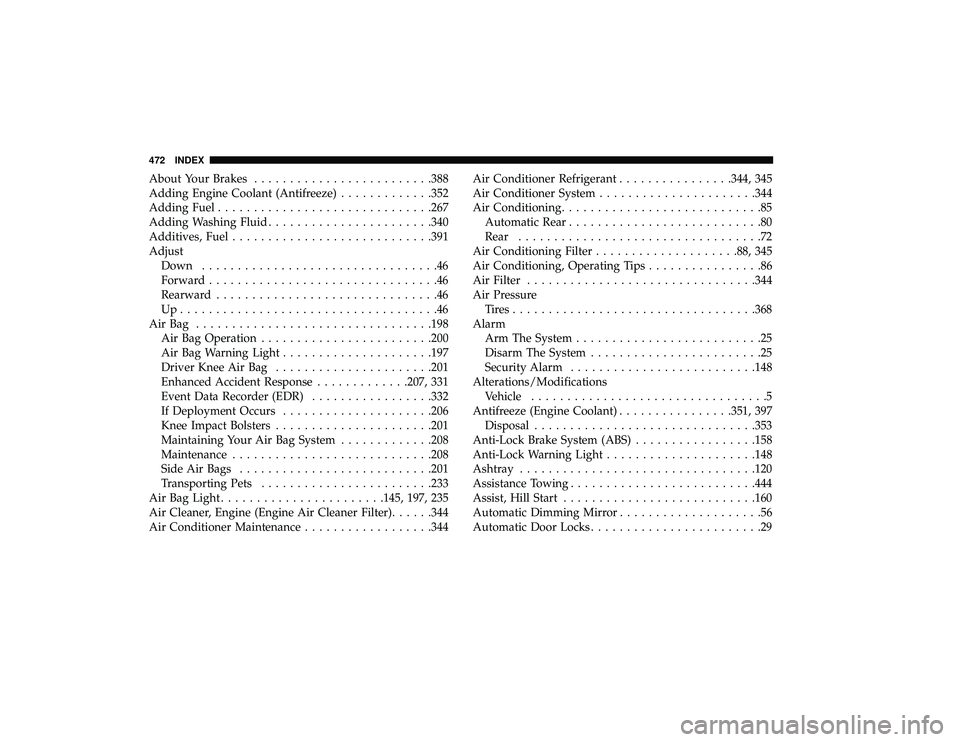
About Your Brakes........................ .388
Adding Engine Coolant (Antifreeze) .............352
Adding Fuel ............................. .267
Adding Washing Fluid ...................... .340
Additives, Fuel ........................... .391
Adjust Down .................................46
Forward ................................46
Rearward ...............................46
Up....................................46
AirBag ................................ .198
Air Bag Operation ....................... .200
Air Bag Warning Light .................... .197
Driver Knee Air Bag ..................... .201
Enhanced Accident Response .............207, 331
Event Data Recorder (EDR) .................332
If Deployment Occurs .................... .206
Knee Impact Bolsters ..................... .201
Maintaining Your Air Bag System .............208
Maintenance ........................... .208
Side Air Bags .......................... .201
Transporting Pets ....................... .233
Air Bag Light ...................... .145, 197, 235
Air Cleaner, Engine (Engine Air Cleaner Filter) ......344
Air Conditioner Maintenance ..................344Air Conditioner Refrigerant
................344, 345
Air Conditioner System ..................... .344
Air Conditioning ............................85
Automatic Rear ...........................80
Rear ..................................72
Air Conditioning Filter ................... .88, 345
Air Conditioning, Operating Tips ................86
Air Filter ............................... .344
Air Pressure Tires................................. .368
Alarm Arm The System ..........................25
Disarm The System ........................25
Security Alarm ......................... .148
Alterations/Modifications Vehicle .................................5
Antifreeze (Engine Coolant) ................351,
397
Disposal .............................. .353
Anti-Lock Brake System (ABS) .................158
Anti-Lock Warning Light .................... .148
Ashtray ................................ .120
Assistance Towing ......................... .444
Assist, Hill Start .......................... .160
Automatic Dimming Mirror ....................56
Automatic Door Locks ........................29
472 INDEX
Page 475 of 490
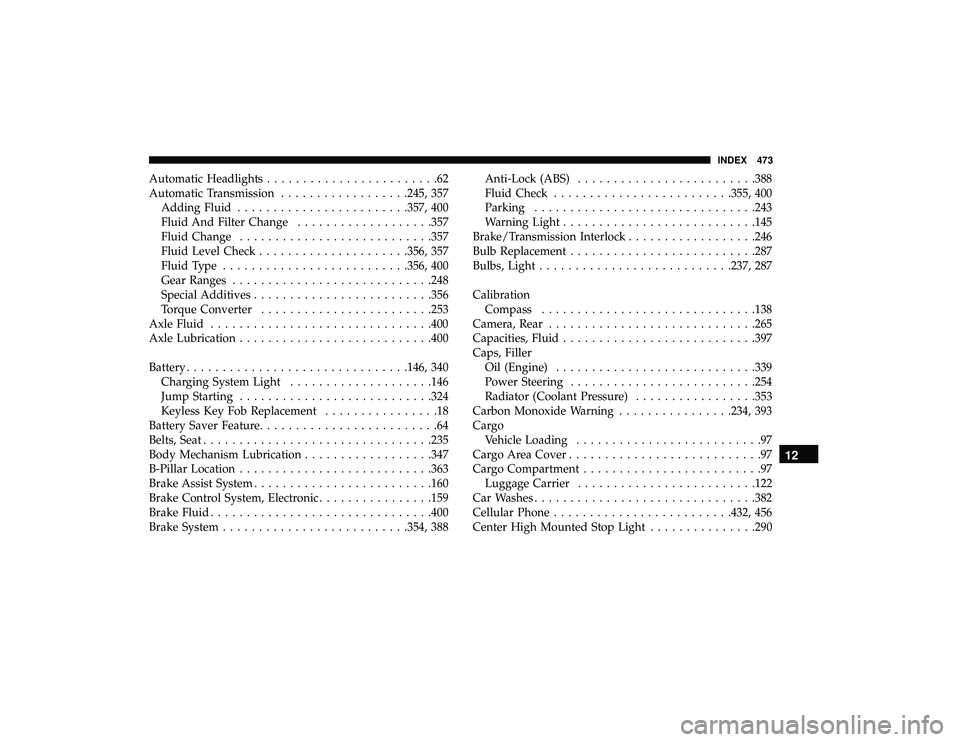
Automatic Headlights........................62
Automatic Transmission ..................245, 357
Adding Fluid ....................... .357, 400
Fluid And Filter Change ...................357
Fluid Change .......................... .357
Fluid Level Check .................... .356, 357
Fluid Type ......................... .356, 400
Gear Ranges ........................... .248
Special Additives ........................ .356
Torque Converter ....................... .253
Axle Fluid .............................. .400
Axle Lubrication .......................... .400
Battery .............................. .146, 340
Charging System Light ................... .146
Jump Starting .......................... .324
Keyless Key Fob Replacement ................18
Battery Saver Feature .........................64
Belts, Seat ............................... .235
Body Mechanism Lubrication ..................347
B-Pillar Location .......................... .363
Brake Assist System ........................ .160
Brake Control System, Electronic ................159
Brake Fluid .............................. .400
Brake System ......................... .354, 388Anti-Lock (ABS)
........................ .388
Fluid Check ........................ .355, 400
Parking .............................. .243
Warning Light .......................... .145
Brake/Transmission Interlock ..................246
Bulb Replacement ......................... .287
Bulbs, Light .......................... .237, 287
Calibration Compass ............................. .138
Camera, Rear ............................ .265
Capacities, Fluid .......................... .397
Caps, Filler Oil (Engine) ........................... .339
Power
Steering ......................... .254
Radiator (Coolant Pressure) .................353
Carbon Monoxide Warning ................234, 393
Cargo Vehicle Loading ..........................97
Cargo Area Cover ...........................97
Cargo Compartment .........................97
Luggage Carrier ........................ .122
Car Washes .............................. .382
Cellular Phone ........................ .432, 456
Center High Mounted Stop Light ...............290
12
INDEX 473